On-Premises Managed Nexus One Cisco Nexus Dashboard Data Sheet
Available Languages
Bias-Free Language
The documentation set for this product strives to use bias-free language. For the purposes of this documentation set, bias-free is defined as language that does not imply discrimination based on age, disability, gender, racial identity, ethnic identity, sexual orientation, socioeconomic status, and intersectionality. Exceptions may be present in the documentation due to language that is hardcoded in the user interfaces of the product software, language used based on RFP documentation, or language that is used by a referenced third-party product. Learn more about how Cisco is using Inclusive Language.
On-premises-managed Cisco Nexus® One, Cisco Nexus Dashboard transforms data-center network operations with simplicity, automation, and analytics.
In this era of digital transformation and business resiliency, continuous innovation is critical for organizations to succeed, and experiencing downtime along the way is not an option. Users increasingly demand more features, better usability, reliability, and environmental sustainability from the applications they use.
Cisco Nexus One represents a paradigm shift — an open, unified management plane that integrates silicon, systems, software, operating model with security and observability at every layer.
The network plays a huge role in meeting such demands and provisioning reliable data-center networking services as fast as possible, when and where organizations need it, is a must. However, network infrastructure management is becoming more complex, diverse, and distributed, with multiple configuration points, monitoring tools, and vast amounts of data generated every second (Figure 1).
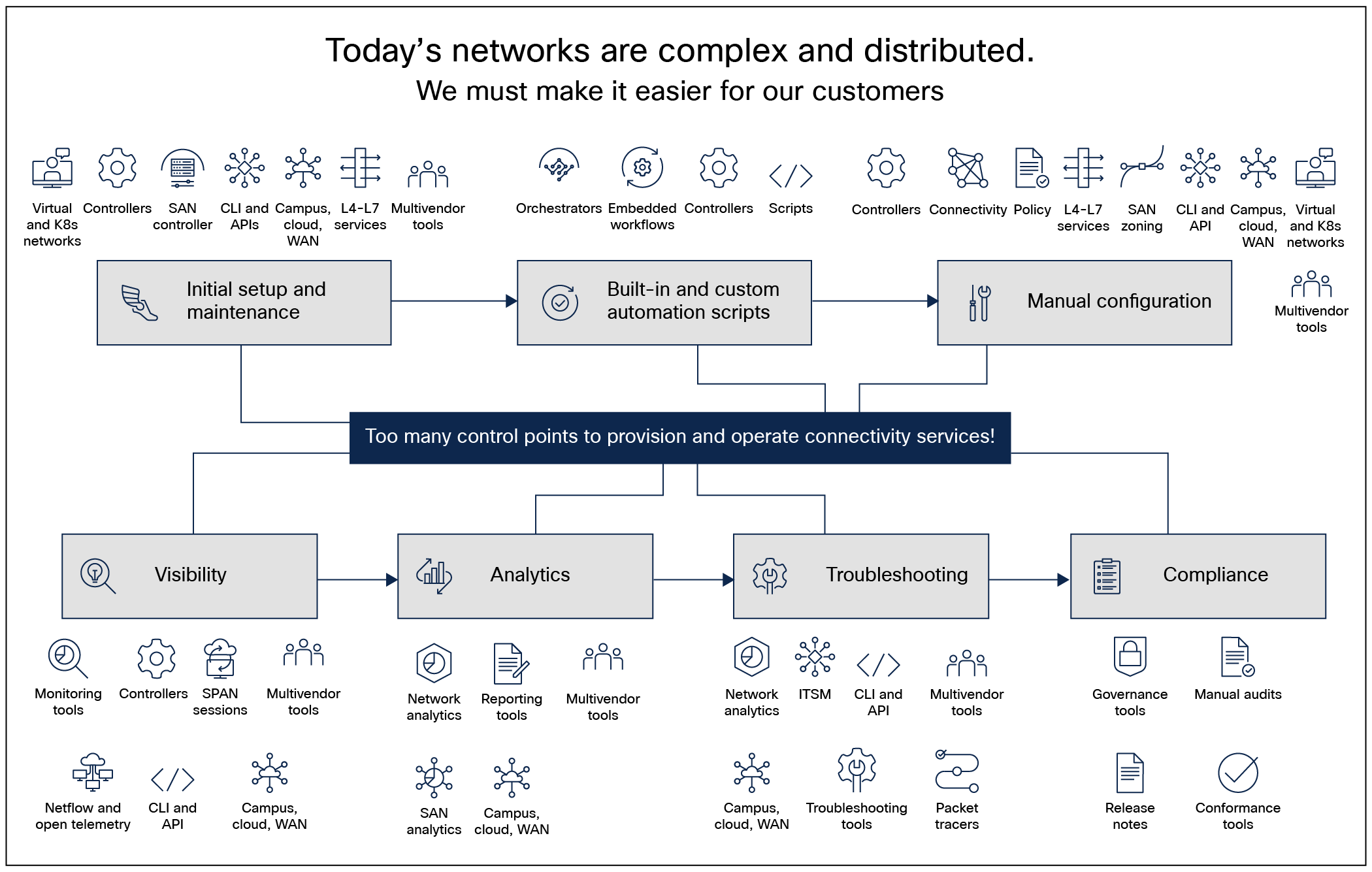
Network complexity in a hyper-diverse and hyper-distributed world
Having an inconsistent way of configuring, provisioning, and operating the network often leads to human errors, potential security holes, and a reactive break-then-fix model that commonly increases downtime due to manual correlation, and endless finger-pointing between teams.
The operating model: unity across environments
At the top of the Nexus One framework lies the operating model. This layer is designed to orchestrate across multiple sites and fabrics, streamlining how you scale and operate networks. The goal is to deliver a consistent experience, regardless of where your workloads live. Nexus One provides consistent networking across on-premises, sovereign cloud, underlay, overlay, and Kubernetes environments. With Cisco Isovalent®, you also gain deep visibility into service IPs and traffic patterns, eliminating operational blind spots.
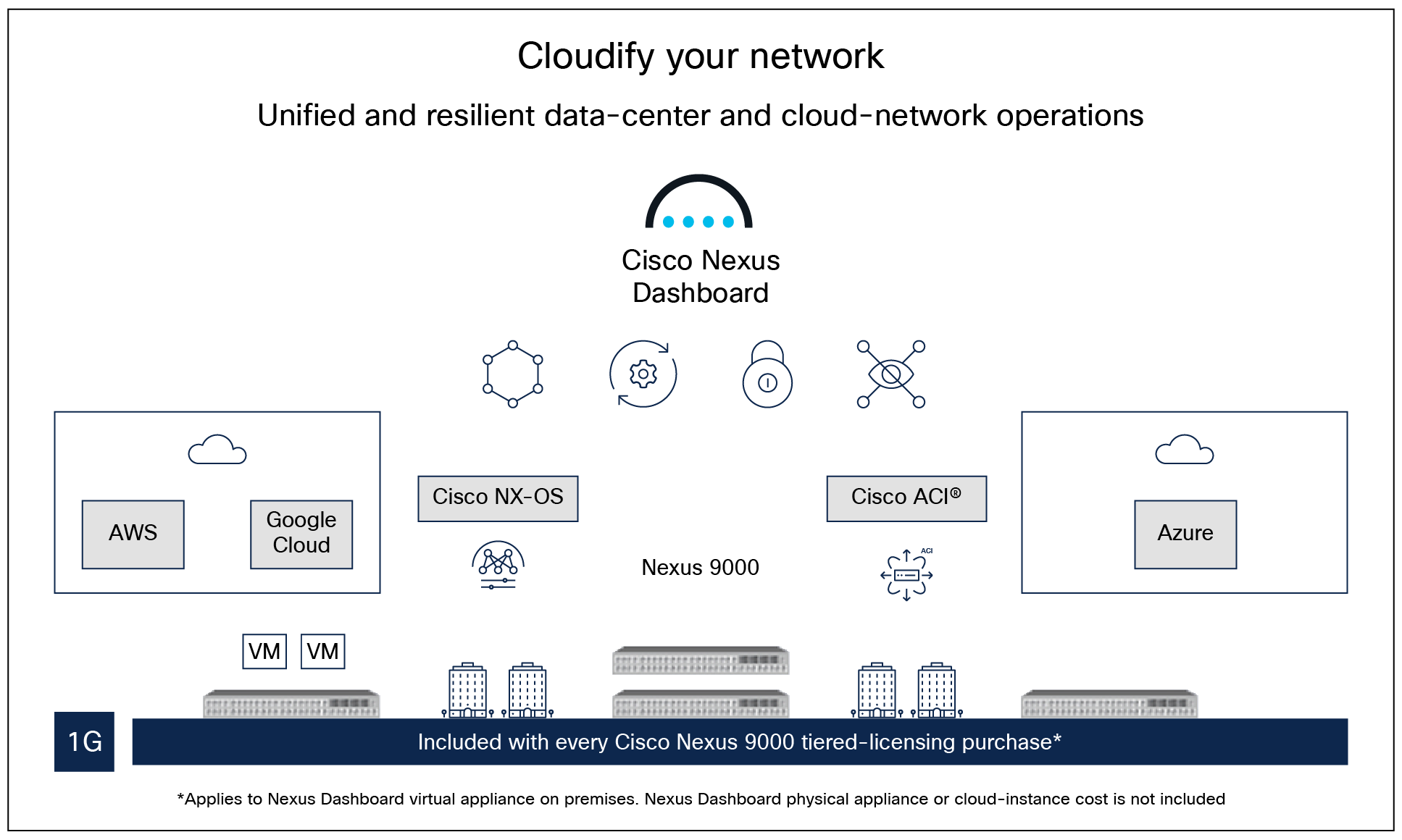
Figure 1. Cisco Nexus One
On-premises with Nexus Dashboard
For organizations managing on-premises data centers, the Cisco Nexus Dashboard serves as the single point of control for provisioning, visibility, troubleshooting, and automation.
● Unified management: It offers unified operations across NX-OS VXLAN EVPN, Cisco ACI and SONiC fabrics.
● Deep observability: With native Splunk® on Nexus Dashboard you get unified analytics and federated search across network telemetry and the Nexus Dashboard data lake without any requirement for data duplication. This helps maintain data sovereignty, cut operational costs, and speed up anomaly detection and root-cause analysis.
● Agentic automation: The platform features AgenticOps, which uses reasoning agents to resolve multi-domain issues and validate changes under human guardrails.
Included with every Cisco N9000 Series switch–tiered licensing purchase, Cisco Nexus Dashboard provides a single focal point to unite the disparate network configurations and views of multiple switches and data centers (Figure 2).
Cisco Nexus Dashboard helps to do the following:
● Configure: Leverage a centralized interface to define and manage network policies across ACI and NX-OS fabrics. Minimize errors and simply processes by using consistent, template-driven deployments and automate multi-site configurations.
● Manage: See a unified view of Cisco ACI and Cisco NX-OS environments, enabling centralized monitoring, troubleshooting, and policy control. Streamline operations across multiple sites with tools for network health management, event correlation, and proactive insights to ensure network reliability and performance.
● Analyze: minimize downtime by turning hardware and software telemetry into insights (including anomalies and advisories) to identify potential issues and recommendations to fix them. Cisco Nexus Dashboard gathers years of experience under a single network-operations platform to take advantage of its analytics to learn more about sustainability, compliance, changes, and traffic behavior (including flow records, drops, congestion, latency, AI/ML RoCEv2, and more) and, from a network perspective, pinpoint exactly where and when an application issue originated.
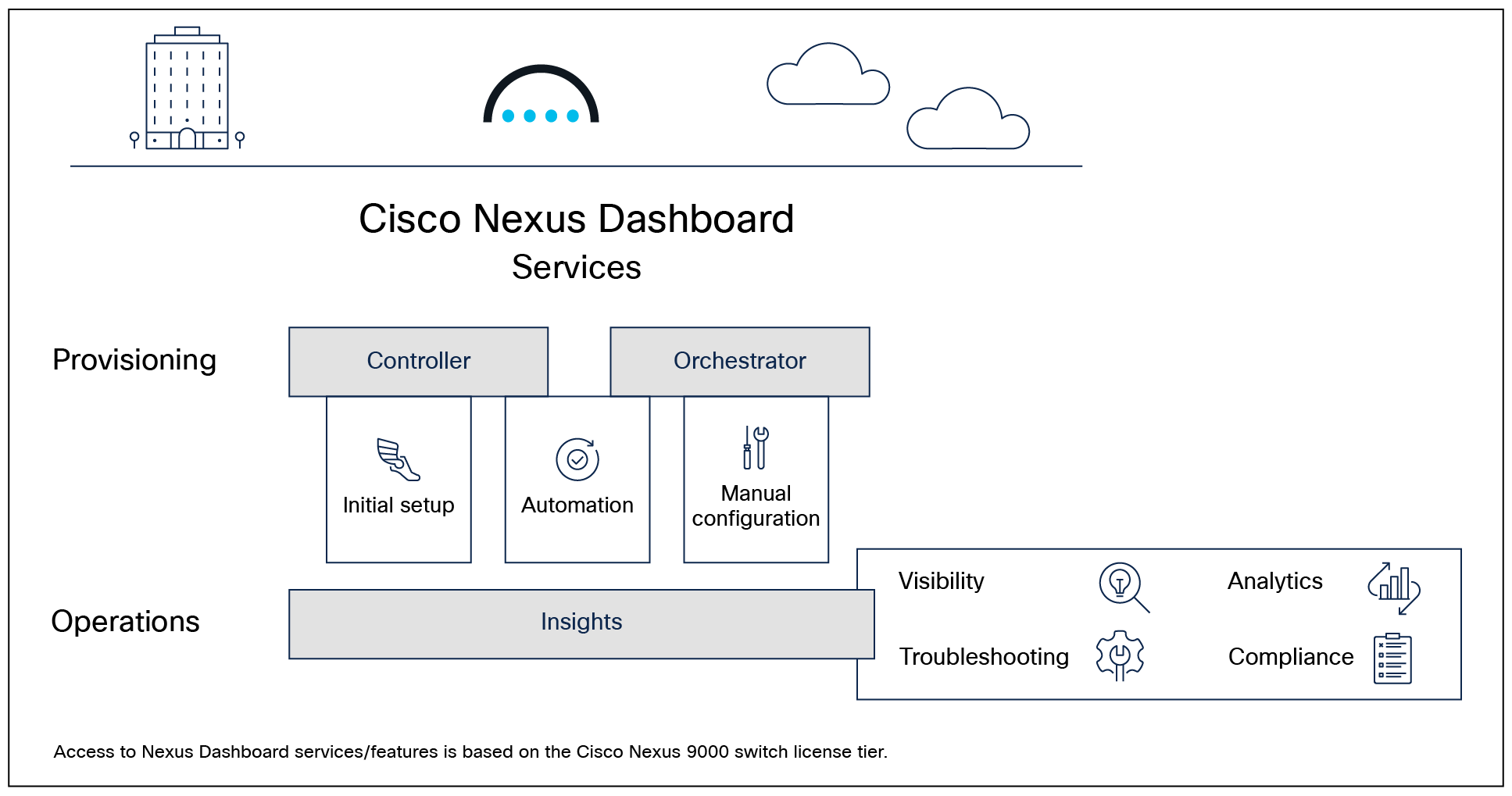
Cisco Nexus Dashboard: powering automation and analytics with a unified, agile, and sustainable networking platform
Operational infrastructure standardization and toolchain unification directly lead to operational excellence and savings and free resources for business innovation. By providing a single point of management that empowers users to provision and operate their networks across different switches, fabrics, and locations, Cisco Nexus Dashboard is evolving to become one of the simplest ways to provision, monitor, and manage data-center networks.
Table 1. Cisco Nexus Dashboard platform features and benefits
| Feature |
Benefit |
| Flexible deployment across physical appliances, virtual environments, and cloud-hosted models, delivering consistent capabilities without infrastructure constraints. |
|
| Multi-cluster support |
Operators can connect multiple Cisco Nexus Dashboard clusters together to bring all services and environments into a single pane of glass experience. |
| SONiC support |
Support for SONiC-based environments (N9100), enabling unified management and automation across heterogeneous network operating systems. |
| Kerberos/NTLM-based proxy authentication |
Enables secure integration with enterprise authentication systems, aligning with existing identity and access policies while eliminating manual credential handling and improving compliance in regulated environments. |
| Connected TAC integration |
Accelerates issue resolution through TAC-initiated log collection and guided diagnostics, reducing mean time to resolution (MTTR) and improving support efficiency. |
| MCP server integration |
Enables integration with customer-managed AI/LLM environments, allowing organizations to leverage internal AI models for automation, insights, and operational workflows. |
| Cisco AI Assistant integration with Cisco Cloud Control |
Enhances operational efficiency with AI-driven assistance for documentation search, integrated with Cisco Cloud Control. |
| ND License dashboard |
Provides clear visibility into feature entitlement and usage, aligning deployments with licensing tiers and optimizing feature consumption. |
| Remote authentication |
Centralize user access and managed resources using remote authentication providers including RADIUS, TACACS, LDAP or Microsoft Entra ID MFA to support seamless single sign on (SSO) across any multi-cluster connected clusters. |
| Role-Based Access Control with Multi-tenancy |
Securely separates users, roles, and resources across teams or tenants, enabling shared infrastructure with strict isolation, centralized control, and operational consistency. |
| Air-gap support |
Enables secure, fully offline operation with controlled manual updates—ideal for highly regulated or restricted environments. |
Automation and management features
Table 2. Cisco Nexus Dashboard automation and management features
| Feature |
Benefit |
Supported Fabric Types |
| Fabric creation and switch discovery |
Guided workflows to simplify fabric creation and onboarding of greenfield or brownfield networks using best practices and automated discovery. |
VXLAN, Classic LAN, AI, External, Routed, IPFM |
| Switch roles |
Automatically applies best‑practice configurations based on switch function and topology position, ensuring consistent deployments. |
VXLAN, Classic LAN, AI, External, Routed, IPFM |
| Inventory |
Provides a centralized, real-time view of all discovered network devices to streamline management and monitoring. |
VXLAN, Classic LAN, AI, External, Routed, IPFM, ACI |
| Power On Auto Provisioning (POAP) |
Zero‑touch onboarding that automatically detects, configures, and integrates switches, dramatically reducing deployment time and errors. |
VXLAN, Classic LAN, AI, External, Routed, IPFM |
| Configuration drift visibility |
Detects and highlights unintended changes with precise, line‑by‑line comparisons to speed troubleshooting and maintain compliance. |
VXLAN, Classic LAN, AI, External, Routed, IPFM |
| Unified topology views and control |
Delivers an integrated physical and overlay topology with deep visibility across VXLAN, virtual infrastructure, and endpoints for faster troubleshooting. |
VXLAN, Classic LAN, AI, External, Routed, IPFM, ACI |
| Fabric control and overlay visibility and management |
Simplifies multi‑fabric LAN including VXLAN-EVPN, , AI/ML networks, and traditional three-tier LAN, management with policy-based provisioning, compliance checks, and scalable overlay workflows. |
VXLAN, Classic LAN, AI, External, Routed, IPFM |
| Fabric Groups |
Enables Multi‑Site orchestration, policy consistency, and visibility across different fabric types deployed in multiple locations. |
VXLAN, ACI, |
| Remote storage for fabric backup |
Enhances data protection and disaster recovery by enabling automated off-platform backup storage for improved resiliency and compliance. |
External/Classic LAN |
| OpenStack Integration (ML2 plugin) |
Enhances OpenStack integration with state reconciliation, multi–address-scope support, and clear network type visibility for improved consistency and operational control across virtual and physical infrastructure. |
|
| One Manage |
Provides centralized, multi-cluster monitoring, topology insights, and fabric configuration from a single pane of glass. |
VXLAN, Classic LAN, AI, External, Routed, IPFM, ACI |
| Microsegmentation using VXLAN Group Policy objects |
Enables scalable, policy-based segmentation across VXLAN fabrics to reduce attack surface and enforce east-west security. |
VXLAN |
| L4-L7 service insertion, service chaining, and load balancing |
Simplifies service integration with native traffic redirection, service chaining, and application-aware load balancing inside VXLAN fabrics. |
VXLAN |
| Change control |
Implements safe, auditable, staged network changes with validation, impact analysis, rollback, and post-change verification. |
VXLAN, Classic LAN, AI, External, Routed, IPFM, Data Broker, ACI |
| Fabric software management |
Streamlines upgrades with pre-checks, maintenance modes, and post-upgrade reports to reduce risk and downtime at scale. |
VXLAN, Classic LAN, AI, External, Routed, IPFM, Data Broker, ACI |
| Git repository integration |
Enables bi‑directional sync of nondefault templates with Git for version-controlled updates and consistent deployment across fabrics. |
VXLAN, Classic LAN, AI, External, Routed, IPFM, Data Broker, ACI |
| Live Protect |
Enables you to monitor, enforce, disable, and retire the security shields, resulting in a smooth transition to remediation. |
VXLAN, Classic LAN, AI, External, Routed, IPFM |
| Quantum key distribution for MACsec through SKIP protocol |
Automates quantum-safe MACsec key exchange using QKD devices to secure inter-fabric connectivity. |
VXLAN, Classic LAN, Routed, External |
| Non-Nexus Platform Support: IOS-XE and IOS-XR |
Extends Nexus Dashboard automation, configuration management, and compliance to IOS‑XE and IOS‑XR platforms in external fabrics. |
VXLAN (Campus), External |
| DevOps and Automation |
Integrates with Ansible and Terraform to enable CI/CD-driven, declarative network automation at scale. |
VXLAN, Classic LAN, AI, External, Routed, IPFM, ACI |
| REST and JavaScript Object Notation (JSON) API |
Provides fully REST-based APIs with built-in documentation to enable seamless integration with custom and third-party automation tools. |
VXLAN, Classic LAN, AI, External, Routed, IPFM, Data Broker, ACI |
| Provisioning and automation for IPFM fabrics |
Accelerates media fabric deployments with best-practice templates, multicast optimization, flow visibility, and end-to-end monitoring. |
IPFM |
Table 3. Cisco Nexus Dashboard orchestration features and benefits
| Feature |
Benefit |
Support Fabric Types |
| Orchestrator capabilities |
Extends ACI orchestration across domains and sites using templates to automate connectivity and enforce consistent policies. |
ACI |
| Application template deployment modes |
Supports both stretched multi-site and autonomous deployments with centralized control and shadow-object prevention. |
ACI |
| Versioning and rollback capabilities |
The platform offers a streamlined one-click upgrade workflow and supports configuration templates with versioning and rollback. Multi-site support extends network segments across up to 14 fabrics for unified orchestration. |
ACI |
| Provisioning policy templates |
Provides reusable templates for applications, tenants, fabrics, L3Out, and L4–L7 services, enabling unified management and seamless inter-site L3Out connectivity through ACI transit routing. |
ACI |
| Service chaining and orchestration |
Advanced L4-L7 service chaining and policy-based routing (PBR) enhance flexibility and efficiency, simplifying security and network service deployments across on-premises and cloud data centers. |
ACI |
| Endpoint Security Group (ESG) for distributed ACI fabrics |
Delivers granular, scalable segmentation across sites with enhanced usability and flexible multi-site planning tools. |
ACI |
| ND API gateway for ACI fabrics |
Route APIC API calls to the ACI fabrics managed by Nexus Dashboard. |
ACI |
Table 4. Cisco Nexus Dashboard visibility and telemetry features and benefits
| Feature |
Benefit |
Supported Fabric Types |
| Mixed fabric support |
Onboard and monitor standalone NX-OS switches (ISN/IPN) used to interconnect ACI pods/fabrics. |
VXLAN, Classic LAN, Routed, External, ACI |
| Time-series database |
Gather evidence from past data. Peer back in time to look at a specific sequence of events and gather intelligent insights. |
VXLAN, Classic LAN, AI, External, Routed, IPFM, ACI, Data Broker |
| Anomalies |
Automatically identifies abnormal network behavior using telemetry-driven analytics to prevent performance and reliability issues. |
VXLAN, Classic LAN, AI, External, Routed, IPFM, ACI, Data Broker |
| Anomaly correlation and Suppression |
Correlates related anomalies to identify root causes faster and reduces alert noise through suppression. |
VXLAN, Classic LAN, AI, External, Routed, IPFM, Data Broker, ACI |
| Custom anomaly rules |
Allows administrators to define environment-specific thresholds for proactive anomaly detection, reducing MTTR and improving operational visibility. |
All |
| TRM visualization |
Delivers intuitive visibility into tenant routed multicast (TRM) flows, simplifying troubleshooting and operational monitoring. |
VXLAN |
| AI job monitoring |
Provides deep visibility into AI workload performance, including network and server NIC-level telemetry for better troubleshooting, correlation and optimization. |
AI, External |
| AI fabric and storage traffic congestion detection |
Gain visibility into RoCEv2 traffic congestion and performance over time with ECN and PFC counters. |
VXLAN, AI |
| Assurance |
Validates network operations by monitoring policy intent, changes, and performance to ensure reliability, reduce downtime, and maintain overall network health. |
VXLAN, Classic LAN, AI, External, Routed, ACI |
| Traffic analytics |
Provides application-aware visibility into latency, drops, and congestion with automatic service discovery and anomaly detection. |
VXLAN, Classic LAN, AI, External, Routed, ACI |
| Flow telemetry |
Accelerates root-cause analysis by correlating flow-level events such as drops, latency, routing, and ACL violations. |
VXLAN, Classic LAN, AI, External, Routed, ACI |
| L4-L7 traffic visibility |
Track end-to-end flows across externally connected devices such as firewalls, to help locate dataplane issues across device silos and deduce the locations of packet drops. |
VXLAN, ACI |
| Search and explore |
Enables fast, intuitive discovery and correlation of devices, events, configurations, and health data from a single interface. |
VXLAN, Classic LAN, AI, External, Routed, ACI |
| Connectivity analysis |
Visualizes and analyzes end‑to‑end network paths to identify bottlenecks, troubleshoot issues, and verify connectivity and policy enforcement. |
VXLAN, Classic LAN, AI, External, Routed, ACI |
| Compliance |
Automatically enforce your IT governance and security policies in the network by establishing golden configuration and communication rules. |
ACI |
| Pre-change analysis |
Avoid network disruption when changing configurations by predicting the impact of the intended changes before deploying. |
ACI |
| Delta analysis |
Narrow down what network changes occurred between two points in time and quickly identify network health, configuration, and resource changes. |
VXLAN, Classic LAN, AI, External, Routed, ACI |
| Upgrade assist |
Perform 40+ checks prior to upgrades, and detect changes in configuration or operational state before and after fabric switch upgrades. |
VXLAN, Classic LAN, AI, External, Routed, Data Broker, ACI |
| Microburst detection |
Expose and locate invisible microbursts. Find out congestion hot spots and protect application performance. |
VXLAN, Classic LAN, AI, External, Routed, Data Broker, ACI |
| Multicast traffic visibility |
Gain visibility into multicast sources, groups, receivers, switches, and traffic rates to monitor state and accelerate troubleshooting. |
VXLAN, Classic LAN, External, IPFM, ACI |
| Energy Management |
Tracks and optimizes energy usage and carbon impact at site and device levels to support sustainability goals. |
VXLAN, Classic LAN, AI, External, Routed, ACI |
| Real-time telemetry |
Reflect new events, changes and/or anomalies for interfaces, telemetry collection status, and hardware statistics in near real-time. |
VXLAN, Classic LAN, AI, External, Routed, ACI |
| Routing table |
View routing table changes at the fabric and switch level, including next-hop and historical details. |
VXLAN, Classic LAN, AI, External, Routed, ACI |
| Resource utilization |
Provides fabric-wide visibility into resource usage and historical trends to support proactive capacity planning and early detection of components nearing limits, including TCAM, routes, ACLs, ports, tenants, VRFs, and EPGs. |
VXLAN, Classic LAN, AI, External, Routed, ACI |
| TCAM utilization |
Manage TCAM capacity resources and security policy with advanced utilization analysis. |
VXLAN, Classic LAN, External, Routed, ACI |
| Hardware resources |
Proactively monitor and report hardware-related anomalies by leveraging telemetry data from sensors such as CPU, memory, disk, power supply, fan speed, and temperature. |
VXLAN, Classic LAN, AI, External, Routed, ACI |
| Statistics |
Use detailed dataplane statistics to diagnose, locate, and remediate issues. Monitor and use protocol anomalies and state information to remediate BGP, vPC, LACP, CDP, and LLDP problems. |
VXLAN, Classic LAN, AI, External, Routed, ACI |
| Endpoints |
Locate virtual machines, bare-metal hosts, and other endpoints in the data-center fabric. Use historical data to track their movements. |
VXLAN, Classic LAN, AI, External, Routed, ACI |
| Topology view and topology snapshot |
Supports interactive, time-based visual troubleshooting to quickly identify changes, failures, or new risk points |
VXLAN, Classic LAN, AI, External, Routed, IPFM, Data Broker, ACI |
| Customizable dashboards |
Enables creation of NOC-style dashboards by aggregating multiple data sources into a single, customizable view for focused monitoring and issue visibility. |
VXLAN, Classic LAN, AI, External, Routed, ACI |
| Advisories |
Get notified on PSIRTs, bugs, field notices, and EoS/EoL announcements. Take necessary action to stay secure and compliant and prevent unscheduled outages. |
VXLAN, Classic LAN, AI, External, Routed, IPFM, Data Broker, ACI |
| Software and hardware conformance |
Minimize risk of running End-of-Sale (EoS) or end-of-life (EoL) devices. View the current and project the future status of network software and hardware inventory against known EoS/EoL notices to plan for upgrades. |
VXLAN, Classic LAN, AI, External, Routed, IPFM, Data Broker, ACI |
| Scale conformance |
Automatically ensure that deployments are within recommended scale limits to minimize potential outages. |
VXLAN, Classic LAN, AI, External, Routed, IPFM, Data Broker, ACI |
| Log Collector |
Automate the mundane, repetitive tasks of log collection and quickly make them available to Cisco TAC Service Requests (SRs). |
VXLAN, Classic LAN, AI, External, Routed, ACI |
| Data Export |
Exports enriched operational data via Kafka, syslog, SNMP, and email to integrate with third‑party applications and workflows. |
VXLAN, Classic LAN, AI, External, Routed, IPFM, Data Broker, ACI |
| Email notification |
Get offline alerts about network health using the email-notification facility. Pick and choose which issues you need to be alerted about. |
VXLAN, Classic LAN, AI, External, Routed, IPFM, Data Broker, ACI |
| Reporting |
Export anomaly and advisory summaries through data CSV download, email and PDFs. Download content as PDF through browser Print and Save. |
VXLAN, Classic LAN, AI, External, Routed, IPFM, Data Broker, ACI |
Cisco Nexus Dashboard is designed with broad compatibility in mind, offering seamless support for multiple generations of Cisco Nexus and MDS switching platforms, ensuring operational continuity and investment protection across evolving data-center infrastructures. Whether managing legacy 8G and 16G Fibre Channel environments or modern 32G and 64G high-performance fabrics, Nexus Dashboard provides consistent visibility, analytics, and control through a unified interface. As the industry moves toward even higher-speed technologies, Nexus Dashboard is built to support next-generation speed increases, allowing organizations to adopt cutting-edge hardware without sacrificing centralized management or operational simplicity.
Cisco Nexus Dashboard brings exceptional power and intelligence to the management of high-performance storage networks, offering a unified platform that simplifies operations and enhances visibility across complex SAN environments. With robust performance management capabilities, it delivers real-time and historical telemetry that enables deep insights into traffic patterns, resource utilization, and potential bottlenecks. SAN Insights (SAN Analytics) takes this further by streaming rich, flow-level telemetry directly from MDS switches, allowing precise visibility into IOPS, latency, throughput, and congestion hotspots. Integrated SAN Zoning tools simplify and secure access control between initiators and targets, while operational dashboards provide customizable, at-a-glance views of fabric health and key performance indicators. Coupled with congestion management features that help detect, isolate, and resolve traffic contention before it impacts workloads, Nexus Dashboard empowers IT teams to proactively optimize storage performance, ensure data availability, and scale confidently in mission-critical environments.
Table 5. Cisco Nexus Dashboard SAN deployment features and benefits
| Feature |
Description and benefit |
| SAN Zoning support |
Simplifies and secures SAN zoning with intuitive configuration management, real-time validation, and proactive alerts to reduce errors and prevent service disruptions. |
| SAN Insights / SAN Analytics |
Transforms SAN telemetry into actionable insights on IOPS, latency, congestion, and host-to-target flows for faster remediation. |
| Configuration drift |
Automatically detects unauthorized SAN changes with precise visibility to protect stability and compliance. |
| Default performance utilization policies |
Provides immediate fabric health visibility by automatically collecting key telemetry metrics, enabling baseline monitoring and early detection of performance degradation and bottlenecks. |
| SAN Fabric limits |
Visually displays fabric capacity limits—such as FLOGIs, zones, and policies—to support proactive capacity planning and informed scaling decisions. |
| CyberArk integration |
Enables secure credential management through enterprise vault integration, improving security posture and compliance. |
| Multi-Interface Charting comparison |
Enables side-by-side comparison of performance metrics across multiple interfaces, ports, or devices to quickly identify anomalies and underperforming links across the fabric. |
| Optics visualization |
Proactively identifies degrading optics through telemetry-based trend analysis to prevent outages before they occur. |
| Discovery Mute |
Temporarily suppresses discovery activity to maintain control during planned changes or sensitive operations. |
Managing Cisco N9300 Series Smart Switches on Cisco Nexus Dashboard
Table 6. Managing Cisco N9300 Series Smart Switches – features and benefits
| Feature |
Benefit |
| Lifecycle management, automation, and integrated security for Smart Switches |
Centralizes automation, visibility, and security for smart switches with deep integration into Cisco Hypershield™. |
| NetOps and SecOps: isolated workflows, seamless delivery |
Preserves role separation while enabling coordinated delivery of networking and security operations. |
| Deployment with Hypershield |
Automates secure onboarding, firmware deployment, and policy enforcement across smart switches and DPUs. |
| Network automation |
Automates fabric policy provisioning, VLAN and VRF configuration, and collects telemetry to support network optimization. |
| Traffic redirection |
Manages VRF and VLAN traffic redirection to DPUs for L3/L4 stateful segmentation and inspection. |
| High availability |
Enables active/active firewall deployments between smart switches and DPUs with synchronized state for seamless failover. |
| Security policy automation |
Cisco Hypershield, through Cisco Security Cloud Control, automates security policy provisioning and lifecycle management directly within the Cisco Nexus smart switch DPU. It also gathers security policy hit counts and compliance insights, providing a comprehensive view of the security posture. |
| Network insights |
Provides detailed performance metrics, anomaly detection, and root-cause analysis tailored for smart switch environments. |
| Security insights |
Delivers visibility into security policies, compliance status, and correlated security events to support coordinated NetOps and SecOps workflows. |
| Troubleshooting workflows |
Accelerates root-cause analysis with packet tracing, capture, traffic spanning, and topology-driven insights. |
Table 7. Cisco Nexus Dashboard integrations
| Integration |
Benefit |
| VMM integrations |
Integrates with virtualization and container platforms to extend end‑to‑end visibility across physical and virtual infrastructure, enabling faster troubleshooting and better alignment between network and application teams |
| DNS |
Enriches endpoint visibility with hostname information by integrating with external DNS providers |
| AppDynamics |
Analyze the impact of your network on application performance – all from a single console. |
| Infoblox IPAM |
Monitors remote IP address pool usage and allocations to improve endpoint visibility and IP resource management. |
| Panduit PDU |
Monitor energy usage and unlock sustainability insights for fabrics and individual devices connected to a Panduit PDU. |
| Hypershield |
Embed security directly into your network with AI-powered management and automation tools |
| Slurm |
Simple Linux Utility for Resource Management (Slurm) is a high-performance, open-source workload manager used to allocate and schedule compute resources in AI clusters |
| Slack |
Query Nexus Dashboard from a Slack workspace |
For detailed platform and compatibility support, refer to: https://www.cisco.com/c/dam/en/us/td/docs/Website/datacenter/day2ops/index.html.
Cisco Nexus Dashboard software does not require an additional license and is included with all Cisco N9000 Series switch tiered-license purchases. Cisco Nexus Dashboard feature access is based on the purchased switch licensing tier. Automation features are offered as part of Cisco Data Center Networking (DCN) Essentials. Orchestration features are offered as part of DCN Advantage. Selected visibility and telemetry features are available in DCN Essentials, DCN Advantage and DCN Premier licensing tiers.
For information on Cisco Nexus Dashboard features entitlement tiers, please refer to the DCN Subscriptions page.
Licensing: There are no additional licensing requirements for Cisco Nexus Dashboard. For a guide to ordering, please refer to the ordering guide.
Cisco Nexus Dashboard delivers increased scale to meet the growing demands of modern, distributed data-center environments. Designed for large-scale operations, Nexus Dashboard can support thousands of network devices and endpoints across multiple fabrics and sites, providing centralized visibility and control without sacrificing performance. Its scalable architecture allows organizations to expand their infrastructure—whether it’s adding more switches, sites, or services—while maintaining consistent policy enforcement and operational efficiency.
Please check the latest scale information for capacity planning here: https://www.cisco.com/c/dam/en/us/td/docs/dcn/tools/nd-sizing/index.html.
Please refer to the sizing guide for physical and virtual cluster size guidelines.
Table 8. ND-CLUSTERG5S (based on Cisco UCS® M8 server) – Cisco Nexus Dashboard platform cluster hardware specifications
| Hardware specifications |
Cisco Nexus Dashboard platform cluster node specifications |
| Memory |
256 GB |
| Processor |
AMD 9454 |
| Hard disk |
6* 2.4 TB each = 14.4 TB total |
| SSD |
960 GB |
| NVMe |
1.6 TB |
| Power supply |
1200 Watts |
Table 9. ND-CLUSTERG5L (based on Cisco UCS M8 server) – Cisco Nexus Dashboard platform cluster hardware specifications
| Hardware specifications |
Cisco Nexus Dashboard platform cluster node specifications |
| Memory |
512 GB |
| Processor |
AMD 9655P |
| Hard disk |
6* 3.2 TB each = 19.2 TB total |
| SSD |
960 GB |
| NVMe |
1.6 TB |
| Power supply |
1200 Watts |
Table 10. ND-CLUSTER-L4 (based on Cisco UCS M6 server) ‒ Cisco Nexus Dashboard platform cluster hardware specifications
| Hardware specifications |
Cisco Nexus Dashboard platform cluster node specifications |
| Memory |
256 GB |
| Processors |
AMD 2.8GHz 7443P |
| Hard disk |
4* 2.4 TB each = 9.6 TB total |
| SSD |
960 GB |
| NVMe |
1.6 TB |
| Power supply |
1050 Watts 1600 Watts |
Table 11. Virtual Nexus Dashboard – Data profile form factor (vND-Data)
| Hardware Specifications |
Cisco Nexus Dashboard Virtual node specifications |
| Processors |
32 vCPU |
| Memory |
128GB |
| Storage |
3TB SSD/NVMe and 50GB HDD/SSD/NVMe |
| Supported Hypervisors |
VMware ESXi 7.0, 7.0.1, 7.0.2, 7.0.3, 8.0, 8.0.2 |
Table 12. Virtual Nexus Dashboard – App profile form factor (vND-App)
| Hardware Specifications |
Cisco Nexus Dashboard Virtual node specifications |
| Processors |
16 vCPU |
| Memory |
64GB |
| Storage |
550GB HDD/SSD/NVMe |
| Supported Hypervisors |
VMware ESXi 7.0, 7.0.1, 7.0.2, 7.0.3, 8.0, 8.0.2 |
Table 13. Amazon AWS cloud form factor requirements per node of Cisco Nexus Dashboard
| Specifications |
Cisco Nexus Dashboard cloud node specifications |
| Amazon EC2 instance type |
m5.4xlarge (recommended), m4.4xlarge |
| Amazon Elastic Block Store (EBS) |
100G gp2 SSD, 300G gp2 SSD |
| Amazon Simple Storage Service (S3) |
Standard S3 storage |
Table 14. Ordering information
| Part number |
Product description |
| ND-CLUSTER-L4 |
Cisco Nexus Dashboard platform cluster based on Cisco UCS M6 server |
| ND-NODE-L4= |
Cisco Nexus Dashboard platform node based on Cisco UCS M6 server |
| ND-CLUSTERG5S |
Cisco Nexus Dashboard small platform cluster based on Cisco UCS M8 server |
| ND-NODE-G5S= |
Cisco Nexus Dashboard small platform node based on Cisco UCS M8 server |
| ND-CLUSTERG5L |
Cisco Nexus Dashboard large platform cluster based on Cisco UCS M8 server |
| ND-NODE-G5L= |
Cisco Nexus Dashboard large platform node based on Cisco UCS M8 server |
| ND-VIRTUAL |
Cisco Nexus Dashboard virtual platform (OVA, KVM) |
| ND-Splunk |
Cisco Nexus Dashboard small platform cluster based on Cisco UCS M8/M8L server with |
Table 15. Cisco Nexus Dashboard third-party ecosystem
| Partner |
Integration capability |
Applications link |
| ServiceNow |
ServiceNow incident visibility and management on Cisco Nexus Dashboard |
ServiceNow App for Cisco Nexus Dashboard* |
| Splunk® |
Real-time and historical monitoring (organization-specific KPIs and dashboards), troubleshooting, cross-tier correlation, and alerting automation for Cisco Nexus Dashboard Insights |
Cisco DCN App for Splunk |
| HashiCorp Terraform |
Terraform provider to support Cisco Nexus Dashboard Orchestrator Automation |
Terraform Provider for Nexus Dashboard Orchestrator Automation |
| Red Hat Ansible |
Ansible module to support Cisco Nexus Dashboard Fabric Controller and Cisco Nexus Dashboard Orchestrator Automation |
Ansible Collection for Nexus Dashboard Fabric Controller and Nexus Dashboard Orchestrator Automation |
Cisco Nexus Dashboard platform clusters have a 90-day limited liability warranty.
Cisco environmental sustainability
Information about Cisco’s environmental sustainability policies and initiatives for our products, solutions, operations, and extended operations or supply chain is provided in the “Environment sustainability” section of Cisco’s Corporate Social Responsibility (CSR) Report.
Reference links to information about key environmental sustainability topics (mentioned in the “Environment sustainability” section of the CSR Report) are provided in the following table:
Table 16. Cisco Nexus Dashboard environmental sustainability
| Sustainability topic |
Reference |
| Information on product-material-content laws and regulations |
|
| Information on electronic waste laws and regulations, including products, batteries, and packaging |
Reference links to product-specific environmental sustainability information that is mentioned in relevant sections of this data sheet are provided in Table 16.
*Not available for all Cisco Nexus Dashboard / Cisco Nexus Dashboard Insights versions
Table 17. Cisco Nexus Dashboard environmental sustainability
| Sustainability topic |
Reference |
| General |
|
| Eco-design compliance (EU ErP Lot, etc.) Environmental certifications (EPEAT, Energy Star, etc.) |
Table AA. Product compliance Table BB. Product compliance or Platform features/benefits |
| Power |
|
| Idle, typical, or max product power Hardware-enabled energy features |
Table CC. Product specifications Table DD. Platform features/benefits |
| Software-enabled energy features Power supply information Power calculator |
Table EE. Platform features/benefits Table FF. Product specifications Table GG. Product specifications |
| Material |
|
| Unit weight System weight (product + packaging) Recycled content |
Table HH. Product specifications Table II. Product specifications Table JJ. Product specifications |
Cisco makes the packaging data available for informational purposes only. It may not reflect the most current legal developments, and Cisco does not represent, warrant, or guarantee that it is complete, accurate, or up to date. This information is subject to change without notice.
Power your digital operations transformation with Cisco Nexus Dashboard
Are your operations teams tasked with delivering security, uptime, and business continuity on a complex data-center infrastructure? Do they have the right tools that provide proactive change management and precise troubleshooting information tied together in a unified, easy-to-consume user experience? Start powering the transformation of the networking operations teams by standardizing on the Cisco Nexus Dashboard experience. Meet and exceed critical business mandates of agility and availability as you operate your secure, intent-based data center from Cisco Nexus Dashboard.
Flexible payment solutions to help you achieve your objectives
Cisco Capital® makes it easier to get the right technology to achieve your objectives, enable business transformation, and help you stay competitive. We can help you reduce the total cost of ownership, conserve capital, and accelerate growth. In more than 100 countries, our flexible payment solutions can help you acquire hardware, software, services, and complementary third-party equipment in easy, predictable payments. Learn more.
As applicable, Cisco will provide support for the product as described here: https://www.cisco.com/c/dam/en_us/about/doing_business/docs/cisco-software-support-service.pdf.
Table 18. Document history
| New or revised topic |
Described in |
Date |
| First draft |
|
May 1, 2021 |
| Second draft |
|
May 12, 2021 |
| Third draft |
|
December 15, 2021 |
| Fourth draft |
|
March 14, 2022 |
| Fifth draft |
|
May 23, 2023 |
| Major updates made throughout the data sheet |
Entire data sheet |
June 2025 |
| Major updates made throughout the data sheet |
Entire data sheet |
December 15, 2025 |