Use HSRP Preempt and Track Commands
Available Languages
Introduction
This document describes how the Hot Standby Router Protocol (HSRP) preempt and track commands work together and how to use them.
Prerequisites
Requirements
Cisco recommends you have basic knowledge of Cisco Command Line Interface (CLI)
Components Used
The information in this document is based on these software versions:
- Routers running Cisco IOS XE Software Release 17.x
The concepts described in this document are not limited to this software release. HSRP preemption and object tracking behavior apply across supported Cisco IOS and Cisco IOS XE platforms, although command syntax and verification output can vary by platform and software version.
The information in this document was created from the devices in a specific lab environment. All of the devices used in this document started with a cleared (default) configuration. If your network is live, ensure that you understand the potential impact of any command.
Background Information
The standby preempt command enables an HSRP router with a higher priority than the current active router to take over the active role after HSRP election processing and any configured preempt delay. Priority is determined first by the configured priority value, then by the HSRP interface IP address when priority values are equal. In each case, a higher value is of greater priority. When a higher priority router preempts a lower priority router, the router sends a Coup message. When a lower priority active router receives a Coup message or a Hello message from an active, higher priority router, the router changes to the Speak state and sends a resign message.
The standby track command allows you to specify another interface on the router for the HSRP process to monitor in order to alter the HSRP priority for a given group. If the line protocol of the specified interface goes down, the HSRP priority is reduced. This means that another HSRP router with higher priority can become the active router if that router has the standby preempt enabled.
This diagram shows an example that uses the standby preempt command in conjunction with the standby track command:
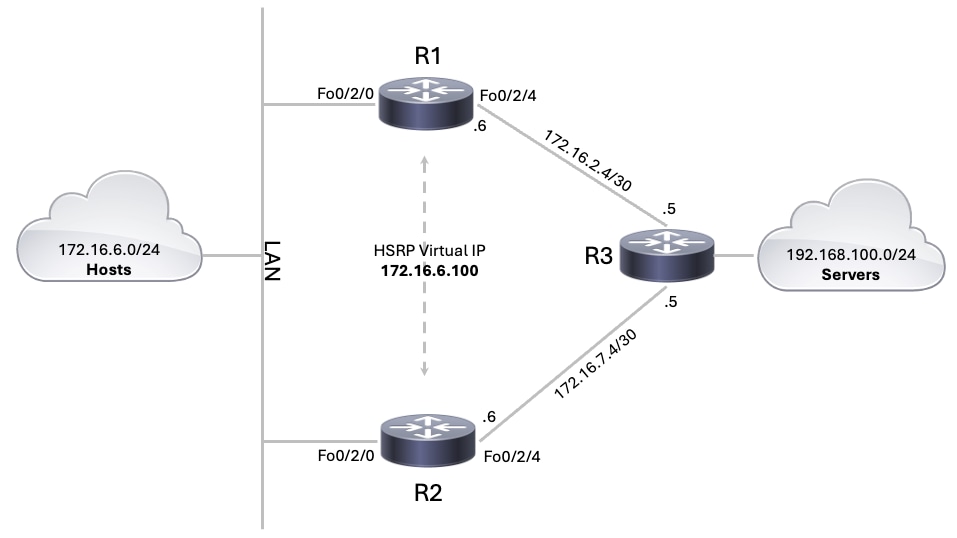 HSRP Preempt and Track Configuration
Configuration Examples
In the network diagram, HSRP is configured in this manner:
- R1 is the active router and tracks object 10, which monitors the line protocol state of the R1 FortyGigabitEthernet0/2/4 server facing interface. When R1 is the active router, traffic from the hosts to the servers is routed through R1.
- R2 is the standby router and tracks object 20, which monitors the line protocol state of the R2 FortyGigabitEthernet0/2/4 server facing interface.
- If the R1 FortyGigabitEthernet0/2/4 interface goes down, track object 10 changes to the Down state and the R1 HSRP priority is decreased by 10. At this point, the R2 HSRP priority is higher than the R1 priority, and R2 takes over as the active router when preemption is enabled.
- When R2 becomes the active router, traffic from the hosts to the servers is routed through R2.
Router 1 Configuration Example
| Configuration Steps | Configuration CLI |
| Step 1. Configure a tracking object (Optional). Create tracking object 10 to monitor the line protocol state of FortyGigabitEthernet0/2/4. Step 2. Configure the LAN facing interface. Configure FortyGigabitEthernet0/2/0 with the LAN IP address. This interface connects R1 to the LAN device and participates in HSRP. Step 3. Configure the HSRP virtual IP address. Configure HSRP group 1 with virtual IP address 172.16.6.100. LAN hosts use this IP address as their default gateway. Step 4. Configure the HSRP priority. Configure R1 with priority 105. This makes R1 the preferred active router while the tracked object is up. Step 5. Enable HSRP preemption. Enable preemption so R1 can return to the active role after the tracked object recovers and its priority returns to 105. Step 6. Track the object under HSRP. Configure HSRP to track object 10 with a decrement value of 10. If FortyGigabitEthernet0/2/4 line protocol goes down, object 10 goes down and R1 reduces its HSRP priority from 105 to 95. Step 7. Configure the server facing interface. Configure FortyGigabitEthernet0/2/4 with the IP address used to reach the servers device. |
|
Router 2 Configuration Example
| Configuration Steps | Configuration CLI |
| Step 1. Configure a tracking object (Optional). Create tracking object 10 to monitor the line protocol state of FortyGigabitEthernet0/2/4. Step 2. Configure the LAN facing interface. Configure FortyGigabitEthernet0/2/0 with the LAN IP address. This interface connects R2 to the LAN device and participates in the same HSRP group as R1. Step 3. Configure the HSRP virtual IP address. Configure HSRP group 1 with the same virtual IP address used on R1, 172.16.6.100. Step 4. Use the default HSRP priority. R2 uses the default HSRP priority of 100. Since R1 has priority 105, R2 remains the standby router while R1 is healthy. Step 5. Enable HSRP preemption. Enable preemption so R2 can become active when R1 priority drops lower than 100. Step 6. Track the object under HSRP. Configure HSRP to track object 20 with a decrement value of 10. If FortyGigabitEthernet0/2/4 line protocol goes down, object 10 goes down and R2 reduces its HSRP priority from 100 to 90. Step 7. Configure the server facing interface. Configure FortyGigabitEthernet0/2/4 with the IP address used to reach the servers device. |
|

Note: A tracking object is optional and is not required for normal HSRP operation. HSRP can elect an active and standby router with only the virtual IP address, priority, and preemption configuration. Tracking is used when HSRP needs to adjust a router priority based on the state of another object, such as an interface line protocol state. In this example, the tracking object allows the router to lower its HSRP priority if the server facing interface goes down.
Verify
Use the show standby command to verify the initial HSRP state when the server facing interfaces are up on both routers.
In this state, R1 is the active HSRP router because it has the higher configured priority of 105. R2 is the standby router with the default priority of 100.
- On R1, track object 10 is Up, so no priority decrement is applied. R1 keeps its configured priority of 105 and owns the active virtual MAC address 0000.0c07.ac01.
- On R2, track object 20 is also Up, so no priority decrement is applied. R2 keeps the default priority of 100 and remains in the standby state. The output shows the active router as 172.16.6.5, which is the LAN-facing IP address of R1.
Key points to verify:
| Check |
R1 Output |
R2 Output |
Result |
|---|---|---|---|
| HSRP state |
State is Active |
State is Standby |
R1 is active, R2 is standby |
| Virtual IP |
172.16.6.100 |
172.16.6.100 |
Both routers use the same HSRP virtual IP |
| Active router |
local |
172.16.6.5, priority 105 |
R1 is the active router |
| Standby router |
172.16.6.6, priority 100 |
local |
R2 is the standby router |
| Priority |
105 (configured 105) |
100 (default 100) |
R1 has the higher priority |
| Preemption |
Preemption enabled |
Preemption enabled |
Both routers can preempt when their priority becomes higher |
| Track object |
Track object 10 state Up decrement 10 |
Track object 20 state Up decrement 10 |
Both tracked server-facing interfaces are up |
| Virtual MAC usage |
MAC In Use |
MAC Not In Use |
R1 is currently forwarding for the HSRP virtual MAC |
R1#show standby
FortyGigabitEthernet0/2/0 - Group 1 State is Active     2 state changes, last state change 15:44:50
 Virtual IP address is 172.16.6.100
  Active virtual MAC address is 0000.0c07.ac01 (MAC In Use)
    Local virtual MAC address is 0000.0c07.ac01 (v1 default)
  Hello time 3 sec, hold time 10 sec
    Next hello sent in 0.352 secs
 Preemption enabled   Active router is local
 Standby router is 172.16.6.6, priority 100 (expires in 10.048 sec) Priority 105 (configured 105) Track object 10 state Up decrement 10
  Group name is "hsrp-Fo0/2/0-1" (default)
  FLAGS: 1/1

R2#show standby
FortyGigabitEthernet0/2/0 - Group 1 State is Standby     4 state changes, last state change 00:11:06
 Virtual IP address is 172.16.6.100   Active virtual MAC address is 0000.0c07.ac01 (MAC Not In Use)
    Local virtual MAC address is 0000.0c07.ac01 (v1 default)
  Hello time 3 sec, hold time 10 sec
    Next hello sent in 1.504 secs
 Preemption enabled Active router is 172.16.6.5, priority 105 (expires in 9.136 sec)
  Standby router is local
 Priority 100 (default 100) Track object 20 state Up decrement 10
  Group name is "hsrp-Fo0/2/0-1" (default)
  FLAGS: 0/1
What happens if the FortyGigabitEthernet0/2/4 interface of R1 goes down?
After FortyGigabitEthernet0/2/4 goes down on R1, tracking object 10 changes to the Down state. HSRP then applies the configured decrement value of 10 to R1 priority. As a result, R1 priority changes from the configured value of 105 to an effective value of 95.
Since R2 priority remains 100, R2 now has the higher HSRP priority. Because preemption is enabled, R2 takes over the active role. The output confirms this behavior:
- R1 changes to State is Standby.
- R1 shows Priority 95 (configured 105).
- R1 shows Track object 10 state Down decrement 10.
- R2 changes to State is Active.
- R2 shows Active router is local.
- R2 uses the active virtual MAC address 0000.0c07.ac01.
At this point, LAN hosts continue to use the same default gateway, 172.16.6.100, but traffic is forwarded through R2 instead of R1.
The output of the show standby command looks like this:
R1#show standby
FortyGigabitEthernet0/2/0 - Group 1
  State is Standby
    4 state changes, last state change 00:00:46
  Virtual IP address is 172.16.6.100
 Active virtual MAC address is 0000.0c07.ac01 (MAC Not In Use)     Local virtual MAC address is 0000.0c07.ac01 (v1 default)
  Hello time 3 sec, hold time 10 sec
    Next hello sent in 1.200 secs
  Preemption enabled
  Active router is 172.16.6.6, priority 100 (expires in 8.512 sec)
 Standby router is local Priority 95 (configured 105)
    Track object 10 state Down decrement 10
  Group name is "hsrp-Fo0/2/0-1" (default)
  FLAGS: 0/1

R2#show standby
FortyGigabitEthernet0/2/0 - Group 1
  State is Active
    5 state changes, last state change 00:01:34
  Virtual IP address is 172.16.6.100
 Active virtual MAC address is 0000.0c07.ac01 (MAC In Use)     Local virtual MAC address is 0000.0c07.ac01 (v1 default)
  Hello time 3 sec, hold time 10 sec
    Next hello sent in 0.592 secs
  Preemption enabled
 Active router is local Standby router is 172.16.6.5, priority 95 (expires in 11.712 sec) Priority 100 (default 100) Track object 20 state Up decrement 10
  Group name is "hsrp-Fo0/2/0-1" (default)
FLAGS: 1/1Note: If standby preempt is not configured on R2, R2 would not have sent a Coup message to R1, which causes R2 to become active. Instead R1 would have remained the active router.
The next example shows the behavior when standby preempt is not configured on R2. When standby preempt is not configured on R2, R2 does not take over the active role even though its priority 100 is higher than R1 effective priority 95; R1 remains active until it fails, resigns, or another HSRP event causes a new election.
R1#show running-config interface FortyGigabitEthernet0/2/0
Building configuration...

Current configuration : 212 bytes
!
interface FortyGigabitEthernet0/2/0
 ip address 172.16.6.5 255.255.255.0
 no ip redirects
 standby 1 ip 172.16.6.100
 standby 1 priority 105
 standby 1 preempt
 standby 1 track 10 decrement 10
 cdp enable
end

R1#show standby
FortyGigabitEthernet0/2/0 - Group 1
  State is Active
    5 state changes, last state change 00:12:27
  Virtual IP address is 172.16.6.100
  Active virtual MAC address is 0000.0c07.ac01 (MAC In Use)
    Local virtual MAC address is 0000.0c07.ac01 (v1 default)
  Hello time 3 sec, hold time 10 sec
    Next hello sent in 0.256 secs
 Preemption enabled Active router is local Standby router is 172.16.6.6, priority 100 (expires in 9.200 sec)
  Priority 95 (configured 105)
    Track object 10 state Down decrement 10
  Group name is "hsrp-Fo0/2/0-1" (default)
  FLAGS: 1/1
R1#

R2#show running-config interface FortyGigabitEthernet0/2/0
Building configuration...

Current configuration : 190 bytes
!
interface FortyGigabitEthernet0/2/0
 ip address 172.16.6.6 255.255.255.0
 no ip redirects
 standby 1 ip 172.16.6.100
 standby 1 track 20 decrement 10
 no negotiation auto
 cdp enable
end

R2#show standby
FortyGigabitEthernet0/2/0 - Group 1
  State is Standby
    7 state changes, last state change 00:11:54
  Virtual IP address is 172.16.6.100
  Active virtual MAC address is 0000.0c07.ac01 (MAC Not In Use)
    Local virtual MAC address is 0000.0c07.ac01 (v1 default)
  Hello time 3 sec, hold time 10 sec
    Next hello sent in 2.032 secs
 Preemption disabled Active router is 172.16.6.5, priority 95 (expires in 9.632 sec) Standby router is local Priority 100 (default 100) Track object 20 state Up decrement 10
  Group name is "hsrp-Fo0/2/0-1" (default)
  FLAGS: 0/1
R2#
The next example shows HSRP tracking multiple objects under the same HSRP group. Each tracked object requires its own decrement value so HSRP knows how much to reduce the router priority when that object goes down. In this output, R1 is configured with priority 105, track object 10 decrements priority by 10, and track object 15 decrements priority by 20. Because both objects are Down, the total decrement is 30, which reduces R1 priority from 105 to 75. Since R2 priority remains 100, R2 becomes the active router and R1 moves to the standby state.
R1#show running-config interface FortyGigabitEthernet0/2/0
Building configuration...

Current configuration : 245 bytes
!
interface FortyGigabitEthernet0/2/0
 ip address 172.16.6.5 255.255.255.0
 no ip redirects
 standby 1 ip 172.16.6.100
 standby 1 priority 105
 standby 1 preempt
 standby 1 track 10 decrement 10 standby 1 track 15 decrement 20
 cdp enable
end

R1#show standby
FortyGigabitEthernet0/2/0 - Group 1
  State is Standby
    7 state changes, last state change 00:03:24
  Virtual IP address is 172.16.6.100
  Active virtual MAC address is 0000.0c07.ac01 (MAC Not In Use)
    Local virtual MAC address is 0000.0c07.ac01 (v1 default)
  Hello time 3 sec, hold time 10 sec
    Next hello sent in 1.008 secs
  Preemption enabled
  Active router is 172.16.6.6, priority 100 (expires in 9.856 sec)
  Standby router is local
 Priority 75 (configured 105) Track object 10 state Down decrement 10 Track object 15 state Down decrement 20
  Group name is "hsrp-Fo0/2/0-1" (default)
  FLAGS: 0/1
Related Information
Revision History
| Revision | Publish Date | Comments |
|---|---|---|
4.0 |
06-Aug-2026
|
Recertification - Updated Formatting. |
3.0 |
04-Mar-2025
|
Updated Contributor List and Formatting. |
1.0 |
10-Dec-2001
|
Initial Release |

 Feedback
Contact Cisco
- Open a Support Case

- (Requires a Cisco Service Contract)