API

API Key

You can use REST APIs to retrieve, add, or modify information on Cisco Spaces: Detect and Locate. The REST APIs are divided into five categories:

  • Active clients’ location APIs: APIs to retrieve client count and location data.

  • Clients location history APIs: APIs to get a MAC address and the details for a given device.

  • Notifications APIs: APIs for subscription-based notifications.

  • Map APIs: APIs to upload, navigate the maps hierarchy, retrieve, and delete a map element.

  • Access point APIs: APIs to get access point details.

API Key

To use REST APIs, you must generate an API Key. An API key is a Cisco-proprietary JSON Web Token (JWT) that is required in each HTTP request header to authenticate and authorize users.

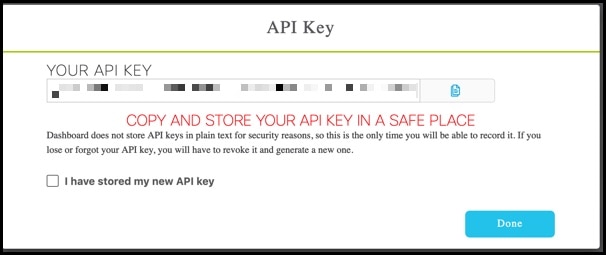
You can generate an API Key from Cisco Spaces: Detect and Locate. Navigate to Notifications > API Keys and then click Add. You are prompted to configure the number of days after which the key should expire. Valid range is between 7 days and 365 days. After the key is generated, ensure that it is stored safely.
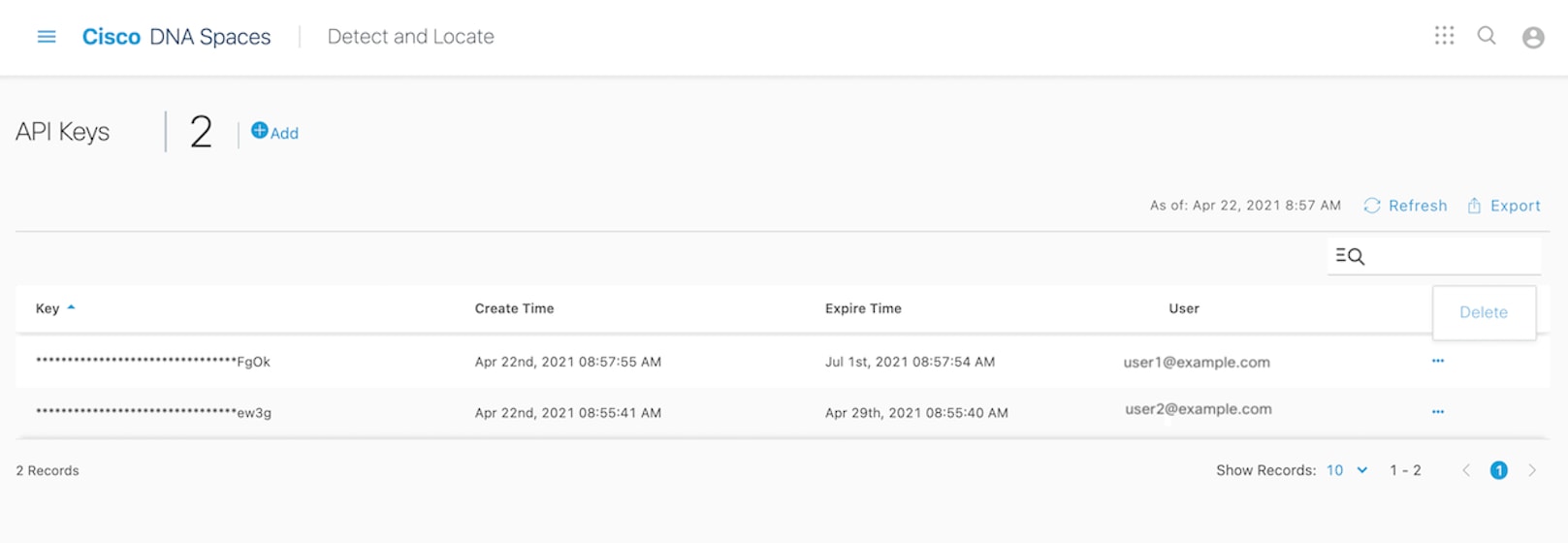
Figure 1. API Keys

The API Keys window shows the key names (only partially displayed), the date and time at which they were created, the date and time at which they are going to expire, and email IDs of the users who created the keys. To delete a key, click on the three dots icon in the Actions column and then click Delete. If you delete a key, the key is not revoked and you can still use it until its expiry date and time.


Note


The API key is visible only at creation time, and hence must be stored securely. Cisco Spaces: Detect and Locate does not save the API key values. Each authenticated user can have up to 10 valid keys. This API key management feature is designed to protect keys created by administrators, ensuring that each administrator manages only their own keys and does not accidentally delete or view keys belonging to other administrators.


Figure 2. Copy the API Key

The following is an example from the POSTMAN client, where an API key has been used as an Authorization header.
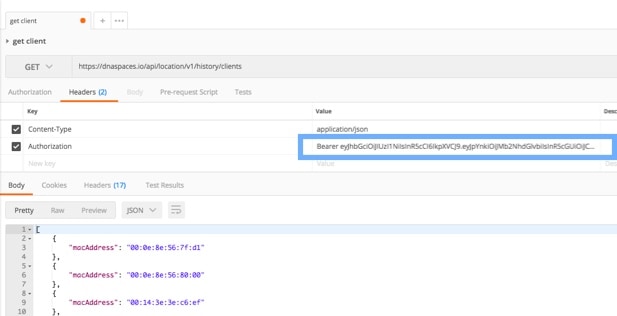
Figure 3. API Keys

API Rate Limiting

Rate limiting is enforced on Location public APIs when callers authenticate with a Bearer token. This limiting is tracked per account (tenant) and applies to both v1 and v2 Location API routes.

API limit (total)

The maximum number of requests allowed per tenant within one rate-limit window.

Table 1. API limit

Setting

Default

Request limit per window

1250

Lockout window (expire)

The duration of the rate-limit window, in milliseconds. When a tenant exhausts its allowance, further requests receive HTTP 429 Too Many Requests until the current window ends.

Table 2. Lockout window

Setting

Default

Window duration

900000 ms (15 minutes)

Lockout behavior: There is no separate penalty period beyond the window. Once X-RateLimit-Remaining reaches 0, the tenant is blocked until X-RateLimit-Reset. Clients should honor Retry-After on 429 responses and avoid retrying until the window resets.

Response headers (legacy format)

Successful and throttled responses include:

Table 3. Rate-limit response headers

Header

Description

X-RateLimit-Limit

Maximum requests allowed in the current window (for example 1250).

X-RateLimit-Remaining

Requests left in the current window. When 0, the next request will be rate limited unless the window has reset.

X-RateLimit-Reset

Unix epoch time (seconds) when the current window resets and the counter is restored.

Retry-After

Present on 429 responses only. Seconds to wait before retrying.

Example: rate limit exceeded (429)

The following example shows a tenant that has used all 1250 requests in the current 15-minute window. The client should wait Retry-After seconds (here, 656 seconds, about 11 minutes) before sending more requests.

HTTP/1.1 429 Too Many Requests
                Content-Type: text/html; charset=utf-8
                Content-Length: 42
                Connection: keep-alive
                date: Wed, 17 Jun 2026 04:26:55 GMT
                access-control-allow-origin: https://dev-dnaspaces.io
                vary: Origin, Accept-Encoding
                access-control-allow-credentials: true
                x-ratelimit-limit: 1250
                x-ratelimit-remaining: 0
                x-ratelimit-reset: 1781671071
                retry-after: 656
                strict-transport-security: max-age=31536000; includeSubDomains; preload

How to read this example:

  • x-ratelimit-limit: 1250 — the tenant may make up to 1250 Bearer requests per 15-minute window.

  • x-ratelimit-remaining: 0 — no requests remain in the current window.

  • x-ratelimit-reset: 1781671071 — window resets at this Unix timestamp (seconds).

  • retry-after: 656 — wait 656 seconds before retrying; aligns with time remaining until reset.