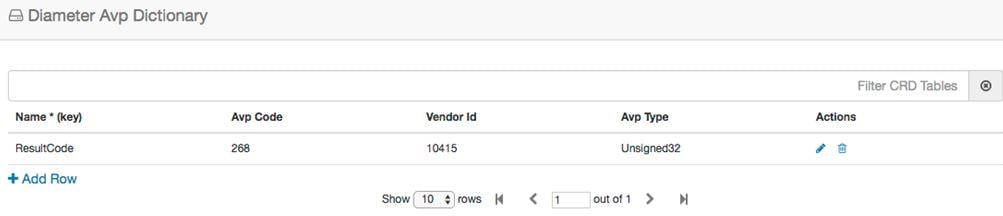
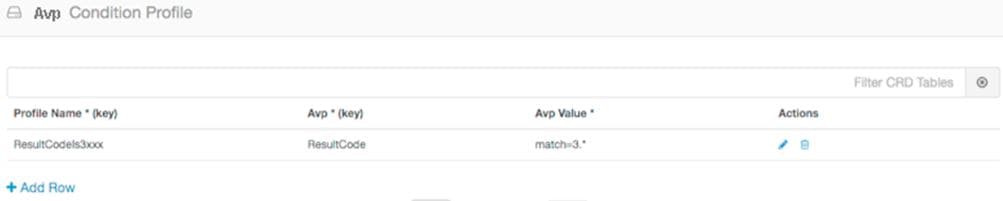
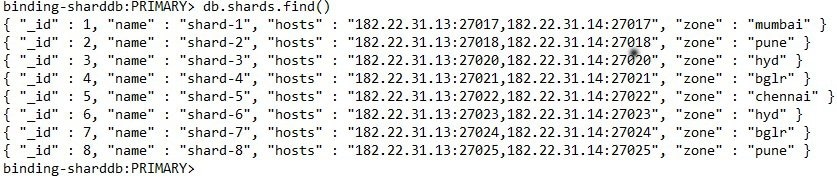
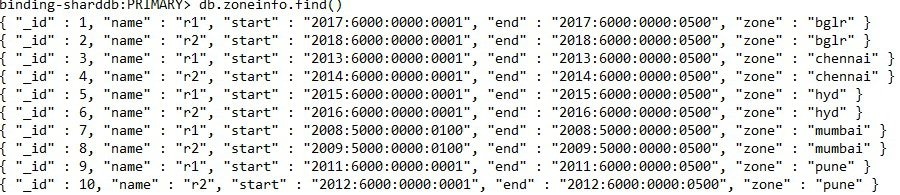
User Configuration

Basic Configuration

Before you begin using CPS vDRA, perform the following basic configurations in CPS DRA:

  • Configure Systems

  • Configure Diameter Application

  • Configure Routing AVP Definitions

Configure Systems

In CPS DRA, navigate to the System and Plugin Configuration.

Configure the stack in DRA Configuration plugin.

Configure the DRA Inbound Endpoints for incoming peer connections and DRA Outbound Endpoints for outgoing peer connection.

You can choose the Transport Protocol as TCP and SCTP depending on your requirement.

You can also specify the IPv4 or IPv6 address configuration for the stack connection.

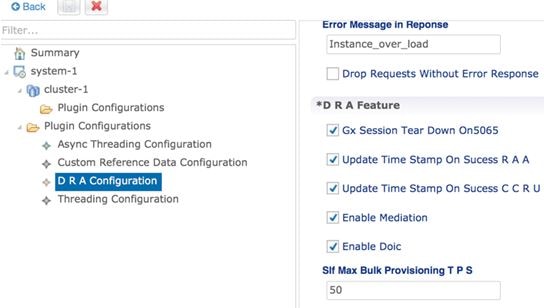
The following image shows a sample configuration.
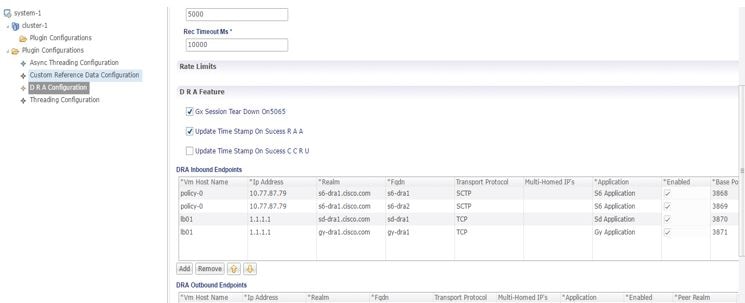
Figure 1. Sample Systems Configuration


For more information, see DRA Configuration.

Configure Diameter Application

Configure the Diameter applications that are required to be connected over various interfaces with CPS vDRA.

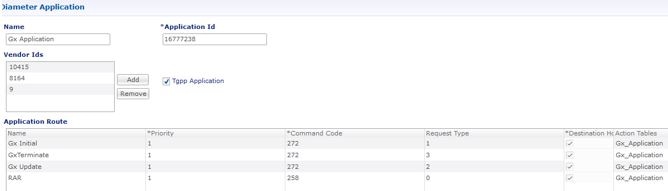
The following image is a sample of a Gx application configuration:
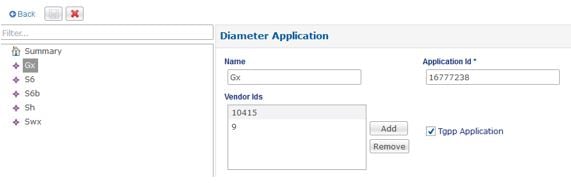
Figure 2. Sample Diameter Application Configuration


For more information, see Diameter Application.

Configure Multiple Diameter Applications for a Peer Connection

Previously, vDRA supported a single application on a peer connection. In this release, vDRA supports multiple applications on a peer connection.

To configure multiple applications for a peer connection, go to vDRA Inbound Endpoints in DRA Plugin configuration. In the Applications field, select the button as shown:

Figure 3. DRA Inbound Endpoints


Select all the applications you require.
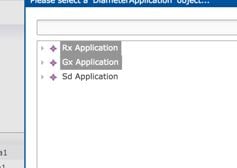
Figure 4. Application Selection


The following example shows multiple Diameter applications for a peer connection:

Figure 5. Multiple Applications


Configure Routing AVP Definitions

Configure the Routing AVP definitions to route calls on the basis of the AVPs that are present in diameter message.

In the Routing AVP Definition page, you specify the Application name and the table for table-driven routing.

In the Diameter Application page, configure the Application Route for table-driven routing.

The following screenshots show a sample configuration:
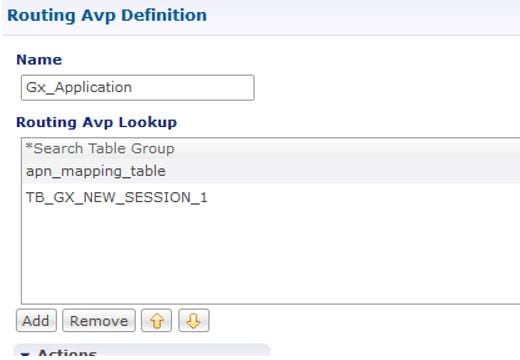
Figure 6. Routing Avp Definition


Figure 7. Diameter Application


Routing Techniques

You can define the routing of calls based on destination host, SRK, or a table.

Configure Destination Host Routing

Destination host based routing is the basic and default routing technique used by CPS vDRA.

When the incoming diameter request contains the destination-host AVP that has the direct connection with the CPS vDRA, vDRA routes the message directly to that connected host.

Before you begin

Stack must be up and running.

For more information, see Basic Configuration.

After configuring the stacks, Diameter endpoints are ready to initiate/accept Diameter connections for the defined IP address, Port, and Application-ID.

Policy DRA

For Policy DRA, you must configure the binding keys for Gx sessions.

Binding helps Policy DRA route the related Gx/Rx sessions to the same PCRF or destined PCRF.

A binding database is needed to map search keys to PCRF binding information. Each binding has a search key and binding data associated with it. The supported search keys are:

  • IMSI + APN

  • IPv6

  • IPv4

  • MSISDN + APN

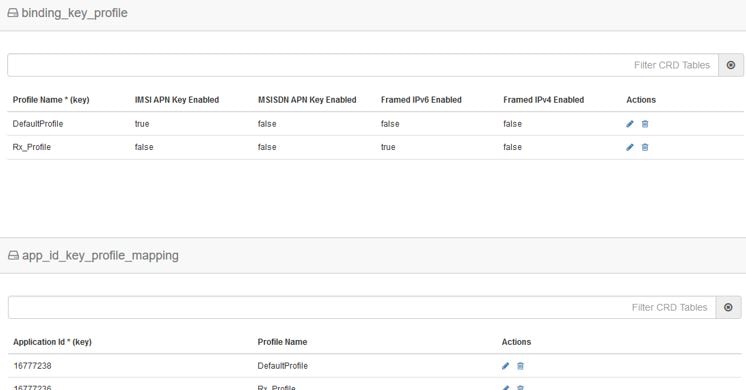
Figure 8. Policy DRA Sample Configuration


If the Binding Key Profile and mapping to Application ID is not configured properly, the following errors may occur:

  • Gx Calls – Session binding failure in database resulting in call failures.

  • Rx Calls – Binding Retrieval failure resulting in call failures.


Note


IMS DRA does not require bindings. Hence, Binding Key Profile is only valid for Policy DRA.


Configure SRK Based Routing

You can configure SRK based routing in one of the following ways:

Configure Secondary Peer Fallback


Note


This configuration is valid for both Policy and IMS DRA.


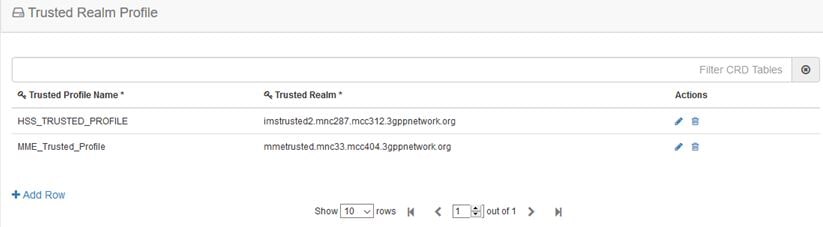
In SRK based routing, you can configure routing to a set of peers. This can be used for alternate routing (secondary and tertiary routes) when the Destination Host routing fails, and for binding data to select a peer for related diameter sessions. The Session Routing Table is configured within a “Peer Group SRK Mapping” Table. If a routing with dest-host fails, CPS vDRA will try to find out secondary routes on the basis of SRK.

Once the SRK of failed peer is determined by CPS vDRA, it will try to find an UP peer that is a member of:

  • A peer group matching the entire SRK label. If it finds one, it will route the message to that peer.

  • If it cannot find one and it is a two-label SRK, then it will try to find an UP peer in a peer group whose label2 part of its SRK matches the label2 part of the lookup SRK (where the label 1 part may be different). If it finds one, then it will route the message to that peer.

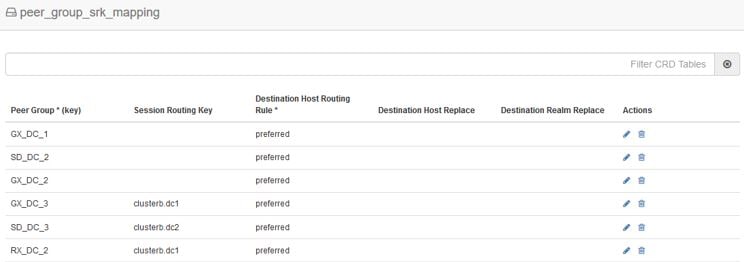
The following screenshot shows an example of SRK configuration:

Figure 9. SRK Configuration


Configure Binding Retriever for Rx Calls


Note


This configuration is valid for Policy only.


Rx (AAR) Message processing: Policy DRA receives the AAR request from Application Function (AF). AAR messages does not have destination host and the destination PCRF has to be found out by vDRA using the keys such as:

  1. Framed Ipv6 Address

  2. Framed IP address

  3. IMSI APN key

  4. MSISDN APN key

Binding is created by vDRA when Gx-CCRI is received at DRA. DRA creates the bindings on the basis of CRD configurations and the availability of AVPs in Gx message. If the configured keys are present in Gx message, vDRA creates and stores the binding in Binding Database. On receiving AAR request, vDRA searches for the session stored in bindings on the basis of Rx profile, and will determine the SRK of Gx-PCRF peer. DRA will then forward the Rx request to the Rx peer having the same SRK. [ SRK will be configured as mentioned in following section ].

Configure SLF Based Routing


Note


This configuration is valid for IMS DRA only.


SLF Routing works with two major configurations and tables within CRD:

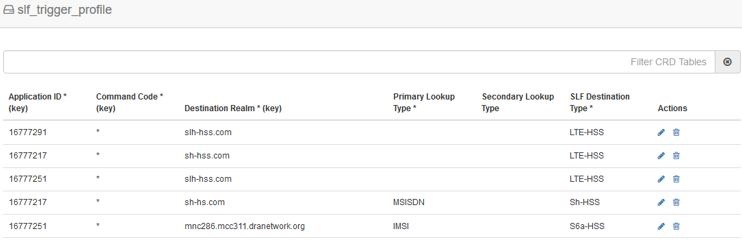
  1. SLF Trigger Profile: For the incoming Diameter requests where Destination-Host is not present (or Destination-Host is present with same of DRA-Host Name) this SLF Trigger table is triggered. In this Table, there are three inputs that you need to configure:

    • Application-Id: Diameter Application ID for which the SLF Query is to happen.

    • Command-Code: Diameter Command Code for which the SLF query is to happen.


      Note


      If this field is configured with a ‘*’, it indicates that SLF query is expected to happen for all the command codes for the specific application.


    • Destination-Realm: Destination-Realm of the Diameter Endpoint (that is, HSS/AAA) or the Destination Realm of vDRA.

      Based on the Input keys (Application-Id, Command-Code and Destination-Realm) configured, if all the entries (as mentioned above) matches with the incoming message then vDRA(SLF) picks the “SLF Lookup Type” and “SLF-Destination-Type” as configured in the SLF Trigger Table.

    • SLF LookupType- Currently the SLF LookupType can be configured as IMSI or MSISDN. Based on the configured value of IMSI or, MSISDN, vDRA (SLF) further makes a query towards the SLF-DB.

    • SLF Destination-Type-Based on the configured value in the ‘SLF Destination Type’, vDRA (SLF) makes a further query towards the SLF-DB.

      Figure 10. SLF Trigger Profile


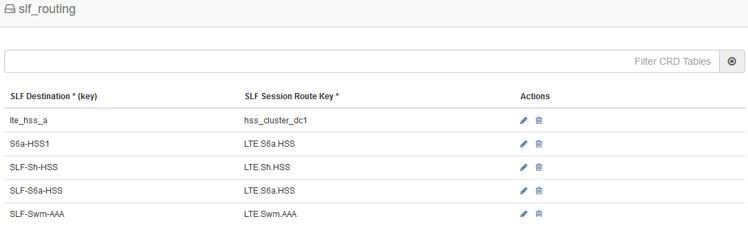
  2. SLF Routing: After vDRA(SLF) makes the query in SLF-DB based on SLF-LookupType and SLF-Destination-Type, an SLF-Destination is obtained.

    SLF Mapping table consists a mapping of ‘SLF-Destination’ which is obtained from the SLF database and a SLF-Session-Route-Key(SLF-SRK). In the SLF Mapping Table, based on the SLF-Destination an SLF-Session-Route-Key (SLF-SRK) is derived and further Peer group is derived for routing from the Peer-Group-Peer table as the next step for Routing.

    Figure 11. SLF Routing


Configure Table Driven Routing

CPS vDRA has the ability to use AVPs within the Diameter messages to help determine how to route the traffic.

The AVP being evaluated is customer configurable, through the CPS DRA GUI. The addition, subtraction, or modification of the evaluation AVP is dynamic and affected real time.

Trigger Condition for Table-driven Routing:

  • After Destination-Host based routing (first priority) and SRK routing (second priority) conditions are not met, vDRA goes for Table-driven routing as third priority.

  • Typically, for Table-driven Routing to trigger, a Diameter message contains a Destination-Realm AVP, but no Destination-Host AVP. So, If the Dest-Host AVP is absent, empty, or equal to the DRA FQDN, then we skip Dest-Host routing altogether and proceed directly to Table-Driven routing.


Note


For IMS-DRA only, the router will try to do the SLF routing ( if all conditions are met ), before moving to table-driven routing.


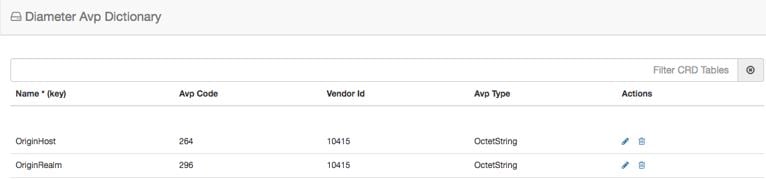
vDRA can parse and has the ability to route based on the following AVPs:

  • Destination-Host

  • Destination-Realm

  • Origin-Host

  • Origin-Realm

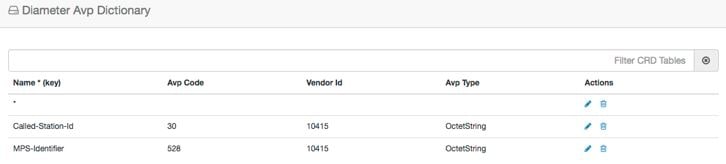
  • APN (from Called-Station-ID)

  • IMSI (from Subscription-ID)

  • MSISDN (from Subscription-ID)

Regular-expression matching and combinations of AVPs are also supported. The following configuration is required in Policy Builder:

  1. Application Route: For more information, see Basic Configuration.

  2. Routing AVP definitions: For more information, see Basic Configuration.

  3. Search table group configurations: For more information, see Search Table Groups.

  4. CRD configuration: For more information, see Custom Reference Data Tables.

Advanced Features

Configure Rate Limiting

You can use CPS vDRA to set rate limiting of traffic coming from and going towards a particular peer. You can configure this for both Ingress and Egress traffic. Rate limit is currently supported at peer level and message level.

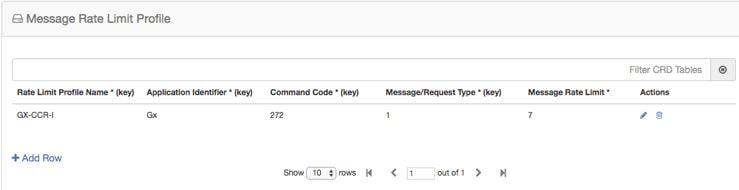
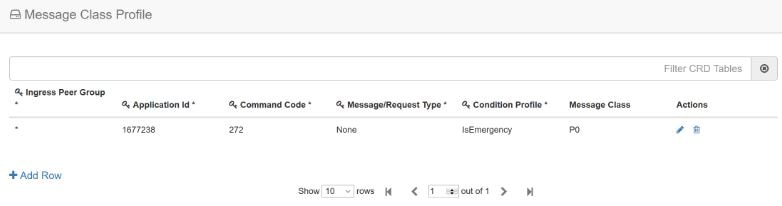
  1. Configure the Message Rate Limit Profile CRD table.

    Create the rate limit profile with the rate limit profile name, application ID, command code, message type, and message rate limit. For more information, see Search Table Groups – Message Rate Limit Profile table.

    Figure 12. Message Rate Limit Profile


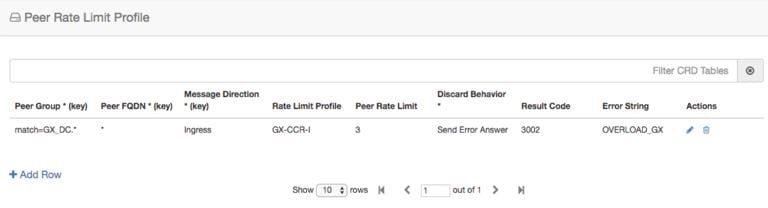
  2. Configure the Peer Rate Limiting CRD table.

    Define the peer group, peer fqdn, message direction (ingress or egress), rate limit profile (created in step 1), peer rate limit, discard behavior (whether to silently drop or send error message). For more information, see Search Table Groups – Peer Rate Limit Profile table.

    If you want the discard behavior sent in the error answer, also configure the Result Code, Error String to be sent in the answer.

    Figure 13. Peer Rate Limit Profile


Configure Error Result Code Profile

CPS vDRA generates several internal errors that are not generic, for example, errors such as Timeout triggered, Peer not found, DB error, and so on.

You can configure error codes and error messages for internally generated errors in CPS vDRA.

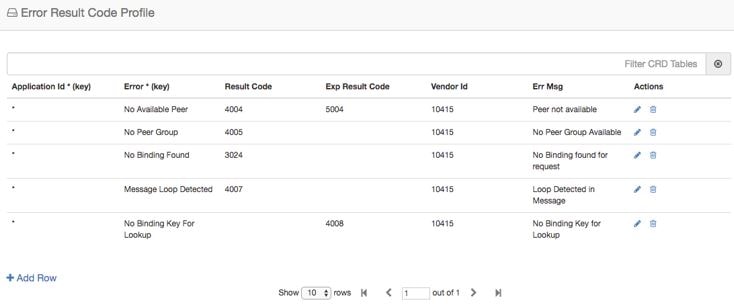
To configure this error code, add entry in the Error Result Code Profile table as shown in the following image:

Figure 14. Error Result Code Profile


For a particular Application ID, if DRA generates an internal error, the error code defined in this table along with the Error Message is sent back in the answer.

If the result code is not configured and the Experimental Result Code is present, then the Experimental Result-Code is sent back in the answer along with Vendor-Id AVP. Between the Result-Code and the Experimental Result code, the Result-code is of higher priority.

Configure Peer Group Answer Timeout

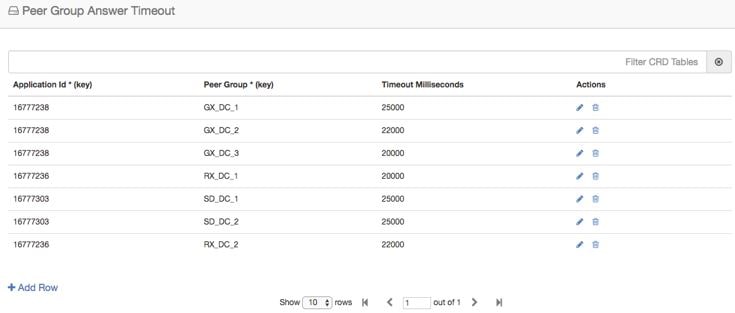
You can set the different request timeout durations for different application ID and peer group. In CPS vDRA, timeout is the amount of time that vDRA waits for the answer from the destination.

To configure this feature, add an entry in the Peer Group Answer Timeout table. The timeout value is in milliseconds.

The default timeout is 1.7 seconds. You can also override the timeout for specific interface in this table as shown in the following image:

Figure 15. Peer Group Answer Timeout


Configure Peer Load Balancing

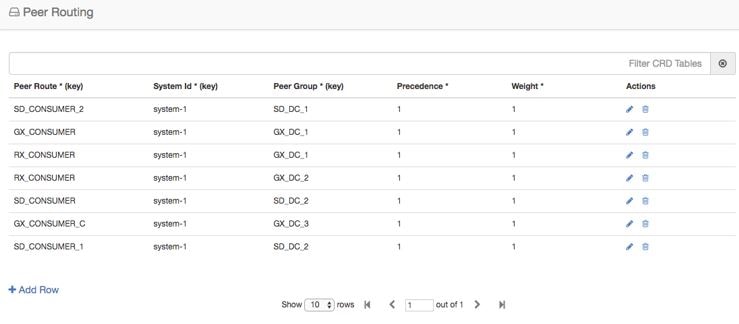
CPS vDRA has capabilities to route messages based on weight and precedence of the peer. Perform the following steps to define the peer load balancing:

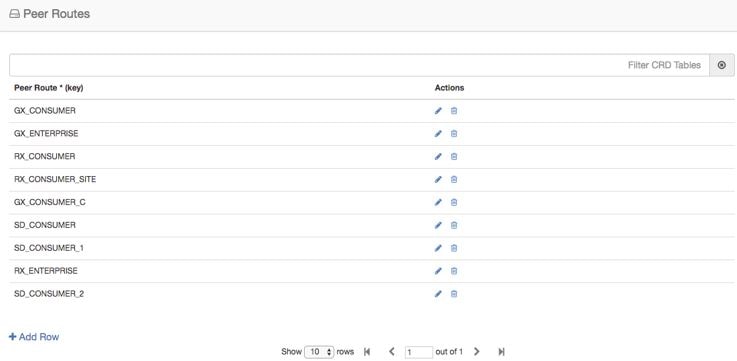
  1. Configure the Peer Routes table:

    • This table defines the name of the Peer Routes that are then used in the Peer Routing table.

    • This table is mainly used in Table-driven routing where the peer route is derived from the application table-driven rule tables.

    Figure 16. Peer Routes


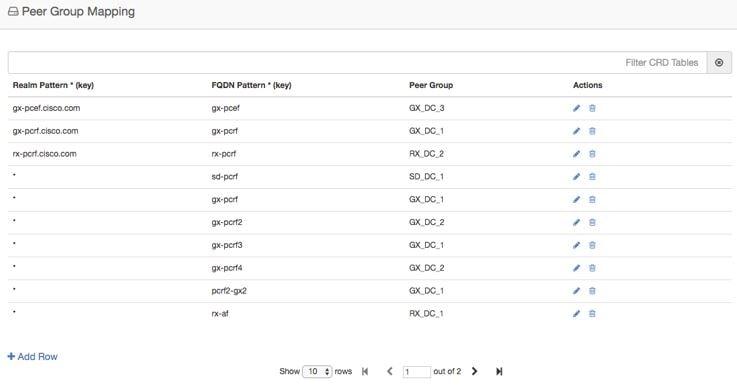
  2. Configure the Peer Group Mapping table. This table defines the mapping of peers and realm with peer group.

    • Once the peer group is derived, CPS vDRA looks up this table to find the peers that belong to the derived peer group. Once DRA lists the peers in the peer group, it tries to match these peers with the Active Peer list, that is, peers which are currently connected to CPS vDRA.

      If multiple peers are up in a peer group, CPS vDRA load balances the traffic in a round-robin manner according to peer weight.

      The peer weight range is 0-1000 and the default weight is 100. If a peer weight is 0, then that peer is skipped.

      For example, if there are two peers up in a peer group with weights 100 and 200 respectively, then CPS vDRA load balances traffic between the two peers in the ratio of 33% and 67% respectively.

    • This table is applicable to SRK and Table driven routing only and is not used in Destination Host routing.

    Figure 17. Peer Group Mapping


Configure Message Retries

CPS vDRA has the capability of retrying messages to multiple connected peers, in case the destination peer is not up. Retry mechanism works completely on the basis of SRK.

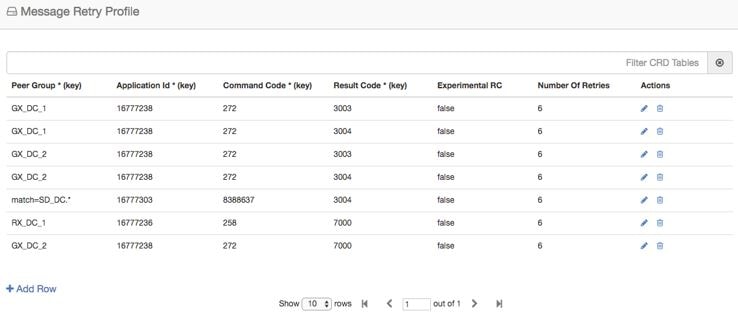
To configure message retries, you need to configure the Message Retry Profile table.

Figure 18. Message Retry Profile


You can configure message retry on the basis of the following inputs:

  • Peer Group

  • Application Id

  • Command Code

  • Result-Code

The outputs of this table are:

  • Number of retries

  • Experimental RC

When the retry criteria matches, then:

  1. First, the retry is done on any connected peer in the same peer group.

  2. If no peer is found in the same peer group, the next priority is given to the peers in the peer group having the same SRK as the peer group to which the request was originally sent.

  3. If the above condition also fails to find a peer, the last priority is given to the peers in the peer group that share the same second label as that of the original peer group.


Note


CPS vDRA uses the Peer Group Mapping table to find the peer in the same peer group. Hence, the Peer Group Mapping table configuration is a prerequisite.


At the end, if no peer is found, retries stop. The retry also stops when the number of retries is exhausted and no response is received.

Configure Reserved IMSIs

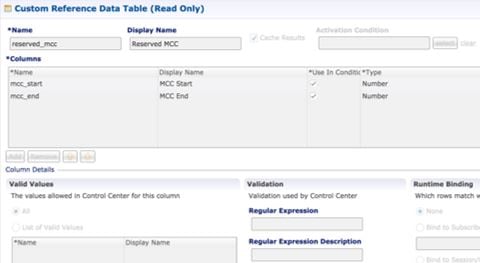
You can now specify a reserved MCC range so that vDRA validates a parsed IMSI for SLF routing against a configured list of reserved MCC. If the IMSI matches a reserved IMSI, the value is ignored for SLF routing.

Configure the Reserved IMSI CRD table with columns for MCC Start Range and MCC End Range.

Figure 19. Reserved IMSI CRD Table


For more information, see Reserved IMSI.

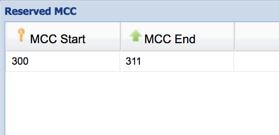
In DRA, configure the MCC Start Range and MCC End Range.

Figure 20. MCC Range


Any calls within Reserved IMSI range are either routed by alternate means such as table-driven routing or result with an error.

Configure Multiple Lookup in SLF Trigger Profile

Previously, in vDRA, the SLF lookup Type in the SLF trigger table had options only to support two types of lookup, that is, IMSI, MSISDN.

You can now specify Primary and Secondary Lookup Keys in the SLF Trigger Profile Table.

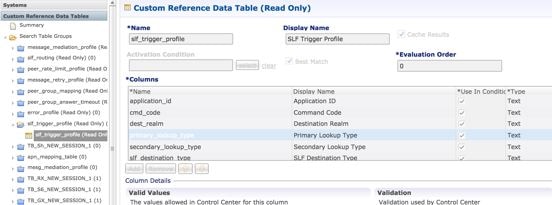
First, configure the columns in the CRD table as shown:

Figure 21. CRD Table Configuration


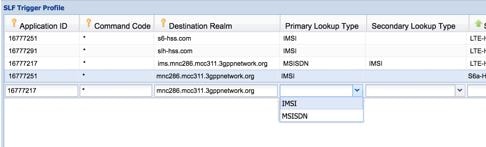
In the SLF Trigger Profile, you can select the Primary Lookup key from the drop down list. Similarly, you can select the Secondary Lookup key.

Figure 22. SLF Trigger Profile


Configuring MongoDB Authentication

Before you begin

  • Currently, MongoDB authentication is supported only for fresh deployments of vDRA where application sharding has been implemented.

  • MongoDB authentication is not supported for MongoDB sharding deployments.

  • Make sure every shard of database cluster has Primary member present. Execute the following command to verify the same.

    show database status | tab | include PRIMARY
  • Make sure all the VMs are in CONNECTED state.

    show docker engine
  • Make sure there are no IP_NOT_REACHABLE alerts present on the system.

    show alert status | tab | include IP_NOT_REACHABLE
  • Make sure the network cache is up to date with all IPs present on each VM.

    show network ips

Procedure


Step 1

Login to Binding VNF CLI and configure MongoDB authentication on single node setup:

  1. Set password.

    db-authentication set-password database mongo password *****

    Example:

    admin@orchestrator[an-dbmaster]# db-authentication set-password database mongo password
    Value for 'password' (<string>): ********
    result SUCCESS
    admin@orchestrator[an-dbmaster]#
  2. Enable transition authentication.

    db-authentication enable-transition-auth database mongo

    Example:

    admin@orchestrator[an-dbmaster]# db-authentication enable-transition-auth database mongo
    admin@orchestrator[an-dbmaster]#
  3. Rolling restart of mongod instances.

    db-authentication rolling-restart database mongo

    Example:

    admin@orchestrator[an-dbmaster]# db-authentication rolling-restart database mongo
    admin@orchestrator[an-dbmaster]#
  4. Monitor rolling restart status.

    db-authentication rolling-restart-status database mongo

    Example:

    admin@orchestrator[an-dbmaster]# db-authentication rolling-restart-status database mongo
    result
    Rolling Restart: Not Scheduled/Completed
    admin@orchestrator[an-dbmaster]#
  5. Disable transition authentication.

    db-authentication disable-transition-auth database mongo

    Example:

    admin@orchestrator[an-dbmaster]# db-authentication disable-transition-auth database mongo
    admin@orchestrator[an-dbmaster]#
  6. Rolling restart of mongod instances.

    db-authentication rolling-restart database mongo

    Example:

    admin@orchestrator[an-dbmaster]# db-authentication rolling-restart database mongo
    admin@orchestrator[an-dbmaster]#

    Note


    During db-authentication rolling-restart command execution mongod instances are restarted.

  7. Make sure all the databases are UP with correct status.

    show database status

    Sample output:

    admin@orchestrator[an-dbmaster]# show database status
                                                              CLUSTER
    ADDRESS        PORT   NAME        STATUS     TYPE         NAME     SHARD     REPLICA SET
    ----------------------------------------------------------------------------------------------
    192.168.11.42  27036  arbiter-1   ARBITER    replica_set  binding  shard-1   rs-shard-1
    192.168.11.43  27036  server-a    PRIMARY    replica_set  binding  shard-1   rs-shard-1
    192.168.11.44  27036  server-b    SECONDARY  replica_set  binding  shard-1   rs-shard-1
    192.168.11.42  27037  arbiter-2   ARBITER    replica_set  binding  shard-2   rs-shard-2
    192.168.11.42  27038  arbiter-3   ARBITER    replica_set  binding  shard-2   rs-shard-2
    192.168.11.43  27037  server-a    SECONDARY  replica_set  binding  shard-2   rs-shard-2
    192.168.11.44  27037  server-b    PRIMARY    replica_set  binding  shard-2   rs-shard-2
    192.168.11.41  27030  binding     SECONDARY  shard_db     binding  shdb-1    binding-sharddb
    192.168.11.42  27030  binding     PRIMARY    shard_db     binding  shdb-2    binding-sharddb
  8. DRA VNF Site-A and Site-B.

    db-authentication set-password database mongo password *****

    Example:

    admin@orchestrator[an-master]# db-authentication set-password database mongo password
    Value for 'password' (<string>): ********
    result SUCCESS
    admin@orchestrator[an-master]#

Step 2

Login to Binding VNF CLI and configure MongoDB authentication in mated pair deployments.

Note


During db-authentication rolling-restart command execution mongod instances are restarted.

  1. On Site A, configure session-AB, imsi-msisdn databases.

  2. On Site B, configure session-AB, imsi-msisdn databases.

  3. On Site A, configure the password and enable-transition-auth and run rolling-restart.

  4. On Site B, configure the password and enable-transition-auth and run rolling-restart.

  5. On Site A, disable transition-auth and run rolling-restart

  6. Make sure all the databases are UP with appropriate status.

    show database status

    Sample output:

    admin@orchestrator[an-dbmaster]# show database status
                                                              CLUSTER
    ADDRESS        PORT   NAME        STATUS     TYPE         NAME     SHARD     REPLICA SET
    ----------------------------------------------------------------------------------------------
    192.168.11.42  27036  arbiter-1   ARBITER    replica_set  binding  shard-1   rs-shard-1
    192.168.11.43  27036  server-a    PRIMARY    replica_set  binding  shard-1   rs-shard-1
    192.168.11.44  27036  server-b    SECONDARY  replica_set  binding  shard-1   rs-shard-1
    192.168.11.42  27037  arbiter-2   ARBITER    replica_set  binding  shard-2   rs-shard-2
    192.168.11.42  27038  arbiter-3   ARBITER    replica_set  binding  shard-2   rs-shard-2
    192.168.11.43  27037  server-a    SECONDARY  replica_set  binding  shard-2   rs-shard-2
    192.168.11.44  27037  server-b    PRIMARY    replica_set  binding  shard-2   rs-shard-2
    192.168.11.41  27030  binding     SECONDARY  shard_db     binding  shdb-1    binding-sharddb
    192.168.11.42  27030  binding     PRIMARY    shard_db     binding  shdb-2    binding-sharddb
  7. DRA VNF Site-A and Site-B.

    db-authentication set-password database mongo password *****

    Example:

    admin@orchestrator[an-master]# db-authentication set-password database mongo password
    Value for 'password' (<string>): ********
    result SUCCESS
    admin@orchestrator[an-master]#

Disabling MongoDB Authentication


Note


This section is used to disable MongoDB authentication in mated pair deployments.


Procedure

Step 1

Login to Binding VNF CLI and perform the following steps:

Note


The steps need to be performed on all binding VNFs.

  1. Enable transition authentication.

    db-authentication enable-transition-auth database mongo
  2. Rolling restart of mongod instances.

    db-authentication rolling-restart database mongo
  3. Rolling restart status.

    db-authentication rolling-restart-status database mongo

Step 2

Login to DRA VNF CLI and remove the password by using db-authentication remove-password database mongo command.

Note


The step needs to be performed on all DRA VNFs.

admin@orchestrator[an-master]# db-authentication remove-password
Value for 'password' (<string>): ********
result SUCCESS
admin@orchestrator[an-master]#

Step 3

Login to binding VNF CLI and remove the password by using db-authentication remove-password database mongo command.

Note


The step needs to be performed on all binding VNFs.

Step 4

Login to binding VNF CLI and perform the following steps:

Note


The steps need to be performed on all binding VNFs.

  1. Disable transition authentication.

    db-authentication disable-transition-auth database mongo
  2. Rolling restart of mongod instances.
    db-authentication rolling-restart database mongo
  3. Rolling restart status.

    db-authentication rolling-restart-status database mongo

Step 5

Make sure all the databases are UP with appropriate status.

show database status

Sample output:

admin@orchestrator[an-dbmaster]# show database status
                                                          CLUSTER
ADDRESS        PORT   NAME        STATUS     TYPE         NAME     SHARD     REPLICA SET
----------------------------------------------------------------------------------------------
192.168.11.42  27036  arbiter-1   ARBITER    replica_set  binding  shard-1   rs-shard-1
192.168.11.43  27036  server-a    PRIMARY    replica_set  binding  shard-1   rs-shard-1
192.168.11.44  27036  server-b    SECONDARY  replica_set  binding  shard-1   rs-shard-1
192.168.11.42  27037  arbiter-2   ARBITER    replica_set  binding  shard-2   rs-shard-2
192.168.11.42  27038  arbiter-3   ARBITER    replica_set  binding  shard-2   rs-shard-2
192.168.11.43  27037  server-a    SECONDARY  replica_set  binding  shard-2   rs-shard-2
192.168.11.44  27037  server-b    PRIMARY    replica_set  binding  shard-2   rs-shard-2
192.168.11.41  27030  binding     SECONDARY  shard_db     binding  shdb-1    binding-sharddb
192.168.11.42  27030  binding     PRIMARY    shard_db     binding  shdb-2    binding-sharddb