Introduction

Overview of the Access Point

The Cisco Catalyst IW9167E Heavy Duty Access Point is a robust wireless device designed for mission-critical applications, offering flexible operation modes and reliable connectivity.

  • Supports both Cisco Catalyst Wi-Fi (CAPWAP) mode and Cisco Ultra-Reliable Wireless Backhaul (Cisco URWB) mode starting from IOS XE Cupertino 17.9.3.

  • Allows switching between Wi-Fi and Cisco URWB modes as needed.

  • Workgroup Bridge (WGB) and Universal WGB (uWGB) are supported from Cisco IOS XE Dublin 17.11.1.

Supported Operating Modes and Configuration Overview

The Cisco Catalyst IW9167E Heavy Duty Access Point can be configured to operate in various modes, depending on deployment requirements and software version.

The following operating modes are available for CAPWAP mode:

  • Local

  • Flexconnect

  • Bridge

  • Flexconnect + Bridge

  • Sniffer

  • Monitor

  • Site survey

Determine Image on IW9167EH

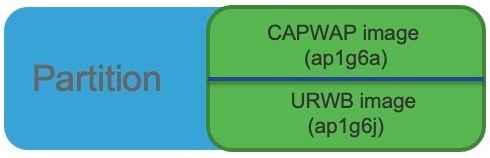
The IW9167EH access point stores multiple software images under different folders on the same partition, and the image selected determines the device's operating mode.

The following image shows the folder structure where software images are stored on the IW9167EH:

Figure 1. IW9167EH Software Image Folder Structure
  • CAPWAP mode uses the ap1g6a-k9w8-xxx.tar image file.

  • Cisco URWB mode uses the ap1g6j-k9c1-xxx.tar image file.

  • WGB/uWGB mode also uses the ap1g6j-k9c1-xxx.tar image file.

Software Images and Operating Modes for IW9167EH

The software image that the IW9167EH access point uses depends on the selected operating mode. The following table lists the available modes and their corresponding image files.

Table 1. IW9167EH Software Images

IW9167EH Mode

Software Image

CAPWAP

ap1g6a-k9w8-xxx.tar

Cisco URWB

Unified Industrial Wireless image ap1g6j-k9c1-xxx.tar

WGB/uWGB

ap1g6j-k9c1-xxx.tar

To determine which image your IW9167EH is running, use the show version command and review the output for the software type.

  • If the show version output displays Cisco AP Software, (ap1g6a) , the AP is running the CAPWAP image ap1g6a-k9w8-xxx.tar , which supports CAPWAP mode.

    Cisco AP Software, (ap1g6a), C9167, RELEASE SOFTWARE
    Technical Support: http://www.cisco.com/techsupport
    Copyright (c) 1986-2022 by Cisco Systems, Inc.
    Compiled Fri Jul 29 01:56:00 PDT 2022
    ROM: Bootstrap program is U-Boot boot loader
    BOOTLDR: U-Boot boot loader Version 2022010100
    APFC58.9A16.E648 uptime is 0 days, 1 hours, 03 minutes
    Last reload time   : Mon Sep 19 02:23:13 UTC 2022
    Last reload reason : Image Upgrade
    cisco IW9167EH-B ARMv8 Processor rev 4 (v8l) with 1757076/1006864K bytes of memory.
                        
  • If the show version output displays Cisco AP Software (ap1g6j) , the AP is running ap1g6j-k9c1-xxx.tar , which supports Cisco URWB mode or Cisco WGB/uWGB.

    Cisco AP Software, (ap1g6j), C9167, RELEASE SOFTWARE 
    Technical Support: http://www.cisco.com/techsupport
    Copyright (c) 1986-2022 by Cisco Systems, Inc.
    Compiled Thu Aug 18 01:01:29 PDT 2022
    
    ROM: Bootstrap program is U-Boot boot loader
    BOOTLDR: U-Boot boot loader Version 2022010100
    
    APFC58.9A16.E464 uptime is 1 days, 3 hours, 58 minutes
    Last reload time   : Wed Sep 7 11:17:00 UTC 2022
    Last reload reason : reload command
                        

Configure AP to boot with different image options

This procedure describes how to configure the access point to boot up with CAPWAP, URWB, or WGB/uWGB mode.

Note


Switching between different modes causes a full factory reset. All configurations and data are removed.


Procedure


Step 1

Use the enable command to enter the privileged EXEC mode.

Example:

Device# enable

Enter your password if prompted.

Step 2

Use the configure boot mode { capwap | urwb | wgb } command to configure AP to CAPWAP, URWB, or WGB/uWGB mode.

Example:

Device# configure boot mode wgb

The AP reboots with the specified mode.


Upgrade the IW9167EH to support WGB/uWGB

This procedure describes how to upgrade the IW9167EH from Cisco IOS XE Cupertino 17.9.x to Cisco IOS XE Dublin 17.11.1 to enable WGB/uWGB mode support.

The IW9167EH is shipped with Cisco IOS XE Cupertino 17.9.3 software and operates in CAPWAP mode. To support WGB/uWGB mode, you must upgrade your AP to Cisco IOS XE Dublin 17.11.1. First, switch your AP to Cisco URWB mode. Then, you can upgrade to 17.11.1.

To determine whether your IW9167EH is running CAPWAP mode or Cisco URWB mode, use the show version command.

  • If the show version output displays Cisco AP Software (ap1g6a) , your AP is running as CAPWAP mode.

  • If the show version output displays Cisco AP Software (ap1g6j) , your AP is running as Cisco URWB mode.

Cisco WGB/uWGB mode shares the same image with Cisco URWB. You cannot upgrade the ap1g6j image to 17.11.1 in CAPWAP mode ( ap1g6a ). If the archive download command detects a mismatch between image types, the upgrade is aborted.

Procedure


Step 1

Use the configure boot mode urwb command to convert CAPWAP mode to Cisco URWB mode.

Example:

Device# configure boot mode urwb
Before image swapping device need factory reset. Are you sure to proceed? (Y/N):y
       Converting to Cisco URWB Mode...
       <rebooting…>
                    

Step 2

Log in with default credentials (Cisco/Cisco).

Step 3

Use the configure iotod-iw offline command to configure Cisco URWB, to make it work in Offline mode.

Example:

Device# configure iotod-iw offline
Switching to IOTOD IW Offline mode...
Will switch from Provisioning Mode to IOTOD IW offline Mode, device need to reboot: Y/N?  Y
<rebooting…>
                    

Step 4

Configure networking in Cisco URWB by setting the IP address, netmask, gateway, and passphrase.

Example:

Device# configure wireless passphrase unit1
Device# configure ap address ipv4 static 192.168.1.200 255.255.255.0 192.168.1.1
Device# write
Device# reload
<rebooting…>
                    

Note


The passphrase is optional. However, it is recommended to assign different passphrases when upgrading multiple units simultaneously on the same Layer 2 network.

If all nodes share the same passphrase, Cisco URWB automatically forms an MPLS network without additional MPLS configuration. As a result, your IP service might not function as expected.

Step 5

Use the archive download-sw /reload tftp://tftp-server/ image-name command to upgrade to 17.11.1.

Example:

Device# archive download-sw /reload tftp://10.10.10.5/ap1g6a-k9w8-tar.17_11_1_160.tar
 <rebooting…>
                    

Step 6

Use the configure boot mode wgb command to convert the AP from Cisco URWB mode to Cisco WGB/uWGB mode.

Example:

Device# configure boot mode wgb
 <rebooting…>