mDNS Gateway
A mDNS gateway is an Apple service discovery protocol that
-
listens for multicast DNS (mDNS) service announcements and queries from local domains with the use of mDNS service records
-
caches and forwards mDNS advertisements between segmented Layer 2 networks or subnets, and
-
enables devices and services to be discovered even when clients and sources reside in different network segments.
The Bonjour protocol operates using service announcements and queries. Each query or advertisement is sent to the Bonjour multicast address IPv4 224.0.0.251 or IPv6 FF02::FB. The protocol uses mDNS on UDP port 5353.
The address used by the Bonjour protocol is a link-local multicast address and is therefore only forwarded to the local Layer 2 network. Because multicast DNS is limited to a Layer 2 domain, a client must be part of the same Layer 2 domain to discover a service. However, this requirement is not always practical in large-scale deployments or enterprises.
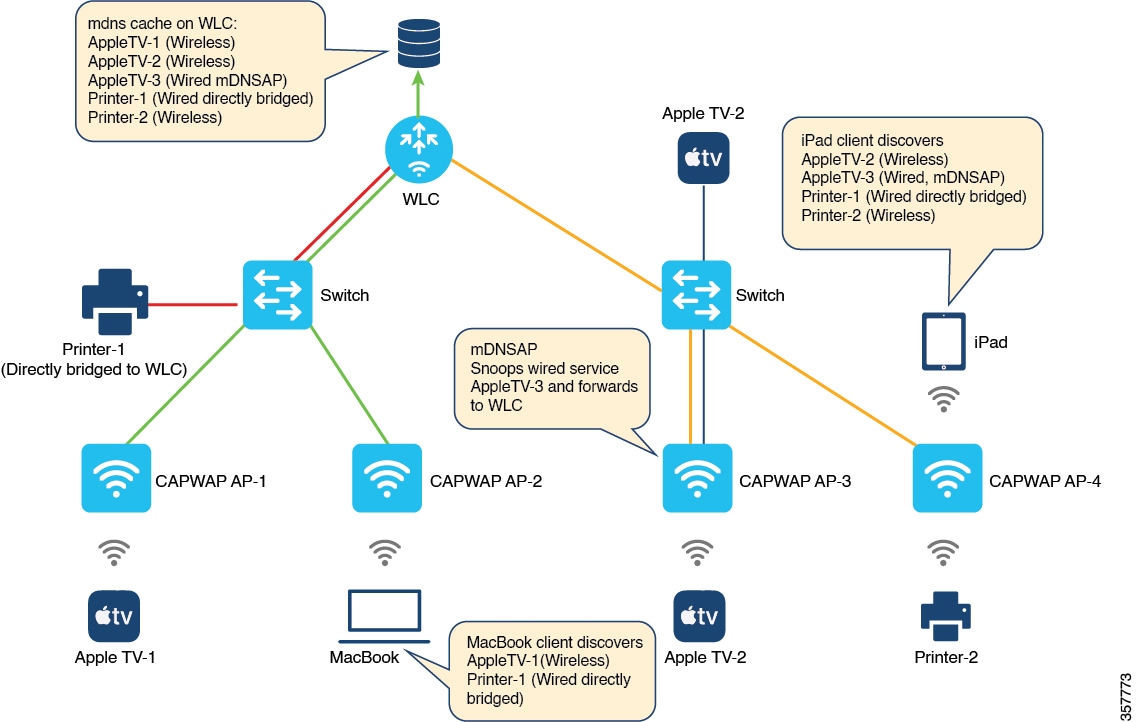
To address this issue, the Cisco Catalyst 9800 Series Wireless Controller acts as a Bonjour Gateway. The controller then listens for Bonjour services and caches these Bonjour advertisements (AirPlay, AirPrint, and so on) from the source or host. For example, Apple TV responds to Bonjour clients when requested for a service. This allows sources and clients to exist in different subnets.
By default, the mDNS gateway is disabled on the controller. To enable mDNS gateway functionality, you must explicitly configure the mDNS gateway using the CLI or Web UI.
Prerequisite of mDNS Gateway
Since the Cisco Catalyst 9800 series wireless controller will respond to and advertise services cached when acting as a Bonjour Gateway, it must have an SVI interface with a valid IP address on every VLAN where mDNS is allowed or used. This interface will provide the source IP address for mDNS packets that are sent from the controller acting as an mDNS Gateway.
Guidelines and restrictions for configuring mDNS AP
Guidelines for configuring mDNS AP
-
Cisco recommends deploying scalable Wide Area Bonjour to route mDNS service between wired and wireless networks. Cisco Catalyst 9800 Series Wireless LAN Controller introduces a new mDNS gateway, called Service-Peer mode, which replaces the classic mDNS flood-n-learn and supports enterprise-grade, scalable, stateful, and reliable complete unicast-based mDNS service-routing with upstream gateway Cisco Catalyst 9000 Series Switches. For more information, see Part: Cisco DNA Service for Bonjour .
-
The mDNS AP (classic flood-and-learn based feature) is enhanced with complete unicast-based service-routing using Cisco Wide Area Bonjour. This enhancement supports flood-free wired and wireless networks and helps overcome several operational, scalability, and service resiliency challenges. The mDNS AP extends the mDNS flood from Wired VLANs to the AP. It further extends this traffic over the CAPWAP tunnel to the controller for central processing across the core network. Cisco recommends using the mDNS AP only for small network environments.
-
The wired mDNS service-provider VLANs must be extended to flood mDNS traffic up to the mDNS AP Ethernet port in trunk mode. The wired VLAN extension to the mDNS AP may include other wired flood traffic, such as broadcast, unknown unicast, and Layer 2 multicast. This additional traffic can affect the mDNS AP’s scale and performance.
-
It is recommended to deploy at least one mDNS AP for each Layer 3 Access switch. All wired mDNS traffic is flooded using alternate L2 methods if a single mDNS AP is shared between multiple Layer 3 Access switches.
-
The old wired mDNS service entry continues to be advertised to all wireless users for up to 4500 seconds, based on the mDNS cache timers on the controller. Stale entries require manual clearing from the local cache in the controller.
-
All WLAN users can discover all flooded wired mDNS services without granular location-based service. The mDNS AP, in large and flooded networks, impacts the user experience on mobile devices.
-
Wireless multicast link-local is enabled by default. When wireless link-local is enabled, only mDNS Bridging mode is supported. If you require mDNS Gateway for wired services, disable wireless link-local.
Restrictions for configuring mDNS AP
-
The mDNS AP is supported only in Local and Monitor modes. If the Cisco Wireless AP operates in FlexConnect mode, the Fabric mode AP does not support the mDNS AP feature. For information about enabling mDNS service routing for various distributed wireless modes, refer to Part: Cisco DNA Service for Bonjour. If you use a FlexConnect AP as an mDNS gateway, do not use a period (.) in the service provider name, as this is not supported.
-
Wireless users connected to mDNS AP may not be able to browse the Wired mDNS services across flooded Wired VLAN to mDNS AP.
-
The mDNS AP scale limit for each Cisco Catalyst 9800 Series Wireless LAN Controller is restricted. The maximum mDNS Wired VLAN count for each controller is limited. The mDNS AP does not support mDNS query packet suppression or rate-limiter in AP. The wired mDNS flood from all wired VLANs is forwarded to the controller for central policy enforcement.
-
The maximum number of flooded packets processed per second from wired VLANs to the mDNS AP is limited. The performance and reliability of the mDNS AP may decrease in large network environments. A maximum of 10 Wired VLANs’ mDNS flood can be extended to mDNS AP. A combination of large wired VLAN scale and mDNS AP scale may impact performance in both the AP and controller.
-
Only one mDNS AP is supported for each wired VLAN. Configuring multiple mDNS APs to map the same wired VLAN ID causes service instability and duplicate processing. Only one wired mDNS service policy is supported for all network-wide mDNS APs.
-
High availability is not supported for multiple mDNS APs. mDNS services across wired and wireless networks are disrupted when connectivity to an mDNS AP is lost due to any type of failure.
-
These limitations apply when an mDNS AP introduces LSS-based mDNS service filtering between flooded wired VLANs and wireless networks:
-
A single mDNS AP with LSS enabled can distribute wired mDNS services only to nearby APs in its neighbor list. Wireless users connected to APs not in the neighbor list may not be able to discover any wired mDNS services.
-
Only one mDNS AP can be deployed in each Wired VLAN. Wired VLANs must be reconfigured across the LAN to enable unique LSS-based mDNS APs in specific locations. For example, to achieve mDNS service discovery on each floor, each floor must have a dedicated wired VLAN or subnet, with one mDNS AP per floor to discover all other APs as neighbors on the same floor.
-
-
The mDNS AP does not support IPv6 for wired mDNS service providers or service receivers. Only IPv4 is supported. The mDNS AP does not support role-based mDNS service filtering between wired and wireless networks. The mDNS AP does not detect or automatically resolve duplicate mDNS service instance names across wired VLANs. The Cisco Catalyst 9800 Series Wireless LAN Controller discovers and records the first service instance with a unique name in its local cache database. If a duplicate service instance name is discovered, the controller rejects the duplicate name and does not distribute it to wireless clients.
Enable mDNS Gateway (GUI)
Procedure
|
Step 1 |
Choose . |
||
|
Step 2 |
In the Global section, toggle the slider to enable or disable the mDNS Gateway. |
||
|
Step 3 |
From the Transport drop-down list, select one of these types:
|
||
|
Step 4 |
Enter an appropriate timer value in Active-Query Timer. The valid range is between 1 to 120 minutes. The default is 30 minutes. |
||
|
Step 5 |
From the mDNS-AP Service Policy drop-down list, select an mDNS service policy.
|
||
|
Step 6 |
Click Apply. |
Enable or disable mDNS Gateway (GUI)
Procedure
|
Step 1 |
Choose . |
|
Step 2 |
Enable or disable the mDNS Gateway toggle button. |
|
Step 3 |
Select ipv4 or ipv6 or both from the Transport drop-down list. |
|
Step 4 |
Enter the Active-Query Timer. |
|
Step 5 |
Click Apply. |
Enable or disable mDNS Gateway (CLI)
 Note |
|
Procedure
|
Step 1 |
Enable the privileged exec mode. Example:Enter your password, if prompted. |
||
|
Step 2 |
Enter the global configuration mode. Example: |
||
|
Step 3 |
Enable mDNS gateway. Example: |
||
|
Step 4 |
Process mDNS message on a specific transport. Example:Here, ipv4 signifies that the IPv4 mDNS message processing is enabled. This is the default value. ipv6 signifies that the IPv6 mDNS message processing is enabled. both signifies that the IPv4 and IPv6 mDNS message is enabled for each network. |
||
|
Step 5 |
Change the periodicity of mDNS multicast active query. Example:
Here, active-query-periodicity refers to the active query periodicity in minutes. The valid range is from 1 to 120 minutes. Active query runs with a default periodicity of 30 minutes. |
||
|
Step 6 |
Return to the global configuration mode. Example: |
Create default service policy
When the mDNS gateway is enabled on any of the WLANs by default, mdns-default-service-policy is associated with it. Default service policy consists of default-service-list and their details are explained in this section. You can override the default service policy with a custom service policy.
Procedure
|
Step 1 |
Create a service-definition if the service is not listed in the preconfigured services. |
|
Step 2 |
Create a service list for IN and OUT by using the service-definitions. |
|
Step 3 |
Use the existing service list to create a new service. For more information, refer to Creating Service Policy section. |
|
Step 4 |
Attach the mdns-service-policy to the profile or VLAN that needs to be enforced. |
|
Step 5 |
To check the default-mdns-service list, use this command: |
Create custom service definition (GUI)
Procedure
|
Step 1 |
Choose . |
|
Step 2 |
In the Service Definition section, click Add. |
|
Step 3 |
In the Quick Setup: Service Definition page that is displayed, enter a name and description for the service definition. |
|
Step 4 |
Enter a service type and click + to add the service type. |
|
Step 5 |
Click Apply to Device. |
Create custom service definition (CLI)
A service definition is a construct that provides an admin-friendly name to one or more mDNS service types or to a pointer (PTR) resource record name.
By default, a few built-in service definitions are already available for the admin to use.
In addition to built-in service definitions, the admin can define custom service definitions.
You can execute this command to view all service definitions (built-in and custom):
Device# show mdns-sd master-service-listProcedure
|
Step 1 |
Enable the privileged exec mode. Example:Enter your password, if prompted. |
||
|
Step 2 |
Enter the global configuration mode. Example: |
||
|
Step 3 |
Configure mDNS service definition. Example:
|
||
|
Step 4 |
Configure mDNS service type. Example: |
||
|
Step 5 |
Return to the global configuration mode. Example: |
Create service list (GUI)
Procedure
|
Step 1 |
Choose . |
||
|
Step 2 |
In the Service List section, click Add. |
||
|
Step 3 |
In the Quick Setup: Service List page that is displayed, enter a name for the service list. |
||
|
Step 4 |
From the Direction drop-down list, select IN for inbound filtering or OUT for outbound filtering. |
||
|
Step 5 |
From the Available Services drop-down list, select a service type to match the service list.
|
||
|
Step 6 |
Click Add Services. |
||
|
Step 7 |
From the Message Type drop-down list, select the message type to match from the following options:
|
||
|
Step 8 |
Click Save to add services. |
||
|
Step 9 |
Click Apply to Device. |
Create service list (CLI)
mDNS service list is a collection of service definitions.
Procedure
|
Step 1 |
Enable the privileged exec mode. Example:Enter your password, if prompted. |
||
|
Step 2 |
Enter the global configuration mode. Example: |
||
|
Step 3 |
Configure mDNS service list. Example:
|
||
|
Step 4 |
Match the service to the message type. Example:Here, service-definition-name refers to the names of services, such as, airplay, airserver, airtunes, and so on.
(OR) |
||
|
Step 5 |
Match all services to the message type. Example:
In case of IN or OUT filter, if any of the service contains the same or subset of the message type (query or announcement), the match all is not allowed unless the existing services are removed. |
||
|
Step 6 |
Display inbound or outbound direction list of the configured service-list to classify matching service-types for service-policy. Example:The list can be filtered by name or specific direction. |
||
|
Step 7 |
Return to the global configuration mode. Example: |
Create service policy (GUI)
Procedure
|
Step 1 |
Choose . |
|
Step 2 |
In the Service Policy section, click Add. |
|
Step 3 |
In the Quick Setup: Service Policy page that is displayed, enter a name for the service policy. |
|
Step 4 |
From the Service List Input drop-down list, select one of the types. |
|
Step 5 |
From the Service List Output drop-down list, select one of the types. |
|
Step 6 |
From the Location drop-down list, select the location you want to associate with the service list. |
|
Step 7 |
Click Apply to Device. |
Create service policy (CLI)
mDNS service policy is used for service filtering while learning services or responding to queries.
Procedure
|
Step 1 |
Enable the privileged exec mode. Example:Enter your password, if prompted. |
||
|
Step 2 |
Enter the global configuration mode. Example: |
||
|
Step 3 |
Enable mDNS service policy. Example: |
||
|
Step 4 |
Filter mDNS service types based on LSS or site-tag. Example:
|
||
|
Step 5 |
Configure various service-list names for IN and OUT directions. Example:
|
||
|
Step 6 |
Return to the global configuration mode. Example: |
Configure a local or native profile for an mDNS policy (CLI)
When an administrator configures local authentication and authorization and does not expect to get any mDNS policy from the AAA server, the administrator can configure a local or native profile. This profile selects a mDNS policy based on user, role, or device type. When this local or native profile is mapped to the wireless profile policy, the mDNS service policy is applied to the mDNS packets that are processed on that WLAN.
Procedure
|
Step 1 |
Enter the global configuration mode. Example: |
|
Step 2 |
Configure the service-template or identity policy. Example: |
|
Step 3 |
Configure the mDNS policy. Example: |
|
Step 4 |
Return to the global configuration mode. Example: |
Configure an mDNS FlexConnect profile (GUI)
Procedure
|
Step 1 |
Choose . |
|
Step 2 |
In the mDNS Flex Profile section, click Add. |
|
Step 3 |
In the Profile Name field, enter the FlexConnect mDNS profile name. |
|
Step 4 |
In the Service Cache Update Timer field, specify the service cache update time. The default value is 1 minute. The valid range is from 1 to 100 minutes. |
|
Step 5 |
In the Statistics Update Timer field, specify the statistics update timer. The default value is 1 minute. The valid range is from 1 to 100 minutes. |
|
Step 6 |
In the VLANs field, specify the VLAN ID. You can enter multiple VLAN IDs separated by commas, or enter a range of VLAN IDs. Maximum number of VLANs allowed is 16. |
|
Step 7 |
Click Apply to Device. |
Configure an mDNS FlexConnect Profile (CLI)
Procedure
|
Step 1 |
Enter the global configuration mode. Example: |
|
Step 2 |
Enter the mDNS FlexConnect profile mode. Example: |
|
Step 3 |
Configure the mDNS update service cache timer for the FlexConnect profile. Example:The default value is 1 minute. Value range is between 1 minute and 100 minutes. |
|
Step 4 |
Configure the mDNS update statistics timer for the FlexConnect profile. Example:The default value is 1 minute. The valid range is from 1 to 100 minutes. |
|
Step 5 |
Configure the mDNS wired VLAN range for the FlexConnect profile between 10 - 20. Example: |
Apply an mDNS FlexConnect profile to a wireless FlexConnect profile (GUI)
Procedure
|
Step 1 |
Choose . |
|
Step 2 |
Click Add. |
|
Step 3 |
Under the General tab, from the mDNS Flex Profile drop-down list, select a FlexConnect profile name from the list. |
|
Step 4 |
Click Apply to Device. |
Apply an mDNS FlexConnect profile to a Wireless FlexConnect profile (CLI)
Procedure
|
Step 1 |
Enter the global configuration mode. Example: |
|
Step 2 |
Enter the wireless FlexConnect profile configuration mode. Example: |
|
Step 3 |
Enable the mDNS features for all the APs in the profile. Example: |
Enable the mDNS gateway on the VLAN interface (CLI)
This procedure configures the mDNS service policy for a specific VLAN. This allows the administrator to configure different settings to the mDNS packets on per VLAN interface basis and not on per WLAN basis.
Procedure
|
Step 1 |
Enter the global configuration mode. Example: |
||
|
Step 2 |
Configure a VLAN ID and enter the interface configuration mode. Example: |
||
|
Step 3 |
Configure the IP address for the interface. Example: |
||
|
Step 4 |
Enable mDNS configuration on a VLAN interface. Example: |
||
|
Step 5 |
Configure the service policy. Example:
|
||
|
Step 6 |
Returns to the privileged EXEC mode. Example:Alternatively, you can also press Ctrl-Z to exit global configuration mode. |
Configure mDNS AP (CLI)
In most of the deployments, the services may be available in VLANs that the APs can hear in the wired side (allowed in the switchport where the AP is directly connected: its own VLAN, or even more VLANs if switchport is a trunk).
This procedure shows how to configure mDNS AP:
Procedure
|
Step 1 |
Enter the global configuration mode. Example: |
||
|
Step 2 |
Configure the mDNS gateway. Example: |
||
|
Step 3 |
Enable mDNS on the AP, and configure a VLAN for the mDNS AP. Example: |
||
|
Step 4 |
Add a VLAN to the mDNS AP. Example:The vlan-id ranges from 1 to 4096. |
||
|
Step 5 |
Delete a VLAN from the mDNS AP. Example: |
||
|
Step 6 |
Disable the mDNS AP. Example: |
||
|
Step 7 |
Return to the privileged EXEC mode. Example:Alternatively, you can also press Ctrl-Z to exit global configuration mode.
|
Enable mDNS Gateway on the RLAN interface (CLI)
By configuring the mDNS gateway mode on the RLAN interface, you can configure the mDNS service policy for a specific RLAN.
Procedure
|
Step 1 |
Enter the global configuration mode and configure a remote LAN profile. Example:Example:
|
||
|
Step 2 |
Enable mDNS configuration on an RLAN interface and restart the RLAN profile. Example:mdns-sd-interface |
||
|
Step 3 |
Exit the remote LAN configuration mode and configure the RLAN policy profile and enter the wireless policy configuration mode. Example: |
||
|
Step 4 |
Enable an mDNS service policy and configure the RLAN for central switching. Example: |
||
|
Step 5 |
Configure the central DHCP for centrally switched clients and assign the profile policy to a VLAN. Example: |
||
|
Step 6 |
Restart the RLAN profile and configure a policy tag. Example: |
||
|
Step 7 |
Map the RLAN policy profile to the RLAN profile. Example:
|
||
|
Step 8 |
Return to the global configuration mode and configure the AP and enter the AP tag configuration mode. Example:
|
||
|
Step 9 |
Map a policy tag to the AP and return to the privileged EXEC mode. Example: |
Enable mDNS Gateway on guest LAN interface (CLI)
By configuring the mDNS gateway mode on a Guest LAN interface, you can configure the mDNS service policy for a specific Guest LAN interface.
Procedure
|
Step 1 |
Enter the global configuration mode. Example: |
||
|
Step 2 |
Configure guest LAN profile with a wired VLAN. Example:
|
||
|
Step 3 |
Configure the guest LAN profile without a VLAN for the Guest Anchor controller. Example: |
||
|
Step 4 |
Configure the mDNS gateway for a Guest LAN. Example:
|
||
|
Step 5 |
Return to the privileged EXEC mode. Example:Alternatively, you can also press Ctrl-Z to exit global configuration mode. |
Associate mDNS service policy with wireless profile policy (GUI)
Procedure
|
Step 1 |
Choose . |
|
Step 2 |
Click the policy profile name. |
|
Step 3 |
In the Advanced tab, select the mDNS service policy from the mDNS Service Policy drop-down list. |
|
Step 4 |
Click Update & Apply to Device. |
Associate mDNS service policy with wireless profile policy (CLI)
Note |
You must globally configure the mDNS service policy before associating it with the wireless profile policy. |
A default mDNS service policy is already attached when the wireless profile policy is created. You can use the following commands to override the default mDNS service policy with any of your service policy:
Procedure
|
Step 1 |
Enter the global configuration mode. Example: |
||||||||||||||||||||||||||
|
Step 2 |
Configures the wireless profile policy. Example:Here, profile-policy refers to the name of the WLAN policy profile. |
||||||||||||||||||||||||||
|
Step 3 |
Associate an mDNS service policy with the wireless profile policy. Example:The default mDNS service policy name is default-mdns-service-policy.
|
||||||||||||||||||||||||||
|
Step 4 |
Return to the global configuration mode. Example: |
Enable or disable mDNS Gateway for WLAN (GUI)
Procedure
|
Step 1 |
Choose . |
|
Step 2 |
Click on the WLAN. |
|
Step 3 |
In the Advanced tab, select the mode in mDNS Mode drop-down list. |
|
Step 4 |
Click Update & Apply to Device. |
Enable or disable mDNS Gateway for WLAN (CLI)
Note |
Bridging is the default behaviour. This means that the mDNS packets are always bridged. |
Procedure
|
Step 1 |
Enter the global configuration mode. Example: |
||
|
Step 2 |
Specify the WLAN name and ID. Example:
|
||
|
Step 3 |
Enable or disable mDNS Gateway and bridge functions on WLAN. Example: |
||
|
Step 4 |
Return to the global configuration mode. Example: |
||
|
Step 5 |
Verify the status of mDNS on WLAN. Example: |
||
|
Step 6 |
Verify the service policy configured in WLAN. Example: |
mDNS Gateway with guest anchor support and mDNS bridging
-
When mDNS Gateway is enabled on both the Anchor and Foreign controllers, the mDNS gateway supports guest anchor deployments. In this mode, clients on a guest LAN or WLAN with guest anchor enabled receive responses with any services or cache from the export Foreign controller. All advertisements received on the guest LAN or WLAN by the export Foreign are learned on the export Foreign itself. All queries received on the guest LAN or WLAN are answered by the export Foreign itself.
-
When mDNS Gateway is enabled on the Anchor and disabled on the Foreign controller (Bridging Mode), the mDNS gateway supports guest anchor deployments. In this scenario, clients on the guest LAN or WLAN with guest anchor enabled receive any services or cache from the export Anchor, even if the clients are connected to the Foreign. All advertisements received on the guest LAN or WLAN by the export Foreign are forwarded to the Anchor, and the cache is stored on the Anchor. All queries received on the guest LAN or WLAN are answered by the export Anchor itself.
Note |
Comment by CISCO\ashijadh: based on PRRQ comments
|
Configure mDNS Gateway on guest anchor (CLI)
Procedure
|
Step 1 |
Enter the global configuration mode. Example: |
|
Step 2 |
Configure the guest LAN profile with a wired VLAN. Example: |
|
Step 3 |
Enable mDNS Gateway on the guest LAN. Example: |
Configure mDNS Gateway on guest foreign (Guest LAN) (CLI)
Procedure
|
Step 1 |
Enter the global configuration mode. Example: |
||
|
Step 2 |
Configure guest LAN profile with a wired VLAN. Example:
|
||
|
Step 3 |
Enable mDNS Gateway on the guest LAN. Example: |
||
|
Step 4 |
Return to the global configuration mode. Example: |
Configure mDNS Gateway on guest anchor (CLI)
Procedure
|
Step 1 |
Enter the global configuration mode. Example: |
|
Step 2 |
Configure the guest WLAN profile with a wired VLAN. Example: |
|
Step 3 |
Enable mDNS Gateway on the guest WLAN. Example: |
Configure mDNS Gateway on guest foreign (Guest WLAN) (CLI)
Procedure
|
Step 1 |
Enter the global configuration mode. Example: |
||
|
Step 2 |
Configure guest WLAN profile with a wired VLAN. Example:
|
||
|
Step 3 |
Enable mDNS Gateway on the guest WLAN. Example: |
||
|
Step 4 |
Return to the global configuration mode. Example: |
Verify mDNS Gateway configurations
To verify the mDNS summary, use this command:
Device# show mdns-sd summary

mDNS Gateway: Enabled
Active Query: Enabled
  Periodicity (in minutes): 30
Transport Type: IPv4
To verify the mDNS cache, use this command:
Device# show mdns-sd cache

----------------------------------------------------------- PTR Records ---------------------------------------
RECORD-NAME                     TTL      WLAN   CLIENT-MAC       RR-RECORD-DATA
--------------------------------------------------------------------------------------------------------------
_airplay._tcp.local             4500     30     07c5.a4f2.dc01   CUST1._airplay._tcp.local
_ipp._tcp.local                 4500     30     04c5.a4f2.dc01   CUST3._ipp._tcp.local2
_ipp._tcp.local                 4500     15     04c5.a4f2.dc01   CUST3._ipp._tcp.local4
_ipp._tcp.local                 4500     10     04c5.a4f2.dc01   CUST3._ipp._tcp.local6
_veer_custom._tcp.local         4500     10     05c5.a4f2.dc01   CUST2._veer_custom._tcp.local8
To verify the mDNS cache from wired service provider, use this command:
Device# show mdns-sd cache wired

----------------------------------------------------------- PTR Records ---------------------------------------
RECORD-NAME                                TTL      VLAN      CLIENT-MAC       RR-RECORD-DATA
---------------------------------------------------------------------------------------------------------------
_airplay._tcp.local                        4500     16        0866.98ec.97af   wiredapple._airplay._tcp.local
_raop._tcp.local                           4500     16        0866.98ec.97af   086698EC97AF@wiredapple._raop._tcp.local
---------------------------------------------------------- SRV Records -----------------------------------------
RECORD-NAME                                TTL      VLAN      CLIENT-MAC       RR-RECORD-DATA
-----------------------------------------------------------------------------------------------------------------
wiredapple._airplay._tcp.local             4500     16        0866.98ec.97af   0 0 7000 wiredapple.local
086698EC97AF@wiredapple._raop._tcp.local   4500     16        0866.98ec.97af   0 0 7000 wiredapple.local
---------------------------------------------------------- A/AAAA Records ----------------------------------------
RECORD-NAME                                TTL      VLAN      CLIENT-MAC       RR-RECORD-DATA
------------------------------------------------------------------------------------------------------------------
wiredapple.local                           4500     16        0866.98ec.97af   2001:8:16:16:e5:c446:3218:7437
----------------------------------------------------------- TXT Records -------------------------------------------
RECORD-NAME                                TTL      VLAN      CLIENT-MAC       RR-RECORD-DATA
--------------------------------------------------------------------------------------------------------------------
wiredapple._airplay._tcp.local             4500     16        0866.98ec.97af   [343]'acl=0''deviceid=08:66:98:EC:97:AF''features=
086698EC97AF@wiredapple._raop._tcp.local   4500     16        0866.98ec.97af   [193]'cn=0,1,2,3''da=true''et=0,3,5''ft=0x5A7FFFF7
To verify the mdns-sd type PTR, use this command:
Device# show mdns-sd cache type {PTR | SRV | A-AAA | TXT}

RECORD-NAME                                    TTL      WLAN      CLIENT-MAC       RR-Record-Data
-------------------------------------------------------------------------------------------------------------------------------------
_custom1._tcp.local                            4500     2         c869.cda8.77d6   service_t1._custom1._tcp.local
_custom1._tcp.local                            4500     2         c869.cda8.77d6   vk11._custom1._tcp.local
_ipp._tcp.local                                4500     2         c869.cda8.77d6   service-4._ipp._tcp.local
To verify the mdns-sd cache for a client MAC, use this command:
Device# show mdns-sd cache {ap-mac <ap-mac> | client-mac <client-mac>


                    | glan-id <glan-id> | mdns-ap <mac-address> | rlan-id <rlan-id>

                | wlan-id <wlan-id> | wired}
RECORD-NAME                                    TTL      WLAN      CLIENT-MAC       RR-Record-Data
-------------------------------------------------------------------------------------------------------------------------------------
_custom1._tcp.local                            4500     2         c869.cda8.77d6   service_t1._custom1._tcp.local
_custom1._tcp.local                            4500     2         c869.cda8.77d6   vk11._custom1._tcp.local
_ipp._tcp.local                                4500     2         c869.cda8.77d6   service-4._ipp._tcp.local
----------------------------------------------------------- SRV Records -------------------------------------------------------------
RECORD-NAME                                    TTL      WLAN      CLIENT-MAC       RR-Record-Data
-------------------------------------------------------------------------------------------------------------------------------------
service-4._ipp._tcp.local                      4500     2         c869.cda8.77d6   0 0 1212 mDNS-Client1s-275.local
vk11._custom1._tcp.local                       4500     2         c869.cda8.77d6   0 0 987 mDNS-Client1s-275.local
service_t1._custom1._tcp.local                 4500     2         c869.cda8.77d6   0 0 197 mDNS-Client1s-275.local
---------------------------------------------------------- A/AAAA Records -----------------------------------------------------------
RECORD-NAME                                    TTL      WLAN      CLIENT-MAC       RR-Record-Data
-------------------------------------------------------------------------------------------------------------------------------------
mDNS-Client1s-275.local                        4500     2         c869.cda8.77d6   120.1.1.33
----------------------------------------------------------- TXT Records -------------------------------------------------------------
RECORD-NAME                                    TTL      WLAN      CLIENT-MAC       RR-Record-Data
-------------------------------------------------------------------------------------------------------------------------------------
service-4._ipp._tcp.local                      4500     2         c869.cda8.77d6   'CLient1'
vk11._custom1._tcp.local                       4500     2         c869.cda8.77d6   'txtvers=11'
service_t1._custom1._tcp.local                 4500     2         c869.cda8.77d6   'txtvers=12'
To verify the mdns-sd cache with respect to the RLAN ID, use this command:
Device# show mdns-sd cache rlan-id 1 detail

Name: _printer._tcp.local
  Type: PTR
  TTL: 4500
  RLAN: 1
  RLAN Name: rlan_test_1
  VLAN: 141
  Client MAC: 000e.c688.3942
  AP Ethernet MAC: 0042.5ab6.0ef0
  Remaining-Time: 4485
  Site-Tag: default-site-tag
  mDNS Service Policy: mdnsTV6
  Overriding mDNS Service Policy: NO
  UPN-Status: Disabled
  Rdata: printer._printer._tcp.local
Name: lab-47-187.local
  Type: A/AAAA
  TTL: 4500
  RLAN: 1
  RLAN Name: rlan_test_1
  VLAN: 141
  Client MAC: 000e.c688.3942
  AP Ethernet MAC: 0042.5ab6.0ef0
  Remaining-Time: 4485
  Site-Tag: default-site-tag
  mDNS Service Policy: mdnsTV6
  Overriding mDNS Service Policy: NO
  UPN-Status: Disabled
  Rdata: 10.15.141.124
To verify the mdns-sd cache with respect to mDNS-AP, use this command:
Device# show mdns-sd cache mdns-ap 706b.b97d.b060 detail

Name: _printer._tcp.local
  Type: PTR
  TTL: 4500
  VLAN: 145
  Client MAC: 0050.b626.5bfa
  mDNS AP Radio MAC: 706b.b97d.b060
  mDNS AP Ethernet MAC: 706b.b97c.5208
  Remaining-Time: 4480
  mDNS Service Policy: mdnsTV
  Rdata: printer._printer._tcp.local
Name: Client-46-153.local
  Type: A/AAAA
  TTL: 4500
  VLAN: 145
  Client MAC: 0050.b626.5bfa
  mDNS AP Radio MAC: 706b.b97d.b060
  mDNS AP Ethernet MAC: 706b.b97c.5208
  Remaining-Time: 4480
  mDNS Service Policy: mdnsTV
  Rdata: 10.15.145.103
To verify the mdns-sd cache in detail, use this command:
Device# show mdns-sd cache detail

Name: _custom1._tcp.local
  Type: PTR
  TTL: 4500
  WLAN: 2
  WLAN Name: mdns120
  VLAN: 120
  Client MAC: c869.cda8.77d6
  AP Ethernet MAC: 7069.5ab8.33d0
  Expiry-Time: 09/09/18 21:50:47
  Site-Tag: default-site-tag
  Rdata: service_t1._custom1._tcp.local
To verify the mdns-sd cache statistics, use this command:
Device# show mdns-sd cache statistics

mDNS Cache Stats
Total number of Services: 4191
To verify the mdns-sd statistics, use this command:
Device# show mdns-sd statistics

------------------------------------------------------
Consolidated mDNS Packet Statistics
------------------------------------------------------
mDNS stats last reset time: 03/11/19 04:17:35
mDNS packets sent: 61045
  IPv4 sent: 30790
    IPv4 advertisements sent: 234
    IPv4 queries sent: 30556
  IPv6 sent: 30255
    IPv6 advertisements sent: 17
    IPv6 queries sent: 30238
  Multicast sent: 57558
    IPv4 sent: 28938
    IPv6 sent: 28620
mDNS packets received: 72796
  advertisements received: 13604
  queries received: 59192
  IPv4 received: 40600
    IPv4 advertisements received: 6542
    IPv4 queries received: 34058
  IPv6 received: 32196
    IPv6 advertisements received: 7062
    IPv6 queries received: 25134
mDNS packets dropped: 87
------------------------------------------------------
Wired mDNS Packet Statistics
------------------------------------------------------
mDNS stats last reset time: 03/11/19 04:17:35
mDNS packets sent: 61033
  IPv4 sent: 30778
    IPv4 advertisements sent: 222
    IPv4 queries sent: 30556
  IPv6 sent: 30255
    IPv6 advertisements sent: 17
    IPv6 queries sent: 30238
  Multicast sent: 57558
    IPv4 sent: 28938
    IPv6 sent: 28620
mDNS packets received: 52623
  advertisements received: 1247
  queries received: 51376
  IPv4 received: 32276
    IPv4 advertisements received: 727
    IPv4 queries received: 31549
  IPv6 received: 20347
    IPv6 advertisements received: 520
    IPv6 queries received: 19827
mDNS packets dropped: 63
------------------------------------------------------
mDNS Packet Statistics, for WLAN: 2
------------------------------------------------------
mDNS stats last reset time: 03/11/19 04:17:35
mDNS packets sent: 12
  IPv4 sent: 12
    IPv4 advertisements sent: 12
    IPv4 queries sent: 0
  IPv6 sent: 0
    IPv6 advertisements sent: 0
    IPv6 queries sent: 0
  Multicast sent: 0
    IPv4 sent: 0
    IPv6 sent: 0
mDNS packets received: 20173
  advertisements received: 12357
  queries received: 7816
  IPv4 received: 8324
    IPv4 advertisements received: 5815
    IPv4 queries received: 2509
  IPv6 received: 11849
    IPv6 advertisements received: 6542
    IPv6 queries received: 5307
mDNS packets dropped: 24
To verify the default service list details, use this command:
Device# show mdns-sd default-service-list

--------------------------------------------
mDNS Default Service List
--------------------------------------------
Service Definition: apple-tv
Service Names: _airplay._tcp.local
_raop._tcp.local
Service Definition: homesharing
Service Names: _home-sharing._tcp.local
Service Definition: printer-ipps
Service Names: _ipps._tcp.local
Service Definition: apple-airprint
Service Names: _ipp._tcp.local
_universal._sub._ipp._tcp.local
Service Definition: google-chromecast
Service Names: _googlecast._tcp.local
_googlerpc._tcp.local
_googlezone._tcp.local
Service Definition: apple-remote-login
Service Names: _sftp-ssh._tcp.local
_ssh._tcp.local
Service Definition: apple-screen-share
Service Names: _rfb._tcp.local
Service Definition: google-expeditions
Service Names: _googexpeditions._tcp.local
Service Definition: multifunction-printer
Service Names: _fax-ipp._tcp.local
_ipp._tcp.local
_scanner._tcp.local
Service Definition: apple-windows-fileshare
Service Names: _smb._tcp.local
To verify the primary service list details, use this command:
Device# show mdns-sd master-service-list

--------------------------------------------
        mDNS Master Service List
--------------------------------------------
Service Definition: fax
Service Names: _fax-ipp._tcp.local
Service Definition: roku
Service Names: _rsp._tcp.local
Service Definition: airplay
Service Names: _airplay._tcp.local
Service Definition: scanner
Service Names: _scanner._tcp.local
Service Definition: spotify
Service Names: _spotify-connect._tcp.local
Service Definition: airtunes
Service Names: _raop._tcp.local
Service Definition: airserver
Service Names: _airplay._tcp.local
               _airserver._tcp.local
.
.
.
Service Definition: itune-wireless-devicesharing2
Service Names: _apple-mobdev2._tcp.local
To verify the mdns-sd service statistics on the controller, use this command:
Device# show mdns-sd service statistics

Service Name                                                 Service Count
-----------------------------------------------------------------------------
_atc._tcp.local                                               137
_hap._tcp.local                                               149
_ipp._tcp.local                                               149
_rfb._tcp.local                                               141
_smb._tcp.local                                               133
_ssh._tcp.local                                               142
_daap._tcp.local                                              149
_dpap._tcp.local                                              149
_eppc._tcp.local                                              138
_adisk._tcp.local                                             149
To verify the mDNS-AP configured on the controller and VLAN(s) associated with it, use this command:
Device# show mdns-sd ap

Number of mDNS APs.................................. 1
AP Name 		Ethernet MAC 		Number of Vlans			Vlanidentifiers
----------------------------------------------------------------------------------------------------
AP3600-1 		7069.5ab8.33d0	         1					 300
Further Debug
To debug mDNS further, use this procedure:
-
Run this command at the controller:
set platform software trace wncd <0-7> chassis active R0 mdns debug -
Reproduce the issue.
-
Run this command to gather the traces enabled:
show wireless loadbalance ap affinity wncd 0
AP MAC 		Discovery Timestamp 	Join Timestamp                Tag				Vlanidentifiers
---------------------------------------------------------------------------------------
0cd0.f894.0600      06/30/21 12:39:48	   06/30/21 12:40:021	default-site-tag				 300
 Feedback