Network security with ACLs
This chapter describes how to configure network security on the switch by using access control lists (ACLs), which in commands and tables are also referred to as access lists.
ACL overview
An access control list (ACL) is a network security mechanism that
-
defines permit and deny conditions for network packets
-
filters inbound and outbound traffic as it traverses network devices, and
-
enforces access and segmentation policies by controlling which packets are forwarded or dropped.
When a packet is received on an interface, the switch compares the fields in the packet against any applied ACLs to verify that the packet has the required permissions to be forwarded, based on the criteria specified in the access lists. The controller checks each packet against the conditions you set in the access list, one at a time. The controller accepts or rejects the packets based on the first matching condition. Arrange your access list conditions carefully because the controller stops checking once it finds a match. If you do not set any restrictions, the controller forwards the packet. If you set restrictions and none are matched, the controller drops the packet. The controller can use ACLs on all packets it forwards . There is an implicit "deny any host" rule.
Configure access list
Configure access lists on the controller to provide basic security for your network. If you do not configure ACLs, the switch might allow all packets onto every part of your network.
Control access and traffic types
You can use ACLs to control which hosts access various parts of your network and to decide which types of traffic are forwarded or blocked at router interfaces. For example, you can allow email traffic but block Telnet traffic.
Access control entries
An access control entry (ACE) is a rule component that
-
specifies a permit or deny action for network packets
-
defines conditions such as source or destination IP, protocol, or port that packets must meet to match the rule, and
-
determines packet handling within an ordered ACL.
The meaning of permit or deny depends on the context in which the ACL is used.
 Note |
The maximum number of ACEs that can be applied under an access policy (ACL) for central switching is 256 ACEs. For Flex Mode Local Switching, the maximum is 64 ACEs. |
ACL supported types
The switch supports IP ACLs and Ethernet (MAC) ACLs:
-
IP ACLs filter IPv4 traffic, including TCP, user datagram protocol (UDP), internet group management protocol (IGMP), and internet control message protocol (ICMP).
-
Ethernet ACLs filter non-IP traffic.
This switch also supports quality of service (QoS) classification ACLs.
Supported ACLs
The controller supports three types of ACLs to filter traffic:
-
Port ACL: Port ACLs control access to traffic entering a Layer 2 interface. You can apply port ACLs to a Layer 2 interface in both directions for each access list type: IPv4 and MAC.
-
Router ACL: Router ACLs control access to routed traffic between VLANs. They are applied to Layer 3 interfaces in a specific direction (inbound or outbound).
-
FQDN ACL: FQDN ACLs are encoded along with IPv6 ACLs and sent to the AP. FQDN ACLs are always custom ACLs. The AP performs DNS snooping and sends the IPv4 and IPv6 addresses to the controller.
Note |
On switches running the LAN base feature set, router ACLs are supported only on SVIs. VLAN maps are not supported. |
ACL precedence
When VLAN maps, port ACLs, and router ACLs are configured on the same switch, the filtering precedence for ingress traffic is greatest for port ACL, followed by VLAN map, and then router ACL. For egress traffic, router ACLs have the highest filtering precedence, followed by VLAN maps, and then port ACLs. These examples describe simple use cases:
-
When both an input port ACL and a VLAN map are applied, incoming packets received on ports with a port ACL are filtered by the port ACL. Other packets are filtered by the VLAN map.
-
When an input router ACL and an input port ACL exist in a switch virtual interface (SVI), incoming packets received on ports with a port ACL are filtered by the port ACL. Incoming routed IP packets are filtered by the router ACL. Other packets are not filtered.
-
When an output router ACL and an input port ACL exist in an SVI, incoming packets received on ports with a port ACL are filtered by the port ACL. Outgoing routed IP packets are filtered by the router ACL. Other packets are not filtered.
-
When a VLAN map, an input router ACL, and an input port ACL exist in an SVI, incoming packets received on ports with a port ACL are filtered only by the port ACL. Incoming routed IP packets received on other ports are filtered by both the VLAN map and the router ACL. Other packets are filtered only by the VLAN map.
-
When a VLAN map, an output router ACL, and an input port ACL exist in an SVI, incoming packets received on ports with a port ACL are filtered only by the port ACL. Outgoing routed IP packets are filtered by both the VLAN map and the router ACL. Other packets are filtered only by the VLAN map.
Port ACLs
A port ACL is an access control mechanism that
-
applies to Layer 2 physical or EtherChannel interfaces on a switch
-
supports the use of both IP and MAC-based access lists to filter traffic, and
-
controls traffic in the inbound and outbound directions on the respective interface.
-
Standard IP access lists that use source addresses.
-
Extended IP access lists that use source and destination addresses and may include protocol type information.
-
MAC extended access list that use source and destination MAC addresses and may include protocol type information.
The switch examines ACLs on an interface and permits or denies packet forwarding based on how the packet matches the entries in the ACL. In this way, ACLs control access to a network or to part of a network.
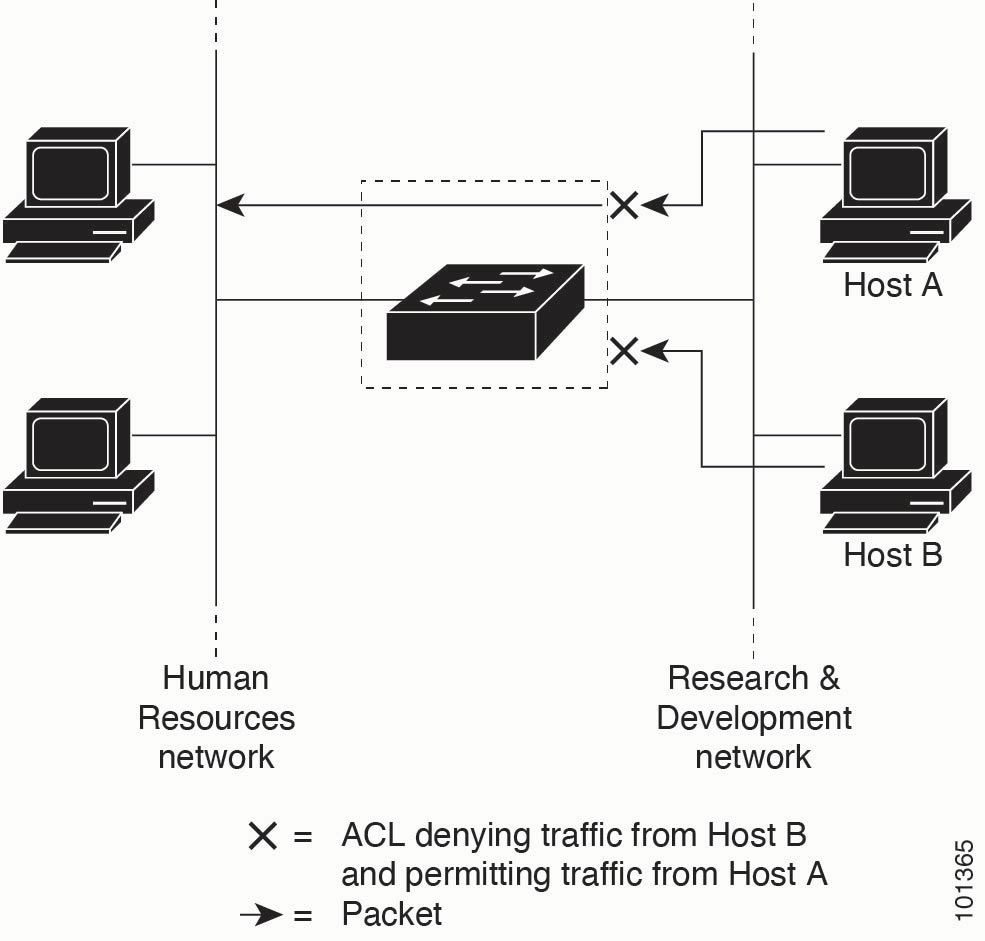
This is an example of using port ACLs to control access to a network when all workstations are in the same VLAN. When you apply ACLs at the Layer 2 input, they allow Host A to access the Human Resources network while preventing Host B from accessing it. Port ACLs can only be applied to Layer 2 interfaces in the inbound direction.
When you apply a port ACL to a trunk port, the ACL filters traffic on all VLANs present on the trunk port. When you apply a port ACL to a port with a voice VLAN, it filters traffic on both data and voice VLANs.
With port ACLs, you can filter IP traffic by using IP access lists and non-IP traffic by using MAC addresses. You can filter both IP and non-IP traffic on the same Layer 2 interface by applying both an IP access list and a MAC access list to the interface.
Note |
You can apply only one IP access list and one MAC access list to a Layer 2 interface. If an IP access list or MAC access list is already configured on a Layer 2 interface and you apply a new IP access list or MAC access list to the interface, the new ACL replaces the previously configured one. |
Router ACLs
A router ACL is a network security mechanism that
-
can be applied to Layer 3 interfaces (such as SVIs, physical interfaces, and EtherChannels)
-
filters traffic based on defined rules in specific directions (inbound or outbound), and
-
supports both standard and extended IP matching criteria.
You can apply one router ACL in each direction on an interface.
The switch supports these access lists for IPv4 traffic:
-
Standard IP access lists use source addresses for matching operations.
-
Extended IP access lists use source and destination addresses and optional protocol type information for matching operations.
As with port ACLs, the switch examines ACLs associated with features configured on each interface. When packets enter the switch on an interface, ACLs associated with all inbound features configured on that interface are examined. After routing, and prior to forwarding to the next hop, the switch examines all ACLs associated with outbound features configured on the egress interface.
ACLs permit or deny packet forwarding based on how the packet matches the entries in the ACL. They can be used to control access to a network or to part of a network.
ACEs and fragmented and unfragmented traffic
A fragmented or unfragmented packet is a type of network traffic that
-
may be divided into multiple fragments as it traverses a network
-
only includes Layer 4 information in the first fragment (such as TCP/UDP port, ICMP type/code), and
-
requires specific ACE matching behavior depending on the presence or absence of Layer 4 information in its fragments.
IP packets can be fragmented as they cross the network. The first fragment, which contains the beginning of the packet, includes Layer 4 information such as TCP or UDP port numbers, or ICMP type and code. All other fragments lack Layer 4 information.
Some access control entries (ACEs) do not check Layer 4 information, so they can be applied to all packet fragments. ACEs that test Layer 4 information cannot be applied to most fragments in a fragmented IP packet. If a fragment contains no Layer 4 information and the ACE tests Layer 4 information, matching rules are modified.
-
Permit ACEs that check Layer 3 information in the fragment, including protocol type such as TCP or UDP, match the fragment regardless of missing Layer 4 details.
Note
For TCP ACEs with Layer 4 options, fragmented packets are dropped in accordance with RFC 1858.
-
Deny ACEs that check Layer 4 information match a fragment only if the fragment contains Layer 4 information.
ACEs and fragmented and unfragmented traffic examples
Consider access list 102, configured with these commands, applied to three fragmented packets:
Device(config)# access-list 102 permit tcp any host 10.1.1.1 eq smtp
Device(config)# access-list 102 deny tcp any host 10.1.1.2 eq telnet
Device(config)# access-list 102 permit tcp any host 10.1.1.2
Device(config)# access-list 102 deny tcp any any
Note |
In the first and second ACEs, the eq keyword after the destination address checks if the TCP destination port matches the well-known port numbers for Simple Mail Transfer Protocol (SMTP) or Telnet. |
-
Packet A is a TCP packet from host 10.2.2.2, port 65000, sent to host 10.1.1.1 on the SMTP port. If the packet is fragmented, the first fragment matches the first ACE (a permit) because all Layer 4 information is included. The remaining fragments also match the first ACE, even if they do not include the SMTP port information, because the first ACE checks only Layer 3 information when applied to fragments. In this example, the fragment is a TCP packet sent to 10.1.1.1.
-
Packet B is sent from host 10.2.2.2, port 65001, to host 10.1.1.2 on the Telnet port. If the packet is fragmented, the first fragment matches the second ACE (a deny) because it includes all Layer 3 and Layer 4 information. The remaining fragments in the packet do not match the second ACE because they are missing Layer 4 information. Instead, they match the third ACE (a permit).
Because the first fragment was denied, host 10.1.1.2 cannot reassemble a complete packet. As a result, packet B cannot be reassembled on host 10.1.1.2. Permitted fragments still use network bandwidth and resources on host 10.1.1.2 during the attempted reassembly.
-
Packet C is sent from host 10.2.2.2, port 65001, to host 10.1.1.3 on the FTP port. This packet is fragmented. If this packet is fragmented, the first fragment matches the fourth ACE (a deny). All other fragments also match the fourth ACE because it does not check Layer 4 information. Layer 3 information in each fragment shows they are sent to host 10.1.1.3, while previous permit ACEs check different hosts.
Standard and extended IPv4 ACLs
An IPv4 access control list (ACL) is a packet-filtering feature that
-
sequentially compares packets against a set of permit or deny conditions
-
determines packet acceptance or rejection based on the first match, and
-
enforces traffic control policies on network interfaces.
The switch stops testing after the first match. The order of the conditions is critical. If no conditions match, the switch denies the packet.
The software supports two types of ACLs for IPv4:
-
Standard IP access lists use source addresses for matching operations.
-
Extended IP access lists use source and destination addresses for matching operations and can include protocol-type information for more granular control.
Note |
Only extended ACLs are supported; standard ACLs are not supported. |
IPv4 ACL switch unsupported features
The switch does not support the following ACL-related features:
-
Non-IP protocol ACLs or bridge-group ACLs.
-
IP accounting.
-
Inbound and outbound rate limiting (except with QoS ACLs).
-
Reflexive ACLs, URL redirect ACLs and dynamic ACLs are not supported. (except for some specialized dynamic ACLs used by the switch clustering feature).
-
ACL logging for port ACLs and VLAN maps.
Access list numbers
The ACL number determines the type of access list you create.
This lists the access-list number and corresponding access list type and shows whether or not they are supported in the switch. The switch supports IPv4 standard and extended access lists, numbers 1 to 199 and 1300 to 2699.
|
Access List Number |
Type |
Supported |
|---|---|---|
|
1–99 |
IP standard access list |
Yes |
|
100–199 |
IP extended access list |
Yes |
|
200–299 |
Protocol type-code access list |
No |
|
300–399 |
DECnet access list |
No |
|
400–499 |
XNS standard access list |
No |
|
500–599 |
XNS extended access list |
No |
|
600–699 |
AppleTalk access list |
No |
|
700–799 |
48-bit MAC address access list |
No |
|
800–899 |
IPX standard access list |
No |
|
900–999 |
IPX extended access list |
No |
|
1000–1099 |
IPX SAP access list |
No |
|
1100–1199 |
Extended 48-bit MAC address access list |
No |
|
1200–1299 |
IPX summary address access list |
No |
|
1300–1999 |
IP standard access list (expanded range) |
Yes |
|
2000–2699 |
IP extended access list (expanded range) |
Yes |
In addition to numbered standard and extended ACLs, you can create standard and extended named IP ACLs with the supported numbers. For example, you can name standard IP ACLs with numbers from 1 to 99, and extended IP ACLs with numbers from 100 to 199. With named ACLs, you can delete individual entries, but with numbered lists, you cannot.
Numbered standard IPv4 ACLs
When you create an ACL, an implicit deny statement is automatically present at the end. Any packet that does not match an earlier entry in the ACL is denied by this statement. For standard access lists, if you omit the mask in an IP host address ACL entry, the switch assumes a mask of 0.0.0.0.
-
The switch rewrites standard access lists to move host match entries and entries with a don’t care mask of 0.0.0.0 to the top of the list. Entries with non-zero don’t care masks are placed below them. As a result, the ACEs may appear in a different order in show command output and in the configuration file than the order in which you entered them.
-
After you create a numbered standard IPv4 ACL, you can apply it to VLANs, feature-id terminal lines (virtual teletype (VTY) lines), or interfaces.
Numbered extended IPv4 ACLs
A numbered extended IPv4 ACL is an access control mechanism that
-
matches IPv4 traffic using both source and destination addresses
-
optionally uses protocol type information for greater refinement, and
-
requires that Access Control Entries (ACEs) be appended to the list since reordering or selective removal is unsupported.
When you are creating ACEs in numbered extended access lists, remember that after you create the ACL, any additions are placed at the end of the list.
The switch does not support dynamic or reflexive access lists. It also does not support filtering based on the type of service (ToS) minimize-monetary-cost bit.
Some protocols also have specific parameters and keywords that apply to that protocol.
You can define an extended TCP, UDP, ICMP, IGMP, or other IP ACL. The switch also supports these IP protocols:
-
Authentication Header Protocol ( ahp )
-
Encapsulation Security Payload ( esp )
-
Enhanced Interior Gateway Routing Protocol ( eigrp )
-
generic routing encapsulation ( gre )
-
Internet Control Message Protocol ( icmp ) and Open Shortest Path First routing ( ospf )
-
Internet Group Management Protocol ( igmp ) and Payload Compression Protocol ( pcp )
-
any Interior Protocol ( ip ) and Protocol-Independent Multicast ( pim )
-
IP in IP tunneling ( ipinip ) and Transmission Control Protocol ( tcp )
-
KA9Q NOS-compatible IP over IP tunneling ( nos ) and User Datagram Protocol ( udp )
Named IPv4 ACLs
Consider these guidelines before configuring named ACLs:
-
Numbered ACLs are also available.
-
A standard ACL and an extended ACL cannot have the same name.
-
VLAN ACLs or VLAN maps are not supported.
-
You can use standard or extended ACLs whether named or numbered, in VLAN maps.
-
With IPv4 QoS ACLs, if you enter the class-map { match-all | match-any} class-map-name global configuration command, you can enter these match commands:
-
match access-group acl-name
Note
The ACL must be an extended named ACL.
-
match input-interface interface-id-list
-
match ip dscp dscp-list
-
match ip precedence ip-precedence-list
Note
You cannot enter the match access-group acl-index command.
-
ACL logging
ACL logging is a router logging feature that
-
generates informational messages about packets permitted or denied by a standard IP access control list (ACL)
-
records each message with details such as the action taken, the source IP address, and the access list number, and
-
supports logging only for router ACLs (RACLs), not for ACLs used with Unicast Reverse Path Forwarding (uRPF).
The controller software can provide logging messages about packets permitted or denied by a standard IP access list. The level of messages logged to the console is controlled by the logging console commands, which control the syslog messages.
Note |
Because routing is done in hardware and logging is done in software, if a large number of packets match a permit or deny ACE containing a log keyword, the software might not be able to match the hardware processing rate, and not all packets will be logged. |
The first packet that triggers the ACL generates a logging message immediately. Subsequent packets are collected over 5-minute intervals before they are logged. The logging message includes the access list number, an indication of whether the packet was permitted or denied, the source IP address, and the number of packets from that source permitted or denied during the prior 5-minute interval.
Note |
The logging facility might drop some message packets if there are too many to handle, or if more than one logging message must be processed in a second. This behavior prevents the router from crashing due to too many logging packets. Therefore, do not use the logging facility as a billing tool or as an accurate source for the number of matches to an access list. |
Hardware and software treatment of IP ACLs
The ACL scale for controllers is as follows:
-
Cisco Catalyst 9800-40 wireless controller, Cisco Catalyst 9800-L wireless controller, Cisco Catalyst 9800-CL wireless controller (small and medium) support 128 ACLs with 128 access list entries (ACEs).
-
Cisco Catalyst 9800-80 wireless controller and Cisco Catalyst 9800-CL wireless controller (large) support 256 ACLs and 256 ACEs.
-
FlexConnect and Fabric mode APs support 96 ACLs.
Note |
If an ACL configuration cannot be implemented in the hardware due to an out-of-resource condition on the controller, then only the traffic in that VLAN arriving on that controller is affected. Software forwarding of packets might adversely impact the performance of the switch or switch stack, depending on the number of CPU cycles that this consumes. |
For router ACLs, other factors can cause packets to be sent to the CPU:
-
Using the log keyword
-
Generating ICMP unreachable messages
When traffic flows are both logged and forwarded, forwarding is done by hardware, but logging must be done by software. Because of the difference in packet handling capacity between hardware and software, if the sum of all flows being logged (both permitted flows and denied flows) is of great enough bandwidth, not all of the packets that are forwarded can be logged.
If a router ACL configuration cannot be applied in hardware, packets that arrive in a VLAN and must be routed are processed in software. However, packets are bridged in hardware. If ACLs cause large numbers of packets to be sent to the CPU, the switch performance can be negatively affected.
When you enter the show ip access-lists privileged EXEC command, the match count displayed does not account for packets that are access controlled in hardware. Use the show access-lists hardware counters and show platform acl counters hardware privileged EXEC commands to obtain basic hardware ACL statistics for switched and routed packets.
Router ACLs operate in this way:
-
The hardware controls permit and deny actions of standard and extended ACLs (input and output) for security access control.
-
If log has not been specified, and if ip unreachables is disabled, the hardware drops flows that match a deny statement in a security ACL. The flows matching a permit statement are switched in hardware.
-
Adding the log keyword to an ACE in a router ACL causes a copy of the packet to be sent to the CPU for logging only. If the ACE is a permit statement, the packet is switched and routed in hardware.
IPv4 ACL interface considerations
When you apply the ip access-group interface configuration command to a Layer 3 interface (an SVI, a Layer 3 EtherChannel, or a routed port), the interface must have been configured with an IP address. Layer 3 access groups filter packets that are routed and packets that are received by Layer 3 processes on the CPU. They do not affect packets bridged within a VLAN.
-
For inbound ACLs, after receiving a packet, the controller checks the packet against the ACL. If the ACL permits the packet, the controller continues to process the packet. If the ACL rejects the packet, the controller discards the packet.
-
For outbound ACLs, after receiving and routing a packet to a controlled interface, the controller checks the packet against the ACL. If the ACL permits the packet, the controller sends the packet. If the ACL rejects the packet, the controller discards the packet.
If an undefined ACL has nothing listed in it, it is an empty access list.
By default, the input interface sends ICMP Unreachable messages whenever a packet is discarded, regardless of whether the packet was discarded because of an ACL on the input interface or because of an ACL on the output interface. ICMP Unreachables are normally limited to no more than one every half second per input interface. You can change this by using the ip icmp rate-limit unreachable global configuration command.
 Feedback