Non-Reference Designs

Configuration Limits and Scalability Constraints for Non-Reference Designs

The following tables specify the configuration limits and scalability constraints for the Unified CCE products. These configuration limits are part of the Unified CCE product design constraints and were used for system sizing characteristics as tested by Cisco. Most of these system parameters (or combinations of these system parameters) form contribution factors that affect system capacity.

These limits apply to Non-Reference Designs, only. Do not use these limits to size a Reference Design solution. If you are not using the standard three coresident PG layout of one Agent PG, one VRU PG, and one MR PG, your design is a Non-Reference Design. The higher configuration limits that are listed for Reference Designs do not apply without the standard PG layout.

When you design your contact center, ensure that your design is deployed within these limits. (See the comments in the following table for more information.) Consult Cisco if you have special configuration requirements that might exceed specific parameters.


Important


This information serves as a quick reference. Check the Virtualization for Unified Contact Center Enterprise at http://www.cisco.com/c/dam/en/us/td/docs/voice_ip_comm/uc_system/virtualization/virtualization-unified-contact-center-enterprise.html and the Contact Center Enterprise Compatibility Matrix at https://www.cisco.com/c/en/us/support/customer-collaboration/unified-contact-center-enterprise/products-device-support-tables-list.html for more information on system constraints.

The compatibility matrix specifies all supported configurations and versions for Cisco Unified Contact Center Enterprise Release 10.0 . The information in the compatibility matrix supersedes compatibility information in any other Cisco Unified Contact Center Enterprise documentation. If a configuration or version is not stated in the compatibility matrix, that configuration or version is not supported.


The check mark in the table indicates that a given parameter is applicable to the indicated Unified CCE product edition. See the notes at the end of this table.

Table 1. Configuration Limits and Scalability Constraints
Maximum Limit Limit Value Unified CCE Comments
<=450 agents (Unified CCE only) >450 - <=12,000 agents
Administrators (Users) 100 1000

Includes setup, config, and scripting users.

ECC (Extended Context Call) and User variables size (bytes) 2000 2000

The maximum that is indicated is independent from the number of ECC and user variables used, with each representing approximately 50-bytes extra storage per record. The maximum includes both persistent and nonpersistent variables.

Number of Peripheral Variables (Call Variables) 10 10
Peripheral Variable length (characters) 40 40 40 characters, excluding terminating NULL.
VRU PIMs on each VRU PG N/A 10

Each CVP supports up to 3000 ports and 15 CPS, and each VRU PG can support a maximum of 12000 ports.

Up to 10 VRU PIMs per VRU PG can be supported as long as the total ports on the VRU PG are less than 12000, and the total CPS across all the VRU PIMs is less than 60 CPS.

Maximum CPS per VRU PIM N/A 15 Maximum CPS per VRU PG is 60.
MR PIMs on each MR PG 1 2
UCM PIMs 1 12
Maximum Number of PGs for each CUCM Cluster 4 4
Duplex PGs on each ICM instance 1 150 For deployments with <= 450 agents and Cisco Outbound Option, there is another MR PG. See UCM limit above.
PIMs on each system (total) 4 150 One agent PIM, two VRU PIMs, and one MR PIM (applies to >= 450 agents only).
Configured agents on each system (total) N/A 65,000
Configured agents on each system (total) 3000 76,000
Configured agents on each peripheral 3000

12,000

Skill groups on each peripheral gateway 1500 4000 Configuration of precision queues creates a skill group per agent PG which counts toward the supported number of skill groups on each PG.
Skill groups on each system 1500 27,000 Configuration of precision queues creates a skill group per agent PG which counts toward the supported number of skill groups on each system.
Provisioning operations on each hour 30 120 For Configuration Manager, CCMP or AAS – maximum number of save operations across all ADSs in the solution in a 1-hour period. 200 changes per provisioning operation.

Maximum agents tracked in Agent State Trace

100

For more information on Agent State Trace, see the Configuration Guide for Cisco Contact Center Enterprise at http://www.cisco.com/c/en/us/support/customer-collaboration/unified-contact-center-enterprise/products-installation-and-configuration-guides-list.html

SIP dialer ports on each dialer N/A 1500 This limit assumes that the model is distributed, numbers vary based on deployment.
SIP dialers on each PG pair (Side A + Side B) N/A 1 Only one dialer type can be installed per PG.
SIP dialer Ports on each server (total) N/A 1500 In multi-instance deployment.
Dialer ports on each system (total) N/A 4000
Dialers on each system (total) N/A 32
Campaigns on each system N/A 600

Sizing is required. Smaller deployments cannot support the full 600 campaigns.

Campaigns skill groups on each system N/A 100 Total skill groups from all campaigns.
Campaign skill groups on each campaign N/A 20 Limitation on skill groups for any given campaign (as long as the maximum 100 campaign skill groups per system not exceeded).
Dialed numbers on each system 1500 240,000
Labels configured on each system 500

100,000 for up to 4000 agents

160,000 for up to 12,000 agents

Call type skill groups on each interval 1000 30,000 Total call type skill group records.
Configured call types 500 10,000 Total call types configured.
Active call types 250 8000
Precision Routing (PR) Attributes on each system N/A 10,000
PR Attributes for each Agent N/A 50
PR Precision Queues (PQ) on each system N/A 4000
PR PQ Steps on each system N/A 10,000
PR Terms for each PQ Step N/A 10
PR Steps for each PQ N/A 10
PR Unique attributes for each PQ N/A 10

Unique skill groups and PQs in a supervisor team

50

50


Note


Deployments close to the maximum number of configured agents on a system can show performance degradation and failed call routing, especially if contending capacity limitations also approach maximum thresholds. Expert assistance from partner or professional services is necessary for capacity-related system planning. Parameters that most impact performance with large numbers of configured agents includes total number of system peripherals, routes, number of active agents, and overall call load. The points at highest risk for degradation are busy hours and the half-hour update period, during which the PG sends report data to the Central Controller. System administrators can lessen the impact of these issues by purging unused configured agents, retiring inactive peripherals, and maintaining systems at current maintenance release levels.

Unified CCE Solution


Additional Sizing Factors

Many variables in the Unified CCE configuration and deployment options can affect the server requirements and capacities. This section describes the major sizing variables and how they affect the capacity of the various Unified CCE components.

Busy Hour Call Attempts (BHCA)

The number of calls attempted during a busy hour is an important metric. As BHCA increases, there is an increase in the load on all Unified CCE components, most notably on Unified CM, Unified IP IVR, and the Unified CM PG. The capacity numbers for agents assume up to 30 calls per hour per agent. If a deployment requires more than 30 calls per hour per agent, it decreases the maximum number of supported agents for the agent PG. Handle such occurrences on a case-by-case basis.

Agents

The number of agents is another important metric that impacts the performance of most Unified CCE server components, including Unified CM clusters.

Average Skill Groups or Precision Queues Per Agent

The number of skill groups or precision queues per agent (which is independent of the total number of skills per system) significantly affects the following:

  • Finesse servers

  • Agent PG

  • Call Router

  • Logger

Limit the number of skill groups and precision queues per agent to 5 or fewer, when possible. Periodically remove unused skill groups or precision queues so that they do not affect the system's performance.

The Finesse server does not display statistics for unused skill groups. Therefore, the number of skill groups that are assigned to agents affects the performance of the Finesse server more than the total number of skill groups configured.

Queue (skill group) statistics are updated on the Finesse Desktop at 10-second intervals. The Finesse Desktop also supports a fixed number of queue statistics fields. These fields cannot be changed.

The first table shows examples of the number of skill groups or precision queues (PQ) per agent affecting the capacity of the Unified CCE system. The Finesse server supports the same number of agents and skill groups.

Unified CCE supports a maximum of 50 unique skill groups across all agents on a supervisor’s team, including the supervisor’s own skill groups. If this number is exceeded, all skill groups monitored by the supervisor still appear on the supervisor desktop. However, exceeding this number can cause performance issues and is not supported.


Note


Each precision queue that you configure creates a skill group per Agent PG and counts toward the supported number of skill groups per PG. The skill groups are created in the same Media Routing Domain as the precision queue.


The numbers in this table are subject to specific hardware and software requirements.

Table 2. Sizing Effects of Skill Groups or Precision Queues for Each Agent (12,000 Agents)
Avg Configured PQ or SG for each Agent System Generic PG Limits
Max Concurrent Agent for each System Max Concurrent Agent for each PG Max Configured PQ or SG for each PG Max Configured VRU Ports for each PG Max Configured VRU PIMs for each PG
5 12000 2000 4000 1000 4
10 11038 1832 4000 1000 4
15 10078 1663 4000 1000 4
20 9116 1495 4000 1000 4
25 8156 1326 4000 1000 4
30 7194 1158 4000 1000 4
35 6234 989 4000 1000 4
40 5272 820 4000 1000 4
45 4312 652 4000 1000 4
50 3350 484 4000 1000 4

Note


CTI OS monitor mode applications are supported only at 20 or lower skill groups per agent.


Supervisors and Teams

The number of supervisors and team members can also be a factor impacting the CTI OS Server performance. Distribute your agents and supervisors across multiple teams and have each supervisor monitor only a few agents.


Note


Supervisors can monitor only agents within their own team, and all of the agents must be configured on the same peripheral.


Note


You can add a maximum of 50 agents per team. You can add a maximum of ten supervisors per team.


A Unified CCE system can support a maximum of 50 agents per supervisor with the assumptions below. If a particular environment requires more than 50 agents per supervisor, then use the following formula to ensure that there is no impact to the CTI OS Server and Supervisor desktop. The most important factor in this calculation is the number of updates per second.

X = (Y * (N + 1) / R) + ((Z * N * A) / 3600), rounded up to the next integer

Where:

X = Number of updates per second received by the CTI OS Supervisor desktop.

Y = Weighted Average of Number of Skill Groups or Precision Queues per Agents. For example, if total of 10 agents have the following skill group distribution: 9 have 1 skill group and 1 agent has 12 Skill Groups. The number of skills per agent ('Y') is, Y = 90% * 1 + 10% * 12 = 2.1.
       (The number of configured statistics in the CTI OS server is 17.)

Z = Calls per hour per agent.

A = Number of agent states. (Varies based on call flow; average = 10.)

N = Number of agents per supervisor.

R = The skill group or precision queue refresh rate configured on the CTI OS Server. (Default = 10 seconds.)

(Y * (N + 1) / R) = Number of updates per second, based on skill groups.

(Z * N * A) / 3600 = Number of updates per second, based on calls.

The CTI OS Supervisor desktop is not impacted as long as there are fewer than 31 updates per second. This threshold value is derived by using the above formula to calculate the update rate for 50 agents per supervisor (N = 50), as follows:

X = (5 * (50 + 1) / 10) + ((30 * 50 * 10) / 3600) = 25.5 + 5 = 31 updates per second

The maximum number of agents per supervisor must not exceed 200 for any given configuration, still holding updates per second to a maximum of 31 with the above formula.

CTI OS Skill Group Statistics Refresh Rate

The skill group statistics refresh rate can also affect the performance of CTI OS Server. Cisco requires that you do not lower the refresh rate below the default value of 10 seconds.

Call Types

The call type is also an important metric that affects the performance of most Unified CCE server components. An increase in the number of transfers and conferences increase the load on the system which decreases the total capacity.

Queuing

The Unified IP IVR and Unified Customer Voice Portal (CVP) place calls in a queue and play announcements until an agent answers the call. For sizing purposes, it is important to know whether:

  • The VRU will handle all calls initially (call treatment), and direct the callers to agents after a short queuing period.

  • The agents will handle calls immediately, and the VRU queues only unanswered calls when all agents are busy.

The answer to this question determines very different VRU sizing requirements and affects the performance of the Call Router/Logger and Voice Response Unit (VRU) PG.

Translation Route Pool

Sizing the translation route pool depends on the expected call arrival rate. Use the following formula to size the translation route pool:

Translation route pool = 20 * (Calls per second)

This calculation is specific to Unified CCE .

UCCE Script Complexity

As the complexity and/or number of UCCE scripts increase, the processor and memory overhead on the Call Router and VRU PG increases significantly. The delay time between replaying RunExternalScript also has an impact.

Reporting

Real-time reporting can have a significant effect on Logger and Rogger processing due to database access. A separate VM is required for an Administration & Data Server to off-load reporting overhead from the Logger and Rogger.

VRU Script Complexity

As VRU script complexity increases with features such as database queries, the load placed on the IP IVR Server and the Router also increases. There is no good rule or benchmark to characterize the Unified IP IVR performance when used for complex scripting, complex database queries, or transaction-based usage. Test complex VRU configurations in a lab or pilot deployment to determine the response time of database queries under various BHCA and how they affect the processor and memory for the VRU server, PG, and Router.

Third-Party Database and Cisco Resource Manager Connectivity

Carefully examine connectivity of any Unified CCE solution component to an external device and/or software to determine the overall effect on the solution. Cisco Unified CCE solutions are flexible and customizable, but they can also be complex. Contact centers are often mission-critical, revenue-generating, and customer-facing operations. Therefore, engage a Cisco Partner (or Cisco Advanced Services) with the appropriate experience and certifications to help you design your Unified CCE solution.

Expanded Call Context (ECC)

The ECC usage impacts PG, Router, Logger, and network bandwidth. There are many ways that ECC can be configured and used. The capacity impact varies based on ECC configuration, handled on a case-by-case basis.
Non-Reference Design Core Components and Implementations

Using MGCP Gateways

Cisco Unified CVP requires the deployment of a SIP Gateway. However, you require the use of MGCP 0.1 voice gateways with Unified CM deployments for purposes of overlap sending, NSF, and Q.SIG support. The following design considerations apply to deploying Cisco Unified CVP in this environment:

  • Design and plan a phased migration of each MGCP voice gateway to SIP.

  • Implement both MGCP 0.1 and SIP.

    Because of the way MGCP works, a PSTN interface using MGCP can be used for MGCP only. If you want to use MGCP for regular Unified CM calls and SIP for Unified CVP calls, you need two PSTN circuits.

  • Deploy a second SIP voice gateway at each Unified CVP location.

  • Send calls through the Unified CM to Unified CVP.

When sending calls through Unified CM to Unified CVP, the following guidelines apply:

  • The Unified CVP survivability.tcl script cannot be used in this solution. If the remote site is disconnected from the central site, the call is dropped.

  • There is an additional hit on the performance of Unified CM. This is because, in a usual Unified CVP deployment, Unified CM resources are not used until the call is sent to the agent. In this model, Unified CM resources are used for all calls to Unified CVP, even if they terminate in self-service. This is in addition to the calls that are extended to agents. If all calls are eventually extended to an agent, the performance impact on Unified CM is approximately double that of a usual Unified CVP deployment. This factor alone typically limits this scenario to small call centers only.

  • In order to queue calls at the edge, use the sigdigits feature in Unified CVP to ensure that the calls are queued at the appropriate site or Voice Browser.


Note


The Cisco Unified CVP provides the flexibility to add, modify, remove, or deploy Unified CVP in many scenarios to facilitate interoperability with third-party devices. Not all SIP service providers support advanced features such as REFER, 302 Redirect Messages, DTMF-based take-back-and-transfer, or data transport (UUI, GTD, NSS, and so forth). Refer to the interoperability note available at the following location for information on the interoperability support for SBC when deployed in place of Cisco CUBE, http://www.cisco.com/en/US/solutions/ns340/ns414/ns728/voice_portal.html

Network VRU Types

This section discusses the Network VRU types for Unified ICM, and how Unified ICM relates to Unified CVP deployments. It includes the following topics:

  • Unified ICM Network VRUs
  • Unified CVP Type 10 VRU
  • Unified CVP Type 7 VRU (Correlation ID Mechanism)
  • Unified CVP Type 8 VRU (Translation Route ID Mechanism)

Note


The terms voice response unit (VRU) and interactive voice response (IVR) are used interchangeably throughout this document.

Unified CVP Type 10 VRU

Unified CVP Type 10 VRU simplifies the configuration requirements in Unified CVP Comprehensive Model deployments. Use the Type 10 VRU for new installations except for the VRU-only deployments. In deployments that need to use ICM Customers, you cannot initiate a two-step transfer from the Unified CVP VRU switch leg to a completely separate Unified CVP (for example, a two-step CVP-to-CVP transfer using SendToVRU). You are require to use a translation route for these two-step transfers to work.

Type 10 Network VRU operates as follows:

  • Transferred routing client responsibilities are handed off to the Unified CVP switch leg.

  • An automatic transfer to the Unified CVP VRU leg occurs resulting in a second transfer when calls are originated by the VRU, ACD, or Cisco Unified Communications Manager (Unified CM).

  • For calls originated by Unified CM, the Correlation ID transfer mechanism is used. The Correlation ID is automatically added to the end of the transfer label defined in the Type 10 Network VRU configuration.

  • The final transfer to the Unified CVP VRU leg is similar to a Type 7 transfer, which includes a RELEASE message to be sent to the VRU prior to any transfer.

You need to define a single Type 10 Network VRU in Unified CVP implementations without the ICM Customers feature (that is, in Unified CVP implementations with a single Network VRU), and associate all Unified ICM VRU scripts. One label for the Unified CVP Switch leg routing client, transfers the call to the Unified CVP VRU leg. If calls are transferred to Unified CVP from Unified CM, another label for the Unified CM routing client, and this label should be different from the label used for the CVP Routing Client. This label transfers the call to the Unified CVP Switch leg. The Unified ICM Router sends this label to Unified CM with a Correlation ID concatenated to it. You must configure Unified CM to handle these arbitrary extra digits.

Configure the Unified CVP Switch leg peripheral to point to the same Type 10 Network VRU. Also, associate all incoming dialed numbers for calls that are to be transferred to Unified CVP with a Customer Instance that points to the same Type 10 Network VRU.

For calls that originate at a Call Routing Interface VRU, a TranslationRouteToVRU node is required to transfer the call to a Unified CVP’s Switch leg peripheral. For all other calls, use either a SendToVRU node, a node that contains automatic SendToVRU function (such as the queuing nodes), or a RunExternalScript.


Note


Type 5 and Type 2 VRU types are not supported. Instead of these VRU types, use Type 10 VRU.
Correlation ID

Configure the appropriate route patterns for the Translation Route DNIS or VRU Label with Correlation ID appended. You use the Correlation ID method with Type 10 VRUs. Configure the route pattern in Unified CM to allow appending extra digits, such as an exclamation point (!), to the end of the pattern.

Unified CVP Type 7 VRU (Correlation ID Function)

When the VRU functions as an IVR with the Correlation ID function, Unified ICM uses Type 3 and Type 7 to designate suboperations of the VRU with the Peripheral Gateway in the Correlation ID scheme. Both Type 3 and Type 7 VRUs can be reached with the Correlation ID function, and a Peripheral Gateway is needed to control the VRU. However, the difference between these two types is in how they release the VRU leg and how they connect the call to the final destination.

In Type 3, the switch that delivers the call to the VRU can take the call from the VRU and connect it to a destination (or agent).

In Type 7, the switch cannot take the call away from the VRU. When the IVR treatment is complete, Unified ICM must disconnect or release the VRU leg before the final connect message can be sent to the Switch leg to instruct the switch to connect the call to the destination.

When used as an Intelligent Peripheral IVR, Unified CVP supports only Type 7 because it gets a positive indication from Unified ICM when its VRU leg is no longer needed (as opposed to waiting for the Voice Browser to inform it that the call has been pulled away). Type 3 is deprecated.

A call has two legs: the Switch leg and the VRU leg. Different Unified CVP hardware can be used for each leg. A service node along with a Unified CVP for VRU leg with Peripheral Gateway acting as VRU Type 7 can be used to complete the IVR application (for example, self service and queuing).


Note


Use Type 10 VRU for all new implementations of Unified CVP using Unified ICM 7.1 or greater, except as VRU Only.

For configuration examples of the Unified CVP application with VRU Type 7, see the Configuration Guide for Cisco Unified Customer Voice Portalat http://www.cisco.com/en/US/products/sw/custcosw/ps1006/products_installation_and_configuration_guides_list.html.

Unified CVP Type 8 VRU (Translation Route ID Function)

When the VRU functions as an IVR with the Translation Route ID function, Unified ICM uses Type 8 or Type 10 to designate suboperations of the VRU through the Peripheral Gateway in the translation route scheme. Both Type 8 and Type 10 VRUs can be reached through the Translation Route ID mechanism, and Peripheral Gateway is needed to control the VRU. However, they differ in how they connect the call to the final destination.

In Type 8, the switch that delivers the call to the VRU can take the call from the VRU and connect it to a destination or agent.

When the switch cannot take the call away from the VRU to deliver it to an agent, use Type 10. In that case, when the IVR treatment is complete, Unified ICM sends the final connect message to the VRU (rather than to the original switch) to connect the call to the destination. The VRU assumes control of the switching responsibilities when it receives the call. This process is known as handoff.

Similar to the Correlation ID, there are two legs of the call: the Switch leg and the VRU leg. Use Unified CVP for either the Switch leg or the VRU leg. For example, when Network Interface Controller (NIC), Contact Director, or CICM is taken, configure Unified CVP as Type 8 or Type 10 in the VRU leg.


Note


Use Type 10 VRU for new implementations of Unified CVP using Unified ICM 7.1 or greater, except as VRU Only.

For configuration examples of the Unified CVP application with VRU Type 8 or Type 10, see Configuration Guide for Cisco Unified Customer Voice Portal at http://www.cisco.com/en/US/products/sw/custcosw/ps1006/products_installation_and_configuration_guides_list.html.

Network VRU Types and Unified CVP Deployment

In Unified ICM , a Network VRU is a configuration database entity that you can access using Network VRU Explorer. A Network VRU entry contains the following information:

  • Type—A number from 7, 8, and 10, which corresponds to one of the VRU types.

  • Labels—A list of labels that you use in Unified ICM to transfer a call to the particular Network VRU. These labels are relevant only for Network VRUs of Type 7 or 10 (that is, those VRU types that use the Correlation ID Mechanism to transfer calls). Each label consists of two parts:

    • A digit string, which becomes a Dialed Number Identification Service (DNIS). A SIP Proxy Server or a static route table (when SIP is used), or gateway dial peers understand DNIS.

    • A routing client, or switch leg peripheral. Each peripheral device that acts as a Switch leg must have its label, although the digit strings are the same in all cases.

Network VRU configuration entries have no value until they are associated with active calls. Unified ICM association is made at the following locations:

  • In the Advanced tab for a given peripheral in the PG Explorer tool

  • In the Customer Instance configuration in the Unified ICM Instance Explorer tool

  • In every VRU Script configuration in the VRU Script List tool

Depending on the protocol-level call flow, the currently used Unified ICM Enterprise looks at either the peripheral or the Customer Instance to determine how to transfer a call to a VRU. The Unified ICM Enterprise examines the Network VRU associated with the Switch leg peripheral when the call first arrives on a Switch leg, and examines the Network VRU that is associated with the VRU leg peripheral when the call is being transferred to the VRU using the Translation Route Mechanism. The Unified ICM Enterprise examines the Network VRU that is associated with the Customer Instance when the call is being transferred to the VRU using the Correlation ID Mechanism.

Unified ICM Enterprise also checks the Network VRU that is associated with the VRU Script every time it encounters a RunExternalScript node in its routing script. If Unified ICM determines that the call is currently not connected to the designated Network VRU, the VRU Script is not run.

Unified ICM Enterprise Release 7.1 introduced Network VRU Type 10, which simplifies the configuration of Network VRUs for Unified CVP. For most call flow models, a single Type 10 Network VRU replaces the place of the Type 2, 3, 7, or 8 Network VRUs that are associated with the Customer Instance and the switch, and VRU leg peripherals. VRU Only (Model #4a) still requires Type 7 or 8.


Note


For existing deployments, the previously suggested VRU types work in the similar way, new installations are required to use Type 10. Existing deployments should switch to Type 10 on upgrade.

Standalone Self-Service

Standalone Self-Service usually does not communicate with Unified ICM VRU scripts, so a Network VRU setting is not required. Standalone Self-Service with Unified ICM Label Lookup does not use the VRU scripts in Unified ICM. It issues a Route Request to the VRU Peripheral Gateway (PG) Routing Client, which does not require this Network VRU.

Standalone Self-Service Deployments ASR-TTS

If the ASR/TTS MRCP server fails, the following conditions apply to the call disposition:

  • Calls in progress in standalone deployments are disconnected. Calls in progress in ICM-integrated deployments can be recovered using scripting techniques to work around the error. For example, retry the request, transfer to an agent or label, switch to the prerecorded prompts and DTMF-only input for the rest of the call, an error will occur with an END script node, to invoke survivability on the originating gateway.


    Note


    Cisco VVB has a built-in load-balancing mechanism that uses a round-robin technique. If the present ASR/TTS MRCP server fails, then the next request for MRCP resource will get to the next server in the server group.

    In a call, if the selected ASR/TTS MRCP server responds with a failure to the setup request, then the VVB retries only once to set up with another server. If the VXML application has defined a preferred server for ASR dialog or TTS, then retry is not attempted.

    For configuration steps, see the section "Configure Speech Server" in CVP Configuration Guide.


  • New calls in ICM-integrated deployments are directed transparently to an alternate ASR/TTS Server if a backup ASR/TTS Server is configured on the gateway.

Call Director

Unified CCE and Unified CVP are responsible for call switching only. It does not provide queuing or self-service, so there is no VRU leg. A Network VRU setting is not required.

VRU-Only

In VRU-Only, the call arrives at Unified ICM through an ICM-NIC interface. Initially, Unified CVP is not responsible for the Switch leg; its only purpose is as a VRU. However, depending on the type of NIC used, it may be required to take over the Switch leg after it receives the call.

The following sections descibe the VRU-Only types.

VRU-Only with NIC Controlled Routing

Note


VRU-Only with NIC Controlled Routing has the following assumptions:
  • A fully functional NIC can deliver the call temporarily to a Network VRU (that is, to Unified CVP's VRU leg) and then retrieve the call and deliver it to an agent when that agent is available.

  • If the agent is capable of requesting that the call is retransferred to another agent or back into queue or self-service, the NIC can retrieve the call from the agent and redelivering it as requested.


There are two variants of VRU-Only with NIC Controlled Routing, depending on whether the Correlation ID or the Translation Route function is used to transfer calls to the VRU. Most NICs (most PSTN networks) cannot transfer a call to a particular destination directory number and carry an arbitrary Correlation ID along with it. The destination device can pass back to Unified ICM to make the Correlation ID transfer mechanism function properly. For most NICs, you must use the Translation Route function.

However, a few exceptions to this rule exist, in which case the Correlation ID function can be used. The NICs transmits a Correlation ID include Call Routing Service Protocol (CRSP), and Telecom Italia Mobile (TIM). However, because this capability also depends on the PSTN devices that connect behind the NIC, check with your PSTN carrier to determine whether the Correlation ID can be passed through to the destination.

If the NIC is capable of sending the Correlation ID, the incoming dialed numbers must all be associated with a Customer Instance that is associated with a Type 7 Network VRU. The Type 7 Network VRU must contain labels that are associated to the NIC routing client, and all the VRU Scripts must also be associated with that same Type 7 Network VRU. The peripherals do not need to be associated with any Network VRU. We recommend that to run the Unified ICM routing script SendToVRU node prior to the first RunExternalScript node.

If the NIC cannot send a Correlation ID, the incoming dialed numbers must all be associated with a Customer Instance that is not associated with any Network VRU. However, the Unified CVP peripherals must be associated with a Network VRU of Type 8, and all the VRU Scripts must also be associated with that same Type 8 Network VRU. In this case, it is necessary to insert a TranslationRouteToVRU node in the routing script prior to the first RunExternalScript node. If the call is going to the VRU leg because it is being queued, generally the TranslationRouteToVRU node appears after the Queue node. In that way, you can avoid an unnecessary delivery and removal from Unified CVP when the requested agent is already available.

VRU-Only with NIC Controlled Prerouting

Note


VRU-Only with NIC Controlled Prerouting assumes a less capable NIC that can deliver the call only once, either to a VRU or to an agent. After the call is delivered to retrieve a call and then it is redelivered somewhere else, Unified CVP takes control of the switching responsibilities for the call. Unified ICM considers this process as a handoff.

Calls that fit VRU-Only with NIC Controlled Prerouting must use the Translation Route function to transfer calls to the VRU. A handoff cannot be implemented using the Correlation ID function.

To implement VRU-Only with NIC Controlled Prerouting with Unified ICM 7.1 and later, the incoming dialed numbers must all be associated with a Customer Instance that is associated with a Type 10 Network VRU. The VRU labels are associated with the Unified CVP routing client, not the NIC. The Unified CVP peripherals and VRU Scripts must be associated with the Type 10 Network VRU. You need to insert a TranslationRouteToVRU node in the routing script, followed by a SendToVRU node, before the first RunExternalScript node. If the call is going to the VRU leg because it is being queued, these two nodes should appear after the Queue node. An unnecessary delivery and removal from Unified CVP can be avoided if the requested agent is already available.


Note


Two different VRU transfer nodes are required. The first node transfers the call away from the NIC with a handoff, and it establishes Unified CVP as a Switch leg device for this call. Physically the call is delivered to an Ingress Gateway. The second transfer delivers the call to the Voice Browser and also establishes Unified CVP as the call's VRU device.

Unified CM, ACD Call Deployments, and Sizing Implications

The information in this section applies to ACDs and Cisco Unified Communications Manager (Unified CM) integrations that use Unified CVP instead of Cisco IP IVR for queuing. If Unified CVP is considered, these devices share the following characteristics:

  • Manage agents and can be destinations for transfers.

  • Can issue Route Requests and be Switch leg devices.

  • Although they can be Switch leg devices, they cannot handle more than one transfer and they might not be able to handle the Correlation ID.

  • Manage agents and transfer calls to the destination.

  • Route requests and be switch leg devices. However, the device cannot handle Correlation ID and more than one transfer.

A Unified CM or ACD user issues a Route Request for one of the following reasons:

  • Connect to another agent in a particular skill group

  • Reach a self-service application

  • Blind-transfer a previously received call to one of the above entities

A Unified CM user might also issue a Route Request for one of the following reasons:

  • Deliver a successful outbound call from the Unified ICM Outbound dialer to a self-service application based on Unified CVP

  • Warm-transfer a call that the user had previously received to either a particular skill group or a self-service application

Each of the above calls invokes an Unified ICM routing script. The script searches for an available destination agent or service and if an appropriate destination is found, it sends the corresponding label either back to the ACD or, if blind-transferring an existing call, to the original caller's Switch leg device. If it needs to queue the call or if the ultimate destination is intended to be a self-service application rather than an agent or service, the script sends a VRU translation route label either back to the ACD or, if transferring an existing call through blind-transfer, to the original caller's Switch leg device.

If the above sequence results in transferring the call to Unified CVP's VRU leg device, a second transfer is done to deliver it to a Voice Browser. To ensure that these events take place, the following Unified ICM configuration elements are required:

  • For new calls from the ACD or warm transfers of existing calls:

    • Configure the Unified CVP peripheral to be associated with a Type 10 Network VRU.

    • Associate the dialed number that the ACD dialed with a Customer Instance that is associated with a Type 10 Network VRU.

    • When an ACD is not configured Unified CM, the routing script that is invoked by the ACD dialed number must contain a TranslationRouteToVRU node to get the call to Unified CVP's Switch leg, followed by a SendToVRU node to get the call to the Voice Browser and Unified CVP's VRU leg.

    • The routing script that is invoked by Unified CM should use a SendToVRU node to send the call to Unified CVP using the Correlation ID. The Type10 VRU performs an automatic second transfer to the Voice Browser VRU leg.

    • Associate all the VRU scripts that are run by that routing script with the Type 10 Network VRU.

  • For blind transfers of existing calls:

    • The Unified CVP peripheral can be associated with any Network VRU.

    • The dialed number that the ACD dialed must be associated with a Customer Instance that is associated with a Type 10 Network VRU.

    • The routing script that is invoked by the ACD dialed number must contain a SendToVRU node to send the call to the Voice Browser and Unified CVP's VRU leg.

    • All the VRU scripts that are run by that routing script must be associated with the Type 10 Network VRU.

When Unified ICM chooses an agent or ACD destination label for a call, it tries to find one that lists a routing client that can accept that label. For calls originated by an ACD or Unified CM that are not blind transfers of existing calls, the only routing client is the ACD or Unified CM, after the call is transferred to Unified CVP, because of the handoff operation, the only routing client is the Unified CVP Switch leg. However, in the case of blind transfers of existing calls, two routing clients are possible:

  • The Call Server switch leg that delivered the original call.

  • The ACD or Unified CM. For calls that originate through Unified CVP, you can prioritize Unified CVP labels above ACD or Unified CM labels by checking the Network Transfer Preferred check box in the Unified ICM Setup screen for the Unified CVP peripheral.

In addition to the CTI Agent Desktop, the system recognizes a configured routing Dialed Number to intercept the transfer and run the Unified CCE routing script without sending the transfer commands to Unified CM through JTAPI.

Third-Party VRU

A third-party TDM VRU can be used in any of the following ways:

  • As the initial routing client (using the GED-125 Call Routing Interface)

  • As a VRU (using the GED-125 Call Routing Interface)

  • As a Service Control VRU (using the GED-125 Service Control Interface)

In the first and second operations, the VRU works as an ACD. Similar to ACD, the VRU can be a destination for calls that arrive from another source. Calls can even be translation-routed to such devices to carry call context information. (This operation is known as a traditional translation route, not a TranslationRouteToVRU). Also like an ACD, the VRU can issue its own Route Requests and invoke routing scripts to transfer the call to subsequent destinations or even to Unified CVP for self-service operations. These transfers almost always use the Translation Route transfer function.

In the third operation, the VRU replaces either Unified CVP's Switch leg or Unified CVP VRU leg, or it can also replace Unified CVP.

Release Trunk Transfer

Release Trunk Transfer releases the ingress trunk and removes Unified CVP and the gateway from the call control loop. These transfers have the following characteristics:

  • They can be invoked by VXML Server (Standalone Call Flow Model).

  • They cause the switch leg to terminate resulting in a Telephony Call Dispatcher (TCD) record being written to the database for the call even though the caller is still potentially talking to an agent. This behavior differs from other types of transfers in which the TCD record is not finalized until the caller ends the call.

  • As the ingress trunk is released, you do not have to size gateways to include calls that have been transferred using Release Trunk Transfer. This behavior differs from other types of transfers in which gateway resources continue to be occupied until the caller ends the call.

  • Because Unified CVP is no longer monitoring the call, you do not have to size Call Servers to include calls that have been transferred using Release Trunk Transfer. Additionally, Unified CVP Call Director port licenses are not required.

The signaling methods to trigger a release trunk transfer are:

  • Takeback-and-Transfer

  • Hookflash and Wink

  • Two B Channel Transfer

Takeback-and-Transfer

Takeback-and-Transfer (TNT), also known as Transfer Connect, is a transfer method where dual tone multifrequency (DTMF) tones are outpulsed to the PSTN by Unified CVP. TNT outpulses DTMF tones to the PSTN. A typical DTMF sequence is *8xxxx, where xxxx represents a new routing label for the PSTN. Upon detection of a TNT DTMF sequence, the PSTN drops the call leg to the Ingress Gateway port, and then reroutes the caller to a new PSTN location, such as a TDM ACD location. This method is offered by a few PSTN service providers.

Customers can use TNT, if they have an existing ACD site but no IVR and want to use Unified CVP as an IVR. Over time, customers may need to transition agents from the TDM ACD to Unified CCE and use Unified CVP as an IVR, queueing point, and transfer pivot point. Using Unified CVP as more than just an IVR eliminates the need for TNT services.

Two B Channel Transfer

Two B Channel Transfer (TBCT) is an Integrated Services Digital Network (ISDN)-based release trunk signaling function that is offered by some public switched telephone network (PSTN) service providers. When a TBCT is invoked, the Ingress Gateway places the initial inbound call on hold briefly while a second call leg (ISDN B Channel) is used to call the termination point. When the termination point answers the call, the gateway sends ISDN signaling to the PSTN switch to request to complete the transfer, bridge the call through the PSTN switch, and remove the call from the Ingress Gateway. As with a TNT transfer, the termination point might be a TDM PBX or ACD connected to the PSTN.

This process may be necessary for a customer with an existing ACD site but no IVR, who wants to use Unified CVP initially as just an IVR. Over time, the customer might want to transition agents from the TDM ACD to Cisco Unified CCE and use Unified CVP as an IVR, queueing point, and transfer pivot point (which eliminates the need for TBCT services and using Unified CVP to perform reroute on transfer failure).

VXML Transfer

VXML call control is supported only in Standalone deployments in which call control is provided by the VXML Server.

The VXML Server supports the following types of transfers:

Table 3. Types of VXML Transfers
Release Trunk Transfer VXML Blind Transfer VXML Bridged Transfer

Incoming call is released from the Ingress Voice Gateway.

Call is bridged to an Egress Voice Gateway or a VoIP endpoint. However, the VXML Server releases all subsequent call control.

Call is bridged to an Egress Voice Gateway or a VoIP endpoint. However, the VXML Server retains call control so that it can return a caller to an IVR application or transfer the caller to another termination point.

Invoked using the subdialog_return element.

VXML Server can invoke a TNT transfer, Two B Channel transfer, HookFlash/Wink transfers, and SIP Refer Transfers. The TDM Release Trunk Transfers (TNT, TBCT and Hookflash/Wink) is not supported in Cisco VVB.

Invoked using the Transfer element in Cisco Unified Call Studio. These transfers transfer the call to any dial peer that is configured in the gateway.

Bridged transfers do not terminate the script. The VXML Server waits until either the ingress or the destination call ends. The script ends only if the ingress call leg disconnects. If the destination call leg disconnects first, the script recovers control and continues with additional self-service activity. Note that the VXML Server port license remains in use for the duration of a bridged transfer, even though the script is not actually performing any processing.

VXML blind transfers differ from VXML bridged transfers in the following ways:

  • VXML blind transfers do not support call progress supervision; bridged transfers support it. This means that if a blind transfer fails, the VXML Server script does not recover control and cannot attempt a different destination or take remedial action.

  • VXML blind transfers cause the VXML Server script to end. Always connect the "done exit" branch from a blind transfer node to a subdialog_return and a disconnect node.


Note


Cisco VVB supports Blind Transfer only under VXML Transfer.


Non-Reference Call Flows

Unified CVP offers several call flows to support different needs. The appropriate deployment for your contact center depends on the call flow, geographic distribution, and server configurations that best meet your needs. The Comprehensive call flow is the only one that you can use in a Reference Design. You can use the following alternate call flows in a Non-Reference Design:

  • Unified CVP VXML Server (standalone)—Provides a standalone VRU with no integration to Unified CCE for queuing control or subsequent call control. Used to deploy self-service VXML applications.

  • Call Director—Provides IP switching services only. Use this call flow if you want to:

    • Only use Unified CVP to provide Unified CCE with VoIP call switching.

    • Prompt and collect data using third-party VRUs and ACDs.

    • Avoid using the Unified CVP VXML Server.

  • VRU Only—Provides VRU services, queuing treatment, and switching for PSTN endpoints. This model relies on the PSTN to transfer calls between call termination endpoints. Use this call flow if you want to:

    • Use Unified CVP to provide Unified CCE with VRU services, including integrated self-service applications and initial prompt and collect.

    • Avoid using Unified CVP for switching calls.

    • Use an optional Unified CVP VXML Server.

    • Prompt or collect data using optional ASR and TTS services.

Standalone Self-Service

Standalone Self-Service is implemented when a Unified CM user dials a directory number that connects to a Cisco VVB and invokes a Unified CVP VXML Server application. The Cisco VVB is configured in Unified CM as a SIP trunk. The call flow is as follows:

  1. A caller dials a route pattern.

  2. Unified CM directs the call to the Cisco VVB.

  3. The Cisco VVB invokes a voice browser session based on the configured Unified CVP self-service application.

  4. The Unified CVP self-service application makes an HTTP request to the Unified CVP VXML Server.

  5. The Unified CVP VXML Server starts a self-service application.

  6. The Unified CVP VXML Server and Cisco VVB exchange HTTP requests and VXML responses.

  7. The caller ends the call.

VXML Server (Standalone)

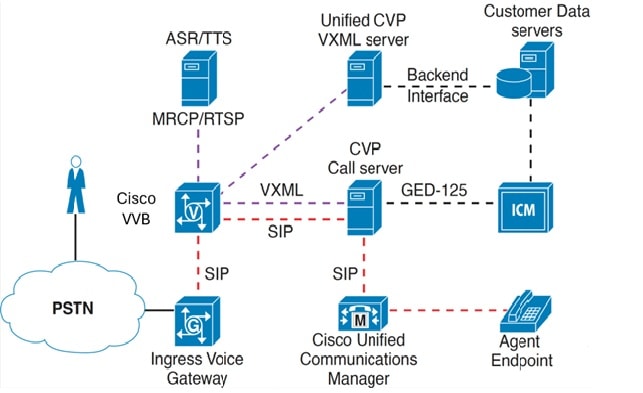
The VXML Server (standalone) functional deployment provides organizations with a standalone IVR solution for automated self-service. Callers can access Unified CVP from a local, long-distance, or toll-free numbers that terminate at Unified CVP Ingress Voice Gateways. Callers can also access Unified CVP from VoIP endpoints number that terminates at Unified CVP Ingress Voice Gateways. Callers can also access Unified CVP from VoIP endpoints. The following figure illustrates this deployment.

Figure 1. VXML Server (Standalone) Functional Deployment

This deployment includes the following components:

  • Ingress Voice Gateway

  • Virtualized Voice Browser

  • VXML Server

  • Unified Call Studio

  • Operations Console Server

Following are the optional components of this deployment:

  • Automatic Speech Recognition/Text-to-Speech (ASR/TTS) Server

  • Third-Party Media Server

  • Egress Voice Gateway

  • Reporting Server

  • CVP Call Server

  • ICM

  • Cisco Unified Communications Manager

Protocol-Level Call Flow
  1. A call arrives at the Ingress Cisco VVB through TDM or SIP. The gateway performs inbound Plain Old Telephone Service (POTS) or VoIP dial-peer matching.

  2. The selected Cisco VVB port invokes the Unified CVP self-service script.

  3. The self-service script invokes the Unified CVP standalone bootstrap VXML document, which sends an HTTP request to the configured IP address of the VXML Server.

  4. The VXML service function, which resides in the CVP Server, runs the application that is specified in the HTTP URL and returns a dynamically generated VXML document to the Cisco VVB. The Unified CVP VXML Service may access back-end systems to incorporate personalized data into the VXML document that is sent to the Cisco VVB.

  5. The Cisco VVB parses and renders the VXML document. For spoken output, the Cisco VVB either retrieves and plays back prerecorded audio files that are referenced in the VXML document, or it streams media from a text-to-speech (TTS) server. DTMF is detected on Cisco VVB.

  6. The Cisco VVB submits an HTTP request containing the results of the caller input to the VXML Server. This server runs the application that is specified in the HTTP URL again and returns a dynamically generated VXML document to the Cisco VVB. The dialog continues through repetition of Steps 5 and 6.

  7. The VRU dialog ends when the caller ends the call, the application releases, or the application initiates a transfer.

Transfers and Subsequent Call Control

You can use the VXML Server (Standalone) functional deployment to transfer callers to another endpoint. Transfers to either VoIP (for example, Cisco Unified Communications Manager) or TDM (for example, Egress Voice Gateway to PSTN or TDM ACD). IVR application data cannot be passed to the new endpoint with this deployment. If the endpoint is a TDM ACD, the agent screen popup window does not appear.

This deployment supports the following call transfers:

  • VXML Bridged Transfer

  • VXML Blind Transfer

  • Release Trunk Transfer (TNT, hookflash, TBCT, and SIP Refer)


Note


Cisco VVB supports the Blind Transfer feature only.


Non-Reference Design Deployments of the Unified CM

A single Unified CM can originate and receive calls from SIP. PSTN calls that arrived on MGCP Voice Gateways registered with Unified CM can be routed or transferred to Unified CVP only through SIP (and not through Cisco Unified Border Element).


Note


SCCP-based line side protocol is not supported in newer phones. SCCP-based line side protocol is supported in older phones in earlier releases. However, fresh installation of or enabling the deprecated phones is not supported.

For information on phones supported in the Cisco Unified Call Manager (CUCM) releases, see the Deprecated Phone Models section of the CUCM compatibility information for the relevant release at the following URL: https://www.cisco.com/c/en/us/support/unified-communications/unified-communications-manager-callmanager/products-device-support-tables-list.html


Unified CM is an optional component in the Unified CVP solution. Its use in the solution depends on the type of call center being deployed. TDM-based call centers using ACDs, for example, typically do not use Unified CM (except when they are migrated to Cisco Unified CCE). The same can be said for self-service applications that use the Unified CVP Standalone self-service deployment model. Unified CM is used as part of the Unified CCE solution. Call center agents are part of an IP solution that uses Cisco IP Phones, or when migrated from TDM ACDs.

Cisco Unified Communications Manager is a software application that controls the Voice Gateways and IP phones, providing the foundation for a VoIP solution. Unified Communications Manager runs on Cisco Unified Computing System (UCS) hardware or a specification-based equivalent. The software running on a VM is referred to as a Unified Communications Manager server. Multiple Unified Communications Manager servers can be grouped into a cluster to provide for scalability and fault tolerance. Unified Communications Manager communicates with the gateways using standard protocols such as Media Gateway Control Protocol (MGCP) and Session Initiation Protocol (SIP). Unified Communications Manager communicates with the IP phones using SIP or Skinny Call Control Protocol (SCCP). For details on Unified Communications Manager call processing capabilities and clustering options, see the latest version of the Cisco Collaboration System Solution Reference Network Designs at http://www.cisco.com/go/ucsrnd.

Cisco Unified IP IVR

The Unified IP IVR provides prompting, collecting, and queuing capability for the Unified CCE solution. Unified IP IVR does not provide call control as Unified CVP does because it is behind Unified Communications Manager and under the control of the Unified CCE software by way of the Service Control Interface (SCI). When an agent becomes available, the Unified CCE software instructs the Unified IP IVR to transfer the call to the selected agent phone. The Unified IP IVR then requests Unified Communications Manager to transfer the call to the selected agent phone.

Unified IP IVR is a software application that runs on Cisco Unified Computing System (UCS) hardware or a specification-based equivalent. You can deploy multiple Unified IP IVR servers with a single Unified Communications Manager cluster under control of Unified CCE.

Unified IP IVR has no physical telephony trunks or interfaces like a traditional VRU. The telephony trunks are terminated at the Voice Gateway. Unified Communications Manager provides the call processing and switching to set up a G.711 or G.729 Real-Time Transport Protocol (RTP) stream from the Voice Gateway to the Unified IP IVR. The Unified IP IVR communicates with Unified Communications Manager through the Java Telephony Application Programming Interface (JTAPI), and the Unified IP IVR communicates with Unified CCE through the Service Control Interface (SCI) with a VRU Peripheral Gateway or System Peripheral Gateway.

For deployments requiring complete fault tolerance, a minimum of two Unified IP IVRs are required.

In Unified CCE deployments with only Unified IP IVR, a Unified CM cluster can support about 2000 Unified CCE agents. These limits assume that the BHCA call load and all configured devices are spread equally among the eight call processing subscribers with 1:1 redundancy. These capacities can vary, depending on your specific deployment. Size your solution with the Cisco Unified Communications Manager Capacity Tool.

A subscriber can support a maximum of 500 agents. In a fail-over scenario, the primary subscriber supports a maximum of 1000 agents.

For deployments requiring large numbers of VRU ports, use Unified CVP instead of Unified IP IVR. Unified IP IVR ports place a significant call processing burden on Unified CM, while Unified CVP does not. Thus, Unified CCE deployments with Unified CVP allow more agents and higher BHCA rates per cluster.

JTAPI Communications for Unified IP IVR

The Unified IP IVR sign-in process establishes JTAPI communications between the Unified CM cluster and the application. The CTI Manager communicates through JTAPI to Unified IP IVR. Every subscriber within a cluster runs a CTI Manager instance. But, the Unified CM PIM on the PG communicates with only one CTI Manager (and thus one node) in the cluster. That connected CTI Manager passes CTI messages for the other nodes within the cluster. Each redundant pair of PGs shares a unique JTAPI user ID.

Each Unified IP IVR communicates with only one CTI Manager within the cluster. The user ID is how the CTI Manager tracks the different processes.

Unified IP IVR is not deployed in redundant pairs. But, if its primary CTI Manager is out of service, Unified IP IVR can fail over to another CTI Manager within the cluster.

Unified IP IVR uses the same types of JTAPI messages as an Agent PG. Unlike the Agent PG, Unified IP IVR provides both the application and the devices that are monitored and controlled.

The devices that Unified CCE monitors and controls are the physical phones. The Unified IP IVR does not have physical ports like a traditional VRU. Unified IP IVR ports are logical ports called CTI Ports. For each CTI Port on Unified IP IVR, there needs to be a CTI Port device defined in Unified Communications Manager.

Unlike a traditional PBX or telephony switch, Unified Communications Manager does not select the Unified IP IVR port to which it sends the call. When a call is made to a DN that is associated through a CTI Route Point with a Unified IP IVR JTAPI user, the subscriber asks the Unified IP IVR which CTI Port handles the call. If Unified IP IVR has an available CTI Port, Unified IP IVR responds to the routing control request with the device identifier of the CTI Port to handle that call.

SIP sends Dual Tone Multi-Frequency (DTMF) digits, however Unified IP IVR and Unified Communications Manager only support out-of-band DTMF digits. JTAPI messages from the cluster notify Unified IP IVR of caller-entered DTMF digits. The cluster uses an MTP resource to convert in-band signaling to out-of-band signaling. CTI ports only support out-of-band DTMF digits. If your deployment includes SIP phones or gateways, provision sufficient MTP resources to support the conversion. The Mobile Agent feature also requires extra MTP resources for this conversion.

The following scenarios are examples of Unified IP IVR device and call control. When an available CTI Port is allocated to the call, a Unified IP IVR workflow starts within Unified IP IVR. When the workflow performs the accept step, a JTAPI message is sent to the subscriber to answer the call for that CTI Port. When the Unified IP IVR workflow wants the call transferred or released, the workflow again instructs the subscriber on what to do with that call.

When a caller releases the call while interacting with the Unified IP IVR, the VG detects the caller release. The VG notifies the subscriber with the Media Gateway Control Protocol (MGCP), which then notifies the Unified IP IVR with JTAPI. When the VG detects DTMF tones, the VG notifies the subscriber through H.245 or MGCP, which then notifies the Unified IP IVR through JTAPI.

In order for the CTI Port device control and monitoring to occur, associate the CTI Port devices on Unified Communications Manager with the appropriate Unified IP IVR JTAPI user ID. If you have two 150-port Unified IP IVRs, you have 300 CTI ports. Associate half of the CTI ports with JTAPI user Unified IP IVR 1, and associate the other half of the CTI ports with JTAPI user Unified IP IVR 2.

While you can configure Unified Communications Manager to route calls to Unified IP IVRs on its own, Unified CCE routes calls to the Unified IP IVRs in a Unified CCE environment (even if you have only one Unified IP IVR and all calls require an initial VRU treatment). Doing so ensures proper Unified CCE reporting. For deployments with multiple Unified IP IVRs, this routing practice also allows Unified CCE to load-balance calls across the multiple Unified IP IVRs.

CTI Manager Failover with Unified IP IVR

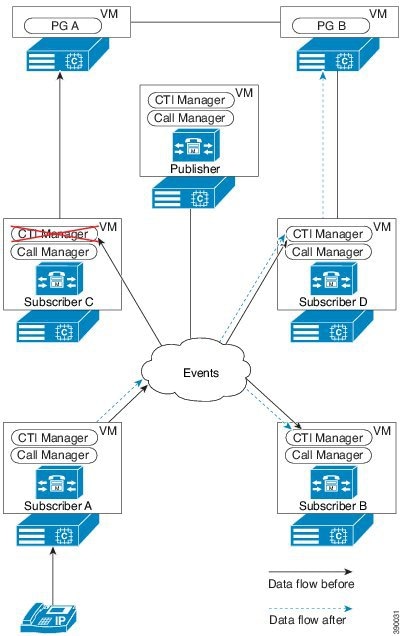
Each Agent PG can support only one CTI Manager connection. While each subscriber has a CTI Manager, only two subscribers usually connect to the Agent PGs. You would have to add another pair of Agent PGs to enable all subscribers in a four-subscriber cluster to connect directly to an Agent PG.

The following figure shows the failure of a CTI Manager with a connection to the Agent PG. Only subscribers C and D are configured to connect to the Agent PGs.

The following conditions apply to this scenario:

  • For redundancy, all phones and gateways that are registered with subscriber A use subscriber B as their backup server.

  • The CTI Managers on subscribers C and D provide JTAPI services for the Agent PGs.

Figure 2. CTI Manager with Agent PG Connection Fails

Unlike Unified CVP, Unified IP IVR depends on the CTI Manager for call control. In Unified IP IVR deployments, failure of a CTI Manager with an Agent PG connection causes the Unified IP IVR JTAPI subsystem to shut down. This shutdown causes the Unified IP IVR server to drop all voice calls that the server is processing.

Then, the JTAPI subsystem restarts and connects to the CTI Manager on the backup subscriber. The Unified IP IVR reregisters all the CTI ports that are associated with the Unified IP IVR JTAPI user. After all the Unified CM devices are successfully registered, the server resumes its VRU functions and handles new calls.

Unified IP IVR Design Considerations

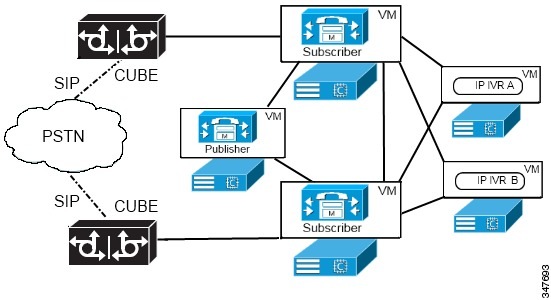
Cisco Unified IP IVR can establish JTAPI connections with two CTI Managers on different subscribers in the Unified Communications Manager cluster. This feature enables Unified IP IVR redundancy at the CTI Manager level. You can gain more redundancy by deploying multiple Unified IP IVR servers. Multiple Unified IP IVR servers enable call routing scripts to load balance calls between the available IP IVR resources.

The following figure shows two Unified IP IVR servers set up redundantly with a cluster. Set up the Unified IP IVR group with each server connected to the CTI Manager on a different Unified Communications Manager subscriber. Then, add a second CTI Manager as a backup to each Unified IP IVR server. If the primary CTI Manager fails, the Unified IP IVR server fails over to the backup CTI Manager.

Figure 3. IP IVR High Availability Deployment
High Availability Through Call Forwarding

You can use the following call forwarding features in Unified Communications Manager to manage Unified IP IVR port usage:

  • Forward Busy—Forwards calls to another port or route point when Unified Communications Manager detects that the port is busy.

  • Forward No Answer—Forwards calls to another port or route point when Unified Communications Manager detects that a port did not pick up a call within the timeout period.

  • Forward on Failure—Forwards calls to another port or route point when Unified Communications Manager detects a port failure caused by an application error.

When using the call forwarding features, do not establish a path back to the CTI port that initiated the call forwarding. Such paths create loops when all the Unified IP IVR servers are unavailable.

High Availability Through Call Flow Routing Scripts

You can use Unified CCE call flow routing scripts to support high availability. Check the Unified IP IVR Peripheral Status with a call flow routing script before sending calls to Unified IP IVR. This check prevents calls from queuing to an inactive Unified IP IVR. For example, create a Translation Route to the Voice Response Unit (VRU) to select the Unified IP IVR with the most idle ports. This method distributes the calls evenly on a call-by-call basis. You can modify this method to load balance ports across multiple Unified IP IVRs. This method can address all the Unified IP IVRs on the cluster in the same Translation Route or Send to VRU node.


Note


If the Unified IP IVR server fails, all calls at the Unified IP IVR are dropped. Minimize the impact of such failures by distributing calls across multiple Unified IP IVR servers. In Unified IP IVR, a default script prevents loss of calls if the Unified IP IVR loses the link to the VRU PG.


Outbound Option with Unified IP IVR

When you use Unified IP IVR with Outbound Option, front-end all calls through Unified CM. This deployment results in a higher call load on the subscribers. Because the subscriber supports only five calls per second, distribute calls that are transferred to agents and the VRU across multiple subscribers with a Cisco Unified SIP Proxy server.

For some deployments, if the outbound call center is in one country (for example, India) and the customers are in another country (for example, US), then consider the WAN network structure. When using Unified IP IVR deployments for transfer to a VRU campaign, and the Unified IP IVR is separated from the Outbound Option Dialer servers by a WAN. Provide Unified IP IVR with its own Unified CM cluster to reduce the WAN traffic.

Distributed Deployment of Outbound Option for Transfer to VRU Campaign

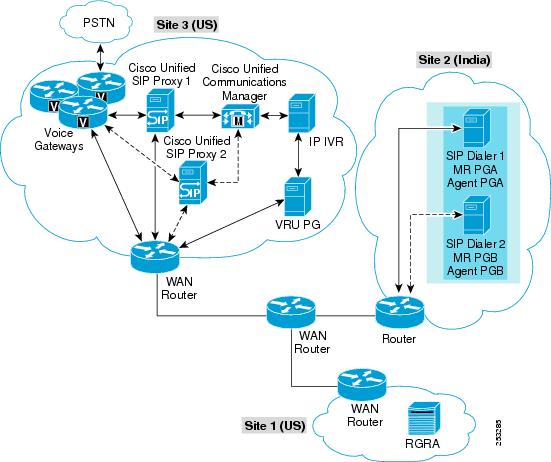
This figure shows a distributed deployment for a transfer-to-VRU campaign with Unified IP IVR.

Figure 4. Distributed Deployment Example for Transfer-to-VRU Campaign with Unified IP IVR

In the solution in this figure, note these points:

  • The Voice Gateway and Router/Logger A servers are distributed between two sites (Site 1 and 3) in the United States.

  • The Unified CM cluster is located at Site 3 (United States) along with the VRU PG.

  • The redundant VRU PGs are at Site 3 (United States).

  • IP IVR is included at Site 3 (United States).

  • The redundant MRPG/Dialer and redundant Agent PGs are installed on the same VM at Site 2.

  • The SIP Dialer uses the Voice Gateways located at Site 3 (United States).

  • The Voice Gateways are included in the diagram with CT3 interface at Site 3 (United States). These routers will provide 1:1 redundancy for Dialer calls.

  • The redundant Cisco Unified SIP Proxy servers are at Site 2 to avoid the WAN SIP signaling traffic to transfer live outbound calls.

  • Each SIP Dialer connects to its own Cisco Unified SIP Proxyy server at Site 2. Each Cisco Unified SIP Proxy server controls the set of Voice Gateways at Site 3 (United States).

  • The Cisco Unified SIP Proxy servers provide (N+1) redundancy.

If you enable recording at the SIP Dialer, the WAN bandwidth requirements are:

  • Bandwidth for each answered outbound call:

    • G.711 Codec calls require a WAN bandwidth of 80 kbps for the Call Progress Analysis time period.

    • G.729 Codec calls require a WAN bandwidth of 26 kbps for the Call Progress Analysis time period.

  • Bandwidth for each alerting outbound calls:

    • G.711 Codec calls require a WAN bandwidth of 80 kbps

    • G.729 Codec calls require a WAN bandwidth of 26 kbps

  • Outbound calls being queued for self-serviced at Unified IP IVR do not require WAN bandwidth.

Generic Peripheral Gateway

Generic PG—Combines an Agent PG and a VRU PG

The last class of PG is the Generic PG. This PG can combine PIMs of different types. So, you can deploy the Agent PG and VRU PG independently. You can also combine those functions in a single Generic PG.