Reporting Guide for Cisco Unified Customer Voice Portal, Release 15.0(1)
Bias-Free Language
The documentation set for this product strives to use bias-free language. For the purposes of this documentation set, bias-free is defined as language that does not imply discrimination based on age, disability, gender, racial identity, ethnic identity, sexual orientation, socioeconomic status, and intersectionality. Exceptions may be present in the documentation due to language that is hardcoded in the user interfaces of the product software, language used based on RFP documentation, or language that is used by a referenced third-party product. Learn more about how Cisco is using Inclusive Language.
Reporting is an optional component for Cisco Unified Customer Voice Portal (CVP) installation.
Select Reporting during the installation process
to install the Reporting Server,
which is comprised of the reporting service and the
reporting database.
The reporting
service receives reporting data from the Interactive Voice Response (IVR) service, the Session Initiation Protocol (SIP)
service (if used), and the VoiceXML (VXML) server and transforms and writes this data to
the Informix reporting database to provide historical reporting in a call center
environment.
Reporting data includes summary information about call
activity, which assists call center managers in reviewing
and managing daily operations. It can also include operational detail data for
various IVR applications.
Reporting
Architecture
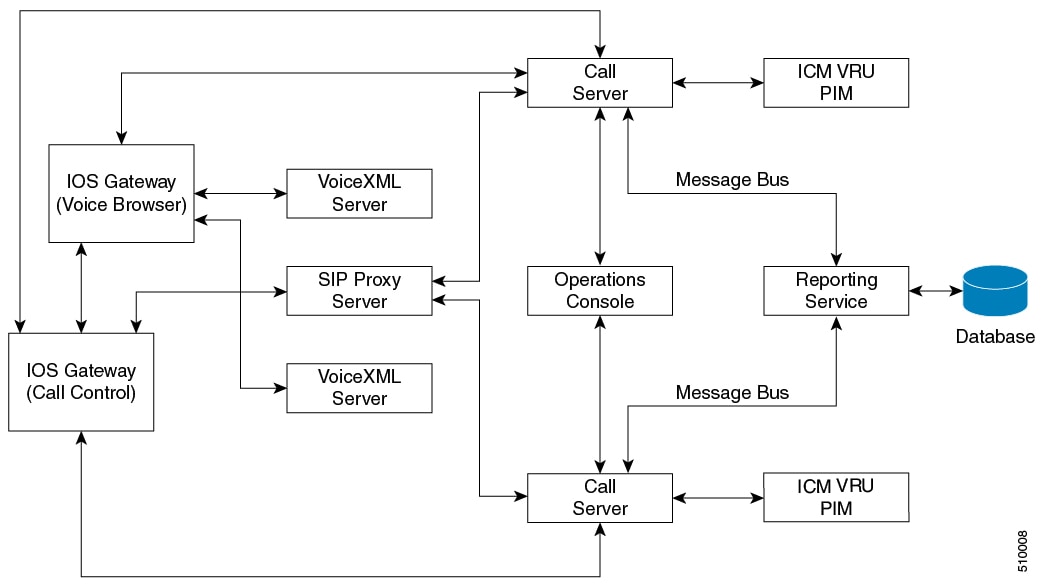
The following
diagram shows the Unified CVP architecture. For clarity, the diagram separates
the reporting service and the database.
Note
The connection
of the Operations Console to the call server through an OAMP Resource Manager
(ORM) is simply indicative, because the ORM is invisible to the end user. An
ORM is co-located with each managed Unified CVP component, and the Operations
Console is connected to each component.
Figure 1. CVP
Architecture
The call server
uses a central messaging bus to allow each service to communicate.
The reporting
service connects to the message bus through either an in-process plug-in or an
out-of-process plug-in, depending on whether the reporting service resides in
the same Java Virtual Machine (JVM) with the message bus system.
The service
listens to all messages passing through the message bus and captures both
call-state change messages sent from Call Server or reporting messages sent
from the Reporting Server.
The reporting service then parses those messages, converts them into batches of applicable Structured Query language (SQL)
statements, and runs them into an SQL database using the Java Database Connectivity (JDBC) Application provisioning interface
(API).
The reporting
service can also receive and process Unified CVP messages related to Unified
CVP system administrative tasks, such as turning on or off debugging and
querying statistics. As the Figure 1 shows, the reporting service can be shared
by multiple Call Servers that belong to the same Unified CVP deployment.
Note
A deployment needs only one reporting server. During temporary database outages, messages are buffered to file and are inserted
into the database after the database comes back on line. The amount of time that messages can be buffered depends on the system
throughput. See Failure and Restoration.
If your
environment uses more than one reporting server, be aware that:
Each Call
Server and each VXML Server can be associated with only one reporting server.
Reports
cannot span multiple Informix databases.
Although Unified CVP does not have a built-in reporting engine, its installation includes reporting templates designed for
use with the Unified Intelligence Center (Unified IC) reporting application. You can import these templates into Unified IC
and run them from the Unified IC interface.
Cisco Unified
Customer Voice Portal Reporting Server Deployment Options and Sizing
Topics in the Installation and Upgrade guide
include:
Installing the reporting
component
Specifying the reporting password
Excluding the reporting server from anti-virus software port
blocking
Upgrading the reporting server
Adding reporting capability to the VXML Server
Backing up and purging of the reporting
database
Cisco Unified
Customer Voice Portal Reporting Server Setup
You can find
explanations and procedures regarding the configuration and maintenance of the
Unified CVP Reporting server in the
Administration Guide for
Cisco Unified Customer Voice Portal
and in the
Configuration Guide for
Cisco Unified Customer Voice Portal.
Topics in the
operations console help and in the Configuration guide include:
Reporting server
statistics
Adding a
reporting server
Editing a
reporting server
Deleting a
reporting server
Finding a
reporting server
Configuring a
VoiceXML server for reporting (adding and editing)
Applying
inclusive and exclusive VoiceXML filters for reporting
Transferring a
file to multiple devices
Database
Maintenance
Through the
Operations Console, Unified CVP provides access to database maintenance and
enables you to perform administrative tasks such as backups and purges.
See
Configuration Guide for
Cisco Unified Customer Voice Portal
for details on database operations.

 Feedback