Overview

This chapter contains the following topics:

System Overview

The Cisco UCS X9508 Server Chassis and its components are part of the Cisco Unified Computing System (UCS). This system can use multiple server chassis configurations along with the Cisco UCS Fabric Interconnects to provide advanced options and capabilities in server and data management. The following configuration options are supported:

  • All Cisco UCS compute nodes. In a compute node-only configuration, two Intelligent Fabric Modules (IFMs) are required.

  • A mix of Cisco UCS compute nodes and Cisco UCS PCIe Nodes. In this configuration, the compute nodes are paired with Cisco UCS PCIe nodes.

    • With the Cisco UCS X440p PCIe Node, an M7 generation compute node is paired 1:1.

    • With the Cisco UCS X580p PCIe node, up to two M8 generation compute nodes can be paired with each PCIe node.

  • Two Intelligent Fabric Modules (IFMs) and two Cisco X9416 X-Fabric Modules (XFMs) or Cisco X9516 X-Fabric Modules are required in each UCS X9508 chassis for full performance.

Either servers or compute nodes, and PCIe nodes are managed through the GUI or API with Cisco Intersight.

The Cisco UCS X9508 Server Chassis system consists of the following components:

  • Chassis versions:

    • Cisco UCS X9508 server chassis–AC version

  • Intelligent Fabric Modules (IFMs), two deployed as a pair:

    • Cisco UCS 9108 100G IFMs (UCSX-I-9108-100G)—Two I/O modules, each with 8 100 Gigabit QSFP28 optical ports

    • Cisco UCS 9108 25G IFMs (UCSX-I-9108-25G)—Two I/O modules, each with 8 25 Gigabit SFP28 optical ports

  • X-Fabric Modules:

    • Two UCS X9416 XFMs are required in each UCS X9508 server chassis to support GPU acceleration through Cisco UCS X440p PCIe nodes.

    • Two UCS X9516 XFMs are required in each UCS X9508 server chassis to support GPU acceleration through Cisco UCS X580p PCIe nodes.

  • Power supplies—Up to six 2800 Watt, hot-swappable power supplies

  • Fan modules—Four hot-swappable fan modules

  • Up to 8 UCS X Series compute nodes of M6 or M7 generation for PCIe Gen4 connectivity through the X9416 XFMs, or up to 8 UCS X series compute nodes of M8 generation for PCIe Gen5 connectivity through the UCS X516 XFMs.

  • Up to 4 UCS X-Series M6 or M7 compute nodes paired 1:1 with up to 4 Cisco UCS X440p PCIe Nodes and two UCS X9416 XFMs for PCIe Gen4 connectivity.

  • Up to 4 UCS X-Series M8 compute nodes paired with up to 2 Cisco UCS X580p PCIe Nodes and two UCS X516 XFMs for PCIe Gen5 connectivity.
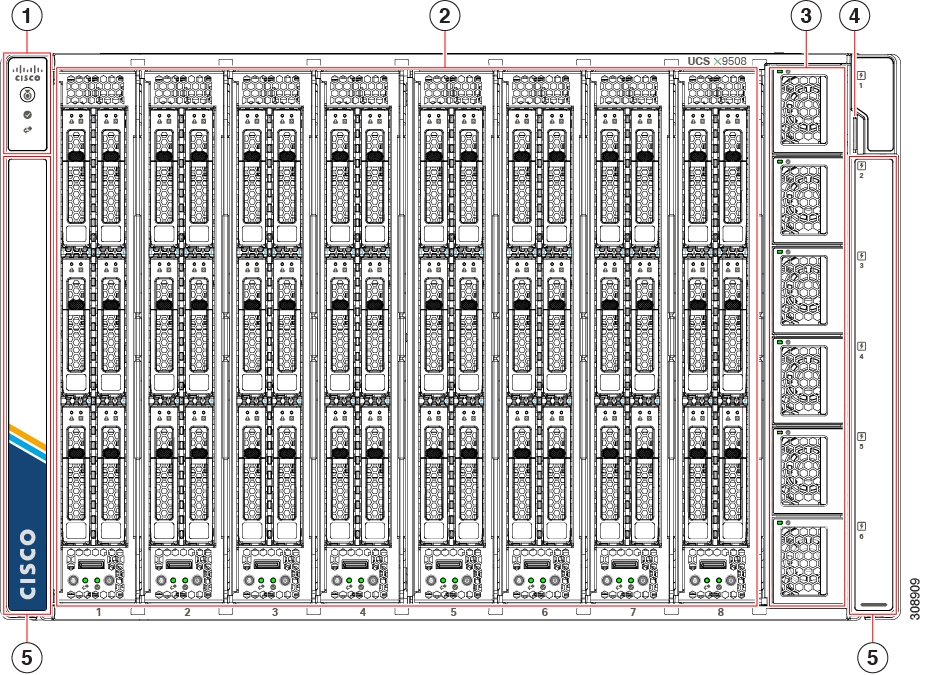
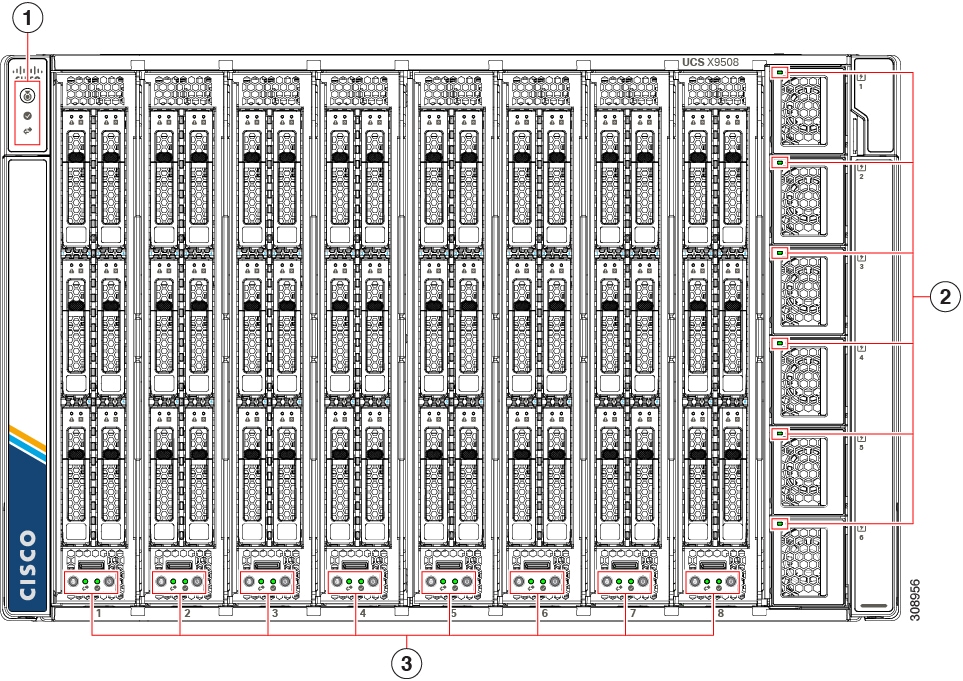
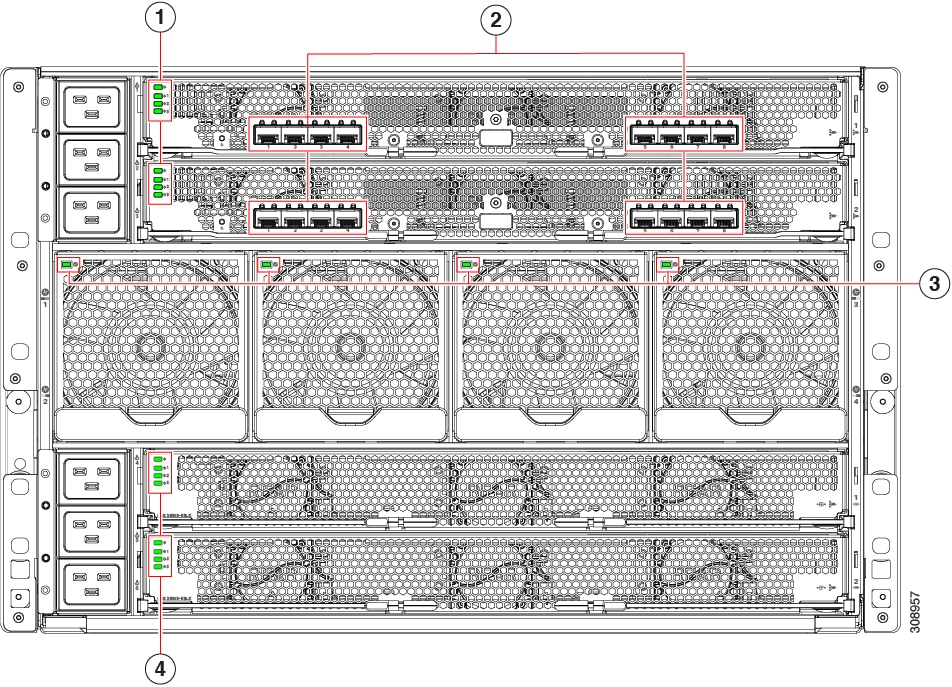
The following figures show the server chassis front and back.
Figure 1. Cisco UCS X9508 Server Chassis, Front

1

System LEDs:

  • Locator LED/Button

  • System Status LED

  • Network Link LED

For information about System LEDs, see LEDs.

2

Node Slots, a total of 8.

Shown populated with compute nodes, but can also contain PCIe Nodes

3

Power Supplies, a maximum of 6.

4

System Asset Tag

5

System side panels (two), which are removable. The side panels cover the rack mounting brackets.

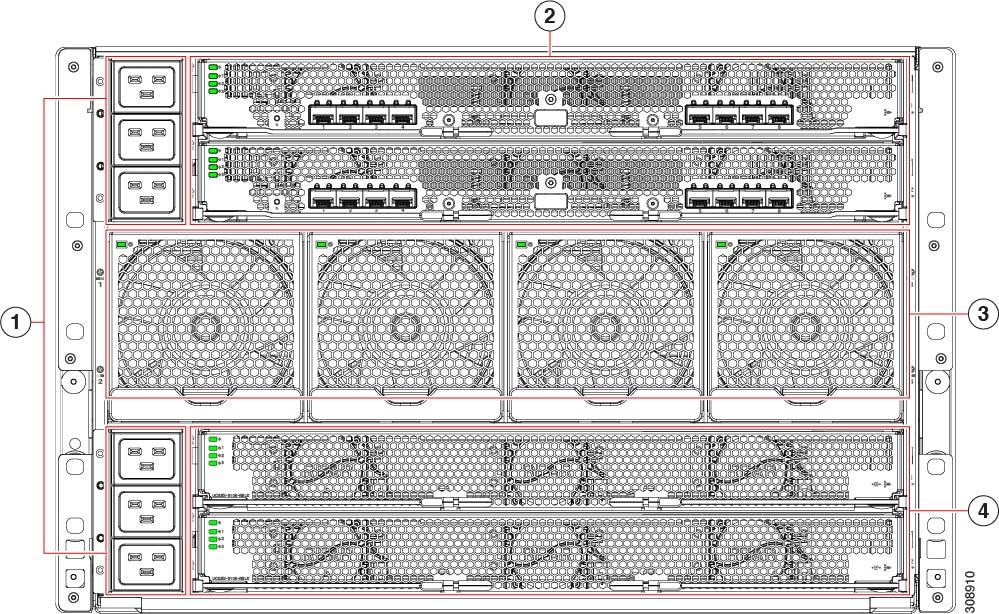
Figure 2. Cisco UCS X9508 Server Chassis, Rear

1

Power Entry Modules (PEMs) for facility inlet power

Each PEM contains 3 IEC 320 C20 inlets.

  • PEM 1 is at the top of the chassis, and it supports IEC inlets 1 through 3, with inlet 1 at the top of PEM 1.

  • PEM 2 is at the bottom of chassis, and it supports IEC inlets 4 through 6, with inlet 4 at the top of PEM 2

2

Intelligent Fabric Modules (shown populated), which are always deployed as a pair of the following:

  • Cisco UCS 9108 100G modules

  • Cisco UCS 9108 25G modules

3

System fans (four)

4

X-Fabric Module slots for either UCS active filler panels (for compute nodes) or up to two UCS X-Fabric Modules (for compute nodes paired with PCIe nodes).

Features and Benefits

The Cisco UCS X9508 server chassis revolutionizes the use and deployment of compute-node and PCIe-node based systems. By incorporating unified fabric, cloud native management, and X-Fabric technology, the Cisco Unified Computing System enables the chassis to have fewer physical components, no independent management, and to be more energy efficient than traditional blade server chassis.

This simplicity eliminates the need for dedicated chassis management and blade switches, reduces cabling, and enables the Cisco Unified Computing System to scale to 20 chassis without adding complexity. The Cisco UCS X9508 server chassis is a critical component in delivering the Cisco Unified Computing System benefits of data center simplicity and IT responsiveness.

Table 1. Features and Benefits

Feature

Benefit

Management by Cisco Intersight

Reduces total cost of ownership by removing management modules from the chassis, making the chassis stateless.

Provides a single, highly available cloud-based management tool for all server chassis, IFMs, XFMs, and nodes, thus reducing administrative tasks.

Unified fabric

Decreases TCO by reducing the number of network interface cards (NICs), host bus adapters (HBAs), switches, and cables needed.

Support for two UCS I/O Modules

Eliminates switches from the chassis, including the complex configuration and management of those switches, allowing a system to scale without adding complexity and cost.

Allows use of two I/O modules for redundancy or aggregation of bandwidth.

Auto discovery

Requires no configuration; like all components in the Cisco Unified Computing System, chassis are automatically recognized and configured by Cisco Intersight.

Direct node to fabric connectivity

Provides reconfigurable chassis to accommodate a variety of form factors and functions, which supports investment protection for new fabrics and future compute and PCIe nodes.

Provides IFM-to-compute node connectivity to chassis through an Ortho-Direct connection.

Provides 8 nodes with 200 Gbps (dual 25G-PAM4-ETH x8 lanes) of available Ethernet fabric throughput for each compute node. The system is designed to support higher potential Ethernet fabric throughput for future and emerging technologies, such as 112 GbpsPAM4 Ethernet.

Provides 8 nodes with 200 Gbps (dual 16G-PCIe x 16 lanes) of available PCIe fabric throughput for each compute node. The system is designed to support higher potential Ethernet fabric throughput for future and emerging technologies, such as 32 Gbps PCIe Gen5.

Redundant hot swappable power supplies and fans

Provides high availability in multiple configurations.

Increases serviceability.

Provides uninterrupted service during maintenance.

Available configured for AC environments (mixing not supported)

Hot-pluggable compute nodes and intelligent fabric modules

Provides uninterrupted service during maintenance and server deployment.

Comprehensive monitoring

Provides extensive environmental monitoring on each chassis

Allows use of user thresholds to optimize environmental management of the chassis.

Efficient front-to-back airflow

Helps reduce power consumption and increase component reliability.

Tool-free installation

Requires no specialized tools for chassis installation.

Provides mounting rails for easy installation and servicing.

Node configurations

Allows up to 8 UCS compute nodes or up to 4 compute nodes paired with either 4 UCS X440p PCIe Nodes (Gen4 support) or two UCS X580p PCIe Nodes (Gen 5 support)

Chassis Components

This section lists an overview of chassis components.

Cisco UCS X9508 Server Chassis

The Cisco UCS X9508 Series server chassis is a scalable and flexible chassis for today’s and tomorrow’s data center that helps reduce total cost of ownership.

The chassis is seven rack units (7 RU) high and can mount in an industry-standard 19-inch rack with square holes for use with cage nuts or round-holes for use with spring nuts. The chassis can house up to eight Cisco UCS nodes.

Up to six hot-swappable AC power supplies are accessible from the front of the chassis. These power supplies can be configured to support nonredundant, N+1 redundant, N+2 redundant, and grid-redundant configurations. The rear of the chassis contains four hot-swappable fans, six power connectors (one per power supply), two horizontal top slots for Intelligent Fabric Modules (IFM1, IFM2), and two additional horizontal bottom slots for X-Fabric modules (XFM1, XFM2).

Scalability is dependent on both hardware and software. For more information, see the appropriate UCS software release notes.

Compute Nodes

The Cisco UCS X Series compute nodes are based on industry-standard server technologies and provide the following:

  • Up to two Intel multi-core processors

  • Front-accessible, hot-swappable NVMe drives or solid-state disk (SSD) drives

  • Depending on the compute node, support is available for up to two adapter card connections for up to 200 Gbps of redundant I/O throughput

  • Industry-standard double-data-rate 4 (DDR4) memory (M6 and M7 compute nodes) or DDR5 memory (M8 compute nodes)

  • Remote management through an integrated service processor that also executes policy established in Cisco Intersight cloud-based server management

  • Local keyboard, video, and mouse (KVM) and serial console access through a front console port on each compute node

Cisco UCS X210c M6 Compute Node

The Cisco UCS X210c M6 is a two-socket compute node that hosts a maximum of two M6 CPUs. This compute node is supported in the Cisco UCS X9508 server chassis, which provides power and cooling. Data interconnect for the compute node to other data center equipment is supported through Intelligent Fabric Modules in the same server chassis.

Each Cisco UCS X210c M6 compute node has Cisco-standard indicators on the face of the module. Indicators are grouped for module-level information, and drive-level indicators.

Figure 3. Cisco UCS X210c M6 Compute Node

Cisco UCS X210c M7 Compute Nodes

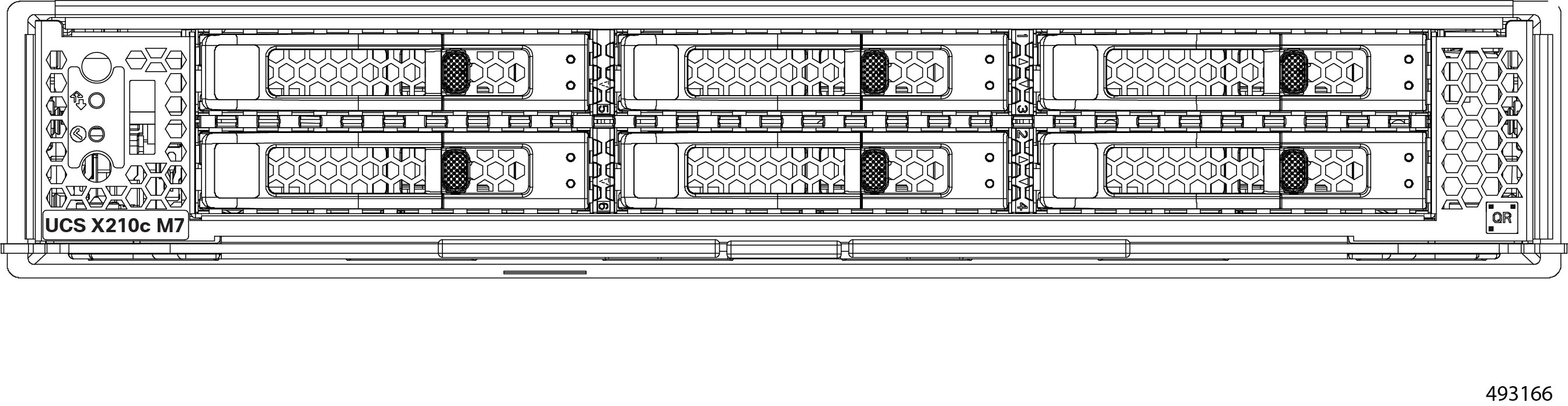
The Cisco UCS X210c M7 Compute Node is the computing device to integrate into the Cisco UCS X-Series Modular System. Up to eight compute nodes can reside in the 7-Rack-Unit (7RU) Cisco UCS X9508 Chassis, offering one of the highest densities of compute, IO, and storage per rack unit in the industry.

The Cisco UCS X210c M7 Compute Node harnesses the power of up to two 5th Generation Intel® Xeon® Scalable Processors with up to 64 cores per processor or up to 2x 4th Generation Intel® Xeon® Scalable Processors with up to 60 cores per processor.

The compute node supports up to 6 hot-pluggable, Solid-State Drives (SSDs), or Non-Volatile Memory Express (NVMe 2.5-inch drives with a choice of enterprise-class RAID or pass-through controllers with four lanes each of PCIe Gen 4 connectivity and up to 2 M.2 SATA or NVMe drives for flexible boot and local storage capabilities. This option is shown in the illustration below.

To support customization for your deployment, the Cisco UCS X210c M7 Compute Nodes offers an optional PCIe Gen 4 front mezzanine module with support for up to two U.2 or U.3 NVMe drives and two GPUs.

For more information, see the Cisco UCS X210c M7 Compute Node Installation and Service Guide.

Cisco UCS X410c M7 Compute Nodes

The Cisco UCS X410c M7 Compute Node (UCSX-410C-M7) is a two-slot compute node that supports four CPU sockets for 4th Generation Intel® Xeon® Scalable Processors, offering robust processing capabilities, extensive memory, flexible storage, and advanced networking options to meet the demands of diverse and evolving IT requirements.

Each compute node consists of two distinct subnodes, a primary and a secondary.

  • The primary contains two CPUs (1 and 2), two heatsinks, and half of the DIMMs. All additional hardware components and supported functionality are supported through the primary, including the front and rear mezzanine hardware options, rear mezzanine bridge card, front panel, KVM, management console, and status LEDs.

  • The secondary contains two additional CPUs (3 and 4), two heatsinks, and the other half of the DIMMs.

The primary node can support a front storage module, which supports multiple different storage device configurations:

  • All SAS/SATA configuration consisting of up to six SAS/SATA SSDs with an integrated RAID controller (HWRAID) in slots 1 through 6.

  • All NVMe configuration consisting of up to six U.2 NVMe Gen4 (x4 PCIe) SSDs in slots 1 through 6.

  • A mixed storage configuration consisting of up to six SAS/SATA or up to four NVMe drives is supported. In this configuration, U.2 NVMe drives are supported in slots 1 through 4 only. U.3 NVMe drives can be used in slots 1 through 6.

For more information, see the Cisco UCS X410c M7 Compute Node Installation and Service Guide.

Cisco UCS X440p PCIe Nodes

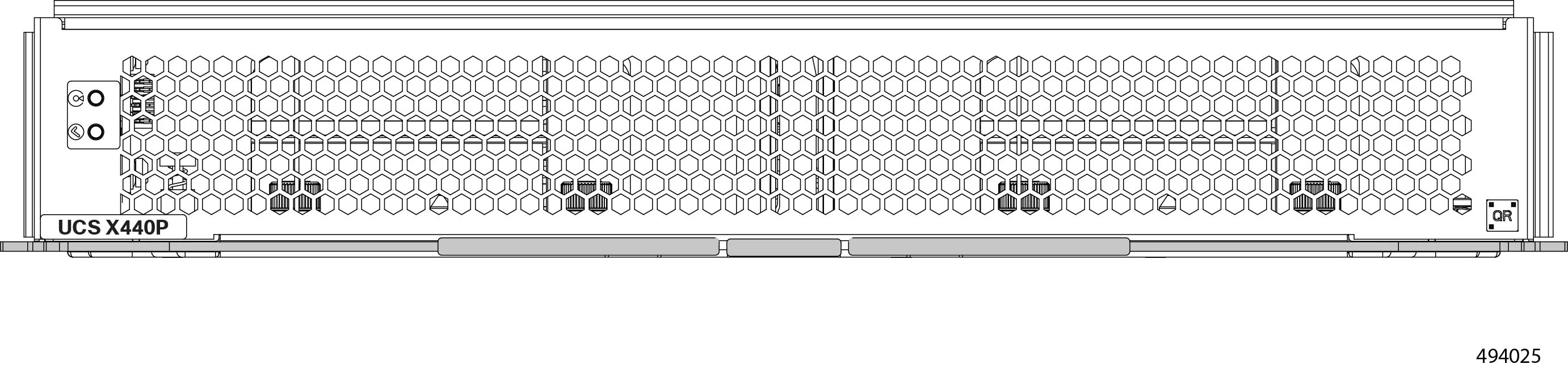
The Cisco UCS X440p Gen4 PCIe Node is a modular node that can be paired 1:1 with a Cisco UCS X-Series M7 Compute Node in the UCS X9508 chassis to provide GPU-accelerator support using the UCS X9416 X-Fabric modules in the same chassis.

Each Cisco UCS X440p PCIe Node supports up to four of the supported FHFL GPUs to a Cisco UCS X-Series M7 Compute Node. This PCIe node supports PCIE Gen4 connectivity.


Note


A single Cisco UCS X9508 chassis cannot support a mix of different PCIe nodes, so if the same server chassis contains Cisco UCS X440p PCIe Nodes, it cannot contain Cisco UCS X580p PCIe Nodes.


Note


The compute node paired with the X440p PCIe Node must be a Cisco M7 X-Series Compute Node.

For more information, see the Cisco UCS X440p PCIe Node Installation and Service Guide.


Cisco UCS X210c M8 Compute Nodes

The Cisco UCS X210c M8 Compute Node is the third generation of compute node to integrate into the Cisco UCS X-Series Modular System. It delivers performance, flexibility, and optimization for deployments in data centers, and at remote sites.

The Cisco UCS X210c M8 Compute Node is a single-slot compute node that has two CPU sockets that can support Sixth Generation Intel Xeon Scalable Server Processors.

Additionally, each compute node supports a front storage module offers the following different storage device configurations:

  • Up to six SAS/SATA NVMe SSDs with an integrated RAID controller.

  • Up to six NVMe SSDs in slots 1 through 6.

  • A mixture of up to six SATA/SATA or up to four NVMe drives is supported. In this configuration, U.3 NVMe drives in slots 1 through 6. The U.3 NVMe drives are also supported with an integrated RAID module (MRAID Controller, UCSX-RAID-M1L6) and Compute RAID Controller (UCSX-X10C-RAIDF).

  • Up to nine hot-pluggable EDSFF E3.S NVMe drives with a passthrough front mezzanine controller option.

  • With an integrated RAID module, the following drive configurations are supported:

    • SAS/SATA drives in slots 1 through 6

    • NMVe U.3 drives in slots 1 through 6

    • A mix of NVMe U.3 and SAS/SATA drives. SAS/SATA and NVMe U.3 drives are supported in on Slots 1 through 6

For more information, see the Cisco UCS X210c M8 Compute Node Installation and Service Guide.

Cisco UCS X215c M8 Compute Nodes

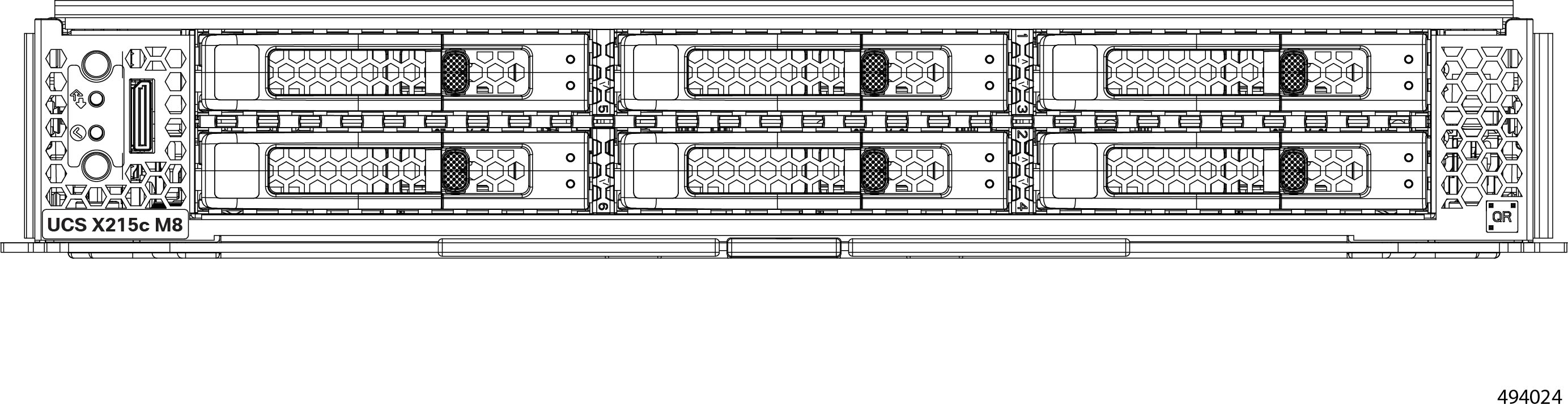
The Cisco UCS X215c M8 is a single-slot compute node that has two CPU sockets that can support a maximum of one Fourth Gen AMD EPYC™ Processors with up to 96 cores per processor and up to 384 MB of Level 3 cache per CPU or Fifth Gen AMD EPYC™ Processors with up to 196 cores per processor and up to 384 MB of Level 3 cache per CPU. The minimum system configuration requires one CPU installed in the CPU1 slot.

Additionally, each compute node has a front mezzanine modules the offers the following:

  • A front storage module, which supports multiple different storage device configurations:

    • Up to six hot pluggable SAS/SATA/U.3 NVMe 2.5inch SSDs (slots 1-6).

    • SATA/SAS/U.3 drives can co-exist on the front mezzanine module. RAID volumes are restricted to same type of drives only. For example, RAID 1 volume need to use a set of SATA or SAS or U.3 NVMe drives.

For more information, see the Cisco UCS X215c M8 Compute Node Installation and Service Guide.

Cisco UCS X580p PCIe Nodes

The Cisco UCS X580p PCIe Node delivers high-performance GPU support with associated Cisco UCS X-Series M8 Compute nodes through UCS X9516 X-Fabric Modules in the same chassis.

Each Cisco UCS X580p PCIe node is a dual-slot node that supports up to four FHFL PCIe GPUs and can be paired with the Cisco UCS X210c M8 Compute Node with Intel® Xeon® 6 processors, as well as the UCS X215c M8 compute node with EPYC processors. This node offers significantly greater flexibility than the Cisco UCS X440p PCIe Node, allowing users to associate up to four GPUs with up to two Cisco UCS M8 X-Series Compute Nodes. This node supports PCIe Gen 5 connectivity.


Note


A single Cisco UCS X9508 chassis cannot support a mix of different PCIe nodes, so if the same server chassis contains Cisco UCS X580p PCIe Nodes, it cannot contain Cisco UCS X440p PCIe Nodes.


Note


The compute nodes associated with the X580p PCIe Node must be a Cisco M8 X-Series Compute Nodes.

For more information, see the Cisco UCS X580p PCIe Node Installation and Service Guide.


Intelligent Fabric Modules

The Cisco UCS X9508 contains Intelligent Fabric Modules (IFMs) on the rear of the server chassis. IFMs have multiple functions in the server chassis:

  • Data traffic: IFMs support network-level communication for traditional LAN and SAN traffic as well as aggregating and disaggregating traffic to and from individual compute nodes.

  • Chassis health: IFMs monitor common equipment in the server chassis, such as fan units, power supplies, environmental data, LED status panel, and so on. Management functions for the common equipment is supported through IFMs.

  • Compute Node health: IFMs monitor Keyboard-Video-Mouse (KVM) data, Serial over LAN (SoL) data, and IPMI data for the compute nodes in the chassis, as well as provide management of these features.

IFMs must always be deployed in pairs to provide redundancy and failover to safeguard system operation.

Cisco UCS 9108 25G Intelligent Fabric Module

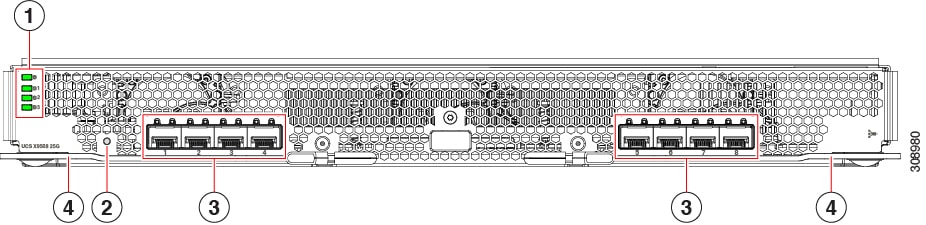
The Cisco UCS 9108 Intelligent Fabric Module (UCSX-I-9108-25G) is an IFM that supports aggregate data throughput of 2TB/s through two groups of four optical ports.

Figure 4. UCS 9108 25 Gbps Intelligent Fabric Module, Faceplate View

1

Status LEDs:

  • IFM Status (top LED)

  • Fan Status LEDs 1 through 3, with Fan 1 as LED 2, Fan 2 as LED 3, and Fan 3 as LED 4.

2

IFM Reset Button

3

SFP28 Optical Ports

Ports are arranged in two groups of four physical ports:

  • Ports are in groups of four. Port number 1 is the left port in this group, and port number 4 is the right port in the group.

  • Ports are in groups of four. Port number 5 is the left port in this group, and port number 8 is the right port in the group.

4

IFM Ejector Handles, left and right


Note


For information about removing and installing the IFM's components, see Cisco UCS 9108 25G IFM Field Replaceable Unit Replacement Instructions.


Cisco UCS 9108 100G Fabric Module

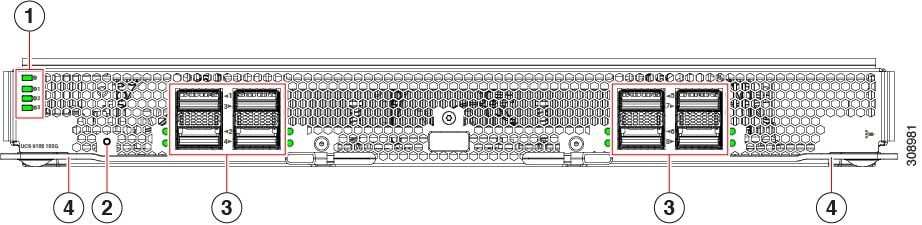
The Cisco UCS 9108 Intelligent Fabric Module (UCSX-I-9108-100G) is an IFM that supports data throughput of 100G through two groups of 4 ports.

Figure 5. UCS 9108 100 Gbps Intelligent Fabric Module, Faceplate View

1

Status LEDs:

  • IFM Status (top LED)

  • Fan Status LEDs 1 through 3, with Fan 1 as LED 2, Fan 2 as LED 3, and Fan 3 as LED 4.

2

IFM Reset Button

3

QSFP28 Optical Ports.

Ports are arranged in two groups of four physical ports. Ports are stacked in vertical pairs, with two ports in each vertical port stack.

  • Port number 1 is the top port in the left port pair in the first port group, and port number 3 is the top port of the right port pair in the group.

  • Port number 5 is the top port in the left port pair of the second group, and port number 7 is the top port in the right port pair of the group.

4

IFM Ejector Handles, left and right


Note


For information about removing and installing the IFM's components, see Cisco UCS 9108 100G IFM Field Replaceable Unit Replacement Instructions.


X-Fabric Modules

The Cisco UCS X9508 server chassis supports Cisco X-Fabric Modules, including the Cisco UCS X9416 X-Fabric Module and Cisco UCS X9516 X-Fabric Modules (XFMs).

The module is a configuration option:

  • The UCS X9416 X-Fabric Modules are required when the server chassis contains the Cisco UCS X440p PCIe node.

  • The UCS X9516 X-Fabric Modules are required when the server chassis contains the Cisco UCS X580p PCIe node.

  • The X-Fabric module is not required if your server chassis contains only Cisco UCS X-Series compute nodes, such as the Cisco UCS X210c.


Caution


Although Cisco UCS X-Fabric Modules can be removed, the best practice is to leave them installed even during installation. If your Cisco UCS X9508 server is configured so that no XFMs are installed, only XFM blanks, leave the blanks installed also, even during chassis installation.


X-Fabric Modules are always deployed in pairs to support GPU acceleration through the Cisco UCS X440p PCIe nodes (Gen4 support) or Cisco UCS X580p PCIe nodes (Gen5 support). Therefore, two PCIe modules must be installed in a server chassis that contains any number of PCIe nodes.


Caution


Do not operate the server chassis with the XFM slots empty!


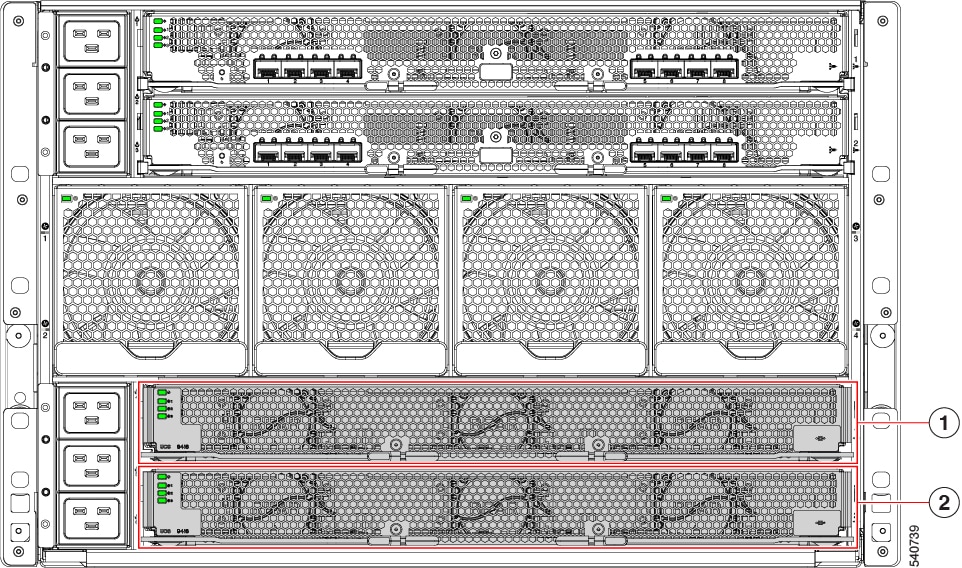
Each server chassis supports two UCS X9416 modules, which are located in the two horizontal module slots at the bottom of the chassis rear.

1

XFM slot 1 (XFM1)

Provides PCIe connectivity to all module slots 1 through 8

2

XFM slot 2 (XFM2)

Provides PCIe connectivity to all module slots 1 through 8

For additional information, see the following topics:

Cisco UCS X9416 Fabric Module

The Cisco UCS X9416 module is a Cisco X-Fabric Module (XFM) that provides PCIe connectivity for module slots one through eight on the front of the server chassis. Each X-Fabric Module is installed in the bottom two slots of the rear of the Cisco UCS X9508 server chassis.


Caution


Although the Cisco UCS X9416 Fabric Modules can be removed, the best practice is to leave them installed even during chassis installation.


Each module provides:

  • Integrated, hot-swappable active fans for optimal cooling

  • PCIe x16 connectivity and signaling between pairs of compute nodes and GPU modules, such as the Cisco X440p PCIe node

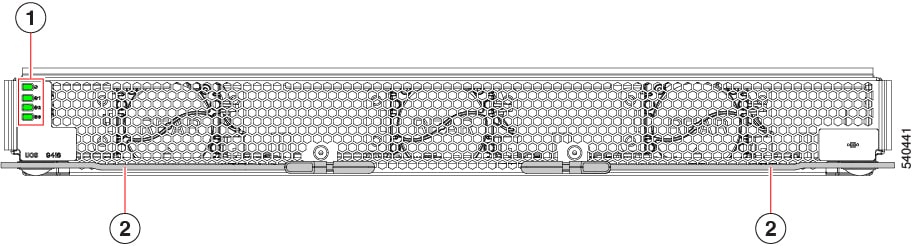
Each module has STATUS LEDs to visually indicate operational status the X-Fabric module and its fans.

1

Status LEDs:

  • Module Status (top LED)

  • Fan Status LEDs 1 through 3, with Fan 1 as LED 2, Fan 2 as LED 3, and Fan 3 as LED 4.

2

Module Ejector Handles, Left and Right


Note


For information about removing and installing the XFM's components, see Cisco UCS X9416 X-Fabric Module Field Replaceable Unit Replacement Instructions.


Cisco UCS X9516 Fabric Module

The Cisco UCS X9516 (UCSX-FS-9516) is a Cisco X-Fabric Module (XFM) that provides PCIe Gen 5 connectivity for module slots one through eight on the front of the server chassis. A total of two of these modules is required.

Each X-Fabric Module is installed in the bottom two slots of the rear of the Cisco UCS X9508 server chassis.

Each module provides:

  • Integrated, hot-swappable active fans for optimal cooling

  • PCIe x16 connectivity and signaling between pairs of compute nodes and GPU modules, such as the available M8 series of Cisco UCS X Series Compute Nodes and the Cisco UCS X580p PCIe Node. Additional information about these products is available through the Cisco website.

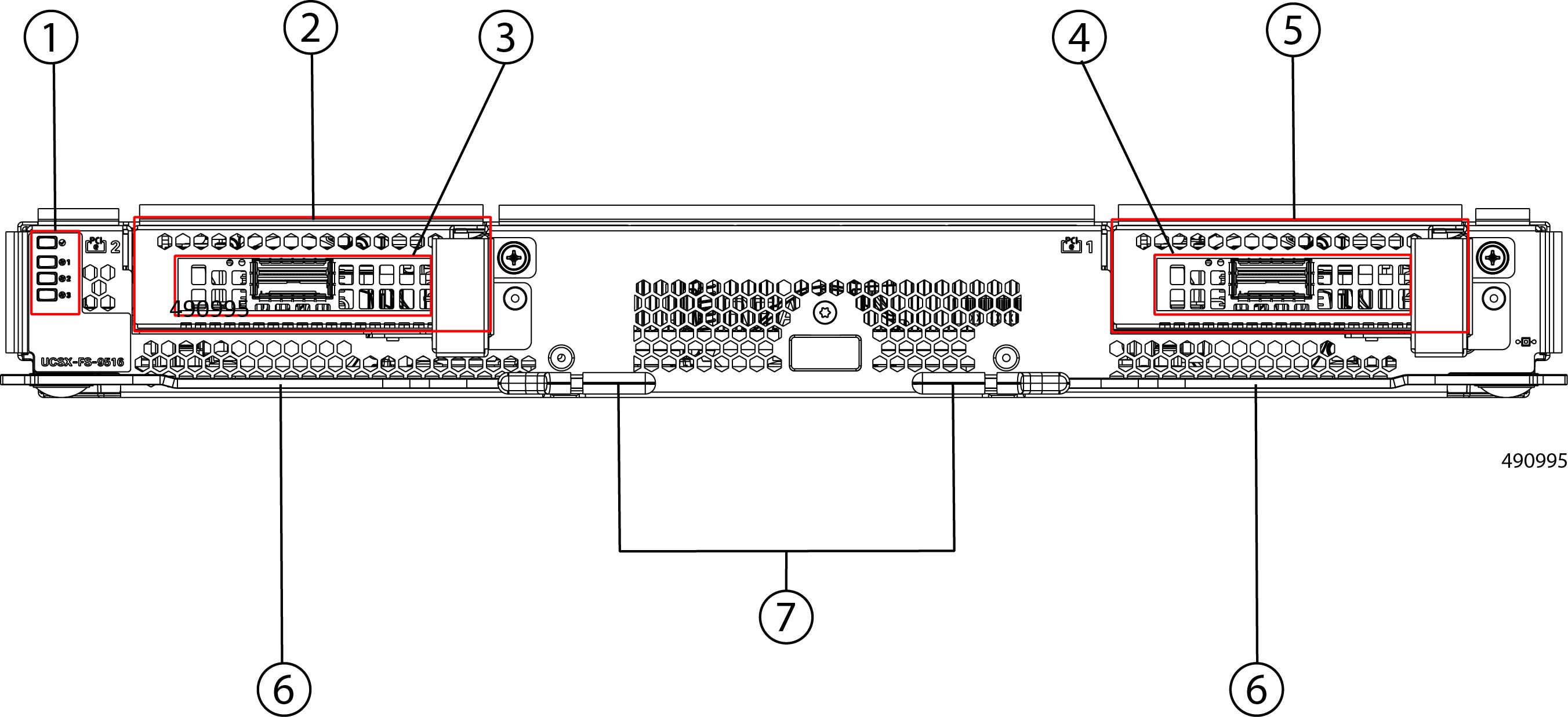
Each Cisco UCS X9516 X-Fabric Module features:

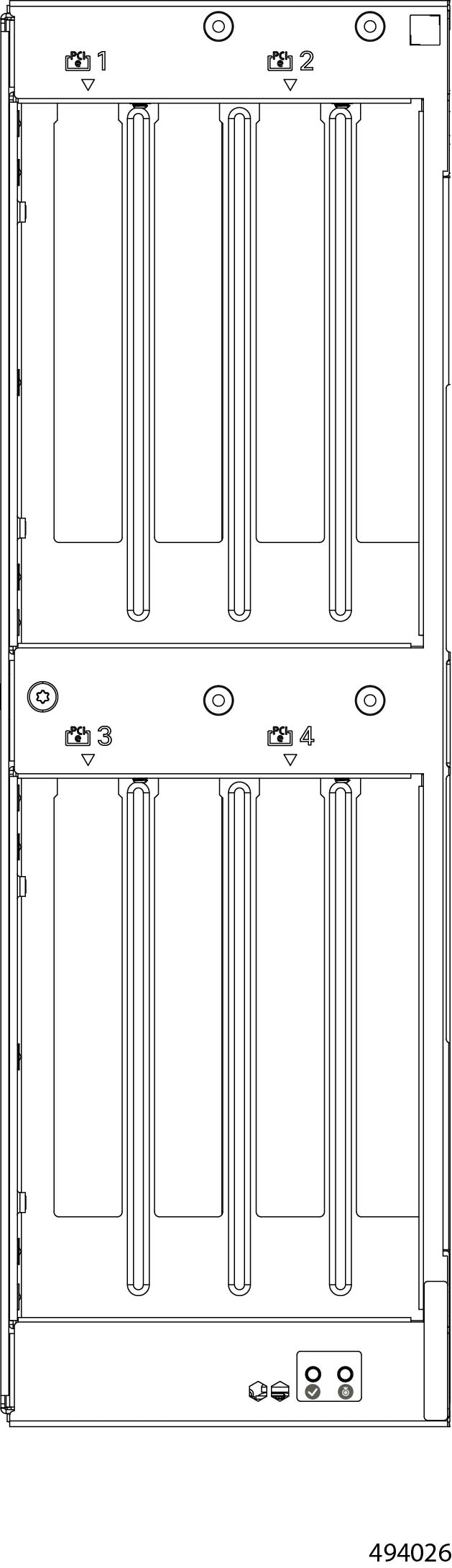
  • Two PCIe cages (numbered 1 and 2) that accept PCI cards to offer flexibility for your deployment. The XFM faceplate has identifiers for each slot at the upper left corner of the cage. For information about the supported Gen5 PCIe cards, see Cisco UCS X9516 Supported PCIe Cards.

  • Connectivity and operational information available through the LED cluster at the left edge of the XFM.

  • Ejector handles for tool-less installation and removal from the rear panel of the Cisco UCS X9508 server chassis that contains the XFMs.


    Caution


    Although the Cisco UCS X9516 Fabric Modules can be removed, the best practice is to leave them installed even during chassis installation.


Note


The following illustration shows the XFM populated with PCIe cards. Filler blanks are available. If the XFM will not contain any PCIe cards, each unused card slot must be covered with a filler blank.


1

Status LEDs:

  • Module Status (top LED)

  • Fan Status LEDs 1 through 3, with Fan 1 as LED 2, Fan 2 as LED 3, and Fan 3 as LED 4.

2

PCIe Cage 2

3

PCIe Card Slot 2

Supports one Gen5 x16 card

4

PCIe Card Slot 1

Supports one Gen5 x16 card

5

PCIe Cage 1

6

Module ejectors, two

One on the left of the module and one on the right

7

Module Ejector Handles, two

One per ejector, left and right

-

Cisco UCS X9516 Supported PCIe Cards

The UCS X9516 Fabric Modules offer customizable PCIe connectivity through two PCIe cages. Each cage can accept one of the following third-party PCIe Gen 5 x16 NICs for a total of two NICs per XFM:

  • NVIDIA ConnectX®-7 200/400G Network Adapter cards

Cisco UCS X-Fabric Module Blanks

The Cisco UCSX-9508-RBLK is Cisco UCS X-Fabric Module Blank slot which is used for providing future X-Fabric connectivity. Currently this module blank has active fans to facilitate airflow, and it is often called the Active Fan Module (AFM).

In a typical configuration, this module blank can be installed in either of the two bottom slots in the rear of the chassis below the IFM slots.


Caution


If your Cisco UCS X9508 server is configured so that no XFMs are installed, only XFM blanks, leave the blanks installed even during chassis installation.


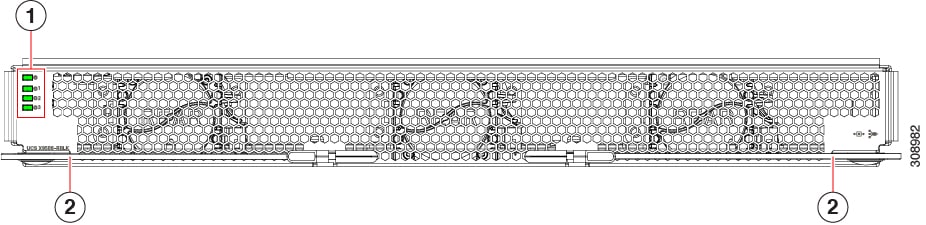
Figure 6. UCS X9508 Rear Module Blank (AFM), Faceplate View

1

Status LEDs:

  • Module Status (top LED)

  • Fan Status LEDs 1 through 3, with Fan 1 as LED 2, Fan 2 as LED 3, and Fan 3 as LED 4.

2

Module Ejector Handles, Left and Right


Note


For information about removing and installing the XFM's components, see Cisco UCS 9508 Active Fan Module (AFM) Field Replaceable Unit Replacement Instructions.


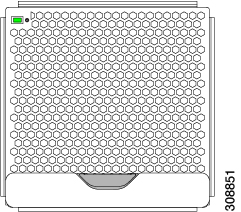
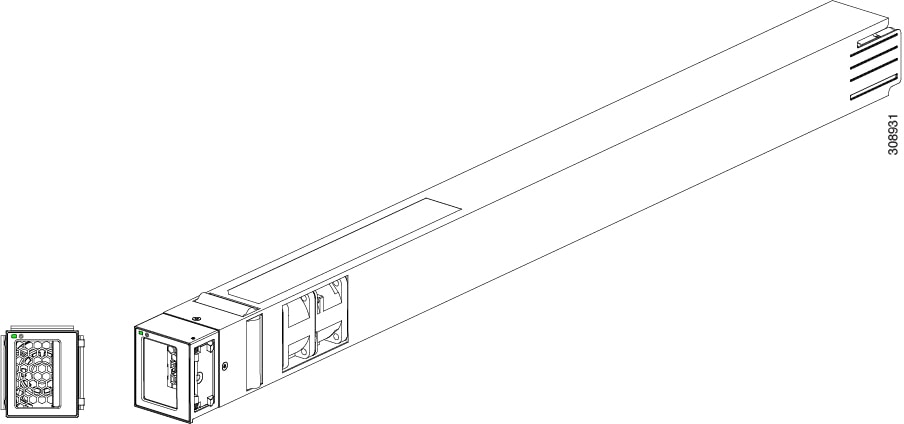
Fan Modules

The chassis contains 4 fan modules, with the minimum configuration of 4 fan modules for optimal cooling. Fans draw air in through the front of the chassis (the cool aisle) and exhaust air through the back of the chassis (the hot aisle)

Fans are located in the middle of the server chassis rear panel. Fans are numbered one to four starting with the leftmost fan.

Figure 7. Fan Module

Power Supplies

The chassis supports up to 6 AC power supplies (PSUs), with the minimum configuration of 2 PSUs required. They are Titanium certified 2800W capable AC Power Supply Units (PSUs) that support input power from AC sources.

PSUs are redundant and load-sharing and can be used in the following power modes:

  • N+1 power supply configuration, where N is the number of power supplies required to support system power requirements

  • N+2 power supply configuration, where N is the number of power supplies required to support system power requirements

  • Grid configuration, which is also known as N+N power supply configuration, in which N is the amount of power supplies required to support the system power requirements.


Note


The chassis requires a minimum of two PSUs to operate.


Figure 8. AC Power Supply

To determine the number of power supplies needed for a given configuration, use the Cisco UCS Power Calculator tool.

LEDs

One LED indicates power connection presence, power supply operation, and fault states. See Interpreting LEDs for details.

Buttons

There are no buttons on a power supply.

Connectors

The AC power connections are at the rear of the chassis on the Power Entry Module (PEM) to support AC input from the facility. The chassis has two PEMs (PEM 1 and PEM 2), and each supports 3 power supplies.

  • PEM 1 supports PSUs 1, 2, and 3.

  • PEM 2 supports PSUs 4, 5, and 6.

Each of the six hot-swappable power supplies is accessible from the front of the chassis. These power supplies are Titanium efficiency, and they can be configured to support non-redundant, N+1 redundant, N+2 redundant, and grid-redundant configurations.

Power Supply Configuration

When considering power supply configuration, you need to take several things into consideration:

  • AC power supplies are all single phase and have a single input for connectivity to its respective PEM. The customer power source (a rack PDU or equivalent) connects input power directly to the chassis power entry module (PEM), not the actual AC power supplies.

  • The number of power supplies required to power a chassis varies depending on the following factors:

    • The total "Maximum Draw" required to power all the components configured within that chassis—such as intelligent fabric modules (IFMs), fans, compute nodes (CPU and memory configuration of the compute nodes).

    • The Desired Power configuration for the chassis. The chassis supports non-redundant power supply configuration, N+1 power supply configuration, N+2 power supply configuration, and grid power supply configuration, which is also known as N+N redundancy. The system also supports an Extended Power mode.

    • The load is balanced across all active power supplies excluding power supplies in the standby mode.

  • When connecting the chassis to facility power, make sure not to overload the capacity of a PDU or power strip, for example, by connecting all PSUs to one PDU or power strip that is not capable of carrying the total power draw of the chassis.

Power Save Mode

If the Power Save mode is enabled in the Power policy of the Chassis Profile, power supplies that are not needed to meet the current power demand will be placed into standby mode and will not share the power load. Power supplies required to maintain power supply redundancy will remain active and will not enter standby. Power supplies in standby mode will automatically turn on if the power demand increases or if there is a failure in an active power supply.

Extended Power Mode

The Cisco UCS X9508 Server Chassis supports an Extended Power mode that allows the chassis to utilize an additional 15% of the redundant power reserve. If a power supply fails, the extended power from that failed supply is lost. In response, the chassis limits power consumption to the remaining extended power available from the other redundant power supplies. If no redundant power supplies remain, the chassis limits power to the non-extended power value.

To protect the system from power faults, the chassis includes a hardware mechanism known as the "emergency brake". The "emergency brake" activates if the actual power demand exceeds the non-extended power limit, and it limits power consumption faster than the remaining PSUs can reach an over-current state or cause a power distribution unit (PDU) breaker to trip. Once the power demand falls below the limit, the emergency brake is released, and normal server throttling is used to maintain power under the cap.

Non-Redundant Mode

In non-redundant mode, the system may go down with the loss of any supply or power grid associated with any particular chassis. We do not recommend operating the system in non-redundant mode in a production environment.

To operate in non-redundant mode, each chassis should have at least two power supplies installed. The supplies that are placed into standby depends on the installation order (not on the slot number). The load is balanced across active power supplies, not including any supplies in standby.

The chassis requires a minimum of 2 power supplies. In cases of low-line operation, the total available power is 1400W each for a total of 2800W. Do not attempt to run the chassis on less than the minimum number of power supplies.


Note


In a non-redundant system, power supplies can be in any slot. Installing less than the required number of power supplies results in undesired behavior such as compute node shutdown. Installing more than the required amount of power supplies may result in lower power supply efficiency. At a minimum, this mode will require two power supplies.


Consideration for Non-Redundant Power Mode

When the chassis is configured for non-redundant power mode, any PSUs you select can be put into standby mode. In this mode, the PSUs do not actively supply power. Instead, the PSUs are online standbys. For more information about non-redundant power mode, see Non-Redundant Mode.

When the chassis is in non-redundant power mode and multiple PSUs are installed, through Intersight you can configure the server chassis for Power Save Mode. In this mode, any unused PSUs are put into standby mode. They are not actively providing power.

In non-redundant mode and when Power Save Mode is enabled, the server chassis can have one or more active PSUs and one or more standby PSUs. In this configuration, if all active PSUs fail either simultaneously or almost simultaneously, a timing issue can prevent the server chassis from having sufficient time to activate the standby PSUs. As a result, the server chassis may experience a brownout condition.
  • You can avoid this consideration by not enabling Power Save Mode.

  • You can recover from this consideration by power cycling or rebooting the server chassis. If PSUs are powered cycled, the chassis automatically power cycles. Based on the settings in the Server Profiles for the installed servers or compute nodes, servers might or might not power on. Based on the number of servers that power on, the brownout condition can be cleared.

N+1 Power Supply Configuration

In an N+1 configuration, the chassis contains a total number of power supplies to satisfy system power requirements, plus one additional power supply for redundancy. Any additional power supplies may be placed into Standby mode, if the Standby mode is enabled in the Power Policy of the Chassis Profile.


Note


In an N+1 configuration, a maximum power of 14kW is delivered with five PSUs configured as Active while the remaining one PSU is in standby mode. The 14kW maximum delivered power is only possible at high input voltage range (200-240VAC). In low input voltage range (100-127VAC nominal), the maximum delivered power would be 7kW.


If one Active power supply should fail, the surviving supplies can provide power to the chassis, until the Standby power supply can be switched to Active status. In addition, Cisco Intersight turns on any "turned-off" power supplies to bring the system back to N+1 status. The system will continue to operate, giving you a chance to replace the failed power supply.

N+2 Power Supply Configuration

In an N+2 configuration, the chassis contains a total number of power supplies to satisfy system power requirements, plus two additional power supplies for redundancy. Any additional power supplies may be placed into Standby mode, if the Standby mode is enabled in the Power Policy of the Chassis Profile.


Note


In N+2 redundant mode, a maximum power load of 11.2KW is supported with four active modules. The 11.2KW maximum power load is only possible at high input voltage range (200-240VAC). In low input voltage range (100-127VAC nominal), the maximum delivered power would be 5.6KW.


If one or two power supplies should fail, the surviving supplies can provide power to the chassis. In addition, the Cisco Intersight interface supports turning on any "turned-off" power supplies to bring the system back to N+2 status.

Grid Configuration

With grid power configuration (also called N+N redundancy), each set of three PSUs has its own input power circuit, so each set of PSUs is isolated from any failures that might affect the other set of PSUs. If one input power source fails, causing a loss of power to three power supplies, the surviving power supplies on the other power circuit continue to provide power to the chassis. The two power sources in the chassis are defined by the Power Entry Module (PEM) boundaries: PEM1 corresponds to source 1 and connects to power supplies 1-3, while PEM2 corresponds to source 2 and connects to power supplies 4-6. For Grid mode operation, it is required to have an even number of power supplies that are equally distributed across these two PEMs.


Caution


Grid redundant mode requires the chassis load to be limited to 8.4kW for high input voltage range (200-240VAC) and 4.2kW for low input power range for a maximum grid configuration (3+3). For a 2+2 minimum configuration, the chassis load is limited to 5.6kW for high line input voltage and 2.8kW for low line input voltage.

If Extended Power Mode is enabled in the Power policy of the Cisco UCS X9508 Chassis Profile, the power limit is increased by 15%. Specifically:

  • For a 6 PSU configuration in Grid mode, the normal power limit is 8400W. With Extended Power Mode enabled, this limit increases to 9660W total, which corresponds to 1610W per PSU or 4830W per power grid (PEM) under high line/low line conditions.

  • For a 4 PSU configuration, the power limit increases to 6440W total (3220W per power grid).


Grid redundant mode is configured when:

  • all six PSUs are in Active mode to provide power

  • two sets of three PSUs are each connected to separate facility input power sources, including separate cabling for each set

  • For grid redundant mode, the total number of PSUs should always be divided equally. So, a grid power configuration supports 3+3 (maximum configuration per input power source) or 2+2 (minimum configuration per power input source).

The grid power configuration is primarily used when you have two separate facility input power sources available to a chassis. A common reason for using this power supply configuration is if the rack power distribution is such that power is provided by two PDUs and you want redundant protection in the case of a PDU failure or to allow continued operation during power facilities maintenance.

LEDs

LEDs on both the chassis and the modules installed within the chassis identify operational states, both separately and in combination with other LEDs.

LED Locations

The UCS X9508 server chassis uses LEDs to indicate power, status, location/identification. Other LEDs on IFMs, PSUs, fans, and compute nodes indicate status information for those elements of the system.

Figure 9. LEDs on a Cisco UCS X9508 Server Chassis—Front View
Figure 10. LEDs on the Cisco UCS X9508 Server Chassis—Rear View

Interpreting LEDs

Table 2. Chassis, System Fans, and Power Supply LEDs

LED

Color

Description

Locator

LED and button

(callout 1 on the chassis front panel)

Off

Locator not enabled.

Blue

Locates a selected chassis

You can initiate beaconing in UCS Intersight or with the button, which toggles the LED on and off.

Network Status

(callout 1 on the chassis front panel)

Off

Network link state undefined.

Solid Green

Network link state established on at least one IFM, but no traffic detected.

Blinking Green

Network traffic detected on at least one IFM.

System Status

(callout 1 on the chassis front panel)

Solid amber

Chassis is in a degraded operational state. For example:

  • Power Supply Redundancy Lost

  • Mismatched Processors

  • 1 on N Processors Faulty

  • Memory RAS Failure

  • Failed Storage Drive/SSD

Solid Green

Normal operating condition.

Blinking Amber

Chassis is in a critical error state. For example:

  • Boot Failure

  • Fatal Processor and/or bus error detected

  • Loss of both I/O Modules

  • Over Temperature Condition

Off

System is in an undefined operational state or not receiving power.

Fan Module

(callout 3 on the Chassis Rear Panel)

Off

No power to the chassis or the fan module was removed from the chassis.

Amber

Fan module restarting.

Green

Normal operation.

Blinking amber

The fan module has failed.

Power Supplies, each has one a bicolor LED

(callout 2 on the Chassis Front Panel)

Off

Power supply is not fully seated, so no connection exists.

Green

Normal operation.

Blinking green

AC power is present, but the power supply is in Standby mode.

Amber

Any fault condition is detected. Some examples:

  • Over or under voltage

  • Over temperature alarm

  • Power supply has no connection to a power cord.

Blinking Amber

Any warning condition is detected. Some examples:

  • Over voltage warning

  • Over temperature warning

Table 3. Intelligent Fabric Module and Rear Module Blank LEDs

LED

Color

Description

Module Status

(callout 1 and 4 on the Chassis Rear Panel)

Off

No power.

Green

Normal operation.

Amber

Booting or minor temperature alarm.

Blinking amber

POST error or other error condition.

Module Fans

(callout 1 and 4 the Chassis Rear Panel)

Off

Link down.

Green

Link up and operationally enabled.

Amber

Link up and administratively disabled.

Blinking amber

POST error or other error condition.

Table 4. Compute Node Server LEDs

LED

Color

Description

Compute Node Power

(callout 3 on the Chassis Front Panel)

Off

Power off.

Green

Normal operation.

Amber

Standby.

Compute Node Activity

(callout 3 on the Chassis Front Panel)

Off

None of the network links are up.

Green

At least one network link is up.

Compute Node Health

(callout 3 on the Chassis Front Panel)

Off

Power off.

Green

Normal operation.

Amber

Degraded operation.

Blinking Amber

Critical error.

Compute Node Locator

LED and button

(callout 3 on the Chassis Front Panel)

Off

Locator not enabled.

Blinking Blue 1 Hz

Locates a selected compute node—If the LED is not blinking, the compute node is not selected.

You can initiate the LED in UCS Intersight or by pressing the button, which toggles the LED on and off.

Drive Activity

Off

Inactive.

Green

Outstanding I/O to disk drive.

Drive Health

Off

No fault detected, the drive is not installed, or it is not receiving power.

Amber

Fault detected

Flashing Amber 4 Hz

Rebuild drive active.

If the Drive Activity LED is also flashing amber, a drive rebuild is in progress.

Optional Hardware Configuration

As an option, the server chassis can support a GPU-based PCIe node that pairs with Cisco UCS X-Series compute nodes to provide GPU acceleration. The following PCIe nodes are supported.

  • The Cisco UCS X440p PCIe Node, which offers:

    • A GPU adapter node supporting zero, one or two GPUs through two separate GPU cages. For information about supported GPUs, see the Cisco UCS X440p PCIe Node Spec Sheet.

    • Each GPU installs directly into the GPU adapter card by a x8 Gen 4 PCI connection.

    • A storage adapter and riser card supporting zero, one, or two U.2 NVMe drives. NVMe RAID is supported through Intel VROC key on connected M6 compute nodes only.


      Note


      For the Cisco UCS X9508 chassis to support any number of Cisco UCS X440p PCIe Nodes, both Cisco UCS X9416 Fabric Modules must be installed to provide proper PCIe signaling and connectivity to the node slots on the front of the server chassis.


  • The Cisco UCS X580p PCIe Node, which offers:

    • A GPU adapter node supporting zero through four GPUs through two separate PCIe cages. For information about supported GPUs, see the Cisco UCS X580p PCIe Node Spec Sheet.

    • Each GPU installs directly into a GPU cage by x16 Gen5 PCIe connection

    • Each PCIe node can connect to up to two separate M8 compute nodes.


      Note


      For the Cisco UCS X9508 chassis to support any number of Cisco UCS X580p PCIe Nodes, both Cisco UCS X9516 Fabric Modules must be installed to provide proper PCIe signaling and connectivity to the node slots on the front of the server chassis.

      • For information about the optional Cisco UCS X580p PCIe node, go to the Cisco UCS X580p PCIe Node Installation and Service Guide.

      • For information about the Cisco UCS X9516 Fabric Module, see Cisco UCS X9516 Fabric Module.