Product Overview

Fabric Interconnect Features

A Cisco UCS 6300 Series Fabric Interconnect provides both network connectivity and management capabilities to a Cisco UCS system. The fabric interconnect provides Ethernet and Fibre Channel to the servers in the system, the servers connect to the fabric interconnect, and the fabric interconnect connects to the LAN or SAN.

Each Cisco UCS 6300 Series Fabric Interconnect runs Cisco UCS Manager to fully manage all Cisco UCS elements. The fabric interconnect supports full end-to-end 40-Gigabit capabilities in the fabric and enables 16-Gigabit Fibre Channel capabilities. High availability can be achieved when a Cisco UCS 6300 Series Fabric Interconnect is connected to another Cisco UCS 6300 Series Fabric Interconnect through the L1 or L2 port on each device.

The Cisco UCS 6300 Series Fabric Interconnect joins next-generation UCS products, including the following hardware:

  • Cisco UCS 6332 Fabric Interconnect, an Ethernet or Fibre Channel over Ethernet (FCoE) chassis with 32 40-Gigabit QSFP+ ports

  • Cisco UCS 6332-16UP Fabric Interconnect, an Ethernet, FCoE, and Fibre Channel chassis with 16 1- or 10-Gigabit SFP+ ports or 16 4-, 8-, or 16-Gigabit Fibre Channel ports, 24 40-Gigabit QSFP+ ports

  • Cisco 2304 IOM , I/O module with 8 40-Gigabit backplane ports and 4 40-Gigabit uplink ports

  • Multiple VICs

Cisco UCS 6332 Fabric Interconnect

The Cisco UCS 6332 Fabric Interconnect is a 1 RU, top-of-rack switch with 32 40-Gigabit QSFP+ ports, one 100/1000 network management port, one RS-232 console port for setting the initial configuration, and two USB ports for saving or loading configurations. The switch also includes an L1 port and an L2 port for connecting two fabric interconnects to provide high availability. The switch mounts in a standard 19-inch rack, such as the Cisco R Series rack.

Cooling fans pull air front-to-rear. That is, air intake is on the fan side and air exhaust is on the port side.

Figure 1. Cisco UCS 6332 Fabric Interconnect Rear View

1

Port lane switch button, port lane LEDs, and L1 and L2 ports. For additional information about the port lane switch and LEDs, see Lane Switch and LEDs.

2

Ports 1–12 and ports 15–26 can operate as 40-Gbps QSFP+ ports, or as 4 x 10-Gbps SFP+ breakout ports.

Ports 1 - 4 support Quad to SFP or SFP+ (QSA) adapters to provide 1-Gbps/10 Gbps operation.

Ports 13 and 14 can operate as 40-Gbps QSFP+ ports. They cannot operate as 4 x 10-Gbps SFP+ breakout ports.

3

Ports 27–32 operate as 40-Gbps QSFP+ ports.

For additional information about the port groups, see Port Numbering.

Figure 2. Cisco UCS 6332 Fabric Interconnect Front View


1

Power supply and power cord connector

2

Fans1 through 4, numbered left to right, when facing the front of the chassis

3

Management, console, and USB ports, and LEDs. For more information about the connections ports and LEDs, see Connection Ports and LEDs.

Cisco UCS 6332-16UP Fabric Interconnect

The Cisco UCS 6332-16UP Fabric Interconnect is a 1 RU top-of-rack switch with 24 40-Gb QSFP+ ports, 16 10-Gb SFP ports, one 100/1000 network management port, one RS-232 console port for setting the initial configuration, and two USB ports for saving or loading configurations. The switch also includes an L1 port and an L2 port for connecting two fabric interconnects to provide high availability. The switch mounts in a standard 19-inch rack, such as the Cisco R Series rack.

Cooling fans pull air front-to-rear. That is, air intake is on the fan side and air exhaust is on the port side.

Figure 3. Cisco UCS 6332-16UP Fabric Interconnect Rear View

1

Port lane switch button, port lane LEDs, and L1 and L2 ports. For more information about the port lane switch, see Lane Switch and LEDs.

2

Ports 1–16 are Unified Ports (UP) that operate either as 1- or 10-Gbps SFP+ fixed Ethernet ports; or as 4-, 8-, or 16-Gigabit Fibre Channel ports.

3

Ports 17–34 operate either as 40-Gbps QSFP+ ports, breakout mode for 4 x 10-Gigabit SFP+ breakout ports, or QSA for 10G.

4

Ports 35–40 operate as 40-Gbps QSFP+ ports.

Figure 4. Cisco UCS 6332-16UP Fabric Interconnect Front View


1

Power supply and power cord connector

2

Fans1 through 4, numbered left to right, when facing the front of the chassis

3

Management, console, and USB ports, and LEDs. For more information about the connection ports, see Connection Ports and LEDs.

Ports on the Cisco UCS 6300 Fabric Interconnects

Ports on the Cisco UCS 6300 Series can be configured to carry either Ethernet or Fibre Channel traffic. These ports are not reserved. They cannot be used by a Cisco UCS domain until you configure them.


Note


When you configure a port on a fabric interconnect, the administrative state is automatically set to enabled. If the port is connected to another device, this may cause traffic disruption. You can disable the port after it has been configured.


The following table summarizes the second and third generation ports for the Cisco UCS fabric interconnects.

Cisco UCS Mini

Second Generation

Third Generation

Item

Cisco UCS 6324

Cisco UCS 6248 UP

Cisco UCS 6296 UP

Cisco UCS 6332

Cisco UCS 6332-16UP

Description

Fabric Interconnect with 4 ports and 1 scalability port

48-Port Fabric Interconnect

96-Port Fabric Interconnect

32-Port Fabric Interconnect

40-Port Fabric Interconnect

Form factor

1 RU

1 RU

2 RU

1 RU

1 RU

Number of fixed 10 GB Interfaces

4

32

48

96 (24 X 4 using 4 x10G breakout cables), QSA

88 (18 x 4 using 4 x 10G breakout cables)

Number of 1GB Interfaces (depending on the SFP module installed)

4

32

48

4 (only ports 1 - 4 with QSA adapter)

Ports 1-16

Unified Ports ( 8-, 4-, 2-, 1- Gbps, FC, FCoE)

4

All

All

None

None

Number of 40-Gbps ports

1

32

24

Unified Ports(1- or 10 Gbps Ethernet, or 4-, 8-, or 16-Gbps, Fibre Channel)

None

None

None

Ports 1-16

Compatibility with the IOM

N/A

UCS 2204, UCS 2208

UCS 2204, UCS 2208

All

All

Expansion Slots

1 (16 port)

3 (16 port)

None

None

Fan Modules

2

5

5

4

Power Supplies

2 (AC/DC available)

2 (AC/DC available)

2 (AC/DC/HVDC available)

2 (AC/DC/HVDC available)


Note


The third-generation ports support breakout capability. For more information on how the 40-Gigabit Ethernet ports can be converted into 4 X 10-Gigabit Ethernet ports, see http://www.cisco.com/c/en/us/td/docs/unified_computing/ucs/ucs-manager/GUI-User-Guides/Getting-Started/3-1/b_UCSM_Getting_Started_Guide_3_1/b_UCSM_Initial_Configuration_Guide_3_0_chapter_011110.html.


Port Numbering

Ports on the Cisco UCS 6332 Fabric Interconnect are numbered and grouped according to their function. The ports are numbered top to bottom and left to right. The following figure shows the port numbering.

Figure 5. Cisco UCS 6332 Fabric Interconnect Port Numbers


1

Ports 1–12. Each port can operate as either a 40-Gbps QSFP+ port or as 4 x 10-Gbps SFP+ breakout ports.

Ports 1 - 4 support Quad to SFP or SFP+ (QSA) adapters to provide 1-Gbps/10-Gbps operation.

2

Ports 13–14. Each port operates as a 40-Gbps QSFP+ port. These two ports cannot operate as 4 x 10-Gbps SFP+ breakout ports.

3

Ports 15–26. Each port can operate as either a 40-Gbps QSFP+ port or as 4 x 10-Gbps SFP+ breakout ports.

4

Ports 28–32. Each port operates as a dedicated 40-Gbps QSFP+ port.

Ports on the Cisco UCS 6332-16UP Fabric Interconnect are numbered and grouped according to their function. The ports are numbered top to bottom and left to right. The following figure shows the port numbering.

Figure 6. Cisco UCS 6332-16UP Fabric Interconnect Port Numbers


1

Ports 1–16. These ports are universal ports that operate as 1- or 10-Gbps fixed Ethernet or as 4-, 8-, or 16-Gbps Fibre Channel.

2

Ports 17–34. Each port operates as either 40-Gbps QSFP+ port, breakout mode for 4 x 10-Gigabit SFP+ breakout port, or QSA for 10G.

3

Ports 35–40. Each port operates as a fixed 40-Gbps QSFP+ port.

4

Port Breakout Feature

Both the Cisco UCS 6332 fabric interconnect and the Cisco UCS 6332-16UP fabric interconnect have ports that can be configured for the breakout feature that supports connectivity between 40-Gigabit Ethernet ports and 10-Gigabit Ethernet ports. This feature provides backward compatibility to existing hardware that supports 10-Gigabit Ethernet. A 40-Gigabit Ethernet port can be used as 4 10-Gigabit Ethernet ports. Using a 40-Gigabit Ethernet SFP, these ports on the UCS 6300 Series fabric interconnect can be configured as an appliance port, server port (IOM, Fabric Extender, or C-series server), uplink, FCoE uplink and/or FCoE storage port.

The breakout feature can be configured on ports 1 to 12 and ports 15 to 26 on the Cisco UCS 6332 fabric interconnect. Ports 17 to 34 on the Cisco UCS 6332-16UP fabric interconnect support the breakout feature. For information on how to configure the breakout feature, see the Getting Started Guide for the latest release of Cisco UCS Manager. The configuration guides are available at this URL: http://www.cisco.com/c/en/us/support/servers-unified-computing/ucs-manager/products-installation-and-configuration-guides-list.html.


Note


Configuring the breakout feature requires a reboot of the fabric interconnect.

Power Supplies

The fabric interconnect has two power supplies that are accessible from the rear of the chassis. Two power supplies can be used for redundancy, but the fabric interconnect is fully functional with one power supply.

Table 1. Power Supply Models

Cisco PID

Fabric Interconnect

Source

Wattage

UCS-PSU-6332-AC

Cisco UCS 6332 and Cisco UCS 6332-16UP

110 to 240 VAC

650 W

UCS-PSU-6332-DC

Cisco UCS 6332 and Cisco UCS 6332-16UP

-48 VDC

930 W

N9K-PUV-1200W

Cisco UCS 6332 and Cisco UCS 6332-16UP

240 to 380 VDC

1230 W

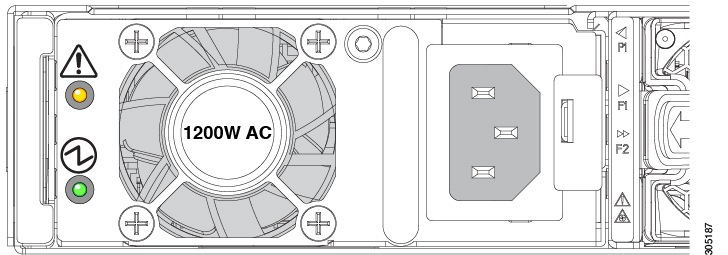
Figure 7. AC Power Supply for the Cisco UCS 6332 and UCS 6332-16UP Fabric Interconnect

Power supplies have two LEDs: one for power status and one for a failure condition.

1

Amber fault/error LED

2

Green power on LED

LED

State

Description

Power on LED

Solid green

Power supply is on and functioning properly

Power on LED

Blinking green

3.3 V voltage standby (VSB) is on but the power supply is not powering the other units

Power on LED

Off

There is no AC power to the power supply

Fault/error LED

Solid amber

Power supply failure that indicates an over voltage, over current, or over temperature

Fault/error LED

Blinking amber

AC power is present, 3.3 VSB is on, and the power supply is off

Fault/error LED

Off

Normal operation

If one power supply is installed in the chassis, but the other power supply slot is empty, a blank filler panel should be used to cover the empty slot.

LED Descriptions

The fabric interconnect has status LEDs and QSFP+ port LEDs .

Table 2. Status LEDs for the Cisco UCS 6300 Series Fabric Interconnect

LED

Color Location

Ports

Green and Yellow

Front and rear of chassis

Beacon

Blue

Front and rear of chassis

System Status

Green, Amber, or Red

Front and rear of chassis

Environment

Amber or Red

Rear of chassis

Power supply

Green or Amber

Front of chassis

Fan modules

Green or Amber

Front of chassis, integrated in the fan

QSFP+ port LEDs on the front of the chassis allow you to see the link status of the ports. When you press the push button on the front panel, a QSFP+ port LED shows the link and activity status for the selected lane, and one of the four green LEDs show which lane is selected. You can press the push button four times to check all four lanes of each QSFP+ port. After the fourth press, all LEDs turn off, indicating that the current link status is 40-Gbps mode, which is the default mode.

Lane Switch and LEDs

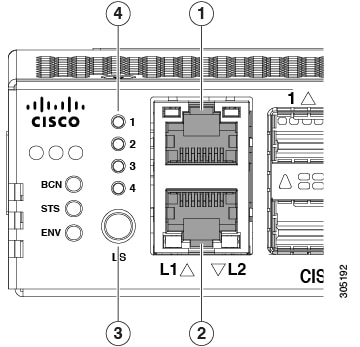
Both the Cisco UCS 6332 Fabric Interconnect and the UCS 6332-16UP Fabric Interconnect have a lane switch button and lane LEDs that are shown in the following figure:

Figure 8. Port Lane Switch, HA Ports, and LEDs


1

L1 highly available port

2

L2 highly available port

3

Lane switch

4

QSFP+ lane LEDs

The port lane switch operates as follows:

  • The default mode of operation after bootup is 40-Gbps. The LED on each individual port QSFP+ port indicates the 40-Gbps link status. The lane switch button is illuminated, but none of the four lane LEDs are illuminated.

  • Pressing the lane switch button for the first time causes the lane 1 LED to illuminate. The LED on each individual QSFP+ port represents the lane 1 status of the port.

  • Pressing the lane switch button for the second time causes the lane 2 LED to illuminate. The LED on each individual QSFP+ port represents the lane 2 status of the port.

  • Pressing the lane switch button for the third time causes the lane 3 LED to illuminate. The LED on each individual QSFP+ port represents the lane 3 status of the port.

  • Pressing the lane switch button for the fourth time causes the lane 4 LED to illuminate. The LED on each individual QSFP+ port represents the lane 4 status of the port.

  • Pressing the lane switch button again causes the 40-Gbps mode to be in effect again.

When you cycle the lane switch button, the LED of a QSFP+ port indicates the status of the different lanes. If a port is configured in breakout mode, the LED for a QSFP+ port is off when the lane LEDs are off. If a 40-Gbps port is not operating in breakout mode, and if the link is up, the LED on a QSFP+ port is green when all the lane LEDs are off. The LED turns off when you press the lane button to lane 1, 2, 3, or 4.

The QSFP+ port LEDs for ports 13 and 14 are always the same as the 40-Gbps mode status because those two ports cannot operate in breakout mode.

Connection Ports and LEDs

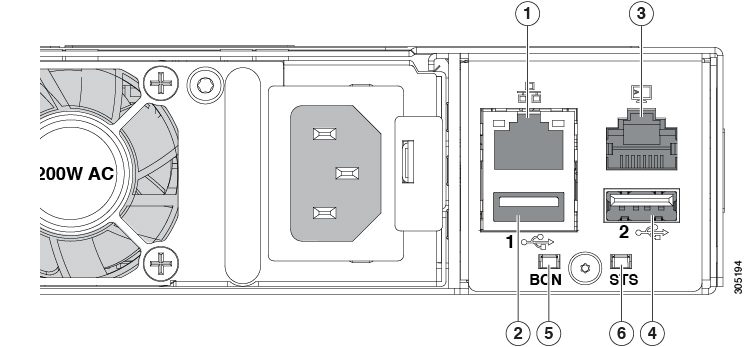
Both the Cisco UCS 6332 Fabric Interconnect and the UCS 6332-16UP Fabric Interconnect have the connection ports and LEDs shown in the following figure:

Figure 9. Connection Ports and LEDs


1

RJ45 network management port

2

USB port 1

3

RJ45 console port

4

USB port 2

5

Beaconing LED and button

6

System status LED

The status of the beacon and system LEDs are as follows:

LED

Location

Function

Color

State

Description

Beacon LED

Front and rear

Indicate selected chassis

Blue

Solid on

Chassis selected

Beacon LED

Front and rear

Indicate selected chassis

Blue

Off

Chassis not selected

System status LED

Front and rear

Indicate system power/health at bootup and run time

Green

Solid on

Normal operation

System status LED

Front and rear

Indicate system power/health at bootup and run time

Green

Off

System powered off

System status LED

Front and rear

Indicate system power/health at bootup and run time

Amber

On

System fault

System status LED

Front and rear

Indicate system power/health at bootup and run time

Red

Solid on

Power shut down by software

System status LED

Front and rear

Indicate system power/health at bootup and run time

Red

Blinking

Secure boot validation has failed

Management Port LEDs

The status of the management ports is listed below.

LED Position

LED State

Description

Left

Off

No link

Left

Solid green

Physical link

Right

Off

No activity

Right

Blinking green

Activity

System Environment LEDs

The system environment LED states are listed below.

LED State

Description

Solid amber

Minor fan alarm (a fan is missing or there is a failure)

Solid red

Major fan alarm (two or more fans are missing or have failed, or there is a fan direction mismatch

QSFP Port LEDs

The QSFP port LED states are listed below.

LED State

Description

Yellow

Enabled, but SFP not inserted

Green

Enabled and link is up

Off

Enabled, but link is not connected

Blinking yellow

Power On Self Test (POST) failed

Blinking yellow

Port beacon enabled

Yellow

Administrative (software shutdown)

L1 and L2 Port LEDs

The L1 and L2 port LED states are listed below.

LED Position

LED State

Description

Left

Off

No link

Left

Solid green

Physical link

Right

Off

No activity

Right

Blinking green

Activity

Supported Transceivers

The Cisco UCS 6300 Series Fabric Interconnects support SFP+ Ethernet transceivers, SFP transceivers, SFP+ transceivers, SFP+ copper twinax cables with integrated transceivers, SFP Fibre Channel transceivers, QSFP transceivers, and QSFP cables. Except where noted, both the UCS 6332 Fabric Interconnect and the UCS 6332-16UP Fabric Interconnect support all the transceivers listed in this section.

On the Cisco UCS 6332 Fabric Interconnect, all 1-Gigabit and 10-Gigabit transceivers and twinax cables must use a QSA module (CVR-QSFP-SFP10G) to operate in a 40-Gbps QSFP+ port. In addition, the QSA module is required for a 40-Gbps QSFP+ port to operate at 1 Gbps or 10 Gbps.

On the Cisco UCS 6332-16UP Fabric Interconnect, all 1-Gigabit and 10-Gigabit transceivers, Fibre Channel transceivers, and twinax cables must use a QSA module (CVR-QSFP-SFP10G) to operate in ports 17–40 (the 40-Gbps QSFP+ ports). Ports 1–16 operate as SFP+ universal ports that are capable of operating at 1- or 10-Gbps fixed Ethernet or 4-, 8-, or 16-Gbps Fibre Channel ports and do not need a QSFP to SFP+ adapter. In addition, the QSA module is required for a 40-Gbps QSFP+ port to operate at 1 Gbps or 10 Gbps.

SFP 1-Gigabit Transceivers

The SFP 1-Gigabit Ethernet transceiver module is a bidirectional device with a transmitter and receiver in the same physical package.

Table 3. Supported SFP Optical Transceivers

Model

Description

GLC-T

1000BASE-T standard

GLC-SX-MMD

1000BASE-SX short wavelength; with MDOM

SFP-GE-T

1000BASE-T SFP (NEBS 3 ESD)—supported only on the UCS 6332-16UP Fabric Interconnect


Note


The maximum length of fiber optic runs is limited to 300 meters. This is imposed by our use of 802.3X/802.1Qbb Priority Pauses. SFP-10G-LR is supported between fabric interconnect and I/O Module, but the 300 m limit still applies.


SFP+ Transceivers and SFP+ Copper Cables

The enhanced SFP+ 10-Gigabit Ethernet transceiver module is a bidirectional device with a transmitter and receiver in the same physical package. It has a 20-pin connector on the electrical interface and duplex LC connector on the optical interface.

Table 4. Supported Transceivers

Product ID

Description

SFP-10G-SR

10GBASE-SR SFP+ module (multimode fiber [MMF])

SFP-10G-SR -S

10GBASE-SR SFP+ module (multimode fiber [MMF], S-Class)

SFP-10G-LR

10GBASE-LR SFP+ module (single-mode fiber [SMF])

SFP-10G-LR -S

10GBASE-LR SFP+ module (single-mode fiber [SMF], S-Class)

FET-10G

Cisco 10G Line Extender for FEX

SFP+ Copper Cables with Integrated Transceivers

SFP-H10GB-CU1M

10GBASE-CU SFP+ cable 1 meter, passive

SFP-H10GB-CU2M

10GBASE-CU SFP+ cable 2 meter, passive

SFP-H10GB-CU3M

10GBASE-CU SFP+ cable 3 meter, passive

SFP-H10GB-CU5M

10GBASE-CU SFP+ cable 5 meter, passive

SFP-H10GB-ACU7M

10GBASE-CU SFP+ cable 7 meter, active

SFP-H10GB-ACU10M

10GBASE-CU SFP+ cable 10 meter, active

SFP-10G-AOC1M

10GBASE-AOC SFP+ cable 1 meter

SFP-10G-AOC2M

10GBASE-AOC SFP+ cable 2 meter

SFP-10G-AOC3M

10GBASE-AOC SFP+ cable 3 meter

SFP-10G-AOC5M

10GBASE-AOC SFP+ cable 5 meter

SFP-10G-AOC7M

10GBASE-AOC SFP+ cable 7 meter

SFP-10G-AOC10M

10GBASE-AOC SFP+ cable 10 meter


Note


The maximum length of fiber optic runs is limited to 300 meters. This is imposed by our use of 802.3X/802.1Qbb Priority Pauses. SFP-10G-LR is supported between fabric interconnect and FEX, but the 300 m limit still applies.


QSFP Transceivers and Cables

The Cisco UCS 6300 Series Fabric Interconnects support Cisco 40GGBASE Quad Small Form Factor (QSFP) transceiver modules.

Table 5. Supported QSFP Transceivers and Cables

Model

Description

QSFP-40G-SR4

40GBASE-SR4 QSFP module (multimode fiber [MMF]), 100 meter

QSFP-40G-SR4-S

40GBASE-SR4 QSFP module (multimode fiber [MMF]), 100 meter

QSFP-40G-CSR4

40GBASE Extended CSR4 QSFP module (MMF), 300 meter

QSFP-40G-LR4

Cisco 40GBASE-LR4 QSFP+ transceiver module for SMF, duplex LC connector

QSFP-40G-LR4-S

Cisco 40GBASE-LR4 QSFP+ transceiver module for SMF, duplex LC connector

QSFP-40G-SR-BD

Cisco QSFP40G BiDi Short-reach transceiver

FET-40G

Cisco 40G Line Extender for FEX

QSFP-4x10G-AC7M

Cisco 40GBASE-CR4 QSFP+ to 4 10GBASE-CU SFP+ active direct-attached breakout cable, 7 meter

QSFP-4x10G-AC10M

Cisco 40GBASE-CR4 QSFP+ to 4 10GBASE-CU SFP+ active direct-attached breakout cable, 10 meter

QSFP-H40G-CU1M

Cisco 40GBASE-CR4 SFP+ passive direct-attach copper cable, 1 meter

QSFP-H40G-CU3M

Cisco 40GBASE-CR4 SFP+ passive direct-attach copper cable, 3 meter

QSFP-H40G-CU5M

Cisco 40GBASE-CR4 SFP+ passive direct-attach copper cable, 5 meter

QSFP-H40G-ACU7M

Cisco 40GBASE-CR4 SFP+ active direct-attach copper cable, 7 meter

QSFP-H40G-ACU10M

Cisco 40GBASE-CR4 SFP+ active direct-attach copper cable, 10 meter

QSFP-4SFP10G-CU1M

Cisco 40GBASE-CR4 QSFP+ to 4 10GBASE-CU SFP+ passive direct-attach copper transceiver assembly, 1 meter

QSFP-4SFP10G-CU3M

Cisco 40GBASE-CR4 QSFP+ to 4 10GBASE-CU SFP+ passive direct-attach copper transceiver assembly, 13 meter

QSFP-4SFP10G-CU5M

Cisco 40GBASE-CR4 QSFP+ to 4 10GBASE-CU SFP+ passive direct-attach copper transceiver assembly, 5 meter

QSFP-4X10G-AOC1M

Cisco 40GBASE-AOC QSFP TO 4 SFP+ Active Optical breakout Cable, 1 meter

QSFP-4X10G-AOC2M

Cisco 40GBASE-AOC QSFP TO 4 SFP+ Active Optical breakout Cable, 2 meter

QSFP-4X10G-AOC3M

Cisco 40GBASE-AOC QSFP TO 4 SFP+ Active Optical breakout Cable, 3 meter

QSFP-4X10G-AOC5M

Cisco 40GBASE-AOC QSFP TO 4 SFP+ Active Optical breakout Cable, 5 meter

QSFP-4X10G-AOC7M

Cisco 40GBASE-AOC QSFP TO 4 SFP+ Active Optical breakout Cable, 7 meter

QSFP-4X10G-AOC10M

Cisco 40GBASE-AOC QSFP TO 4 SFP+ Active Optical breakout Cable, 10 meter

QSFP-H40G-AOC1M

Cisco 40GBASE-AOC QSFP direct-attach Active Optical Cable, 1 meter

QSFP-H40G-AOC2M

Cisco 40GBASE-AOC QSFP direct-attach Active Optical Cable, 2 meter

QSFP-H40G-AOC3M

Cisco 40GBASE-AOC QSFP direct-attach Active Optical Cable, 3 meter

QSFP-H40G-AOC5M

Cisco 40GBASE-AOC QSFP direct-attach Active Optical Cable, 5 meter

QSFP-H40G-AOC7M

Cisco 40GBASE-AOC QSFP direct-attach Active Optical Cable, 7 meter

QSFP-H40G-AOC10M

Cisco 40GBASE-AOC QSFP direct-attach Active Optical Cable, 10 meter

QSFP-H40G-AOC15M

Cisco 40GBASE-AOC QSFP direct-attach Active Optical Cable, 15 meter

CVR-QSFP-SFP10G

Cisco 40GBASE QSFP to SFP+ and SFP adapter


Note


The Cisco UCS 6332 Fabric Interconnect does not support passive copper CR4 cables in ports 27 through 32 because these ports do not support negotiate auto. All other 40-Gigabit ports on the Cisco UCS 6332 Fabric Interconnect support passive copper CR4 cables.

The Cisco UCS 6332-16UP Fabric Interconnect does not support passive copper CR4 cables in ports 35 through 40 because these ports do not support negotiate auto. All other 40-Gigabit ports on the Cisco UCS 6332-16UP Fabric Interconnect support passive copper CR4 cables.


SFP Fibre Channel Transceivers

The Cisco UCS 6332-16UP Fabric Interconnect supports the SFP Fibre Channel transceivers listed below. These transceivers are not supported on the UCS 6332 Fabric Interconnect.

Table 6. SFP Fiber Channel Transceivers

Model

Description

DS-SFP-FC4G-SW

4 Gbps Fibre Channel-SW SFP, LC

DS-SFP-FC8G-SW

8-Gbps Fibre Channel SW SFP+, LC

DS-SFP-FC8G-LW

8-Gbps Fibre Channel LW SFP+, LC

DS-SFP-FC16G-SW

16-Gbps Fibre Channel SW SFP+, LC


Note


The maximum length of fiber optic runs from the fabric interconnect to a chassis is limited to 300 meters. This restriction is imposed by the use of 802.3X/802.1Qbb Priority Pauses.