Adaptive Solutions OpenShift Container Platform 4.19 with OpenShift Virtualization Design Guide
Available Languages
Bias-Free Language
The documentation set for this product strives to use bias-free language. For the purposes of this documentation set, bias-free is defined as language that does not imply discrimination based on age, disability, gender, racial identity, ethnic identity, sexual orientation, socioeconomic status, and intersectionality. Exceptions may be present in the documentation due to language that is hardcoded in the user interfaces of the product software, language used based on RFP documentation, or language that is used by a referenced third-party product. Learn more about how Cisco is using Inclusive Language.
- US/Canada 800-553-2447
- Worldwide Support Phone Numbers
- All Tools
 Feedback
 Feedback
In partnership with:

About the Cisco Validated Design Program
The Cisco Validated Design (CVD) program consists of systems and solutions designed, tested, and documented to facilitate faster, more reliable, and more predictable customer deployments. For more information, go to: https://www.cisco.com/go/designzone
Executive Summary
Cisco and Hitachi are introducing Adaptive Solutions OpenShift Container Platform 4.19 with OpenShift Virtualization as a validated reference architecture, documented as a Cisco Validated Design (CVD). This converged infrastructure design presents a compelling solution as the industry begins to rethink their data center footprints as containers have become standard and virtualization implementations are being reconsidered.
This solution incorporates Red Hat OpenShift for a unified portal for both containers and virtualization, powered by industry-leading Hitachi storage and Cisco compute, provides a robust, high-performance, and scalable data center architecture managed by Cisco Intersight. Trusted by global customers for their mission-critical applications and data, this hybrid cloud platform helps accelerate application performance, boost efficiency, and deliver unparalleled data availability while supporting sustainability goals.
Some of the key advantages of this design include:
● Run containerized and VM workloads alongside each other in a cluster: Red Hat OpenShift Container Platform (OCP) with Red Hat OpenShift Virtualization (OCPv) provides a highly available and high-performance environment for virtual machines and container applications supported by the enhanced security of Isovalent Enterprise Networking for Kubernetes.
● High-performance storage for availability-critical workloads: The Hitachi VSP One Block B20 Series systems use all-flash NVMe solid-state drives, positioned from the low-midrange to mid-range storage market.
● Next generation servers: Cisco UCS X210c M8 servers, powered by 6th Generation Intel Xeon processors.
● Innovative cloud operations: Continuous feature delivery with Cisco Intersight eliminates the need for maintaining on-premises virtual machines dedicated to management functions.
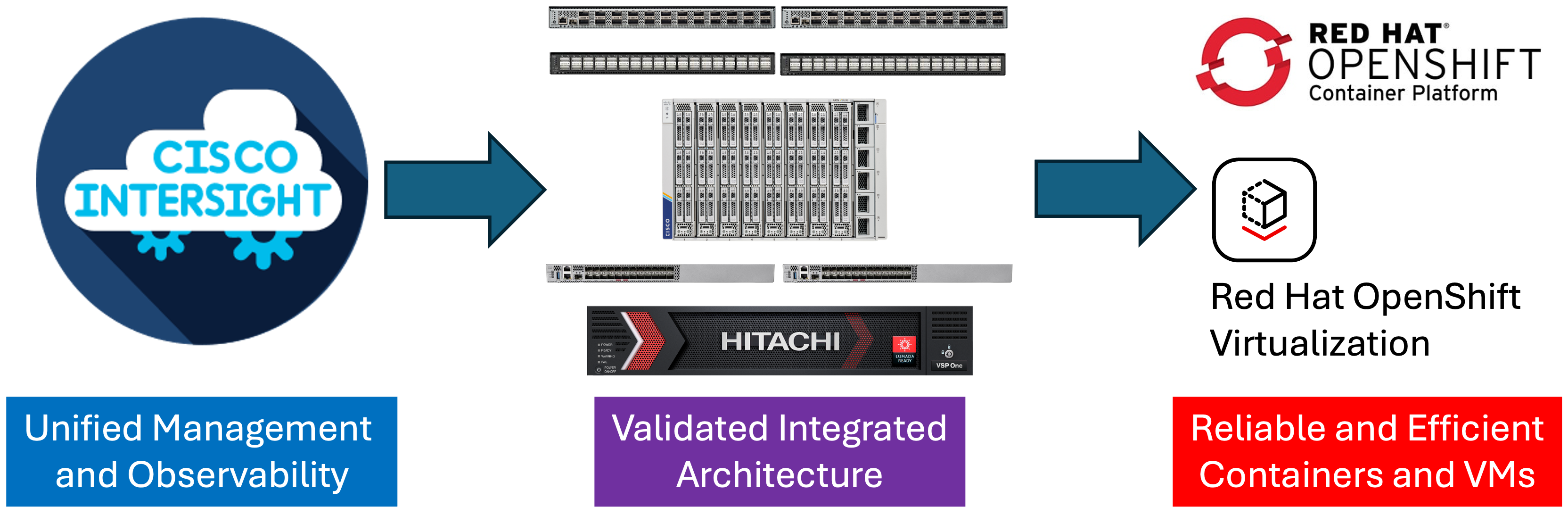
The release of this CVD includes this design guide as well as an accompanying deployment guide covering deployment of the solution architecture. This architecture combines decades of industry expertise and superior technologies to address today’s enterprise challenges and to position customers for future success.
The library of Adaptive Solutions validated designs can be found here: https://cisco.com/go/as-cvds
Solution Overview
This chapter contains the following:
Cisco and Hitachi continue their partnership to develop Adaptive Solutions for Converged Infrastructure Cisco Validated Design (CVD), bringing greater value to our joint customers in building the modern data center.
This data center, designed with the Adaptive Solutions for Converged Infrastructure (CI) architecture for both containers and virtual machines incorporates components and best practices from both companies to deliver the power, scalability, and resiliency required to meet evolving business needs.
Leveraging decades of industry expertise and advanced technologies, this Cisco CVD offers a resilient, agile, and flexible foundation for today’s businesses. In addition, the Cisco and Hitachi partnership extends beyond a single solution, enabling businesses to benefit from their ambitious roadmap that includes evolving technologies such as advanced analytics, IoT, cloud, and edge capabilities.
With Cisco and Hitachi, organizations can confidently advance their modernization journeys and prepare to seize new business opportunities enabled by innovative technology.
This document describes a validated approach for deploying Cisco and Hitachi technologies as private cloud infrastructure. This specific architecture incorporates the Cisco UCS 6536 Fabric Interconnect, supporting Cisco’s latest version of Cisco UCS X-Series compute nodes, the Intel based X210c M8. This infrastructure is paired with the VSP One Block, delivering a powerful and versatile storage solution for a variety of datacenter deployments.
It is validated with Red Hat OCP and Red Hat OCPv to meet the most relevant deployment needs, offering new features to optimize storage utilization and facilitate private cloud capabilities aligned with today’s enterprise demands.
The intended audience of this document includes but is not limited to IT architects, sales engineers, field consultants, professional services personnel, IT managers, partner engineering teams, and customers looking to deploy infrastructure that delivers both IT efficiency and innovation.
This document provides design guidance for incorporating Cisco Intersight-managed Cisco UCS X-Series platforms with Hitachi VSP One Block in the Adaptive Solutions architecture. It introduces key design elements, deployment considerations, and best practices to ensure successful implementation.
It also highlights the design and product requirements for integrating containers, container enabled virtualization and storage systems into Cisco Intersight, enabling a true cloud-based, integrated approach to infrastructure management.
The following design elements are newly introduced in the Adaptive Solutions architecture:
● Cisco UCS X210c M8 servers, powered by 6th Generation Intel Xeon processors, supporting up to 86 cores per processor and memory options supporting DDR5-8800 and DDR5-6400 DIMMs for up to 8TB total memory.
● Cisco N9324C Smart Switch delivering consistent zone-based security by integrating DPU (Data Processing Units) alongside Cisco Silicon One networking ASICs.
● Cisco Isovalent Enterprise Platform delivering enhanced Kubernetes networking and security using eBPF, with additional capacity for deep network observability along with runtime visibility and enforcement. Red Hat OCP 4.19 as a bare metal deployment with Red Hat OCPv to create and manage and store virtual machines alongside standard containerized applications.
● Hitachi Storage Plug-in for Containers (HSPC) dynamically provisionsprovisions persistent volumes for stateful containers from Hitachi storage.
● Hitachi Storage Plug-in for Prometheus (HSPP) to monitor the metrics of Kubernetes resources and Hitachi storage system resources within a single tool.
● Hitachi Virtual Storage Platform (VSP) One Block 24
Adaptive Solutions for Converged Infrastructure is a powerful and scalable architecture that leverages the combined strengths of both Cisco and Hitachi, delivered through a unified support model. The Adaptive Solutions Virtual Server Infrastructure data center is delivered as a validated architecture using the following components:
● Cisco Unified Computing System featuring Cisco UCS X-Series servers
● Cisco N9300 Series Smart Switches and Cisco Nexus family of switches
● Red Hat OpenShift Container Platform with Red Hat OpenShift Virtualization
● Isovalent Enterprise Platform
● Cisco MDS family of switches
● Hitachi Virtual Storage Platform One Block
The Adaptive Solutions architecture delivers 100 Gbps compute performance along with a 32 Gbps FC-SCSI storage network, implemented with Red Hat OpenShift Container Platform with the Red Hat Virtualization feature.
This architecture is validated with Red Hat OCP with the Red Hat OCPv feature, hosted on Cisco UCS-X servers, Cisco SAN switches and supported by Hitachi VSP as a robust back-end storage system. It leverages the latest capabilities and services to create, manage, and store virtual machines alongside standard containerized applications.
Cisco UCS X-Series compute is managed and monitored through Cisco Intersight, providing a unified operational view across all infrastructure layers through Cisco’s Software-as-a-Service (SaaS) Intersight platform. The Hitachi VSP One Block series includes a GUI-based Administrator application that supports configuration and management functions for the FC-SCSI ports, and storage pools. HSPC will be used to provide persistent storage for Red Hat OCP and Red Hat OCPv for containers and VMs. Cisco Intersight can be used to monitor configuration for Hitachi VSP resources created and allocated by the Hitachi Storage Plug-in for Containers (HSPC) a well-known and proven CSI (Container Storage Interface) driver, enabling consistent, cloud-managed operations across the infrastructure.
The integration of HSPC with OpenShift brings other benefits such as snapshot and cloning and restore operations for persistent volumes, enabling rapid copy creation for immediate use in decision support, software development, and data protection operations. Although these features are not part of this CVD, these features are available with HSPC 3.17.2 and VSP One Block 24 microcode A3-04-20-40/04 SVOS 10.4.1 (or higher).
Additionally, Cisco’s Isovalent networking and security solution for Kubernetes built on Cilium using eBPF (extended Berkeley Packet Filter), designed to provide advanced observability, zero-trust security, and high-performance networking for Kubernetes and multi-cloud environments can be incorporated as a CNI (Container Network Interface).
Bringing these CVD components into a resilient deployment of OCP and Red Hat OCPv with the powerful and intelligently managed compute of Cisco UCS, secure networking for SAN (MDS), LAN (Smart Switches) and containers (Cilium) with a robust, flexible, and reliable storage system like Hitachi VSP One Block that stores different types of workloads, virtual machines, and meets a wide variety of requirements in a highly dynamic environment. Adaptive Solutions with Red Hat OCPv provides a highly available and high-performance environment for virtual machines and container applications.
Technology Overview
This chapter contains the following:
Cisco Unified Computing System X-Series
Cisco UCS Fabric Interconnects
Red Hat OpenShift Container Platform
Isovalent Networking for Kubernetes
Hitachi Virtual Storage Platform
Hitachi Storage Plug-in for Containers
Hitachi Storage Plug-in for Prometheus
Hitachi Replication Plug-in for Containers
Hitachi VSP One Block Accelerated Virtual Machine Migration to OpenShift
Hitachi Storage Concepts for Red Hat OCP
The Adaptive Solutions Converged Infrastructure is a reference architecture that combines components and best practices from Cisco and Hitachi Vantara. This architecture supports the Red Hat OpenShift Container Platform (OCP), enabling both containerized workloads and virtual machines through Red Hat OpenShift Virtualization (Red Hat OCPv).
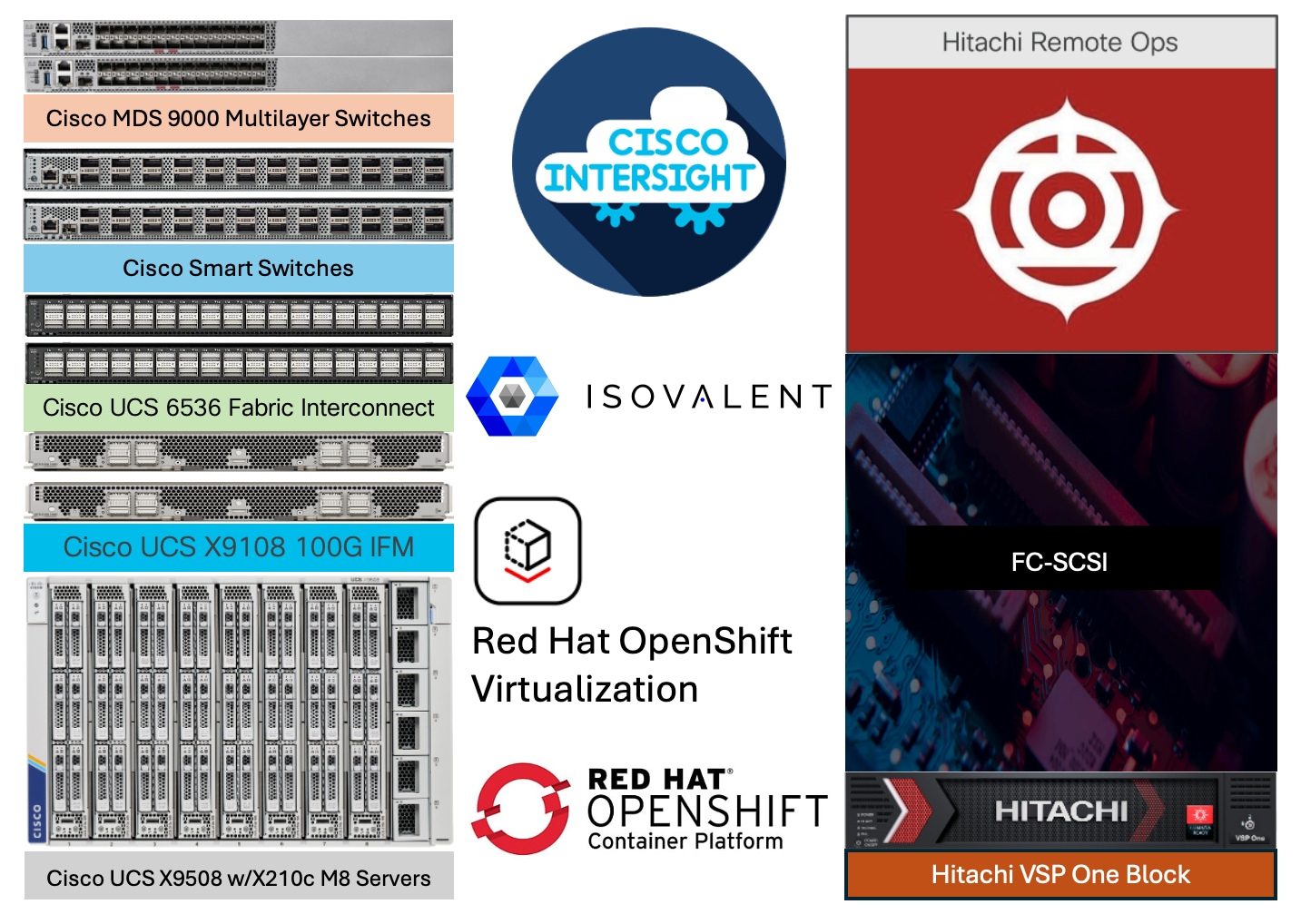
The Cisco and Hitachi Vantara components used in Adaptive Solutions designs have been validated within this reference architecture, providing customers with a proven deployment model. Organizations can implement this design as-is or adapt it based on the compatibility matrices of Cisco and Hitachi Vantara. While best practices apply across supported product families, deployment steps may differ when using supported components. Each component family shown in Figure 2 (Cisco UCS, Cisco MDS, Cisco Smart Switches, and VSP One Block) offers platform and resource options to scale up or scale out while maintaining consistent features.
The Adaptive Solutions hardware in this design is built with the following components:
● Cisco UCS X9508 Chassis with Cisco UCS 6536 Fabric Interconnects and up to eight Cisco UCS X210c M8 Compute Nodes per chassis.
● Cisco NX-OS-based N9324C Smart Switches with 100GE connectivity and DPUs enabled for secure segmentation and zone-based security.
● High-speed Cisco NX-OS-based MDS 9124V SAN switching design supporting up to 64 Gbps Fibre Channel connections.
● VSP One Block series storage systems are positioned as a scalable storage solution for the midrange segment. Built on more than 59 years of Hitachi Vantara engineering expertise and innovation in the IT sector, the VSP One Block series delivers superior performance, resiliency, and agility. It is backed by the industry’s first and most comprehensive 100 percent data availability guarantee, ensuring unmatched reliability for business-critical workloads.
The software components of the solution consist of:
● Cisco Intersight platform to deploy the Cisco UCS components and to maintain and support the infrastructure.
● Cisco Intersight Assist Virtual Appliance to help connect VSP systems, and Cisco Smart Switches to Cisco Intersight, providing visibility and management capabilities for these elements.
● Cisco Isovalent Enterprise Platform delivers cloud-native networking and security, built on the open-source Cilium project. It provides deep visibility, scalable network connectivity, and robust security for Kubernetes environments, enabling enterprises to monitor and protect their workloads efficiently. The platform also offers enterprise-grade features such as observability, policy management, and compliance support for modern cloud infrastructure.
● VSP One Block Administrator provides an integrated interface to configure and manage the VSP One Block system FC-SCSI ports and storage pools.
● Hitachi Storage Plug-in for Containers is a block-based Container Storage Interface (CSI) driver designed to create and manage persistent volumes for Hitachi storage systems in a Kubernetes container platform. With HSPC, you can create and run stateful containers, pods, and virtual machines. It facilitates the dynamic provisioning of persistent volumes from VSP One storage systems.
● Hitachi Storage Plug-in for Prometheus enables Kubernetes administrators to monitor the metrics of Kubernetes resources and Hitachi storage system resources using a single tool.
● Red Hat OCP 4.19 and Red Hat OCPv leverage the latest capabilities and services to create, manage, and store virtual machines alongside standard containerized applications.
Cisco Unified Computing System X-Series
The Cisco UCS X-Series Modular System is designed to take the current generation of the Cisco UCS platform to the next level with its future-ready design and cloud-based management. Decoupling and moving the platform management to the cloud allows Cisco UCS to respond to customer feature and scalability requirements in a much faster and efficient manner. Cisco UCS X-Series state-of-the-art hardware simplifies the data-center design by providing flexible server options. A single server type, supporting a broader range of workloads, results in fewer different data-center products to manage and maintain. The Cisco Intersight cloud-management platform manages Cisco UCS X-Series as well as integrating with third-party devices, including Hitachi storage, to provide visibility, optimization, and orchestration from a single platform, thereby driving agility and deployment consistency.
Cisco UCS X9508 Chassis
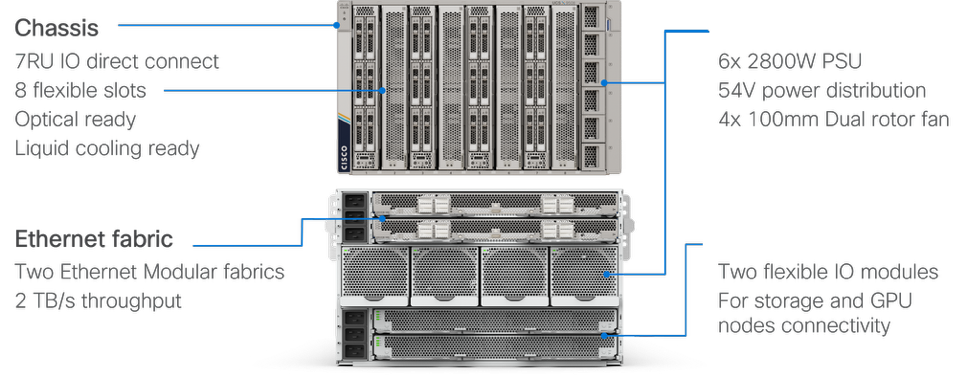
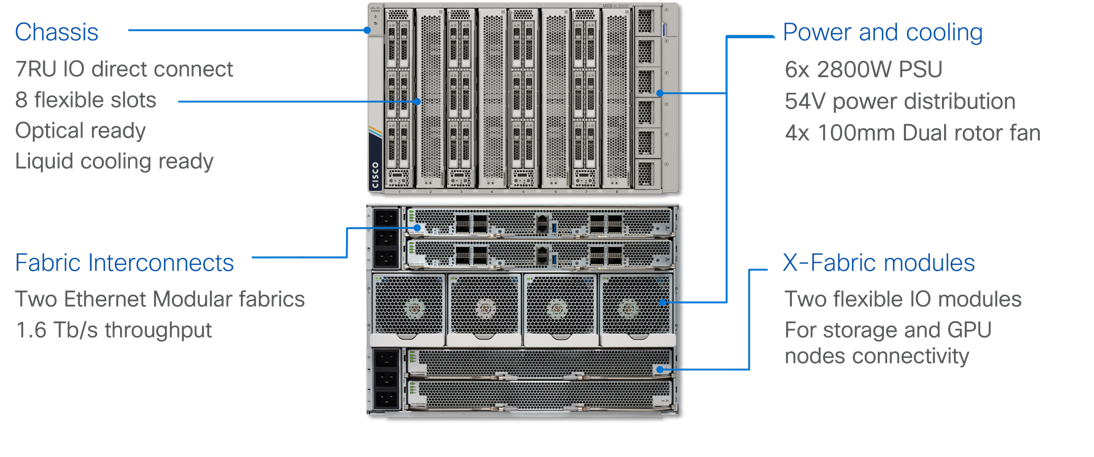
The Cisco UCS X-Series chassis is engineered to be adaptable and flexible. As shown in Figure 5, the Cisco UCS X9508 chassis has only a power-distribution midplane. This midplane-free design provides fewer obstructions for better airflow. For I/O connectivity, vertically oriented compute nodes intersect with horizontally oriented fabric modules, allowing the chassis to support future fabric innovations. Cisco UCS X9508 Chassis’ superior packaging enables larger compute nodes, thereby providing more space for actual compute components, such as memory, GPU, drives, and accelerators. Improved airflow through the chassis enables support for higher power components, and more space allows for future thermal solutions (such as liquid cooling) without limitations.
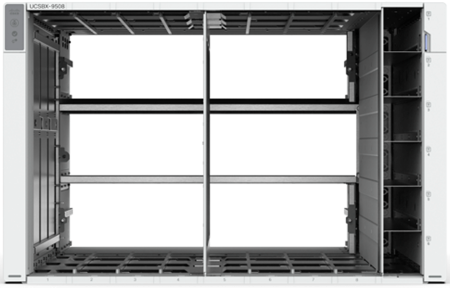
The Cisco UCS X9508 7-Rack-Unit (7RU) chassis has eight flexible slots. These slots can house a combination of compute nodes and a pool of current and future I/O resources that includes GPU accelerators, disk storage, and nonvolatile memory. At the top rear of the chassis are two Intelligent Fabric Modules (IFMs) that connect the chassis to upstream Cisco UCS 6400/6500 Series. At the bottom rear of the chassis are slots to house X-Fabric modules that can flexibly connect the compute nodes with I/O devices. Six 2800W Power Supply Units (PSUs) provide 54V power to the chassis with N, N+1, and N+N redundancy. A higher voltage allows efficient power delivery with less copper and reduced power loss. Efficient, 100mm, dual counter-rotating fans deliver industry-leading airflow and power efficiency, and optimized thermal algorithms enable different cooling modes to best support the customer’s environment.
Cisco UCS 9108-100G Intelligent Fabric Modules
For the Ethernet and FC-SCSI traffic delivered from the Fabric Interconnects into the Cisco UCS X9508 Chassis, the network connectivity is provided by a pair of Cisco UCS 9108-100G Intelligent Fabric Modules (IFMs). IFMs also host the Chassis Management Controller (CMC) for chassis management. In contrast to systems with fixed networking components, Cisco UCS X9508’s midplane-free design enables easy upgrades to new networking technologies as they emerge making it straightforward to accommodate new network speeds or technologies in the future.
Cisco UCS X210c M8 Compute Node
The Cisco UCS X9508 Chassis can host up to 8 Cisco UCS X210c M8 Compute Nodes. The hardware details of the Cisco UCS X210c M8 Compute Nodes are shown in Figure 6.
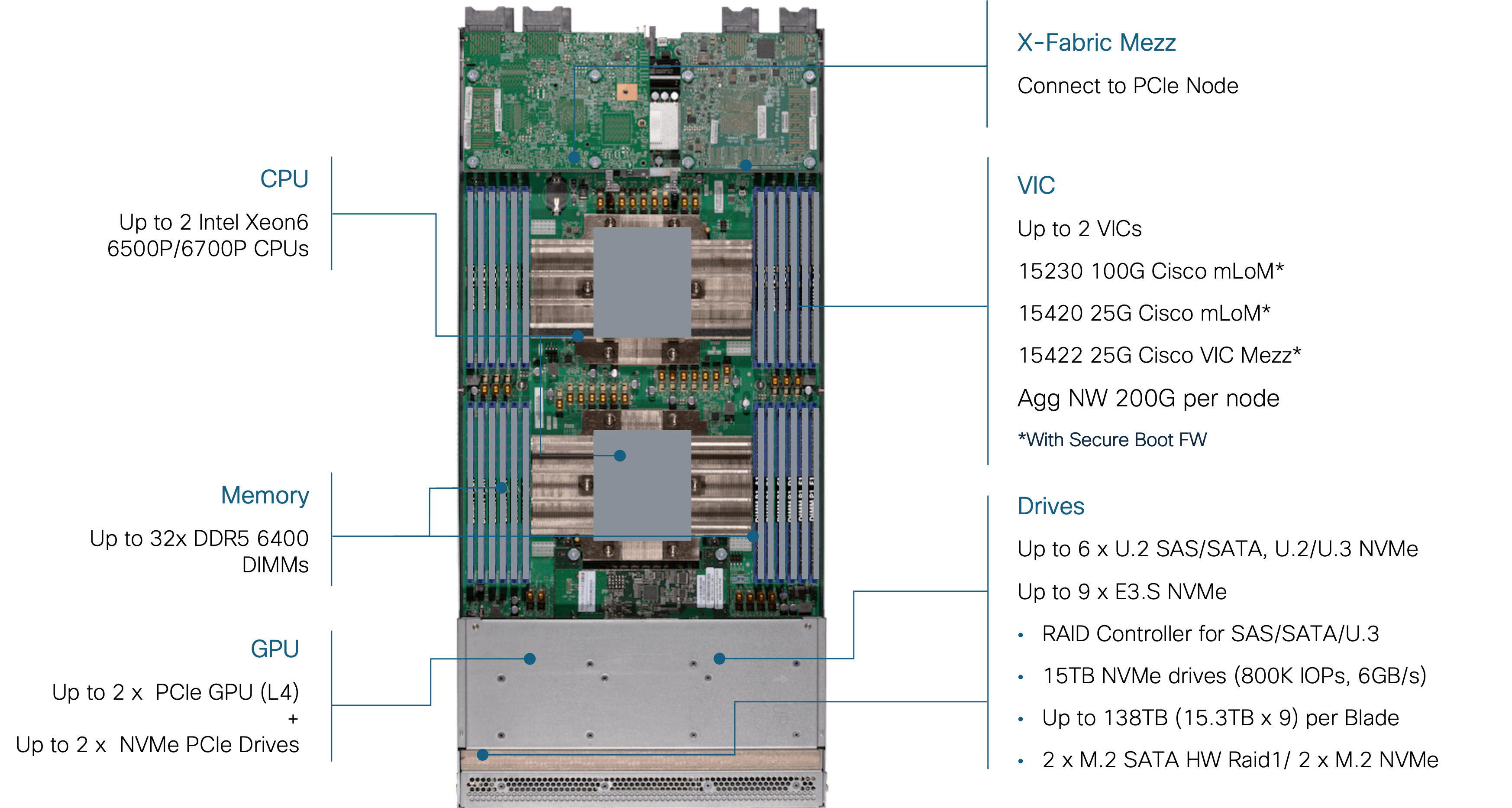
The Cisco UCS X210c M8 features:
● CPU: Up to 2x 6th Gen Intel Xeon Processors with up to 86 cores per processor and up to 336 MB Level 3 cache per CPU.
● Memory: Up to 8TB of main memory with 32x 256 GB DDR5 6400 MT/s or up to 1TB of DDR5 8000 MT/s DIMMs depending on the CPU installed.
● Disk storage: Up to nine hot-pluggable, U.2/U.3/E3.S drives with a choice of enterprise-class RAIDs or passthrough controllers, up to two M.2 SATA drives with optional hardware RAID.
● Virtual Interface Card (VIC): Up to 2 VICs including an mLOM Cisco UCS VIC 15230 (100Gbps) or an mLOM Cisco UCS VIC 15420 (50Gbps) and a mezzanine Cisco UCS VIC card 15422 can be installed in a Compute Node to pair with and extend the connectivity of the Cisco UCS VIC 15420 adapter.
● Security: The server supports an optional Trusted Platform Module (TPM). Additional security features include a secure boot FPGA and ACT2 anti-counterfeit provisions.
Cisco UCS VIC 15230
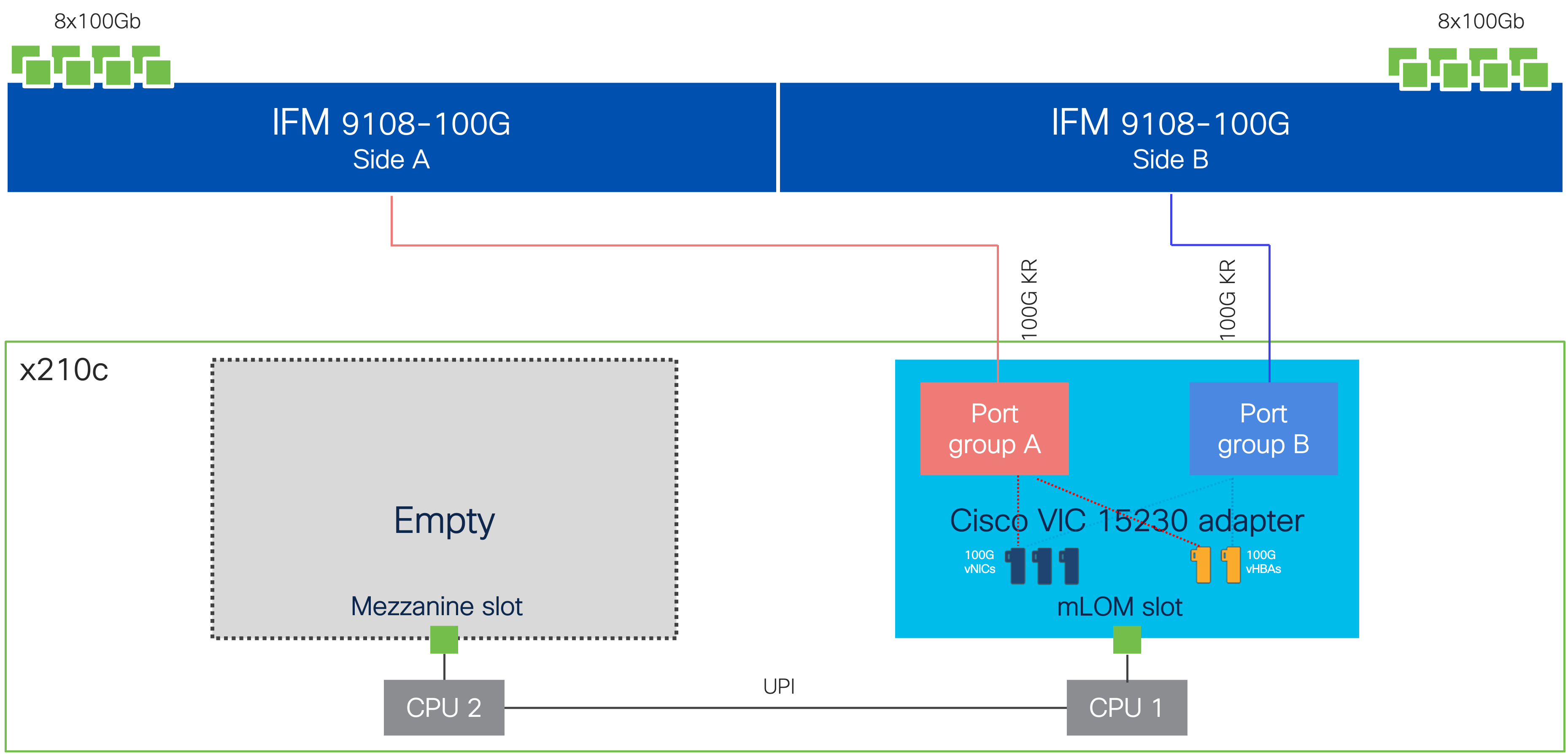
Cisco UCS VIC 15230 fits the mLOM slot in the Cisco UCS X215c or Cisco UCS X210c Compute Node and enables up to 100 Gbps of unified fabric connectivity to each of the chassis’ Cisco UCS IFM for a total of 200 Gbps of connectivity per server. Cisco UCS VIC 15230 connectivity to the IFM and up to the fabric interconnects is delivered through 100Gbps. Cisco UCS VIC 15230 supports 512 virtual interfaces (both FCoE and Ethernet) capable of providing 100Gbps, along with the latest networking innovations including NVMeoF over FC or TCP, VxLAN/NVGRE offload, and secure boot technology.
Cisco UCS 6536 Fabric Interconnects
The Cisco UCS Fabric Interconnects (FIs) provide a single point for connectivity and management for the entire Cisco UCS system. Typically deployed as an active/active pair, the system’s FIs integrate all components into a single, highly available management domain controlled by Cisco Intersight or Cisco UCS Manager. Cisco UCS FIs provide a single unified fabric for the system, with low-latency, lossless, cut-through switching that supports LAN, SAN, and management traffic using a single set of cables.

This single RU device includes up to 36 10/25/40/100 Gbps Ethernet ports, 16 8/16/32-Gbps Fibre Channel ports using 4 128 Gbps to 4x32 Gbps breakouts on ports 33-36. All 36 ports support breakout cables or QSA interfaces.
The Cisco Intersight platform is a Software-as-a-Service (SaaS) infrastructure lifecycle management platform that delivers simplified configuration, deployment, maintenance, and support. The Cisco Intersight platform is designed to be modular, so you can adopt services based on their individual requirements. The platform significantly simplifies IT operations by bridging applications with infrastructure, providing visibility and management from bare-metal servers and hypervisors to serverless applications, thereby reducing costs, and mitigating risk. This unified SaaS platform uses a unified Open API design that natively integrates with third-party platforms and tools.
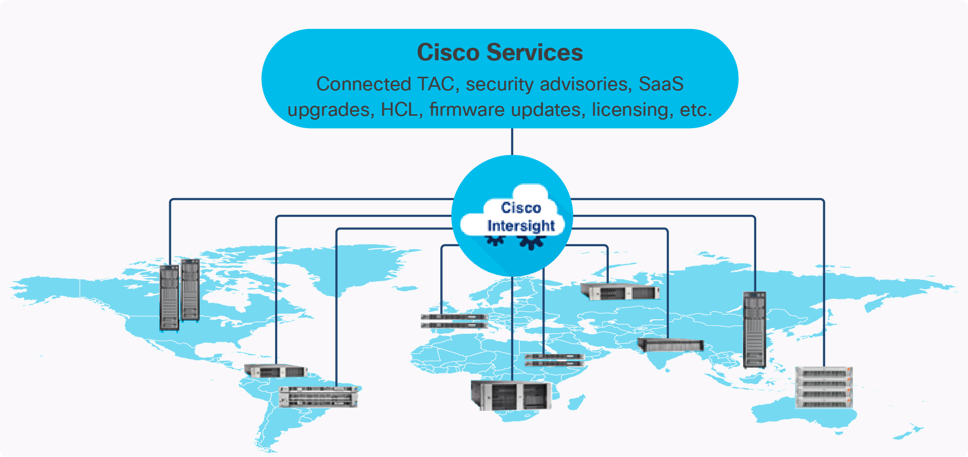
The main benefits of Cisco Intersight infrastructure services are as follows:
● Stay ahead of problems with global visibility and accelerate trouble resolution through proactive support capabilities.
● Provide role-based access control (RBAC) to resources within the data center through a single platform.
● Intersight Cloud Orchestrator (ICO) provides a task based “low code” workflow approach to executing storage operations with Hitachi VSP One Block.
● Combine the convenience of a SaaS platform with the capability to connect from anywhere and manage infrastructure through a browser or mobile app.
● Elimination of silos for managing datacenter ecosystem as all components, including Hitachi storage can be managed via Intersight.
● Upgrade to add workload optimization and Kubernetes services when needed.
Cisco Intersight Virtual Appliance and Private Virtual Appliance
In addition to the SaaS deployment model running on Intersight.com, on-premises options can be purchased separately. The Cisco Intersight Virtual Appliance and Cisco Intersight Private Virtual Appliance are available for organizations that have additional data locality or security requirements for managing systems. The Cisco Intersight Virtual Appliance delivers the management features of the Cisco Intersight platform in an easy-to-deploy onto a KVM based hypervisor, VMware vSphere or Microsoft Hyper-V Server virtual machine that allows you to control the system details that leave your premises. The Cisco Intersight Private Virtual Appliance is provided in a form factor specifically designed for those who operate in disconnected (air gap) environments. The Private Virtual Appliance requires no connection to public networks or back to Cisco to operate.
Cisco Intersight Assist
Cisco Intersight Assist helps you add endpoint devices to Cisco Intersight. A data center could have multiple devices that do not connect directly with Cisco Intersight. Any device that is supported by Cisco Intersight, but does not connect directly with it, will need a connection mechanism. Cisco Intersight Assist provides that connection mechanism to include the Cisco Nexus switches, Cisco MDS switches, the Cisco Nexus Dashboard, and the Hitachi Virtual Storage Platform.
Cisco Intersight Assist is available within the Cisco Intersight Virtual Appliance, which is distributed as a deployable virtual machine across multiple supported formats.
Licensing Requirements
The Cisco Intersight platform uses a subscription-based license with multiple tiers. You can purchase a subscription duration of one, three, or five years and choose the required Cisco UCS server volume tier for the selected subscription duration. You can purchase any of the following higher-tier Cisco Intersight licenses using the Cisco ordering tool:
● Cisco Intersight Essentials: Essentials offers comprehensive monitoring and inventory visibility across global locations, UCS Central Software and Cisco Integrated Management Controller (IMC) supervisor entitlement, policy-based configuration with server profiles, firmware management, Connected TAC with Proactive RMAs, and evaluation of compatibility with the Cisco Hardware Compatibility List (HCL).
● Cisco Intersight Advantage: Advantage offers all the features and functions of the Essentials tier. It includes storage widgets and cross-domain inventory correlation across compute, storage, and virtual environments (VMware vCenter). It also includes OS installation for supported Cisco UCS platforms and Intersight Orchestrator for orchestration across Cisco UCS and third-party systems.
Servers in the Cisco Intersight Managed Mode require at least the Essentials license. For more information about the features provided in the various licensing tiers, see: https://intersight.com/help/saas/getting_started/licensing_requirements/lic_intro
Cisco N9300 Smart Switches
The Cisco N9300 Series Smart Switches are designed to revolutionize data center networking and security by integrating Data Processing Units (DPUs) alongside Cisco’s Silicon One E100 ASIC all within a compact, efficient form factor. These switches deliver stateful segmentation, automated policy management, and a rich suite of networking and security services, enabling scalable and secure operations for modern data centers. With hardware acceleration provided by P4-programmable ASICs and DPUs, the Cisco N9300 Series delivers exceptional performance, cost optimization, and operational simplicity, making them ideal for hybrid-cloud, AI/ML workloads, and future-ready infrastructures. Advanced features such as real-time telemetry, unified policy enforcement, and support for technologies like Carrier-Grade NAT, IPsec, and load balancing are integrated, reducing the total cost of ownership while enhancing security and manageability.

The switches support Cisco NX-OS and Nexus Dashboard for centralized management and leverage Cisco Hypershield, a distributed AI-native security architecture that embeds advanced segmentation and zero-trust policies directly into the DPU architecture. This integration ensures high-speed, scalable, and consistent enforcement of security policies across workloads, reduces operational complexity, and provides real-time insights for rapid incident response. With flexible deployment options, extensive programmability, and future-proof hardware, the Cisco N9300 Series Smart Switches empower organizations to protect sensitive data, streamline operations, and adapt to evolving business needs.
Cisco MDS 9124V 64G Multilayer Fabric Switch
The next-generation Cisco MDS 9124V 64-Gbps 24-Port Fibre Channel Switch (Figure 11) supports 64, 32, and 16 Gbps Fibre Channel ports and provides high-speed Fibre Channel connectivity for all-flash arrays and high-performance hosts. This switch offers state-of-the-art analytics and telemetry capabilities built into its next-generation Application-Specific Integrated Circuit (ASIC) chipset. This switch allows seamless transition to Fibre Channel Non-Volatile Memory Express (NVMe/FC) workloads whenever available without any hardware upgrade in the SAN. It empowers small, midsize, and large enterprises that are rapidly deploying cloud-scale applications using extremely dense virtualized servers, providing the benefits of greater bandwidth, scale, and consolidation.
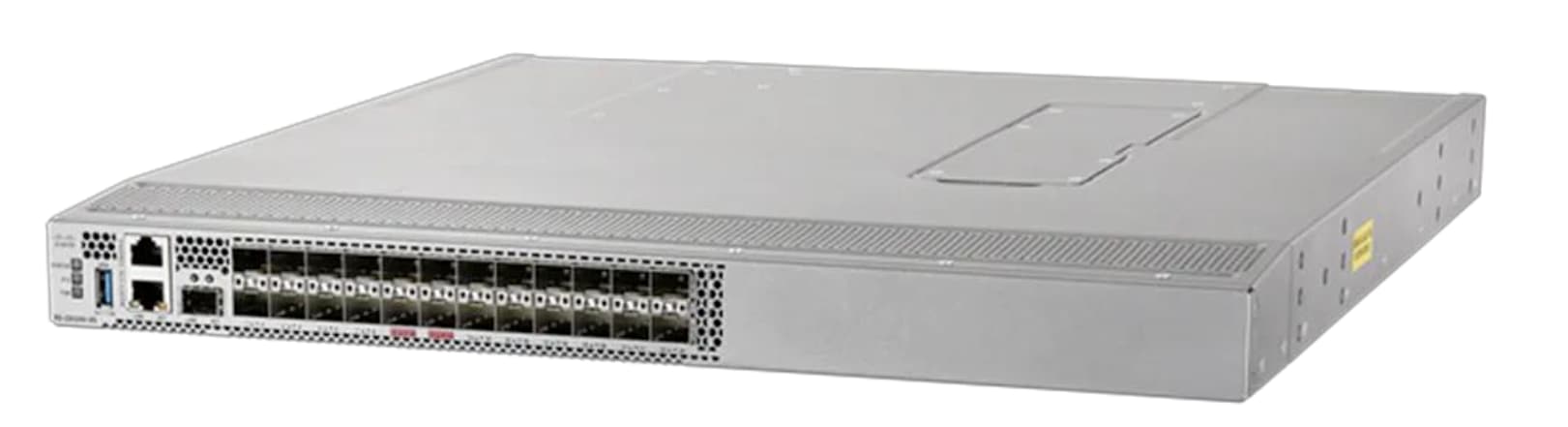
The Cisco MDS 9124V delivers advanced storage networking features and functions with ease of management and compatibility with the entire Cisco MDS 9000 family portfolio for reliable end-to-end connectivity. This switch also offers state-of-the-art SAN analytics and telemetry capabilities that have been built into this next-generation hardware platform. This new state-of-the-art technology couples the next-generation Cisco port ASIC with a fully dedicated network processing unit designed to complete analytics calculations in real time. The telemetry data extracted from the inspection of the frame headers are calculated on board (within the switch) and, using an industry-leading open format, can be streamed to any analytics-visualization platform. This switch also includes a dedicated 10/100/1000BASE-T telemetry port to maximize data delivery to any telemetry receiver including the Cisco Nexus Dashboard Fabric Controller. The Cisco MDS 9148V 48-Port Fibre Channel Switch is also available when more ports are needed.
Red Hat OpenShift Container Platform
Red Hat OCP provides an integrated system to build, deploy, and manage applications consistently across on-premises and hybrid cloud deployments. OCP provides the control plane and data plane within the same interface. OCP provides administrator views to deploy operators, monitor container resources, manage container health, manage users, work with operators, manage pods and deployment configurations, as well as define storage resources. OCP also provides a developer view to allow users to deploy application resources from various pre-defined resources such as YAML files, Docker files, Catalogs, or GIT within user defined namespaces. With OCP kubectl, a native binary of Kubernetes is complemented by the oc command, which provides further support for OCP resources, such as deployment and build configurations, routes, image streams, and tags. OCP provides a GUI and a CLI interface.

More information on Red Hat OCP can be found here: https://www.redhat.com/en/technologies/cloud-computing/openshift/container-platform
Red Hat OpenShift Virtualization
Red Hat OCPv is a feature of Red Hat OCP that allows you to run virtual machines running in containers and can be managed as native Kubernetes objects. OCPv uses KVM, the Linux kernel hypervisor. OCPv enables the following virtualization tasks:
● Creating and managing Linux and Windows virtual machines (VMs)
● Running VM workloads alongside pods in the same cluster
● Importing virtual machines from VMware vSphere, KVM, OpenStack, and other environments
● Cloning virtual machines
● Live migrating of virtual machines between the nodes
Migration Toolkit for Virtualization
Migration Toolkit for Virtualization (MTV) enables you to migrate virtual machines from multiple source providers to an OpenShift Virtualization destination provider.
The following source providers are supported:
● VMware vSphere and Open Virtual Appliances (OVAs) created by VMware vSphere
● Red Hat Virtualization (RHV)
● OpenStack
● Remote OpenShift Virtualization clusters
Within the scope of this Cisco Validated Design, MTV is not covered. For additional information on MTV with Hitachi VSP see https://docs.hitachivantara.com/v/u/en-us/hitachi-integrated-systems/mk-sl-374.
Isovalent Networking for Kubernetes
Isovalent Networking for Kubernetes delivers enterprise-grade networking, security, and observability, enabling businesses to simplify operations and efficiently scale their Kubernetes deployments. This is achieved with advanced features of Cilium built within the lightweight eBPF architecture. Purpose-built for modern workloads, Isovalent reduces complexity, ensures compliance, and provides reliable connectivity across cloud and hybrid infrastructures.
Traditional networking solutions often struggle with the demands of dynamic Kubernetes environments, leading to performance bottlenecks and complex troubleshooting. Isovalent addresses these challenges with high-performance, low-latency networking, zero-trust security, and real-time observability, ensuring seamless application performance, enhanced efficiency, and scalable operations for enterprises.
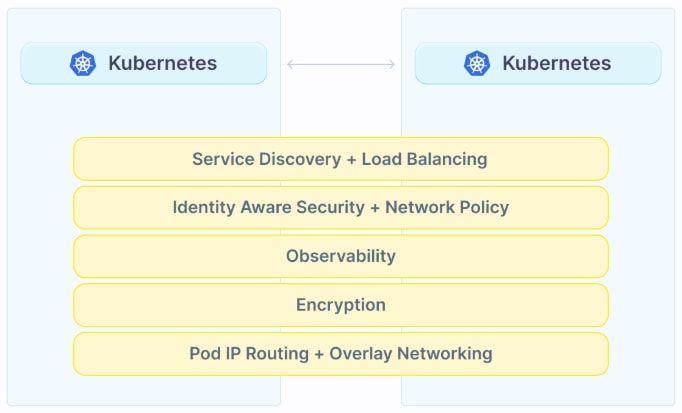
Isovalent delivers faster time-to-market, reduced operational overhead, and simplified compliance with enterprise-grade security and observability, safeguarding your brand while enabling your teams to focus on high-value, strategic initiatives.
Hitachi Virtual Storage Platform
VSP One Block is a highly scalable, true enterprise-class block storage system designed for mission-critical workloads. It supports virtualization of external storage and offers advanced features such as virtual partitioning and quality of service (QoS) to enable diverse workload consolidation. With the industry’s only 100% data availability guarantee, VSP One Block ensures maximum uptime and flexibility for your block-level storage needs.

VSP One Block uses all-NVMe storage with three dedicated models, supported in a 2RU configuration. All models have the same capacity (72 NVMe flash drives) and support various storage transport protocols such as NVMe over TCP, Fibre Channel (FC), and iSCSI. The NVMe flash architecture delivers consistent low-microsecond latency, reducing the transaction cost of latency-critical applications and delivering predictable performance to optimize storage resources.
The VSP One Block storage system consists of a controller chassis, one or more NVMe drive boxes, and internal components such as fans and PCIe switches.
VSP One Block capabilities eliminate complexity for end users by providing:
● Always-on Data reduction
● Dynamic Drive Protection (DDP), which removes the need for complicated RAID setups
● Dynamic Carbon Reduction, delivering measurable reductions in power consumption
The following models are available in the VSP One Block series:
● VSP One Block 24 – 256 GB cache + Software Advanced Data Reduction (ADR) + 24 cores
● VSP One Block 26 – 768 GB cache + 2x Compression Accelerator Module (CAM) + 24 cores
● VSP One Block 28 – 1 TB cache + 4x CAM + 64 cores
Key Features of the VSP One Block:
● High performance
◦ Multiple-controller configurations distribute processing loads across controllers.
◦ Ultra-high-speed I/O powered by NVMe flash drives with up to 1,024 GiB of cache.
◦ Network throughput options include 100 Gbps NVMe/TCP, 64 Gb FC, and 25 Gbps iSCSI.
◦ Hardware acceleration for high-performance compression.
◦ Intel® Xeon® 4thth Gen processors with PCIe Gen4 and Dynamic Power Reduction.
◦ Always-on compression acceleration engines and algorithms.
◦ NVMe Gen4 drive trays and Gen4 SSD media, scalable up to 72 drives.
◦ Virtual Storage Scale-Out expansion capabilities.
◦ 33 percent more I/O slots for flexible configuration.
◦ Thin Image Advanced Data Protection and ransomware protection with Safe Snap.
● High reliability
◦ Service continuity for all main components through redundant configurations.
◦ Dynamic drive protection (DDP) uses dual-parity RAID 6 configurations (for example, 14D+2P). DDP is a drive distributed RAID function. DDP distributed spare space capacity across all drives, eliminating the need for dedicated spare drives. In addition, DDP distributes the rebuild workload across all drives, reducing rebuild times. DDP improves usability, efficiency, and performance.
◦ Data security is ensured by automatically transferring data to non-volatile cache flash memory during a power outage without any intervention.
◦ Nondisruptive maintenance for main components enables the storage system to remain operational.
● Scalability and versatility
◦ VSP One B24: Scalable capacity up to 4.3 PB (internal) and 64 PiB (external)
◦ VSP One B26: Scalable capacity up to 4.3 PB (internal) and 128 PiB (external)
◦ VSP One B28: Scalable capacity up to 4.3 PB (internal) and 255 PiB (external)
● Manageability
◦ Integrated with Cisco Intersight to improve IT operational efficiency.
◦ Supports Ansible playbooks for automated configuration and management.
◦ Integration with Hitachi Virtual Storage Platform 360 (VSP 360) provides a unified management platform that simplifies infrastructure operations, accelerates decision-making, and reduces time to deliver data services.
◦ Native container management platform plug-ins for simplified storage management.
The VSP One Block series builds upon over 59 years of proven Hitachi engineering expertise, delivering a comprehensive suite of business continuity options, and setting the benchmark for industry-leading reliability. As a result, 85 percent of Fortune 100 financial services companies rely on Hitachi storage systems for their mission-critical data.
Hitachi Storage Virtualization Operating System RF
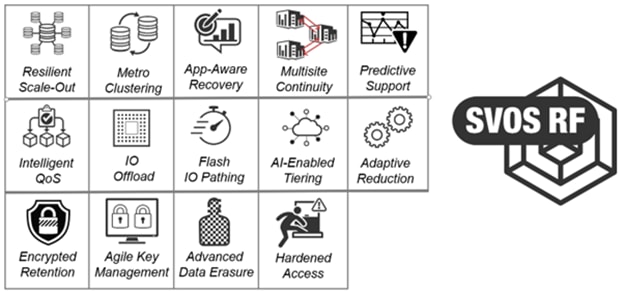
Hitachi SVOS RF (Resilient Flash) delivers best-in-class business continuity, always-on and data availability, and simplified storage management across all VSP systems through a unified operating system.
Flash performance is optimized with a patented flash-aware I/O stack, whereas adaptive inline data reduction increases storage efficiency and balances data optimization with application performance. With industry-leading storage virtualization, SVOS RF extends the life of existing investments by incorporating third-party all-flash and hybrid arrays into a consolidated resource pool.
SVOS RF provides the foundation for global storage virtualization by abstracting and managing heterogeneous storage within a single, unified virtual storage layer. This software-defined storage approach enables resource pooling, automation, self-optimization, and centralized management, delivering higher utilization and improved operational efficiency. Optimized for flash, SVOS RF maintains consistently low response times as data volumes grow, with selectable data-reduction technologies to be activated based on workload requirements.
SVOS RF also integrates with Hitachi base and advanced software packages to deliver:
● Superior availability and operational efficiency
● Active-active clustering for continuous availability
● Data-at-rest encryption for enhanced security
● AI and machine learning-driven insights for intelligent operations
● Policy-defined data protection with local and remote replication
For more information about Hitachi Storage Virtualization Operating System RF, see https://www.hitachivantara.com/en-us/products/storage-platforms/primary-block-storage/virtualization-operating-system.html.
Hitachi Storage Plug-in for Containers
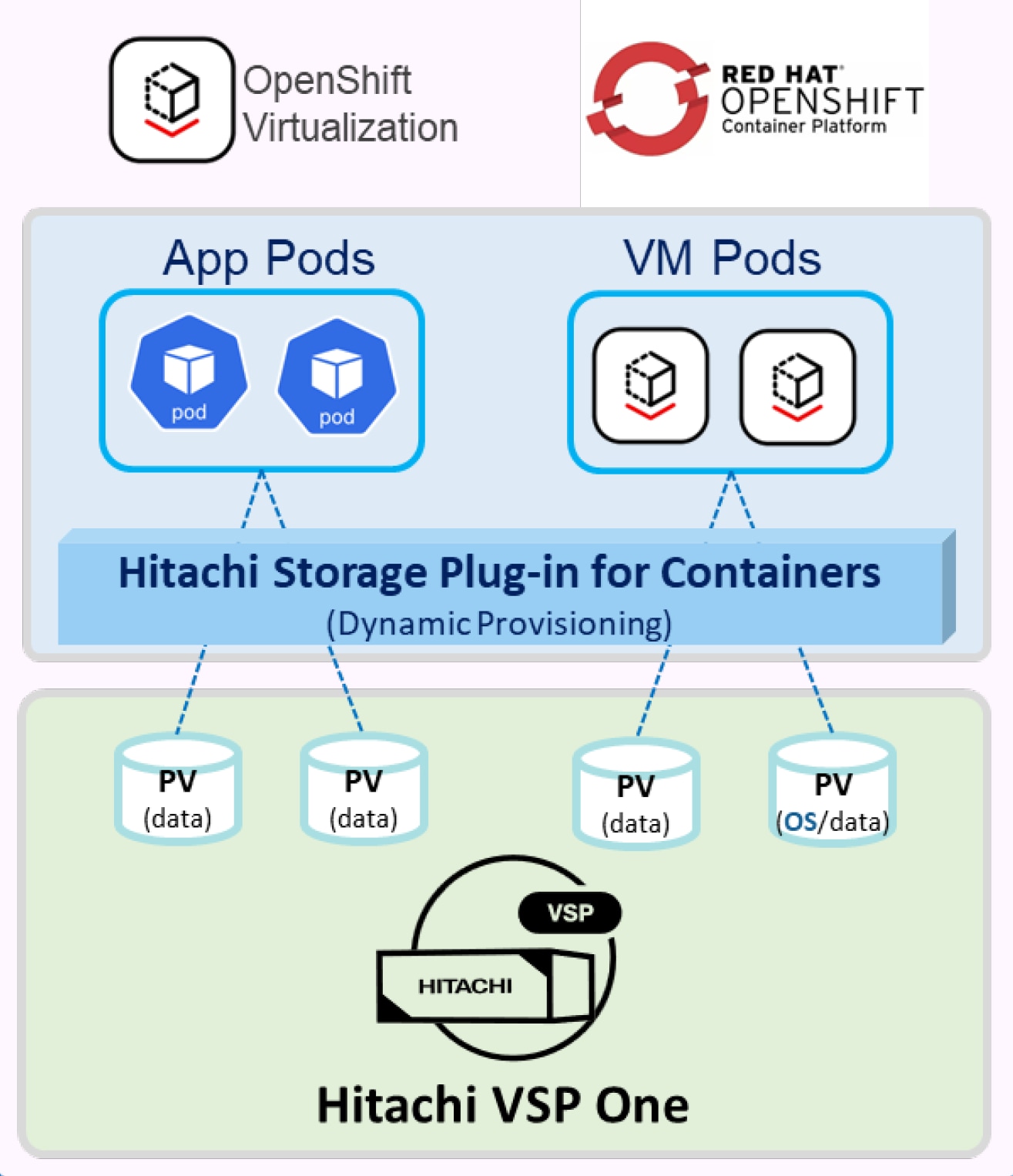
Hitachi Storage Plug-in for Containers (HSPC) is a software component that includes libraries, configurations and commands used to provide persistent storage for virtual machine pods and traditional containers. It enables stateful applications to retain and maintain data beyond the container lifecycle. The Storage Plug-in for Containers delivers persistent volumes from Hitachi Dynamic Provisioning (HDP) or Hitachi Thin Image (HTI) pools to bare-metal or hybrid deployments using Fibre Channel, NVMe over Fibre Channel, or iSCSI protocols. It integrates Kubernetes or OpenShift with Hitachi storage systems using Container Storage Interface (CSI).
● HSPC dynamically provisions persistent volumes for stateful containers from Hitachi storage by automatically creating PVs, Host Groups, and LUN paths.
● This Hitachi CSI driver supports the ReadWriteMany (RWX) access mode essential for live migration of virtual machines across cluster nodes.
Figure 14 illustrates a container environment with HSPC is deployed.
For more interoperability support details about HSPC, see: https://docs.hitachivantara.com/v/u/en-us/adapters/3.17.2/rn-92adptr141.
Hitachi Storage Plug-in for Prometheus
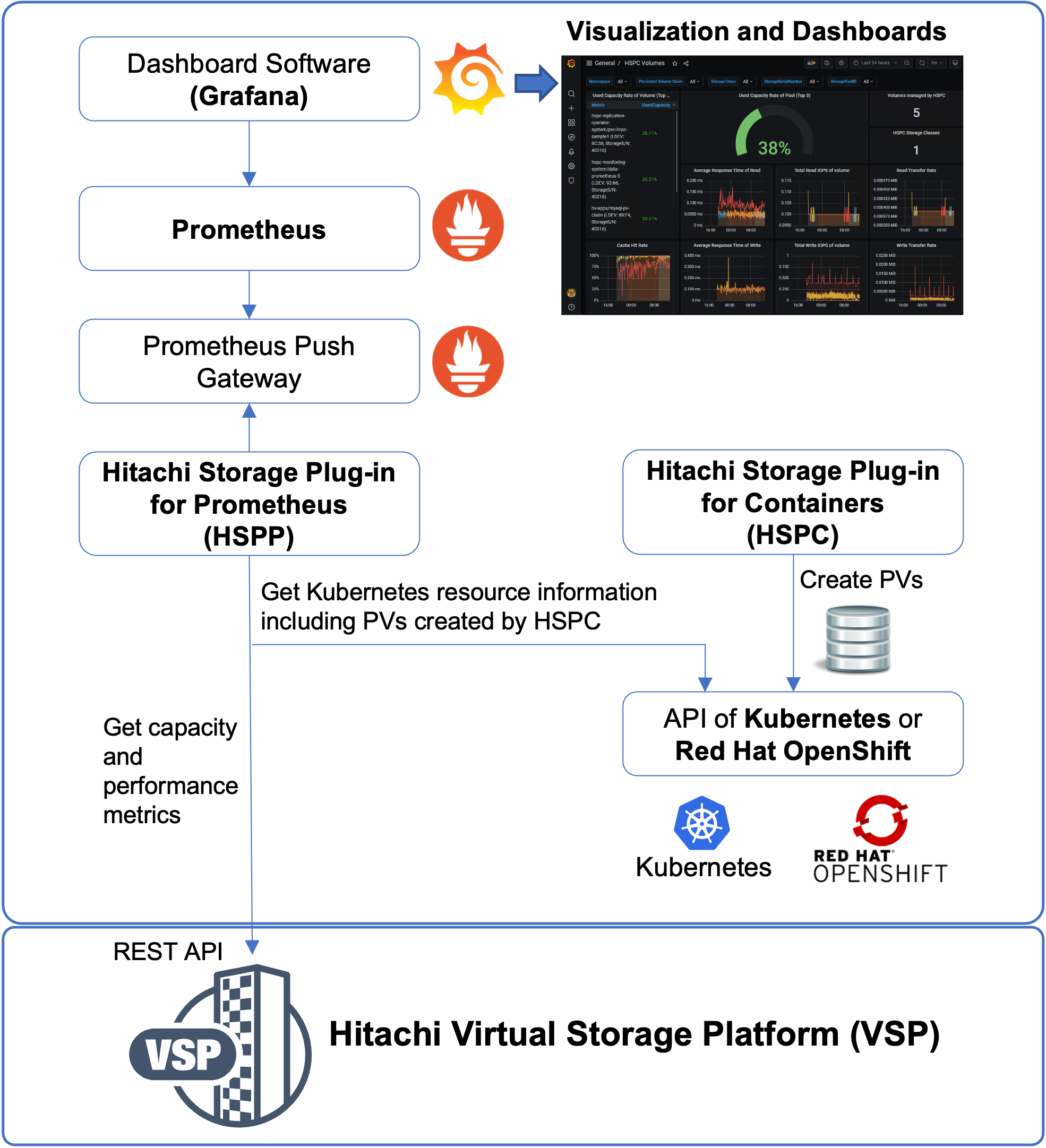
The Hitachi Storage Plug-in for Prometheus shown in Figure 15, enables Kubernetes administrators to monitor metrics for Kubernetes resources and Hitachi storage system resources within a single interface. The plug-in Prometheus to collect metrics and Grafana to visualize them, providing easy evaluation and actionable insights for Kubernetes administrators. Prometheus collects storage system metrics, such as capacity, IOPS, and transfer rate at five-minute intervals.
For additional details about configuration, see: Hitachi Storage Plug-in for Prometheus Quick Reference Guide.
Hitachi Replication Plug-in for Containers
Hitachi Replication Plug-in for Containers (HRPC) supports any Kubernetes cluster configured with HSPC, providing data protection, disaster recovery, and migration of persistent volumes to remote Kubernetes clusters. It supports replication for both bare-metal and virtual environments.
Replication services for persistent storage on VSP storage systems can be enabled through a storage class that uses HRPC for CSI-managed persistent volumes.
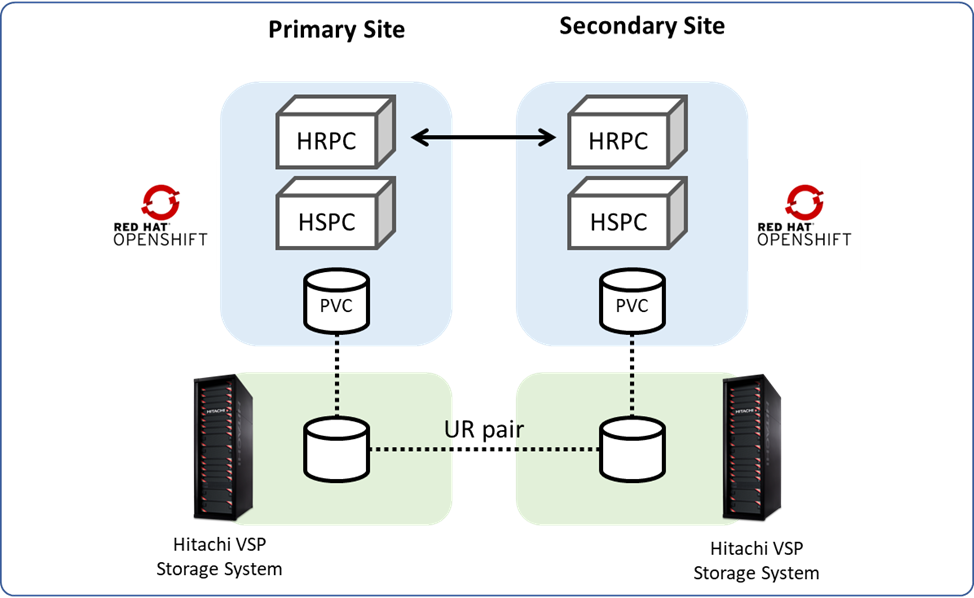
HRPC provides replication data services for persistent volumes on VSP storage platforms, addressing use cases such as:
● Migration: Persistent volumes can be snapshotted and cloned locally or replicated to remote Kubernetes clusters with their own remote VSP storage systems.
● Disaster Recovery: Persistent volumes can be protected against datacenter failures by replicated data over long distances using Hitachi Universal Replicator.
● Backup: Persistent volumes can be protected with point-in-time snapshots locally using the Hitachi CSI plug-in (Hitachi Storage Plug-in for Containers) or backed up to remote VSP storage using HRPC.
Managing Disaster Recovery operations using the DR Operator
The Disaster Recovery (DR) Operator is a Kubernetes-native orchestrator that automates and streamlines disaster recovery operations between primary and secondary storage systems. It manages replication workflows, such as split, failover, failback, and resynchronization for TrueCopy and Universal Replicator pairs, ensuring minimal downtime and consistent data protection across sites.
The DR Operator:
● Eliminates manual, per-PVC operations
● Enables scalable disaster recovery across large Kubernetes environments
● Supports user-defined policies at the application level
● Performs application-aware disaster recovery based on the defined policies
HRPC will not be included in this CVD. For additional details, see Hitachi Replication Plug-in for Containers.
High Availability with Global-Active Device and Hitachi Storage Plug-in for Containers (Stretched PVC)
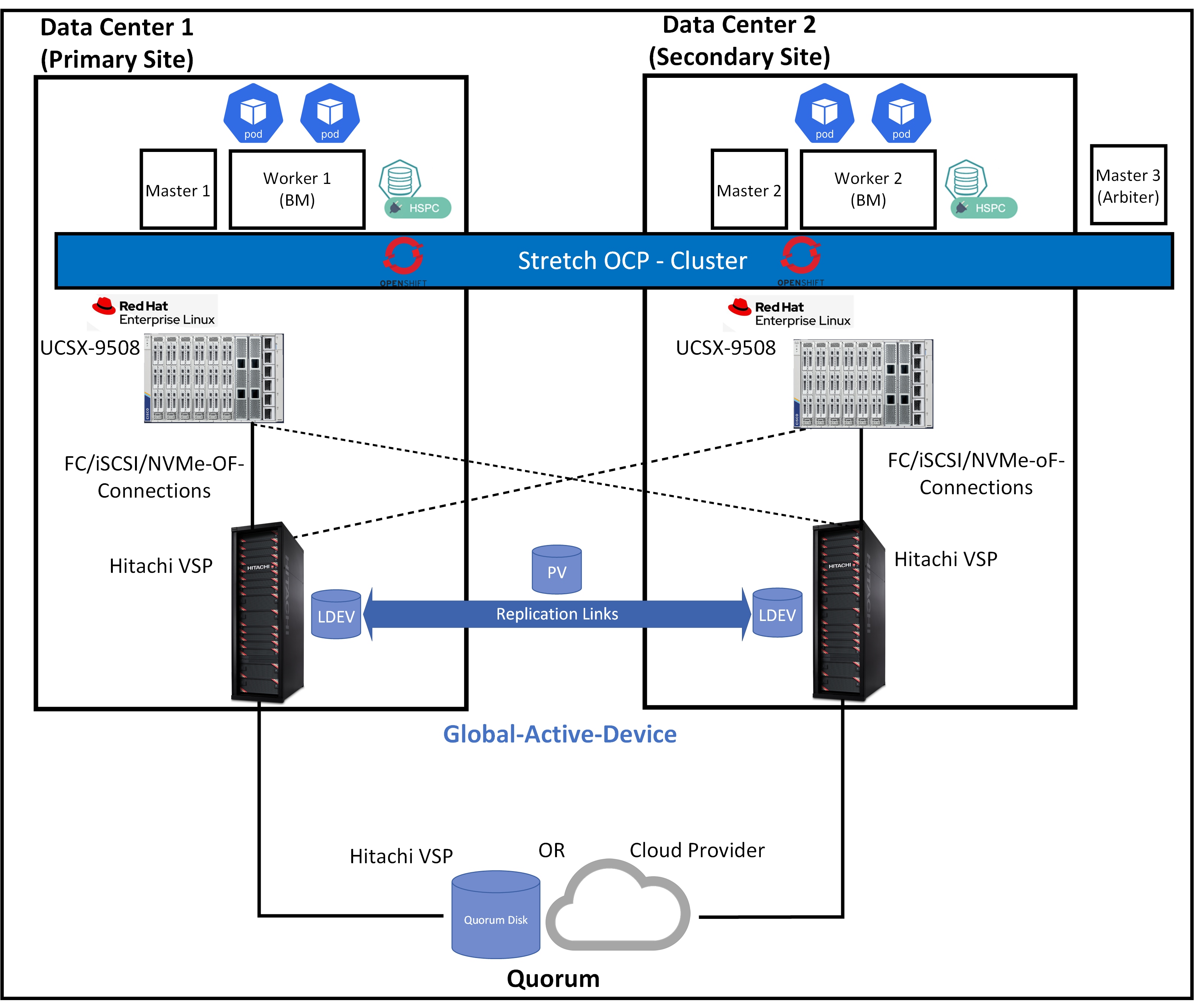
Global-active device (GAD) enables synchronous remote copies of data volumes for continuous availability. A Virtual Storage Machine (VSM) is configured in both primary and secondary storage systems using the actual information from the primary system. The Global-active device primary and secondary volumes share the same logical device (LDEV) number in the VSM, enabling the host to view the paired volumes as a single volume on a single storage system. Both volumes receive identical data from the host, ensuring they function as a single volume.
A quorum disk hosted on a third, external storage system or in an iSCSI-attached host acts as a heartbeat mechanism. Both storage systems access the quorum disk to monitor each other. In the event of a communication failure, the quorum disk helps identify the issue and ensures the system continues to receive host updates without disruption.
Global-active device automates high availability by providing full metro clustering between data centers located up to 500 km apart. Its active-active design supports simultaneous read/write copies of the same data in two locations simultaneously. Cross-mirrored storage volumes between VSP systems safeguard mission-critical data and ensure uninterrupted access for host applications, even during site or storage system failures. This ensures that up-to-date, consistent data availability and enables production workloads to run concurrently on both systems.
With HSPC, the Stretched PersistentVolumeClaim (PVC) feature automates the provisioning of active-active replication between storage systems at each site within a single Kubernetes or OpenShift cluster spanning two sites. This feature allows you to build a high-availability cluster that includes storage systems at both sites. Traditionally, the provisioning synchronous replication for conventional systems requires close collaboration between the storage system administrator, cluster administrator, and user. By using the Stretched PVC feature, the cluster administrator and user can independently provision of synchronous replication by using Kubernetes or OpenShift command-line tools. Figure 16 illustrates a cluster environment with Stretched PVC deployed.
Hitachi Global-active device included in this CVD is not part of this design. The information provided here is for reference only. For more information about High availability with Global-active device and stretched PVC capability, see https://www.cisco.com/c/en/us/td/docs/unified_computing/ucs/UCS_CVDs/cisco_hitachi_adaptivesolutions_ci_stretcheddc.html.
Hitachi VSP 360 is a unified management platform that simplifies data infrastructure management operations, improves decision-making, and reduces the time required to deliver data services. It enables IT teams to efficiently manage hybrid cloud environments, proactively optimize performance with AIOps-driven insights, and enforce consistent data governance across the storage lifecycle.
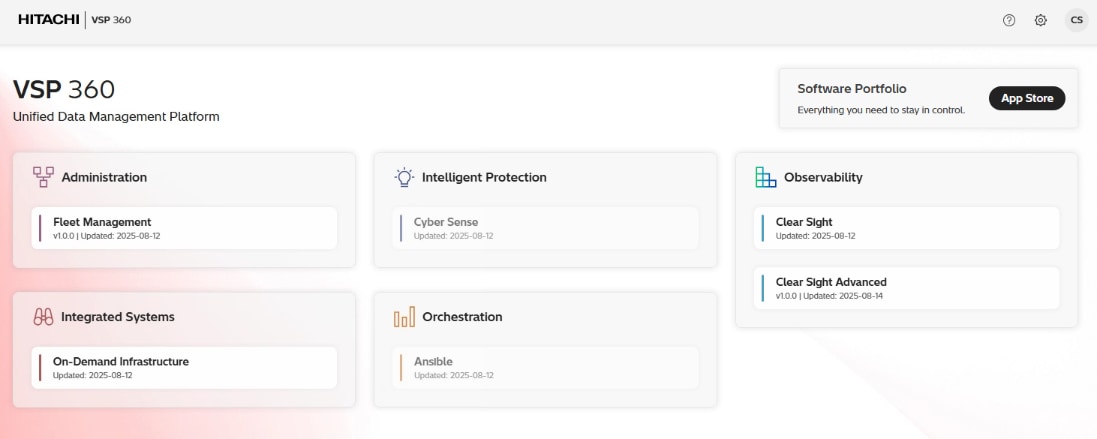
After installing the VSP 360 platform, you can:
● Install additional applications from the software portfolio that are not installed by default, including tools for observability, automation, and data governance.
● Add users and assign roles to control access and manage permissions across storage systems.
● Create user groups with specific roles and privileges to streamline administration and strengthen security.
The following VSP 360 applications are installed by default:
● Fleet Management: Simplifies setup, management, and maintenance of storage resources, reducing the complexity of managing storage systems. This includes adding storage systems, fabric switches, and servers. Configuring block storage, including port security, parity groups, and pools. Configuring port settings. Creating, attaching, and protecting volumes. Scheduling jobs for storage systems, servers, fabric switches, or virtual storage machines.
● Data Protection: Detects ransomware-related data corruption with 99.99% accuracy using advanced AI and analytics, ensuring effective cyber resiliency. Enables structured workflows that automate and manage backup, recovery, and retention tasks across complex IT environments. The client software must be installed on each server participating in the data protection environment. The VSP 360 Data Protection application serves as the central controller and user interface connection point. Active data protection policies continue functioning even if the primary controller is unavailable because participating clients operate autonomously using distributed rules.
● Clear Sight: Provides a unified digital experience for monitoring and managing infrastructure.
● Clear Sight Advanced: Uses AI-powered analytics to provide insight into system health, capacity, and performance, enabling proactive optimization and issue prevention. Features range from providing administrators and stakeholders with insights to effectively manage infrastructure. Deploying probes to monitor and collect data from different devices within the storage infrastructure. Configuring resource thresholds for proactive monitoring. Navigating from high-level summaries to detailed hierarchical views for in-depth analysis. Generating advanced reports to identify risks, highlight non-compliant resources, and recommend corrective actions. Delivering actionable insights to proactively mitigate risks and resolve issues before they escalate. Analyzing port imbalances and workload placement. Analyzing and troubleshooting block storage health. Using predefined or custom reports to monitor the performance, capacity, and overall health of storage system resources.
● EverFlex from Hitachi Control: Helps businesses modernize their IT operations and achieve greater agility and cost efficiency.
You can install the following additional applications from the software portfolio:
● Ansible: Connects to a library of Ansible playbooks, allowing you to link and launch them directly from VSP 360.
● CyberSense: Enhances cyber resiliency by detecting ransomware-related data corruption with 99.99% accuracy using advanced AI and analytics.
Note: Hitachi VSP 360 is not included in this CVD. The information provided here is for reference only. For more information about Hitachi VSP 360, see https://www.hitachivantara.com/en-us/products/data-management.
Hitachi Remote Ops (Hi-Track) is a monitoring system that provides continuous access to the full spectrum of Hitachi’s Global Support Center infrastructure and expertise while meeting stringent security requirements to protect your environment.
Remote Ops performs regular health checks, analyzes errors and automatically opens cases when necessary. This allows Hitachi Vantara experts to proactively contact you, offer performance improvement guidance, and remotely fine-tune your environment all while ensuring that your data remains secure.
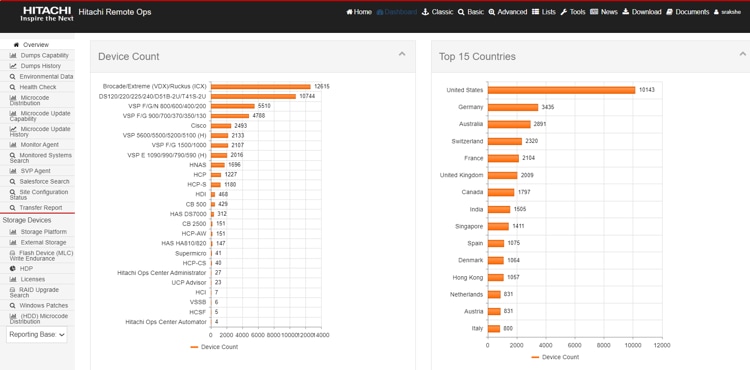
Hitachi Remote Ops monitoring system is not covered in the subsequent deployment guide, as it is enabled by default with every VSP as part of professional services. For more information, see https://www.hitachivantara.com/en-us/pdf/datasheet/remote-ops-monitoring-system-datasheet.pdf.
Hitachi VSP One Block Accelerate Virtual Machine Migration to OpenShift with Storage Offload
Hitachi has partnered with Red Hat to introduce a powerful storage offload feature in the Migration Toolkit for Virtualization (MTV) Operator, available starting with MTV version 2.9. If you plan to migrate VM workloads from a VMware vSphere cluster to OpenShift Virtualization, and both environments are backed by the same VSP One storage system, you can take advantage of this feature to significantly streamline the migration process.
For more information about this collaboration and feature from the following article, see: https://www.hitachivantara.com/en-us/blog/replatform-faster-openshift-vsp-one-storageoffload.
For specifications and details, see the latest MTV documentation: https://docs.redhat.com/en/documentation/migration_toolkit_for_virtualization/.
The following lists some of the main benefits of this storage offload migration:
● Up to 10 × faster migration: Internal testing shows up to 90% reduction in migration time – reducing a 10-hour process down to a 1-hour operation.
● No IP network dependency: VM volume data remains within the VSP storage system, freeing network bandwidth and reducing latency.
● Minimizes compute host resource usage: Less time spent on migration tasks, preserving CPU and memory for critical workloads.
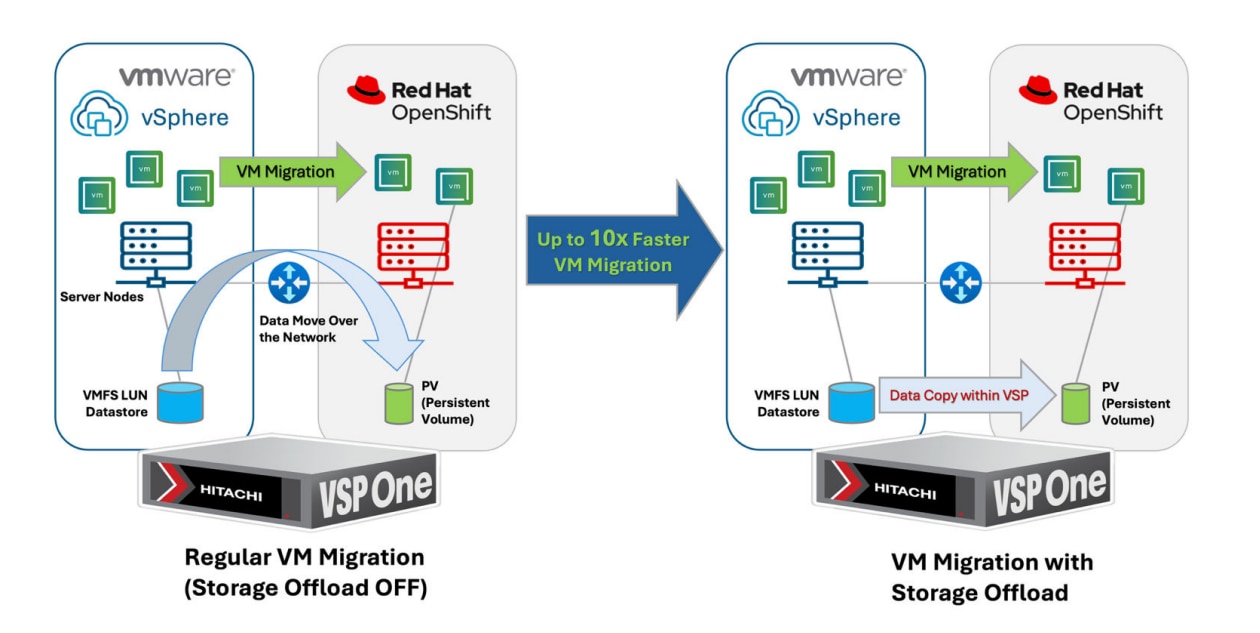
The following details the difference between having the storage offload feature OFF and ON during VM migration.
For regular VM migration with storage offload OFF:
● A VM migration plan is created and completed using the Migration Toolkit for Virtualization (MTV) Operator on OpenShift.
● An empty persistent volume (PV) is provisioned from VSP storage for the destination VM in the OpenShift cluster.
● From the ESXi host, the target VM data (VMDK) is read from the VMFS datastore (backed by the VSP storage).
● The data is transferred across the network to the OpenShift cluster.
● The data is written into the persistent volume attached to the new VM.
For VM migration with storage offload ON:
● A VM migration plan is created and completed using the Migration Toolkit for Virtualization (MTV) Operator on OpenShift.
● An empty persistent volume (PV) is provisioned from VSP storage for the destination VM in the OpenShift cluster.
● The VM data is copied directly within the VSP storage using XCOPY command (bypassing the network).
● The same PV is temporarily attached to the source ESXi host.
● The storage offload XCOPY command is issued from the ESXi host to copy VM data from the VMFS datastore to the newly attached PV.
● After the data copy is complete, the PV is detached from the ESXi host.
For detailed implement procedures, see https://docs.hitachivantara.com/v/u/en-us/hitachi-integrated-systems/mk-sl-374.
Hitachi VSP Storage Concepts for Red Hat OCP
This guide offers a VSP storage solution that can be used to meet most deployment configurations that require persistent storage service for containers (applications) and virtualization in a Red Hat OCP environment. This solution integrates the Hitachi Storage Plug-in for Container Storage Interface (CSI) with the Red Hat OCP environment which will leverage the following concepts.
HSPC with Red Hat OpenShift Container Management Platform
This section covers the deployment types of container management platforms and their support with Hitachi storage to provide persistent storage. Within this guide, Red Hat OCP in a Bare Metal (BM) deployment is covered with HSPC for BM nodes.
The following table lists Hitachi integration points with Red Hat OCP for various deployment types. A BM deployment type backed by HSPC using the Fibre Channel protocol is covered in this guide.
| Red Hat OpenShift Container Platform |
||
| Deployment Type |
Storage Type |
Hitachi Persistent Storage Provider Compatibility |
| VM (all virtual infrastructure) |
iSCSI, NVMe/TCP |
Hitachi Storage Plug-in for containers |
| Bare Metal (all physical infrastructure |
Fibre Channel (FC-SCSI and FC-NVMe), iSCSI and NVMe/TCP |
Hitachi Storage Plug-in for Containers |
| Hybrid (mix of physical and virtual workers) |
iSCSI, NVMe/TCP |
Hitachi Storage Plug-in for containers (Virtual) |
| Fibre Channel (FC-SCSI and FC-NVMe), iSCSI and NVMe/TCP |
Hitachi Storage Plug-in for Containers (Bare Metal) |
|
Storage Class
A StorageClass provides a way for administrators to describe the classes of storage they offer, which can be requested through the OpenShift Container Platform (OCP) interface. Each class contains fields for administrators to define the provisioner, parameter, and reclaim policy, which are used for PV creation using PVCs. The provisioner parameter in a bare-metal environment backed by Hitachi storage using the HSPC CSI driver hspc.csi.hitachi.com. StorageClasses have specific names and must be referenced when creating PVCs. When administrators create StorageClass objects, these objects cannot be updated after creation.
Secret
The Secret file contains the storage URL, username, and password settings necessary for HSPC to work with the environment. From an available Linux machine, administrators must encode the URL, username, and password in base64 to access VSP One Block.
Multipathing
For worker nodes connected to VSP One Block storage using FC or iSCSI, enable multipathing. The requirement is to create the multipath.conf and ensure that the user_friendly_names option is set to yes, and the multipathd.service is enabled. This can be done by applying a Machine Config Operator (MCO) to the OCP cluster after deployment.
Note: Applying MachineConfig will restart the worker nodes one at a time.
HSPC VSP Host Groups, LDEVs, and LUNs
HSPC automatically creates a host group based on the ports designated within the StorageClass. Prerequisites include physical connectivity and logical zoning completion. HSPC uses the following naming rule when creating host groups: "spc-WNN-WWN-WWN" If host groups already exist, delete or rename them to comply with this naming rule.
Additionally, HSPC creates the underlying LDEV that supports the PV and establishes LUN paths automatically to the host group during PVC claim. LDEVs created by HSPC use the designator “spc-xxxx”
When a volume is dynamically created by HSPC, information about the created volume is stored in spec.csi.volumeAttributes of the PersistentVolume. You can view these properties using the “kubectl or oc get pv -o” yaml command. These properties are mainly used for internal purposes. Table 1 lists the properties that can help with troubleshooting.
Table 1. Volume properties for VSP family and VSP One Block
| Property |
Description |
| ldevIDDEC |
Decimal LDEV ID |
| ldevIDHex |
Hexadecimal LDEV ID |
| Size |
Capacity of the volume Note: Capacity shown here is the original capacity used when creating the volume. |
Persistent Volume Claims (PVC) and Persistent Volumes (PV)
One of the storage resources that the Red Hat OCP orchestrates is persistent storage using Persistent Volumes (PV). PVs are resources in the Kubernetes cluster that have a lifecycle independent of any pod that uses a PV. This is a type of volume on the host machine that stores persistent data. PVs provide storage resources in a cluster, allowing the storage resource to persist even when the pods that use them have completed their lifecycle. PVs can be provisioned statically or dynamically, and they can be customized for performance, size, and access mode. PVs are attached to pods through a PersistentVolumeClaim (PVC), which is a request for the resource that acts as a claim to check for available resources.
PV Snapshots
A VolumeSnapshot represents a snapshot of a volume on the storage system for additional analysis, backup, or disaster recovery purposes. Similar to how PersistentVolume and PersistentVolumeClaim API resources are used to provision volumes, VolumeSnapshot and VolumeSnapshotContent API resources are provided to create volume snapshots. VolumeSnapshot support is only available for CSI drivers.
● VolumeSnapshotContent: Represents a snapshot taken of a volume in the cluster. Similar to the PersistentVolume object, the VolumeSnapshotContent is a cluster resource that points to a real snapshot in the backend storage. VolumeSnapshotContent is not namespaced.
● VolumeSnapshot: A request for a snapshot of a volume, similar to a PersistentVolumeClaim. Creating a VolumeSnapshot triggers a snapshot (VolumeSnapshotContent), and the objects are bound together. There is a one-to-one binding between VolumeSnapshot and VolumeSnapshotContent. VolumeSnapshot is namespaced.
● VolumeSnapshotClass: Defines different attributes for a VolumeSnapshot similar to how a StorageClass is used for PVs.
PV Clone
The HSPC CSI volume cloning feature adds support for specifying existing PVCs in the dataSource field to indicate that a user wants to clone a volume.
A clone is defined as a duplicate of an existing Kubernetes volume that can be consumed as any standard volume. The only difference is that upon provisioning, rather than creating a "new" empty volume, the backend device creates an exact duplicate of the specified volume.
From the Kubernetes API perspective, cloning adds the ability to specify an existing PVC as a dataSource during new PVC creation. The source PVC must be bound and available (not in use).
Read Write Many (RWX)
When running virtual machines in a containerized environment such as Red Hat OpenShift, it is critical to use the right storage provider. The Hitachi HSPC CSI driver supports ReadWriteMany (RWX) access mode, which is required to support live migration of virtual machines across cluster nodes. When you deploy virtual machines or migrate VMs from another source provider such as VMware, the VMs will automatically be created with persistent volume claims (PVCs) with a shared ReadWriteMany (RWX) access mode. For live migrations of virtual machines between cluster nodes, OCP cluster must have shared storage with ReadWriteMany (RWX) access mode.
Solution Design
This chapter contains the following:
Physical End-to-End Connectivity
Cisco UCS X-Series Configuration - Cisco Intersight Managed Mode
Red Hat OpenShift Container Platform Design
Cisco Intersight Integration with Hitachi Storage, and Cisco Switches
The Adaptive Solutions architecture delivers a cloud-managed infrastructure solution on the latest Cisco UCS hardware featuring the Cisco UCS 6536 Fabric Interconnect and the Cisco UCS X210c M8 Compute nodes. This Virtual Server Infrastructure (VSI) architecture supporting both containers and virtual machines is built to deliver Red Hat OCP on the Red Hat CoreOS immutable servers installed to local M.2 drives with the Hitachi VSP providing the storage infrastructure serving high performance FC-SCSI block storage for the application access. The Cisco Intersight cloud-management platform is utilized to configure and manage the infrastructure, with visibility at all layers of the architecture.
See the Hitachi Virtual Storage Platform with Cisco Intersight Cloud Orchestrator - Best Practices Guide for additional information for provisioning storage.
This release of the Adaptive Solutions architecture enables the container-based platform of Red Hat OCP that is FC-SCSI based, while also utilizing 100G Ethernet networking for both container and virtual machine hosting. In this design, the Hitachi VSP One Block and the Cisco UCS 6536 Fabric Interconnects are connected through Cisco MDS 9124V Switches for application and storage needs, with boot established through local M.2 drives configured in RAID 1.
The physical connectivity details of the topology are shown in Figure 19.
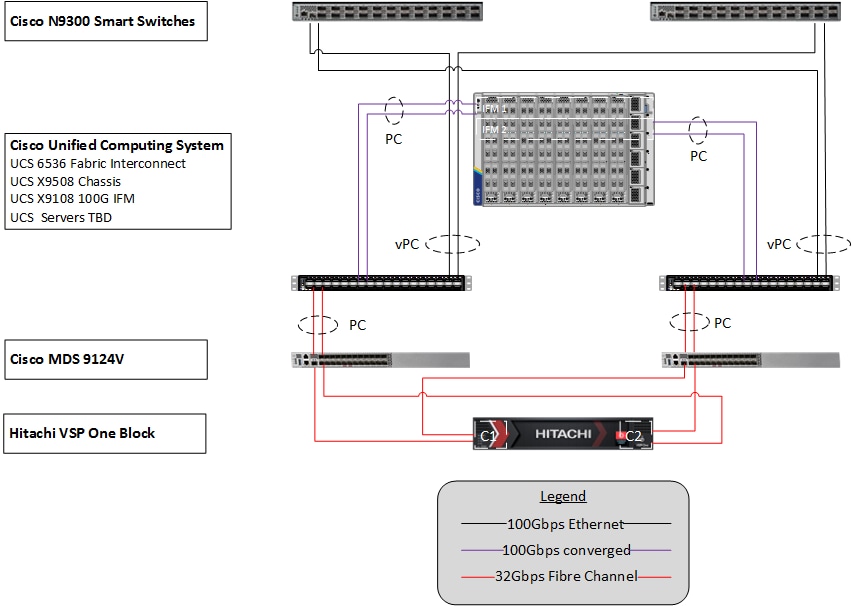
To validate the configuration, the components are set up as follows:
● Cisco UCS 6536 Fabric Interconnects provide the chassis and network connectivity.
● The Cisco UCS X9508 Chassis connects to fabric interconnects using Cisco UCS 9108-100G intelligent fabric modules (IFMs), where two 100 Gigabit Ethernet ports are used on each IFM to connect to the appropriate FI. If additional bandwidth is required, up to eight 100G ports can be utilized to the chassis.
● Cisco UCS X210c M8 Compute Nodes contain the fifth-generation Cisco 15230 virtual interface cards (VICs) delivering up to 100G from each side of the fabric as the servers physically connect directly to the fabric interconnects within the chassis.
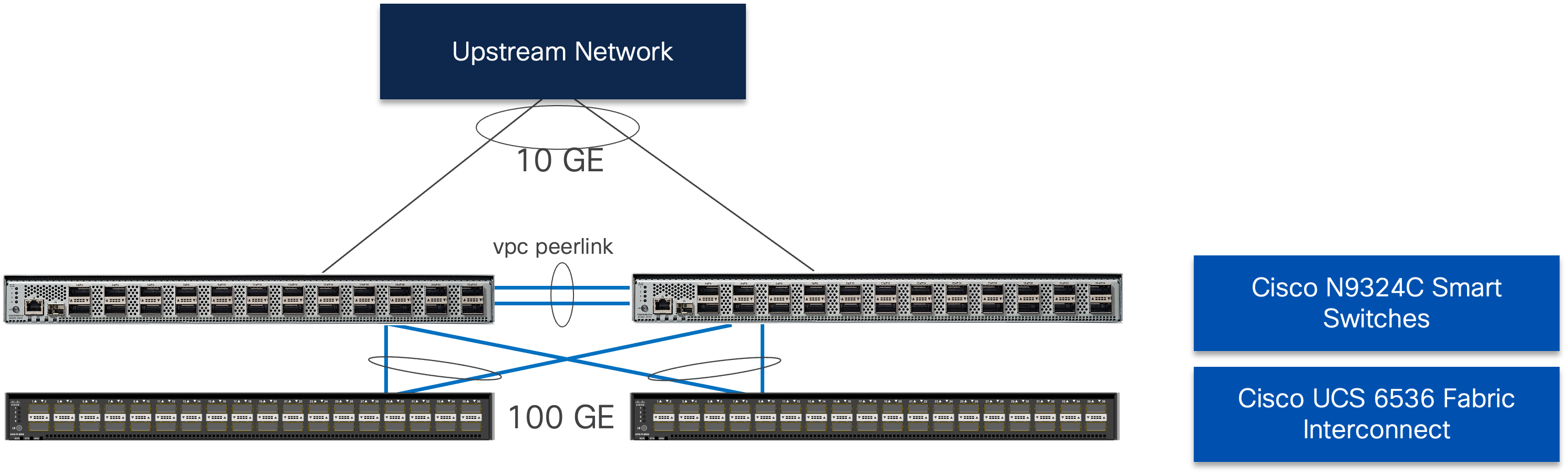
● Cisco N9324C Smart Switches in Cisco NX-OS mode provide the switching fabric and connect to each of the Cisco UCS 6536 Fabric Interconnects in a Virtual Port Channel (vPC) configuration.
● Cisco MDS 9124V Fibre Channel switches with Cisco NX-OS provide the SAN switching fabric and connect to the Cisco UCS 6536 Fabric Interconnects via SAN Port Channels.
● The Hitachi VSP One Block is connected to the Cisco MDS 9124V switches through multiple 32 Gbps fibre channel links, providing high-performance FC-SCSI connectivity. Although the VSP One Block supports 64 Gbps fibre channel ports, their speed has been adjusted to be consistent with the UCS Fabric Interconnect fibre channel ports and avoid any fibre channel link buffering issues.
● Red Hat CoreOS is installed to local M.2 disks on the Cisco UCS X210c M8 Compute Nodes to validate the infrastructure.
In the Adaptive Solutions deployment, each Cisco UCS server equipped with a Cisco Virtual Interface Card (VIC) is configured for multiple virtual Network Interfaces (vNICs) and virtual Host Based Adapters (vHBAs), which appear as standards-compliant PCIe endpoints to the OS. The end-to-end logical connectivity delivers multi-pathing for the VLAN and VSAN connectivity between the server profile for each OCP node and the storage configuration on the Hitachi VSP One Block is described below.
Figure 20 illustrates the end-to-end connectivity design.
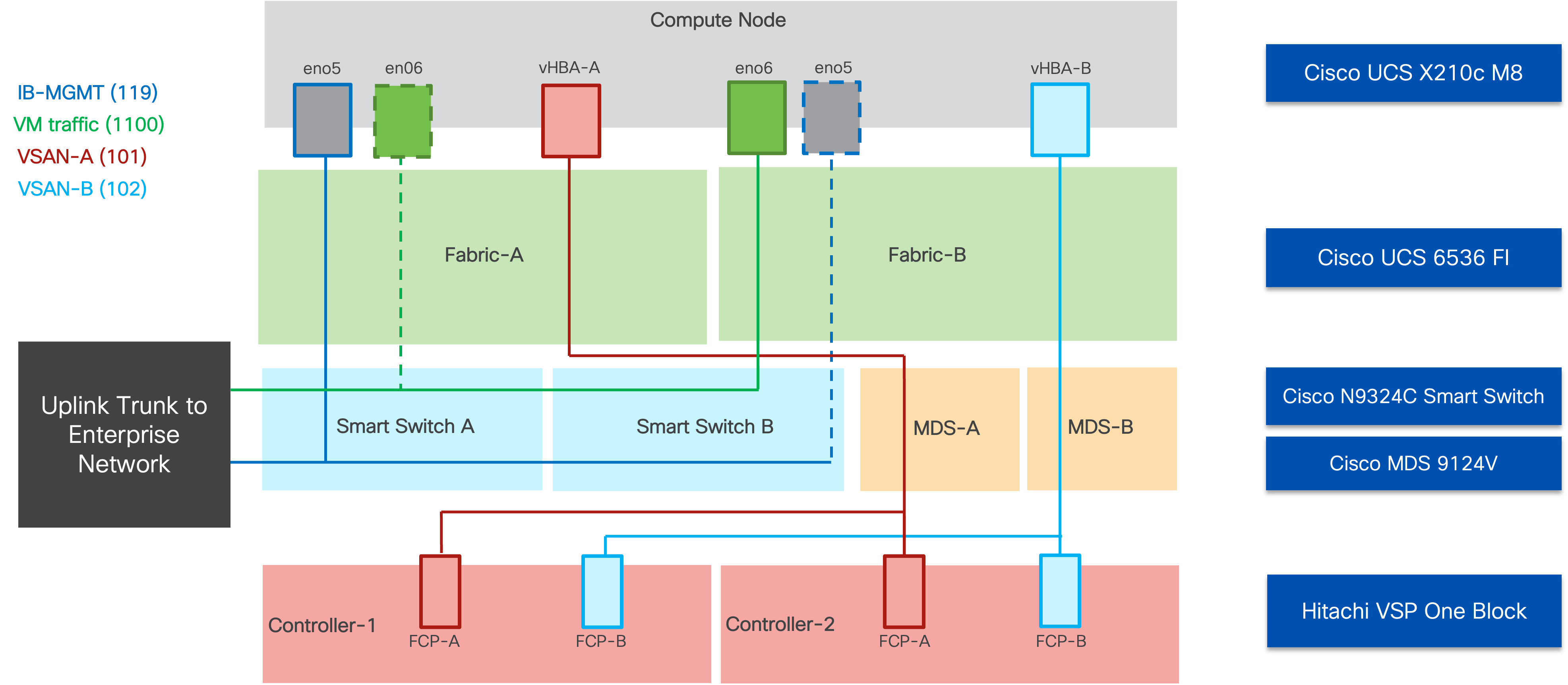
Each OCP node profile supports:
● Managing the OCP Control and Worker nodes using a common management segment (IB-MGMT)
● The vNICs are:
◦ The primary vNIC (eno5) carries the node management and container traffic (IB-MGMT) that is set to fabric A with failover to fabric B enabled within the hardware. The MTU value for this vNIC is not enabled for jumbo frames to best deal with traffic that might be needed outside of OCP within the management network.
◦ The second vNIC (eno6) is dedicated to virtual machine traffic provisioned through Red Hat OCPv. This vNIC is pinned to fabric B, with failover enabled to fabric A as needed. The MTU for the vNICs is set to Jumbo MTU (9000), leaving further MTU specification to the provisioned resources as needed.
◦ The vHBAs provisioned for the VIC by the node profile will be associated to VSAN-A and VSAN-B, with zoning established in the MDS, and multi-pathing managed by the Hitachi Storage Plug-in for Containers (HSPC) covered later, and the VSP.
Physical End-to-End Connectivity
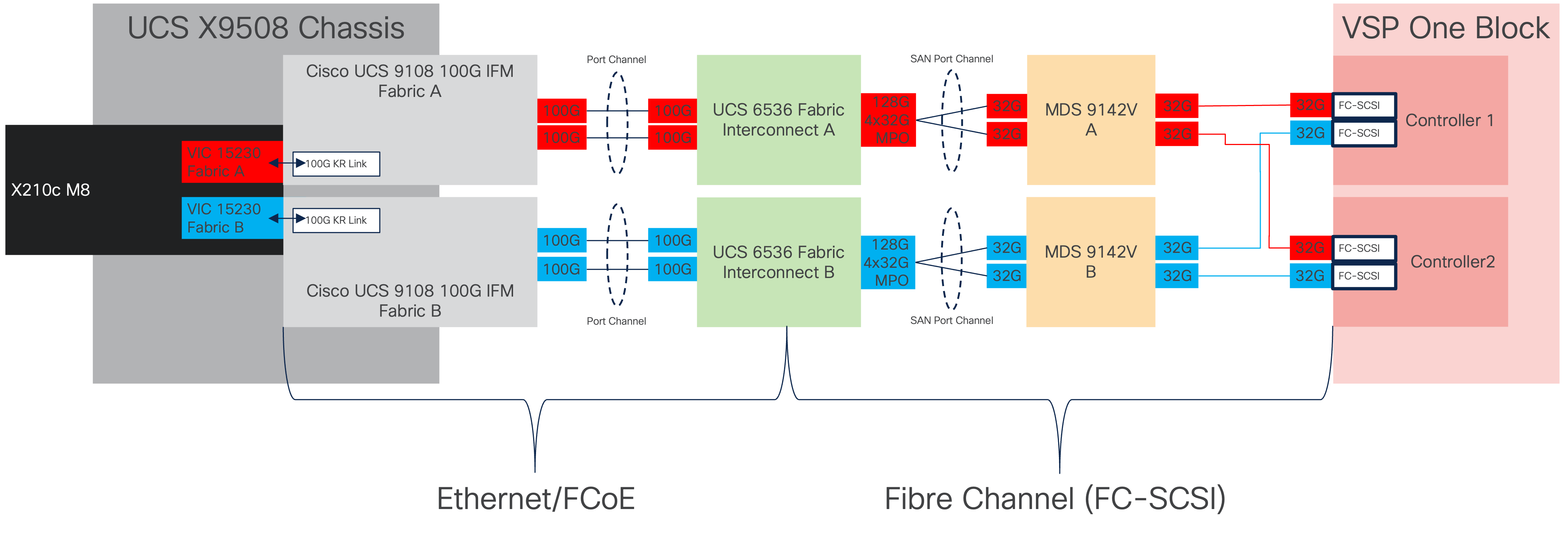
The physical end-to-end connectivity specific to the storage traffic is shown in Figure 21. The Fabric Interconnects create a demarcation of FCoE handling from the compute side as the VICs talk to the IFM and connect to the FIs. The server to IFM connection that the VICs participate in is a direct physical connection of KR links between the server and the IFM, differing from the previous generation of Cisco UCS 5108 Chassis where a physical KR lane structure mediated the traffic between the servers and the respective Cisco UCS IOMs.
Leaving the FIs, the traffic is converted to direct Fibre Channel packets carried within dedicated SAN port channels to the MDS. After being received by the MDS, the zoning within each MDS isolates the intended initiator to target connectivity as it proceeds to the VSP.
The specific connections as the storage traffic flows from a Cisco UCS X210c M8 server in a UCS environment to Hitachi VSP One Block system are as follows:
● Each Cisco UCS X210c M8 server is equipped with a Cisco UCS VIC 15230 adapter that connects to each fabric at a link speed of 100Gbps that are configured with Ethernet adapter policies maximized for IP storage traffic.
● The link from the Cisco UCS VIC 15230 is physically connected into the Cisco UCS 6536 FI as they both reside in the Cisco UCS X9508 chassis.
● Connecting from each IFM to the Fabric Interconnect with pairs of 100Gb uplinks (can be increased to up to 8 100GB connections per IFM) that are automatically configured as port channels during chassis association, which carry the FC frames as FCoE along with the Ethernet traffic coming from the chassis.
● Continuing from the Cisco UCS 6536 Fabric Interconnects, a breakout MPO transceiver that presents multiple 32G FC ports configured as a port channel into the Cisco MDS 9124V, carrying FC-SCSI traffic, for increased aggregate bandwidth and link loss resiliency.
● Ending at the Hitachi VSP One Block Fibre Channel controller ports with dedicated F_Ports on the Cisco MDS 9124V for each N_Port WWPN of the VSP controller, with each channel board (CHB).
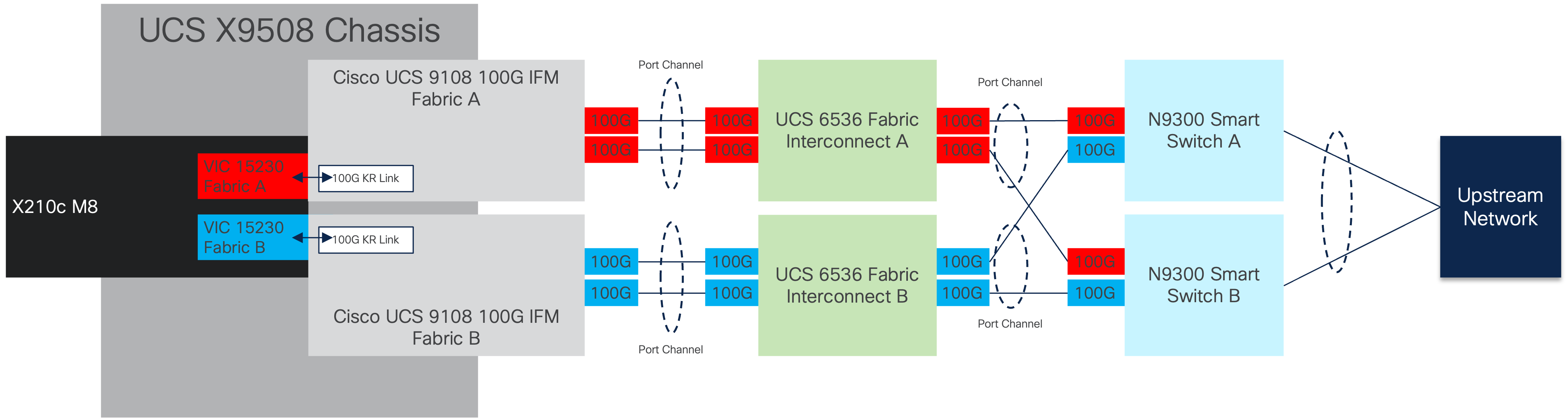
The dedicated Ethernet traffic utilizes the same links coming from the IFM into the FIs as shown in figure 37, but will communicate beyond the FIs within a pair of port channels that are received across the upstream N9300 Smart Switches as two separate Virtual Port Channels (vPC) that each switch will participate in.
As with the FC storage traffic, the Ethernet data traffic follows similar paths as follows:
● Each Cisco UCS X210c M8 server is equipped with a VIC 15230 adapter that connects to each fabric at a link speed of 100Gbps.
● The link from the VIC 15230 is physically connected into the Cisco UCS Cisco UCS 9108 100G IFM as they both reside in the X9508 chassis.
● Connecting from each IFM to a dedicated Fabric Interconnect with pairs of 100Gb uplinks (can be increased to up to 8 100GB connections per IFM) that are automatically configured as port channels during chassis association.
● Connecting out of the Fabric Interconnects, the port channels are configured with two 100Gb uplinks to the N9300 Smart Switches that can be expanded as needed.
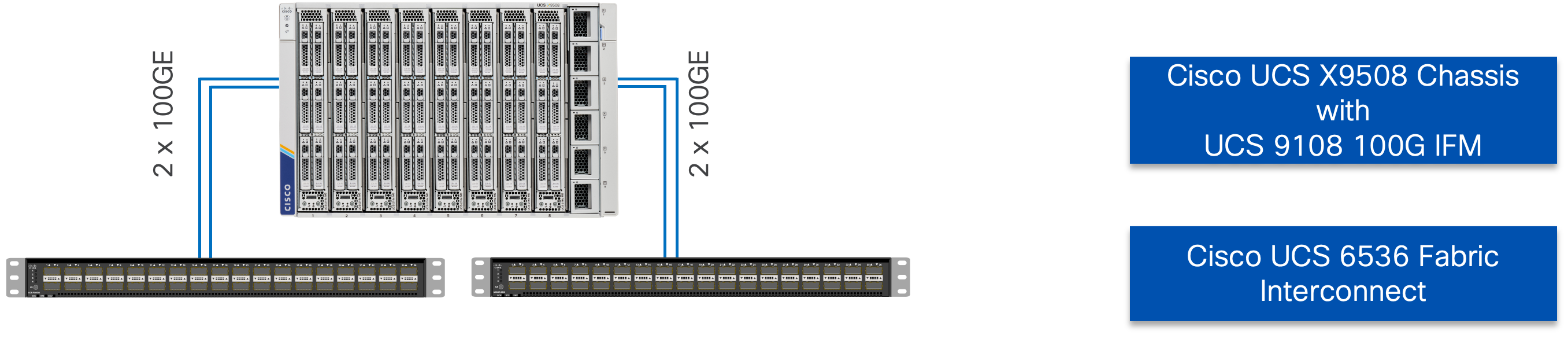
The Cisco UCS X9508 Chassis is equipped with the Cisco UCS 9108-100G intelligent fabric modules (IFMs). The Cisco UCS X9508 Chassis connects to each Cisco UCS 6536 FI using two of the eight 100GE ports, as shown in Figure 23. If you require more bandwidth, all eight ports on the IFMs can be connected to each FI.
Cisco UCS Fabric Interconnect 6536 to Cisco N9300 Smart Switch Ethernet Connectivity
Cisco UCS 6536 FIs are connected with port channels to Cisco N9324C Smart Switches using 100GE connections configured as virtual port channels. Each FI is connected to both Cisco Nexus switches using a 100G connection; additional links can easily be added to the port channel to increase the bandwidth as needed. Figure 24 illustrates the physical connectivity details.
The Cisco N9300 Smart Switches are implemented with NX-OS to cover the core networking requirements for Layer 2 and (optionally) Layer 3 communication. Some of the key NX-OS features implemented within the design are:
● Feature interface-vans—Allows the VLAN IP interfaces to be configured within the switch as gateways.
● Feature HSRP—Allows the Hot Standby Routing Protocol configuration for high availability.
● Feature LACP—Allows the utilization of Link Aggregation Control Protocol (802.3ad) by the port channels configured on the switch.
● Feature VPC—Virtual Port-Channel (vPC) presents the two Nexus switches as a single “logical” port channel to the connecting upstream or downstream device.
● Feature LLDP—Link Layer Discovery Protocol (LLDP), a vendor-neutral device discovery protocol, allows the discovery of both Cisco devices and devices from other sources.
● Feature NX-API—NX-API improves the accessibility of CLI by making it available outside of the switch by using HTTP/HTTPS. This feature helps with configuring the Cisco Nexus switch remotely using the automation framework.
● Feature UDLD—Enables unidirectional link detection for various interfaces.
The Cisco MDS 9124V delivers 32Gbps Fibre Channel (FC) capabilities to the Adaptive Solutions design that is future proofed with 64Gbps capability. A redundant 32 Gbps Fibre Channel SAN configuration is deployed utilizing two Cisco MDS 9124Vs switches. Some key MDS features implemented within the design are:
● Feature NPIV - N port identifier virtualization (NPIV) provides a means to assign multiple FC IDs to a single N port.
● Feature fport-channel-trunk - F-port-channel-trunks allow for the fabric logins from the NPV switch to be virtualized over the port channel. This provides nondisruptive redundancy should individual member links fail.
● Enhanced Device Alias - a feature that allows device aliases (a name for a WWPN) to be used in zones instead of WWPNs, making zones more readable. Also, if a WWPN for a vHBA or Hitachi VSP port changes, the device alias can be changed, and this change will carry over into all zones that use the device alias instead of changing WWPNs in all zones.
● Smart-Zoning - a feature that reduces the number of TCAM entries and administrative overhead by identifying the initiators and targets in the environment.
Cisco UCS Fabric Interconnect 6536 to Cisco MDS 9124V SAN Connectivity
For SAN connectivity, each Cisco UCS 6536 Fabric Interconnect is connected to a Cisco MDS 9124V SAN switch using a breakout on ports 33-36 to a 2 x 32G Fibre Channel SAN port-channel connection, as shown in Figure 25.

Hitachi VSP One Block to MDS 9124V SAN Connectivity
For SAN connectivity, each Hitachi VSP Block One controller is connected to both of the Cisco MDS 9124V SAN switches using 32G Fibre Channel connections, as shown in Figure 26.

Cisco UCS X-Series Configuration - Cisco Intersight Managed Mode
Cisco Intersight Managed Mode continues to standardize policy and operation management for the Cisco UCS X-Series compute nodes and the Cisco UCS Fabric Interconnects used in this CVD. The Cisco UCS compute nodes are configured using server profiles defined in Cisco Intersight. These server profiles derive all the server characteristics from various policies and templates. At a high level, configuring Cisco UCS using Intersight Managed Mode consists of the steps shown in Figure 27.

Set up Cisco UCS Fabric Interconnect for Cisco Intersight Managed Mode
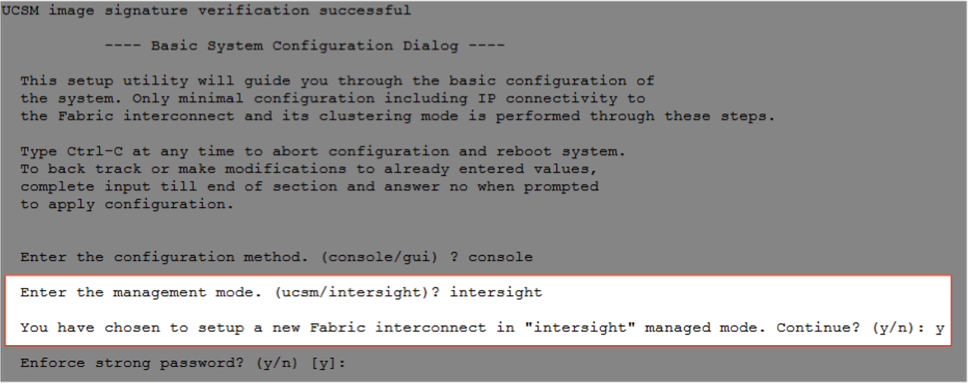
During the initial configuration, for the management mode the configuration wizard enables customers to choose whether to manage the fabric interconnect through Cisco UCS Manager or the Cisco Intersight platform. Customers can switch the management mode for the fabric interconnects between Cisco Intersight and Cisco UCS Manager at any time; however, Cisco UCS FIs must be set up in Intersight Managed Mode (IMM) for configuring the Cisco UCS X-Series system. Figure 28 shows the dialog during initial configuration of Cisco UCS FIs for setting up IMM.
Claim a Cisco UCS Fabric Interconnect in the Cisco Intersight Platform
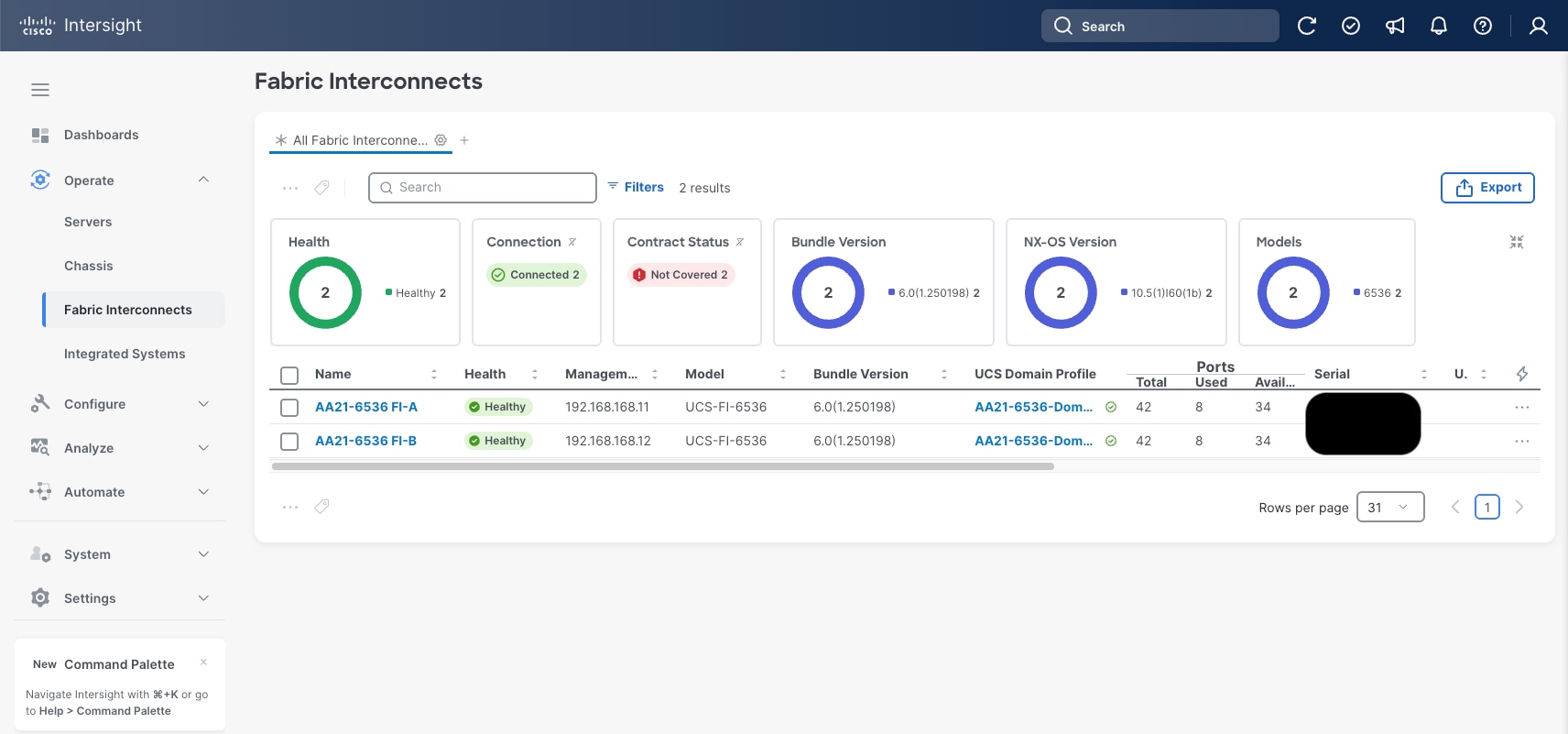
After setting up the Cisco UCS fabric interconnect for Cisco Intersight Managed Mode, FIs can be claimed to a new or an existing Cisco Intersight account. When a Cisco UCS fabric interconnect is successfully added to the Cisco Intersight platform, all future configuration steps are completed in the Cisco Intersight portal.
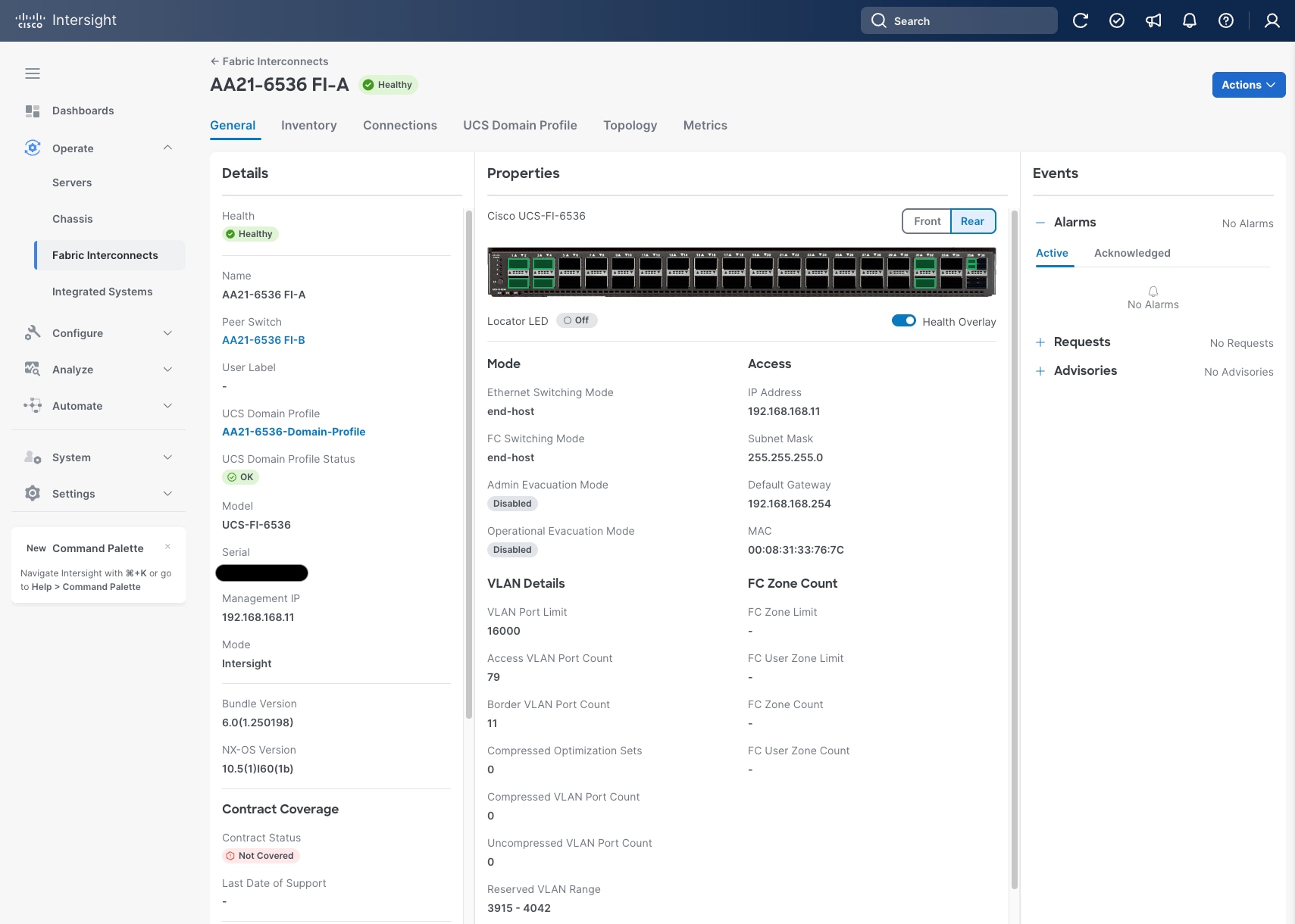
You can verify whether a Cisco UCS fabric interconnect is in Cisco UCS Manager managed mode or Cisco Intersight Managed Mode by clicking the fabric interconnect name and looking at the detailed in-formation screen for the FI, as shown in Figure 30.
Cisco UCS Chassis Profile (Optional)
A Cisco UCS Chassis profile configures and associate chassis policy to an IMM claimed chassis. The chassis profile feature is available in Intersight only if customers have installed the Intersight Essentials License. The chassis-related policies can be attached to the profile either at the time of creation or later.
The chassis profile is used to set the power policy for the chassis. By default, Cisco UCS X-Series power supplies are configured in GRID mode, but the power policy can be utilized to set the power supplies in non-redundant or N+1/N+2 redundant modes.
Cisco UCS Domain Profile
A Cisco UCS domain profile configures a fabric interconnect pair through reusable policies, allows configuration of the ports and port channels, and configures the VLANs and VSANs to be used in the network. It defines the characteristics of and configures the ports on the fabric interconnects. One Cisco UCS domain profile can be assigned to one fabric interconnect domain, which will be associated with one port policy per Cisco UCS domain profile.
Some of the characteristics of the Cisco UCS domain profile in the environment are:
● A single domain profile is created for the pair of Cisco UCS fabric interconnects.
● Unique port policies are defined for the two fabric interconnects.
● The VLAN configuration policy is common to the fabric interconnect pair because both fabric interconnects are configured for the same set of VLANs.
● The VSAN configuration policies are unique for the two fabric interconnects because the VSANs are unique.
● The Network Time Protocol (NTP), network connectivity, Link Control (UDLD), and system Quality-of-Service (QoS) policies are common to the fabric interconnect pair.
After the Cisco UCS domain profile has been successfully created and deployed, the policies including the port policies are pushed to the Cisco UCS fabric interconnects. The Cisco UCS domain profile can easily be cloned to install additional Cisco UCS systems. When cloning the UCS domain profile, the new UCS domains utilize the existing policies for consistent deployment of additional Cisco UCS systems at scale.
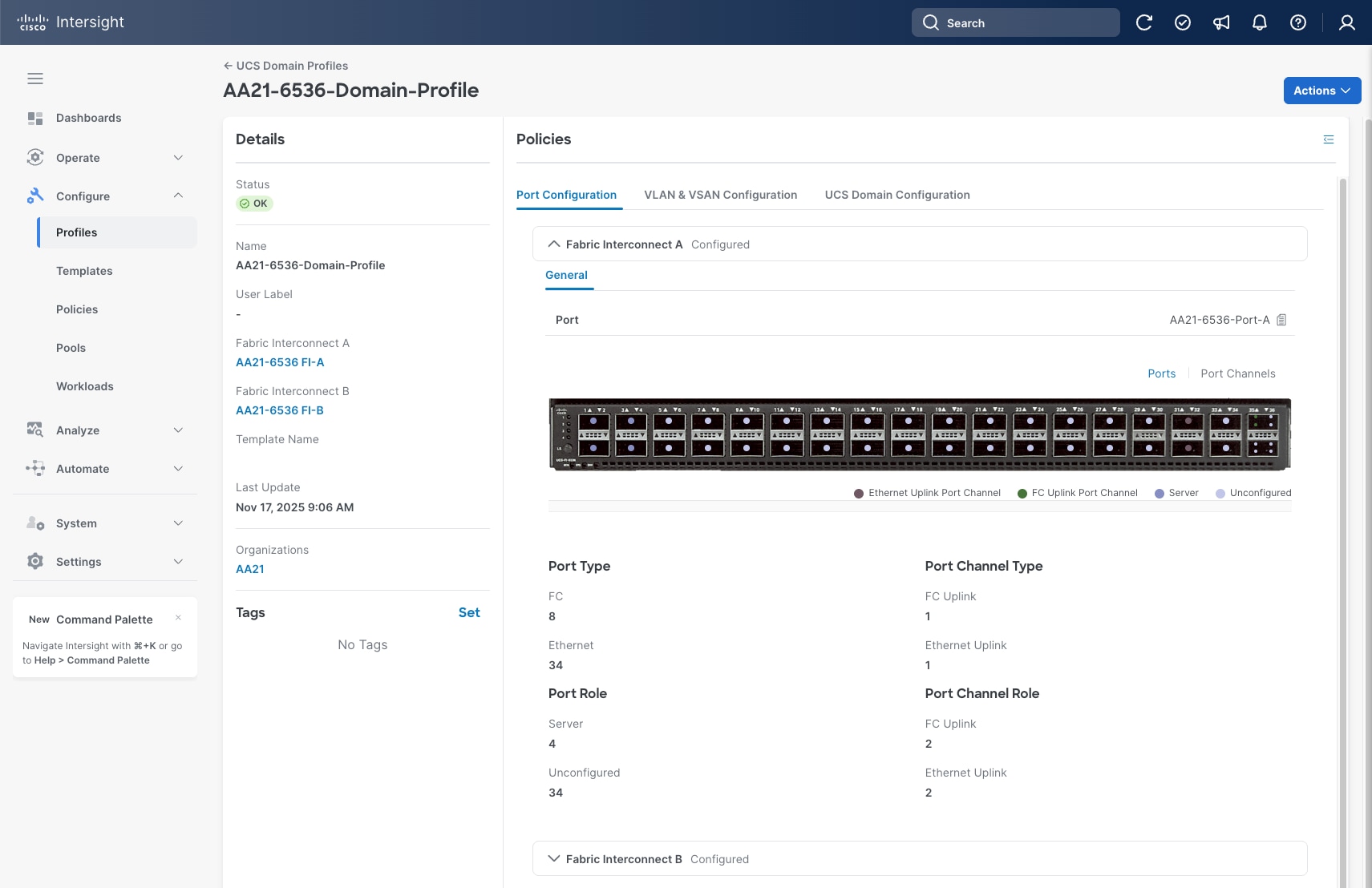
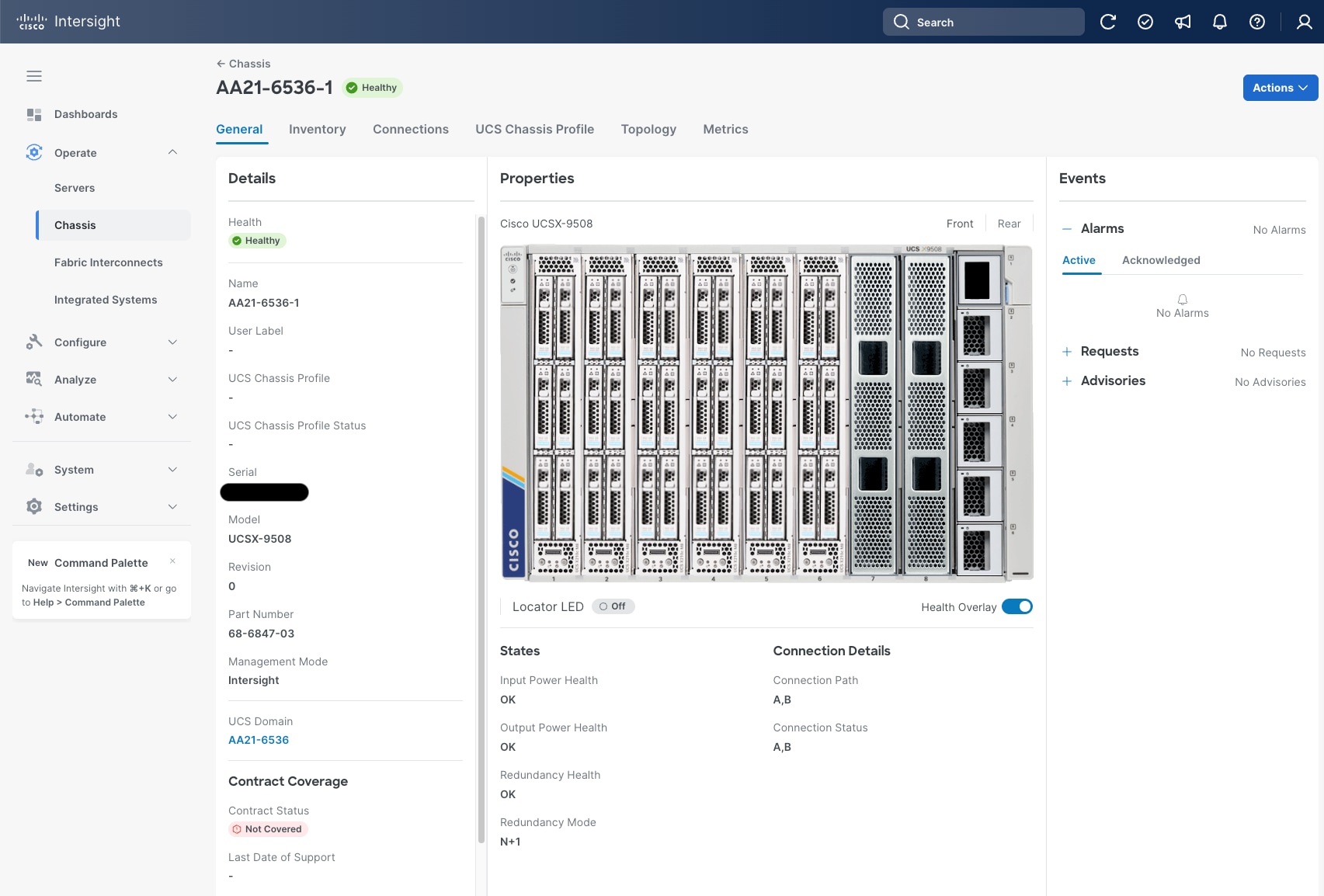
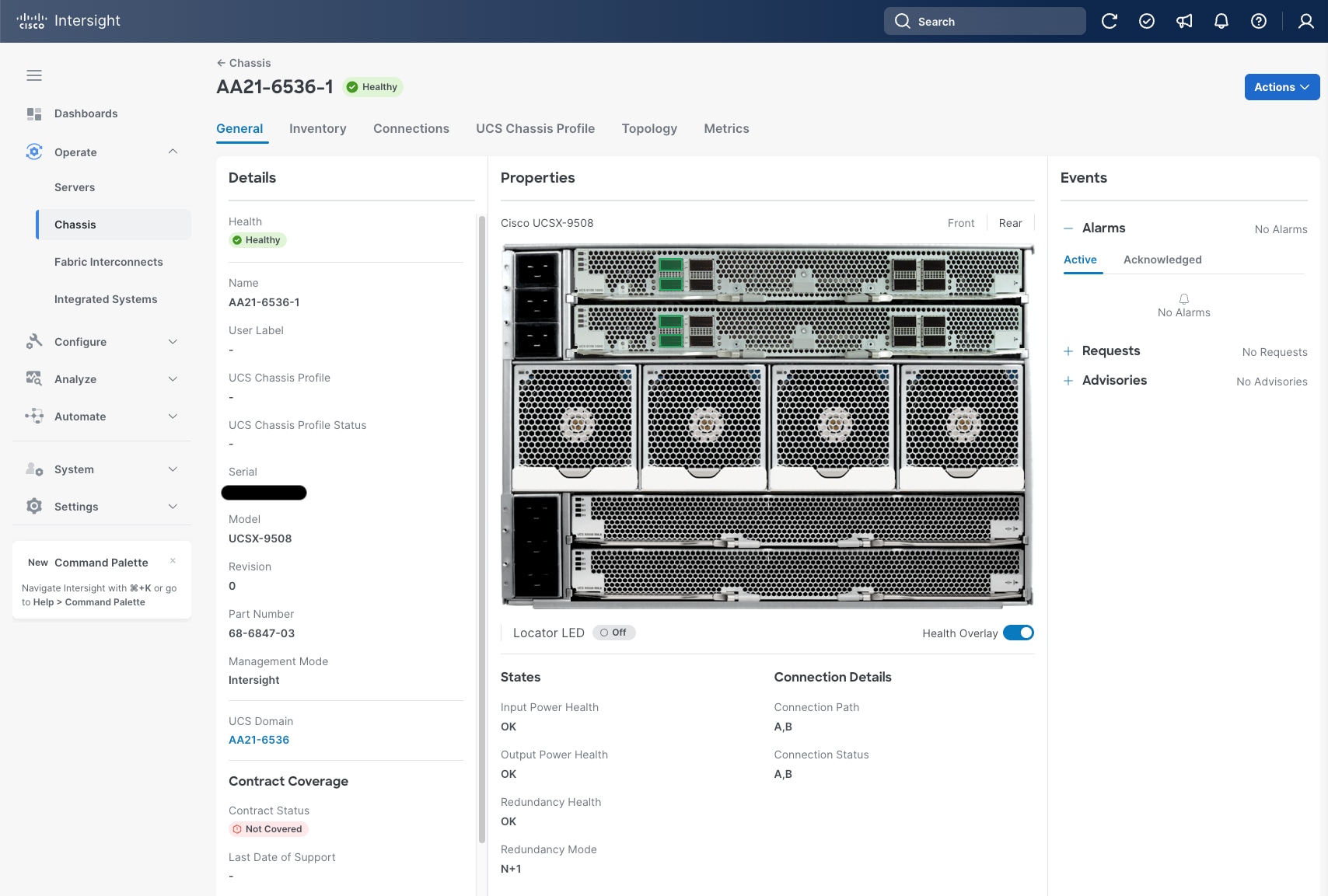
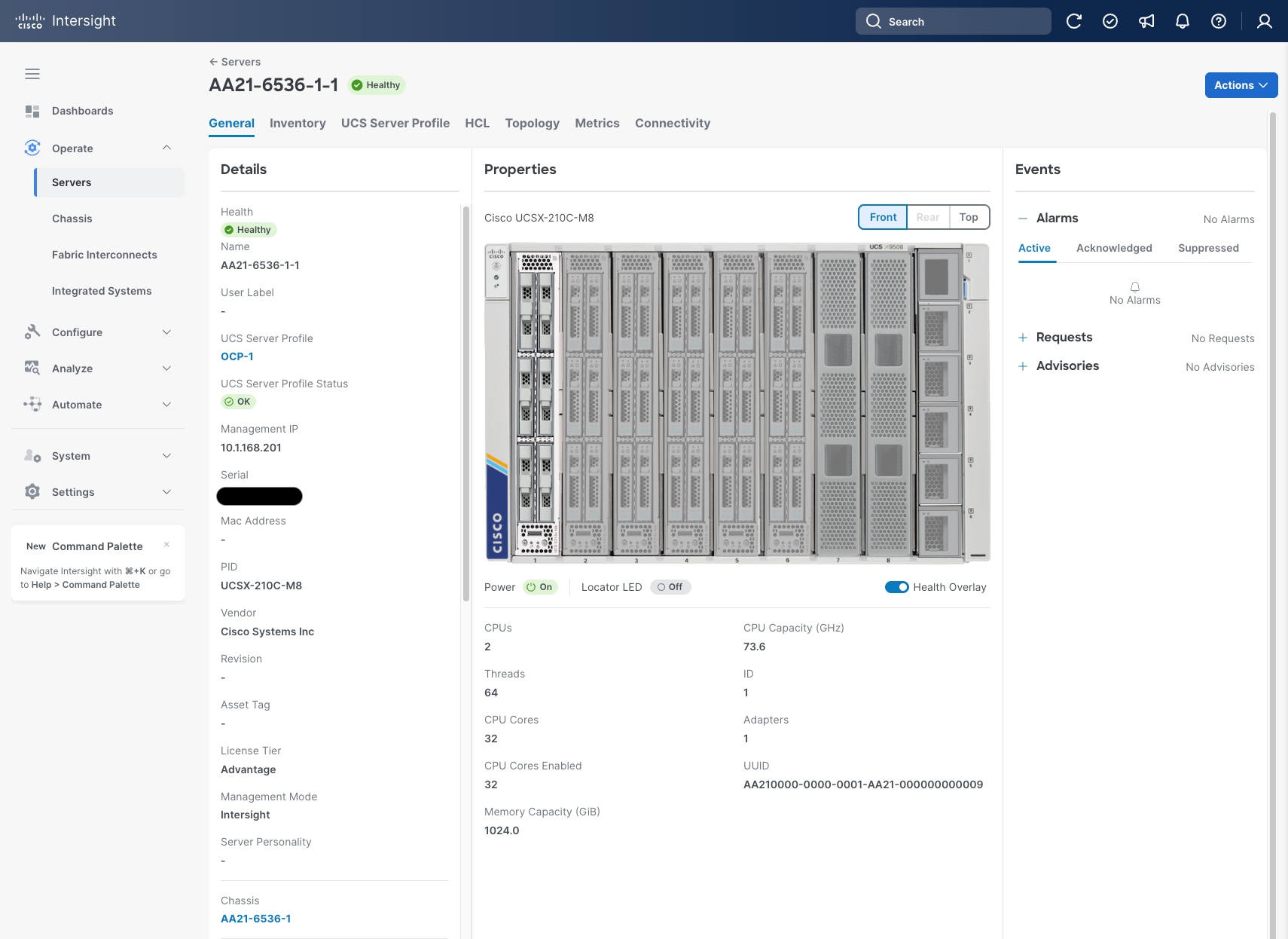
The Cisco UCS X9508 Chassis and Cisco UCS X210c M8 Compute Nodes are automatically discovered when the ports are successfully configured using the domain profile as shown in Figure 32, Figure 33, and Figure 34.
Server Profile Template
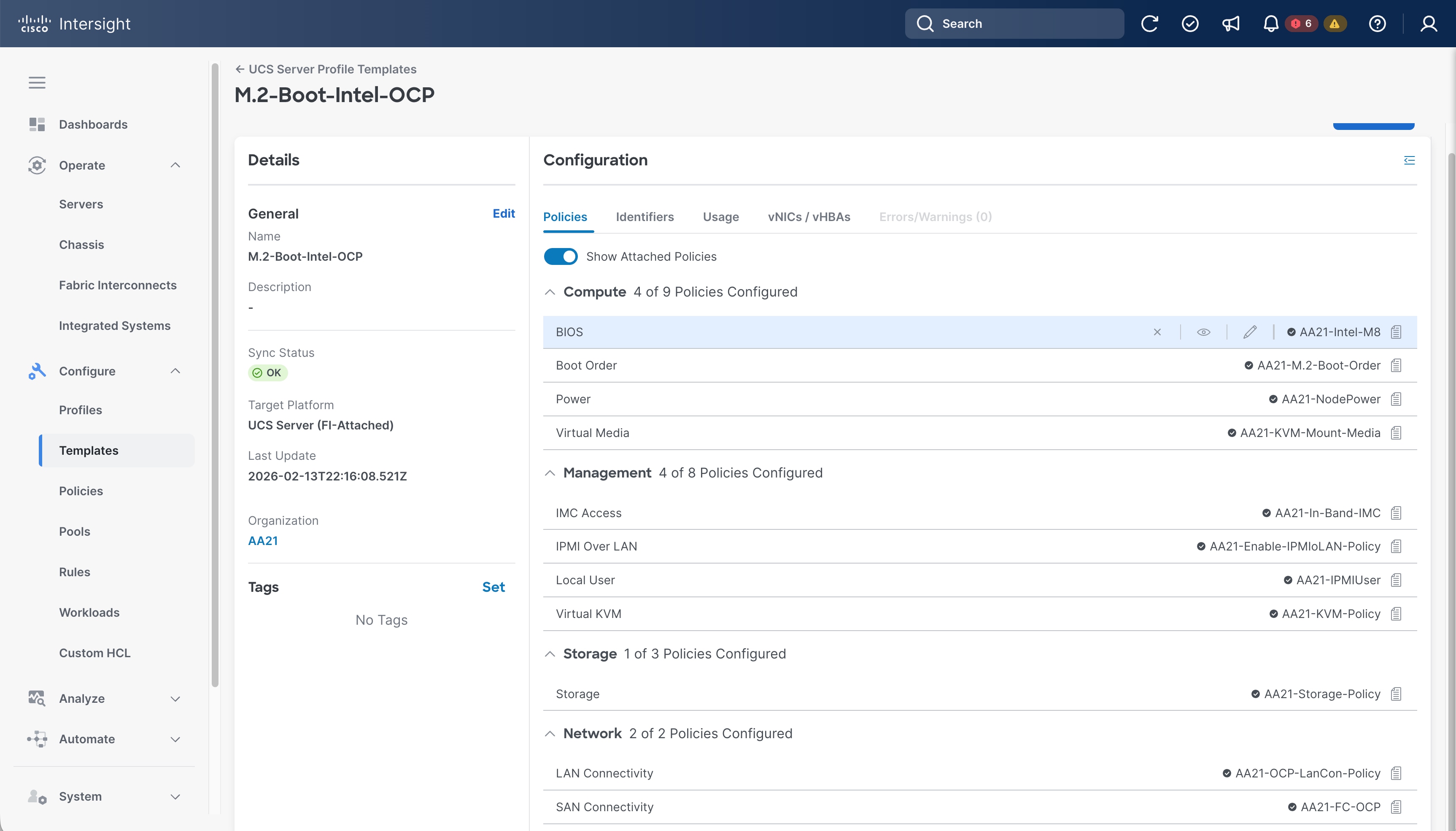
A server profile template enables resource management by simplifying policy alignment and server configuration. A server profile template is created using the server profile template wizard. The server profile template wizard groups the server policies into the following categories to provide a quick summary view of the policies that are attached to a profile:
● Compute policies: UUID pool, BIOS, boot order, and virtual media policies. (Firmware, Power, and Thermal policies are not used in this design)
● Management policies: Integrated Management Controller (IMC) Access, Intelligent Platform Management Interface (IPMI) over LAN, Local User, and virtual Keyboard, Video, and Mouse (KVM) policies. (Certificate Management, Serial over LAN (SOL), Simple Network Management Protocol (SNMP), and Syslog policies are not used in this design)
● Storage policies: Used to reference the local disk device that will be presented to the operating system. This includes the RAID or JBOD specification along with which disks in the system will be used.
● Network policies: adapter configuration, LAN connectivity, and SAN connectivity policies.
Note: The LAN connectivity policy requires you to create Ethernet network policy, Ethernet adapter policy, and Ethernet QoS policy.
Some of the characteristics of the server profile template are as follows:
● BIOS policy is created to specify various server parameters in accordance with UCS VSI best practices and Cisco UCS Performance Tuning Guides.
● Boot order policy defines virtual media (KVM mapped DVD), the Local Disk defined by the Storage Policy, and a CIMC mapped DVD for OS installation.
● IMC access policy defines the management IP address pool for KVM access.
● LAN connectivity policy is used to create two virtual network interface cards (vNICs); one for OCP node management (eno5), and one for Red Hat OCPv VM connectivity (eno6); along with various policies and pools.
● SAN connectivity policy is used to create two virtual host bus adapters (vHBAs); for FC-SCSI traffic on SAN A and for SAN B; along with various policies and pools.
Figure 35 shows various policies associated with the server profile template.
Derive and Deploy Server Profiles from the Cisco Intersight Server Profile Template
The Cisco Intersight server profile allows server configurations to be deployed directly on the compute nodes based on polices defined in the server profile template. After a server profile template has been successfully created, server profiles can be derived from the template and associated with the Cisco UCS Compute Nodes using the Actions drop-down in Figure 35.
On successful deployment of the server profile, the Cisco UCS Compute Nodes are configured with parameters defined in the server profile.
Cisco UCS Ethernet Adapter Policies
The processing of Ethernet packet can be adjusted within Cisco UCS to use of Cisco UCS Ethernet Adapter policies to optimize network traffic into multiple receive (RX) queues and maximize the use of multiple CPU cores in servicing these queues resulting in higher network throughput on up to 100Gbps interfaces. IMM (and UCSM) adapter policies allow the number of transmit (TX) and receive (RX) queues and the queue ring size (buffer size) to be adjusted, and features such as Receive Side Scaling (RSS) to be enabled. RSS allows multiple RX queues to each be assigned to a different CPU core, allowing parallel processing of incoming Ethernet traffic.
This solution design incorporates a pre-defined Linux-v2 specification for the Ethernet adapter-policy, giving a standard set of options optimized for Linux based systems using the VIC 15000 series of adapters. If needed, this can be used as a baseline with adjustments made to further customize settings for the applications being run within the server.
For more information on configuring Ethernet Adapter polices, see: https://www.cisco.com/c/en/us/products/collateral/interfaces-modules/unified-computing-system-adapters/ucs-vic-15000-series-ether-fabric-wp.html.
With Hitachi Storage Plug-in for Containers and VSP One Block storage, your organization can dynamically provision and deliver enterprise shared and persistent storage for virtual machines and containers.
At the hardware and physical connectivity level, the VSP One Block system includes two controllers and supports connectivity through a variety of storage protocols depending on the selected Channel Host Bus Adapters (CHBs). Using multiple CHBs within the storage system allows the design of multiple layers of redundancy, enhancing availability and maintaining performance during failure events.
In this architecture, the VSP One Block is configured with two FC CHBs installed across separate controllers. Each FC CHB provides two individual 64 Gbps capable ports, allowing redundant connections to each fabric within the Cisco UCS infrastructure. In this deployment, a total of four ports are configured for the FC-SCSI protocol, two ports from Controller 1 and two ports from Controller 2. Each FC-SCSI port has been configured for 32 Gbps, as it is best practice to keep link speeds consistent across the infrastructure stack.
FC-SCSI ports CL1-C and CL2-C connect to the Cisco MDS SAN Fabric-A, whereas ports CL3-C and CL4-C connect to the Cisco MDS SAN Fabric-B. With this approach alternate data paths are presented through the SAN fabric which delivers a total of four redundant paths per host to the VSP One array.
In the context of this design, which leverages the HSPC CSI driver, after underlying physical connectivity is established along with proper zoning, HSPC automatically create the subsequent LDEV and host groups with subsequent WWNs and establishes LUN paths to the UCS compute host.
This CVD describes an FC-SCSI storage deployment. When using the FC-SCSI protocol on the storage array, local storage is used for server boot LUNs, which must be configured on UCS server internal storage using M.2 drives.
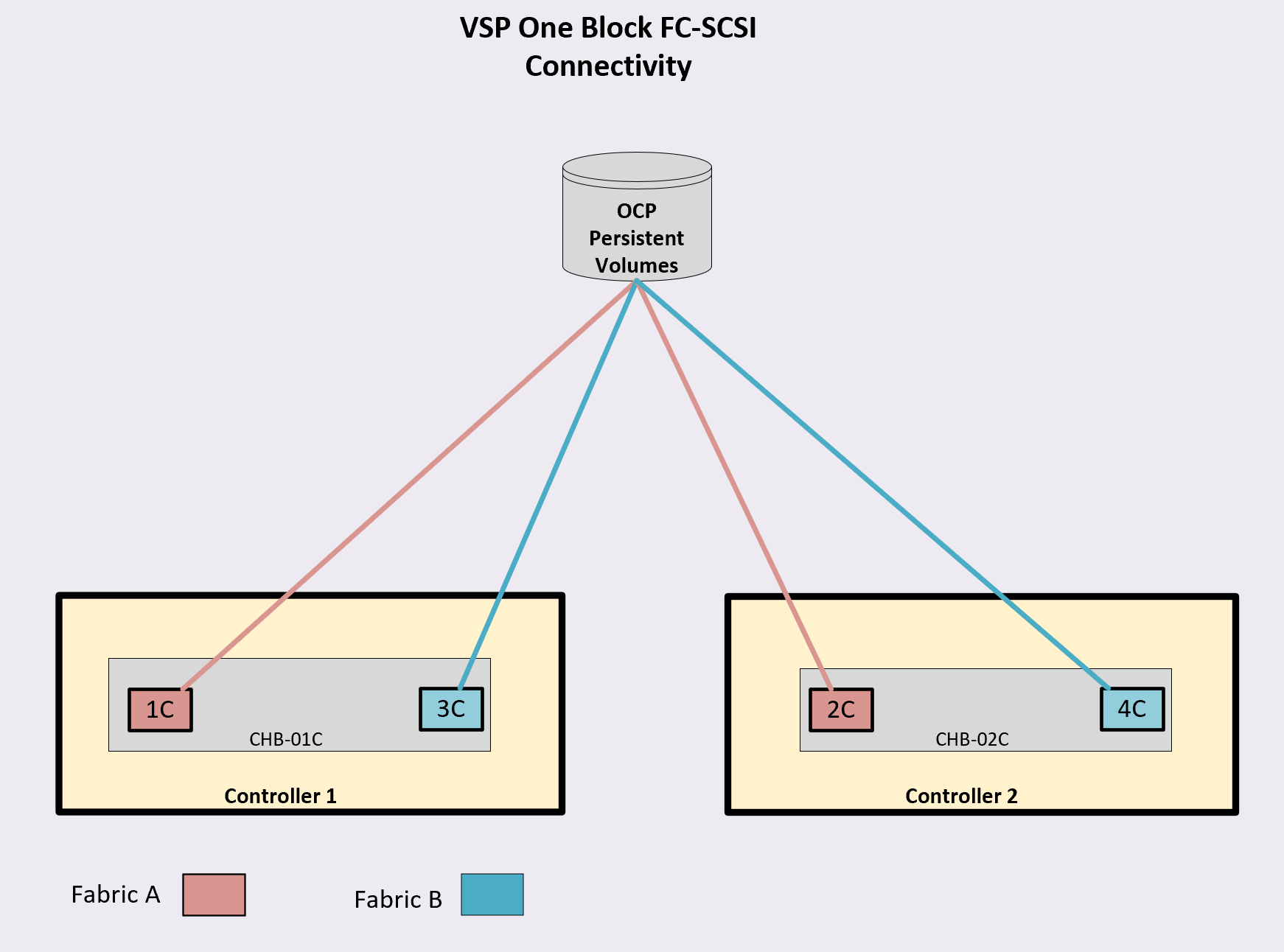
Hitachi Storage Plug-in for Containers: Design and Best Practice Considerations
With Hitachi Storage Plug-in for Containers and VSP One Block storage, your organization can dynamically provision and deliver shared and persistent storage for virtual machines and containers using the Red Hat OpenShift Container Platform for Management and Virtualization.
The CSI controller components should be deployed as a Deployment on control-plane nodes, while the CSI node service runs as a DaemonSet on all worker nodes to ensure full coverage across the cluster. Using the Red Hat OpenShift OperatorHub, users can deploy HSPC and set up the appropriate DaemonSet entirely through the OCP console.
It is important to confirm that the underlying storage array has an available Hitachi Dynamic Provisioning pool so that an appropriate StorageClass can be created. After deployment, administrators must design StorageClasses to align with application requirements, enabling dynamic volume expansion and selecting appropriate storage pools for a balance of performance and capacity.
To summarize, deployment and configuration for HSPC includes the following:
● Install Hitachi Storage Plug-in for Containers.
● Configure Secret settings to access VSP One storage systems.
● Configure StorageClass settings.
● Additionally, it is best practice for security credentials to be stored in Kubernetes Secrets, and service accounts should have only the permissions they require.
With Red Hat OpenShift Virtualization with HSPC users have the following methods to deploy virtual machines:
● Create a VM from a template using the OCP web console.
● Create a VM from an instance type using the OCP web console.
● Create a VM from a VirtualMachine manifest using the OCP web console or the command line.
● Create a VM using existing PVCs, snapshots, or using VM clone operations.
For operational efficiency, users are encouraged to leverage advanced volume features such as snapshots for point-in-time recovery, clones for fast dev/test environments, and expansion for seamless scaling.
Nodes must also have reliable SAN connectivity—using iSCSI, Fibre Channel, or NVMe/FC to the VSP One Block storage to prevent latency issues. Labeling or tainting nodes can help restrict CSI operations to the appropriate node based on hardware capabilities or other requirements for the underlying application.
Storage administrators should plan capacity carefully by monitoring pool usage, especially because snapshots and clones share underlying storage and can gradually consume more space as data diverges.
Ongoing visibility into operations can be enhanced with the Hitachi Storage Plug-in for Prometheus (HSPP), which exposes driver and array metrics for monitoring through Prometheus and Grafana dashboards.
For high availability and disaster recovery, the Hitachi Replication Plug-in for Containers (HRPC) can be integrated to replicate volumes across clusters, ensuring business continuity.
When planning cluster resources, make sure to account for additional CPU, memory, and storage to support the overhead introduced by the OpenShift Virtualization. Follow Red Hat documentation to calculate these resources requirements.
On the storage side, if you are using multiple clusters, consider using the resource partitioning function provided by Hitachi Storage Plug-in for Containers together with Hitachi Virtual Storage Platform One Block storage. With HSPC, you can partition storage system resources and allocate them to specific Kubernetes clusters, thereby isolating the impact between clusters.
For more information, see the HSPC Reference Guide here: https://docs.hitachivantara.com/v/u/en-us/adapters/3.17.x/mk-92adptr142.
Hitachi VSP One Block Administrator
VSP One Block Administrator is a configuration management application for the VSP One Block storage system that reduces storage management complexities, as it is integrated into the controller and requires no additional software deployment. It is used to configure FC-SCSI-based storage protocol settings on the array.
The VSP One Block Administrator interface was used to complete the following tasks for the FC-SCSI storage protocol:
● Create Dynamic Drive Protection (DDP) Storage Pools. DDP is an implementation where parity data is stored on the data drives instead of dedicated parity drives. VSP One Block supports dual-parity DDP groups (6D+2P, 14D+2P). As part of this CVD, DDP Storage Pools were created to support Red Hat OCP persistent volumes provisioned using the HSPC Container Storage Interface (CSI) driver.
● Manage FC Port settings for the Fibre Channel ports on the array.
Red Hat OpenShift Container Platform Design
The RedHat OpenShift Container Platform design incorporates concepts and best practices from RedHat, Cisco, and Hitachi to set up worker nodes on Cisco UCS servers to deliver reliability and performance of those servers to the Hitachi storage and Cisco MDS SAN Network in which they connect.
Bare Metal Deployment
The validated architecture consists of 6 nodes, that are split into three control nodes and three worker nodes. Three control nodes are considered essential for a production placement, with the option to expand worker nodes as needed.
The installation is guided through the Red Hat Hybrid Cloud Console leveraging integration with Cisco Intersight to select the Cisco UCS X210c compute nodes and automatically associate the installation ISO.
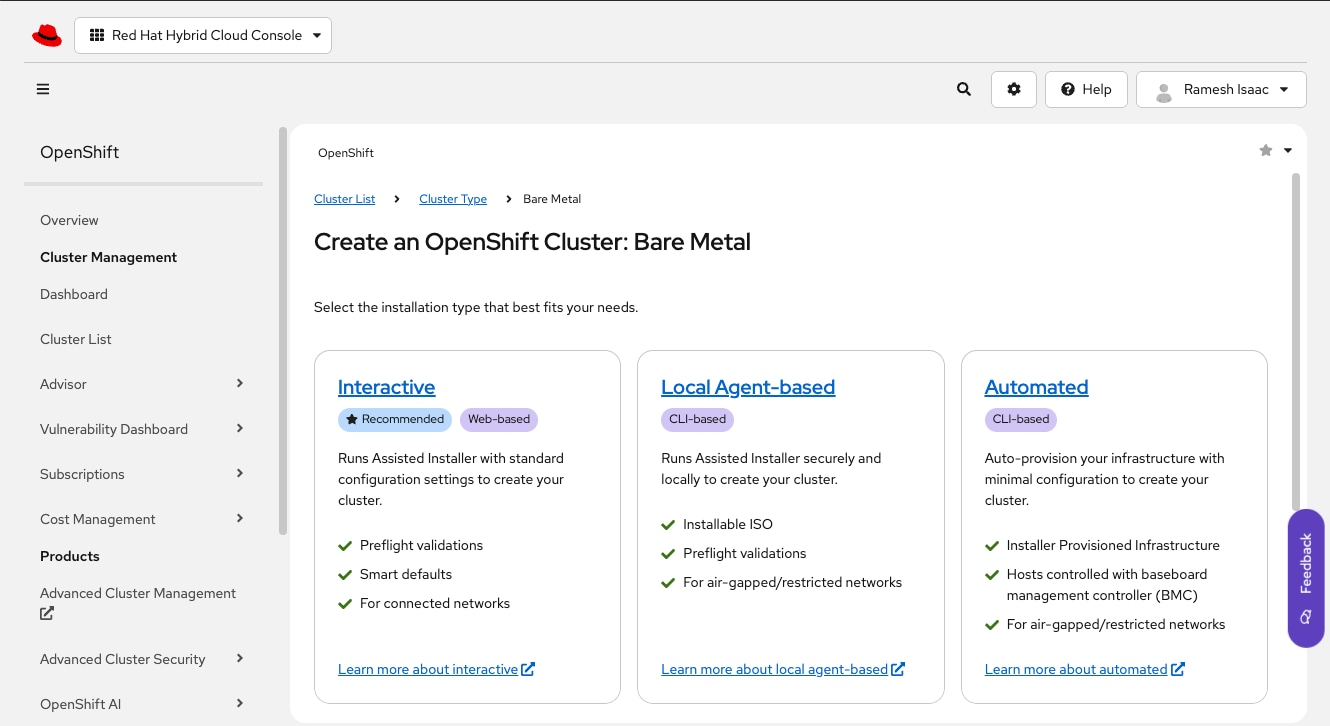
Node Networking
The node networking leverages Isovalent Cilium CNI (Container Network Interface) as an eBPF (extended Berkely Packet Filter) powered dataplane for both container and VM traffic. eBPF within Cilium gives control and visibility directly from the Linux kernel enabling Cilium to inspect, modify, and route network packets in real time without needing to load kernel modules.
Figure 38 provides an overview of the container and VM networking used in the design. The first vNIC (eno5) on the node handles all node management and container traffic and will path through fabric interconnect A with fabric failover to fabric interconnect B as needed. The second vNIC (eno6) is created as a primary for VM traffic using a bridge created by the NodeNetworkConfigurationPolicy (NNCP) with the NMState Operator and is set up in a similar manner to eno5 with traffic handled by fabric interconnect B with fabric failover to fabric Interconnect A as needed. This eno6 bridge implements NetworkAttachmentDefinitions (NADs) referencing VLANs that are carried to the external network with the Multus CNI to allow VM interface associations.
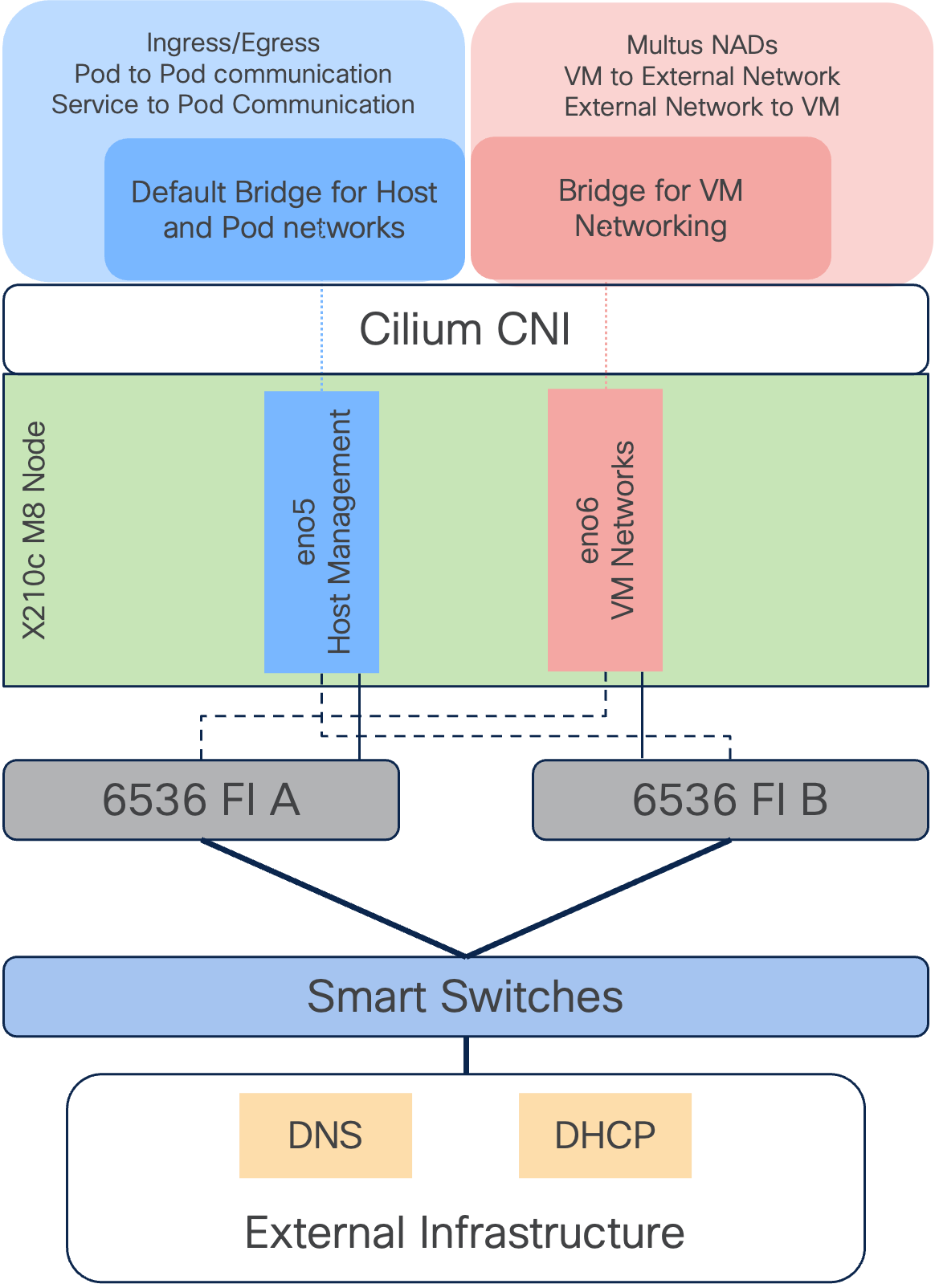
Container and Virtual Machine Storage
HSPC is responsible for the creation of logical volumes, host groups, and multipathing on the VSP One Block system. Multiple storage classes can be defined within OCP for the deployment of containers and virtual machines. For this CVD, a storage class has been defined for the HSPC Container Storage Interface. Containers and virtual machines configured to use the HSPC storage class will have logical volumes, host groups and multipathing automatically provisioned on the VSP One Block system.
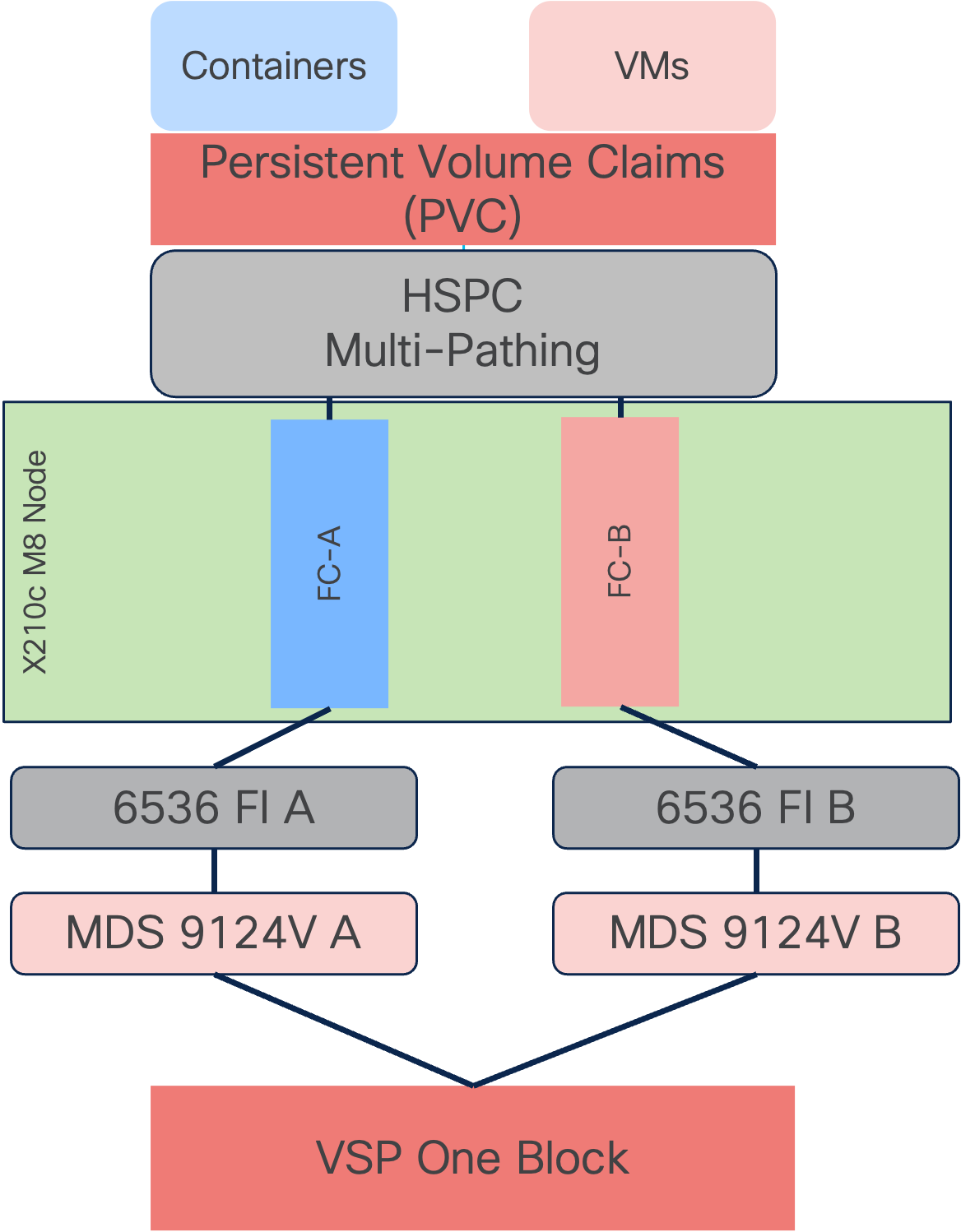
Cisco Intersight Integration with Hitachi Storage and Cisco Switches
Hitachi storage is connected to Cisco Intersight using third-party device connectors, and Cisco Nexus and MDS switches using a Cisco device connector. The Cisco Intersight Assist virtual appliance enables Cisco Intersight to communicate with both non-Cisco devices and supported Cisco switches because third-party infrastructure does not include a built-in Cisco Intersight device connector.
Cisco Intersight uses:
● A device connector running within a Cisco Intersight Assist virtual appliance to connect with the VSP One Block.
● A device connector running within the Cisco Intersight Assist virtual appliance to communicate with Cisco N9300 Smart Switches and MDS switches.
Note: A single Cisco Intersight Assist virtual appliance can support VSP storage systems and Cisco switches.
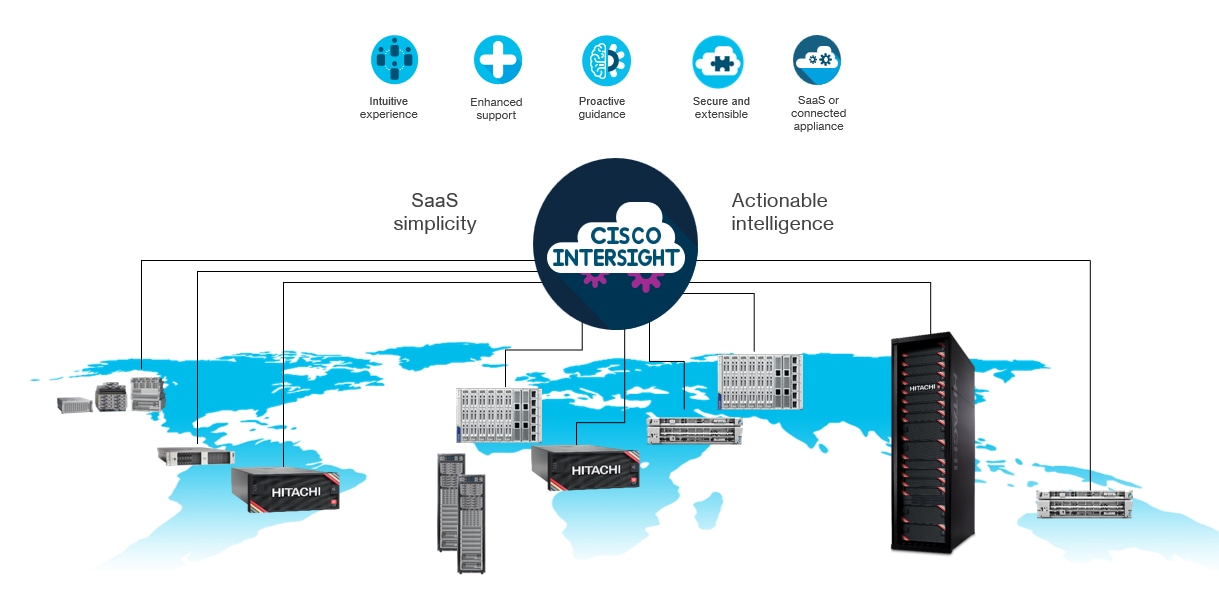
Cisco Intersight integration with VSP and Cisco UCS ecosystem enables customers to:
● Monitor the compute, storage, and switching environment.
● Add dashboard widgets for at-a-glance insights.
● Monitor and view resources created by the Hitachi Storage Plug-in for Containers.
● Orchestrate virtual, storage, switching, environments to perform common configuration tasks.
The Adaptive Solutions architecture enables customers to use new management capabilities without compromising their existing Cisco UCS ecosystem and VSP. IT users can manage heterogeneous infrastructure from a centralized Cisco Intersight portal. At the same time, the IT staff can continue to use VSP storage systems and Cisco Switch Interfaces for comprehensive analysis, diagnostics, and reporting of virtual, storage, and switching environments.
For more information about the ICO capabilities with VSP storage systems, see https://docs.hitachivantara.com/v/u/en-us/application-optimized-solutions/mk-sl-280
Obtain Storage-level Information
With the Cisco Intersight Assist deployed and connected to the Intersight SaaS platform, the VSP storage systems can be brought into visibility from a connection with Cisco Intersight Assist.
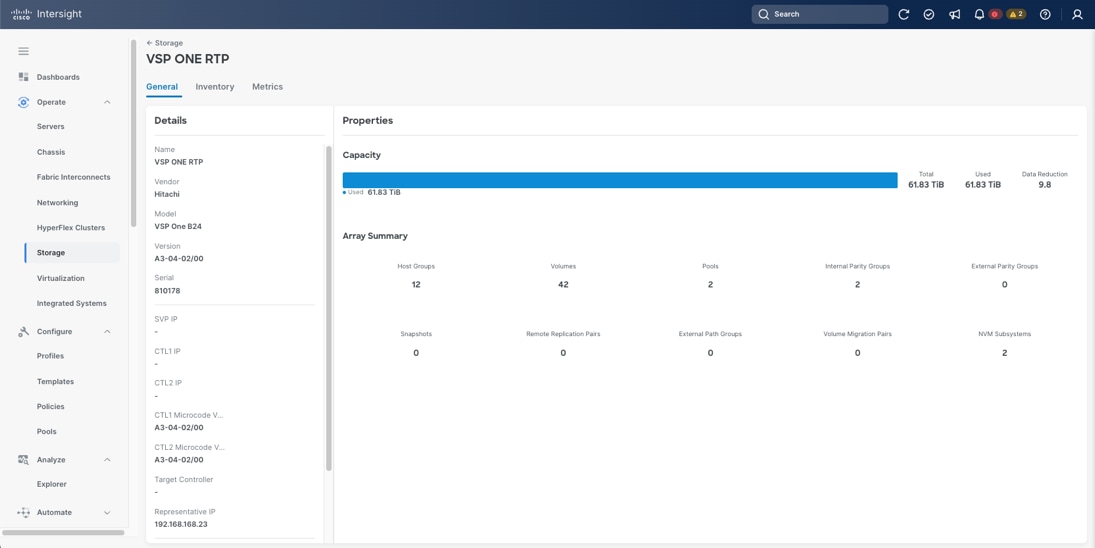
Obtain Cisco Switch Information
After successfully claiming supported Cisco switches as targets, customers can also view information on these products on Cisco Intersight.
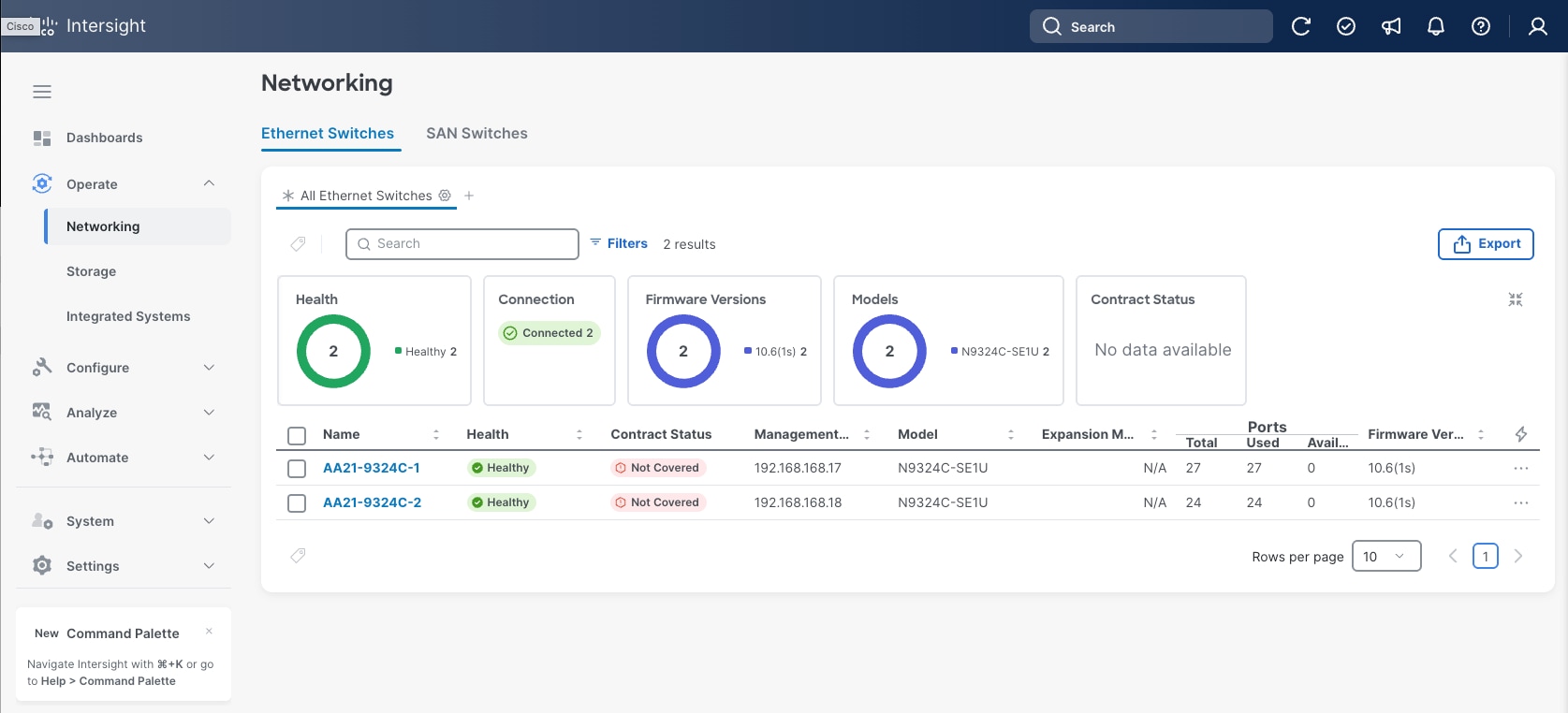
Detailed views of the added switches are available by selecting the left-side menu options and listed targets.
All components in the Adaptive Solutions design are built to create a secure infrastructure, accessible only by those who need it within their operational categories.
Cisco Intersight
Cisco Intersight supports SSO (Single-Sign-On), along with RBAC controls to structure access and permissions to manage resources. With Cisco UCS overseen by Intersight Managed Mode, all servers become centrally maintained by consistent access policies which are secured by default:
● SSH (TCP port 22) – Encrypted and enabled by default (it cannot be disabled)
● HTTPS (TCP port 443) – Encrypted (OpenSSL-based)
● KVM Management (TCP port 2068) – Encrypted (RC4)
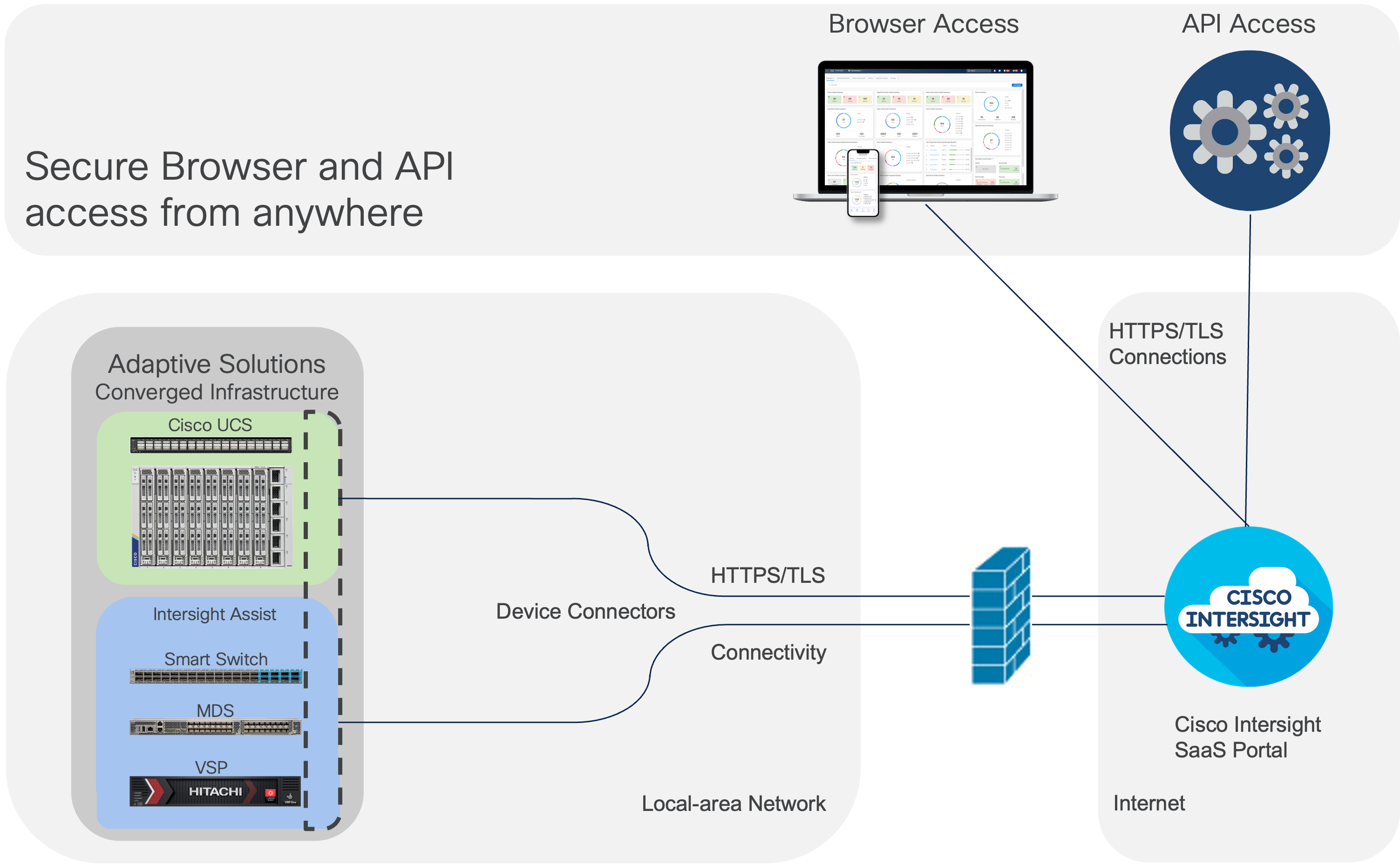
Within the Cisco UCS platform, the Cisco UCS X-Series servers also support an optional Trusted Platform Module (TPM) and UEFI Secure Boot. Additional security features include a secure boot FPGA and ACT2 anti-counterfeit provisions.
In this design, operational components are separated by in-band and out-of-band networks to insulate traffic as needed. Zoning within VSANs restricts FC traffic to designated targets and initiators as a base level of isolation. Cisco Nexus supports RBAC, TACACS+, RADIUS and direct LDAP, for structuring permissions and ensuring secure access. Information on further securing Cisco Nexus switches can be found here: https://sec.cloudapps.cisco.com/security/center/resources/securing_nx_os.html
Hitachi VSP Security
The Hitachi VSP series includes multiple security features designed to protect sensitive data, prevent unauthorized access, and meet stringent compliance requirements, which include:
● Protection against unauthorized access: All VSP series models are hardened to prevent data leaks and unauthorized system access. These measures help safeguard sensitive data, meet stringent data privacy requirements, and adhere to strict regulatory compliance policies. Additional capabilities are available to ensure quick recovery from ransomware attacks.
● Data Security for VSP Storage System: Hitachi storage systems provide the following capabilities to ensure data confidentiality and integrity:
◦ Data Retention Utility: Protects data volumes from read and/or write operations by defining retention terms for designated volumes.
◦ Volume Shredder: Erases data at the end of the retention period by overwriting it with dummy data, preventing recovery of deleted information.
◦ Data-at-Rest Encryption (DARE): Provides hardware-based Advanced Encryption Standard (AES) encryption through Encryption License Keys, enabling implementation and management of data-at-rest encryption for sensitive data on your storage system.
The data-at-rest encryption functionality is implemented using cryptographic hardware (chips) on the encrypting controllers (ECTLs) of the VSP One Block storage system. ECTLs encrypt and decrypt data as it is written to and read from the cached memory.
Encryption Management: Encryption is enabled or disabled at the Dynamic Disk Pool (DDP) group level. All drives within a DDP group (parity group) are either encrypted or non-encrypted.
Although it is possible to configure both encrypting and non-encrypting DDP groups on the ECTL, best practice is to enable encryption for all DDP groups.
Configuration and deployment of encryption should align with business and security requirements.
For more information about encryption system requirements, configuration details, key management, backup, rotation, restoration and Key Management Server (KMS) deployment, see: https://docs.hitachivantara.com/r/en-us/svos/10.4.x/mk-23vsp1b010
Note: The creation and secure storage of encryption backup keys must be part of the organization’s corporate security policy. To ensure data availability, keys should be backed up immediately after creation and again after any hardware maintenance involving drive or ECTL replacement. Users are responsible for securely storing secondary backup keys.
Red Hat OpenShift Container Platform Security
The OpenShift Container Platform employs a multi-layered security architecture, with measures implemented at the host (RHCOS and RHEL), container, orchestration, and application layers. These security controls include vulnerability scanning of container content, proactive checks during build and deployment, fine-grained authentication and authorization mechanisms, and securing networking and storage components. The platform also features robust solutions for API management, single sign-on, and supports comprehensive auditing. Audit logging allows administrators to configure and review detailed records of system activity, ensuring traceability and accountability. Additionally, OpenShift uses a variety of certificates—including API server, proxy, node, service CA, and etcd certificates—to validate access and secure communication between components.
To further strengthen data security, OpenShift offers etcd encryption, which safeguards sensitive information in case of backup exposure. Administrators can leverage the Red Hat Quay Container Security Operator for vulnerability scanning, while compliance requirements are addressed through the Compliance Operator and the oc compliance CLI plugin, which facilitate compliance scans and remediation recommendations. For ongoing integrity assurance, the File Integrity Operator continuously monitors cluster nodes for unauthorized file modifications, providing administrators with actionable logs. Collectively, these features help organizations meet regulatory standards and maintain a secure, auditable, and compliant container platform environment.
Data centers around the world currently account for 1 percent of the global electricity consumption, with this percentage doubling for total amount consumed within US, making them a considerable factor to energy consumption. Among the various components within a data center, servers are identified to consume the largest share of the electricity. According to Gartner, the proportion of the overall data center power budget allocated to storage is expected to double by 2030, rising from less than 20 percent in 2020 to nearly 40 percent.
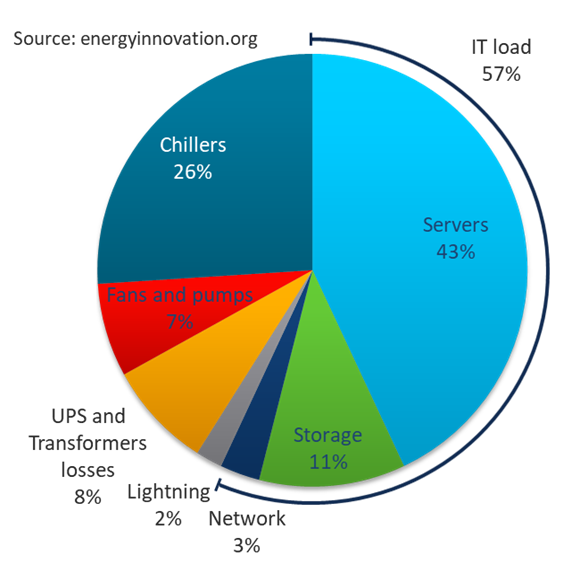
Reducing datacenter power consumption is an important goal, and the Adaptive Solutions design offers several implementations and options to address sustainability, some of which are detailed below.
Sustainable Design
One key approach is to focus on a modern, sustainable design while striving to increase overall efficiency. Data center consolidation, modernization and maximizing rack utilization are crucial steps to achieve this goal.
Replacing older servers with advanced models, such as the Cisco UCS M8 servers introduced in this solution can significantly improve performance and achieve higher virtual machine (VM) consolidation ratios compared to previous generations, while continuing to provide more flexibility and increased performance to support new and evolving applications.
The Cisco UCS X-9508 used in this solution provides a future-ready platform with the density and efficiency of blade servers and the expandability and flexibility of rack servers. The modular, chassis-based design allows you to share resources (chassis enclosure, switching fabric, power, and cooling) among multiple servers for a more efficient utilization of rack space, power, and cooling, while maintaining the flexibility to expand capabilities as needed. The Cisco UCS-X9508 7-RU chassis supports up to 8 compute nodes with unified connectivity and management. Each compute node can also support up to 6 Solid-State Drives (SSDs), or Non-Volatile Memory Express (NVMe) drives for a total of ~90TB of local storage using 15.3TB NVMe drives available today. Cisco UCS X-Series is also designed for the next decade of computing, with the ability to support new technologies as they evolve and mature such as PCI Gen5.0, CXL and liquid cooling for a more efficient data center.
Sustainable Components
Hitachi Virtual Storage Platform and Cisco UCS X-Series platform used in this solution are committed to sustainability in their design and implementation of both products. These are critical tools for enterprises as they modernize their data centers and select infrastructure to consolidate their workloads.
Cisco UCS X-Series Platform Sustainability
The Cisco UCS X-Series platform is designed with several energy efficient features to optimize power and cooling:
● Cisco UCS X-Series chassis uses a more open design for less air impedance and minimal air-handling material to reduce the overall resources that need to be sourced and installed within the system.
● It is equipped with modular, titanium-rated power supply units (PSUs) and 54-volt DC-power delivery system that minimizes the many internal power conversions, internal copper cabling needed, and amperage – saving in both overhead and power loss.
● The Cisco UCS X-Series has modular counter-rotating fans with wider apertures and high cubic feet per minute (CFM). It also has innovative zone-based cooling to optimize only those components needing more handling. With an innovative fan speed algorithm, an industry first, the Cisco UCS X-Series can optimize power consumption and minimize hysteresis to prevent fan speed overshot and reduce overall fan power consumption.
● The architecture of the Cisco UCS X-Series can extend the useful life of server elements using a mid-plane-less design to disaggregate components, with the ability to support new high-speed interconnects in the future and extend the refresh cycle of components.
For Cisco UCS X-Series servers, server power usage is displayed under the server’s Statistics tab for various customizable intervals as shown below. By enabling Intelligent Platform Management Interface (IPMI) over LAN policy on each server, power usage and other metrics can be queried from IPMI over LAN, allowing multiple management components (for example, VMware vCenter and Cisco Intersight) to monitor and provide a broader picture of the power consumption over time from a server and workload perspective. Alternatively, you can also use Redfish to query server power usage when managing the servers in Intersight Managed Mode.
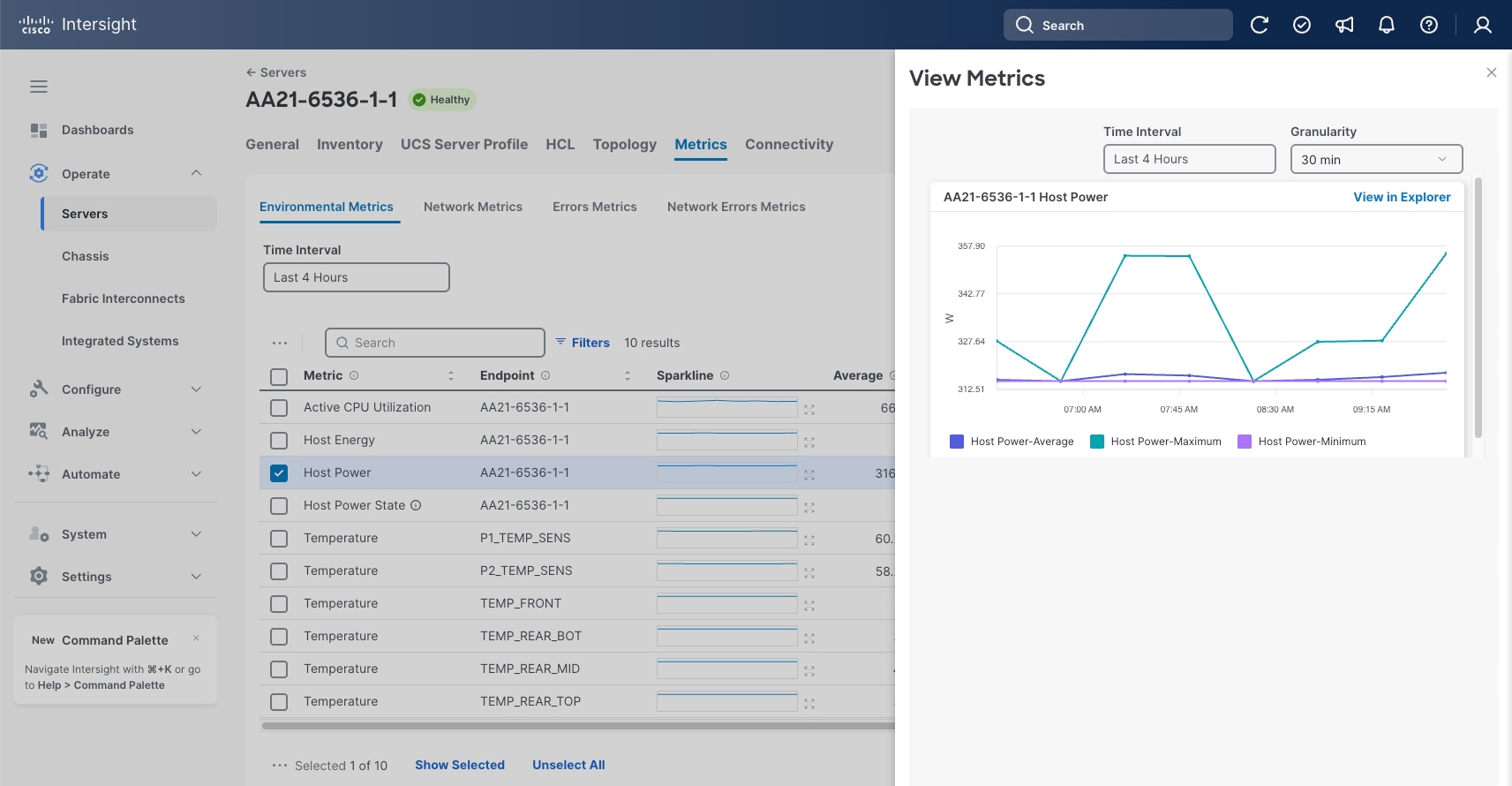
To reduce power consumption, Cisco Intersight provides Server BIOS policies that can be configured to potentially conserve power without affecting performance. These policies provide multiple options specifying both how Cisco UCS X-Series Chassis fans are controlled and how Cisco UCS X-Series Chassis power supplies are used. Additionally, these policies provide priority levels for Cisco UCS X-Series servers for power allocation to these servers.
Note: For more information on the BIOS policy options and recommendations, see https://www.cisco.com/c/en/us/products/collateral/servers-unified-computing/ucs-c-series-rack-servers/bios-tuning-guide-ucs-m8-intel-xeon-wp.html.
The Cisco UCS Chassis can also implement a policy through Cisco Intersight to provide intelligent options in power use. These options are:
● Power Redundancy: Redundancy Mode determines the number of PSUs the chassis keeps as redundant. N+2 mode is only supported on Cisco UCS X-Series.
● Power Save Mode: If the requested power budget is less than available power capacity, the additional PSUs not required to comply with redundancy policy are placed in Power Save mode.
● Dynamic Power Rebalancing: If enabled, this mode allows the chassis to dynamically reallocate the power between servers depending on their power usage.
● Extended Power Capacity: If enabled, this mode allows chassis available power to be increased by borrowing power from redundant power supplies.
● Power Allocation (Watts): Sets the Allocated Power Budget of the Chassis. This field is only supported for Cisco UCS X-Series Chassis.
Red Hat OpenShift Container Platform Sustainability
Containers bring an innate aspect of sustainability over other application offerings by their nature of efficient and reduced resource needs. Red Hat Container Platform implemented within Adaptive Solutions delivers this as an end-to-end supported model to improve energy efficiency across IT environments.
Several of the sustainability features enabled by Red Hat OCP beyond containers include:
● Power Monitoring - Kepler (Kubernetes-based Efficient Power Level Exporter) captures and monitors power-use metrics across the ecosystem, focusing on reporting, reduction, and regression so enterprises can better understand energy consumption.
● Virtualization - Red Hat OCPv consolidates multiple virtual machines (VMs) onto fewer physical servers, directly translating to lower energy consumption and increased hardware utilization.
● Node Hardware Power - Redfish enabled UCS bare metal restart and poweroff operations through the IPMI.
● Community Enabled Sustainability – A community of developers creating and offering solutions like the kube-green operator to automate shut down of resources to improved energy efficiency.
Hitachi VSP Sustainability
The Hitachi VSP storage solution is certified with Carbon Footprint of Products (CFP), a scheme that quantifies CO2 equivalent emissions by converting greenhouse gas emissions across all life cycle stages of a product from raw material acquisition through disposal and recycling.
For more information, see Hitachi Information and Communications Environmental Initiatives SuMPO EPD
Hitachi’s eco-friendly storage systems are designed to reduce environmental impact, achieving an estimated 30 percent to 60 percent reduction in CO2 emissions compared to previous models. The VSP One Block storage solution is also certified under the U.S. ENERGY STAR program and is ranked number one in its class.
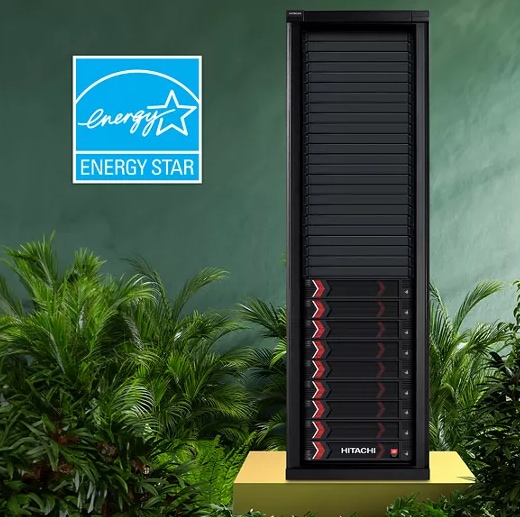
Hitachi Virtual Storage Platform delivers the following benefits for building a greener data center:
● Hitachi's patented Dynamic Carbon Reduction (DCR) technology reduces power consumption by placing controller CPUs in low-power mode during periods of low activity.
● ENERGY STAR certified Carbon Footprint of Products (CFP)-approved for environmental compliance.
● VSP One Block systems achieved a first, second, third place for energy-efficient data storage solutions with VSP One Block B24, B26, and VSP E1090.
● Modern Storage Assurance extends service lifecycles and minimizes electronic waste, enabling continued use of both current and next-generation VSP One Block infrastructure.
● The Storage Virtualization Operating System (SVOS) provides enhanced data reduction technology that increases storage efficiency, reducing power usage and CO22 emissions by up to 65% in some cases.
● Hitachi Vantara diagnostics and sustainability advisory services help organizations adopt effective and measurable sustainability practices.
For a VSP B24 system, which was used in the validation of this CVD, ENERGY STAR Certification can be referenced here: ENERGY STAR Certified Data Center Storage. Hitachi Vantara also received the EcoVadis Gold Medal for corporate social responsibility and sustainability practices as well as the Technology AI Sustainable Technology Award in 2025.

For more information about Hitachi Virtual Storage Platform One Block Series, see: https://www.hitachivantara.com/en-us/blog/going-for-sustainability-gold-again-with-data-storage-energy-star-finish.
For more information about Hitachi Virtual Storage Platform One Block Series, see: https://www.hitachivantara.com/en-in/products/storage-platforms/block-storage/midrange/vsp-one-block.
Some of the key design considerations for the Adaptive Solutions Red Hat OCPv architecture are explained in this section.
Management Design Considerations
Out-of-band Management Network
The management interface of every physical device is connected to a dedicated out-of-band management switch which can be part of the existing management infrastructure in a customer’s environment. The out of band management network provides management access to all the devices in the environment for initial and on-going configuration changes. The routing and switching configuration for this network is independent of the deployment and therefore changes in configurations do not impact management access to the devices. In this CVD, the out-of-band management network is carried within the Cisco Nexus uplinks to allow Cisco UCS CIMC/KVM connectivity.
In-band Management Network
The in-band management is a VLAN configured for connectivity to internally accessed infrastructure in the design. The primary example for in-band connectivity is the management connectivity for Red Hat OCP nodes, container ingress/egress and other management components like Hitachi VSP One Block. The hardware management interfaces to the Smart Switches, MDS, UCS, and the Hitachi VSP are in the out-of-band management network which has direct Layer 3 access to the in-band management network. In a production environment this might require a firewall separating the two.
Jumbo Frames
An MTU of 9216 is configured at all network levels to allow jumbo frames as needed by the guest OS and application layer. This allows the network at every point to negotiate an MTU up to 9000 with the end point. For VLANs that leave through the Nexus switch uplinks (IB-MGMT and VM-Traffic networks), all endpoints should have an MTU of 1500. For Storage and vMotion VLANs that stay within the design, an MTU of 9000 should be used on all endpoints for higher performance. It is important that all endpoints within a VLAN have the same MTU setting. It is important to remember that most virtual machine network interfaces have an MTU of 1500 set by default and that it may be difficult to change this setting to 9000, especially on many virtual machines. Note that a VLAN tagged trunk can contain both VLANs with MTU 1500 and VLANs with MTU 9000 interfaces.
NTP
For many reasons, including authentication and log correlation, it is critical that all components are properly synchronized to a time-of-day clock. To support this synchronization, all components in this design support network time protocol (NTP). In the setup, the two Cisco Smart Switches are synchronized through NTP to at least two external NTP sources. Cisco Nexus NTP distribution is then set up, and all the other components can use the IP of any of the switches’ L3 interfaces, including mgmt0 as an NTP source. If a customer already has NTP distribution in place, that can be used instead of Cisco Nexus switch NTP distribution.
UEFI Secure Boot
This validation uses Unified Extensible Firmware Interface (UEFI) Secure Boot. UEFI is a specification that defines a software interface between an operating system and platform firmware. With UEFI secure boot enabled, all executables, such as boot loaders and adapter drivers, are authenticated as properly signed by the BIOS before they can be loaded. Additionally, a Trusted Platform Module (TPM) is also installed in the Cisco UCS compute nodes. The TPM stores passphrases in a secure cryptoprocessor contained within the node to prevent the boot disk data on a cluster node from being decrypted if the disk is removed from the server.
Deployment Hardware and Software
This chapter contains the following:
Hardware and Software Revisions
Hardware and Software Revisions
Table 2 lists the hardware and software used in this solution.
Table 2. Hardware and Software Revisions
| Component |
|
Software |
| Network |
Cisco N9324C Smart Switch |
10.6(2)F |
| Cisco MDS 9124v |
9.4(3b) |
|
| Compute |
Isovalent Enterprise Platform |
1.17 |
| Cisco UCS 6536 Fabric Interconnect |
6.0(1.250198) |
|
| Cisco UCS X210c M8 with Cisco UCS VIC 15230 |
6.0(1.250122) |
|
| Red Hat CoreOS fnic driver |
1.8.0.2 |
|
| Red Hat CoreOS enic driver |
5.14.0-570.45.1.el9_6.x86_64 |
|
| Red Hat OCP |
4.19 |
|
| Cisco Intersight Assist Virtual Appliance |
1.1.5-0 (automatically upgrades to current release) |
|
| Storage |
VSP One Block |
SVOS 10.4.0 Code Version A3-04-02-40/00 |
| Hitachi Storage Plug-in for Containers |
3.17.2 |
|
| Hitachi Storage Plug-in for Prometheus |
1.4.1 |
About the authors
Ramesh Isaac, Technical Marketing Engineer, Cisco Systems, Inc.
Ramesh Isaac is a Technical Marketing Engineer in the Cisco UCS Data Center Solutions Group. Ramesh has worked in the data center and mixed-use lab settings for over 25 years. He started in information technology supporting UNIX environments and focused on designing and implementing multi-tenant virtualization solutions in Cisco labs before entering Technical Marketing where he has supported converged infrastructure and virtual services as part of solution offerings as Cisco. Ramesh has held certifications from Cisco, VMware, and Red Hat.
Gilberto Pena Jr, Virtualization Solutions Architect, Hitachi Vantara
Gilberto Pena Jr. is a Virtualization Solutions Architect in the Infrastructure Platform Solutions Engineering group at Hitachi Vantara. He has over 25 years of experience working with enterprise financial customers, with a focus on LAN and WAN design, as well as converged and hyperconverged virtualization solutions. He has also held certifications from Cisco.
Acknowledgements
For their support and contribution to the design, validation, and creation of this Cisco Validated Design, the authors would like to thank:
● Gopu Narasimha Reddy, Technical Marketing Engineer, Cisco Systems, Inc.
● Marcos Hernández, Distinguished Engineer, Technical Marketing, Cisco Systems, Inc.
● Arvin Jami, Product Owner-Solutions Architect, Hitachi Vantara
Appendix
This appendix contains the following:
Cisco Intersight: https://www.intersight.com
Cisco Intersight Managed Mode: https://www.cisco.com/c/en/us/td/docs/unified_computing/Intersight/b_Intersight_Managed_Mode_Configuration_Guide.html
Cisco Unified Computing System: https://www.cisco.com/site/us/en/products/computing/servers-unified-computing-systems/index.html
Cisco UCS 6536 Fabric Interconnects: https://www.cisco.com/c/en/us/products/collateral/servers-unified-computing/ucs6536-fabric-interconnect-ds.html
Cisco N9300 Series Smart Switches: https://www.cisco.com/c/en/us/products/collateral/switches/9300-series-smart-switches/n9300-series-smart-switch-ds.html
Cisco MDS 9124V Multilayer Fabric Switches: https://www.cisco.com/c/en/us/products/collateral/storage-networking/mds-9100-series-multilayer-fabric-switches/mds-9124v-fibre-channel-switch-ds.html
Isovalent Enterprise Networking for Kubernetes: https://isovalent.com/products/kubernetes-networking/
Hitachi Virtual Storage Platform One Block: https://www.hitachivantara.com/en-us/products/storage-platforms/block-storage/midrange/vsp-one-block
Hitachi SVOS: https://www.hitachivantara.com/en-us/products/storage-platforms/primary-block-storage/virtualization-operating-system.html
Cisco UCS Hardware Compatibility Matrix: https://ucshcltool.cloudapps.cisco.com/public/
Hitachi Product Compatibility Guide: https://compatibility.hitachivantara.com/
CVD Program
ALL DESIGNS, SPECIFICATIONS, STATEMENTS, INFORMATION, AND RECOMMENDATIONS (COLLECTIVELY, "DESIGNS") IN THIS MANUAL ARE PRESENTED "AS IS," WITH ALL FAULTS. CISCO AND ITS SUPPLIERS DISCLAIM ALL WARRANTIES, INCLUDING, WITHOUT LIMITATION, THE WARRANTY OF MERCHANTABILITY, FITNESS FOR A PARTICULAR PURPOSE AND NONINFRINGEMENT OR ARISING FROM A COURSE OF DEALING, USAGE, OR TRADE PRACTICE. IN NO EVENT SHALL CISCO OR ITS SUPPLIERS BE LIABLE FOR ANY INDIRECT, SPECIAL, CONSEQUENTIAL, OR INCIDENTAL DAMAGES, INCLUDING, WITHOUT LIMITATION, LOST PROFITS OR LOSS OR DAMAGE TO DATA ARISING OUT OF THE USE OR INABILITY TO USE THE DESIGNS, EVEN IF CISCO OR ITS SUPPLIERS HAVE BEEN ADVISED OF THE POSSIBILITY OF SUCH DAMAGES.
THE DESIGNS ARE SUBJECT TO CHANGE WITHOUT NOTICE. USERS ARE SOLELY RESPONSIBLE FOR THEIR APPLICATION OF THE DESIGNS. THE DESIGNS DO NOT CONSTITUTE THE TECHNICAL OR OTHER PROFESSIONAL ADVICE OF CISCO, ITS SUPPLIERS OR PARTNERS. USERS SHOULD CONSULT THEIR OWN TECHNICAL ADVISORS BEFORE IMPLEMENTING THE DESIGNS. RESULTS MAY VARY DEPENDING ON FACTORS NOT TESTED BY CISCO.
CCDE, CCENT, Cisco Eos, Cisco Lumin, Cisco Nexus, Cisco StadiumVision, Cisco TelePresence, Cisco WebEx, the Cisco logo, DCE, and Welcome to the Human Network are trademarks; Changing the Way We Work, Live, Play, and Learn and Cisco Store are service marks; and Access Registrar, Aironet, AsyncOS, Bringing the Meeting To You, Catalyst, CCDA, CCDP, CCIE, CCIP, CCNA, CCNP, CCSP, CCVP, Cisco, the Cisco Certified Internetwork Expert logo, Cisco IOS, Cisco Press, Cisco Systems, Cisco Systems Capital, the Cisco Systems logo, Cisco Unified Computing System (Cisco UCS), Cisco UCS B-Series Blade Servers, Cisco UCS C-Series Rack Servers, Cisco UCS S-Series Storage Servers, Cisco UCS X-Series, Cisco UCS Manager, Cisco UCS Management Software, Cisco Unified Fabric, Cisco Application Centric Infrastructure, Cisco Nexus 9000 Series, Cisco Nexus 7000 Series. Cisco Prime Data Center Network Manager, Cisco NX-OS Software, Cisco MDS Series, Cisco Unity, Collaboration Without Limitation, EtherFast, EtherSwitch, Event Center, Fast Step, Follow Me Browsing, FormShare, GigaDrive, HomeLink, Internet Quotient, IOS, iPhone, iQuick Study, LightStream, Linksys, MediaTone, MeetingPlace, MeetingPlace Chime Sound, MGX, Networkers, Networking Academy, Network Registrar, PCNow, PIX, PowerPanels, ProConnect, ScriptShare, SenderBase, SMARTnet, Spectrum Expert, StackWise, The Fastest Way to Increase Your Internet Quotient, TransPath, WebEx, and the WebEx logo are registered trade-marks of Cisco Systems, Inc. and/or its affiliates in the United States and certain other countries. (LDW_P3)
All other trademarks mentioned in this document or website are the property of their respective owners. The use of the word partner does not imply a partnership relationship between Cisco and any other company. (0809R)
