FlexPod Datacenter for SAP HANA Tailored Datacenter Integration Design Guide
Available Languages
Bias-Free Language
The documentation set for this product strives to use bias-free language. For the purposes of this documentation set, bias-free is defined as language that does not imply discrimination based on age, disability, gender, racial identity, ethnic identity, sexual orientation, socioeconomic status, and intersectionality. Exceptions may be present in the documentation due to language that is hardcoded in the user interfaces of the product software, language used based on RFP documentation, or language that is used by a referenced third-party product. Learn more about how Cisco is using Inclusive Language.
- US/Canada 800-553-2447
- Worldwide Support Phone Numbers
- All Tools
 Feedback
 Feedback
Published: July 2025


In partnership with:

About the Cisco Validated Design Program
The Cisco Validated Design (CVD) program consists of systems and solutions designed, tested, and documented to facilitate faster, more reliable, and more predictable customer deployments. For more information, go to: http://www.cisco.com/go/designzone
Executive Summary
The FlexPod Datacenter solution is a validated approach for deploying Cisco and NetApp technologies and products to build shared private and public cloud infrastructure. Cisco and NetApp have partnered to deliver a series of FlexPod solutions that enable strategic data center platforms. The success of the FlexPod solution is driven through its ability to evolve and incorporate both technology and product innovations in the areas of management, compute, storage, and networking.
This document explains the design details of incorporating the Cisco UCS X-Series M7 modular platform into the FlexPod Datacenter for SAP HANA Tailored Datacenter Integration (TDI) implementations and the ability to manage and orchestrate FlexPod components from the cloud using Cisco Intersight. Some of the key advantages of integrating Cisco UCS X-Series M7 compute nodes into the FlexPod infrastructure are:
● Upgraded servers: Cisco UCS X210c M7 with 5th Gen or 4th Gen Intel® Xeon® Scalable Processors with up to 64 cores per processor and Cisco UCS X410c M7 with 4th Gen Intel® Xeon® Scalable Processors with up to 60 cores per processor supporting up to 2TB RAM per socket with homogenous DIMM configs and up to 3TB per socket with mixed DIMM population [requiring workload-based sizing] for SAP HANA TDI.
● Simpler and programmable infrastructure: infrastructure as code delivered using Ansible.
● End-to-End 100Gbps Ethernet: utilizing the 5th Generation Cisco UCS VICs 15231 and 15420/15422, the 5th Generation Cisco UCS 6536 Fabric Interconnect (FI), and the Cisco UCS 9108 100G IFM Intelligent Fabric Module (IFM) to deliver 100Gbps Ethernet from the server through the network to the storage.
● End-to-End 32Gbps Fibre Channel: utilizing the 5th Generation Cisco UCS VICs 15231 and15420/15422, the 5th Generation Cisco UCS 6536 Fabric Interconnect, and the Cisco UCS 9108 100G IFM to deliver 32Gbps Ethernet from the server using 100Gbps Fibre Channel over Ethernet (FCoE) through the network to the storage. You can leverage the 64Gbps connectivity between the Cisco MDS 9124V and the NetApp AFF A90 array.
● Built for investment protections: designed ready for future technologies, such as liquid cooling and high-Wattage CPUs; Compute Express Link (CXL)-ready.
In addition to the compute-specific hardware and software innovations, integrating the Cisco Intersight cloud platform with VMware vCenter, NetApp Active IQ Unified Manager, and Cisco Nexus and MDS switches, delivers monitoring, orchestration, and workload optimization capabilities for different layers (virtualization, storage, and networking) of the FlexPod infrastructure.
For information about the FlexPod design and deployment details, including the configuration of various elements of design and associated best practices, refer to the Cisco Validated Designs for FlexPod, here: https://www.cisco.com/c/en/us/solutions/design-zone/data-center-design-guides/flexpod-design-guides.html.
Solution Overview
This chapter contains the following:
● Audience
The Cisco Unified Computing System (Cisco UCS) with Intersight Managed Mode (IMM) is a modular compute system, configured and managed from the cloud. It is designed to meet the needs of modern applications and to improve operational efficiency, agility, and scale through an adaptable, future-ready, modular design. The Cisco Intersight platform is a Software-as-a-Service (SaaS) infrastructure lifecycle management platform that delivers simplified configuration, deployment, maintenance, and support.
SAP HANA in-memory database handles transactional and analytical workloads with any data type – on a single data copy. It breaks down the transactional and analytical silos in organizations, for quick decision-making, on premise and in the cloud. SAP HANA offers a multi-engine, query-processing environment that supports relational data (with both row- and column-oriented physical representations in a hybrid engine) as well as graph and text processing for semi-structured and unstructured data management within the same system. The SAP HANA Tailored Datacenter Integration (TDI) solution offers a more open and flexible way for the integration of SAP HANA into the data center with benefits like the virtualization of the SAP HANA platform or a flexible combination of multiple SAP HANA systems on the fully certified, converged infrastructure.
Powered by the Cisco Intersight cloud-operations platform, the Cisco UCS X-Series enables the next-generation cloud-operated FlexPod infrastructure that not only simplifies data-center management but also allows the infrastructure to adapt to the unpredictable needs of modern applications as well as traditional workloads. With the Cisco Intersight platform, you get all the benefits of SaaS delivery and the full lifecycle management of Intersight-connected distributed servers and integrated NetApp storage systems across data centers, remote sites, branch offices, and edge environments
The intended audience of this document includes but is not limited to IT architects, sales engineers, field consultants, professional services, IT managers, partner engineering, and customers who want to take advantage of an infrastructure built to deliver IT efficiency and enable IT innovation for their varied SAP and SAP HANA deployments.
This document provides design guidance for incorporating the Cisco Intersight-managed Cisco UCS X-Series M7 servers and end-to-end 100Gbps within the FlexPod Datacenter (DC) infrastructure as a platform for SAP HANA TDI deployments.
This document builds on the design framework found in the FlexPod Datacenter using IaC with Cisco IMM M7, VMware vSphere 8, and NetApp ONTAP 9.12.1 Deployment Guide and extends it by explaining the design considerations and requirements specific to SAP HANA TDI deployments, both in virtualized as well as bare-metal scenarios.
The following design elements distinguish this version of the FlexPod Datacenter for SAP HANA Tailored Datacenter Integration Design Guide from previous models:
● Cisco UCS X210c M7 and X410c M7 compute nodes with Intel® Xeon® Scalable Processors with up to 60 cores per processor, up to 2TB RAM per socket (for SAP HANA TDI) and Cisco 5th Generation Virtual Interface Cards (VICs)
● An updated, more complete end-to-end Infrastructure as Code (IaC) Day 0 configuration of the FlexPod Infrastructure utilizing Ansible Playbooks
● NetApp ONTAP 9.16.1
● VMware vSphere 8.0
● RHEL for SAP HANA 9.4 and SLES (SUSE Linux Enterprise Server) for SAP 15 SP6
The FlexPod Datacenter solution with Cisco UCS X-Series M7, VMware 8.0, and NetApp ONTAP 9.16.1 offers the following key benefits:
● Simplified cloud-based management of solution components
● Hybrid-cloud-ready, policy-driven modular design
● Highly available and scalable platform with flexible architecture that supports various deployment models
● Cooperative support model and Cisco Solution Support
● Easy to deploy, consume, and manage architecture, which saves time and resources required to research, procure, and integrate off-the-shelf components
● Support for component monitoring, solution automation and orchestration, and workload optimization
Like all other FlexPod solution designs, FlexPod Datacenter with Cisco UCS X-Series M7 is configurable according to demand and usage. You can purchase the precise infrastructure you need for your current application requirements and can then scale-up by adding more resources to the FlexPod system or scale-out by adding more FlexPod instances. By moving the management from the fabric interconnects into the cloud, the solution can respond to the speed and scale of your deployments with a constant stream of new capabilities delivered from Intersight software-as-a-service model at cloud-scale. If you require management within the secure site, Cisco Intersight is also offered within an on-site appliance with both connected and not connected or air gap options.
Technology Overview
This chapter contains the following:
● SAP HANA Tailored Datacenter Integration
● SAP HANA TDI Implementation Options
● Interoperability and Feature Compatibility
● Infrastructure as Code with Red Hat Ansible Automation Platform
● Cisco Unified Computing System X-Series
● Cisco UCS and Intersight Security
● Cisco Nexus Switching Fabric
● Cisco MDS 9124V 64G 24-Port Fibre Channel Switch
● NetApp Active IQ Unified Manager
● NetApp ONTAP tools for VMware vSphere
● Red Hat Enterprise Linux for SAP Solutions
● SUSE Linux Enterprise Server for SAP Applications
● Cisco Intersight Assist Device Connector for VMware vCenter and NetApp ONTAP
FlexPod Datacenter architecture is built using the following infrastructure components for compute, network, and storage:
● Cisco Unified Computing System (Cisco UCS)
● Cisco Nexus and Cisco MDS switches
● NetApp All Flash FAS (AFF), FAS, and All SAN Array (ASA) storage systems
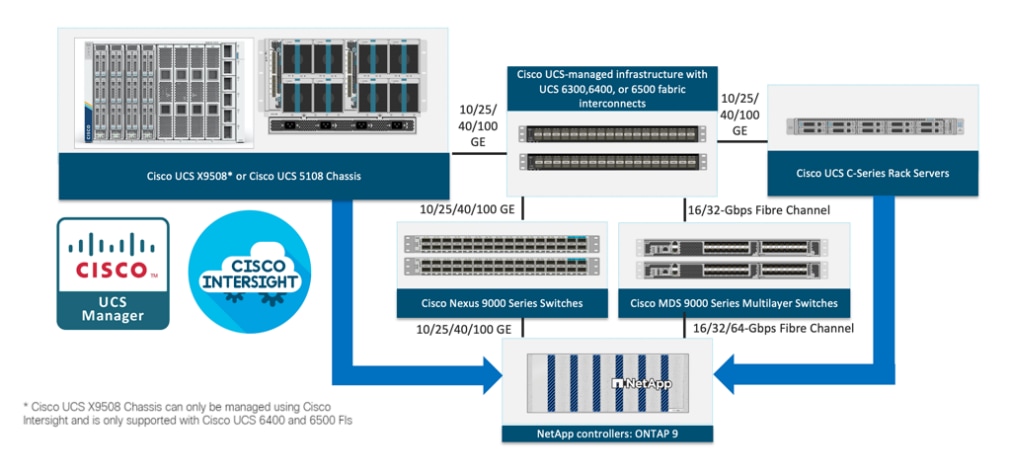
All the FlexPod components have been integrated so that you can deploy the solution quickly and economically while eliminating many of the risks associated with researching, designing, building, and deploying similar solutions from the foundation. One of the main benefits of FlexPod is its ability to maintain consistency at scale. Each of the component families shown in Figure 1 (Cisco UCS, Cisco Nexus, Cisco MDS, and NetApp controllers) offers platform and resource options to scale-up or scale-out the infrastructure while supporting the same features.
The FlexPod Datacenter solution for SAP HANA TDI with Cisco UCS X-Series M7 servers referenced in this CVD is comprised of the following hardware components:
● Cisco UCS X9508 Chassis with Cisco UCS 9108 100G IFM and up to eight Cisco UCS X210c M7 or up to four X410c M7 Compute Nodes or a mix of both
● Fifth-generation Cisco UCS 6536 Fabric Interconnects to support 10/25/40/100GbE and 16/32GbFC connectivity from various components
● High-speed Cisco NX-OS-based Cisco Nexus 93600CD-GX switching design to support 100GE and 400GE connectivity
● Cisco MDS 9124V switches to support 32G / 64G FC connectivity
● NetApp AFF A90 end-to-end NVMe storage with up to 200GE connectivity and 64G FC connectivity
The software components of the solution consist of:
● Cisco Intersight platform to deploy the Cisco UCS components and maintain and support the FlexPod components
● Cisco Intersight Assist Virtual Appliance to help connect NetApp ONTAP, Cisco Nexus Switches, Cisco MDS Switches, and VMware vCenter to Cisco Intersight
● NetApp Active IQ Unified Manager to monitor and manage the storage and for NetApp ONTAP integration with Cisco Intersight
● VMware vCenter 8.0 and later to set up and manage the virtual infrastructure based on VMware vSphere 8.0 and later
● SAP HANA and SAP HANA certified Linux versions as found here: https://launchpad.support.sap.com/#/notes/2235581
SAP HANA Tailored Datacenter Integration
SAP HANA Tailored Datacenter Integration (TDI) offers customers additional flexibility to integrate HANA into their datacenters. It allows custom build solutions to assemble hardware OS and hypervisor (optional) from SAP-certified components providing flexible tailored customer sizing.
With TDI phase 5, SAP extends the support for Intel E7 CPUs to include all Intel Broadwell E7, Skylake-SP (Platinum, Gold, Silver with 8 or more cores per processor) and newer processors with 8+ cores/socket.
Now Partners are able to build HANA systems using a wide range of CPUs that differ in frequency, processing power, and most importantly cost. As a result, supported HANA configurations will include more granular HANA system sizes and scalability – thus enabling customers to further lower their hardware infrastructure costs by buying only the processing power and memory required for their specific workloads.
FlexPod Datacenter qualifies under SAP HANA TDI with the solution comprised of Cisco UCS M7 compute nodes and NetApp AFF storage arrays both certified under the Certified Appliances and Certified Enterprise Storage categories respectively listed per SAP Certified and Supported SAP HANA® Hardware Directory
For more information, see SAP HANA Tailored Data Center Integration – Overview
SAP HANA TDI Implementation Options
This section defines the basic requirements for available implementation options with Cisco UCS X-Series M7 based FlexPod DC.
A variety of configuration choices is possible; scaling from very small servers to very large clusters. This allows different system design options with respect to scale-up and scale-out variations. To maximize performance and throughput, SAP recommends that you scale-up as far as possible (acquire the configuration with the highest processor and memory specification for the application workload) before scaling-out (for deployments with even greater data volume requirements).
SAP HANA System on a single node: Scale-Up (Bare Metal or Virtualized)
A scale-up TDI solution is the simplest of the installation types. All data and processes are located on the same server in this single-node solution. SAP HANA scale-up TDI solutions are based on Cisco UCS X-Series compute node and use the intended NetApp AFF storage.
The network requirements for this option depend on the use case. Networks for client and application server connectivity, enterprise backup, and optional system replication services may be needed depending on customer needs. At a minimum, application server access the network should provide a transfer rate of 10Gbps, and bandwidth factored (using vNIC mapping between the Fabric A and B) for the data, log, and shared filesystem storage access networks with required bandwidth more than 10GbE for Ethernet for NFS, and more than 8GbE for FC access network are required to run SAP HANA in a scale-up configuration.
The storage sizing for the SAP HANA TDI node is based on the amount of physical memory. In addition to the space required for the operating system, the SAP HANA TDI installation requires the following amount of free disk space:
● At least 50 GB of free disk space for the mount point /usr/sap
● Three dedicated partitions for SAP HANA:
◦ /hana/data partition requires the same size as the RAM
◦ /hana/log partition requires the same size as RAM, up to a maximum of 512 GB
◦ /hana/shared partition requires the same size as RAM, up to a maximum of 1 TB
Note: The directory /usr/sap [at least 50GB of disk space] must not be a mount point but can be included in the root file system. The SAP HANA database lifecycle manager exclusively manages this directory. Files must not be saved or mounted inside this directory as they may be deleted.
The file systems /hana/data and /hana/log may use shared file systems like NFS or block storage using the SAP HANA storage connector API with non-shared file systems.
SAP HANA System on a scale-out cluster: Multiple-Host (Bare Metal or Virtualized)
SAP HANA scale-out combines multiple independent SAP HANA databases into one system. By distributing a system across multiple hosts (scale-out), the hardware restrictions of a single physical server can be overcome, and an SAP HANA system can distribute the load across multiple servers.
When configuring a multiple-host system, the additional hosts must be defined as worker hosts or standby hosts (worker is default). Worker machines process data; standby machines do not handle any processing and instead wait to take over processes in the case of worker machine failure.
The SAP HANA database has a scale-out configuration with one main and one or more secondary worker nodes. Tables are distributed to SAP HANA hosts using table groups that are defined by semantically related tables. All tables in a table group must be on the same node.
For more information on scaling SAP HANA, see Scaling SAP HANA.
The network requirements for this option depend on the use case. Networks for client and application server connectivity, enterprise backup, and optional system replication services may be needed depending on customer needs. At a minimum, in addition to the application server network and storage access network requirements as in scale-up scenario, additionally a fully redundant internode network with a recommended minimum of 10 Gbps is required for node-to-node communication of the SAP HANA processes.
For more information on SAP HANA network requirements, see https://www.sap.com/documents/2016/08/1cd2c2fb-807c-0010-82c7-eda71af511fa.html
In addition to storage requirements as in scale-up scenario, a multiple-host installation requires the installation path /hana/shared is visible on all hosts and disk space requirements are 1x RAM of a worker node for each 4 nodes of the scale-out deployment.
For more information on SAP HANA storage requirements, see SAP Note 1900823 - SAP HANA Storage Connector API.
Co-existing SAP HANA and SAP Application Workloads
There are scenarios where SAP HANA database bare metal installation along with virtualized SAP application workloads are common in the datacenter. With SAP HANA TDI it is possible to run SAP HANA on shared infrastructure that also hosts non-HANA workloads like standard SAP applications. It is important to ensure appropriate storage IO and network bandwidth segregation so that HANA systems get their due to comfortably satisfy the storage and network KPIs for production support.
Interoperability and Feature Compatibility
Any time that devices are interconnected, interoperability needs to be verified. Verification is particularly important in the storage environment. Every vendor publishes its own interoperability matrices (also known as hardware and software compatibility lists). Cisco UCS is no different in this respect. Of course, full interoperability is much easier to achieve with products from the same vendor because they come from the same engineering organization and are readily available for internal testing.
The different hardware and software compatibility tools are available at the following links:
● Cisco UCS Hardware and Software Interoperability Matrix
● Cisco Nexus and MDS Interoperability Matrix
● NetApp Interoperability Matrix Tool
In addition to the hardware components the software product features need to fully integrate with SAP solutions which is confirmed with SAP certifications and SAP notes accordingly:
● Certified and supported SAP HANA hardware
● SAP note 2235581 – SAP HANA: Supported Operating Systems
● SAP Note 3372365 - SAP HANA on VMware vSphere 8.0 in production
To achieve the performance and reliability requirements for SAP HANA, it is vital to select the correct components and configuration for the SAP landscape.
Bare-metal Installation
The existing core-to-memory ratios for SAP HANA bare-metal environments are dependent on the Intel CPU architecture and the type of SAP data processing: online analytical processing (OLAP), online transaction processing (OLTP), or a mixed data processing system like with SAP Suite on/for HANA (SoH/S4H).
With these dependencies the 2-socket, Intel Sapphire Rapids CPU based Cisco UCS X210c M7 compute node can scale-up to 3 TB for SAP Business Warehouse (BWoH) systems or 4 TB DDR main memory for SAP Suite (SoH) systems. With Intel Emarald Rapids based Cisco UCS X210c M7 compute node configurations with up to 4TB is possible for both BWoH and SoH systems.
The 4-socket, Intel Sapphire Rapids CPU architecture-based Cisco UCS X410c M7 server can scale up to 6 TB for SAP BW systems or 8 TB for SAP Suite and they enable the option to build an SAP HANA scale-out system with 3TB/6TB per node configuration with multiple 4-socket nodes: up to 4 nodes for SAP Business Warehouse environments. Table below lists the Cisco UCS X-Series and C-Series certified for SAP HANA. A homogeneous symmetric assembly of DIMMs and maximum utilization of all memory channels per processor is highly recommended although a mixed memory or half-populated memory distribution is possible for SAP HANA TDI environments as well. The frequency of DIMM module should not be mixed.
Table 1. Cisco UCS X-Series and Cisco UCS C-Series certified for SAP HANA
| Component |
CPU |
Memory Size |
SAP HANA Scale-up |
SAP HANA Scale-out |
| UCS X210c M7 |
Two (2) Intel Xeon Intel Emerald Rapids SP Intel Sapphire Rapids SP |
256 GiB – 4 TiB* |
Supported |
Not supported |
| UCS X410c M7 |
Four (4) Intel Xeon Intel Sapphire Rapids SP |
256 GiB – 8 TiB* |
Supported |
Supported |
| UCS C220 M7 |
Two (2) Intel Xeon Intel Emerald Rapids SP Intel Sapphire Rapids SP |
256 GiB – 4 TiB* |
Supported |
Not supported |
| UCS C240 M7 |
Two (2) Intel Xeon Intel Emerald Rapids SP Intel Sapphire Rapids SP |
256 GiB – 4 TiB* |
Supported |
Not supported |
*The maximum memory size depends on the SAP product usage. Larger memory configuration can be achieved following an SAP HANA workload-based sizing exercise.
For more information about the certified and supported memory configuration, see the SAP Certified and Supported SAP HANA hardware directory.
Virtualized Installation
Since SAP HANA TDI Phase 5, it is possible to perform a workload-based sizing (SAP note 2779240) which can deviate from the existing core-to-memory ratio if the following conditions are met:
● Certified SAP HANA hardware
● Validated hypervisor
● Deviations are within the upper and lower limits of the hypervisor
VMware vSphere and Intel Sapphire Rapids and Emerald Rapids CPUs are validated for SAP HANA starting with VMware vSphere 8.0.
VMware virtual SAP HANA (vHANA) sizing is done just like physically deployed SAP HANA systems. The major difference is that an SAP HANA workload needs to fit into the compute and RAM maximums of a VM and that the costs of virtualization (RAM and CPU costs of the ESXi) need to be considered when planning an SAP HANA deployment.
The minimum size of a vHANA instance is a half socket with 8vCPUs based on at least 8 physical cores and 128 GB main memory. While it is supported on 4 socket nodes, no odd multiples of 0.5 (half) sockets like 1.5 sockets VMs are supported.
The maximum size of a vHANA instance for standard sizing depends on the CPU architecture:
● Cisco UCS X-Series M7 (Saphire Rapids)
◦ Cisco X210c M7: 120 vCPUs per socket and 4TiB
◦ Cisco X410c M7: 240 vCPUs per socket and 8TiB
● Cisco UCS X-series M7 (Emerald Rapids)
◦ Cisco UCS X210c M7: 256 vCPUs and 4 TiB
Each SAP HANA instance / virtual machine is sized according to the existing SAP HANA sizing guidelines and VMware recommendations. SAPs general sizing recommendation is to Scale-Up first.
SAP HANA production virtual machines as part of an SAP HANA Scale-Out Cluster (OLAP) is possible with 4-socket Intel Sapphire Rapids based Cisco UCS X410c M7 nodes with up to 6TiB of RAM per scale-out VM.
For more information on sizing options and rules, see SAP Note 3372365 - SAP HANA on VMware vSphere 8.
For each SAP HANA node in a virtual machine, a data volume, a log volume, and shared filesystem volume are configured. There are several options for connecting SAP HANA database persistence storage namely the data, log, and shared filesystems to vHANA nodes (VMs). The preferred option is to connect the storage volumes with NFS directly out of the guest operating system. Using this option, the configuration of hosts and storage does not differ between physical hosts and VMs.
The storage configuration and sizing for a virtualized SAP HANA system is identical to the one for bare-metal servers. The existing SAP HANA storage requirements for the partitioning, configuration, and sizing of data, log, and binary volumes remain valid for virtualization scenarios.
Network requirements depend on the client and application, backup/storage connectivity, and optional system replication and cluster services access. For a 2-socket host the recommended minimum network configuration is two times 10 GbE for vMotion/HA and two times 10 GbE for the application server access network. For a 4-socket host the recommended network bandwidth is 25 GbE.
Infrastructure as Code with Red Hat Ansible Automation Platform
This FlexPod solution provides a fully automated solution deployment that explains all sections of the infrastructure and application layer. The configuration of the NetApp ONTAP Storage, Cisco Network and Compute, and VMware layers are automated by leveraging Ansible playbooks that have been developed to setup the components as per the solution best practices that were identified during the testing and validation.
The automated deployment using Ansible provides a well-defined sequence of execution across the different constituents of this solution. Certain phases of the deployment also involve the exchange of parameters or attributes between compute, network, storage, and virtualization and also involve some manual intervention. All phases have been clearly demarcated and the implementation with automation is split into equivalent phases using Ansible playbooks with a tag-based execution of a specific section of the component’s configuration.
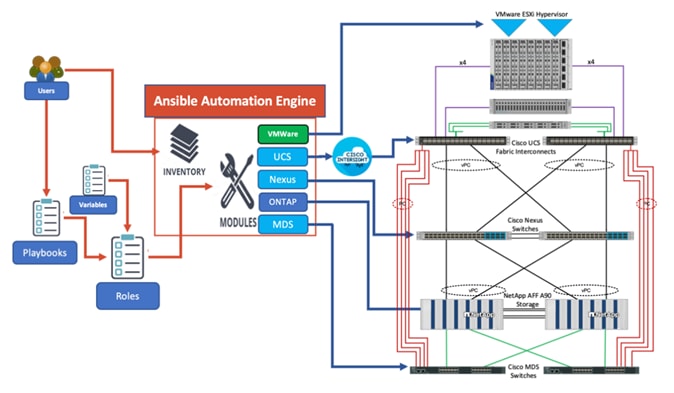
As illustrated in Figure 2, the Ansible playbooks to configure the different sections of the solution invoke a set of Roles and consume the associated variables that are required to setup the solution. The variables needed for this solution can be split into two categories – user input and defaults/ best practices. Based on the installation environment, you can choose to modify the variables to suit your requirements and proceed with the automated installation.
Cisco Unified Computing System X-Series
The Cisco UCS X-Series Modular System is designed to take the current generation of the Cisco UCS platform to the next level with its future-ready design and cloud-based management. Decoupling and moving the platform management to the cloud allows Cisco UCS to respond to your feature and scalability requirements in a much faster and more efficient manner. Cisco UCS X-Series state of the art hardware simplifies the data-center design by providing flexible server options. A single server type, supporting a broader range of workloads, results in fewer different data center products to manage and maintain. The Cisco Intersight cloud-management platform manages Cisco UCS X-Series as well as integrating with third-party devices, including VMware vCenter and NetApp storage, to provide visibility, optimization, and orchestration from a single platform, thereby driving agility and deployment consistency.
Cisco UCS X9508 Chassis
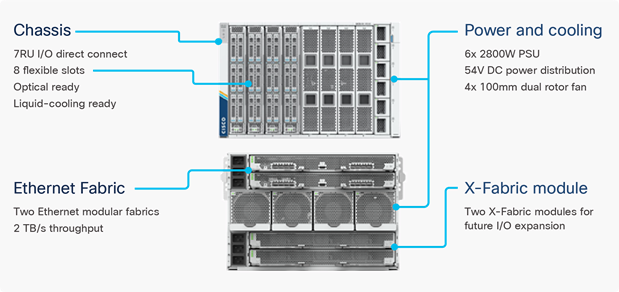
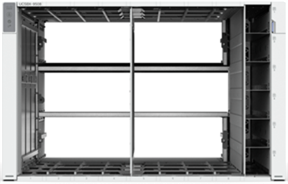
The Cisco UCS X-Series chassis is engineered to be adaptable and flexible. As seen in Figure 3, the Cisco UCS X9508 chassis has only a power-distribution midplane. This midplane-free design provides fewer obstructions for better airflow. For I/O connectivity, vertically oriented compute nodes intersect with horizontally oriented fabric modules, allowing the chassis to support future fabric innovations. Cisco UCS X9508 Chassis’ superior packaging enables larger compute nodes, thereby providing more space for actual compute components, such as memory, GPU, and drives. Improved airflow through the chassis enables support for higher power components, and more space allows for future thermal solutions (such as liquid cooling) without limitations.
The Cisco UCS X9508 7-Rack-Unit (7RU) chassis has eight flexible slots. These slots can house a combination of compute nodes and a pool of current and future I/O resources that includes GPU accelerators, disk storage, and nonvolatile memory. At the top rear of the chassis are two Intelligent Fabric Modules (IFMs) that connect the chassis to upstream Cisco UCS 6400 or 6500 Series Fabric Interconnects. At the bottom rear of the chassis are slots to house Cisco UCS X-Fabric modules that can flexibly connect the compute nodes with I/O devices. Six 2800W Power Supply Units (PSUs) provide 54V power to the chassis with N, N+1, and N+N redundancy. A higher voltage allows efficient power delivery with less copper and reduced power loss. Efficient, 100mm, dual counter-rotating fans deliver industry-leading airflow and power efficiency, and optimized thermal algorithms enable different cooling modes to best support your environment.
Cisco UCS 9108 100G IFM
In the end-to-end 100Gbps Ethernet design, for the Cisco UCS X9508 Chassis, the network connectivity is provided by a pair of Cisco UCS 9108 100G IFMs. Like the fabric extenders used in the Cisco UCS 5108 Blade Server Chassis, these modules carry all network traffic to a pair of Cisco UCS 6536 Fabric Interconnects (FIs). IFMs also host the Chassis Management Controller (CMC) for chassis management. In contrast to systems with fixed networking components, Cisco UCS X9508’s midplane-free design enables easy upgrades to new networking technologies as they emerge making it straightforward to accommodate new network speeds or technologies in the future.

Each IFM supports eight 100Gb uplink ports for connecting the Cisco UCS X9508 Chassis to the FIs and 8 100Gb or 32 25Gb server ports for the eight compute nodes. IFM server ports can provide up to 200 Gbps of unified fabric connectivity per compute node across the two IFMs. The uplink ports connect the chassis to the Cisco UCS FIs, providing up to 1600Gbps connectivity across the two IFMs. The unified fabric carries management, VM, and Fibre Channel over Ethernet (FCoE) traffic to the FIs, where server management traffic is routed to the Cisco Intersight cloud operations platform, FCoE traffic is forwarded to either native Fibre Channel interfaces through unified ports on the FI (to Cisco MDS switches) or to FCoE uplinks (to Cisco Nexus switches supporting SAN switching), and data Ethernet traffic is forwarded upstream to the data center network (using Cisco Nexus switches).
Cisco UCS X210c M7 Compute Node
The Cisco UCS X9508 Chassis is designed to host up to 8 Cisco UCS X210c M7 Compute Nodes. Figure 6 shows a front view of the Cisco UCS X210c M7 Compute Node.

The Cisco UCS X210c M7 features:
● CPU: Up to 2x 5th Gen or 4th Gen Intel® Xeon® Scalable Processors with up to 64 cores per processor and up to 320 MB of Level 3 cache per CPU.
● Memory: Up to 8TB of main memory with 32x 256 GB DDR5 5600 MT/s or DDR5 4800 MT/s DIMMs depending on the CPU installed.
● Disk storage: Up to six hot-pluggable, Solid-State Drives (SSDs), or Non-volatile Memory Express (NVMe) 2.5-inch drives with a choice of enterprise-class Redundant Array of Independent Disks (RAIDs) or passthrough controllers, up to two M.2 SATA drives with optional hardware RAID or up to two M.2 NVMe drives in pass-through mode.
● GPUs: The optional front mezzanine GPU module is a passive PCIe Gen 4.0 front mezzanine option with support for up to two NVMe drives and two HHHL GPUs.
● Virtual Interface Card (VIC): Up to 2 VICs including an mLOM Cisco UCS VIC 15420, Cisco UCS VIC 15231 or Cisco UCS VIC 15230 and a mezzanine Cisco UCS VIC card 15422 can be installed in a Compute Node.
● Security: The server supports an optional Trusted Platform Module (TPM). Additional security features include a secure boot FPGA and ACT2 anti-counterfeit provisions.
Cisco UCS X410c M7 Compute Node
The Cisco UCS X9508 Chassis is designed to host up to 4 Cisco UCS X410c M7 Compute Nodes. Figure 7 shows a front view of the Cisco UCS X410c M7 Compute Node.
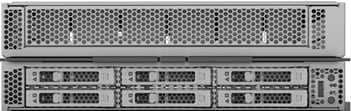
The Cisco UCS X410c M7 features:
● CPU: Up to 4x 4th Gen Intel® Xeon® Scalable Processors with up to 60 cores per processor.
● Memory: Up to 16TB of main memory with 64 x 256 GB DDR5 4800 MT/s DIMMs in 4s configuration.
● Disk storage: Up to six hot-pluggable, Solid-State Drives (SSDs), or Non-volatile Memory Express (NVMe) 2.5-inch drives with a choice of enterprise-class Redundant Array of Independent Disks (RAIDs) or passthrough controllers, up to two M.2 SATA drives with optional hardware RAID or up to two M.2 NVMe drives in pass-through mode..
● Virtual Interface Card (VIC): Up to 2 VICs including an mLOM Cisco UCS VIC 15420, Cisco UCS VIC 15231 or Cisco UCS VIC 15230 and an optional mezzanine Cisco UCS VIC card 15422 can be installed in a Compute Node.
● Security: The server supports an optional Trusted Platform Module (TPM). Additional security features include a secure boot FPGA and ACT2 anti-counterfeit provisions.
Cisco UCS Virtual Interface Cards (VICs)
Cisco UCS X210c M7 and X410c M7 Compute Nodes support the following Cisco UCS VIC cards:
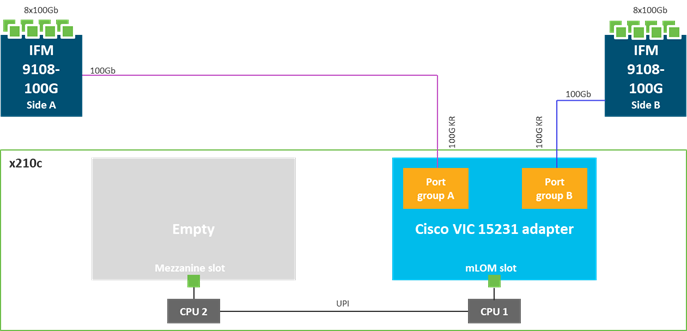
● Cisco UCS VIC 15231
Cisco UCS VIC 15231 fits the mLOM slot in the Cisco UCS X210c Compute Node and enables up to 100 Gbps of unified fabric connectivity to each of the chassis IFMs for a total of 200 Gbps of connectivity per server. Cisco UCS VIC 15231 connectivity to the IFM and up to the fabric interconnects is delivered through 100Gbps.
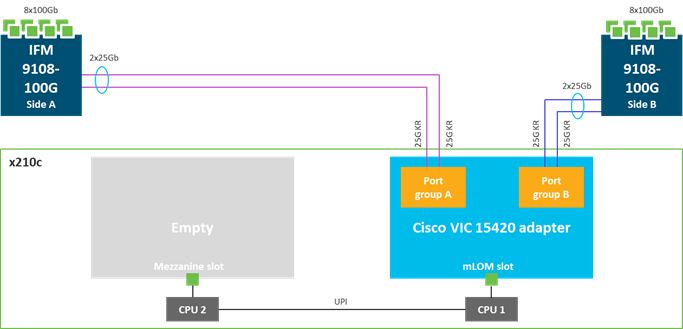
● Cisco UCS VIC 15420
Cisco UCS VIC 15420 fits the mLOM slot in the Cisco UCS X210c Compute Node and enables up to 50 Gbps of unified fabric connectivity to each of the chassis IFMs for a total of 100 Gbps of connectivity per server. Cisco UCS VIC 15420 connectivity to the IFM and up to the fabric interconnects is delivered through 4x 25-Gbps connections, which are configured automatically as 2x 50-Gbps port channels.
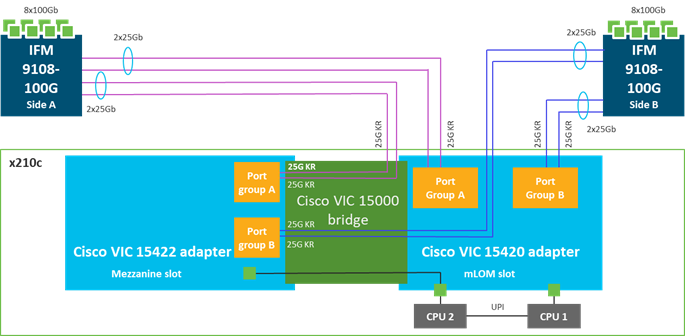
● Cisco UCS VIC 15422
The optional Cisco UCS VIC 15422 fits the mezzanine slot on the server. A bridge card (UCSX-V5-BRIDGE) ex-tends this VIC’s 2x 50 Gbps of network connections up to the mLOM slot and out through the mLOM’s IFM connectors, bringing the total bandwidth to 100 Gbps per fabric for a total bandwidth of 200 Gbps per server.
Cisco UCS 6536 Fabric Interconnects
The Cisco UCS Fabric Interconnects (FIs) provide a single point for connectivity and management for the entire Cisco Unified Computing System. Typically deployed as an active/active pair, the system’s FIs integrate all components into a single, highly available management domain controlled by Cisco Intersight. Cisco UCS FIs provide a single unified fabric for the system, with low-latency, lossless, cut-through switching that supports LAN, SAN, and management traffic using a single set of cables.

The Cisco UCS 6536 utilized in the current design is a 36-port Fabric Interconnect. This single RU device includes up to 36 10/25/40/100 Gbps Ethernet ports, 16 8/16/32-Gbps Fibre Channel ports using 4 128 Gbps to 4x32 Gbps breakouts on ports 33-36. All 36 ports support breakout cables or QSA interfaces.
The Cisco Intersight platform is a Software-as-a-Service (SaaS) infrastructure lifecycle management platform that delivers simplified configuration, deployment, maintenance, and support. The Cisco Intersight platform is designed to be modular, so you can adopt services based on your individual requirements. The platform significantly simplifies IT operations by bridging applications with infrastructure, providing visibility and management from bare-metal servers and hypervisors to serverless applications, thereby reducing costs and mitigating risk. This unified SaaS platform uses a unified Open API design (important for enabling automation using Ansible) that natively integrates with third-party platforms and tools.
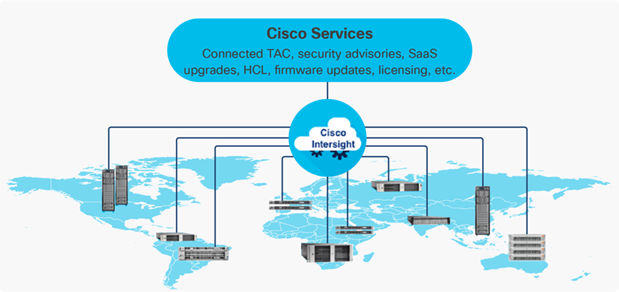
The main benefits of Cisco Intersight infrastructure services are as follows:
● Simplify daily operations by automating many daily manual tasks
● Combine the convenience of a SaaS platform with the capability to connect from anywhere and manage infrastructure through a browser or mobile app
● Stay ahead of problems and accelerate trouble resolution through advanced support capabilities
● Gain global visibility of infrastructure health and status along with advanced management and support capabilities
Cisco Intersight Virtual Appliance and Private Virtual Appliance
In addition to the SaaS deployment model running on Intersight.com, on-premises options can be purchased separately. The Cisco Intersight Virtual Appliance and Cisco Intersight Private Virtual Appliance are available for organizations that have additional data locality or security requirements for managing systems. The Cisco Intersight Virtual Appliance delivers the management features of the Cisco Intersight platform in an easy-to-deploy VMware Open Virtualization Appliance (OVA) or Microsoft Hyper-V Server virtual machine that allows you to control the system details that leave your premises. The Cisco Intersight Private Virtual Appliance is provided in a form factor specifically designed for those who operate in disconnected (air gap) environments. The Private Virtual Appliance requires no connection to public networks or back to Cisco to operate.
Cisco Intersight Assist
Cisco Intersight Assist helps you add endpoint devices to Cisco Intersight. A data center could have multiple devices that do not connect directly with Cisco Intersight. Any device that is supported by Cisco Intersight, but does not connect directly with it, will need a connection mechanism. Cisco Intersight Assist provides that connection mechanism. In FlexPod, VMware vCenter, NetApp Active IQ Unified Manager, connect to Intersight with the help of the Intersight Assist VM.
Cisco Intersight Assist is available within the Cisco Intersight Virtual Appliance, which is distributed as a deployable virtual machine contained within an Open Virtual Appliance (OVA) file format. More details about the Cisco Intersight Assist VM deployment configuration is explained in later sections.
Licensing Requirements
The Cisco Intersight platform uses a new subscription-based license model now with two tiers. You can purchase a subscription duration of one, three, or five years and choose the required Cisco UCS server volume tier for the selected subscription duration. For Cisco UCS M6 and earlier generation servers, each Cisco endpoint can be claimed into Intersight at no additional cost (no license) and can access base-level features listed in the Intersight Licensing page referenced below. All Cisco UCS M7 servers require either an Essentials or Advantage license listed below:
● Cisco Intersight Infrastructure Services Essentials: The Essentials license tier offers server management with global health monitoring, inventory, proactive support through Cisco TAC integration, multi-factor authentication, along with SDK and API access.
● Cisco Intersight Infrastructure Services Advantage: The Advantage license tier offers advanced server management with extended visibility, ecosystem integration, and automation of Cisco and third-party hardware and software, along with multi-domain solutions.
Servers in the Cisco Intersight Managed Mode require at least the Essentials license. In order to have Intersight integration with NetApp ONTAP storage through NetApp Active IQ Unified Manager, the Advantage license tier is required.
For more information about the features provided in the various licensing tiers, see https://intersight.com/help/saas/getting_started/licensing_requirements/lic_infra.
Cisco UCS and Intersight Security
From a Security perspective, all Cisco UCS user interfaces are hardened with the latest security ciphers and protocols including redirection of http to https, password and password expiry policies, integration with secure authentication systems, and so on. Additionally, Cisco UCS servers support confidential computing (both Intel SGX and AMD based), although confidential computing is not addressed in this CVD. All Cisco UCS servers now sold come with Trusted Platform Modules (TPMs), that in VMware allows attestation of Unified Extended Firm-ware Interface Forum (UEFI) secure boot, which allows only securely signed code to be loaded. Many of the latest available operating systems, such as Microsoft Windows 11, require a TPM. The latest versions of VMware allow the assignment of a virtual TPM to VMs running operating systems that require a TPM.
The Zero Trust framework for FlexPod solution leverages several technologies and security products to incorporate segmentation and control (multi-tenancy design using VRF, VLANs), visibility and monitoring (network and OS level visibility and anomaly detection), threat protection and response into the infrastructure. This solution utilizes multiple additional security components by Cisco and NetApp including Cisco Secure Firewall Threat Defense (FTD), Cisco Secure Network Analytics (previously Stealthwatch) to provide visibility and monitoring, Cisco Secure Workload (previously Tetration), and NetApp Autonomous Ransomware Protection (ARP) to provide threat protection and response.
If you’re interested in understanding the FlexPod Datacenter Zero Trust Framework design and deployment details, including the configuration of various elements of design and associated best practices, see following Cisco Validated Designs for FlexPod:
https://www.cisco.com/c/en/us/td/docs/unified_computing/ucs/UCS_CVDs/flexpod_zero_trust_design.html.
https://www.cisco.com/c/en/us/td/docs/unified_computing/ucs/UCS_CVDs/flexpod_zero_trust.html.
The Cisco Nexus 9000 Series Switches offer both modular and fixed 1/10/25/40/100 Gigabit Ethernet switch configurations with scalability up to 60 Tbps of nonblocking performance with less than five-microsecond latency, wire speed VXLAN gateway, bridging, and routing support.

The Cisco Nexus 9000 series switch featured in this design is the Cisco Nexus 93600CD-GX configured in NX-OS standalone mode. NX-OS is a purpose-built data center operating system designed for performance, resiliency, scalability, manageability, and programmability at its foundation. It provides a robust and comprehensive feature set that meets the demanding requirements of virtualization and automation.
The Cisco Nexus 93600CD-GX Switch is a 1RU switch that supports 12 Tbps of bandwidth and 4.0 bpps across 28 fixed 40/100G QSFP-28 ports and 8 fixed 10/25/40/50/100/200/400G QSFP-DD ports. The 28 ports support 10/25-Gbps..
For more information about the features, see https://www.cisco.com/c/en/us/products/collateral/switches/nexus-9000-series-switches/nexus-9300-gx-series-switches-ds.html.
Cisco MDS 9124V 64G 24-Port Fibre Channel Switch
The next-generation Cisco MDS 9124V 64-Gbps 24-Port Fibre Channel Switch supports 64, 32, and 16 Gbps Fibre Channel ports and provides high-speed Fibre Channel connectivity for all-flash arrays and high-performance hosts. This switch offers state-of-the-art analytics and telemetry capabilities built into its next-generation Application-Specific Integrated Circuit (ASIC) chipset.

The Cisco MDS 9124V delivers advanced storage networking features and functions with ease of management and compatibility with the entire Cisco MDS 9000 family portfolio for reliable end-to-end connectivity. This switch also offers state-of-the-art SAN analytics and telemetry capabilities that have been built into this next-generation hardware platform. The Cisco MDS 9148V provides additional high availability with port-channel link members striped across two 24-port port groups.
NetApp AFF A-Series controller lineup provides industry leading performance while continuing to provide a full suite of enterprise-grade data services for a shared environment across on-premises data centers and the cloud. Powered by NetApp ONTAP data management software, NetApp AFF A-Series systems deliver the industry’s highest performance, superior flexibility, and best-in-class data services and cloud integration to help you accelerate, manage, and protect business-critical data across your hybrid clouds.
These systems deliver the industry’s lowest latency for an enterprise all-flash array, making them a superior choice for running the most demanding workloads and AI/DL applications. NetApp offers a wide range of AFF A-series controllers to meet var-ying demands of the field. All AFF A-Series systems offer advanced reliability, availability, and serviceability to keep your critical data available. They also provide comprehensive data management and data protection capabilities for your enterprise applications with industry-leading ONTAP software. In this solution, AFF A90 was used for validation.
For more information about the NetApp AFF A-series controllers, see the NetApp AFF product page: https://www.netapp.com/data-storage/aff-a-series/
You can view or download more technical specifications of the NetApp AFF A-series controllers here: https://www.netapp.com/media/7828-DS-3582-AFF-A-Series.pdf
NetApp AFF A90
The NetApp AFF A90 systems deliver industry-leading performance, verified by SPC-1 and SPEC SFS industry benchmarks. These systems are ideal for everything from VMware environments to highly I/O intensive applications such as Oracle, Microsoft SQL Server, SAP, and SAP HANA workloads, to the most data-intensive AI training, tuning, inferencing, and retrieval-augmented generation (RAG) workloads.
With the AFF A90 systems, you don’t need to choose between performance and efficiency since they will have always-on improved data compression and no performance impact, due to QuickAssist Technology (Intel QAT). The systems allow you to achieve exceptional storage efficiency while delivering the consistent high performance needed for mission-critical workloads. In addition, the AFF A90 comes with faster front-end 200Gb Ethernet and 64Gb FC networking connectivity.
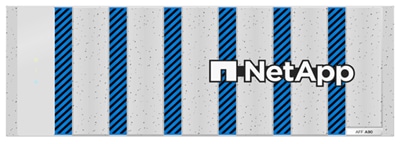
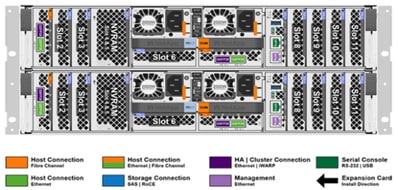
You can look up the detailed NetApp storage product configurations and limits here: https://hwu.netapp.com/
FlexPod CVDs provide reference configurations and there are many more supported IMT configurations that can be used for FlexPod deployments, including NetApp hybrid storage arrays.
NetApp ONTAP 9.16.1
NetApp storage systems harness the power of ONTAP to simplify the data infrastructure from edge, core, and cloud with a common set of data services and 99.9999 percent availability. NetApp ONTAP 9 data management software from NetApp enables you to modernize your infrastructure and transition to a cloud-ready data center. NetApp ONTAP 9 has a host of features to simplify deployment and data management, accelerate and protect critical data, and make infrastructure future-ready across hybrid-cloud architectures.
NetApp ONTAP 9 is the data management software that is used with the NetApp AFF A90 all-flash storage systems in this solution design. NetApp ONTAP software offers secure unified storage for applications that read and write data over block- or file-access protocol storage configurations. These storage configurations range from high-speed flash to lower-priced spinning media or cloud-based object storage. NetApp ONTAP implementations can run on NetApp engineered AFF, FAS, or ASA series arrays and in private, public, or hybrid clouds (NetApp Private Storage and NetApp Cloud Volumes ONTAP). Specialized implementations offer best-in-class converged infrastructure, featured here as part of the FlexPod Datacenter solution or with access to third-party storage arrays (NetApp FlexArray virtualization). Together these implementations form the basic framework of the NetApp Data Fabric, with a common software-defined approach to data management, and fast efficient replication across systems. FlexPod and ONTAP architectures can serve as the foundation for both hybrid cloud and private cloud designs.
Note: The support for the NetApp AFF A90 was introduced with NetApp ONTAP 9.15.1. In this solution, NetApp ONTAP 9.16.1 was used for validation.
Read more about the capabilities of NetApp ONTAP data management software here: https://www.netapp.com/us/products/data-management-software/ontap.aspx.
For more information on new features and functionality in latest NetApp ONTAP software, refer to the NetApp ONTAP release notes: NetApp ONTAP 9 Release Notes (netapp.com).
NetApp Active IQ Unified Manager
NetApp Active IQ Unified Manager is a comprehensive monitoring and proactive management tool for NetApp ONTAP systems to help manage the availability, capacity, protection, and performance risks of your storage systems and virtual infrastructure. The Unified Manager can be deployed on a Linux server, on a Windows server, or as a virtual appliance on a VMware host.
Active IQ Unified Manager enables monitoring your NetApp ONTAP storage clusters, VMware vCenter server and VMs from a single redesigned, intuitive interface that delivers intelligence from community wisdom and AI analytics. It provides comprehensive operational, performance, and proactive insights into the storage environment and the VMs running on it. When an issue occurs on the storage or virtual infrastructure, NetApp Active IQ Unified Manager can notify you about the details of the issue to help with identifying the root cause.
NetApp Active IQ Unified Manager enables to manage storage objects in your environment by associating them with annotations. You can create custom annotations and dynamically associate clusters, SVMs, and volumes with the annotations through rules. The VM dashboard gives you a view into the performance statistics for the VM so that you can investigate the entire I/O path from the vSphere host down through the network and finally to the storage. Some events also provide remedial actions that can be taken to rectify the issue. You can also configure custom alerts for events so that when issues occur, you are notified through email and SNMP traps.
For more information on NetApp Active IQ Unified Manager, go to: https://docs.netapp.com/us-en/active-iq-unified-manager/
NetApp ONTAP tools for VMware vSphere
The NetApp ONTAP tools for VMware vSphere is a set of tools for virtual machine lifecycle management. It integrates with the VMware ecosystem to help in datastore provisioning and in providing basic protection for virtual machines. It is a collection of horizontally scalable, event-driven, microservices deployed as an Open Virtual Appliance (OVA). The latest release 10.3 has REST API integration with ONTAP.
Note: Each component in NetApp ONTAP tools provides capabilities to help manage your storage more efficiently.
ONTAP tools for VMware vSphere consists of:
● Virtual machine functionality like basic protection and disaster recovery
● VASA Provider for VM granular management
● Storage policy-based management
● Storage Replication Adapter (SRA)
● SnapMirror active sync (SMAS)
VASA Provider
VASA Provider for NetApp ONTAP uses VMware vSphere APIs for Storage Awareness (VASA) to send information about storage used by VMware vSphere to the vCenter Server. VASA is a set of APIs that integrate storage arrays with vCenter Server for management and administration. VASA Provider enables you to perform the following tasks:
● Provision VMware Virtual Volumes (vVols) datastores
● Create and use storage capability profiles that define different storage service level objectives (SLOs) for your environment
● Verify for compliance between the datastores and the storage capability profiles
● Set alarms to warn you when volumes and aggregates are approaching the threshold limits
VMware vSphere Storage APIs - Array Integration (VAAI)
VAAI is a set of APIs that enables communication between VMware vSphere ESXi hosts and the storage devices. The APIs include a set of primitive operations used by the hosts to offload storage operations to the array. VAAI can provide significant performance improvements for storage-intensive tasks.
Storage Replication Adapter (SRA)
SRA is the storage vendor specific software that is installed inside the VMware Live Site Recovery appliance. The adapter enables communication between Site Recovery Manager and a storage controller at the Storage Virtual Machine (SVM) level and the cluster level configuration.
Note: It is recommended to use the latest ONTAP tools for VMware vSphere 10 for ONTAP 9.16.1. In this solution, we used ONTAP tools 10.3 for validation.
For detailed information about ONTAP tools for VMware vSphere 10, see:
https://docs.netapp.com/us-en/ontap-tools-vmware-vsphere-10/index.html
Note: While vVol datastores with FCP are supported with virtualized SAP HANA, the preferred option to connect storage to virtual machines is with NFS directly out of the guest operating system. For more information, go to: https://docs.netapp.com/us-en/netapp-solutions-sap/bp/saphana_aff_fc_sap_hana_using_vmware_vsphere.html.
SnapCenter Software is a simple, centralized, scalable platform that provides application consistent data protection for applications, databases, host file systems, and VMs running on NetApp ONTAP systems anywhere on premise or in the Hybrid Cloud.
SnapCenter leverages NetApp Snapshot, SnapRestore, FlexClone, SnapMirror, and SnapVault technologies to provide:
● Fast, space-efficient, application-consistent, disk-based backups
● Rapid, granular restore, and application-consistent recovery
● Quick, space-efficient cloning
SnapCenter includes both SnapCenter Server and individual lightweight plug-ins. You can automate deployment of plug-ins to remote application hosts, schedule backup, verification, and clone operations, and monitor all data protection operations.
Data protection is supported for Microsoft Exchange Server, Microsoft SQL Server, Oracle Databases on Linux or AIX, SAP HANA database, and Windows Host Filesystems running on NetApp ONTAP systems. It is also supported for other standard or custom applications and databases by providing a framework to create user-defined SnapCenter plug-ins. You may install only the plug-ins that are appropriate for the data that you want to protect.
Note: For more information on SnapCenter Software, refer to the SnapCenter software documentation: https://docs.netapp.com/us-en/snapcenter/index.html
SAP HANA Data Protection with SnapCenter
The FlexPod solution can be extended with additional software and hardware components to cover data protection, backup and recovery, and disaster recovery operations. The following link provides a high-level overview on how to enhance SAP HANA backup and disaster recovery using the NetApp SnapCenter plug-in for SAP HANA.
● SnapCenter Plug-in for SAP HANA Database overview
Details on the setup and configuration of SnapCenter for SAP HANA backup and recovery, disaster recovery operations and SAP HANA system replication can be found in the following technical reports:
● SAP HANA Backup and Recovery with SnapCenter
● SAP HANA Disaster Recovery with Asynchronous Storage Replication
● SAP HANA System Replication leveraging Backup and Recovery with SnapCenter
VMware vSphere is a virtualization platform for holistically managing large collections of infrastructures (resources including CPUs, storage, and networking) as a seamless, versatile, and dynamic operating environment. Unlike traditional operating systems that manage an individual machine, VMware vSphere aggregates the infrastructure of an entire data center to create a single powerhouse with resources that can be allocated quickly and dynamically to any application in need.
SAP supports VMware vSphere 8 for virtual deployments in production scenarios of SAP HANA on either certified appliances or through SAP HANA tailored data center integration (TDI) verified hardware configurations. For more information, see SAP Note 3372365 - SAP HANA on VMware vSphere 8.
For TDI, SAP HANA certified Linux versions (SAP Note 2235581 - SAP HANA: Supported Operating Systems) are also supported inside a VMware vSphere VM.
VMware vCenter 8.0
VMware vCenter Server provides unified management of all hosts and VMs from a single console and aggregates performance monitoring of clusters, hosts, and VMs. VMware vCenter Server gives administrators a deep insight into the status and configuration of compute clusters, hosts, VMs, storage, the guest OS, and other critical components of a virtual infrastructure. VMware vCenter manages the rich set of features available in a VMware vSphere environment.
Red Hat Enterprise Linux for SAP Solutions
Red Hat Enterprise Linux for SAP Solutions is an SAP specific offering, tailored to the needs of SAP workloads such as S/4HANA and SAP HANA platform. Furthermore, standardizing your SAP environment on Red Hat Enterprise Linux for SAP Solutions helps streamline operations and reduce costs by providing integrated smart management and high availability solutions as part of the offering.
Built on Red Hat Enterprise Linux (RHEL), the RHEL for SAP Solutions subscription offers the following additional components:
● SAP-specific technical components to support SAP S/4HANA, SAP HANA, and SAP Business Applications.
● High Availability solutions for SAP S/4HANA, SAP HANA, and SAP Business Applications.
● RHEL System Roles for SAP, which can be used to automate the configuration of a RHEL system to run SAP workloads.
● Smart Management and Red Hat Insights for lifecycle management and proactive optimization.
● Update Services and Extended Update Support.
SUSE Linux Enterprise Server for SAP Applications
SUSE Linux Enterprise Server (SLES) for SAP Applications is targeted for SAP HANA, SAP NetWeaver, and SAP S/4HANA solutions providing optimized performance and reduced downtime as well as faster SAP landscape deployments.
The key features of SLES for SAP Applications are:
● Deploy SAP services avoiding delays with the saptune configuration of the OS and HA configuration, optimized for specific SAP applications.
● Reduce downtime and increase security. Reduce outages with HA configurations designed for SAP HANA, and SAP applications. Eliminate downtime for Linux security updates with live kernel patching.
● Avoid errors with advanced monitoring. Monitor key metrics with Prometheus exporters for server and cloud in-stances, SAP HANA, SAP applications, and high availability cluster operations for visualization with SUSE Manag-er or other graphical display tools.
● Safeguard SAP Systems to prevent errors. Automatically discover and enable full observability of servers, SAP HANA databases, SAP S/4HANA and NetWeaver applications, and clusters with Trento in SAP domain language. Continuously check HA configurations, visualize potential problems, and apply recommended fixes.
Cisco Intersight Assist Device Connector for VMware vCenter and NetApp ONTAP
Cisco Intersight integrates with VMware vCenter and NetApp storage as follows:
● Cisco Intersight uses the device connector running within the Cisco Intersight Assist virtual appliance to communicate with the VMware vCenter.
● Cisco Intersight uses the device connector running within a Cisco Intersight Assist virtual appliance to integrate with NetApp Active IQ Unified Manager. The NetApp AFF storage (here AFF A90) should be added to NetApp Active IQ Unified Manager.
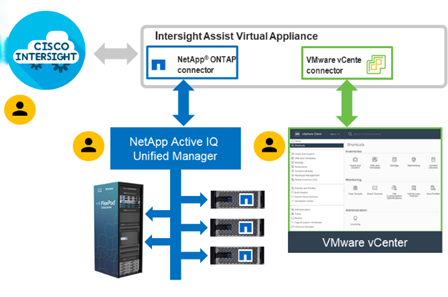
The device connector provides a secure way for connected targets to send information and receive control instructions from the Cisco Intersight portal using a secure internet connection. The integration brings the full value and simplicity of Cisco Intersight infrastructure management service to VMware hypervisor and NetApp ONTAP data storage environments.
Enterprise SAN and NAS workloads can benefit equally from the integrated management solution. The integration architecture enables FlexPod customers to use new management capabilities with no compromise in their existing VMware and NetApp ONTAP operations. IT users will be able to manage heterogeneous infrastructure from a centralized Cisco Intersight portal. At the same time, the IT staff can continue to use VMware vCenter and NetApp Active IQ Unified Manager, for comprehensive analysis, diagnostics, and reporting of virtual and storage environments.
Solution Design
This chapter contains the following:
● Cisco Nexus Ethernet Connectivity
● Cisco MDS SAN Connectivity – Fibre Channel Design Only
● Cisco UCS X-Series Configuration – Cisco Intersight Managed Mode
● NetApp AFF – Storage Virtual Machine (SVM) Design
● VMware vSphere - ESXi Design
The FlexPod Datacenter with Cisco UCS X-Series M7 solution delivers a cloud-managed infrastructure solution on the latest Cisco UCS hardware for both virtualized and bare-metal implementations of SAP / SAP HANA. VMware vSphere 8.0 hypervisor in case of virtualized deployments and supported Linux OS distributions otherwise is installed on the Cisco UCS X-Series M7 Compute Nodes configured for stateless compute design using boot from SAN or iSCSI booting. The NetApp AFF A90 provides the storage infrastructure required for setting up the SAP HANA environment. The Cisco Intersight cloud-management platform is utilized to configure and manage the infrastructure.
The FlexPod Datacenter for SAP HANA TDI with Cisco UCS X-Series M7 solution meets the following general design requirements:
● Resilient design across all layers of the infrastructure with no single point of failure
● Scalable design with the flexibility to add compute capacity, storage, or network bandwidth as needed
● Modular design that can be replicated to expand and grow as the needs of the business grow
● Flexible design that can support different models of various components with ease
● Simplified design with ability to integrate and automate with external automation tools
● Cloud-enabled design which can be configured, managed, and orchestrated from the cloud using GUI or APIs
● The supported connection options for storage devices for SAP HANA database persistence partitions are SAN (Fibre Channel protocol only with XFS filesystem support) and NAS (NFS v3/4.1 filesystem supported)
Note: With these requirements in mind, especially the connection options / protocol supported, consider two possible topologies – one for IP-based storage access focusing on ISCSI and NFS protocols, and another FC-based storage access focusing on Fibre Channel only.
FlexPod Datacenter with Cisco UCS M7 supports both IP and Fibre Channel (FC)—based storage access design. For the IP-based solution, iSCSI configuration on Cisco UCS and NetApp AFF A90 is utilized to set up boot from SAN for the Compute Node. For the FC designs, NetApp AFF A90 and Cisco UCS are connected through Cisco MDS 9124V Fibre Channel Switches and boot from SAN uses the FC network. In both these designs, VMware ESXi hosts access the VM datastore volumes on NetApp using NFS. The physical connectivity details for both IP and FC designs are explained below.
IP-based Storage Access: iSCSI and NFS
The physical topology for the IP-based FlexPod Datacenter is shown in Figure 18.
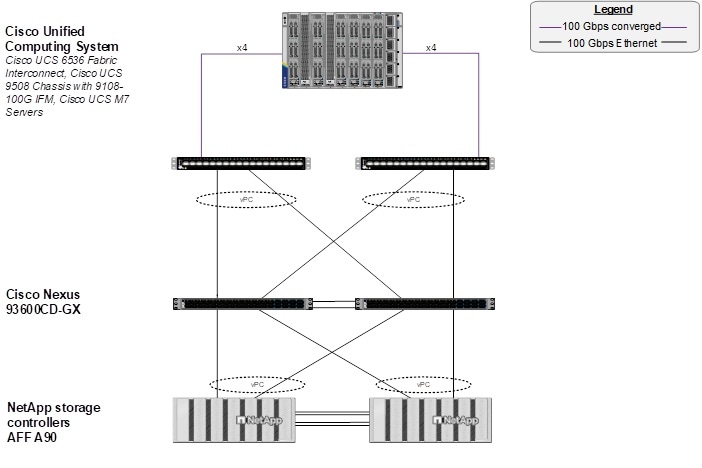
To validate the IP-based storage access in a FlexPod configuration, the components are set up as follows:
● Cisco UCS 6536 Fabric Interconnects provide the chassis and network connectivity.
● The Cisco UCS X9508 Chassis connects to fabric interconnects using Cisco UCS 9108 100G IFM intelligent fabric modules (IFMs), where four 100 Gigabit Ethernet ports are used on each IFM to connect to the appropriate FI. If additional bandwidth is required, all eight 100G ports can be utilized. The Cisco UCSX-I-9108-25G IFMs can also be used with 4x25G breakout cables used to connect the chassis to the fabric interconnects.
● Cisco UCS X210c M7or X410c Compute Nodes contain fifth-generation Cisco UCS 15231 virtual interface cards (VICs) which can be used with either IFM. Cisco UCS 15420 and 15422 VICs can also be used with either IFM.
● Cisco Nexus 93600CD-GX Switches in Cisco NX-OS mode provide switching fabric.
● Cisco UCS 6536 Fabric Interconnect 100-Gigabit Ethernet uplink ports connect to Cisco Nexus 93600CD-GX Switches in a Virtual Port Channel (vPC) configuration.
● The NetApp AFF A90 controllers connect to the Cisco Nexus 93600CD-GX Switches using two 100 GE ports from each controller configured as a vPC.
● VMware 8.0 ESXi software is installed on Cisco UCS X-Series M7 Compute Nodes and servers to validate the infrastructure. For bare-metal scenarios SLES for SAP 15 SP6 and RHEL 9.4 for SAP are installed.
Note: With SAP HANA, the iSCSI connection option is only allowed for boot disk/LUN. In this IP-based storage access configuration, HANA data, log, and shared filesystems leverage NFS.
FC-based Storage Access: FC and NFS
The physical topology for the FC-booted FlexPod Datacenter is shown in Figure 19.
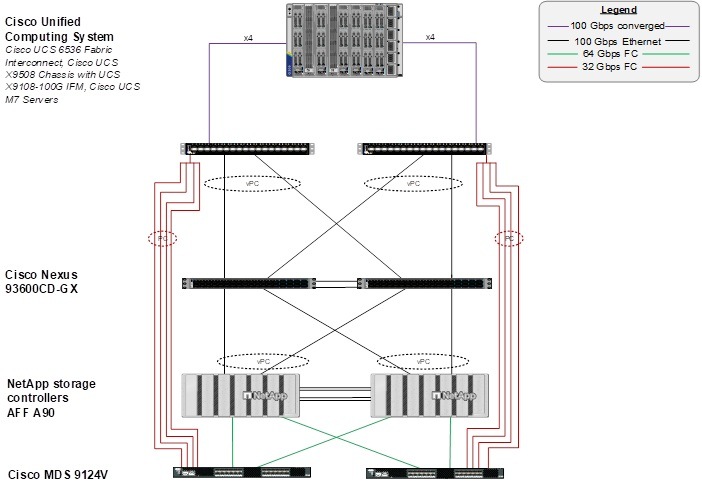
To validate the FC-based storage access in a FlexPod configuration, the components are set up as follows:
● Cisco UCS 6536 Fabric Interconnects provide the chassis and network connectivity.
● The Cisco UCS X9508 Chassis connects to fabric interconnects using Cisco UCSX 9108-100G IFMs, where four 100 Gigabit Ethernet ports are used on each IFM to connect to the appropriate FI. If additional bandwidth is required, all eight 100G ports can be utilized. The Cisco UCSX 9108-25G IFMs can also be used with 4x25G breakout cables used to connect the chassis to the fabric interconnects.
● Cisco UCS X-Series M7 Compute Nodes contain 5th generation Cisco UCS 15231 virtual interface cards (VICs) which can be used with either IFM. Cisco UCS 15420 and 15422 VICs can also be used with either IFM.
● Cisco Nexus 93600CD-GX Switches in Cisco NX-OS mode provide the switching fabric.
● Cisco UCS 6536 Fabric Interconnect 100 Gigabit Ethernet uplink ports connect to Cisco Nexus 93600CD-GX Switches in a vPC configuration.
● The NetApp AFF A90 controllers connect to the Cisco Nexus 93600CD-GX Switches using two 100 GE ports from each controller configured as a vPC for NFS traffic.
● Cisco UCS 6536 Fabric Interconnects are connected to the Cisco MDS 9124V switches using multiple 32-Gbps Fibre Channel connections (utilizing breakouts) configured as a single port channel for SAN connectivity.
● The NetApp AFF A90 controllers connect to the Cisco MDS 9124V switches using 64-Gbps Fibre Channel connections for SAN connectivity.
● VMware 8.0 ESXi software is installed on Cisco UCS X-Series M7 Compute Nodes and servers to validate the infrastructure. For bare-metal scenarios SLES for SAP 15 SP6 and RHEL 9.4 for SAP are installed.
Note: In this FC-based storage access configuration, HANA data and log LUNs are served with FC and HANA shared using NFS.
VLAN Configuration
Table 2 lists VLANs configured for setting up the FlexPod environment along with their usage.
| VLAN ID |
Name |
Usage |
| 2 |
Native-VLAN |
Use VLAN 2 as native VLAN instead of default VLAN (1). |
| 101 |
fcoe_vlan_a |
FCoE VLAN for MDS switch A Fibre Channel traffic |
| 102 |
fcoe_vlan_b |
FCoE VLAN for MDS switch B Fibre Channel traffic |
| 1130 |
OOB-MGMT |
Out-of-band management VLAN to connect management ports for various devices. |
| 1131 |
IB-MGMT |
In-band management VLAN utilized for all in-band management connectivity - for example, Admin network for ESXi hosts, VM management, and so on. |
| 1132 |
vMotion ** |
VMware vMotion traffic. |
| 1133 |
HANA-Appserver |
SAP Application server network. |
| 1134 |
HANA-Data |
SAP HANA Data NFS filesystem network for IP/NFS only solution. |
| 1135 |
Infra-NFS ** |
NFS VLAN for mounting datastores in ESXi servers for VM boot disks. |
| 1136 |
HANA-Log |
SAP HANA Log NFS filesystem network for IP/NFS only solution. |
| 1137 |
HANA-Shared |
SAP HANA shared filesystem network. |
| 1138* |
iSCSI-A |
iSCSI-A path for storage traffic including boot-from-san traffic. |
| 1139* |
iSCSI-B |
iSCSI-B path for storage traffic including boot-from-san traffic. |
| 76 |
HANA-Internode |
Node-to-Node communication in multi-host systems only. |
| 77 |
HANA-Backup |
SAP HANA system backup network |
* iSCSI VLANs are not required if using FC storage access.
**Only needed for Virtualized SAP HANA use cases.
Additional information on VLAN usage as follows:
● VLAN 1130 allows you to manage and access out-of-band management interfaces of various devices.
● VLAN 1131 is used for in-band management of VMs, ESXi hosts, ssh/admin network in case of bare-metal system and other infrastructure services.
● VLAN 1132 is used for VM vMotion.
● VLANs 1133 and 76 are used for SAP HANA system traffic – for SAP Application server connection and node-to-node communication in multi-host systems, respectively. VLAN 77 is to enable SAP HANA node connect to Datacenter backup network.
● VLAN 1134 and 1136 are used for SAP HANA Data and Log NFS networks – only needed in IP only solution and virtualized SAP HANA system for SAP HANA data and log filesystem mounts.
● VLAN 1135 provides ESXi SAP HANA hosts access to the NFS datastores hosted on the NetApp Controllers for deploying VMs.
● VLAN 1137 provides SAP HANA nodes access to HANA shared filesystem network both in bare metal as well as virtualized SAP HANA.
● A pair of iSCSI VLANs (1138 and 1139) is configured to provide access to boot LUNs for ESXi hosts or bare-metal SAP HANA nodes. These VLANs are not necessary in FC-only connectivity.
VSAN Configuration
Table 3 lists the VSANs configured for setting up the FlexPod environment along with their usage.
| VSAN ID |
Name |
Usage |
| 101 |
FlexPod-Fabric-A |
VSAN ID of MDS-A switch and FI-A for boot-from-SAN and SAP HANA storage access. |
| 102 |
FlexPod-Fabric-B |
VSAN ID of MDS-B switch and FI-B for boot-from-SAN and SAP HANA storage access. |
A pair of VSAN IDs (101 and 102) are configured to provide block storage access for the ESXi or Linux hosts boot and SAP HANA database persistence LUNs.
Virtualized SAP HANA deployments
In FlexPod Datacenter deployments, each Cisco UCS server equipped with a Cisco UCS Virtual Interface Card (VIC) is configured for multiple virtual Network Interfaces (vNICs), which appear as standards-compliant PCIe endpoints to the OS. The end-to-end logical connectivity including VLAN/VSAN usage between the server profile for an ESXi host and the storage configuration on NetApp AFF A90 controllers is described below.
Logical Topology for IP-based Storage Access
Figure 20 illustrates the end-to-end connectivity design for IP-based storage access.
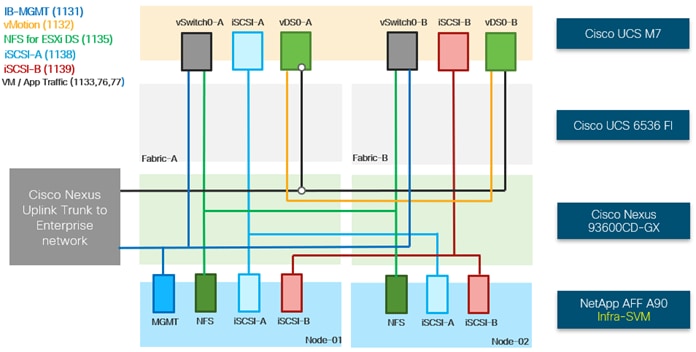
Each ESXi server profile supports:
● Managing the ESXi hosts using a common management segment.
● Diskless SAN boot using iSCSI with persistent operating system installation for true stateless computing.
● Six vNICs where:
◦ Two redundant vNICs (vSwitch0-A and vSwitch0-B) carry management and infrastructure NFS traffic. The MTU value for these vNICs is set as a Jumbo MTU (9000), but management interfaces with MTU 1500 can be placed on these vNICs.
◦ Two redundant vNICs (vDS0-A and vDS0-B) are used by the first vSphere Distributed switch (vDS0) and carry VMware vMotion traffic and your application data traffic like HANA-Replication, HANA-Appserver, HANA-Backup and HANA-Internode (in case of scale-out system). The MTU for the vNICs is set to Jumbo MTU (9000).
◦ Two vNICs (iSCSi -A and iSCSi -B) are used by the iSCSI-vDS. The iSCSI VLANs are set as native on the corresponding vNICs. The MTU value for the vNICs and all interfaces on the vDS is set to Jumbo MTU (9000). The initial VMware ESXi setup utilizes two vSwitches, but the vNICs and VMkernel ports are migrated to the second vDS.
● Each ESXi host (compute node) mounts VM datastores from NetApp AFF A90 controllers using NFS for deploying virtual machines.
Logical Topology for FC-based Storage Access
Figure 21 illustrates the end-to-end connectivity design for FC-based storage access.
s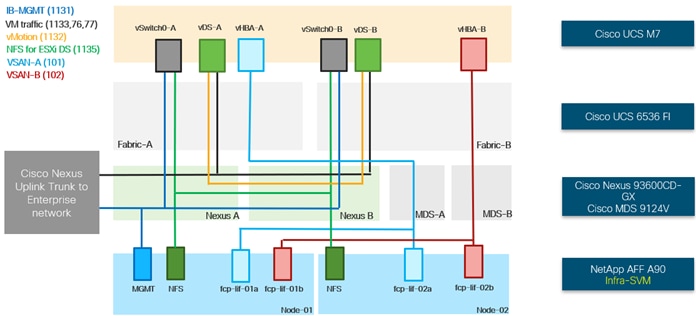
Each ESXi server profile supports:
● Managing the ESXi hosts using a common management segment.
● Diskless SAN boot using FC with persistent operating system installation for true stateless computing.
● Four vNICs where:
◦ Two redundant vNICs (vSwitch0-A and vSwitch0-B) carry management and Infrastructure NFS VLANs. The MTU value for these vNICs is set as a Jumbo MTU (9000), but management interfaces with MTU 1500 can be placed on these vNICs.
◦ Two redundant vNICs (vDS-A and vDS-B) are used by the first vSphere Distributed switch (vDS0) and carry VMware vMotion traffic and your application data traffic like HANA-Replication, HANA-Appserver, HANA-Backup and HANA-Internode (in case of scale-out system). The MTU for the vNICs is set to Jumbo MTU (9000).
● One vHBA for FC defined on Fabric A to provide access to SAN-A path.
● One vHBA for FC defined on Fabric B to provide access to SAN-B path.
● Each ESXi host (compute node) mounts VM datastores from NetApp AFF A90 controllers using NFS for deploying virtual machines.
Logical Topology for SAP HANA-specific traffic
Figure 22 illustrates the LIFs, VLANs, and the connectivity needed to address the SAP HANA specific traffic both in IP-based and FC-based storage access designs.
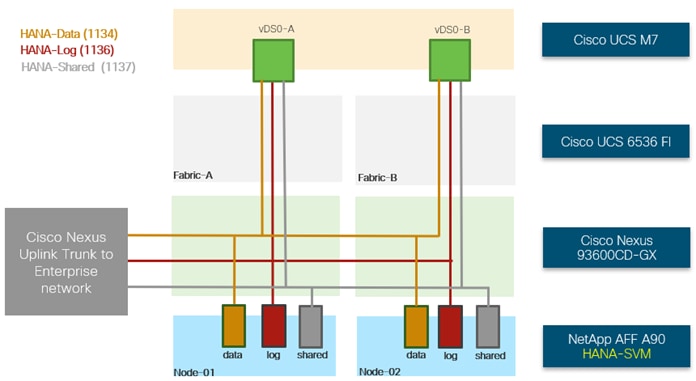
Two redundant vNICs (vDS0-A and vDS0-B), used by the first vSphere Distributed switch (vDS0) also carry the HANA Persistence networks data, log, and shared NFS traffic for direct mounted HANA database filesystems in-side the virtualized SAP HANA instance VM. The MTU for the vNICs is set to Jumbo MTU (9000).
Bare Metal SAP HANA deployments
The end-to-end logical connectivity including VLAN/VSAN usage between the server profile for a bare metal host and the storage configuration on NetApp AFF A90 controllers is described below.
Logical Topology for IP-based Storage Access
Figure 23 and 24 illustrate the end-to-end connectivity design for IP-based storage access for bare metal deployments of single-node and multi-host systems.
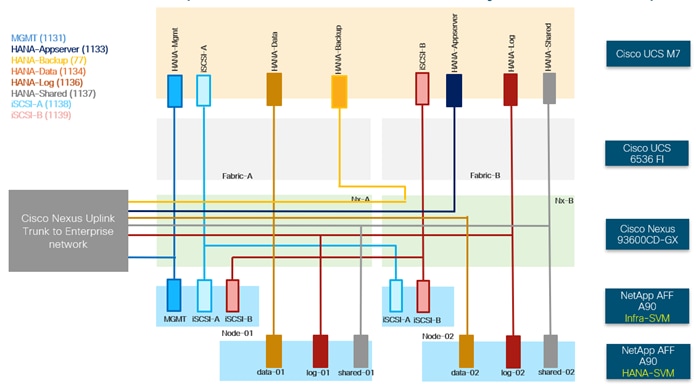
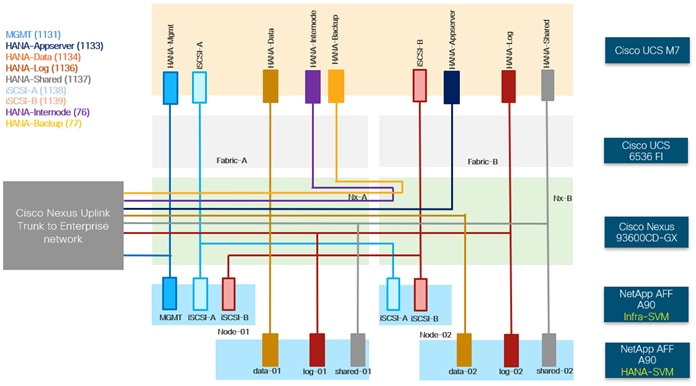
Each bare metal server profile supports:
● Managing the bare metal hosts using a common management segment.
● Diskless SAN boot using iSCSI with persistent operating system installation for true stateless computing.
● Multiple vNICs where:
◦ Two vNICs (iSCSi -A and iSCSi -B) are used by the iSCSI-vDS. The iSCSI VLANs are set as native on the corresponding vNICs. The MTU value for the vNICs and all interfaces on the vDS is set to Jumbo MTU (9000). The initial VMware ESXi setup utilizes two vSwitches, but the vNICs and VMkernel ports are migrated to the second vDS.
◦ Separate failover enabled vNICs for each of the HANA persistence filesystem networks – HANA-Data, HANA-Log and HANA-Shared and corresponding LIFs on each controller part of separate HANA SVM serving database mounts.
◦ Additional vNICs for the networks – SAP Application server network, SAP HANA node backup network, Node-to-Node communication network [only in case of multi-host systems] and any optional networks depending on the customer use-case.
● Each bare metal host (compute node) mounts HANA data, log, and shared filesystems from NetApp AFF A90 controllers using NFS.
Note: The only difference between the single-node and multi-host design is an additional vNIC for HANA-Internode network for the latter.
Logical Topology for FC-based Storage Access
Figure 25 and 26 illustrate the end-to-end connectivity design for FC-based storage access in case of bare metal deployments of single-node and multi-host systems, respectively.
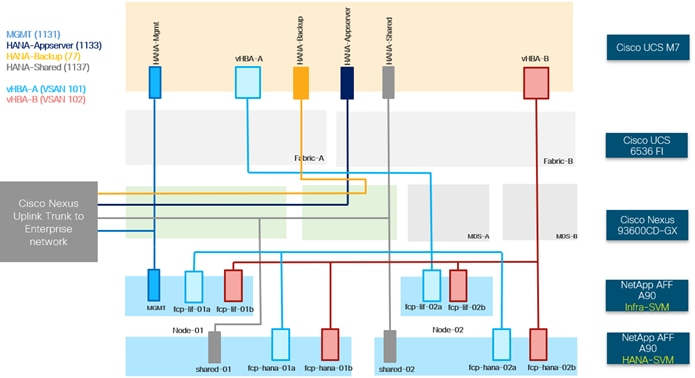
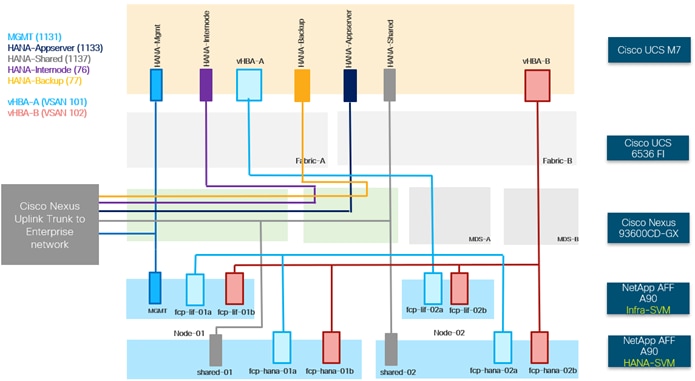
Each bare metal server profile supports:
● Managing the bare metal hosts using a common management segment.
● Diskless SAN boot using FC with persistent operating system installation for true stateless computing.
● Multiple vNICs where:
◦ vNIC for HANA persistence filesystem network – HANA-Shared and corresponding LIFs on each controller part of separate HANA SVM serving database mounts.
◦ Additional vNICs for the networks – SAP Application server network, SAP HANA Node backup network, Node-to-Node communication network (only in case of multi-host systems) and any optional networks depending on the customer use-case.
● One vHBA for FC defined on Fabric A to provide access to SAN-A path.
● One vHBA for FC defined on Fabric B to provide access to SAN-B path.
● Each bare metal host (compute node) mounts HANA data and log LUNs from the NetApp AFF A90 controllers using FC and HANA shared filesystem via NFS.
Note: Separate zones on the MDS switches, one each for Infra and HANA SVM and corresponding igroups serve, the boot and HANA specific LUNs to the HANA nodes.
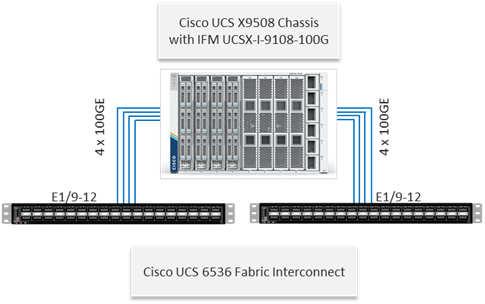
The Cisco UCS X9508 Chassis is equipped with the Cisco UCS 9108-100G IFMs. The Cisco UCS X9508 Chassis connects to each Cisco UCS 6536 FI using four 100GE ports, as shown in Figure 27. If you require more bandwidth, all eight ports on the IFMs can be connected to each FI.
Cisco Nexus Ethernet Connectivity
The Cisco Nexus 93600CD-GX device configuration explains the core networking requirements for Layer 2 and Layer 3 communication. Some of the key NX-OS features implemented within the design are:
● Feature interface-vlan—Allows for VLAN IP interfaces to be configured within the switch as gateways.
● Feature LACP—Allows for the utilization of Link Aggregation Control Protocol (802.3ad) by the port channels configured on the switch.
● Feature VPC—Virtual Port-Channel (vPC) presents the two Nexus switches as a single “logical” port channel to the connecting upstream or downstream device.
● Feature LLDP—Link Layer Discovery Protocol (LLDP), a vendor-neutral device discovery protocol, allows the discovery of both Cisco devices and devices from other sources.
● Feature NX-API—NX-API improves the accessibility of CLI by making it available outside of the switch by using HTTP/HTTPS. This feature helps with configuring the Cisco Nexus switch remotely using the automation framework.
● Feature UDLD—Enables unidirectional link detection for various interfaces.
Cisco UCS Fabric Interconnect 6536 Ethernet Connectivity
Cisco UCS 6536 FIs are connected with port channels to Cisco Nexus 93600CD-GX switches using 100GE connections configured as virtual port channels. Each FI is connected to both Cisco Nexus switches using a 100G connection, additional links can easily be added to the port channel to increase the bandwidth as needed. Figure 28 illustrates the physical connectivity details.
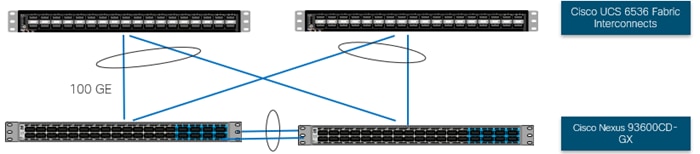
NetApp AFF A90 Ethernet Connectivity
NetApp AFF A90 controllers are connected with port channels (NetApp Interface Groups) to Cisco Nexus 93600CD-GX switches using 100GE connections configured as virtual port channels. The storage controllers are deployed in a switchless cluster interconnect configuration and are connected to each other using the 100GE ports e1a and e7a. Figure 29 illustrates the physical connectivity details.
In Figure 29, the two storage controllers in the high-availability pair are drawn separately for clarity. Physically, the two controllers exist within a single chassis.
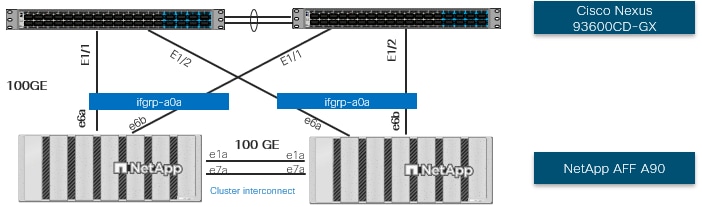
Cisco MDS SAN Connectivity – Fibre Channel Design Only
The Cisco MDS 9124V is the key design component bringing together the 32Gbps/64Gbps Fibre Channel (FC) capabilities to the FlexPod design. A redundant 64 Gbps Fibre Channel SAN configuration is deployed utilizing two Cisco MDS 9124V switches. Some of the key MDS features implemented within the design are:
● Feature NPIV—N port identifier virtualization (NPIV) provides a means to assign multiple FC IDs to a single N port.
● Feature fport-channel-trunk—F-port-channel-trunks allow for the fabric logins from the NPV switch to be virtualized over the port channel. This provides nondisruptive redundancy should individual member links fail.
● Enhanced Device Alias – a feature that allows device aliases (a name for a WWPN) to be used in zones instead of WWPNs, making zones more readable. Also, if a WWPN for a vHBA or NetApp FC LIF changes, the device alias can be changed, and this change will carry over into all zones that use the device alias instead of changing WWPNs in all zones.
● Smart-Zoning—a feature that reduces the number of TCAM entries and administrative overhead by identifying the initiators and targets in the environment.
Cisco UCS Fabric Interconnect 6536 SAN Connectivity
For SAN connectivity, each Cisco UCS 6536 Fabric Interconnect in FC end host or NPV mode is connected to a Cisco MDS 9124V SAN switch using at least one breakout on ports 33-36 to a 4 x 32G Fibre Channel port-channel connection, as shown in Figure 30.
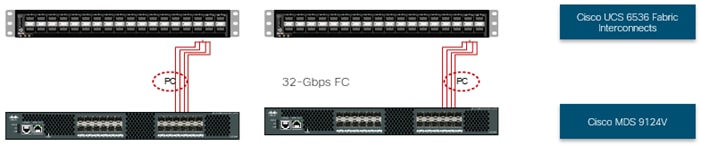
NetApp AFF A90 SAN Connectivity
For SAN connectivity, each NetApp AFF A90 controller is connected to both of Cisco MDS 9124V SAN switches using 64G Fibre Channel connections, as shown in Figure 31.
In Figure 31, the two storage controllers in the high-availability pair are drawn separately for clarity. Physically, the two controllers exist within a single chassis.
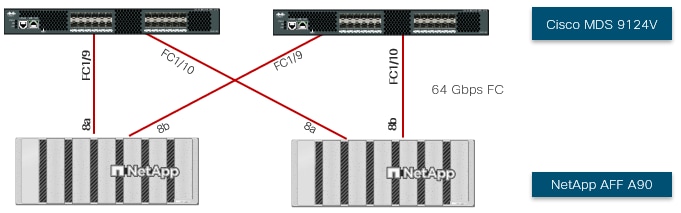
Cisco UCS X-Series Configuration – Cisco Intersight Managed Mode
Cisco Intersight Managed Mode standardizes policy and operation management for Cisco UCS X-Series and the remaining Cisco UCS hardware used in this CVD. The Cisco UCS compute nodes are configured using server profiles defined in Cisco Intersight. These server profiles derive all the server characteristics from various policies and templates. At a high level, configuring Cisco UCS using Intersight Managed Mode consists of the steps shown in Figure 32.

Set up Cisco UCS Fabric Interconnect for Cisco Intersight Managed Mode
During the initial configuration, for the management mode the configuration wizard enables you to choose whether to manage the fabric interconnect through Cisco UCS Manager or the Cisco Intersight platform. Cisco UCS FIs must be set up in Intersight Managed Mode (IMM) for configuring the Cisco UCS X-Series system and the Cisco UCS 6536 fabric interconnects. Figure 33 shows the dialog during initial configuration of Cisco UCS FIs for setting up IMM.
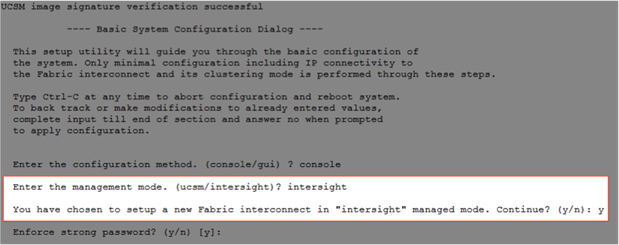
Claim a Cisco UCS Fabric Interconnect in the Cisco Intersight Platform
After setting up the Cisco UCS Fabric Interconnect for Cisco Intersight Managed Mode, FIs can be claimed to a new or an existing Cisco Intersight account. When a Cisco UCS fabric interconnect is successfully added to the Cisco Intersight platform, all future configuration steps are completed in the Cisco Intersight portal.
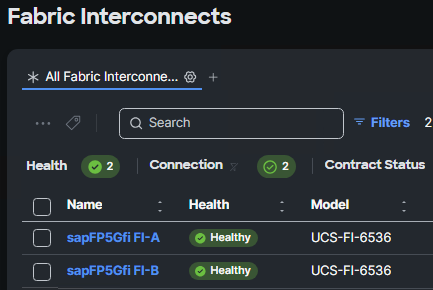
You can verify whether a Cisco UCS Fabric Interconnect is in Cisco UCS Manager managed mode or Cisco Intersight Managed Mode by clicking on the fabric interconnect name and looking at the detailed information screen for the FI, as shown in Figure 35.
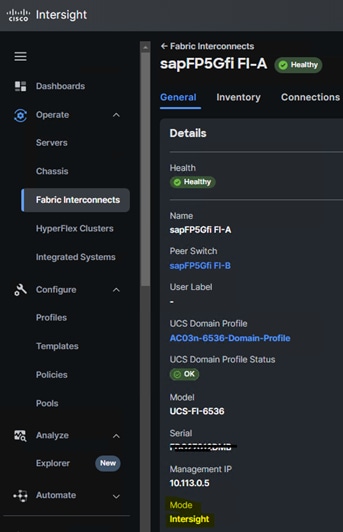
Cisco UCS Chassis Profile
A Cisco UCS Chassis profile configures and associates chassis policy to an IMM claimed chassis. The chassis-related policies can be attached to the profile either at the time of creation or later.
The chassis profile in a FlexPod is used to set the power and thermal policies for the chassis. By default, Cisco UCSX power supplies are configured in GRID mode, but the power policy can be utilized to set the power sup-plies in non-redundant or N+1/N+2 redundant modes. The default thermal policy configures the chassis fans in the Balanced mode. Optional settings for the thermal policy are Low Power, High Power, Maximum Power, and Acoustic. The Cisco UCS Chassis profile is being configured in this CVD with the default power and thermal policies to give you a starting point for optimizing chassis power usage.
Cisco UCS Domain Profile
A Cisco UCS domain profile configures a fabric interconnect pair through reusable policies, allows configuration of the ports and port channels, and configures the VLANs and VSANs to be used in the network. It defines the characteristics of and configures the ports on the fabric interconnects. One Cisco UCS domain profile can be as-signed to one fabric interconnect domain, and the Cisco Intersight platform supports the attachment of one port policy per Cisco UCS fabric interconnect.
Some of the characteristics of the Cisco UCS domain profile in the FlexPod environment are:
● A single domain profile is created for the pair of Cisco UCS fabric interconnects.
● Unique port policies are defined for each of the two fabric interconnects.
● The VLAN configuration policy is common to the fabric interconnect pair because both fabric interconnects are configured for the same set of VLANs.
● The VSAN configuration policies (FC connectivity option) are unique for the two fabric interconnects because the VSANs are unique.
● The Network Time Protocol (NTP), network connectivity, Link Control (UDLD), SNMP, and system Quali-ty-of-Service (QoS) policies are common to the fabric interconnect pair.
After the Cisco UCS domain profile has been successfully created and deployed, the policies including the port policies are pushed to the Cisco UCS fabric interconnects. The Cisco UCS domain profile can easily be cloned to install additional Cisco UCS systems. When cloning the Cisco UCS domain profile, the new Cisco UCS do-mains utilize the existing policies for consistent deployment of additional Cisco UCS systems at scale.
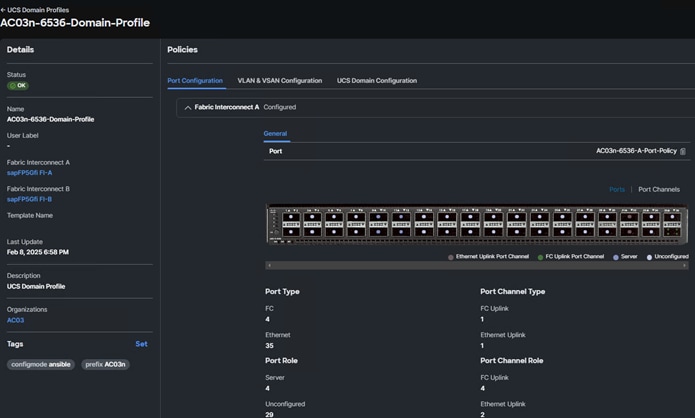
In the Cisco UCS X9508 Chassis, the Cisco UCS X210c M7 / X410c M7 Compute Nodes are automatically discovered when the ports are successfully configured using the domain profile as shown in Figure 36.
Server Profile Template
A server profile template enables resource management by simplifying policy alignment and server configuration. A server profile template is created using the server profile template wizard. The server profile template wizard groups the server policies into the following four categories to provide a quick summary view of the policies that are attached to a profile:
● Compute policies: BIOS, boot order, power, and UUID pool.
● Network policies: adapter configuration, LAN connectivity, and SAN connectivity policies.
◦ The LAN connectivity policy requires you to create the Ethernet network policy, Ethernet adapter policy, and Ethernet QoS policy.
◦ The SAN connectivity policy requires you to create the Fibre Channel (FC) network policy, Fibre Channel adapter policy, Fibre Channel QoS policy, and optional FC zoning policy used with direct attached storage. The SAN connectivity policy is only required for the FC connectivity option.
● Storage policies: not used in FlexPod.
● Management policies: Integrated Management Controller (IMC) Access, Intelligent Platform Management Inter-face (IPMI) over LAN, local user, Serial over LAN (SOL), Simple Network Management Protocol (SNMP), syslog, and virtual Keyboard, Video, and Mouse (KVM) policies.
Some of the characteristics of the server profile template for FlexPod are as follows:
● The BIOS policy is created to specify various server parameters in accordance with FlexPod best practices and Cisco UCS Performance Tuning Guides.
● The Boot order policy defines virtual media (KVM mapped DVD), all SAN paths for NetApp iSCSI or Fibre Channel logical interfaces (LIFs), and a CIMC mapped DVD for OS installation.
● The IMC access policy defines the management IP address pool for KVM access.
● The Local user policy is used to enable KVM-based user access.
● For the iSCSI boot from SAN configuration, the LAN connectivity policy is used to create six virtual network inter-face cards (vNICs); two for the management virtual switch (vSwitch0), two for the application Virtual Distributed Switch (vDS), and two for the iSCSI-vDS. Various policies and pools are also created for the vNIC configuration.
● For the FC boot from SAN configuration, the LAN connectivity policy is used to create four virtual network inter-face cards (vNICs); two for the management virtual switch (vSwitch0) and two for the application Virtual Distributed Switch (vDS); along with various policies and pools.
● For the FC boot and connectivity option, the SAN connectivity policy is used to create two virtual host bus adapters (vHBAs); one each for SAN A and for SAN B; along with various policies and pools. The SAN connectivity policy is not required for iSCSI boot setup.
Figure 37 shows various policies associated with a server profile template.
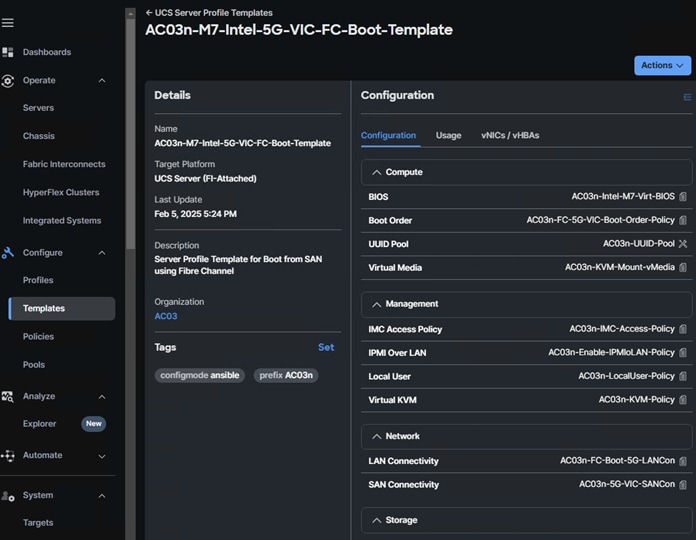
Derive and Deploy Server Profiles from the Cisco Intersight Server Profile Template
The Cisco Intersight server profile allows server configurations to be deployed directly on the compute nodes based on polices defined in the server profile template. After a server profile template has been successfully created, server profiles can be derived from the template and associated with the Cisco UCS Compute Nodes.
Cisco UCS Ethernet Adapter Policies
One point of optimization with Cisco UCS in FlexPod is use of Cisco UCS Ethernet Adapter policies to optimize network traffic into multiple receive (RX) queues to maximize the use of multiple CPU cores in servicing these queues resulting in higher network throughput on up to 100Gbps interfaces. IMM (and UCSM) adapter policies allow the number of transmit (TX) and RX queues and the queue ring size (buffer size) to be adjusted, and features such as Receive Side Scaling (RSS) to be enabled. RSS allows multiple RX queues to each be assigned to a different CPU core, allowing parallel processing of incoming Ethernet traffic. VMware ESXi 8.0 supports RSS, a single TX queue, and up to 16 RX queues. This CVD utilizes the fifth-generation Cisco UCS VICs which support a ring size up to 16K (16,384). Increasing the ring size can result in increased latency, but with the higher speed 100Gbps interfaces used in this CVD, the data moves through the buffers in less time, minimizing the latency in-crease. In this CVD, up to two Ethernet Adapter policies are defined:
| Policy Name |
TX Queues |
TX Ring Size |
RX Queues |
RX Ring Size |
RSS |
| VMware-Default |
1 |
256 |
1 |
512 |
Disabled |
| VMware-5G-16RXQs |
1 |
16384 |
16 |
16384 |
Enabled |
Figure 38 shows part of the VMware-5G-16RXQs Ethernet Adapter policy in Cisco Intersight. Notice that not only the fields in the above table have been modified, but also Completion Queue Count (TX Queues + RX Queues) and Interrupts (Completion Queue Count + 2) have also been modified. For more information on configuring Ethernet Adapter polices, go to: https://www.cisco.com/c/en/us/products/collateral/interfaces-modules/unified-computing-system-adapters/ucs-vic-15000-series-ether-fabric-wp.html.
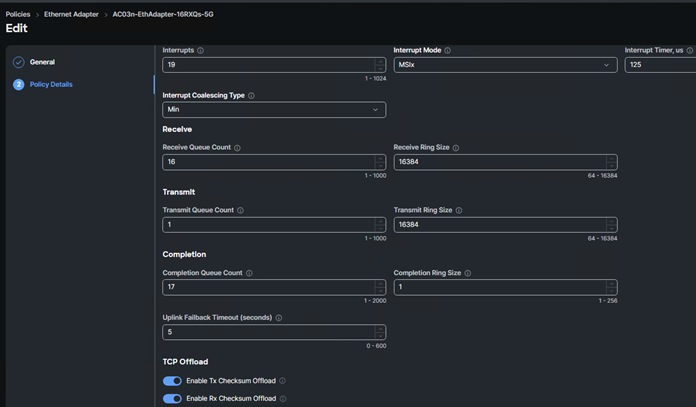
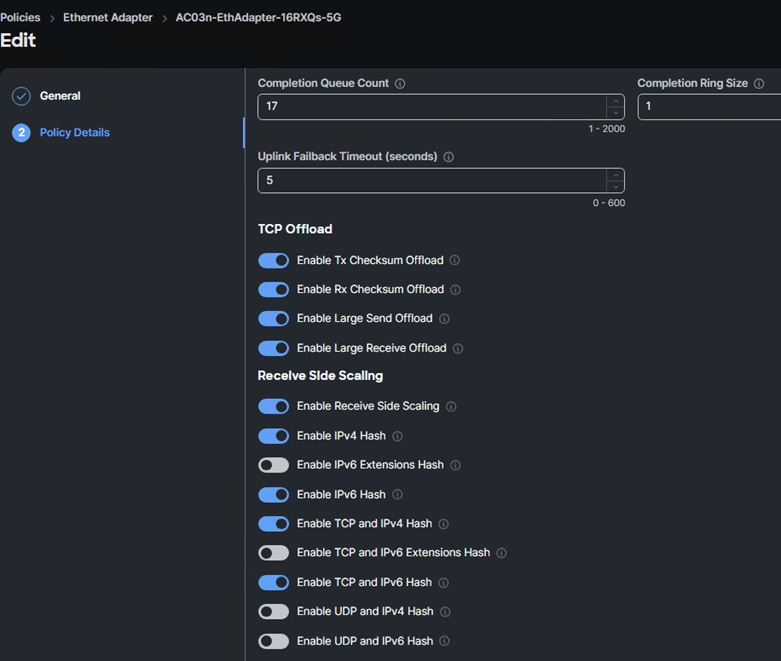
Cisco UCS Fibre Channel Adapter Policy for FC
Another point of optimization with Cisco UCS in FlexPod is the use of a Cisco UCS Fibre Channel Adapter policy optimized for FC. This policy utilizes 16 SCSI I/O queues (the standard VMware Fibre Channel Adapter Policy for FC uses one SCSI I/O queue) to provide a similar optimization of multiple CPU cores servicing multiple queues that you can get with the Ethernet Adapter Policies.
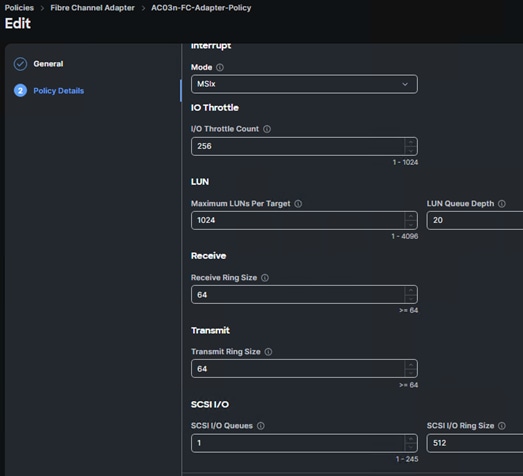
Cisco Intersight-Managed Operating System (OS) Installation
Cisco Intersight enables you to install vMedia-based operating systems managed servers in a data center. With this capability, you can perform an unattended OS installation on one or more Cisco Intersight Managed Mode (IMM) servers from your centralized data center through a simple process. Intersight-Managed OS installation is now supported with iSCSI or FC SAN Boot for all Cisco UCS M7 servers and for VMware ESXi 8.0, including using the Cisco Custom ISO for VMware ESXi 8.0. The end result of this install is a SAN-booted server with an assigned IP address on VMware VMkernel port 0 (vmk0). This feature requires the Intersight Advantage license and is used in the deployment guides.
NetApp AFF – Storage Virtual Machine (SVM) Design
To provide the necessary data segregation and management, a dedicated SVM (Infra-SVM) is created for host-ing the VMware environment. The SVM contains the following volumes and logical interfaces (LIFs):
● Volumes
◦ ESXi boot volume (esxi_boot) that consists of ESXi boot LUNs, used to enable ESXi host boot using iSCSI or FC boot from SAN. The boot LUNs are 128GB in size and thin provisioned as per VMware recommendation.
◦ Infrastructure datastores used by the vSphere environment to store the VMs and swap files. Separate datastores to be configured for NFS volume.
◦ Datastore used by the vSphere environment to host vSphere Cluster Services (vCLS) VMs. By default, the datastore placement logic chooses an available datastore hence it is recommended to create a dedicated datastore for vCLS VMs.
Note: It is a NetApp best practice to create Load sharing mirror for each SVM root volume that serves NAS data in the cluster. For more information on LSM, go to: https://docs.netapp.com/us-en/ontap/data-protection/manage-snapmirror-root-volume-replication-concept.html
● Logical interfaces (LIFs)
◦ NFS LIFs to mount NFS datastores in the vSphere environment.
◦ iSCSI A/B LIFs or FC LIFs to connect to ESXi boot LUNs and for application data access via FC Protocol.
◦ Each LIF belongs to specific VLANs or VSANs assigned for that traffic, as described earlier in this document. For IP based LIFs, IP addresses are assigned from subnets assigned to the respective VLAN. The IP based LIFs configured for SAN storage (iSCSI) require 2 IP addresses per controller to allow all 4 paths between the end host and storage. LIFs configured for NFS requires one IP address per controller.
A visual representation of volumes and logical interfaces (LIFs) are shown in Figure 40 and Figure 41, for iSCSI and FC boot.
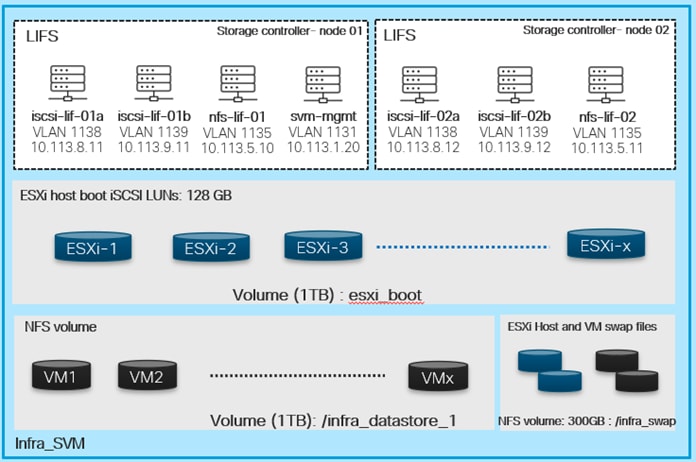
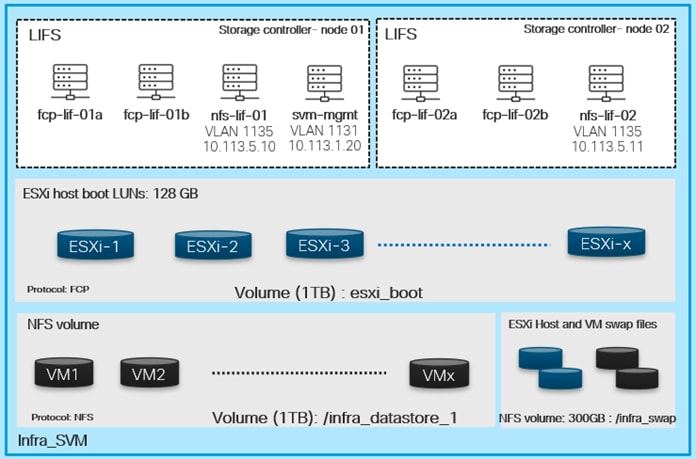
A dedicated SVM (HANA-SVM) is created for hosting the SAP HANA database filesystem volumes. The SVM contains the following volumes and logical interfaces (LIFs):
● Volumes
Datastore used by the SAP HANA Database to host data, log, and shared filesystems for each instance.
Note: It is a NetApp best practice that irrespective of whether the ESXi nodes boot using FC or iSCSI, with virtualized SAP HANA system, NFS v3/4.1 filesystems for SAP HANA Data, Log, and Shared are direct mounted inside the VM host. See https://docs.netapp.com/us-en/netapp-solutions-sap/bp/saphana_aff_fc_introduction.html#sap-hana-tailored-data-center-integration
● Logical interfaces (LIFs)
NFS LIFs to mount NFS datastores in the vSphere environment.
Each LIF belongs to specific VLANs or VSANs assigned for that traffic, as described earlier in this document. For IP based LIFs, IP addresses are assigned from subnets assigned to the respective VLAN. LIFs configured for NFS requires one IP address per controller. So, one LIF each for SAP HANA data, log, and shared networks is created per controller and it serves the filesystem mount via respective assigned subnet. Please note even in the FC Booting ESXi environment, the HANA VMs are carved out on NFS datastores and persistence is served via NFS to the HANA VM hosts. Hence, no FC LIFs are created as part of HANA SVM.
A visual representation of volumes and logical interfaces (LIFs) is shown in Figure 42 for both iSCSI and FC boot environments corresponding to HANA-SVM.
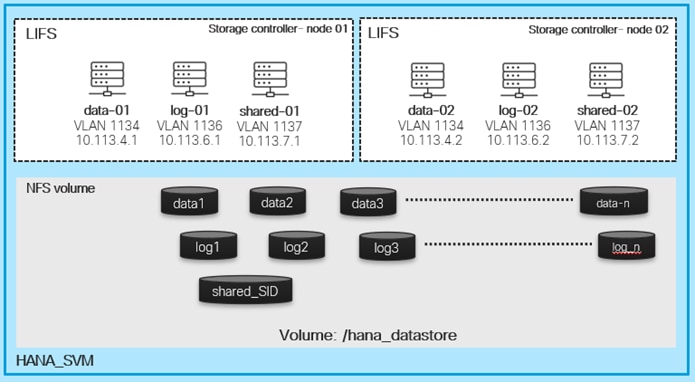
Multiple vNICs (and vHBAs) are created for the ESXi hosts using the Cisco Intersight server profile and are then assigned to specific virtual and distributed switches. The vNIC and (optional) vHBA distribution for the ESXi hosts is as follows:
● Two vNICs (one on each fabric) for vSwitch0 to support core services such as management and infrastructure NFS traffic. The standard VMware-Default Cisco UCS Ethernet adapter policy is assigned to these vNICs.
● Two vNICs (one on each fabric) for a vSphere Virtual Distributed Switch (vDS0) to support your tenant data traffic and vMotion traffic. In this vDS, vMotion is pinned to Cisco UCS Fabric B so that vMotion is switched in the B-side fabric interconnect. A maximum performance VMware-5G-16RXQs. Cisco UCS Ethernet adapter policy utilizing receive side scaling (RSS) is assigned to these vNICs. If higher performance for infrastructure NFS is desired, the NFS VMkernel ports can be migrated to this vDS, provided the infrastructure NFS VLAN is configured in the Ethernet network group policy for the vNICs on this vDS.
● Two vNICs (one on each fabric) for the iSCSI vSphere Virtual Distributed Switch (iSCSI-vDS0) to support iSCSI traffic (including boot). In this vDS, both the iSCSI ports are pinned to the appropriate fabric. A maximum performance VMware-5G-16RXQs Cisco UCS Ethernet adapter policy, utilizing receive side scaling (RSS) and maxi-mum buffer size is assigned to these vNICs.
Note: You will either have iSCSI vNICs or the FC vHBAs configured for stateless boot from SAN of the ESXi servers.
Figure 43 and Figure 44 show the ESXi vNIC configurations in detail.
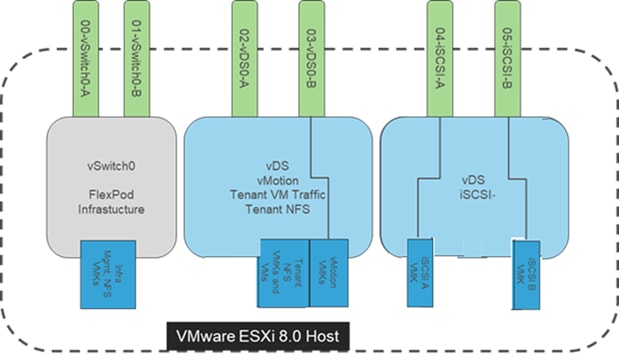
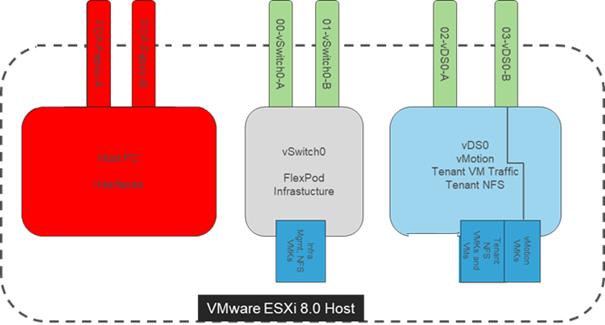
Some of the key design considerations for the FlexPod Datacenter with Cisco UCS X-Series M7 servers are explained in this section.
Management Design Considerations
Out-of-band Management Network
The management interface of every physical device in FlexPod is connected to a dedicated out-of-band management switch which can be part of the existing management infrastructure in your environment. The out-of-band management network provides management access to all the devices in the FlexPod environment for initial and on-going configuration changes. The routing and switching configuration for this network is independent of FlexPod deployment and therefore changes in FlexPod configurations do not impact management access to the devices. In this CVD, the out-of-band management network is connected to the Cisco Nexus uplinks to allow Cisco UCS CIMC connectivity and to provide the out-of-band management network to management virtual machines when necessary.
In-band Management Network
The in-band management VLAN configuration is part of FlexPod design. The in-band VLAN is configured on Cisco Nexus switches and Cisco UCS within the FlexPod solution to provide management connectivity for vCenter, ESXi and other management components. The changes to FlexPod configuration can impact the in-band management network and misconfigurations can cause loss of access to the management components hosted by FlexPod. It is also required that the out-of-band management network have Layer 3 access to the in-band management network so that management virtual machines with only in-band management interfaces can manage FlexPod hardware devices.
vCenter Deployment Consideration
While hosting the vCenter on the same ESXi hosts that the vCenter is managing is supported, it is a best practice to deploy the vCenter on a separate management infrastructure. Similarly, the ESXi hosts in this new FlexPod with end-to-end 100Gbps Ethernet environment can also be added to an existing vCenter. The in-band management VLAN will provide connectivity between the vCenter and the ESXi hosts deployed in the new FlexPod environment. In this CVD deployment guide, the steps for installing vCenter on FlexPod environment are included, but the vCenter can also be installed in another environment with L3 reachability to the ESXi hosts in the FlexPod.
Jumbo Frames
An MTU of 9216 is configured at all network levels to allow jumbo frames as needed by the guest OS and application layer. This allows the network at every point to negotiate an MTU up to 9000 with the end point. For VLANs that leave the FlexPod via the Nexus switch uplinks (OOB-MGMT, IB-MGMT, VM-Traffic), all endpoints should have MTU 1500. For Storage and vMotion VLANs that stay within the FlexPod, MTU 9000 should be used on all endpoints for higher performance. It is important that all endpoints within a VLAN have the same MTU setting. It is important to remember that most virtual machine network interfaces have MTU 1500 set by default and that it may be difficult to change this setting to 9000, especially on a large number of virtual machines.
NTP
For many reasons, including authentication and log correlation, it is critical within a FlexPod environment that all components are properly synchronized to a time-of-day clock. In order to support this synchronization, all components of FlexPod support network time protocol (NTP). In the FlexPod setup, the two Cisco Nexus switches are synchronized via NTP to at least two external NTP sources. Cisco Nexus NTP distribution is then set up and all the other components of the FlexPod can use the IP of any of the switches’ L3 interfaces, including mgmt0 as an NTP source. If you already have NTP distribution in place, that can be used instead of the Cisco Nexus switch NTP distribution.
Boot From SAN
When utilizing Cisco UCS Server technology with shared storage, it is recommended to configure boot from SAN and store the boot partitions on remote storage. This enables architects and administrators to take full advantage of the stateless nature of Cisco UCS Server Profiles for hardware flexibility across the server hardware and overall portability of server identity. Boot from SAN also removes the need to populate local server storage thereby reducing cost and administrative overhead.
UEFI Secure Boot
This validation of FlexPod uses Unified Extensible Firmware Interface (UEFI) Secure Boot. UEFI is a specification that defines a software interface between an operating system and platform firmware. With UEFI secure boot enabled, all executables, such as boot loaders and adapter drivers, are authenticated as properly signed by the BIOS before they can be loaded. Additionally, a Trusted Platform Module (TPM) is also installed in the Cisco UCS compute nodes. VMware ESXi 8.0 supports UEFI Secure Boot and VMware vCenter 8.0 supports UEFI Secure Boot Attestation between the TPM module and ESXi, validating that UEFI Secure Boot has properly taken place.
Deployment Hardware and Software
This chapter contains the following:
● Hardware and Software Revisions
Hardware and Software Revisions
Table 4 lists the hardware and software versions used in this solution.
Table 4. Hardware and Software Revisions
| Component |
Software |
|
| Network |
Cisco Nexus 93600CD-GX |
10.3(6) |
| Cisco MDS 9124V |
9.4(2a) |
|
| Compute |
Cisco UCS Fabric Interconnect 6536 and Cisco UCS 9108-100G IFM |
4.3(4.240074) |
| Cisco UCS X210C M7 / X410c M7 |
5.2(2.240074) |
|
| VMware ESXi |
8.0.3, 2402251 |
|
| VMware vCenter Appliance |
8.0.3.00200 |
|
| Cisco Intersight Assist Virtual Appliance |
1.0.11-202 |
|
| VMware ESXi nfnic FC Driver |
5.0.0.45 |
|
| VMware ESXi nenic Ethernet Driver |
2.0.15.0 |
|
| SLES for SAP |
SP6 |
|
| RHEL for SAP HANA |
9.4 |
|
| Storage |
NetApp AFF A90 |
ONTAP 9.16.1 |
| NetApp ONTAP tools for VMware vSphere |
10.3 |
|
| NetApp Active IQ Unified Manager |
9.16 |
|
| NetApp SnapCenter Plug-in for VMware vSphere |
6.1 |
|
Validate
A high-level overview of the FlexPod design validation is provided in this section. This validation explains various aspects of the converged infrastructure including compute, virtualization, network, and storage. The test scenarios are divided into the following broad categories:
● Functional validation – physical and logical setup validation.
● Feature verification – feature verification within FlexPod design.
● Availability testing – link and device redundancy and high availability testing. Failure and recovery of storage access paths across AFF nodes, MDS and Nexus switches, and fabric interconnects.
● SAP HANA installation and validation – verify key performance indicator (KPI) metrics with the SAP HANA hardware and cloud measurement tool (HCMT) both for single node and multi-host configurations.
● Infrastructure as a code validation – verify automation and orchestration of solution components wherever possible.
The goal of solution validation is to test functional aspects of the design as well as that KPI metrics per SAP prescribed HCMT tests are met. Some of the examples of the types of tests executed include:
● Verification of features configured on various FlexPod components
● Powering off and rebooting redundant devices and removing redundant links to verify high availability
● Failure and recovery of vCenter and ESXi hosts in a cluster
● Failure and recovery of storage access paths across NetApp controllers, MDS and Nexus switches, and fabric interconnects
● Server Profile migration between compute nodes
● HCMT tests for I/O and latency for SAP HANA scale-up and scale-out systems both in the bare-metal as well as virtualized configurations
● Additionally, SAP HANA High Availability and Failover tests in case of multiple-host SAP HANA systems which test the continuous operation without interruption in case of network/storage hardware outages
● Tests for successful failover of SAP HANA services when one of the worker nodes fails or in split brain situations.
As part of the validation effort, the solution validation team identifies the problems, works with the appropriate development teams to fix the problem, and provides work arounds, as necessary.
Conclusion
The FlexPod Datacenter solution is a validated approach for deploying Cisco and NetApp technologies and products for building shared private and public cloud infrastructure. The best-in-class storage, server and networking components serve as the foundation for custom built solution for SAP HANA under Tailored Datacenter Integration delivery model.
With the introduction of Cisco X-Series modular platform to FlexPod Datacenter, customers can now manage and orchestrate the next-generation Cisco UCS platform from the cloud using Cisco Intersight. Some of the key advantages of integrating Cisco UCS X-Series and Cisco Intersight into the FlexPod infrastructure are:
● A single platform built from unified compute, fabric, and storage technologies, allowing you to scale to support variety of bare-metal or virtualized enterprise workloads like SAP HANA without architectural changes.
● Simpler and programmable infrastructure with IaC deployment capabilities.
● Centralized, simplified management of all infrastructure resources, including the NetApp AFF array and VMware vCenter by Cisco Intersight.
● Innovative cloud operations providing continuous feature delivery.
● Smart Zoning reduces the need to implement and maintain large zone databases and eases management and implementation tasks.
● Organizations can interact with a single vendor when troubleshooting problems across computing, storage, and networking environments.
● Future-ready design built for investment protection.
In addition to the Cisco UCS X-Series hardware and software innovations, integration of the Cisco Intersight cloud platform with VMware vCenter and NetApp Active IQ Unified Manager delivers monitoring, orchestration, and workload optimization capabilities for the different layers (including virtualization and storage) of the FlexPod infrastructure.
About the authors
Pramod Ramamurthy, Technical Marketing Engineer, Cloud and Compute Group, Cisco Systems GmbH.
Pramod has over eleven years of experience at Cisco Systems with Datacenter technologies and enterprise solution architectures. He has over ten years of SAP Basis experience from previous roles helping customers with their SAP landscapes design, build, management, and support. As a Technical Marketing Engineer with Computing Systems Product Group’s UCS and SAP solutions team, Pramod focuses on Converged Infrastructure Solutions design, validation and associated collaterals build for SAP and SAP HANA.
Kamini Singh, Technical Marketing Engineer, Hybrid Cloud Infra & OEM Solutions, NetApp, Inc.
Kamini Singh is a Technical Marketing engineer at NetApp. She has more than five years of experience in data center infrastructure solutions. She focuses on FlexPod hybrid cloud infrastructure solution design, implementation, validation, automation, and sales enablement. Kamini holds a bachelor’s degree in Electronics and Communication and a master’s degree in Communication Systems.
Acknowledgements
For their support and contribution to the design, validation, and creation of this Cisco Validated Design, the authors would like to thank:
● John George, Technical Marketing Engineer, Cisco Systems, Inc.
● Joerg Wolters, Technical Marketing Engineer, Cisco Systems, Inc.
● Bobby Oommen, Sr. Manager FlexPod Solutions, NetApp, Inc.
● Marco Schoen, Senior Technical Marketing Engineer, NetApp, Inc.
Appendix
This appendix contains the following:
● Compute
● Network
● Storage
Cisco Intersight: https://www.intersight.com
Cisco UCS X-Series Modular System: https://www.cisco.com/site/us/en/products/computing/servers-unified-computing-systems/ucs-x-series-modular-systems/index.html
Cisco Intersight Managed Mode: https://www.cisco.com/c/en/us/td/docs/unified_computing/Intersight/b_Intersight_Managed_Mode_Configuration_Guide.html
Cisco Unified Computing System: http://www.cisco.com/en/US/products/ps10265/index.html
Cisco UCS 6536 Fabric Interconnects: https://www.cisco.com/c/en/us/products/collateral/servers-unified-computing/ucs6536-fabric-interconnect-ds.html
Cisco Nexus 9000 Series Switches: http://www.cisco.com/c/en/us/products/switches/nexus-9000-series-switches/index.html
Cisco MDS 9124V Switches: https://www.cisco.com/c/en/us/products/collateral/storage-networking/mds-9100-series-multilayer-fabric-switches/mds-9124v-fibre-channel-switch-ds.html
NetApp ONTAP 9 Documentation: https://docs.netapp.com/ontap-9/index.jsp
NetApp AFF A-Series: https://www.netapp.com/data-storage/aff-a-series/
NetApp Active IQ Unified Manager: https://docs.netapp.com/us-en/active-iq-unified-manager/
NetApp ONTAP Storage Connector for Cisco Intersight: https://www.netapp.com/pdf.html?item=/media/25001-tr-4883.pdf
NetApp ONTAP tools for VMware vSphere: https://docs.netapp.com/us-en/ontap-tools-vmware-vsphere/index.html
NetApp ONTAP tools for VMware vSphere 10: https://docs.netapp.com/us-en/ontap-tools-vmware-vsphere-10/index.html
NetApp SnapCenter: https://docs.netapp.com/us-en/snapcenter/index.html
NetApp SAP solutions: https://docs.netapp.com/us-en/netapp-solutions-sap/index.html
VMware vCenter Server: http://www.vmware.com/products/vcenter-server/overview.html
VMware vSphere: https://www.vmware.com/products/vsphere
SAP HANA on VMware vSphere: https://wiki.scn.sap.com/wiki/plugins/servlet/mobile?contentId=449288968#content/view/449288968
Cisco UCS Hardware Compatibility Matrix: https://ucshcltool.cloudapps.cisco.com/public/
VMware and Cisco Unified Computing System: http://www.vmware.com/resources/compatibility
NetApp Interoperability Matrix Tool: http://support.netapp.com/matrix/
Interoperability Matrix for Cisco Nexus and MDS 9000 products: https://www.cisco.com/c/en/us/td/docs/switches/datacenter/mds9000/interoperability/matrix/intmatrx.html
SAP HANA supported server and storage systems: https://www.sap.com/dmc/exp/2014-09-02-hana-hardware/enEN/#/solutions?filters=ve:1;ve:13
Feedback
For comments and suggestions about this guide and related guides, join the discussion on Cisco Community here: https://cs.co/en-cvds.
CVD Program
"DESIGNS") IN THIS MANUAL ARE PRESENTED "AS IS," WITH ALL FAULTS. CISCO AND ITS SUPPLIERS DISCLAIM ALL WARRANTIES, INCLUDING, WITHOUT LIMITATION, THE WARRANTY OF MERCHANTABILITY, FITNESS FOR A PARTICULAR PURPOSE AND NONINFRINGEMENT OR ARISING FROM A COURSE OF DEALING, USAGE, OR TRADE PRACTICE. IN NO EVENT SHALL CISCO OR ITS SUPPLIERS BE LIABLE FOR ANY INDIRECT, SPECIAL, CONSEQUENTIAL, OR INCIDENTAL DAMAGES, INCLUDING, WITHOUT LIMITATION, LOST PROFITS OR LOSS OR DAMAGE TO DATA ARISING OUT OF THE USE OR INABILITY TO USE THE DESIGNS, EVEN IF CISCO OR ITS SUPPLIERS HAVE BEEN ADVISED OF THE POSSIBILITY OF SUCH DAMAGES.
THE DESIGNS ARE SUBJECT TO CHANGE WITHOUT NOTICE. USERS ARE SOLELY RESPONSIBLE FOR THEIR APPLICATION OF THE DESIGNS. THE DESIGNS DO NOT CONSTITUTE THE TECHNICAL OR OTHER PROFESSIONAL ADVICE OF CISCO, ITS SUPPLIERS OR PARTNERS. USERS SHOULD CONSULT THEIR OWN TECHNICAL ADVISORS BEFORE IMPLEMENTING THE DESIGNS. RESULTS MAY VARY DEPENDING ON FACTORS NOT TESTED BY CISCO.
CCDE, CCENT, Cisco Eos, Cisco Lumin, Cisco Nexus, Cisco StadiumVision, Cisco TelePresence, Cisco WebEx, the Cisco logo, DCE, and Welcome to the Human Network are trademarks; Changing the Way We Work, Live, Play, and Learn and Cisco Store are service marks; and Access Registrar, Aironet, AsyncOS, Bringing the Meeting To You, Catalyst, CCDA, CCDP, CCIE, CCIP, CCNA, CCNP, CCSP, CCVP, Cisco, the Cisco Certified Internetwork Expert logo, Cisco IOS, Cisco Press, Cisco Systems, Cisco Systems Capital, the Cisco Systems logo, Cisco Unified Computing System (Cisco UCS), Cisco UCS B-Series Blade Servers, Cisco UCS C-Series Rack Servers, Cisco UCS S-Series Storage Servers, Cisco UCS X-Series, Cisco UCS Manager, Cisco UCS Management Software, Cisco Unified Fabric, Cisco Application Centric Infrastructure, Cisco Nexus 9000 Series, Cisco Nexus 7000 Series. Cisco Prime Data Center Network Manager, Cisco NX-OS Software, Cisco MDS Series, Cisco Unity, Collaboration Without Limitation, EtherFast, EtherSwitch, Event Center, Fast Step, Follow Me Browsing, FormShare, GigaDrive, HomeLink, Internet Quotient, IOS, iPhone, iQuick Study, LightStream, Linksys, MediaTone, MeetingPlace, MeetingPlace Chime Sound, MGX, Networkers, Networking Academy, Network Registrar, PCNow, PIX, PowerPanels, ProConnect, ScriptShare, SenderBase, SMARTnet, Spectrum Expert, StackWise, The Fastest Way to Increase Your Internet Quotient, TransPath, WebEx, and the WebEx logo are registered trade-marks of Cisco Systems, Inc. and/or its affiliates in the United States and certain other countries. (LDW_UP5)
All other trademarks mentioned in this document or website are the property of their respective owners. The use of the word partner does not imply a partnership relationship between Cisco and any other company. (0809R)
