Overlay: Routed

Routed overlay network overview

In multilayer campus networks, the traditional IP addressing plan follows a VLAN-to-subnet approach on a per distribution block basis.

The networking requirements and use cases for business applications typically remain within a single Layer 2 or Layer 3 network. The unique IPv4 or IPv6 subnet from each distribution network can be IP-routed in the default routing space using traditional Interior Gateway Protocols (IGPs) or BGP protocols in the underlay network, or the subnet can be logically segmented and routed in the overlay VXLAN fabric network.

The BGP EVPN VXLAN fabric routed overlay is highly relevant when deploying Cisco Catalyst 9000 series switches in the leaf role at the campus distribution layer. The unified and structured IP addressing plan between the underlay and overlay networks provides a congruent design, deployment, and operational experience across the enterprise network.

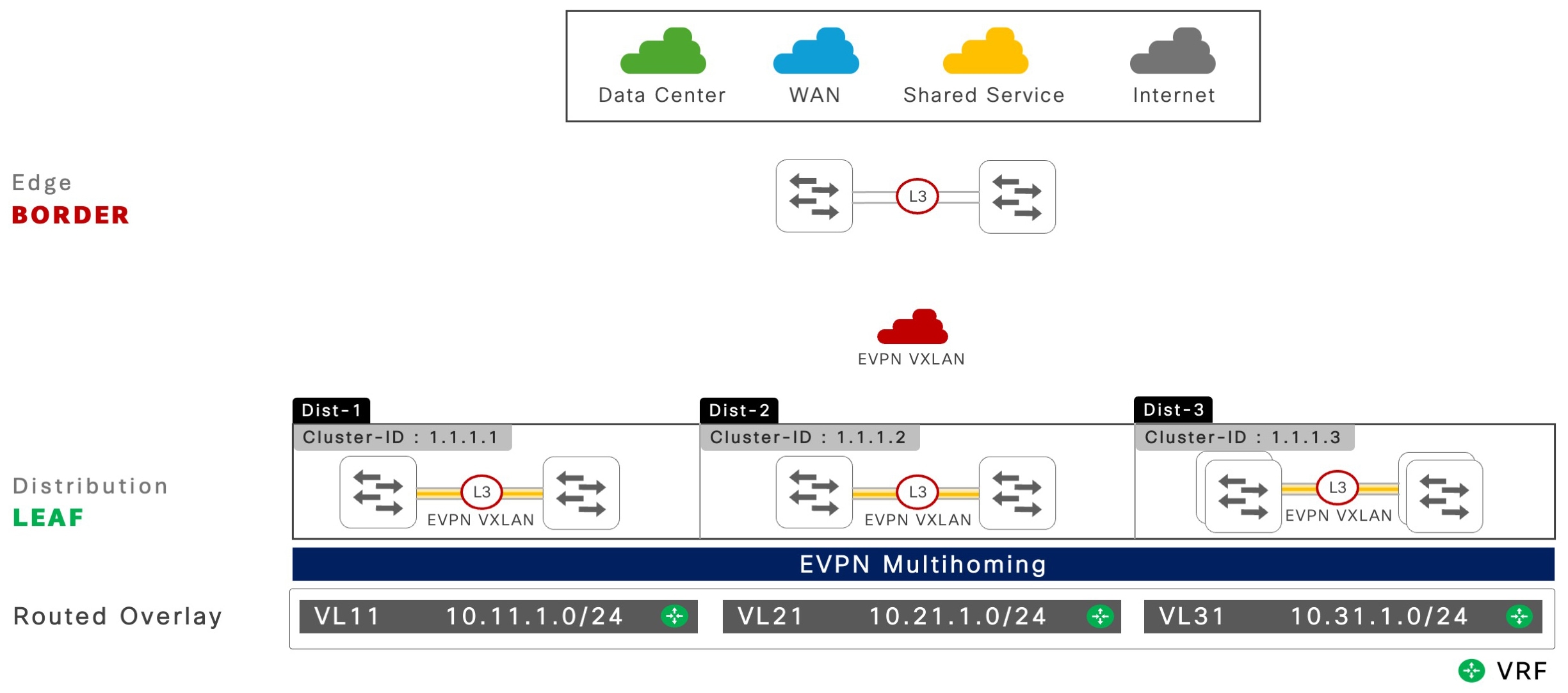
The following figure shows a reference EVPN multihoming network with a routed overlay deployment scenario.

Figure 1. EVPN multihoming with routed overlay fabric network

EVPN multihoming with routed overlay fabric network

Understanding routed overlay networks

The fundamentals of Layer 2 and Layer 3 networking with routed overlay in BGP EVPN VXLAN-based fabric networks remain unchanged from the traditional campus network deployment models. This section provides the key functional and operational components for building scalable BGP EVPN VXLAN fabric networks with EVPN multihoming.

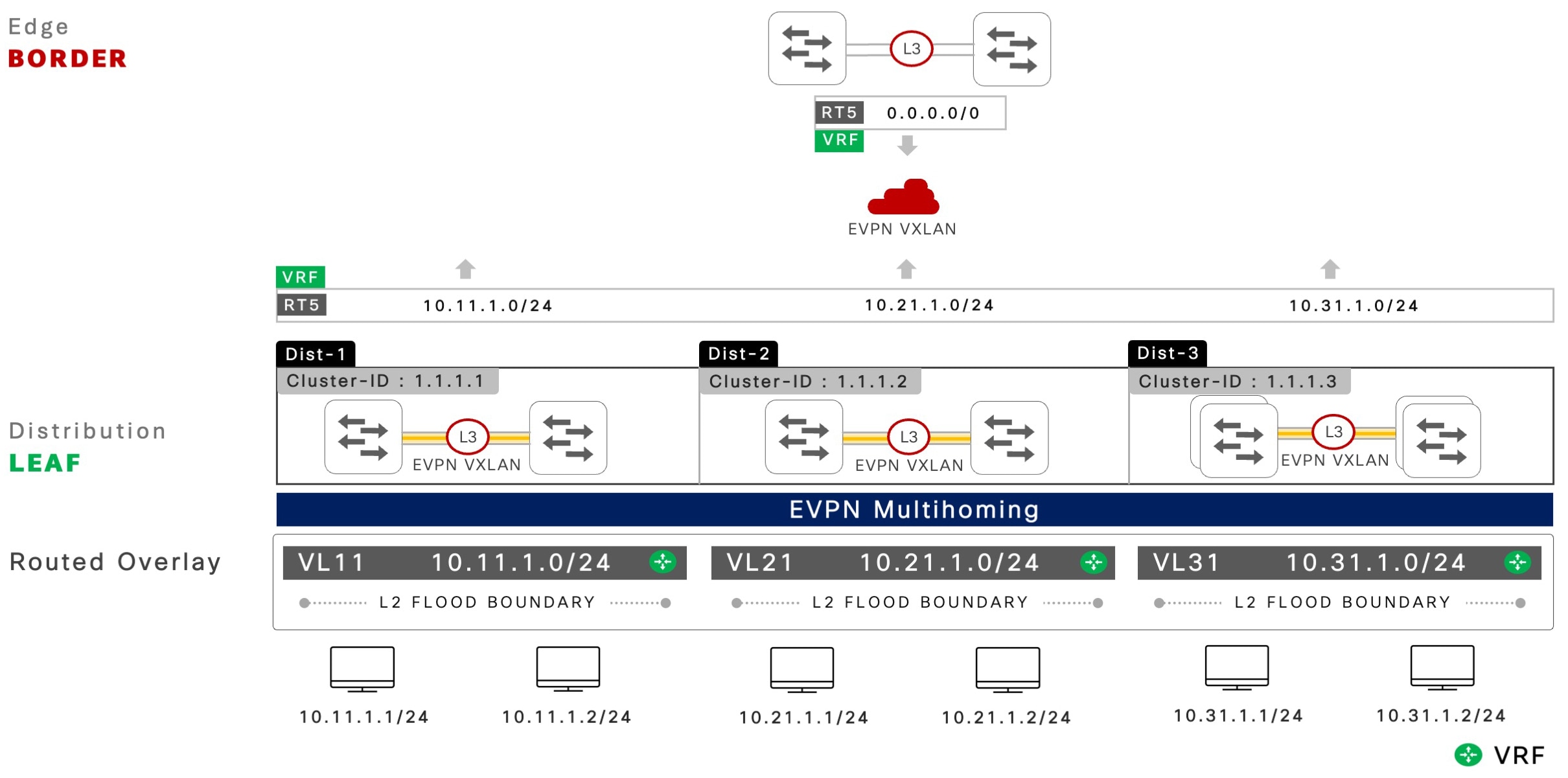
The following figure shows the characteristics of an EVPN multihoming network with routed overlay fabric.

Figure 2. Key fabric network characteristics of a routed overlay network

Key fabric network characteristics of a routed overlay network

Hierarchical BGP control plane

In large-scale campus networks, the recommended deployment approach for controlled route management between EVPN multihoming peers and spines is a two-tier hierarchical BGP control plane. This design enables each BGP peering layer to manage domain-specific EVPN routes to support downstream non-blocking and all-active Layer 2 multipath network, and manage the advertisement of fabric network prefixes to enable secure global network access connectivity.

For more information, refer to the Hierarchical BGP Sessions chapter.

EVPN multihoming

The Layer 2 network with EVPN multihoming operation functions independently from the EVPN fabric core network. The pair of Cisco Catalyst 9000 series switches at each distribution layer form and manage EVPN multihoming within their respective redundancy group. These switches use a unified Layer 2 Ethernet Segment (ES) EtherChannel connection to downstream network devices. The EtherChannel connection can carry VLANs that are either mapped to routed overlay and advertised within the fabric core or continue to operate within the traditional underlay IP network.

Layer 2 broadcast network boundary

The EVPN fabric routed overlay networks provide a unified Layer 2 or Layer 3 network boundary similar to the traditional underlay campus networks. The Layer 2 bridge-domain and blast radius are contained between the Layer 2 access layer and directly attached EVPN multihoming-enabled distribution layer systems.

The pair of Cisco Catalyst 9000 series switches in the distribution layer network dynamically builds a Layer 2 VXLAN tunnel using ingress replication mode to extend Broadcast, Unknown Unicast and Multicast (BUM) traffic. With inbuilt loop detection and fast convergence techniques, the EVPN multihoming-enabled networks support secure and scalable Layer 2 networks over traditional STP-based networks.

Structured IP subnet and gateway redundancy

The Distributed Anycast Gateway (DAG) routed overlay networks follow the standard enterprise campus design principles with a VLAN or subnet per distribution block. Network administrators can define a structured IPv4 or IPv6 addressing plan to build scalable overlay networks.

A pair of Cisco Catalyst 9000 series switches operating in EVPN multihoming mode provides IP gateway redundancy by implementing a built-in gateway function for both IPv4 or IPv6 in each distribution block.

Spine-route policy

In large scale EVPN multihoming enabled fabric networks, controlled route management is enforced through route policies on leaf switches that are attached to spine switches. The iBGP or eBGP prefix advertisement to spine switches in the fabric core limits the advertising of IPv4 or IPv6 network prefixes, specifically EVPN route type 5 prefixes, while retaining unfiltered routing with iBGP peering sessions between leaf switches and remote ES switches. This design supports a non-blocking Layer 2 multipath EtherChannel that ensures scalability and efficient route distribution.


Note


EVPN multihoming-enabled networks support additional overlay network types to stretch the IP subnets or Layer 2 flood-domains beyond a single distribution block by using the DAG technology. Routed overlay networks are recommended for better scale, performance, and resiliency.


Configure routed overlay networks

This section lists the tasks to configure a routed overlay network.

Prerequisites to configure routed overlay networks

A reliable underlay IP network and a Layer 2 EVPN multihoming network are prerequisites for configuring a BGP EVPN VXLAN-enabled fabric core network.

For configuration guidelines for underlay and Layer 2 multihoming, refer to

Configure IP VRFs

Perform this task to configure a logically segmented virtual network with an IP VRF to exchange IPv4 or IPv6 network prefixes across all the VTEPs in the fabric core network.

Procedure

  Command or Action Purpose

Step 1

enable

Example:

Device> enable

Enables privileged EXEC mode.

  • Enter your password if prompted.

Step 2

configure terminal

Example:

Device# configure terminal

Enters global configuration mode.

Step 3

vrf definition vrf-name

Example:

Device(config)# vrf definition green

Configures a new Virtual Routing and Forwarding (VRF) instance and enters VRF configuration mode.

Step 4

rd route distinguisher

Example:

Device(config-vrf)# rd 10.200.255.101:101

Configures a route distinguisher with distinct values across all fabric devices.

Step 5

address-family ipv4 [multicast | unicast]

Example:

Device(config-vrf)# address-family ipv4 unicast

Enters IPv4 unicast address-family configuration mode.

Step 6

route-target [both | export | import] route-target-ext-community

Example:

Device(config-vrf-af)# route-target 65101:101

Configures overlay IPv4 routing import or export policies that match extended community values.

  • The default both keyword will auto-generate the import and export command-line with the configured community value.

Step 7

route-target [both | export | import] route-target-ext-community stitching

Example:

Device(config-vrf-af)# route-target 65101:101 stitching

Configures overlay IPv4 routing import or export policies that match the extended community values to enable extended Network Layer Reachability Information (NLRI) types for BGP EVPN VXLAN enabled networks. The default value is both .

Step 8

exit

Example:

Device(config-vrf-af)# exit

Exits IPv4 unicast address-family configuration mode and returns to VRF configuration mode.

Step 9

address-family ipv6 [multicast | unicast]

Example:

Device(config-vrf)# address-family ipv6 unicast

Enters IPv6 unicast address-family configuration mode.

Step 10

route-target [both | export | import] route-target-ext-community

Example:

Device(config-vrf-af)# route-target 65101:101

Configures overlay IPv6 routing import and export policies that match the extended community value.

  • The default both keyword will auto-generate the import and export command-line with the configured community value.

Step 11

route-target [both | export | import] route-target-ext-community stitching

Example:

Device(config-vrf-af)# route-target 65101:101 stitching

Configures the overlay IPv6 routing import and export policies that match the extended community values to enable extended NLRI types for BGP EVPN VXLAN enabled networks. The default value is both .

Step 12

end

Example:

Device(config-vrf-af)# end

Exits IPv6 unicast address-family configuration mode and returns to privileged EXEC mode.

Configure core VLAN and SVI interfaces

Perform this task to configure core VLAN and SVI interfaces for each IP VRF to enable VXLAN encapsulation and decapsulation functions between downstream non-VXLAN network and remote VXLAN-enabled VTEPs.


Note


Configure a Network Virtualization Endpoint (NVE) interface and bind the L3VNI ID to a logical interface.


Procedure

  Command or Action Purpose

Step 1

enable

Example:

Device> enable

Enables privileged EXEC mode.

  • Enter your password if prompted.

Step 2

configure terminal

Example:

Device# configure terminal

Enters global configuration mode.

Step 3

vlan id

Example:

Device(config)# vlan 101

Configures a dedicated VLAN ID for IP VRF core routing and enters VLAN configuration mode.

  • This VLAN must be pruned from Layer 2 trunk ports and cannot be used for any other purpose.

Step 4

vlan configuration id

Example:

Device(config-vlan)# vlan configuration 101

Configures a core VLAN to assign the Layer 3 VXLAN network (VNI) ID.

Step 5

member vni l3vni-id

Example:

Device(config-vlan)# member vni 11101

Configures a unique Layer 3 VNI ID for an IP VRF.

  • For example, VRF Green will have VLAN 101 as the dedicated VLAN and Layer 3 VNI, and this VNI ID must not be shared with other IP VRFs on the same system.

Step 6

exit

Example:

Device(config-vlan)# exit

Exits VLAN configuration mode and returns to global configuration mode.

Step 7

interface vlan id

Example:

Device(config-vlan)# interface vlan 101

Configures a core VLAN SVI interface and assigns it to an IP VRF and enters interface configuration mode.

  • The core VLAN SVI MAC address is used to support routed MAC address for Layer 3 overlay networks.

Step 8

vrf forwarding vrf-name

Example:

Device(config-if)# vrf forwarding green

Maps IP VRF to a core VLAN SVI interface.

Step 9

ip unnumbered interface-type interface-number

Example:

Device(config-if)# ip unnumbered Loopback0

Configures unnumbered IPv4 address from an underlay logical interface.

Step 10

no autostate

Example:

Device(config-if)# no autostate

Disables autostate on the interface.

  • In EVPN deployments, a VLAN used for a core-facing SVI should not be allowed in any trunk ports. For a core-facing SVI to function properly, the no autostate command must be configured under the SVI.

Step 11

exit

Example:

Device(config-if)# exit

Exits interface configuration mode and returns to global configuration mode.

Step 12

interface nve id

Example:

Device(config)# interface nve 1

Configures a virtual NVE interface to bind one or more L2VNIs and L3VNIs to enable the system-wide VXLAN forwarding function

  • Enters NVE interface configuration mode.

Step 13

source-interface id

Example:

Device(config-if-nve)# source-interface Loopback0

Configures the loopback interface as the source address to enable data communication over a VXLAN tunnel.

Step 14

host-reachability protocol bgp

Example:

Device(config-if-nve)# host-reachability protocol bgp

Configures BGP as the host reachability control plane protocol on the interface.

Step 15

member vni l3vni-id vrf vrf-name

Example:

Device(config-if-nve)# member vni 11101 vrf green

Binds the L3VNI and IP VRF under the NVE interface.

Step 16

end

Example:

Device(config-if-nve)# end

Exits NVE interface configuration mode and returns to privileged EXEC mode.

Configure access SVI interfaces

This section provides step-by-step instructions to configure two Ethernet Segment (ES) systems as a single logical IP gateway with the network edge SVI interface sharing a common IP address.

Procedure

  Command or Action Purpose

Step 1

enable

Example:

Device> enable

Enables privileged EXEC mode.

  • Enter your password if prompted.

Step 2

configure terminal

Example:

Device# configure terminal

Enters global configuration mode.

Step 3

interface vlan id

Example:

Device(config)# interface vlan 11

Configures a Layer 3 access SVI interface ID and enters interface configuration mode.

Step 4

ip address ip-address mask

Example:

Device(config-if)# ip address 10.11.1.254 255.255.255.0 

Assigns an IPv4 gateway address and mask for the selected VLAN. Anycast gateway is auto-enabled with a common IP address between the ES systems.

Step 5

ipv6 address ipv6-address mask

Example:

Device(config-if)# ipv6 address 2001:10:11:1::f/64

Assigns an IPv6 gateway address and prefix for the selected VLAN. Anycast gateway is auto-enabled with a common address between the ES systems.

Step 6

end

Example:

Device(config-if)# end

Exits interface configuration mode and returns to privileged EXEC mode.

Configure spine EVPN route policies

This section provides step-by-step instructions to configure two Cisco Catalyst 9000 series switches that act as a pair of ES systems with an outbound spine EVPN route policy. The route policy controls the advertisement of EVPN routes by the ES systems for a scalable routed overlay network, independent of iBGP or eBGP spine peering session type.

The route policy limits the advertisement of route type 5 (RT-5) prefixes to spine switches for network-wide route propagation. iBGP peering with EVPN multihoming system maintains unfiltered EVPN route exchange to build and maintain a non-blocking Layer 2 multipath network.

Procedure

  Command or Action Purpose

Step 1

enable

Example:

Device> enable

Enables privileged EXEC mode

  • Enter your password if prompted.

Step 2

configure terminal

Example:

Device# configure terminal

Enters global configuration mode.

Step 3

route-map name [permit | deny] sequence-number

Example:

Device(config)# route-map SPINE-ROUTE-POLICY-OUT permit 10

Creates a route-map rule with permit or deny match criteria for filtering or modifying routing information. The optional sequence-number argument indicates the order of route-map rule processing.

  • Enters route-map configuration mode.

Step 4

description description

Example:

Device(config-route-map)# description ROUTED OVERLAY – VL11

(Optional) Configures a description for the route-map sequence.

Step 5

match evpn route-type [1-8 | 2-mac-ip | 2-mac-only]

Example:

Device(config-route-map)# match evpn route-type 5

Configures an EVPN route policy sequence to permit the advertisement of local IPv4 or IPv6 RT-5 network prefixes to any IP VRF.

Step 6

exit

Example:

Device(config-route-map)# exit

Exits route-map configuration mode and returns to global configuration mode.

Step 7

router bgp autonomous-system-number

Example:

Device(config)# router bgp 65101

Configures a BGP Autonomous System Number (ASN) using 2-bytes or 4-bytes in asplain and asdot formats and enters router configuration mode. 

Step 8

address-family l2vpn evpn

Example:

Device(config-router)# address-family l2vpn evpn

Enters BGP L2VPN address-family configuration mode.

Step 9

neighbor spine-loopback-address  route-map name out

Example:

Device(config-router-af)# neighbor 10.200.255.3 route-map SPINE-ROUTE-POLICY-OUT out

Applies the outbound route-map policy to each spine peer to limit advertising the RT-5 prefix.

Step 10

end

Example:

Device(config-router-af)# end

Exits BGP L2VPN address-family configuration mode and returns to privileged EXEC mode.

Configure IP VRF address family routing

Perform this task to advertise network prefixes in IPv4 and IPv6 address family in overlay networks.

Procedure

  Command or Action Purpose

Step 1

enable

Example:

Device> enable

Enables privileged EXEC mode.

  • Enter your password if prompted.

Step 2

configure terminal

Example:

Device# configure terminal

Enters global configuration mode.

Step 3

router bgp autonomous-system-number

Example:

Device(config)# router bgp 65101

Configures a BGP ASN using 2-bytes or 4-bytes in asplain and asdot formats and enters router configuration mode.

Step 4

address-family [ipv4 | ipv6] vrf vrf-name

Example:

Device(config-router)# address-family ipv4 vrf green

Enables IPv4 address-family for a VRF instance to enable IPv4 network prefix routing in overlay networks.

Step 5

advertise l2vpn evpn

Example:

Device(config-router-af)# advertise l2vpn evpn

Enables the advertising of the IPv4 network prefix routing between an IPv4 VRF instance and an EVPN fabric core network.

Step 6

redistribute connected [metric | route-map name]

Example:

Device(config-router-af)# redistribute connected

Configures an IPv4 address family to advertise all locally connected IPv4 network prefixes in the EVPN fabric network.

  • You can also advertise the network prefix using the network command.

Step 7

exit

Example:

Device(config-router-af)# exit

Exits IPv4 address-family configuration mode and returns to router configuration mode.

Step 8

address-family [ipv4 | ipv6] vrf vrf-name

Example:

Device(config-router)# address-family ipv6 vrf green

Enables IPv6 address family for a VRF instance to enable IPv6 network prefix routing in overlay networks.

Step 9

advertise l2vpn evpn

Example:

Device(config-router-af)# advertise l2vpn evpn

Enables IPv6 network prefix routing between an IPv6 VRF instance and the EVPN fabric core network.

Step 10

redistribute connected [metric | route-map] name

Example:

Device(config-router-af)# redistribute connected

Configures an IPv6 address family to advertise all locally connected IPv6 network prefixes in the EVPN fabric network.

  • You also can use the network command to advertise the network prefix.

Step 11

end

Example:

Device(config-router-af)# end

Exits IPv6 address family configuration mode and returns to privileged EXEC mode.

Verify the routed overlay network configuration

This section lists the commands and the output of these commands to verify the routed overlay network configuration and the states of the VTEPs.

The command output may be truncated to focus on critical information useful for Day Two operations and troubleshooting.

IP VRF networks: Verifies the locally configured IP VRFs and the associated physical or logical interface bindings to a virtual network on VTEPs, including leaf and border devices.

The interface bindings displayed in this command output include the network edge VLANs connecting to endpoints, network devices along with a single core VLAN (VLAN 101) of an IP VRF.

 
ES-1# show vrf green 

  Name          Default RD            Protocols	Interfaces 
  green         10.200.255.103:101     ipv4		Vl11 
                                                        Vl101 

BORDER-1# show vrf green 

  Name           Default RD            Protocols	Interfaces 
  green          10.200.255.1:101	ipv4		Vl101 
                                                         Vl1101

BGP L2VPN EVPN neighbors: Verifies that the two-tier hierarchical iBGP session between a pair of Cisco Catalyst 9000 series switches in EVPN multihoming mode and the iBGP peering to a pair of spine systems are operational.

The following output displays iBGP peering between a pair of spine switches, 10.100.255.3 and 10.100.255.4 and direct iBGP peering between ES-1 local 10.100.255.101 and ES-2 10.100.255.102 switches are operational and in EVPN multihoming mode.


ES-1# show bgp l2vpn evpn all summary 

BGP router identifier 10.100.255.101, local AS number 65101 
<snip> 
 
Neighbor           V        AS      MsgRcvd MsgSent   TblVer  InQ     OutQ    Up/Down   State/PfxRcd 
10.100.255.3       4        65101      18     20      104      0        0     00:04:35        2 
10.100.255.4       4        65101      23     25      106      0        0     00:05:19        2 
10.100.255.102     4        65101      51     65      104      0        0     00:04:26        28 
 

Spine policy: Verifies that a VTEP in leaf or border roles implemented in EVPN multihoming mode is configured with a route map and has an outbound policy applied to each spine, such as 10.200.255.3. The spine policy configuration on the border switch is optional and not required if the switch is not implemented in EVPN multihoming mode to connect to external network devices, such as firewalls.


ES-1# show bgp l2vpn evpn neighbor 10.200.255.3 policy 
  
 Neighbor: 10.200.255.3, Address-Family: L2VPN E-VPN 
 Locally configured policies: 
  send-community extended 
 Inherited polices: 
  route-map EVPN-SPINE-ROUTE-POLICY-OUT out 
 

L2VPN advertised routes: Verifies that a VTEP in leaf or border roles implemented in EVPN multihoming mode is advertising EVPN prefixes to the spine (10.200.255.3) based on the applied route-map policy.

The following output shows that the RT-5 EVPN prefix is advertised, and no additional EVPN route-types are advertised to the spine switches.


ES-1# show bgp l2vpn evpn neighbor 10.200.255.3 advertised-route 
  
BGP table version is 7179, local router ID is 10.200.255.101 
<snip> 
     Network          	Next Hop            Metric 	LocPrf 	Weight 	Path 
Route Distinguisher: 10.200.255.101:101 (default for vrf green) 
 *>   [5][10.200.255.101:101][0][24][10.1.11.0]/17 
                      	0.0.0.0                  0         		32768 	? 
 *>   [5][10.200.255.101:101][0][24][10.1.12.0]/17 
                      	0.0.0.0                  0         		32768 	? 
 *>   [5][10.200.255.101:101][0][24][10.1.13.0]/17 
                      	0.0.0.0                  0         		32768 	? 
 

Border-1# show bgp l2vpn evpn neighbors 10.200.255.3 advertised-routes  

BGP table version is 2895, local router ID is 10.200.255.1 
<snip> 
     Network          Next Hop            Metric	LocPrf	Weight	Path 
Route Distinguisher: 10.100.253.23:1101 (default for vrf green) 
 *>   [5][10.100.253.23:1101][0][0][0.0.0.0]/17 
                      	21.1.1.1                 0             	0 	65001	? 
 *>   [5][10.100.253.23:1101][0][16][111.1.0.0]/17 
                      	21.1.1.1                 0             	0 	65001	? 

VRF IP routing table: Verifies that a VTEP in leaf or border roles implemented in EVPN multihoming mode is advertising the EVPN prefixes to the spine, 10.200.255.3 based on applied route-map policy.

The following outputs from leaf and border roles confirm that only RT-5 EVPN prefix is advertised, and no additional EVPN route types are advertised to the spine switches.


ES-1# show ip route vrf green bgp 
 
Routing Table: green 
<snip> 
 
Gateway of last resort is 10.200.255.2 to network 0.0.0.0 
B*    0.0.0.0/0    [200/0] via 10.200.255.1, 00:00:32, Vlan101 
                   [200/0] via 10.200.255.2, 00:00:32, Vlan101 
 

Border-1# show ip route vrf green bgp  
Routing Table: green 
<snip> 
Gateway of last resort is 21.1.1.1 to network 0.0.0.0 
 
B*    0.0.0.0/0 [20/0] via 21.1.1.1, 6w0d 
      10.0.0.0/24 is subnetted, 95 subnets 
B     10.11.1.0    [200/0] via 10.200.255.104, 00:04:25, Vlan1101 
                   [200/0] via 10.200.255.103, 00:04:25, Vlan1101 
 

Reference routed overlay network configuration

This section provides a reference network design to implement an end-to-end routed overlay fabric network.

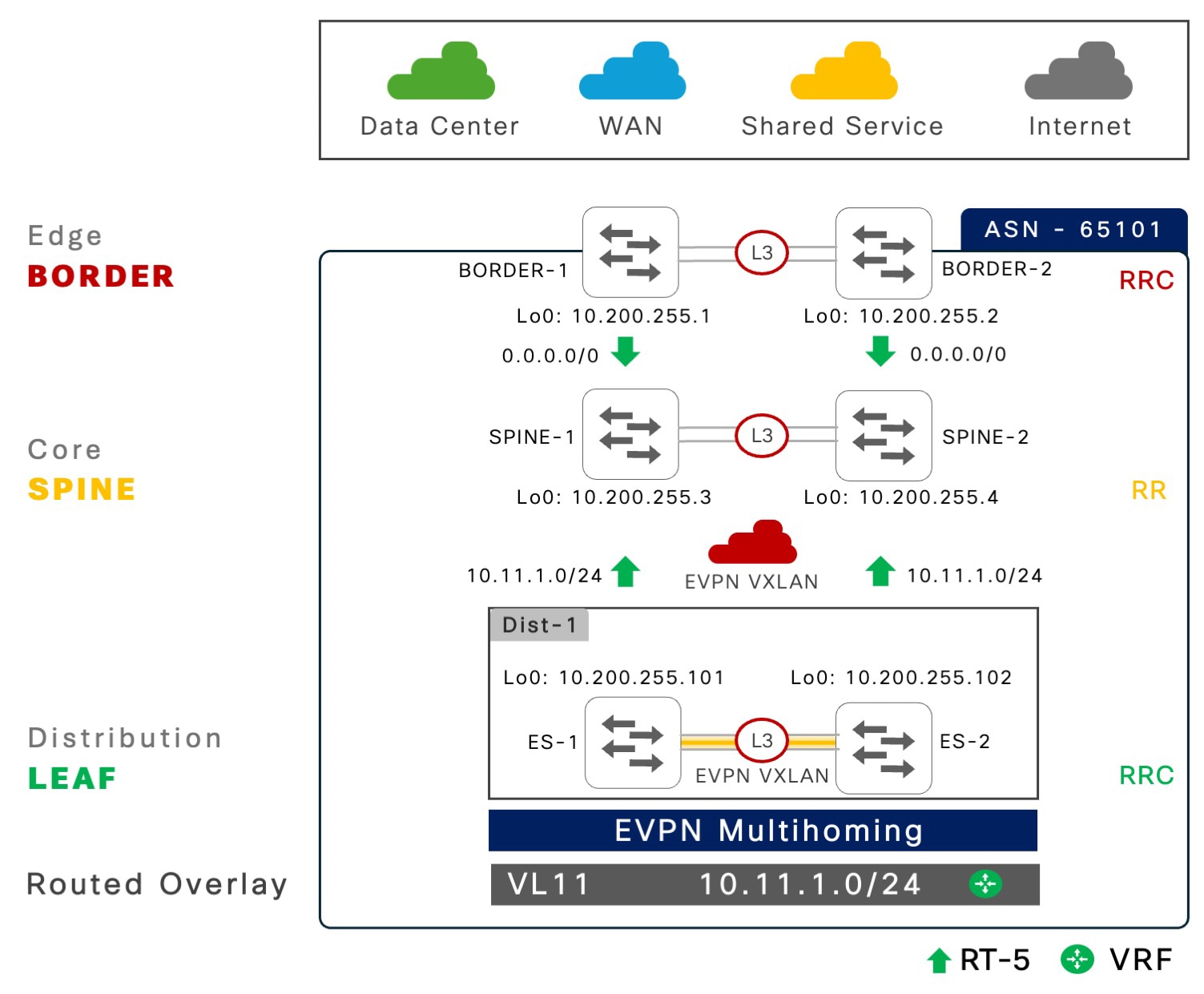
The following figure illustrates an EVPN multihoming network with hierarchical BGP peering that involves the spine and leaf architecture.

Figure 3. EVPN multihoming: Routed overlay fabric network design

Routed overlay fabric network design

Layer 2 EVPN multihoming

This step-by-step configuration shows how to build a non-blocking all-active Layer 2 network with EVPN multihoming technology on a pair of Cisco Catalyst 9000 series switches, starting from a Layer 2 campus network.

Step

ES-1

ES-2

1: Inter-ES Layer 3 EtherChannel

! 
interface Port-Channel 128 
 description CONNECTED TO EVPN MH SW-2 
 no switchport 
 ip address 10.0.0.0 255.255.255.254 
 ip ospf network point-to-point 
 ip ospf multi-area 0 
 ip ospf 100 area 101 
 ip ospf cost 10 
 carrier-delay msec 0 
 hold-queue 4094 in 
 hold-queue 4094 out 
 evpn multihoming core-tracking 
! 

! 
interface Port-Channel 128 
 description CONNECTED TO EVPN MH SW-1 
 no switchport 
 ip address 10.0.0.1 255.255.255.254 
 ip ospf network point-to-point 
 ip ospf multi-area 0 
 ip ospf 100 area 101 
 ip ospf cost 10 
 carrier-delay msec 0 
 hold-queue 4094 in 
 hold-queue 4094 out 
 evpn multihoming core-tracking 
! 

2: IGP routing and core interface

! 
router ospf 100 
 router-id 10.200.255.101 
 max-metric router-lsa include-stub 
  summary-lsa 
 external-lsa on-startup wait-for-bgp  
 nsf cisco  
 fast-reroute per-prefix enable 
   prefix-priority low 
 area 101 stub no-summary 
 passive-interface default 
 no passive-interface Port-Channel 128 
 no passive-interface HundredGig1/0/49 
 no passive-interface HundredGig1/0/50 
! 
interface Loopback 0 
 ip address 10.100.255.101 255.255.255.255 
 ip ospf 100 area 0 
! 

! 
router ospf 100 
 router-id 10.200.255.102 
 max-metric router-lsa include-stub 
   summary-lsa 
 external-lsa on-startup wait-for-bgp  
 nsf cisco  
 fast-reroute per-prefix enable 
    prefix-priority low 
 area 101 stub no-summary 
 passive-interface default 
 no passive-interface Port-Channel 128 
 no passive-interface HundredGig1/0/49 
 no passive-interface HundredGig1/0/50 
! 
interface Loopback 0 
ip address 10.100.255.102 255.255.255.255 
 ip ospf 100 area 0 
! 

3: iBGP routing

! 
router bgp 65101 
 template peer-policy ES-PEER-POLICY 
  send-community both 
 ! 
 template peer-session ES-PEER-SESSION-POLICY 
  remote-as 65101 
  description EVPN-MH-DIST-2-PEER 
  update-source Loopback0  
  fall-over host-route 
 ! 
 bgp router-id interface Loopback0 
 bgp log-neighbor-changes 
 bgp graceful-restart 
 no bgp default ipv4-unicast 
 neighbor 10.100.255.102 inherit 
  peer-session ES-PEER-SESSION-POLICY 
 ! 
 address-family l2vpn evpn 
  bgp nexthop trigger critical-delay 0 
  neighbor 10.100.255.102 activate 
  neighbor 10.100.255.102 send-community both 
  neighbor 10.100.255.102 inherit peer-policy 
    ES-PEER-POLICY 
 ! 
! 
router bgp 65101 
 template peer-policy ES-PEER-POLICY 
  send-community both 
 ! 
 template peer-session ES-PEER-SESSION-POLICY 
  remote-as 65101 
  description EVPN-MH-DIST-1-PEER 
  update-source Loopback0 
  fall-over host-route 
 ! 
 bgp router-id interface Loopback0 
 bgp log-neighbor-changes 
 bgp graceful-restart 
 no bgp default ipv4-unicast 
 neighbor 10.100.255.101 
  inherit peer-session 
  ES-PEER-SESSION-POLICY 
 ! 
 address-family l2vpn evpn 
  bgp nexthop trigger critical-delay 0 
  neighbor 10.100.255.101 activate 
  neighbor 10.100.255.101 send-community both 
  neighbor 10.100.255.101 inherit peer-policy 
    ES-PEER-POLICY 
 ! 

4: Global L2VPN

! 
l2vpn evpn 
advertise mac disable 
anycast-gateway mac auto 
multicast advertise sync-only 
multihoming aliasing disable 
multihoming peering adjacent 
replication-type ingress 
router-id Loopback 0 
! 

! 
l2vpn evpn 
advertise mac disable 
anycast-gateway mac auto 
multicast advertise sync-only 
multihoming aliasing disable 
multihoming peering adjacent 
replication-type ingress 
router-id Loopback 0 
! 

5: Routed VLAN and MAC VRF

! 
vlan 11 
 name ROUTED_DATA_VLAN 
! 
l2vpn evpn instance 11 vlan-based 
 encapsulation vxlan 
! 
vlan configuration 11 
 member evpn-instance 11 vni 11011 
! 
 interface nve 1 
 source-interface Loopback 0 
 host-reachability protocol bgp 
 member vni 11011 ingress-replication 
! 

! 
vlan 11 
 name ROUTED_DATA_VLAN 
! 
l2vpn evpn instance 11 vlan-based 
 encapsulation vxlan 
! 
vlan configuration 11 
 member evpn-instance 11 vni 11011 
! 
 interface nve 1 
 source-interface Loopback 0 
 host-reachability protocol bgp 
 member vni 11011 ingress-replication 
! 

6: ES EtherChannel

! 
interface Port-Channel 1 
 description CONNECTED TO L2 ACCESS  
 switchport trunk allowed vlan 11 
 evpn ethernet-segment auto lacp 
  df-election wait-time 1 
! 
! 
interface Port-Channel 1 
 description CONNECTED TO L2 ACCESS  
 switchport trunk allowed vlan 11 
 evpn ethernet-segment auto lacp 
  df-election wait-time 1 
! 

Underlay: fabric core and BGP peering

Enterprise campus core networks with a solid underlay network foundation is essential to build highly scalable and resilient BGP EVPN VXLAN fabrics. This section is the second step to build a reliable underlay core network and establish hierarchical iBGP peering among targeted network devices with specific roles.


Note


The table is divided into two fabric roles with each step either sharing a common configuration or a unique per-device configuration with a common role.


Step

ES-1 and ES-2

Spine-1 and Spine-2

Border-1 and Border-2

1: Global best practices

!  
system mtu 9100  
!  
port-channel load-balance 
  vlan-src-dst-mixed-ip-port  
ip cef load-sharing algorithm 
  include-ports  
 source destination protocol  
!  
ip tcp mss 8000  
ip tcp window-size 262144  
ip tcp path-mtu-discovery  
! 

!  
system mtu 9100  
!  
port-channel load-balance 
 vlan-src-dst-mixed-ip-port  
ip cef load-sharing algorithm 
  include-ports  
 source destination protocol  
!  
ip tcp mss 8000  
ip tcp window-size 262144  
ip tcp path-mtu-discovery  
! 

!  
system mtu 9100  
!  
port-channel load-balance 
  vlan-src-dst-mixed-ip-port  
ip cef load-sharing algorithm 
  include-ports  
 source destination protocol  
!  
ip tcp mss 8000  
ip tcp window-size 262144  
ip tcp path-mtu-discovery  
! 

2: Underlay interface configuration and best practices

! 
interface range 
  HundredGig1/0/49-50 
 description CONNECTED TO SPINE  
 ip ospf 100 area 0 
 ip ospf network point-to-point 
 carrier-delay msec 0 
 hold-queue 4094 in 
 hold-queue 4094 out 
 evpn multihoming core-tracking 
! 

! 
interface range HundredGig1/0/1-4 
 description CONNECTED TO CAMPUS 
  CORE NETWORK 
 ip ospf 100 area 0 
 ip ospf network point-to-point 
 carrier-delay msec 0 
 hold-queue 4094 in 
 hold-queue 4094 out 
! 

! 
interface range 
  HundredGig1/0/49-50 
 description CONNECTED TO SPINE  
 ip ospf 100 area 0 
 ip ospf network point-to-point 
 carrier-delay msec 0 
 hold-queue 4094 in 
 hold-queue 4094 out 
! 

3: OSPF routing configuration and best practices

ES-1 
! 
router ospf 100 
 router-id 10.200.255.101 
 max-metric router-lsa 
   include-stub summary-lsa 
 external-lsa on-startup 
   wait-for-bgp  
 nsf cisco  
 fast-reroute per-prefix enable 
   prefix-priority low 
 area 101 stub no-summary 
 passive-interface default 
 no passive-interface Port-Channel 128 
 no passive-interface HundredGig1/0/49 
 no passive-interface HundredGig1/0/50 
! 
ES-2 
! 
router ospf 100 
 router-id 10.200.255.102 
 max-metric router-lsa 
   include-stub summary-lsa 
 external-lsa on-startup wait-for-bgp  
 nsf cisco  
 fast-reroute per-prefix enable 
   prefix-priority low 
 area 101 stub no-summary 
 passive-interface default 
 no passive-interface Port-Channel 128 
 no passive-interface HundredGig1/0/49 
 no passive-interface HundredGig1/0/50 
! 
 
SPINE-1 
! 
router ospf 100 
 router-id 10.200.255.3 
 max-metric router-lsa 
   include-stub summary-lsa 
 external-lsa on-startup 
   wait-for-bgp  
 nsf cisco  
 fast-reroute per-prefix enable 
   prefix-priority low 
passive-interface default 
 no passive-interface HundredGig1/0/1 
 no passive-interface HundredGig1/0/2 
no passive-interface HundredGig1/0/3 
 no passive-interface HundredGig1/0/4 
! 
SPINE-2 
! 
router ospf 100 
 router-id 10.200.255.4 
 max-metric router-lsa 
   include-stub summary-lsa 
 external-lsa on-startup 
   wait-for-bgp  
 nsf cisco  
 fast-reroute per-prefix enable 
   prefix-priority low 
 passive-interface default 
 no passive-interface HundredGig1/0/1 
 no passive-interface HundredGig1/0/2 
no passive-interface HundredGig1/0/3 
 no passive-interface HundredGig1/0/4 
! 

BORDER-1 
! 
router ospf 100 
 router-id 10.200.255.1 
 max-metric router-lsa 
   include-stub summary-lsa  
 external-lsa on-startup 
   wait-for-bgp  
 nsf cisco  
 fast-reroute per-prefix enable 
    prefix-priority low 
passive-interface default 
 no passive-interface HundredGig1/0/49 
 no passive-interface HundredGig1/0/50 
! 
BORDER-2 
! 
router ospf 100 
 router-id 10.200.255.2 
 max-metric router-lsa 
    include-stub summary-lsa 
 external-lsa on-startup 
   wait-for-bgp  
 nsf cisco  
 fast-reroute per-prefix enable 
    prefix-priority low 
 passive-interface default 
 no passive-interface HundredGig1/0/49 
 no passive-interface HundredGig1/0/50 
! 

4: BGP routing configuration

! 
router bgp 65101 
! 
bgp router-id interface Loopback0 
bgp log-neighbor-changes 
bgp graceful-restart 
no bgp default ipv4-unicast
! 

! 
router bgp 65101 
! 
bgp router-id interface Loopback0 
bgp log-neighbor-changes 
bgp graceful-restart 
no bgp default ipv4-unicast 
! 

! 
router bgp 65101 
! 
bgp router-id interface Loopback0 
bgp log-neighbor-changes 
bgp graceful-restart 
no bgp default ipv4-unicast 
! 

5: Peer- session and peer-policy templates and parameters for leaf switches

! 
template peer-session 
  EVPN-SPINE-PEER-SESSION-POLICY 
  remote-as 65101 
  description EVPN-SPINE-PEER 
  log-neighbor-changes 
  update-source Loopback0 
  fall-over host-route 
 ! 
template peer-policy 
  EVPN-SPINE-PEER-POLICY 
  send-community both 
! 

! 
template peer-session 
  EVPN-LEAF-
  PEER-SESSION-POLICY 
  remote-as 65101 
  description EVPN-LEAF-PEER 
  log-neighbor-changes 
  update-source Loopback0 
  fall-over host-route 
! 
template peer-policy 
  EVPN-LEAF-PEER-POLICY 
  route-reflector-client 
  send-community both 
 ! 

-

6: Peer-session and peer-policy templates and parameters for border switches

! 
template peer-session 
  EVPN-BORDER-
  PEER-SESSION-POLICY 
  remote-as 65101 
  description EVPN-BORDER-PEER 
  log-neighbor-changes 
  update-source Loopback0 
  fall-over host-route 
 ! 
template peer-policy 
  EVPN-BORDER-PEER-POLICY 
  route-reflector-client 
  send-community both 
 ! 

! 
template peer-session 
  EVPN-SPINE-PEER-SESSION-POLICY 
  remote-as 65101 
  description EVPN-SPINE-PEER 
  log-neighbor-changes 
  update-source Loopback0 
  fall-over host-route 
 ! 
template peer-policy 
  EVPN-SPINE-PEER-POLICY 
  send-community both 
! 

7: Disable intra-cluster EVPN multihome leaf

! 
no bgp client-to-client reflection 
  intra-cluster cluster-id any
! 

-

8: Configure border-spine iBGP peering

! 
neighbor 10.200.255.1 inherit 
  peer-session 
  EVPN-BORDER-
  PEER-SESSION-POLICY 
! 
 neighbor 10.200.255.2 inherit 
  peer-session 
  EVPN-BORDER-
  PEER-SESSION-POLICY 
 ! 

! 
neighbor 10.200.255.3 inherit 
  peer-session 
  EVPN-SPINE-
  PEER-SESSION-POLICY 
! 
 neighbor 10.200.255.4 inherit 
   peer-session 
   EVPN-SPINE-
   PEER-SESSION-POLICY 
! 

9: Configure leaf iBGP peering

! 
neighbor 10.200.255.3 inherit 
  peer-session 
  EVPN-SPINE-PEER-SESSION-POLICY 
! 
 neighbor 10.200.255.4 inherit 
  peer-session 
  EVPN-SPINE-PEER-SESSION-POLICY 
! 

! 
neighbor 10.200.255.101 inherit 
  peer-session 
  EVPN-LEAF-
  PEER-SESSION-POLICY 
 neighbor 10.200.255.101 cluster-id 
  1.1.1.1 
! 
 neighbor 10.200.255.102 inherit 
  peer-session 
  EVPN-LEAF-
  PEER-SESSION-POLICY 
 neighbor 10.200.255.102 cluster-id 
  1.1.1.1 
 ! 

10: Activate leaf and border iBGP Peering under L2VPN EVPN AF

! 
address-family l2vpn evpn 
  bgp nexthop trigger 
   critical-delay 0 
  neighbor 10.200.255.3 activate 
  neighbor 10.200.255.3 
    send-community both 
  neighbor 10.200.255.3 inherit 
    peer-policy 
    EVPN-SPINE-PEER-POLICY 
  neighbor 10.200.255.4 activate 
  neighbor 10.200.255.4 
    send-community both 
  neighbor 10.200.255.4 inherit 
    peer-policy 
    EVPN-SPINE-PEER-POLICY 
! 

! 
address-family l2vpn evpn 
  bgp nexthop trigger 
    critical-delay 0 
  neighbor 10.200.255.1 activate 
  neighbor 10.200.255.1 
    send-community both 
  neighbor 10.200.255.1 inherit 
    peer-policy 
    EVPN-BORDER-PEER-POLICY 
  neighbor 10.200.255.2 activate 
  neighbor 10.200.255.2 
    send-community both 
  neighbor 10.200.255.2 inherit 
    peer-policy 
    EVPN-BORDER-PEER-POLICY 

! 
  neighbor 10.200.255.101 activate 
  neighbor 10.200.255.101 
    send-community both 
  neighbor 10.200.255.101 inherit 
    peer-policy EVPN-LEAF-PEER-POLICY 
  neighbor 10.200.255.102 activate 
  neighbor 10.200.255.102 
    send-community both 
  neighbor 10.200.255.102 inherit 
    peer-policy 
    EVPN-LEAF-PEER-POLICY 
! 

! 
address-family l2vpn evpn 
  bgp nexthop trigger 
    critical-delay 0 
  neighbor 10.200.255.3 activate 
  neighbor 10.200.255.3 
    send-community both 
  neighbor 10.200.255.3 inherit 
    peer-policy EVPN-SPINE-PEER-POLICY 
  neighbor 10.200.255.4 activate 
  neighbor 10.200.255.4 
    send-community both 
  neighbor 10.200.255.4 inherit 
    peer-policy EVPN-SPINE-PEER-POLICY 
! 

Overlay routed networks

The overlay network configuration is the final step to enable the fabric in an enterprise campus. This step-by-step procedure shows VTEPs configured in a routed overlay network that exchanges IP prefixes between external and internal network domains.

On Cisco Catalyst 9000 series switches, the routed overlay configuration is implemented within EVPN multihoming-based networks. The configuration example also shows the standard procedure to implement and manage the overlay network in other system configuration modes such as routed access, Cisco StackWise Virtual, and First Hop Redundancy Protocol (FHRP).

Step

ES-1 and ES-2

Border-1 and Border-2

1: IP-VRF configuration

ES-1 
! 
vrf definition green 
 rd 10.200.255.101:101 
 address-family ipv4 unicast 
 route-target 65101:101 
 route-target 65101:101 stitching 
! 
ES-2 
! 
vrf definition green 
 rd 10.200.255.102:101 
 address-family ipv4 unicast 
 route-target 65101:101 
 route-target 65101:101 stitching 
! 

BORDER-1 
! 
vrf definition green 
 rd 10.200.255.1:101 
 address-family ipv4 unicast 
 route-target 65101:101 
 route-target 65101:101 stitching 
! 
BORDER-2 
! 
vrf definition green 
 rd 10.200.255.2:101 
 address-family ipv4 unicast 
 route-target 65101:101 
 route-target 65101:101 stitching 
! 

2: IP VRF core VLAN

! 
vlan 101 
  name VRF_GREEN_CORE_VLAN 
! 
vlan configuration 101 
 member vni 10011 
! 
interface vlan 101 
 description CORE VLAN – VRF GREEN 
 vrf forwarding green 
 ip unnumbered Loopback0 
 no autostate 
 ! 

! 
vlan 101 
  name VRF_GREEN_CORE_VLAN 
! 
vlan configuration 101 
 member vni 10011 
! 
interface vlan 101 
 description CORE VLAN – VRF GREEN 
 vrf forwarding green 
 ip unnumbered Loopback0 
 no autostate 
 ! 

3: IP VRF L3VNI to NVE interface binding

! 
interface nve 1 
 member vni 10011 vrf green 
! 

! 
interface nve 1 
 member vni 10011 vrf green 
! 

4: Network edge to access or external domain.

! 
interface Vlan 11 
 description ROUTED DATA VLAN – VRF GREEN 
 vrf forwarding green 
 ip address 10.11.1.254 255.255.255.0 
! 
BORDER-1 
! 
interface Vlan 2001 
 description FIREWALL HANDOFF – VRF GREEN 
 vrf forwarding green 
 ip address 21.1.1.0 255.255.255.254 
! 
BORDER-2 
! 
interface Vlan 2002 
 description FIREWALL HANDOFF – VRF GREEN 
 vrf forwarding green 
 ip address 21.1.1.2 255.255.255.254 
! 

5: Route-map policy

! 
route-map SPINE-ROUTE-POLICY-OUT 
   permit 10 
 description ROUTED OVERLAY 
   NETWORK POLICY 
 match evpn route-type 5 
! 

6: Apply spine policy to BGP template

! 
router bgp 65101 
! 
template peer-policy 
   EVPN-SPINE-PEER-POLICY 
 route-map SPINE-ROUTE-POLICY-OUT 
   out 
! 

7: IP VRF routing

! 
router bgp 65101 
! 
address-family ipv4 vrf green 
 advertise l2vpn evpn 
 redistribute connected 
 maximum-paths ibgp 2 
! 

BORDER-1 
! 
router bgp 65101 
! 
address-family ipv4 vrf green 
 advertise l2vpn evpn 
 neighbor 21.1.1.1 remote-as 65001 
 neighbor 21.1.1.1 activate 
 maximum-paths ibgp 2 
! 
BORDER-2 
! 
router bgp 65101 
! 
address-family ipv4 vrf green 
 advertise l2vpn evpn 
 neighbor 21.1.1.3 remote-as 65001 
 neighbor 21.1.1.3 activate 
 maximum-paths ibgp 2 
!