EVPN Multihoming for Non-Fabric Networks

This chapter explains the EVPN multihoming technology and how it works in non-fabric networks.

EVPN Multihoming Overview

The Ethernet VPN (EVPN) multihoming is RFC 7432, RFC 8365 based industry-standard Layer 2 multipath solution solving various traditional networking protocol challenges impacting scale, performance and resiliency. It is an advanced networking technology designed to provide high availability, Border Gateway Protocol (BGP) based Layer 2 loop-free network, and efficient load balancing in modern enterprise campus networks.

A pair of Cisco Catalyst 9000 series switches can connect to downstream Layer 2 or Layer 3 network device with local physical connection binding into single logical EtherChannel configured in Layer 2 trunk or access mode. With industry-standard non-blocking architecture any downstream networking devices such as, Ethernet Switch, Wireless LAN Controller (WLC), firewalls, servers and hosts can be dual-homed.


Note


EVPN multihoming in fabric and non-fabric networks is a controlled availability feature with Cisco Technical Assistance Center support for issues.


EVPN Multihoming Key Benefits

EVPN multihoming technology was introduced on Cisco Catalyst 9000 series switches in Cisco IOS XE 17.18.2, delivering a highly flexible and extensible deployment solution for global enterprise customers.

The key technology architecture benefits of Cisco Catalyst 9000 series switches combined with the advanced Cisco IOS XE software capabilities enable best of both worlds. Enterprise network administrators can implement EVPN multihoming within their existing traditional Layer 2 or Layer 3 network designs while laying a practical and gradual foundation for evolving towards modern, secure, fabric-based virtual networks.

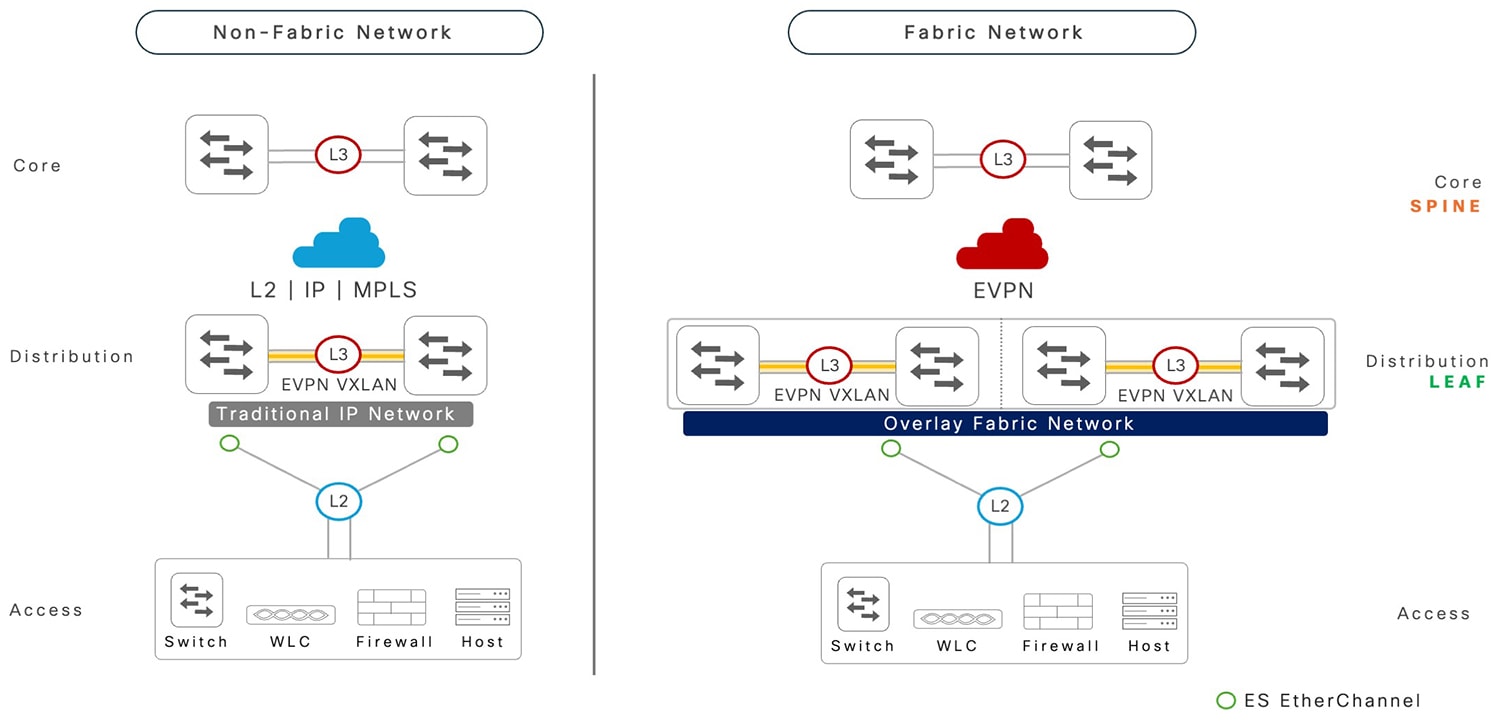
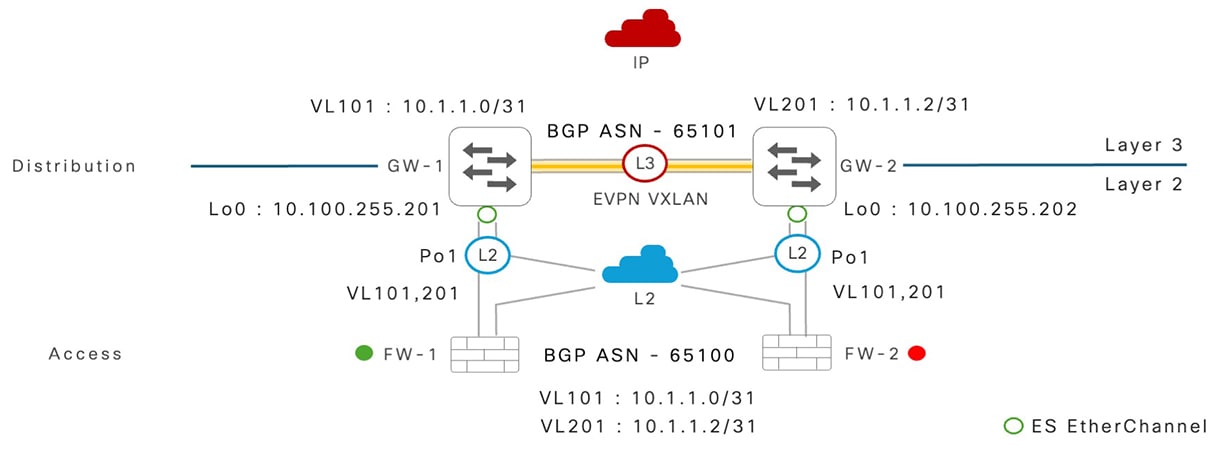
The following illustration shows the EVPN multihoming solution for Cisco Catalyst 9000 series switches in two key flexible deployment models.

Figure 1. EVPN multihoming enterprise campus deployment model

EVPN multihoming enterprise campus deployment model

With flexible deployment model support, EVPN multihoming provides significant technological benefits to support enterprise-grade networking requirements.

  • Industry-standard Layer 2 multipath: RFC 7432 and RFC 8365-defined Layer 2 multipath technology with BGP control-plane eliminates the vendor proprietary complex solutions.

  • Flexible architecture: Purpose-built solution supports a wide range of networking use-cases for traditional Layer 2 and Layer 3, to modernized secure campus fabrics enabling network-wide, two-tier virtual network segmentation and extensions.

  • Distributed planes: A fully distributed architecture where each system maintains its own scalable and resilient control plane, independent management plane configuration, and software versions provide more resilience with synchronized data-plane between paired systems.

  • Increased performance: Non-blocking Spanning Tree Protocol (STP), Layer 2 loop-free network combined with advanced load-sharing technique assist in increasing forwarding capacity and improving application experience.

  • Seamless integration: Least disruptive integration in classic Layer 2 networks with a wide range of networking device types that support link-bundling capabilities. Flexible and seamless integration with existing core network system without a forklift architecture change.

  • Resilient: Deterministic fault detection and recovery technique during various types of planned and unplanned failure conditions, which reduces the Mean Time to Repair (MTTR) and increases the network reliability with a higher Mean Time Between Failure (MTBF).

    A pair of modular-class platforms with redundancy (Quad-Sup NSF and SSO): Provides non-stop business communication in maintaining network availability and forwarding throughput capacity during software upgrades and other unplanned failure events.

EVPN Multihoming for Non-Fabric Networks

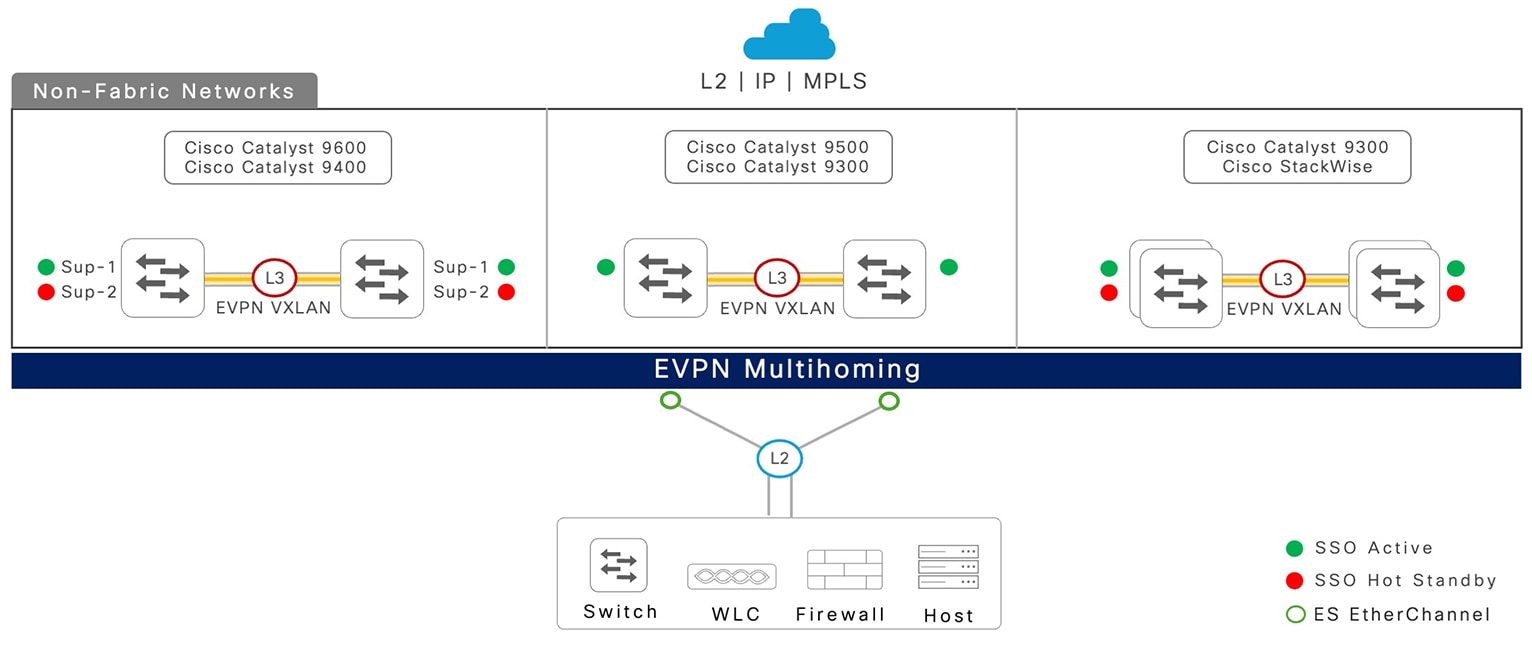
The Cisco Catalyst 9000 series switches introduce EVPN multihoming technology that provides flexible deployment solutions for global enterprise customers to retain the original traditional Layer 2 or Layer 3 network in an upstream core network. Such network deployment option is also known as a non-fabric network.

Figure 2. EVPN multihoming: non-fabric networks

EVPN multihoming: non-fabric networks

Cisco Catalyst 9000 Series Platform Support Matrix

EVPN multihoming is supported on a wide range of modular and fixed Cisco Catalyst 9000 series switch models. The system can be deployed in standalone or resilient mode providing single network and device-level redundancy.

This table provides a list of supported Cisco Catalyst 9000 series platforms with the system mode.

Table 1. EVPN multihoming platform support matrix

Cisco Catalyst 9000 series switch model

System mode

Modular platforms

  • Catalyst 9400 Series Supervisor 1

  • Catalyst 9400 Series Supervisor 2

  • Catalyst 9400 Series Supervisor 2XL

  • Catalyst 9600 Supervisor 1

  • Single supervisor: non-redundant

  • Dual supervisor: redundant

Fixed platforms

Catalyst 9300 Series

  • Standalone: non-redundant

  • StackWise: redundant

Catalyst 9500 High Performance Series

Standalone: non-redundant

Restrictions

This section provides a list of EVPN multihoming deployment restrictions.

  • EVPN multihoming is not supported on Cisco Catalyst 9500-X Series Switches, Cisco Catalyst 9600-Sup2, Cisco C9350 Series Smart Switches, and Cisco C9610 Series Smart Switches.

  • Combined mode with StackWise Virtual and EVPN multihoming on a single switch is not supported on Cisco Catalyst 9400, 9500-H, and 9600 Series Switches.

  • EVPN multihoming for non-fabric and fabric networks with IPv6-only underlay network is not supported.

  • EVPN multihoming ISSU from a release prior to Cisco IOS XE 17.18.2 is not supported on Cisco Catalyst 9400 and Cisco Catalyst 9600 modular platforms with redundant supervisors.

  • Anycast gateway (global or VRF-enabled) SVI with any First Hop Redundancy Protocol (FHRP) protocol is not supported.

  • Cisco Port Aggregation Protocol (PAgP) on Ethernet segment-enabled EtherChannel is not supported.

  • Resilient Ethernet Protocol (REP) on Layer 2 Ethernet segment port is not supported.

  • Layer 2 network in ring physical network topology connection to EVPN multihoming in not supported.

EVPN Multihoming Scale Matrix

This section describes the system-wide Layer 2 interface and table entry scale limits for EVPN multihoming enabled on a Cisco Catalyst 9000 series switch in the non-fabric mode.

Table 2. EVPN multihoming platform scale matrix

EVPN multihoming segment scale matrix

Scale count

Ethernet segment switch per redundancy group

2

Ethernet segment Port Channel interface

48

Number of VLANs

200

MAC address

10,000

IPv4 address

10,000

IPv6 address

Note


In a dual-stack (IPv4 + IPv6) deployment, the IPv6 addresses we are referring to are link-local and static or DHCP-assigned IPv6 addresses.

20,000

EVPN Multihoming Technology Overview

The legacy networking protocols in enterprise campus networks have been a challenge for IT organizations.

The challenges include difficulty in eliminating Spanning Tree Protocol (STP) that can lead to inefficient network topologies, restrictions in traditional Layer 2 designs that limit the network switching capacity, lack of deterministic reliability that makes it a challenge to support real-time mission-critical applications, insufficient support for mobility in wireless and legacy application environments, and increased complexity in network management and troubleshooting.

This section provides a brief overview of the advanced industry-standard EVPN multihoming technology for traditional Layer 2 and Layer 3 networks. Each subsection focuses on various technology components enabling loop-free, high-performance and resilient Layer 2 networking solutions.

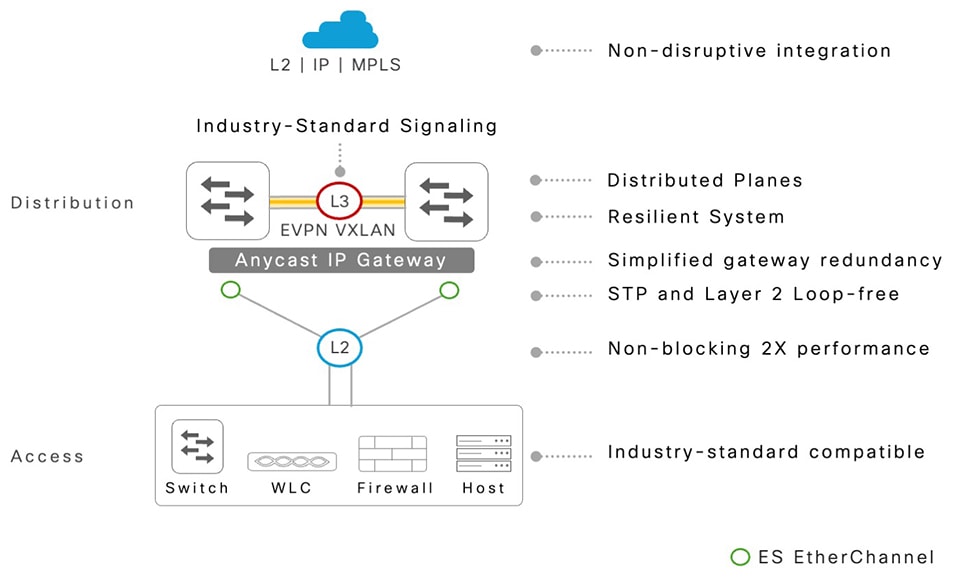
The following illustration captures the key benefits of EVPN multihoming technology for simplified and resilient enterprise campus networks.

Figure 3. EVPN multihoming technology benefits
Benefits of EVPN multihoming technology

Refer the Terms and Definitions section for the description and purpose of acronyms.

Network System Components

The EVPN multihoming technology comprises directly attached networking systems through traditional Layer 2 ports in trunk or access mode. The Cisco Catalyst 9000 series switches is required to provision in EVPN multihoming mode to provide a loop-free Layer 2 multipath EtherChannel to any type of downstream network device.

Ethernet Segment Redundancy Group

An Ethernet segment redundancy group is a physical grouping of network devices that form an EVPN multihoming network, enabling an all-active Layer 2 multipath solution.

The EVPN multihoming redundancy group consists of a single pair of Cisco Catalyst 9000 series switches, which provide physical connectivity and system-level redundancy. This architecture ensures continuous communication during both planned and unplanned failure events.

Ethernet Segment Switch

An Ethernet segment switch is a typical Cisco Catalyst 9000 series switch in core or distribution system configured to support the Layer 2 multihomed network with directly attached various type of Layer 2 systems.

The Ethernet Segment (ES) system can support multifunctional Layer 2 and Layer 3 networks for enterprise campus networks in classic and traditional non-fabric or modern fabric network roles. As a result, the ES switch is also known as Provider Edge (PE) or leaf. Each ES switch operates and maintains fully distributed control, management, and data planes while solving legacy protocol challenges with industry-standard Layer 2 multipath solutions.


Note


Cisco Catalyst 9000 series switches in StackWise mode is considered as logical system Ethernet segment switches.


Ethernet Segment Switch Platform and Software

The EVPN multihoming technology operation between ES network devices—fixed or modular models, is no different from any of the other industry-standard networking protocols, like OSPF and BGP. A pair of ES switches can have different platform types, modules, interfaces, and so on. The ES pair switches can also have different Cisco IOS-XE software versions to address stage upgrade and other conditions.

While the technology permits asymmetric platform and software versions on an ES pair, Cisco recommends common platform and software version to deliver consistent performance and resiliency for non-disruptive business continuity during planned and unplanned failure conditions.

Ethernet Segment Client

The Layer 2 system is a directly attached single, dual or multihome connection to a pair of Cisco Catalyst 9000 series switches in an ES system. The Layer 2 ES client network can be of any device type but must follow the industry-standard Layer 2 networking technologies.

EVPN Multihoming Control Plane

The EVPN multihoming technology is built on industry-standard, highly flexible, and proven BGP routing protocol. The BGP control plane replaces legacy STP for Layer 2 loop detection and prevention techniques.

The L2VPN EVPN address-family is a multiprotocol extension that enables a network-agnostic multihoming solution. The BGP protocol provides four key functions: discover remote neighbor and ES ID, real-time synchronization of network states, distributed forwarding rule to select local-bias rules for optimal performance, and resiliency for deterministic and efficient rapid fault-detection and recovery.

Ethernet Segment

Ethernet segment (ES) is a pair of Cisco Catalyst 9000 series switches in the aggregation layer with a Layer 2 physical port that directly connects to an ES client device. It represents a single logical entity to enable loop-free, non-blocking all-active Layer 2 network connectivity.

An STP-Bridge Protocol Data Unit (BPDU) free Layer 2 network dynamically supports per-VLAN loop prevention while maximizing the network throughput to support accelerated application performance and resiliency.

Ethernet Segment ID

An Ethernet segment ID is a 10-byte (00:01:01:01:01:01:01:01:01:01) identifier for each Layer 2 port that is connected to an ES client device. A common ES ID is assigned to a pair of Catalyst 9000 ES systems on the Layer 2 physical port that connects to the same Layer 2 ES client device to enable all-active EVPN multihoming.

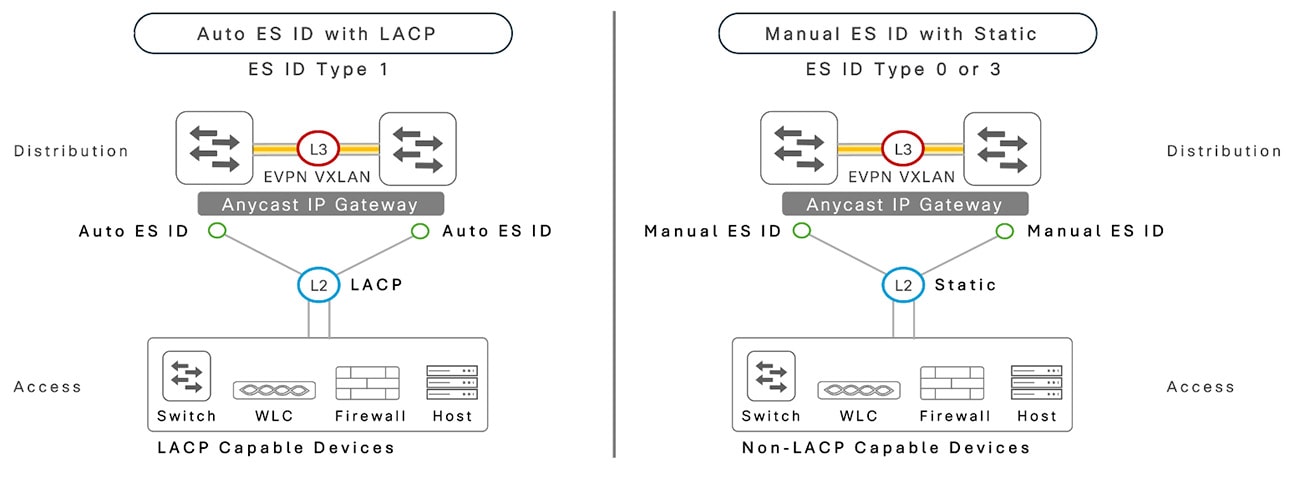
Cisco Catalyst 9000 series switches support 3 types of industry-standard ESI ID that is either auto-generated or IT-defined and manually configured.

Anycast Gateway MAC and IP Addresses

A Cisco Catalyst 9000 SVI interface with anycast gateway is provisioned with a shared virtual IP address and an auto-derived shared virtual MAC address with anycast-gateway mac auto command in the global settings, on pair of EVPN multihoming switches. The unified, resolved ARP and ND addresses between the distributed Catalyst 9000 IP gateway switches support optimal data load-balancing across all available bundled links and resilient networks during planned or unplanned failures for Wired and Wireless endpoints.

Designated Forwarder and Non-Designated Forwarder Roles

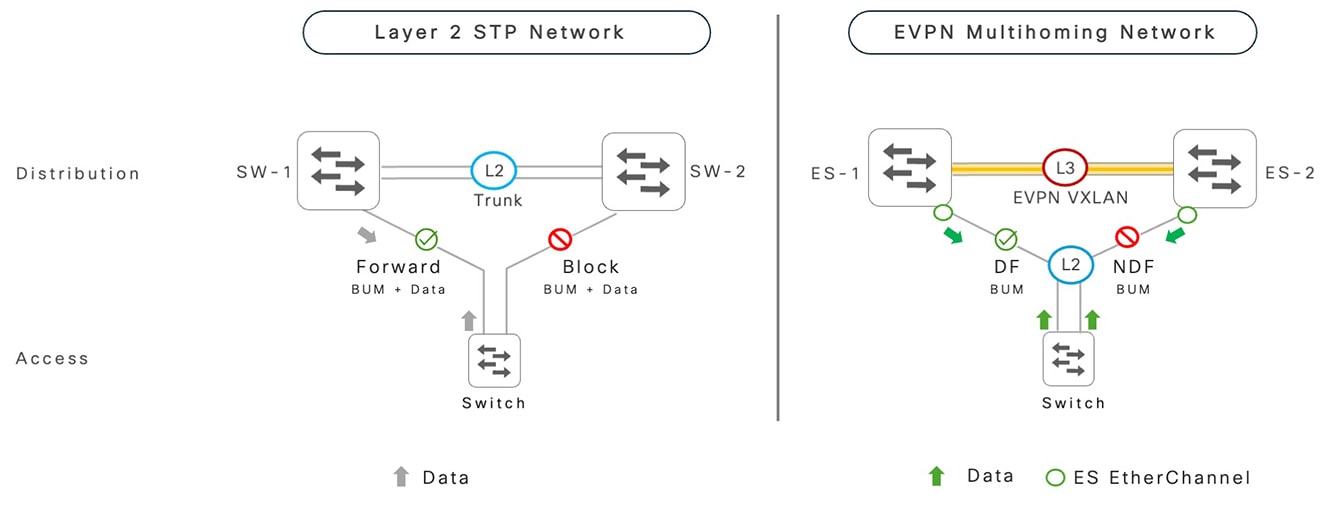
Traditionally, in Layer 2 STP-enabled networks, loop detection is achieved through a blocking link to transmit broadcast and business application data traffic. As a result, the network operates inefficiently at reduced bandwidth capacity. Additionally, protocol-based fault detection and recovery increase the network convergence time, which impacts the reliability of mission-critical applications during faults.

In EVPN multihoming-based campus networks, the same result is obtained using a very different logic. Instead of blocking links, the EVPN distinctly decouples network traffic types between broadcast categories and business applications. On a per ES port and VLAN basis, the pair of Cisco Catalyst 9000 series switches dynamically assign specific roles to forward BUM (Broadcast, Unknown Unicast, and Multicast) traffic in active and passive modes. However, business application forwarding traffic is unblocked in active-active mode.

The Catalyst 9000 series switch elected to actively forward the BUM traffic on a shared ES EtherChannel interface is known as Designated Forwarder (DF). The Catalyst 9000 series switch elected to block the forwarding of the BUM traffic on a shared ES EtherChannel interface is known as Non-Designated Forwarder (non-DF). The dynamic DF and non-DF role assignment is automatically derived based on the internal system modulo hash algorithm, which enables auto load balancing of the BUM traffic between a pair of Catalyst 9000 switches connected to same downstream Layer 2 network access devices.

Figure 4. Designated forwarder and non-designated forwarder roles

Designated forwarder and non-designated forwarder roles

Dynamic MAC and IP Learning and Synchronization

EVPN multihoming networks build and maintain the Layer 2 and Layer 3 network information using the control plane, between a pair of Cisco Catalyst 9000 ES switches.

The upstream flow-driven data is hashed from Layer 2 network devices and forward traffic towards the IP network, the dynamic MAC, IPv4, and IPv6 host addresses synchronized using the BGP control plane in real time between both the ES switches.

The common MAC or IP forwarding tables enable high performance and fully-distributed local forwarding while pre-programming the inter-ES Layer 2 VXLAN tunnel to bridge the downstream Layer 2 network traffic as the last-resort interface to reroute the data plane rapidly, upon local path failure, without relying on data-plane flooding.

IGMP Join and Leave Synchronization

The incoming Internet Group Management Protocol (IGMP) messages from multicast host receivers are locally processed by the connected Cisco Catalyst 9000 ES switches. The IPv4 or IPv6 multicast group-to-IP membership information is synchronized between the ES switches by using an extended BGP control plane that supports consistent multicast state across the multihomed Ethernet segments.

The Catalyst 9000 ES switch with a VLAN in the DF role transmits egress multicast traffic towards the receiver. The peer non-DF ES switch suppresses duplicate multicast frames to prevent loops and undesired multicast replication. This enables EVPN multihoming to support symmetric unicast or multicast application performance and resiliency during planned or unplanned failure events.

EVPN Multihoming Non-Fabric Network Deployments

Enterprise campus networks have been designed and deployed in the LAN infrastructure in various forms and sizes to meet a wide range of business requirements and technical use cases.

The new EVPN multihoming technology on Cisco Catalyst 9000 series switches can be seamlessly integrated without any forklift changes to existing operating environments.

This section provides network deployment guidelines with EVPN multihoming technology for scalable and resilient enterprise campus networks.

Direct Layer 3 Port Channel Interfaces

In the enterprise campus distribution layer, legacy technologies such as FHRP protocols or Cisco StackWise Virtual require inter-chassis direct physical connection to support efficient control plane communication and high-speed inter-chassis data rerouting during downstream or upstream network.

The core purpose of inter-chassis communication remains unchanged. The introduction of EVPN multihoming deployments is recommended to interconnect a pair of Cisco Catalyst 9000 series switches to efficiently build control-plane peering and provide an alternate interface in case of local interface failures.

The recommended standard best practice for inter-chassis port channel is to bundle multiple physical interface connections that match the overall forwarding bandwidth that matches the ES switch uplink connection.

A port channel can be bundled using standard link-bundling protocols such as IEEE, 802.3ad, and LACP. Unlike legacy Layer 2 networks, the inter-chassis port channel is configured in Layer 3 IPv4 or dual-stack IPv4 or IPv6 routed mode with point-to-point IP address.


Note


The Cisco Catalyst 9000 series switches do not support EVPN multihoming with IPv6-only enabled routing networks.


Inter-ES Switch IP Routing

An inter-chassis Layer 3 port channel is recommended for enabling any unicast IPv4 IGP routing protocol of your choice. This allows to advertise locally configured networks, including logical loopback interfaces, between a pair of Cisco Catalyst 9000 switches to build an iBGP EVPN control plane to enable the EVPN multihoming function.

Based on the IGP best metric calculation, the iBGP control plane and inter-ES L2 VXLAN tunnel between a pair of ES switches uses a direct physical communication path over alternate routes with extra hops. This reduces additional latency and delay in managing control-traffic communication between paired systems.

Network administrators can design and implement an IGP network by following standard Cisco-recommended best practices. As an alternate to IGP, enterprise customers may also use the iBGP IPv4-peering over point-to-point IPv4 addresses. However, the iBGP peering over a loopback interface is required for L2VPN address family, which provides the flexibility to reroute the control plane over alternate Layer 3 connections, such as IP core, to protect the inter-ES switch iBGP peering.

IP Routed Layer 3 Networks

Enterprise campus networks with a common Layer 2 or Layer 3 boundary at the distribution layer enable IP routing towards upstream network devices to support global connectivity for locally attached endpoints.

The implementation and operation of IP routing in Layer 3 core networks remain unchanged, and no additional configurations or settings are required to support EVPN multihoming in the distribution layer.

In brownfield deployments, the existing unicast and multicast routing protocol deployment remains unchanged.

Layer 2 Dual-Home Networks

EVPN multihoming technology is applied to physical, diversified connections from Layer 2 network devices to a pair of Cisco Catalyst 9000 series ES switches. Layer 2 network connections can operate in access or trunk mode and can be bundled into a single, logical ES-enabled Layer 2 EtherChannel interface.

Symmetric network connection types provide a consistent media type, link speed, QoS, and other Cisco IOS XE software services on Catalyst 9000 series switches, enabling a uniform network experience with optimal load-sharing during normal operations and failure events.

Distributed Layer 2 connections can be dynamically bundled using the IEEE 802.3ad LACP protocol between ES switches and Layer 2 network devices.

Alternatively, non-LACP-capable Layer 2 networks are also supported using static link-bundling mode on both ends.

The Cisco Catalyst 9000 series switches offer two Ethernet segment ID configuration options for static link bundle interfaces. Network administrators can configure a static 9-octet ES ID or use the system MAC address.

The following illustration shows a Layer 2 dual-home network.

Figure 5. Layer 2 dual-home network

Layer 2 dual-home network

Layer 2 Single-Home Networks

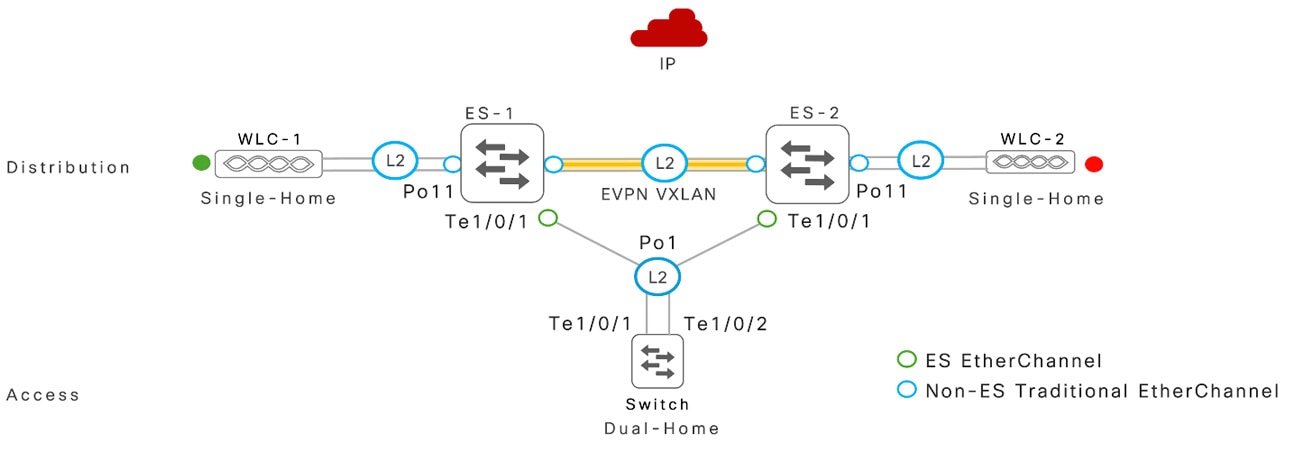
Single-homed network devices connect to individual Cisco Catalyst 9000 series switches and operate independently from dual-homed ES EtherChannel.

For improved scale, performance, and resiliency in Layer 2 networks, do not configure single-homed connections in ES mode. Traditional Layer 2 protocols, such as Spanning Tree Protocol (STP), continue to operate transparently.

To minimize the risk of network misconfiguration, ensure that the VLAN IDs mapped to single-homed and dual-homed network connections are unique.

The following illustration shows a layer 2 single-home network.

Figure 6. Layer 2 single-home network

Layer 2 single-home network

Extended Layer 2 Networks

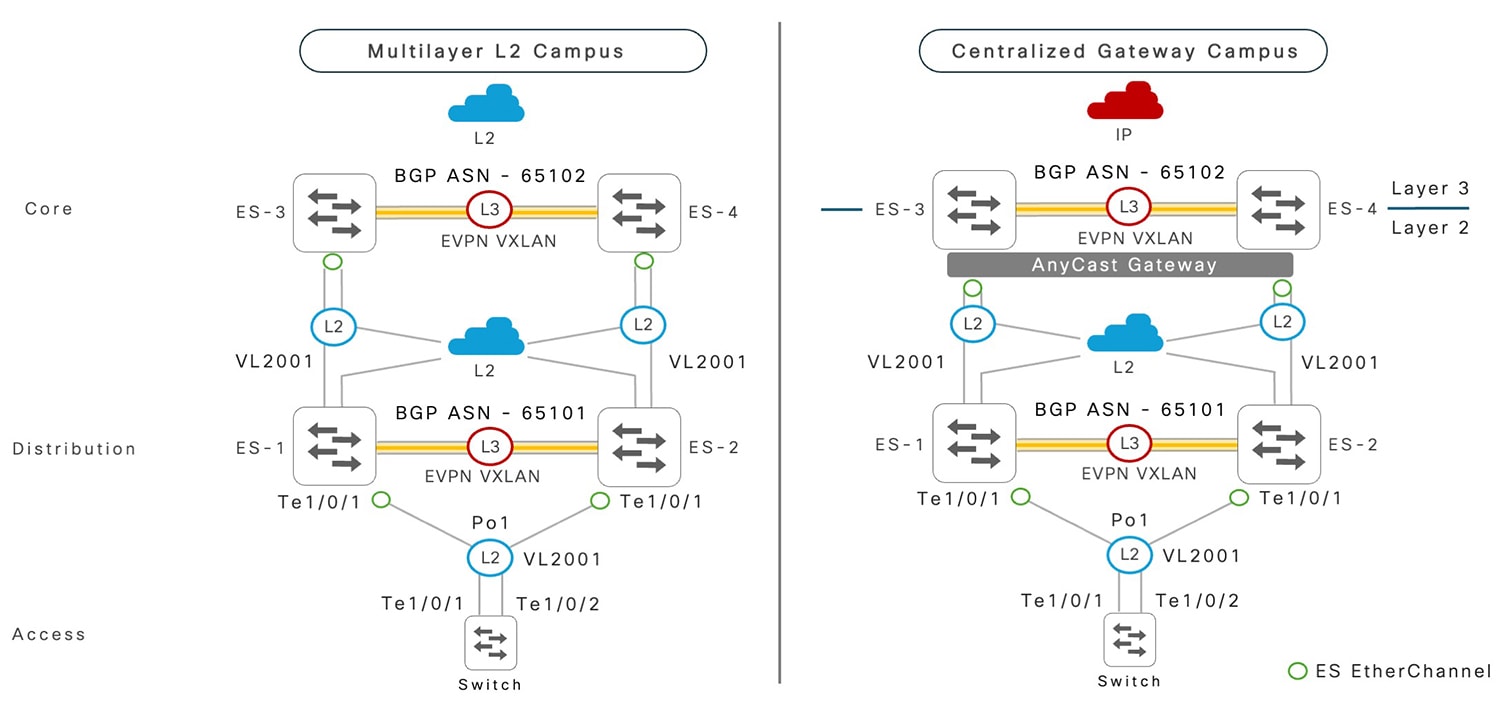
The physical network infrastructure of enterprise campuses may be built to align with connectivity requirements. Network administrators can set the Layer 2 or Layer 3 network boundaries beyond the EVPN multihoming distribution layer to address centralized IP routing, security, and other needs.

The EVPN multihoming technology provides a flexible networking solution to extend the Layer 2 network boundary with ES trunk ports configured to upstream network devices.

Cisco Catalyst 9000 series switches in ES configuration mode synchronize the MAC or IP forwarding table based on the BGP control plane. The propagation of remote MAC learning and bridging from downstream and upstream Layer 2 networks remains consistent.

The following illustration shows two possible network deployment models: a multilayer Layer 2 network, and a centralized gateway extending the Layer 2 or Layer 3 network boundary beyond the standard distribution layer.

Figure 7. Multilayer EVPN multihoming network

Multilayer EVPN multihoming network

Network Load Balancing

The well-designed end-to-end physical environment of enterprise campus networks is built upon standard principles, enabling best-in class data load sharing and redundancy during a wide-range of planned and unplanned failure conditions.

Cisco Catalyst 9000 series switches support various advanced network load balancing techniques that accelerate application performance and deliver deterministic network reliability.

EtherChannel Load Balancing

EtherChannel load balancing uses hardware-accelerated egress data forwarding rules across each EtherChannel bundled port on Cisco Catalyst 9000 series switches.

The flow-based load-balancing logic is derived from the pre-calculated hash algorithm that uses a wide range of Layer 2 or Layer 3 frame tuples, such as source and destination IP, and Layer 4 ports. Network throughput and application performance is optimized by calculating a wide tuple range, combined with the host scale and its respective application flow variations.

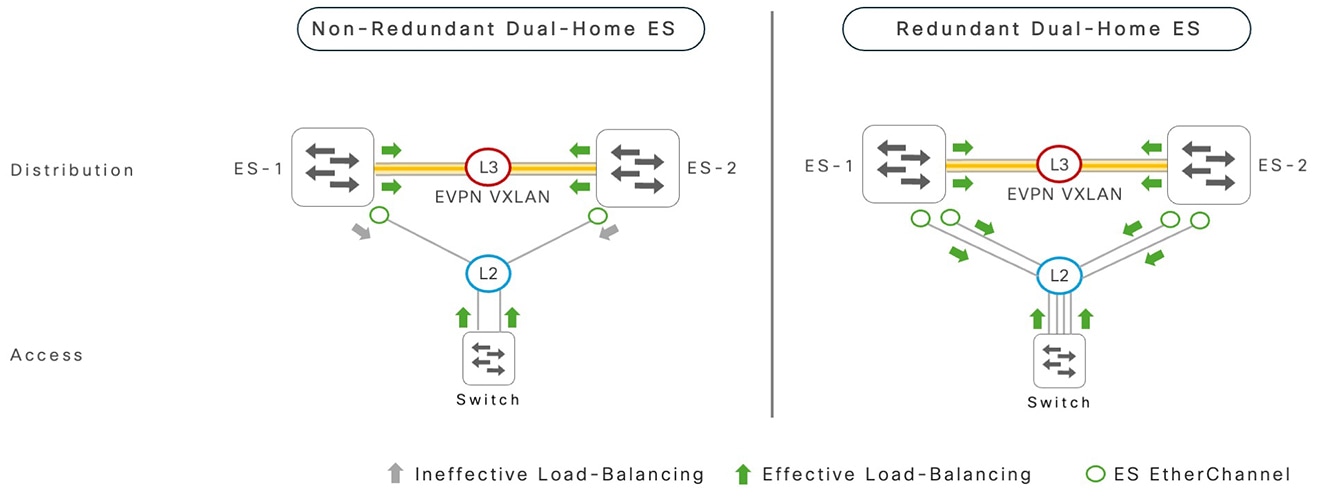
The egress Layer 2 or Layer 3 EtherChannel data load balancing is effective with two or more bundled local physical ports. Adjust the default load-balancing hash tuple on Cisco Catalyst 9000 series switches in ES configuration mode with the system global mode command: port-channel load-balance vlan-src-dst-mixed-ip-port.

The following illustration demonstrates bi-directional data forwarding on non-redundant and redundant ES EtherChannel interfaces.

Figure 8. Ethernet segment EtherChannel load balancing

Ethernet segment EtherChannel load balancing

Network administrators can modify the EtherChannel load balancing method on remotely attached Layer 2 systems for well-balanced data-load sharing on ES EtherChannel interfaces. The remote system configuration procedure is not in the scope of this document.

Equal Cost Multipath

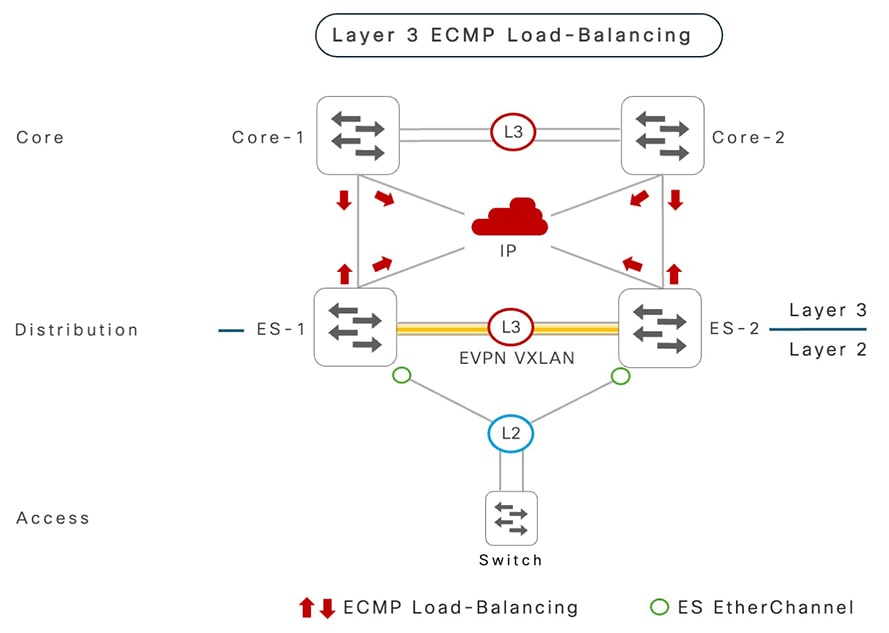
The IP gateway at the distribution layer is the demarcation point between downstream Layer 2 networks and IP routed Layer 3 connectivity to upstream core network systems. Unicast routing protocol operation over redundant and diversified Layer 3 interface connections enables the discovery of remote IP network prefixes with common metrics through each directly connected Layer 3 systems.

The Routing Information Base (RIB) and Forwarding Information Base (FIB) on Cisco Catalyst 9000 series switches are programmed to use all Layer 3 interfaces to transmit data based on comprehensive tuple-based hash results.

The hardware-accelerated Cisco Express Forwarding tables support load balancing across two or more Layer 3 ECMP paths based on per-flow calculated hashing results.

To improve Layer 3 network bandwidth utilization, it is recommended to optimize the default Cisco Express Forwarding hashing for IPv4 and IPv6 networks by including Layer 3 and Layer 4 protocol tuples. For this, use the system global command ip cef load-sharing algorithm include-ports source destination protocol on Cisco Catalyst 9000 switches in ES mode.

Data forwarding over a Layer 2 VXLAN tunnel follows the underlying IP routing tables. The inter-ES Layer 3 EtherChannel between a pair of Cisco Catalyst 9000 switches is preferred and the last resort after the loss of a local downstream Layer 2 trunk port, loss of a single-homed device reachability, or loss of the upstream Layer 3 interface-to-IP core network.

The following illustration shows bidirectional Layer 3 ECMP data forwarding during normal network operational state.

Figure 9. Layer 3 ECMP load balancing

Layer 3 ECMP load balancing

EVPN Multihoming and Single-Homing Network Coexistence

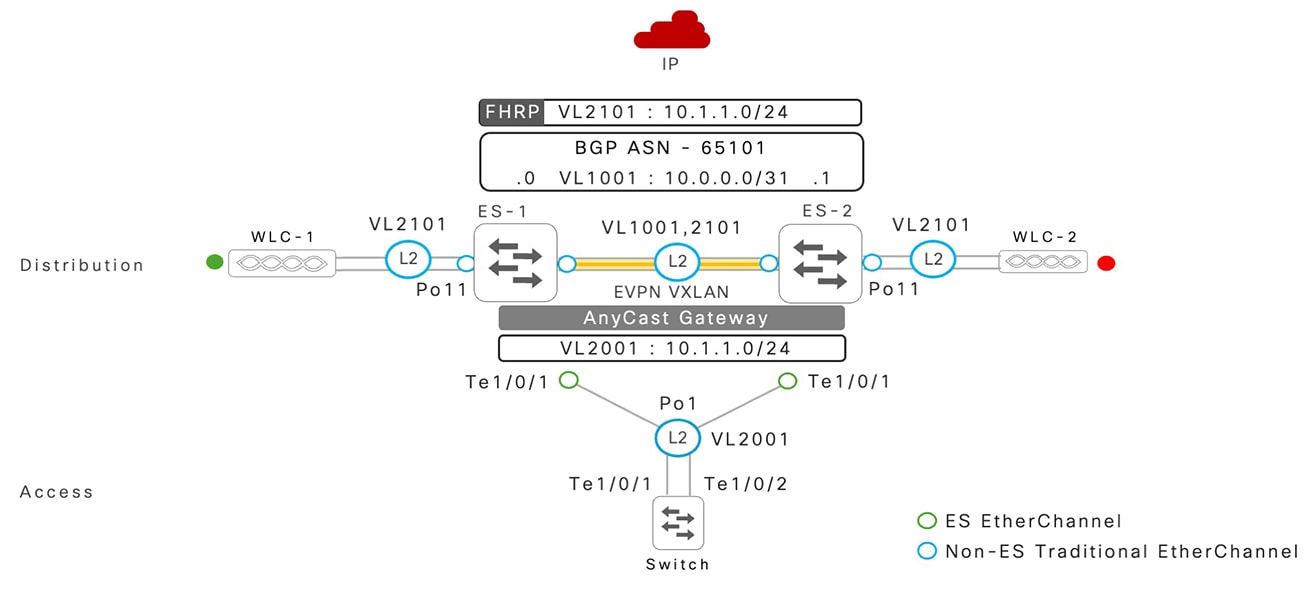
It is recommended to have physical connectivity to a pair of Cisco Catalyst 9000 series switches in the distribution layer to dual-home for load-balancing and redundancy with an EtherChannel.

EVPN multihoming is a purpose-built technology for diversified physical connection, supporting systems and network path-level redundancy. In an environment where a Layer 2 network device is single home connected to a Catalyst 9000 series switch, it can continue to operate in traditional or non-ES configuration.

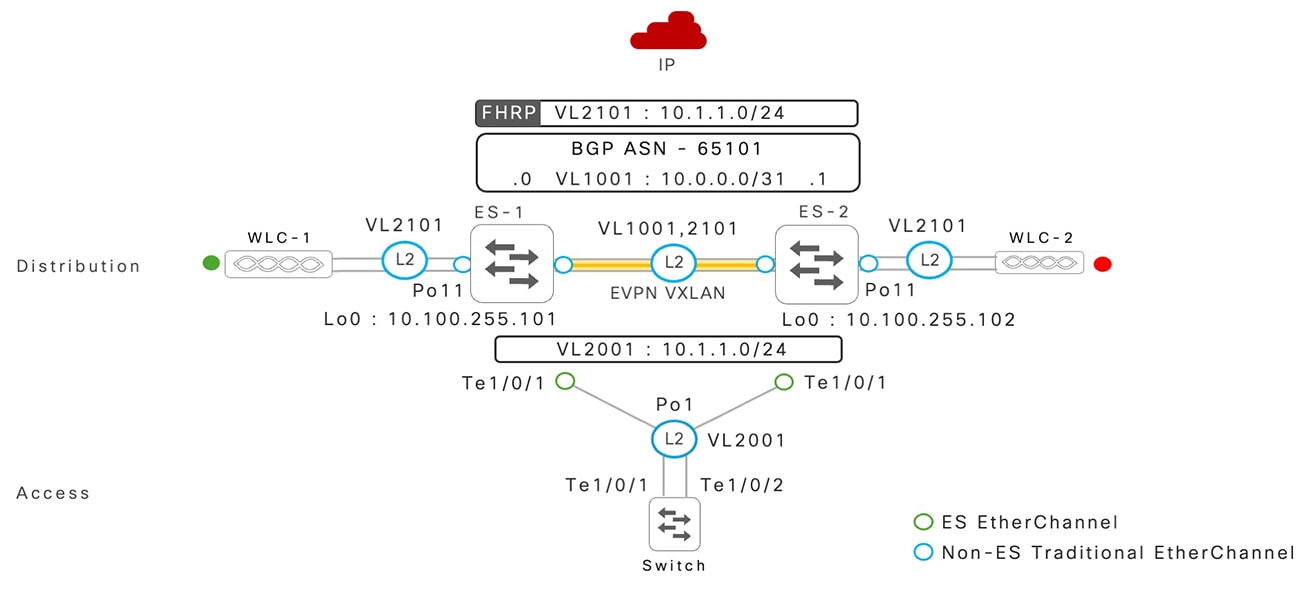
The co-existence of a dual-homed ES-enabled EtherChannel and a single-homed standalone Layer 2 port or an EtherChannel is supported. Based on the technical requirement, network administrators can implement isolated VLANs between both types of EtherChannels. For example, VLAN 101 is mapped to an ES-enabled EtherChannel, and VLAN 201 is mapped to a traditional or non-ES EtherChannel.

The following illustration is an example of a dual-homed EVPN multihoming EtherChannel coexisting with a single-home traditional EtherChannel.

Figure 10. EVPN multihoming and single-homing EtherChannel co-existence

EVPN multihoming and single-homing EtherChannel co-existence

EVPN Multihoming Non-Fabric Systems and Network Resiliency

This section describes the Cisco Catalyst 9000 series Ethernet segment system and path failures and the resilient capabilities to support non-stop network communication.

ES Path and System Failures and Resiliency

In enterprise campus networks, there are various types of unplanned failures, such as fiber cuts, system power or component failures, and so on. Similarly, the planned system outage is a standard process during Cisco IOS XE software upgrade. During any of these events, uncompromised network availability with rapid fault detection and recovery is a foundational requirement for enterprise campus networks.

Well-designed campus networks with Cisco Catalyst 9000 series switches in EVPN multihoming mode, combined with Cisco recommended best-practices deliver deterministic network convergence during various types of planned and unplanned network outages.

ES Path Failures

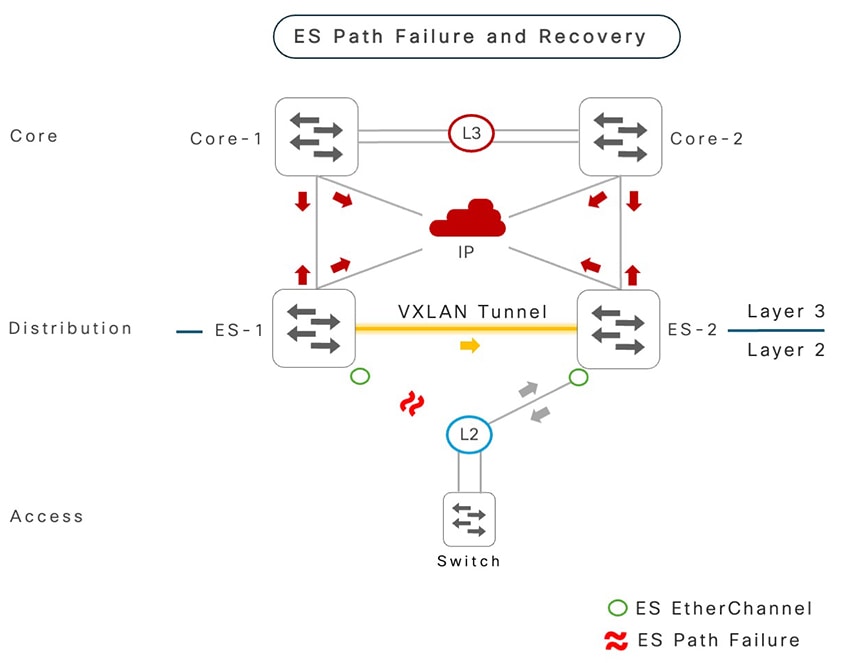
When a local Layer 2 member port fails on an ES EtherChannel, the switch performs rapid failure detection and recovers in the upstream direction data plane based on the alternate path flow hash algorithm.

During a failure in the downstream network traffic towards the hosts, the Catalyst 9000 series ES switches use a pre-programmed Layer 2 VXLAN tunnel to a remote ES neighbor switch as the last resort. The IP-based VXLAN tunnel follows the standard routing table to select the preferred egress interface, which is a directly attached Layer 3 EtherChannel interface that forwards re-routed network traffic.

The following figure shows a path failure event, and the use of an alternate path to manage bidirectional data recovery.

Figure 11. ES path failure and recovery path

ES path failure and recovery path

ES System Failure and Recovery

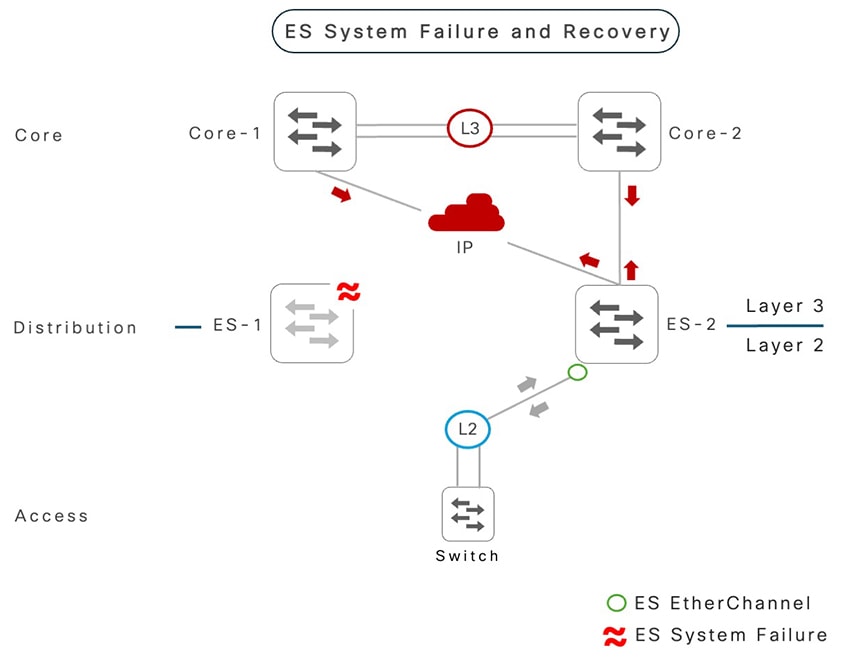
The Cisco Catalyst 9000 series switches in EVPN multihoming mode may reload due to administrative reboot, hardware component failure, and more. The ES system reset can multiple failure triggers in parallel, including iBGP peering disruptions, member-link failures within the ES EtherChannel to downstream Layer 2 network devices, and IP core network connectivity issues

Each remote network device can perform hardware-accelerated fault detection and recovery to support deterministic fast network convergence. Each remote system instantly removes the forwarding path to the failed ES switch and provides non-disruptive network communication through alternate Cisco Catalyst 9000 ES switches.

The following figure shows a switch failure event on Cisco Catalyst 9000 series switches, and the use of an alternate path to manage bidirectional data recovery.

Figure 12. ES System failure and recovery path

ES System failure and recovery path

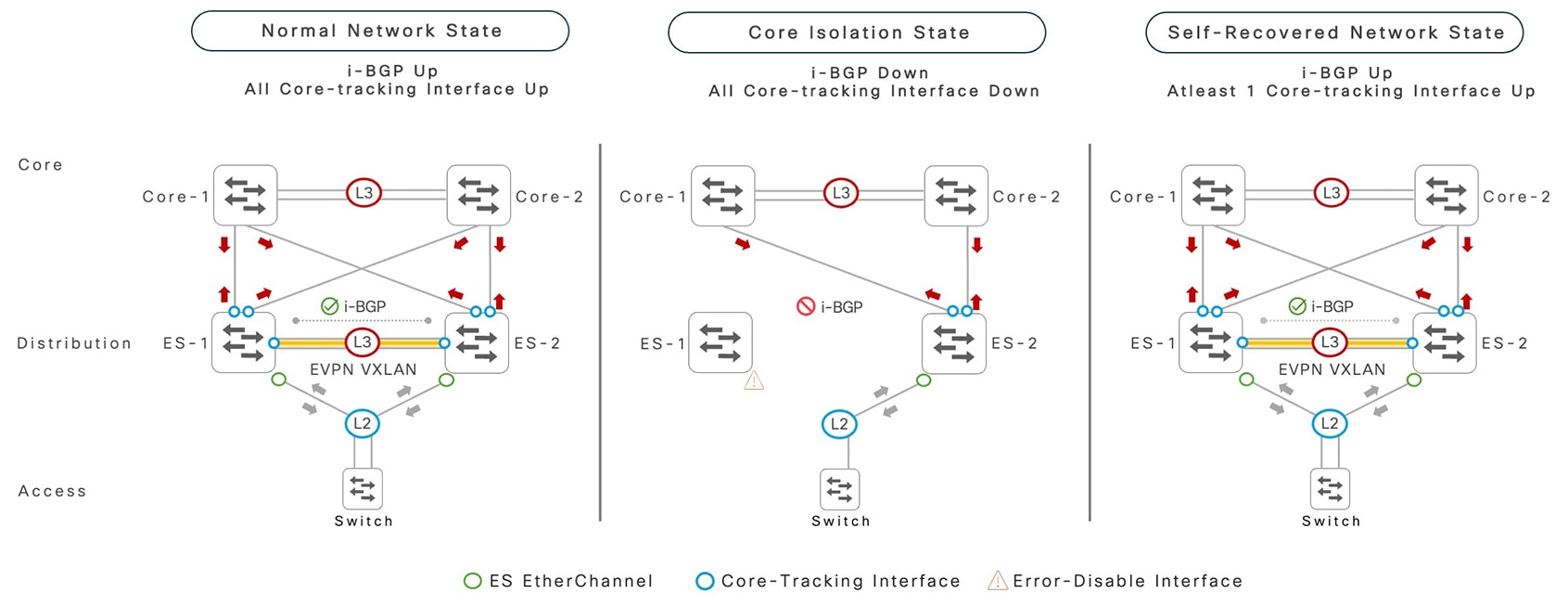
Core Isolation and Interface Tracking

The BGP control plane works as a core signaling protocol between Cisco Catalyst 9000 series switches to maintain the EVPN multihoming state machines and synchronize the forwarding tables to support fully distributed switching over a Layer 2 EtherChannel.

With multiple Layer 3 networking paths, the iBGP peering between paired switches provides multiple alternate iBGP reachability paths to protect the control plane session. It is recommended to manually track each Layer 3 routed interface state and routing path interface level configuration using the evpn multihoming core-tracking command.

In a catastrophic failure event, when an ES switch experiences Layer 3 failures on all interfaces and loses the iBGP session with the remote ES switch, then appropriate action is required on the ES EtherChannel to protect network stability and application performance. The impacted ES switch automatically error-disables the local ES ports, which steers the upstream data plane to an alternate, functioning ES switch. This state is known as core isolation.

The re-establishment of iBGP session between the Cisco Catalyst 9000 series switches through any recovered Layer 3 interface paths automatically self-initiates the local ES port error-disable recovery and gracefully reinstates data forwarding on the ES EtherChannel.

The following figure shows the state of Cisco Catalyst 9000 switch network during normal operations, and during a network fault that causes a core isolation event, followed by self-recovery after network path and iBGP control plane restoration.

Figure 13. Core isolation failure and auto recovery

Core isolation failure and auto recovery

Stateful Switchover and Non-Stop Forwarding

System-level redundancy is achieved through several integrated components, including dual route processors that provide non-stop business communication during planned failures, such as In-Service Software Upgrade (ISSU) and Extended Fast Software Upgrade (xFSU) or unplanned outage. with the Stateful Switchover (SSO) technology.

The Cisco Catalyst 9000 series modular and StackWise-based platforms support SSO capability by synchronizing a wide range of Layer 2 and Layer 3 networking protocols and delivers non-disruptive network communication with the hardware-accelerated Non-Stop Forwarding (NSF) function that provides a near hitless networking experience.

The Cisco Catalyst 9400 and 9600 series switches with redundant supervisor modules in EVPN multihoming mode provides intra-chassis system-level control and data plane redundancy from the peer ES switch. As a result, the Cisco Catalyst 9400 and 9600 series platforms enable resilient Quad-Sup NSF/SSO capabilities that increase the network uptime during failure events.

The Cisco Catalyst 9300 series switches in StackWise mode delivers similar N:1 control and data-plane redundancy.

ISSU

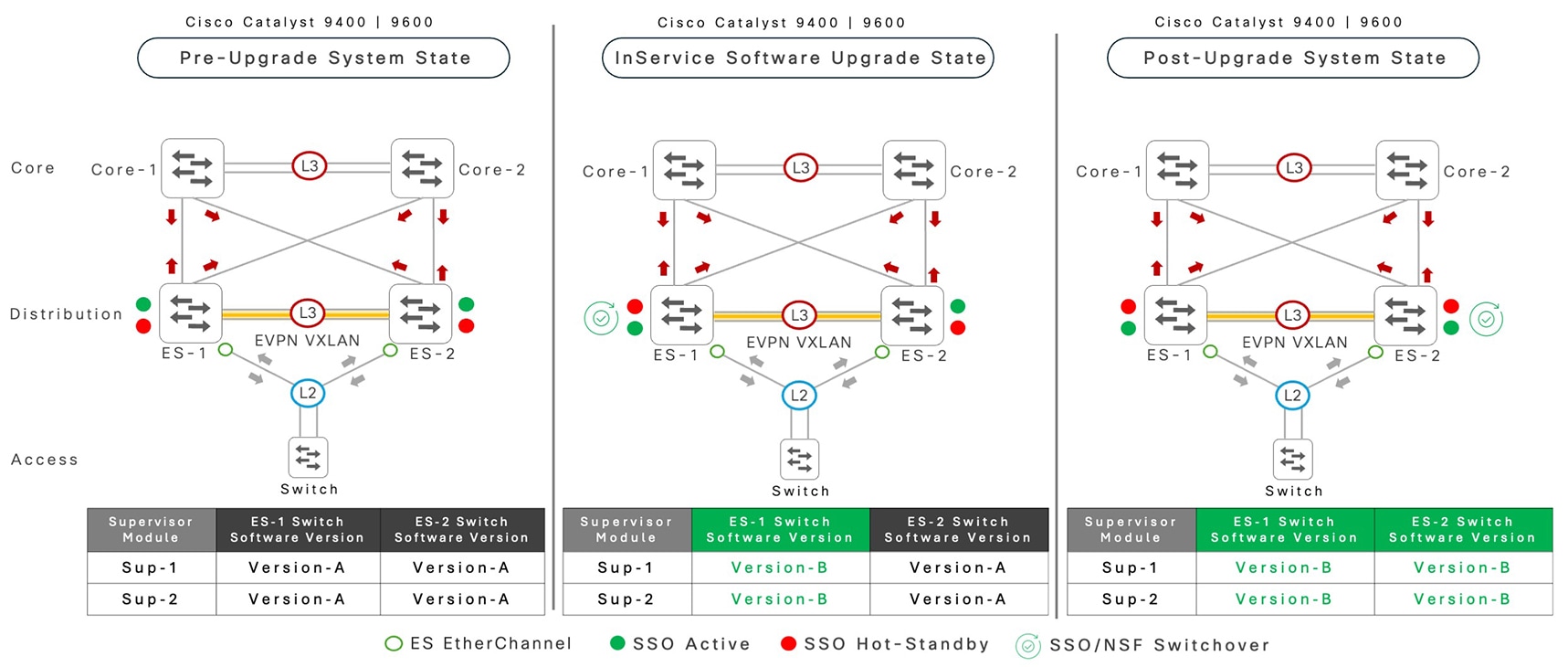
The Cisco Catalyst 9400 and 9600 series switches with redundant supervisor modules and EVPN multihoming supports intra-chassis ISSU capabilities.

Network administrators can upgrade the Cisco IOS XE software on local system supervisor engine modules by following the standard ISSU compatibility matrix.

The Cisco Catalyst 9400 and 9600 series switches in EVPN multihoming mode remain non-disruptive and do not lose the overall forwarding capacity while undergoing real-time software upgrade with ISSU. When an individual Cisco Catalyst 9400 or 9600 series switches undergo an ISSU software upgrade, the BGP EVPN control plane and EVPN multihoming networks remain resilient and operational, even when both the ES system switches run a different Cisco IOS XE software version.

Cisco recommends operating both ES switches with a common software version for a unified network experience, which provides consistent feature sets and other advancements, minimizing end-to-end network disruptions.

The following figure shows the network state of a pair of Cisco Catalyst 9400 or 9600 series switches during a Cisco IOS XE software upgrade through the ISSU procedure. Refer to Configuring ISSU on Cisco Catalyst 9400 or Configuring ISSU on Cisco Catalyst 9600 series switch configuration guides to follow the ISSU upgrade process.

Figure 14. EVPN multihoming ISSU upgrade cycle

EVPN multihoming ISSU upgrade cycle

The Cisco Catalyst 9500 series switches follow the standard Cisco IOS XE software upgrade procedure. The ISSU technology is not applicable to this fixed platform. As a standalone system, the Catalyst 9500 series switches must go through the reboot cycle for the new Cisco IOS XE software to be effective. As a result, the network capacity is reduced temporarily; however, the overall network availability remains uncompromised.

Software Maintenance Upgrade (SMU)

The Cisco Catalyst 9000 series fixed or modular class switches in EVPN multihoming mode support Software Maintenance Upgrade (SMU). SMUs are incremental software fixes that are released as an interim patch to address specific software defects or critical security issues, instead of waiting for a full Cisco IOS XE release.

The Cisco Catalyst 9000 series switches operating in EVPN multihoming mode support two methods to apply patches:

  • Hot SMU: Hot SMU software updates can be applied on Catalyst 9000 series switches in EVPN multihoming mode to fix defects or critical security issues without resetting the system. Performing SSO keeps multihomed networks resilient and available.

  • Cold SMU: Cold SMU software updates typically address the deep firmware level changes to resolve control or forwarding plane network challenges. Cold SMU updates on Cisco Catalyst 9000 series fixed or modular class switches require planned network downtime to apply the patch and reset the system.

    Network administrators can plan to apply the cold SMU individually to each ES switch and reset the switch to make the patch effective, while the other switch continues to support non-stop network data communication.

EVPN Multihoming Non-Fabric Network Configuration Guidelines

The Cisco Catalyst 9000 EVPN multihoming configuration for non-fabric networks is a three-step process. This section provides step-by-step configuration guidelines to be implemented on ES switches to successfully build the iBGP control-plane peering, followed by ES EtherChannel, and end-user or data VLAN interface for routing and bridging.

To maintain the network configuration consistent for simplified operation and troubleshooting, configure the suggested steps from each of the following sections on both the Cisco Catalyst 9000 ES switches; unless explicitly specified, unique configurations, such as IP address.

Cisco recommends additional best practices for deterministic network resiliency and performance. Refer to the section EVPN Multihoming Reference Configuration and Verification for additional recommended configuration information.

Configure an Inter-ES Layer 3 EtherChannel

This task provides a step-by-step basic configuration example to configure Layer 3 port channel interface between a pair of Cisco Catalyst 9000 series switches to support EVPN multihoming. The following reference Layer 3 EtherChannel configuration must be consistently applied on both the ES switches in a single redundancy group.

Procedure

  Command or Action Purpose

Step 1

enable

Example:

Device> enable

Enables privileged EXEC mode.

  • Enter your password if prompted.

Step 2

configure terminal

Example:

Device# configure terminal

Enters global configuration mode.

Step 3

interface port-channel channel-number

Example:

Device(config)# interface port-channel 128

Configures a port-channel interface and enters interface configuration mode.

Step 4

no switchport

Example:

Device(config-if)# no switchport

Converts default Layer 2 interface mode to Layer 3 mode.

Step 5

ip address ip-address mask

Example:

Device(config-if)# ip address 10.0.0.0 255.255.255.254

Configures a point-to-point IPv4 address to enable inter-ES Layer 3 communication.

Step 6

evpn multihoming core-tracking

Example:

Device(config-if)# evpn multihoming core-tracking

Configures inter-ES port channel link status for EVPN multi-homing core tracking purposes.

Step 7

exit

Example:

Device(config-if)# exit

Exits interface configuration mode and returns to global configuration mode.

Step 8

interface type number

Example:

Device(config-if)# interface loopback 0

Configures a global loopback interface to source iBGP peering session between two ES systems.

Step 9

ip address ip-address mask

Example:

Device(config-if)# ip address 10.200.255.101 255.255.255.255

Configures an IPv4 host address for the loopback interface.

Step 10

Advertises inter-ES port channel address and the loopback network address in IGP routing.

Example:

Refer the IP Routing Configuration Guide for guidelines.

Step 11

end

Example:

Device(config-if)# end

Exits interface configuration and returns to privileged EXEC mode.

Configure an iBGP Session

This section provides step-by-step basic configuration example to configure an iBGP peering session on L2VPN EVPN address-family over a loopback interface between a pair of Cisco Catalyst 9000 series switches to support EVPN multihoming. The following reference iBGP session configuration must be consistently applied on both the ES switches.

Procedure

  Command or Action Purpose

Step 1

enable

Example:

Device> enable

Enables privileged EXEC mode.

  • Enter your password if prompted.

Step 2

configure terminal

Example:

Device# configure terminal

Enters global configuration mode.

Step 3

router bgp autonomous-system-number

Example:

Device(config)# router bgp 65101

Configures BGP Autonomous System number using 2-bytes or 4-bytes in asplain and asdot formats, and enters router configuration mode.

Step 4

bgp router-id interface type number

Example:

Device(config-router)# bgp router-id interface Loopback0

Configures a static BGP router ID on a loopback Interface. The IPv4 address of loopback interface is automatically selected as the BGP router ID.

Step 5

neighbor ES-loopback-address remote-as autonomous-system-number

Example:

Device(config-router)# neighbor 10.200.255.102 remote-as 65101

Configures static iBGP peering by using the IP address of the Loopback interface of both the ES switches.

Step 6

neighbor ES-loopback-address update-source id

Example:

Device(config-router)# neighbor 10.200.255.102 update-source Loopback0

Configures the loopback interface IP address as source address to communicate with remote iBGP peers in the ES system.

Step 7

no bgp default ipv4-multicast id

Example:

Device(config-router)# no bgp default ipv4-multicast

Disables activating the BGP IPV4 sessions by default.

Step 8

address-family l2vpn evpn

Example:

Device(config-router)# address-family l2vpn evpn

Enters BGP L2VPN address-family configuration mode.

Step 9

neighbor ES-loopback-address activate

Example:

Device(config-router-af)# neighbor 10.200.255.102 activate

Statically activates remote i-BGP ES peer system to enable EVPN multihoming support.

  • Per-ES switch unique configuration step.

Step 10

end

Example:

Device(config-router-af)# end

Exits BGP L2VPN address-family configuration mode and returns to privileged EXEC mode.

Configure Layer 2 EVPN Multihoming

This section provides a step-by-step basic configuration example to configure global L2VPN EVPN multihoming to enable VLAN, ES EtherChannel, and VXLAN settings between a pair of Cisco Catalyst 9000 series switches. The following reference Layer 2 EVPN multihoming configuration must be consistently applied on both the ES switches.

Procedure

  Command or Action Purpose

Step 1

enable

Example:

Device> enable

Enables privileged EXEC mode.

  • Enter your password if prompted.

Step 2

configure terminal

Example:

Device# configure terminal

Enters global configuration mode.

Step 3

l2vpn evpn

Example:

Device(config)# l2vpn evpn

Enables L2VPN EVPN capability and enters EVPN configuration mode.

Step 4

anycast-gateway mac auto

Example:

Device(config)# anycast-gateway mac auto

Enables load sharing and redundancy with auto-derived common logical IP gateway MAC address (00:00:5e:00:01:01) on all SVI interfaces between both the ES systems.

Step 5

replication-type ingress

Example:

Device(config-evpn)# replication-type ingress

Enables unicast mode BUM replication to extend L2 broadcast between two ES systems.

Step 6

router id id

Example:

Device(config-evpn)# router id Loopback0

(Optional) Configures the L2VPN router ID on the loopback interface.

Step 7

multihoming peering adjacent

Example:

Device(config-evpn)# multihoming peering adjacent  

Configures direct iBGP to EVPN peering support for non-fabric networks.

Step 8

multihoming aliasing disable

Example:

Device(config-evpn)# multihoming aliasing disable

Disables auto generation and advertising of per-EVI EVPN route types.

Step 9

multicast advertise sync-only

Example:

Device(config-evpn)# multicast advertise sync-only

Enables IGMP join and leaf state synchronization and maintains consistent multicast group and receiver states between two ES systems in non-fabric networks.

Step 10

exit

Example:

Device(config-evpn)# exit

Exits EVPN configuration mode and returns to global configuration mode.

Step 11

l2vpn evpn instance evpn-instance-number vlan-based

Example:

Device(config)# l2vpn evpn instance 2001 vlan-based

Configures L2VPN EVPN virtual instance with a unique ID. Typically, the ID value is the same as VLAN ID or data VLAN ID.

Step 12

encapsulation vxlan

Example:

Device(config-evpn-evi)# encapsulation vxlan

Enables VXLAN encapsulation to bridge inter-ES data between two systems.

Step 13

exit

Example:

Device(config-evpn-evi)# exit

Exits EVPN-instance configuration mode and returns to global configuration mode.

Step 14

vlan id

Example:

Device(config)# vlan 2001

Configures a VLAN ID in the local switch database.

Step 15

vlan configuration id

Example:

Device(config)# vlan configuration 2001

Configures EVI for the edge VLAN and enters VLAN configuration mode.

Step 16

member evpn-instance ID vni L2VNI-ID

Example:

Device(config-vlan-config)# member evpn-instance 2001 vni 102001

Binds a L2VPN EVPN instance with the VLAN ID and assigns a unique VXLAN ID for the selected VLAN.

Step 17

exit

Example:

Device(config-evpn-evi)# exit

Exits VLAN configuration mode and returns to global configuration mode.

Step 18

interface nve id

Example:

Device(config)# interface nve 1

Configures a virtual NVE interface binding one or more EVIs to enable system-wide VXLAN forwarding function.

  • Enters interface configuration model

Step 19

source interface id

Example:

Device(config-if)# source interface Loopback0

Configures a Loopback interface as the source interface to enable Layer 2 data communication over the VXLAN tunnel.

Step 20

host-reachability protocol bgp

Example:

Device(config-if)# host-reachability protocol bgp 

Configures BGP as the host-reachability control-plane protocol on this interface.

Step 21

member vni L2VNI-id ingress-replication

Example:

Device(config-if)# member vni 102001 ingress-replication

Binds the Layer 2 VNI ID in ingress-replication mode.

Step 22

interface PortChannel id

Example:

Device(config-if)# interface Port-channel1

Configures a Layer 2 ES EtherChannel interface.

  • Based on the Catalyst 9000 series switche the interface range varies.

Step 23

switchport trunk allowed vlan id

Example:

Device(config-if)# switchport trunk allowed vlan 2001

Enables L2VPN data VLAN on a Layer 2 ES EtherChannel trunk port.

  • We recommend that you allow only L2VPN-enabled VLANs on ES EtherChannel.

Step 24

evpn ethernet-segment auto lacp df-election wait-time wait-time

Example:

Device(config-if)# evpn ethernet-segment auto lacp df-election wait-time 1

Enables an ES with automatic LACP system ID on an EtherChannel.

  • Configure a designated forwarder wait timers in seconds during initial port negotiation. Valid range is from 1to 10 seconds.

Step 25

end

Example:

Device(config-if)# end

Exits interface configuration mode and returns to privileged EXEC mode.

Configure Static (Non-LACP) Layer 2 EVPN Multihoming

This section shows how to configure global L2VPN EVPN multihoming to enable VLAN, ES EtherChannel, and VXLAN settings between a pair of Cisco Catalyst 9000 series switches. The following reference Layer 2 EVPN multihoming configuration must be applied on both the ES switches.

Procedure

  Command or Action Purpose

Step 1

enable

Example:

Device> enable

Enables privileged EXEC mode.

  • Enter your password if prompted.

Step 2

configure terminal

Example:

Device# configure terminal

Enters global configuration mode.

Step 3

l2vpn evpn

Example:

Device(config)# l2vpn evpn

Enables L2VPN EVPN capability and enters EVPN configuration mode.

Step 4

anycast gateway mac auto

Example:

Device(config-evpn)# anycast gateway mac auto

Enables load sharing and redundancy with the auto-derived common logical IP gateway MAC address (00:00:5e:00:01:01) on all SVI interfaces between both the ES systems.

Step 5

replication-type ingress

Example:

Device(config-evpn) #replication-type ingress 

Enables unicast mode BUM replication to extend Layer 2 broadcast between two ES systems.

Step 6

router id id

Example:

Device(config-evpn)# router id loopback0

(Optional) Configures the L2VPN router ID on a loopback interface.

Step 7

multihoming peering adjacent

Example:

Device(config-evpn)# multihoming peering adjacent

Configures direct iBGP-to-EVPN peering support for non-fabric networks.

Step 8

multihoming aliasing disable

Example:

Device(config-evpn)# multihoming aliasing disable

Disables auto generation and advertising of per-EVI EVPN route types.

Step 9

multicast advertise sync-only

Example:

Device(config-evpn)# multicast advertise sync-only 

Enables IGMP join and leaf state synchronization and maintains consistent multicast group and receiver states between two ES systems in non-fabric networks.

Step 10

exit

Example:

Device(config-evpn)# exit

Exits EVPN configuration mode and returns to global configuration mode.

Step 11

l2vpn evpn instance instance-number vlan-based

Example:

Device(config)# l2vpn evpn instance 2002 vlan-based

Configures an L2VPN EVPN virtual instance with a unique ID.

  • Typically, the ID value is same as VLAN ID or data VLAN ID.

Step 12

encapsulation vxlan

Example:

Device(config-evpn-evi)# encapsulation vxlan

Enables VXLAN encapsulation to bridge inter-ES data between two systems.

Step 13

exit

Example:

Device(config-evpn-evi)# exit

Exits EVPN-instance configuration mode and returns to global configuration mode.

Step 14

vlan id

Example:

Device(config)# vlan 2002

Configures a VLAN ID in a local switch database.

Step 15

vlan configuration id

Example:

Device(config)# vlan configuration 2002

Configures EVI for the edge VLAN and enters VLAN configuration mode.

Step 16

member evpn-instance instance-id vni l2vni-id

Example:

Device(config-vlan-config)# member evpn-instance 2002 vni 102002

Binds an L2VPN EVPN instance with the VLAN ID and assigns a unique VXLAN ID for the selected VLAN.

Step 17

exit

Example:

Device(config-vlan-config)# exit

Exits VLAN configuration mode and returns to global configuration mode.

Step 18

interface nve id

Example:

Device(config)# interface nve 1

Configures a virtual NVE interface binding one or more EVIs to enable the system-wide VXLAN forwarding function.

  • Enters interface configuration mode.

Step 19

source interface interface-id

Example:

Device(config-if)# source interface Loopback0

Configures a Loopback interface as the source interface to enable Layer 2 data communication over a VXLAN tunnel.

Step 20

host-reachability protocol bgp

Example:

Device(config-if)# host-reachability protocol bgp

Configures BGP as the host-reachability control-plane protocol on this interface.

Step 21

member vni l2vni-id ingress-replication

Example:

Device(config-if)# member vni 102002 ingress-replication

Binds the Layer 2 VNI ID in ingress-replication mode.

Step 22

l2vpn evpn ethernet-segment id

Example:

Device(config-if)# l2vpn evpn ethernet-segment 1

Configures the static Ethernet segment ID to be assigned to the Layer 2 ES physical port and enters Layer 2 VPN EVPN ethernet segment configuration mode.

Step 23

identifier type 0 H.H.H.H.H.H.H.H.H

  • identifier type 0 H.H.H.H.H.H.H.H.H
  • identifier type 3 system-mac H.H.H

Example:

Device(config-evpn-es)# identifier type 0 01.01.01.01.01.01.01.01.01
Device(config-evpn-es)# identifier type 3 a.b.c

Configure Type 0 or Type 3 manual ES ID.

  • Type 0: Static 9 octet hexadecimal value ES ID for each multihome Layer 2 network.

  • Type 3: Static 6 bytes of ESI ID system MAC format with predefined value.

Step 24

redundancy mode all-active

Example:

Device(config-evpn-es)# redundancy mode all-active

Configure EVPN multihoming redundancy mode as all-active.

Step 25

exit

Example:

Device(config-evpn-es)# exit

Exits Layer 2 VPN EVPN ethernet segment configuration mode and returns to global configuration mode.

Step 26

interface port-channel id

Example:

Device(config)# interface port-channel 1

Configures a Layer 2 ES EtherChannel interface and enters interface configuration mode.

  • The interface range varies based on the Catalyst 9000 series switch.

Step 27

switchport trunk allowed vlan vlan-id

Example:

Device(config-if)# switchport trunk allowed vlan 2002

Enables L2VPN data VLAN on a Layer 2 ES EtherChannel trunk port.

  • We recommend that you allow only L2VPN-enabled VLANs on ES EtherChannel.

Step 28

evpn ethernet-segment id

Example:

Device(config-if)# evpn ethernet-segment 1

Enables an ES with automatic LACP system ID on an EtherChannel.

  • Configure the designated forwarder wait timer in seconds during initial port negotiation. Valid value from 1 to 10 seconds.

Step 29

end

Example:

Device(config-if)# end

Exits interface configuration mode and returns to privileged EXEC mode.

Configure an Anycast Gateway SVI Interface

This section provides a step-by-step basic configuration example to configure both the ES systems as single logical IP gateway with network edge SVI interface sharing common IP address and other respective configuration settings. The following reference Layer 2 EVPN multihoming configuration must be consistently applied on both the ES switches.

Procedure

  Command or Action Purpose

Step 1

enable

Example:

Device> enable

Enables privileged EXEC mode.

  • Enter your password if prompted.

Step 2

configure terminal

Example:

Device# configure terminal

Enters global configuration mode.

Step 3

interface vlan vlan-id

Example:

Device(config)# interface Vlan 2001

Configures Layer 3 SVI interface ID and enters interface configuration mode.

Step 4

ip address ip-address mask

Example:

Device(config-if)# ip address 10.100.1.254 255.255.255.0

Assigns an IPv4 gateway address and mask for the selected VLAN. AnyCast gateway is auto enabled with common addresses between ES systems.

Step 5

ipv6 address ipv6-address mask

Example:

Device(config-if)# ipv6 address 2001:10:1:1::f/64

Assigns an IPv6 gateway address and mask for the selected VLAN. AnyCast gateway is auto enabled with common addresses between ES systems.

Step 6

end

Example:

Device(config-if)# end

Exits interface configuration mode and returns to privileged EXEC mode.

EVPN Multihoming Verification Guidelines

This section provides some examples to verify the EVPN multihoming operational state. To verify the key output the command output may be truncated to focus on critical information to monitor for day-2 operation and troubleshooting.

Inter-ES Layer 3 EtherChannel: Verify the operational state of inter-ES Layer 3 EtherChannel and each configured interfaces in bundled state.

ES1# show etherchannel 128 summary 

<snip> 
 
Group      Port-channel      Protocol         Ports 
------+---------------------+---------------+--------------------------------- 
128           Po128(RU)       LACP           Twe1/0/45(P)    Twe1/0/46(P)     


EVPN multihoming core tracking: Verify the operational state of EVPN multihoming core tracking Layer 3 interfaces to ensure that all tracked IP reachability paths are operational to maintain iBGP peering with the remote ES system. This example shows a direct inter-ES EtherChannel and two Layer 3 core network uplink connections configured with core-tracking, and all interfaces in a fully operational state.
ES1# show l2vpn evpn multihoming core-tracking  
 
Core Interface         		Status                 Protocol 
------------------------------- ---------------------- ----------- 
Port-channel128        	      up                        up 
TwentyFiveGigE1/0/47   	      up                        up 
TwentyFiveGigE1/0/48                up                        up 


iBGP session: Verify the target iBGP session between Cisco Catalyst 9000 series switches are in operational state.
ES1# show bgp l2vpn evpn summary 

BGP router identifier 10.200.255.101, local AS number 65101 
<snip> 
 
Neighbor        V      AS     MsgRcvd  MsgSent   TblVer  InQ  OutQ  Up/Down   State/PfxRcd 
10.200.255.102  4      65101   58701    57916    20508    0    0     3w1d          671 


ES EtherChannel: Verify the Layer 2 EtherChannel interface is operational with the local ES ports bundled in an EtherChannel group with the LACP protocol.
ES1# show etherchannel 1 summary 

<snip> 
 
Group     Port-channel    Protocol        Ports 
--------+-----------------+--------------+-------------------------- 
1      	Po1(SU)        LACP          Twe1/0/1(P)  


VLAN: Verify that the single VLAN ID can be mapped across multiple ES EtherChannel groups stretching the bridge-domain across multiple Layer 2 access switches.

ES-1# show vlan id 2001 

VLAN      Name       Status       Ports 
------------------------------------------------------------------------------------ 
2001      VLAN2001   active       Po1, Po2, Po3,…<snip>…, Po40


DF and non-DF roles: Verify the DF and non-DF roles for each VLAN and EVI from both the Cisco Catalyst 9000 series switches paired as a single ES EtherChannel. This example illustrates that EVI 2001 is mapped to VLAN 2001, the ES-1 switch is dynamically elected to block the sending BUM messages from the local ES EtherChannel; whereas the ES-2 switch is permitted to send the messages.

ES-1# show l2vpn evpn evi 2001 detail 

EVPN instance:          2001 (VLAN Based) 
<snip> 
    Pseudoports: 
      Port-channel1 service instance 2001 (DF state: PE-to-CE BUM blocked) 
        Routes: 0 MAC, 0 MAC/IP 
        ESI: 0150.06AB.D32E.0000.0100 
 
 
ES-2# show l2vpn evpn evi 2001 detail 

EVPN instance:          2001 (VLAN Based) 
<snip> 
    Pseudoports: 
      Port-channel1 service instance 2001 (DF state: forwarding) 
        Routes: 0 MAC, 0 MAC/IP 
        ESI: 0150.06AB.D32E.0000.0100 


MAC table: Verify the locally learned MAC address through the standard data-plane technique from the downstream Layer 2 access network device.
ES-1# show mac address dynamic vlan 2001 

                       Mac Address Table 
---------------------------------------------------------------- 
Vlan     Mac Address        Type              Ports 
---------------------------------------------------------------- 
2001    648f.3e42.c142      DYNAMIC            Po2 
2001    5006.abd3.2ec2      DYNAMIC            Po3 
2001    5006.abd2.76c2      DYNAMIC            Po4 


L2VPN: Verify that each MAC and IP address entries have reachability information through the local ES EtherChannel: VLAN ID and the remote ES peer switch Loopback IP address

For example, on ES-1 switch the endpoint IP address 10.1.1.1 is only reachable through the remote ES-2 switch. Hence all data traffic to this host is sent over L2 VXLAN tunnel from ES-1 to ES-2. However, the remaining hosts are discovered over local ES EtherChannel, and MAC and IP addresses are synchronized with the remote ES-2 neighbor. The ES-1 switch prefers local ES EtherChannel interface and upon local path failure it instantly re-routes to the remote ES-2 through the L2 VXLAN tunnel destination Loopback address 10.200.255.102.

ES1# show l2vpn evpn mac ip evi 2001 

IP Address        EVI   	VLAN     MAC Address    	Next Hop(s) 
------------------------------------------------------------------------------------------- 
10.1.1.1          2001  	2001     5006.abd3.2e42 	10.200.255.102 
10.1.1.2          2001  	2001     648f.3e42.c142 	Po2:2001 
                                                             10.200.255.102 
10.1.1.3          2001         2001     5006.abd3.2ec2 	Po3:2001 
                                                              10.200.255.102 
10.1.1.4          2001         2001     5006.abd2.76c2        Po4:2001 
                                                              10.200.255.102 

ARP table: Like the standard data plane-based learned local MAC table, the IPv4 ARP or IPv6 ND table represents the ARP/ND entries learned from the local ES EtherChannel. Data plane forwarding to unlisted endpoints reachability is managed through a secondary L2VPN table as shown in the output of the show l2vpn evpn mac ip evi command.
ES1# show ip arp vlan 2001 

Protocol         Address          Age (min)  Hardware Addr       Type   Interface 
Internet        10.1.1.254            -      0000.5e00.0101      ARPA   Vlan2001 
Internet        10.1.1.2             17      648f.3e42.c142      ARPA   Vlan2001 
Internet        10.1.1.3             13      5006.abd3.2ec2      ARPA   Vlan2001 
Internet        10.1.1.4              4      5006.abd2.e042      ARPA   Vlan2001 


EVPN Multihoming Reference Configuration and Verification

This section provides EVPN multihoming key reference deployment configuration examples to enable a flexible Layer 2 and Layer 3 networking solution with EVPN multihoming on Cisco Catalyst 9000 series switches.

These reference configurations includes the required baseline configuration to implement each use case. The configuration example includes various Cisco-validated best practices to support better scale and network resiliency for rapid fault detection and recovery.

IP Routed Core Networks

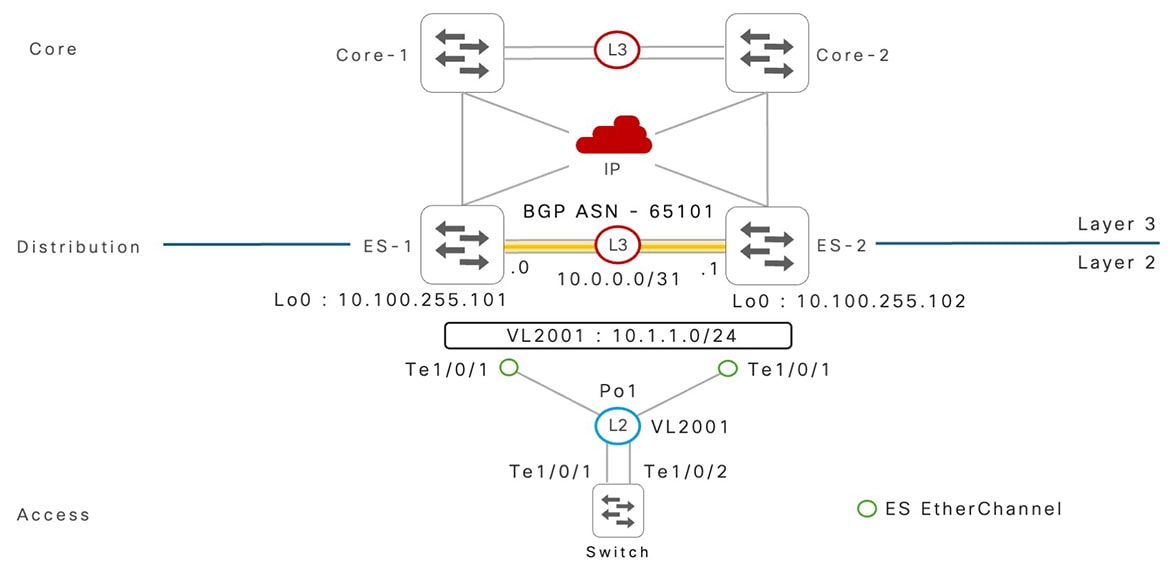
This network deployment model provides reference configurations to implement EVPN multihoming on Cisco Catalyst 9000 series switches that support Layer 2 and Layer 3 network boundary in the campus distribution layer.

The downstream Layer 2 network is built with a fully distributed and loop-free Layer 2 network, combined with IP gateway redundancy with anycast gateway, and supports standard IP routing and ECMP-based forwarding with upstream core network devices.

Figure 15. IP routed core network reference deployment
IP routed core network deployment

Step

ES1

ES2

1: Global configuration

! 
system mtu 9100 
! 
port-channel load-balance vlan-src-dst-mixed-ip-port 
ip cef load-sharing algorithm include-ports 
 source destination protocol 
! 
ip tcp mss 8000 
ip tcp window-size 262144 
ip tcp path-mtu-discovery 
! 
! 
system mtu 9100 
! 
port-channel load-balance vlan-src-dst-mixed-ip-port 
ip cef load-sharing algorithm include-ports 
 source destination protocol 
! 
ip tcp mss 8000 
ip tcp window-size 262144 
ip tcp path-mtu-discovery 
! 

2: Inter-ES Layer 3 EtherChannel

! 
interface Port-Channel 128 
 description CONNECTED TO EVPN MH SW-2 
 no switchport 
 ip address 10.0.0.0 255.255.255.254 
 ip ospf network point-to-point 
 ip ospf multi-area 0 
 ip ospf 100 area 101 
 ip ospf 100 cost 10 
 carrier-delay msec 0 
 hold-queue 4094 in 
 hold-queue 4094 out 
 evpn multihoming core-tracking 
! 
! 
interface Port-Channel 128 
 description CONNECTED TO EVPN MH SW-1 
 no switchport 
 ip address 10.0.0.1 255.255.255.254 
 ip ospf network point-to-point 
 ip ospf multi-area 0 
 ip ospf 100 area 101 
 ip ospf 100 cost 10 
 carrier-delay msec 0 
 hold-queue 4094 in 
 hold-queue 4094 out 
 evpn multihoming core-tracking 
! 

3: IGP routing and core interface

! 
router ospf 100 
 router-id 10.200.255.1 
 max-metric router-lsa include-stub 
  summary-lsa external-lsa on-startup wait-for-bgp  
 nsf cisco  
 fast-reroute per-prefix enable prefix-priority low 
 area 101 stub no-summary 
 passive-interface default 
 no passive-interface Port-Channel 128 
 no passive-interface HundredGig1/0/49 
 no passive-interface HundredGig1/0/50 
! 
interface Loopback 0 
 ip address 10.100.255.101 255.255.255.255 
 ip ospf 100 area 0 
! 
Interface range HundredGig1/0/49-50 
 description CONNECTED TO CORE DEVICES 
 ip ospf 100 area 0 
 ip ospf network point-to-point 
 carrier-delay msec 0 
 hold-queue 4094 in 
 hold-queue 4094 out 
 evpn multihoming core-tracking 
! 
! 
router ospf 100 
 router-id 10.200.255.2 
 max-metric router-lsa include-stub summary-lsa 
   external-lsa on-startup wait-for-bgp  
 nsf cisco  
 fast-reroute per-prefix enable prefix-priority low 
 area 101 stub no-summary 
 passive-interface default 
 no passive-interface Port-Channel 128 
 no passive-interface HundredGig1/0/49 
 no passive-interface HundredGig1/0/50 
! 
interface Loopback 0 
ip address 10.100.255.102 255.255.255.255 
 ip ospf 100 area 0 
! 
Interface range HundredGig1/0/49-50 
 description CONNECTED TO CORE DEVICES 
 ip ospf 100 area 0 
 ip ospf network point-to-point 
 carrier-delay msec 0 
 hold-queue 4094 in 
 hold-queue 4094 out 
 evpn multihoming core-tracking 
! 

4: iBGP routing

! 
router bgp 65101 
 template peer-policy 
  ES-PEER-POLICY 
  send-community both 
 ! 
 template peer-session 
   ES-PEER-SESSION-POLICY 
  remote-as 65101 
  description EVPN-MH-DIST-1-PEER  
  update-source Loopback0 
  fall-over host-route 
 ! 
 bgp router-id interface Loopback0 
 bgp log-neighbor-changes 
 bgp graceful-restart 
 no bgp default ipv4-unicast 
 neighbor 10.100.255.102 inherit peer-session 
  ES-PEER-SESSION-POLICY 
 ! 
 address-family l2vpn evpn 
  bgp nexthop trigger critical-delay 0 
  neighbor 10.100.255.102 activate 
  neighbor 10.100.255.102 send-community both 
  neighbor 10.100.255.102 inherit peer-policy 
   ES-PEER-POLICY 
 ! 
! 
router bgp 65101 
 template peer-policy 
   ES-PEER-POLICY 
  send-community both 
 ! 
 template peer-session 
  ES-PEER-SESSION-POLICY 
  remote-as 65101 
  description EVPN-MH-DIST-1-PEER  
  update-source Loopback0 
  fall-over host-route 
 ! 
 bgp router-id interface Loopback0 
 bgp log-neighbor-changes 
 bgp graceful-restart 
 no bgp default ipv4-unicast 
 neighbor 10.100.255.102 inherit peer-session 
  ES-PEER-SESSION-POLICY 
 ! 
 address-family l2vpn evpn 
  bgp nexthop trigger critical-delay 0 
  neighbor 10.100.255.101 activate 
  neighbor 10.100.255.101 send-community both 
  neighbor 10.100.255.101 inherit peer-policy 
   ES-PEER-POLICY 
 ! 

5: Global L2VPN

! 
l2vpn evpn 
advertise mac disable 
anycast-gateway mac auto 
multicast advertise sync-only 
multihoming aliasing disable 
multihoming peering adjacent 
replication-type ingress 
router-id Loopback 0 
! 
! 
l2vpn evpn 
advertise mac disable 
anycast-gateway mac auto 
multicast advertise sync-only 
multihoming aliasing disable 
multihoming peering adjacent 
replication-type ingress 
router-id Loopback 0 
! 

6: VLAN and MAC VRF

! 
vlan 2001 
 name DATA_VLAN 
! 
l2vpn evpn instance 2001 vlan-based 
 encapsulation vxlan 
! 
vlan configuration 2001 
 member evpn-instance 101 vni 12001 
! 
 interface nve 1 
 source-interface Loopback 0 
 host-reachability protocol bgp 
 member vni 12001 ingress-replication 
! 
! 
vlan 2001 
 name DATA_VLAN 
! 
l2vpn evpn instance 2001 vlan-based 
 encapsulation vxlan 
! 
vlan configuration 2001 
 member evpn-instance 101 vni 12001 
! 
 interface nve 1 
 source-interface Loopback 0 
 host-reachability protocol bgp 
 member vni 12001 ingress-replication 

!

7: ES EtherChannel

! 
interface Port-Channel 1 
 description CONNECTED TO L2 ACCESS  
 switchport trunk allowed vlan 2001 
 evpn ethernet-segment auto lacp df-election 
   wait-time 1 
! 
! 
interface Port-Channel 1 
 description CONNECTED TO L2 ACCESS  
 switchport trunk allowed vlan 2001 
 evpn ethernet-segment auto lacp 
    df-election wait-time 1 
! 

8: AnyCast Gateway SVI interface

! 
interface Vlan 2001 
 ip address 10.1.1.254 255.255.255.0 
 ip ospf 100 area 101 
! 
! 
interface Vlan 2001 
 ip address 10.1.1.254 255.255.255.0 
ip ospf 100 area 101 
! 

Extended Multilayer Core Networks

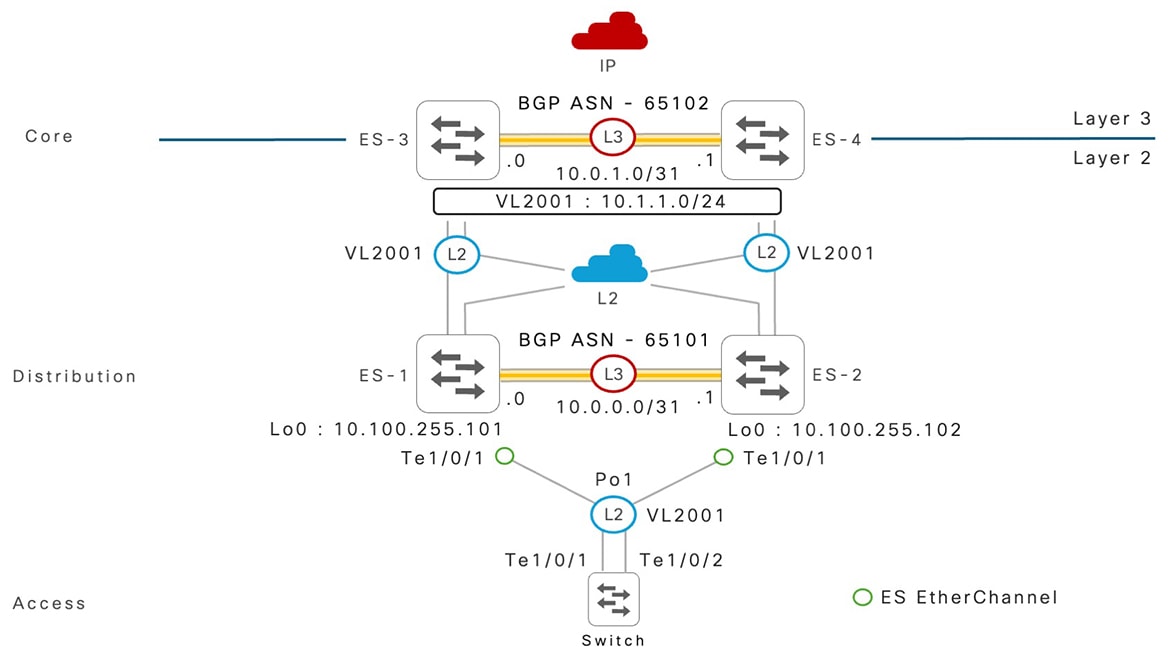
This network deployment model provides reference configurations to implement EVPN multihoming on Cisco Catalyst 9000 series switches that support a extended Layer 2 network boundary beyond the campus distribution layer.

The downstream and upstream Layer 2 networks are built with a fully distributed and loop-free Layer 2 network. The core and distribution layer Cisco Catalyst 9000 series switches implemented in EVPN multihoming mode centralizes IP gateway redundancy with anycast gateway in the core layer and can support standard IP routing and ECMP-based forwarding with upstream network devices.

This section provides a reference extended Layer 2 network configuration of Cisco Catalyst 9000 series switches in the distribution layer. The core layer EVPN multihoming configuration follows similar guidelines as described in the IP Routed Core Networks deployment scenario.

Figure 16. Extended multilayer core network reference deployment

Extended multilayer core network deployment

ES1

ES2

1: Global configuration

! 
system mtu 9100 
! 
port-channel load-balance 
  vlan-src-dst-mixed-ip-port 
ip cef load-sharing algorithm include-ports 
  source destination protocol 
! 
ip tcp mss 8000 
ip tcp window-size 262144 
ip tcp path-mtu-discovery 
! 

ES-2 
! 
system mtu 9100 
! 
port-channel load-balance 
 vlan-src-dst-mixed-ip-port 
ip cef load-sharing algorithm include-ports 
 source destination protocol 
! 
ip tcp mss 8000 
ip tcp window-size 262144 
ip tcp path-mtu-discovery 
! 

2: Inter-ES Layer 3 EtherChannel

! 
interface Port-Channel 128 
 description CONNECTED TO EVPN MH SW-2 
 no switchport 
ip address 10.0.0.0 255.255.255.254 
 ip ospf network point-to-point 
 ip ospf multi-area 0 
 ip ospf 100 area 101 
 ip ospf 100 cost 10 
 carrier-delay msec 0 
 hold-queue 4094 in 
 hold-queue 4094 out 
 evpn multihoming core-tracking 
! 
! 
interface Port-Channel 128 
 description CONNECTED TO EVPN MH SW-1 
 no switchport 
 ip address 10.0.0.1 255.255.255.254 
 ip ospf network point-to-point 
 ip ospf multi-area 0 
 ip ospf 100 area 101 
 ip ospf 100 cost 10 
 carrier-delay msec 0 
 hold-queue 4094 in 
 hold-queue 4094 out 
 evpn multihoming core-tracking 
! 

3: IGP routing and core interface

! 
router ospf 100 
 router-id 10.200.255.1 
 max-metric router-lsa include-stub 
  summary-lsa external-lsa on-startup wait-for-bgp  
 nsf cisco  
 fast-reroute per-prefix enable prefix-priority low 
 area 101 stub no-summary 
 passive-interface default 
 no passive-interface Port-Channel 128 
 no passive-interface HundredGig1/0/49 
 no passive-interface HundredGig1/0/50 
! 
interface Loopback 0 
 ip address 10.100.255.101 255.255.255.255 
 ip ospf 100 area 0 
! 
Interface range HundredGig1/0/49-50 
 description CONNECTED TO CORE DEVICES 
 ip ospf 100 area 0 
 carrier-delay msec 0 
 hold-queue 4094 in 
 hold-queue 4094 out 
 evpn multihoming core-tracking 
! 
! 
router ospf 100 
 router-id 10.200.255.2 
 max-metric router-lsa include-stub summary-lsa 
  external-lsa on-startup wait-for-bgp  
 nsf cisco  
 fast-reroute per-prefix enable prefix-priority low 
 area 101 stub no-summary 
 passive-interface default 
 no passive-interface Port-Channel 128 
 no passive-interface HundredGig1/0/49 
 no passive-interface HundredGig1/0/50 
! 
interface Loopback 0 
 ip address 10.100.255.102 255.255.255.255 
 ip ospf 100 area 0 
! 
Interface range HundredGig1/0/49-50 
 description CONNECTED TO CORE DEVICES 
 ip ospf 100 area 0 
 carrier-delay msec 0 
 hold-queue 4094 in 
 hold-queue 4094 out 
 evpn multihoming core-tracking 
! 

4: iBGP routing

! 
router bgp 65101 
 template peer-policy ES-PEER-POLICY 
  send-community both 
 ! 
 template peer-session 
   ES-PEER-SESSION-POLICY 
  remote-as 65101 
  description EVPN-MH-DIST-1-PEER  
  update-source Loopback0 
  fall-over host-route 
 ! 
 bgp router-id interface Loopback0 
 bgp log-neighbor-changes 
 bgp graceful-restart 
 no bgp default ipv4-unicast 
 neighbor 10.100.255.102 inherit peer-session 
   ES-PEER-SESSION-POLICY 
 ! 
 address-family l2vpn evpn 
  bgp nexthop trigger critical-delay 0 
  neighbor 10.100.255.102 activate 
  neighbor 10.100.255.102 send-community both 
  neighbor 10.100.255.102 inherit peer-policy 
    ES-PEER-POLICY 
 ! 
! 
router bgp 65101 
 template peer-policy ES-PEER-POLICY 
  send-community both 
 ! 
 template peer-session 
   ES-PEER-SESSION-POLICY 
  remote-as 65101 
  description EVPN-MH-DIST-1-PEER  
  update-source Loopback0 
  fall-over host-route 
 ! 
 bgp router-id interface Loopback0 
 bgp log-neighbor-changes 
 bgp graceful-restart 
 no bgp default ipv4-unicast 
 neighbor 10.100.255.102 inherit peer-session
  ES-PEER-SESSION-POLICY 
 ! 
 address-family l2vpn evpn 
  bgp nexthop trigger critical-delay 0 
  neighbor 10.100.255.101 activate 
  neighbor 10.100.255.101 send-community both 
  neighbor 10.100.255.101 inherit peer-policy 
   ES-PEER-POLICY 
 ! 

5: Global L2VPN

! 
l2vpn evpn 
advertise mac disable 
anycast-gateway mac auto 
multicast advertise sync-only 
multihoming aliasing disable 
multihoming peering adjacent 
replication-type ingress 
router-id Loopback 0 
! 
! 
l2vpn evpn 
advertise mac disable 
anycast-gateway mac auto 
multicast advertise sync-only 
multihoming aliasing disable 
multihoming peering adjacent 
replication-type ingress 
router-id Loopback 0 
! 

6: VLAN and MAC VRF

! 
vlan 2001 
 name DATA_VLAN 
! 
l2vpn evpn instance 2001 vlan-based 
 encapsulation vxlan 
! 
vlan configuration 2001 
 member evpn-instance 101 vni 12001 
! 
 interface nve 1 
 source-interface Loopback 0 
 host-reachability protocol bgp 
 member vni 12001 ingress-replication 
! 
! 
vlan 2001 
 name DATA_VLAN 
! 
l2vpn evpn instance 2001 vlan-based 
 encapsulation vxlan 
! 
vlan configuration 2001 
 member evpn-instance 101 vni 12001 
! 
 interface nve 1 
 source-interface Loopback 0 
 host-reachability protocol bgp 
 member vni 12001 ingress-replication 
! 

7: Edge ES EtherChannel

! 
interface Port-Channel 1 
 description CONNECTED TO L2 ACCESS  
 switchport trunk allowed vlan 2001 
 evpn ethernet-segment auto lacp df-election wait-time 1 
! 
! 
interface Port-Channel 1 
 description CONNECTED TO L2 ACCESS  
 switchport trunk allowed vlan 2001 
 evpn ethernet-segment auto lacp df-election wait-time 1 
! 

8: Core ES EtherChannel

! 
interface Port-Channel 100 
 description CONNECTED TO L2 CORE  
 switchport trunk allowed vlan 2001 
 evpn ethernet-segment auto lacp df-election wait-time 1 
! 
! 
interface Port-Channel 100 
 description CONNECTED TO L2 CORE  
 switchport trunk allowed vlan 2001 
 evpn ethernet-segment auto lacp df-election wait-time 1 
! 

Single-Homed Network Coexistence

This network deployment model provides reference configurations to implement the coexistence of dual-homed EVPN multihoming and traditional mode single-homed Layer 2 network device with Cisco Catalyst 9000 series switches in the distribution layer. The single-homed network device follows the standard STP-based Layer 2 configuration and FHRP-based IP gateway redundancy. The Layer 2 bridging between non-ES trunk port follows traditional deployment models while seamlessly enabling inter-ES IP routing over the SVI interface, instead of the Layer 3 port channel for EVPN multihoming networks.

Figure 17. Single-homed network deployment scenario

Single-homed network deployment scenario

ES1

ES2

1: Global configuration

! 
system mtu 9100 
! 
port-channel load-balance 
 vlan-src-dst-mixed-ip-port 
ip cef load-sharing algorithm 
 include-ports source destination protocol 
! 
ip tcp mss 8000 
ip tcp window-size 262144 
ip tcp path-mtu-discovery 
! 
! 
system mtu 9100 
! 
port-channel load-balance 
 vlan-src-dst-mixed-ip-port 
ip cef load-sharing algorithm include-ports 
 source destination protocol 
! 
ip tcp mss 8000 
ip tcp window-size 262144 
ip tcp path-mtu-discovery 
! 

2: Inter-ES VLAN and non-ES trunk VLAN

! 
vlan 1001 
 name INTER-ES-ROUTED-VLAN 
! 
vlan 2101 
 name WIRELESS-MGMT-VLAN 
!   
! 
vlan 1001 
 name INTER-ES-ROUTED-VLAN 
! 
vlan 2101 
 name WIRELESS-MGMT-VLAN 
!   

3: Non-ES Layer 2 EtherChannel

! 
interface Port-Channel 1 
 description CONNECTED TO WLC-1 
 switchport mode trunk 
 switchport trunk allowed vlan 2101 
! 
! 
interface Port-Channel 1 
 description CONNECTED TO WLC-2 
 switchport mode trunk 
 switchport trunk allowed vlan 2101 
! 

4: Inter-ES Layer 2 non-ES EtherChannel

! 
interface Port-Channel 128 
 description CONNECTED TO EVPN MH SW-2 
 switchport mode trunk 
 switchport trunk allowed vlan 1001,2101 
 evpn multihoming core-tracking 
! 
! 
interface Port-Channel 128 
 description CONNECTED TO EVPN MH SW-1 
 switchport mode trunk 
 switchport trunk allowed vlan 1001,2101 
 evpn multihoming core-tracking 
! 

5: Inter-ES routed SVI interface

! 
interface vlan 1001 
 description INTER-ES ROUTED INTERFACE 
 ip address 10.0.0.0 255.255.255.254 
 ip ospf network point-to-point 
 ip ospf multi-area 0 
 ip ospf 100 area 101 
 ip ospf 100 cost 10 
 carrier-delay msec 0 
 hold-queue 4094 in 
 hold-queue 4094 out 
! 
! 
interface vlan 1001 
 description INTER-ES ROUTED INTERFACE 
 ip address 10.0.0.1 255.255.255.254 
 ip ospf network point-to-point 
 ip ospf multi-area 0 
 ip ospf 100 area 101 
 ip ospf 100 cost 10 
 carrier-delay msec 0 
 hold-queue 4094 in 
 hold-queue 4094 out 
! 

6: FHRP SVI Interface (non-anycast gateway)

! 
interface vlan 2101 
 description WIRELESS_MGMT_VLAN - HSRP 
 ip address 10.2.1.252 255.255.255.0 
 standby 0 ip 10.2.1.254 
 standby version 2 
! 
! 
interface vlan 2101 
 description WIRELESS_MGMT_VLAN - HSRP 
 ip address 10.2.1.253 255.255.255.0 
 standby 0 ip 10.2.1.254 
 standby version 2 
! 

7: IGP routing and core interface

! 
router ospf 100 
 router-id 10.200.255.1 
 max-metric router-lsa include-stub summary-lsa 
  external-lsa on-startup wait-for-bgp  
 nsf cisco  
 fast-reroute per-prefix enable prefix-priority low 
 area 101 stub no-summary 
 passive-interface default 
 no passive-interface Vlan1001 
 no passive-interface HundredGig1/0/49 
 no passive-interface HundredGig1/0/50 
! 
interface Loopback 0 
ip address 10.100.255.101 255.255.255.255 
 ip ospf 100 area 0 
! 
Interface range HundredGig1/0/49-50 
 description CONNECTED TO CORE DEVICES 
 ip ospf 100 area 0 
 ip ospf network point-to-point 
 carrier-delay msec 0 
 hold-queue 4094 in 
 hold-queue 4094 out 
 evpn multihoming core-tracking 
! 
! 
router ospf 100 
 router-id 10.200.255.2 
 max-metric router-lsa include-stub summary-lsa 
  external-lsa on-startup wait-for-bgp  
 nsf cisco  
 fast-reroute per-prefix enable prefix-priority low 
 area 101 stub no-summary 
 passive-interface default 
 no passive-interface Vlan1001 
 no passive-interface HundredGig1/0/49 
 no passive-interface HundredGig1/0/50 
! 
interface Loopback 0 
 ip address 10.100.255.102 255.255.255.255 
 ip ospf 100 area 0 
! 
Interface range HundredGig1/0/49-50 
 description CONNECTED TO CORE DEVICES 
 ip ospf 100 area 0 
 ip ospf network point-to-point 
 carrier-delay msec 0 
 hold-queue 4094 in 
 hold-queue 4094 out 
 evpn multihoming core-tracking 
! 

8: iBGP routing

! 
router bgp 65101 
 template peer-policy ES-PEER-POLICY 
  send-community both 
 ! 
 template peer-session ES-PEER-SESSION-POLICY 
  remote-as 65101 
  description EVPN-MH-DIST-1-PEER 
  update-source Loopback0 
  fall-over host-route 
 ! 
 bgp router-id interface Loopback0 
 bgp log-neighbor-changes 
 bgp graceful-restart 
 no bgp default ipv4-unicast 
 neighbor 10.100.255.102 inherit peer-session 
  ES-PEER-SESSION-POLICY 
 ! 
 address-family l2vpn evpn 
  bgp nexthop trigger critical-delay 0 
  neighbor 10.100.255.102 activate 
  neighbor 10.100.255.102 send-community both 
  neighbor 10.100.255.102 inherit peer-policy 
   ES-PEER-POLICY 
 ! 
! 
router bgp 65101 
 template peer-policy ES-PEER-POLICY 
  send-community both 
 ! 
 template peer-session 
  ES-PEER-SESSION-POLICY 
  remote-as 65101 
  description EVPN-MH-DIST-1-PEER 
  update-source Loopback0 
  fall-over host-route 
 ! 
 bgp router-id interface Loopback0 
 bgp log-neighbor-changes 
 bgp graceful-restart 
 no bgp default ipv4-unicast 
 neighbor 10.100.255.101 inherit peer-session
   ES-PEER-SESSION-POLICY 
 ! 
 address-family l2vpn evpn 
  bgp nexthop trigger critical-delay 0 
  neighbor 10.100.255.101 activate 
  neighbor 10.100.255.101 send-community both 
  neighbor 10.100.255.101 inherit peer-policy 
   ES-PEER-POLICY 
 ! 

9: Global L2VPN

! 
l2vpn evpn 
advertise mac disable 
anycast-gateway mac auto 
multicast advertise sync-only 
multihoming aliasing disable 
multihoming peering adjacent 
replication-type ingress 
router-id Loopback 0 
! 
! 
l2vpn evpn 
advertise mac disable 
anycast-gateway mac auto 
multicast advertise sync-only 
multihoming aliasing disable 
multihoming peering adjacent 
replication-type ingress 
router-id Loopback 0 
! 

10: VLAN and MAC VRF

! 
vlan 2001 
 name DATA_VLAN 
! 
l2vpn evpn instance 2001 vlan-based 
 encapsulation vxlan 
! 
vlan configuration 2001 
 member evpn-instance 101 vni 12001 
! 
 interface nve 1 
 source-interface Loopback 0 
 host-reachability protocol bgp 
 member vni 12001 ingress-replication 
! 
! 
vlan 2001 
 name DATA_VLAN 
! 
l2vpn evpn instance 2001 vlan-based 
 encapsulation vxlan 
! 
vlan configuration 2001 
 member evpn-instance 101 vni 12001 
! 
 interface nve 1 
 source-interface Loopback 0 
 host-reachability protocol bgp 
 member vni 12001 ingress-replication 
! 

11: Edge ES EtherChannel

! 
interface Port-Channel 1 
 description CONNECTED TO L2 ACCESS  
 switchport trunk allowed vlan 2001 
 evpn ethernet-segment auto lacp df-election wait-time 1 
! 
! 
interface Port-Channel 1 
 description CONNECTED TO L2 ACCESS  
 switchport trunk allowed vlan 2001 
 evpn ethernet-segment auto lacp df-election wait-time 1 
! 

Layer 3 Routed EVPN Multihoming Networks

This network deployment model provides reference configurations to implement the eBGP IP routing over EVPN multihoming with a dual-homed upstream Layer 3 network device, a route mode firewall.

The pair of Cisco Catalyst 9000 series switches in ES mode builds the described EVPN multihoming configuration with two VLANs to enable eBGP routing peer session over the interface IP address. Both the Catalyst 9000 series switches support bridging VLAN over ES EtherChannel, while enabling IP routing function for a single local VLAN.

The following figure shows GW-1 and GW-2 with VLAN 101 and 201 configured on the ES EtherChannel along with the L2VPN configuration. GW-1 has the SVI interface VLAN 101 with point-to-point IP for eBGP peering session with FW-1, and GW-2 has the SVI interface VLAN 201 with point-to-point IP for eBGP peering session with FW-2. IP BFD is enabled over SVI and BGP fall-over BFD is configured for rapid fault detection and recovery.


Note


Layer 3 IP routing protocol over EVPN multihoming support is limited to eBGP and static routing. All other dynamic IP routing protocols are not supported.


Figure 18. Layer 3 routed EVPN multihoming network reference deployment

Layer 3 routed EVPN multihoming network reference deployment

ES1

ES2

1: Global configuration

! 
system mtu 9100 
! 
port-channel load-balance 
 vlan-src-dst-mixed-ip-port 
ip cef load-sharing algorithm include-ports
  source destination protocol 
! 
ip tcp mss 8000 
ip tcp window-size 262144 
ip tcp path-mtu-discovery 
! 
! 
system mtu 9100 
! 
port-channel load-balance 
 vlan-src-dst-mixed-ip-port 
ip cef load-sharing algorithm 
 include-ports source destination protocol 
! 
ip tcp mss 8000 
ip tcp window-size 262144 
ip tcp path-mtu-discovery 
! 

2: Inter-ES Layer 3 EtherChannel

! 
interface Port-Channel 128 
 description CONNECTED TO EVPN MH SW-2 
 no switchport 
 ip address 10.0.0.0 255.255.255.254 
 ip ospf network point-to-point 
 ip ospf multi-area 0 
 ip ospf 100 area 101 
 ip ospf 100 cost 10 
 carrier-delay msec 0 
 hold-queue 4094 in 
 hold-queue 4094 out 
 evpn multihoming core-tracking 
! 
! 
interface Port-Channel 128 
 description CONNECTED TO EVPN MH SW-1 
 no switchport 
 ip address 10.0.0.1 255.255.255.254 
 ip ospf network point-to-point 
 ip ospf multi-area 0 
 ip ospf 100 area 101 
 ip ospf 100 cost 10 
 carrier-delay msec 0 
 hold-queue 4094 in 
 hold-queue 4094 out 
 evpn multihoming core-tracking 
! 

3: IGP routing and core interface

! 
router ospf 100 
 router-id 10.200.255.1 
 max-metric router-lsa include-stub summary-lsa 
  external-lsa on-startup wait-for-bgp  
 nsf cisco  
 fast-reroute per-prefix enable prefix-priority low 
 area 101 stub no-summary 
 passive-interface default 
 no passive-interface Port-Channel 128 
 no passive-interface HundredGig1/0/49 
 no passive-interface HundredGig1/0/50 
! 
interface Loopback 0 
 ip address 10.100.255.201 255.255.255.255 
 ip ospf 100 area 0 
! 
Interface range HundredGig1/0/49-50 
 description CONNECTED TO CORE DEVICES 
 ip ospf 100 area 0 
 ip ospf network point-to-point 
 carrier-delay msec 0 
 hold-queue 4094 in 
 hold-queue 4094 out 
 evpn multihoming core-tracking 
! 
! 
router ospf 100 
 router-id 10.200.255.2 
 max-metric router-lsa include-stub 
  summary-lsa external-lsa on-startup wait-for-bgp  
 nsf cisco  
 fast-reroute per-prefix enable prefix-priority low 
 area 101 stub no-summary 
 passive-interface default 
 no passive-interface Port-Channel 128 
 no passive-interface HundredGig1/0/49 
 no passive-interface HundredGig1/0/50 
! 
interface Loopback 0 
 ip address 10.100.255.202 255.255.255.255 
 ip ospf 100 area 0 
! 
Interface range HundredGig1/0/49-50 
 description CONNECTED TO CORE DEVICES 
 ip ospf 100 area 0 
 ip ospf network point-to-point 
 carrier-delay msec 0 
 hold-queue 4094 in 
 hold-queue 4094 out 
 evpn multihoming core-tracking 
! 

4: iBGP routing

! 
router bgp 65101 
 template peer-policy ES-PEER-POLICY 
  send-community both 
 ! 
 template peer-session 
  ES-PEER-SESSION-POLICY 
  remote-as 65101 
  description EVPN-MH-DIST-1-PEER  
  update-source Loopback0 
  fall-over host-route 
 ! 
template peer-session FIREWALL-PEER-SESSION-POLICY 
  remote-as 65100 
  description EBGP-FIREWALL-PEER 
  log-neighbor-changes 
 ! 
 bgp router-id interface Loopback0 
 bgp log-neighbor-changes 
 bgp graceful-restart 
 no bgp default ipv4-unicast 
 neighbor 10.100.255.202 inherit peer-session 
  ES-PEER-SESSION-POLICY 
 neighbor 10.1.1.1 inherit peer-session 
  FIREWALL-PEER-SESSION-POLICY 
 neighbor 10.1.1.1 fall-over bfd
 ! 
address-family ipv4  
 neighbor 10.1.1.1 activate 
! 
 address-family l2vpn evpn 
  bgp nexthop trigger critical-delay 0 
  neighbor 10.100.255.202 activate 
  neighbor 10.100.255.202 send-community both 
  neighbor 10.100.255.202 inherit peer-policy 
   ES-PEER-POLICY 
 ! 
! 
router bgp 65101 
 template peer-policy ES-PEER-POLICY 
  send-community both 
 ! 
 template peer-session 
  ES-PEER-SESSION-POLICY 
  remote-as 65101 
  description EVPN-MH-DIST-1-PEER  
  update-source Loopback0 
  fall-over host-route 
 ! 
template peer-session 
   FIREWALL-PEER-SESSION-POLICY 
  remote-as 65100 
  description EBGP-FIREWALL-PEER 
  log-neighbor-changes 
 ! 
 bgp router-id interface Loopback0 
 bgp log-neighbor-changes 
 bgp graceful-restart 
 no bgp default ipv4-unicast 
 neighbor 10.100.255.201 inherit peer-session 
  ES-PEER-SESSION-POLICY 
 neighbor 10.1.1.3 inherit peer-session 
  FIREWALL-PEER-SESSION-POLICY 
 neighbor 10.1.1.1 fall-over bfd
! 
address-family ipv4  
 neighbor 10.1.1.3 activate 
! 
 address-family l2vpn evpn 
  bgp nexthop trigger critical-delay 0 
  neighbor 10.100.255.201 activate 
  neighbor 10.100.255.201 send-community both 
  neighbor 10.100.255.201 inherit peer-policy 
    ES-PEER-POLICY 
 ! 

5: Global L2VPN

! 
l2vpn evpn 
advertise mac disable 
multihoming aliasing disable 
multihoming peering adjacent 
replication-type ingress 
router-id Loopback 0 
! 
! 
l2vpn evpn 
advertise mac disable 
multihoming aliasing disable 
multihoming peering adjacent 
replication-type ingress 
router-id Loopback 0 
! 

6: VRF and MAC VRF

! 
vlan 101 
 name FW_1_ROUTED_VLAN 
! 
vlan 201 
 name FW_2_ROUTED_VLAN 
! 
l2vpn evpn instance 101  vlan-based 
 encapsulation vxlan 
default-gateway advertise
!  
l2vpn evpn instance 201  vlan-based 
 encapsulation vxlan 
default-gateway advertise
! 
vlan configuration 101 
 member evpn-instance 101 vni 10101 
! 
vlan configuration 201 
 member evpn-instance 201 vni 10201 
! 
interface nve 1 
 source-interface Loopback 0 
 host-reachability protocol bgp 
 member vni 10101 ingress-replication 
 member vni 10201 ingress-replication 
! 
! 
vlan 101 
 name FW_1_ROUTED_VLAN 
! 
vlan 201 
 name FW_2_ROUTED_VLAN 
! 
l2vpn evpn instance 101  vlan-based 
 encapsulation vxlan 
default-gateway advertise
!  
l2vpn evpn instance 201  vlan-based 
 encapsulation vxlan 
default-gateway advertise
! 
vlan configuration 101 
 member evpn-instance 101 vni 10101 
! 
vlan configuration 201 
 member evpn-instance 121 vni 10201 
! 
interface nve 1 
 source-interface Loopback 0 
 host-reachability protocol bgp 
 member vni 10101 ingress-replication 
 member vni 10201 ingress-replication 
! 

7: ES EtherChannel

! 
interface Port-Channel 1 
 description CONNECTED TO FIREWALL 
 switchport trunk allowed vlan 101,201 
 evpn ethernet-segment auto lacp 
  df-election wait-time 1 
! 
! 
interface Port-Channel 1 
 description CONNECTED TO FIREWALL  
 switchport trunk allowed vlan 101,201 
 evpn ethernet-segment auto lacp 
   df-election wait-time 1 
! 

8: Anycast gateway SVI interface

! 
interface Vlan 101 
 description FW-1 eBGP INTERFACE 
 ip address 10.1.1.0 255.255.255.254 
 carrier-delay msec 0  
 bfd interval 100 min_rx 100 multiplier 3
 hold-queue 4094 in 
 hold-queue 4094 out 
! 
! 
interface Vlan 201 
 description FW-2 eBGP INTERFACE 
 ip address 10.1.1.2 255.255.255.254 
 carrier-delay msec 0 
 bfd interval 100 min_rx 100 multiplier 3
 hold-queue 4094 in 
 hold-queue 4094 out 
! 

Feature Information for EVPN Multihoming

The following table provides release information about the feature or features described in this module. This table lists only the software release that introduced support for a given feature in a given software release train. Unless noted otherwise, subsequent releases of that software release train also support that feature.


Note


EVPN multihoming in fabric and non-fabric networks is a controlled availability feature with Cisco Technical Assistance Center support for deployment issues.


Table 3. Feature History for EVPN Multihoming

Feature Name

Release

Feature Information

Automatic AnyCast Gateway MAC

17.18.2

Automatic SVI interface virtual MAC address assignment with the anycast gateway auto command is supported in L2VPN EVPN configuration mode.

This feature is supported on

  • Cisco Catalyst 9300 Series Switches

Core-Isolation Interface Tracking

17.18.2

Tracks combined iBGP and interface status to automatically error-disable local ES ports upon failure detection.

This feature is supported on

  • Cisco Catalyst 9300 Series Switches

Core-Isolation Interface Tracking Auto Recovery

17.18.2

Enables automatic local ES port recovery, post iBGP session restoration.

This feature is supported on

  • Cisco Catalyst 9300 Series Switches

Layer 2 Multicast Sync

17.18.2

Synchronizes the IGMPv2 or v3 Multicast group and receiver state information between a pair of ES systems.

This feature is supported on

  • Cisco Catalyst 9300 Series Switches

Terms and Definitions

Terms and their definitions used in EVPN multihoming.

Term

Definition

Anycast IP gateway

A unified IPv4 or IPv6 gateway address for each IP subnet between one or multiple pair of EVPN multihoming redundancy groups.

Anycast virtual MAC

A unified gateway link-layer MAC address for each IP subnet between one or multiple pair of EVPN multihoming redundancy groups.

Broadcast, Unknown Unicast and Multicast (BUM)

BUM category network traffic (tsuch as ARP/ND, miss MAC, Layer 2 multicast) over local Layer 2 ES trunk port or bridge across IP/VXLAN networks.

Designated Forwarder (DF)

The DF in a VTEP role auto elects the role to forward BUM traffic, preventing duplicates and loops in multihomed Layer 2 networks.

Ethernet Segment (ES)

An ES is Layer 2 port in access or trunk mode, a part of the bundled links that connects to a directly attached Layer 2 network device.

ES Identifier

The ESI is a unique auto-generated or manually assigned 10-byte value for each ES port. The pair of VTEPs in same redundancy group auto discovers and synchronizes Layer 2 ES ports to logically bind in a distributed EtherChannel group.

Redundancy Group (RG)

A pair of Catalyst 9000 series switches with a common ESI that supports a loop-free Layer 2 multipath resilient forwarding solution.

Ethernet Virtual Interface (EVI)

An Ethernet virtual network instance binding each VLAN with a unique L2VNI identifier value that extends the Layer 2 bridge network over the IP routed network.

Ingress Replication (IR)

One-In-N-Out method extending BUM traffic from a local Layer 2 port over IP/VXLAN unicast to a remote targeted VTEP IP.

IP-VRF Route-Target (RT)

RTs are extended BGP community attributes used to control the import and export of IPv4 and IPv6 network prefixes within a logically segmented IP network.

MAC VRF

A virtualized and isolated MAC address forwarding table that supports secure extended Layer 2 bridge-domain for VXLAN enabled networks.

Multicast Replication

One-In-One-Out method to extend the BUM traffic from a local Layer 2 port over IP/VXLAN to any remote VTEP registered in common a multicast group.

Non-Designated Forwarder (non-DF)

A VTEP not designated to forward BUM traffic to local VLAN/ES interfaces to prevent Layer 2 loops. The unicast/multicast traffic continues to forward based on Layer 2/Layer 3 tables.

Network Virtualization Endpoint (NVE)

A system-wide single logical interface that binds all Layer 2 and Layer 3 overlay networks, and supports to encapsulate outgoing and de-encapsulate incoming VXLAN traffic over an IP network.

MAC-VRF Route-Target (RT)

RTs are extended BGP community attributes used to control the import and export of MAC, MAC/IPv4 and MAC/IPv6 individual host prefixes within a logically extended Layer 2 network.

System MAC

MAC address ranges from the system internal pool to use for LACP system ID and other purposes.

Layer 2 Virtual Network Identifier (L2VNI)

A 24-bit value in VXLAN header assist in maintaining segmentation and extension of local VLAN or bridge-domain between VTEPs.

Layer 3 Virtual Network Identifier (L3VNI)

A 24-bit value in VXLAN header assist in maintaining IPv4/IPv6 routed data communication within each virtualized IP routing space between VTEPs.

Virtual Extensible Local Area Network (VXLAN)

An overlay networking technology converging routing and bridge networks over IP core network.

EVPN Multihoming BGP Route Types

BGP EVPN multihoming supports multiple route types that collectively provide control plane intelligence for both traditional non-fabric and fabric networks. The BGP control plane between targeted ES systems enables scalable, loop-free, all-active Layer 2 redundancy across multiple provider edge devices. BGP EVPN multihoming also supports fast convergence during unplanned link or node failures, delivering deterministic non-stop business communication within the enterprise campus networks.

Table 4. BGP route types

Route type

Description

1

Used for network-wide messaging, primarily in multihoming scenarios. It advertises the Ethernet Segment Identifier (ESI) to enable functions like split-horizon filtering, aliasing (load balancing), and fast convergence/mass MAC withdrawal in case of a link failure.

Used for network-wide messaging, primarily in multihoming scenarios. It advertises the Ethernet Segment Identifier (ESI) to enable functions like split-horizon filtering, aliasing (load balancing), and fast convergence/mass MAC withdrawal in case of a link failure.

  • EAD-Per-ES: split-horizon filtering, fast convergence/mass MAC withdrawal

    EAD-Per-EVI: aliasing. It can be achieved using the MAC IP proxy route and can be suppressed through the configuration.

2

MAC-only: can be suppressed through the configuration to reduce route scale.

MAC-IPv4: Advertises endpoint reachability information, including both the MAC and IPv4 addresses of hosts connected to the network. It provides MAC/IP address bindings which allow for ARP suppression, reducing broadcast traffic in the network.

MAC-IPv6: Same for IPv6 hosts reachability.

3

IMET: Used to set up the flooding tree for Broadcast, Unknown Unicast, and Multicast (BUM) traffic for a specific virtual network interface (VNI). It announces the source's capability and intention to use ingress replication for BUM traffic.

4

ES: Advertises the ESI and the originating router's IP address. This route is critical for the auto-discovery of multihomed Ethernet segments and the Designated Forwarder (DF) election process, which prevents duplicate BUM traffic from being sent to multihomed devices.

5

IP-Prefix: Advertises internal IP subnets and externally learned routes, typically for inter-subnet forwarding (Layer 3 routing). These routes are essential for efficient routing between different VLANs/subnets within the VXLAN fabric.

6

SMET/IGMP-MLD Proxy: Used to distribute the explicit interest of a host or virtual machine in receiving traffic for a specific multicast group (either [*,G] or [S,G]). This allows Ethernet segment switches to build a more selective forwarding list for multicast flows, avoiding unnecessary flooding.

7

IGMP/MLD Join Sync: Used in multihoming scenarios to synchronize the Internet Group Management Protocol (IGMP) or Multicast Listener Discovery (MLD) join states between a pair of Ethernet segment switches connected to the same Ethernet Segment Identifier (ESI). This ensures that if the designated forwarder fails, the backup ES switch has the correct multicast state to take over seamlessly.

8

IGMP/MLD Leave Sync: Functions similar to Type 7, but for synchronizing IGMP or MLD leave messages. This ensures that a pair of multihomed Ethernet segment switches are aware when a receiver is no longer interested in a multicast stream, allowing for efficient pruning of the multicast forwarding tree.