The documentation set for this product strives to use bias-free language. For the purposes of this documentation set, bias-free is defined as language that does not imply discrimination based on age, disability, gender, racial identity, ethnic identity, sexual orientation, socioeconomic status, and intersectionality. Exceptions may be present in the documentation due to language that is hardcoded in the user interfaces of the product software, language used based on RFP documentation, or language that is used by a referenced third-party product. Learn more about how Cisco is using Inclusive Language.
This table provides release and platform support information for the features explained in this module.
These features are available in all the releases subsequent to the one they were introduced in, unless noted otherwise.
Release
Feature Name and Description
Supported Platform
Cisco IOS XE 26.2.1ea
SPAN: Switched Port Analyzer (SPAN) feature support has been introduced.
Cisco C9550 Series Smart Switches
Cisco IOS XE 17.18.1
SPAN: SPAN mirrors traffic from source ports or VLANs to a destination port for non-intrusive network analysis.
Cisco C9350 Series Smart Switches
Cisco C9610 Series Smart Switches
Switched Port Analyzer
Switched Port Analyzer (SPAN) is a feature in Cisco switches that provides network administrators with a powerful tool for
monitoring, analyzing, and troubleshooting network traffic. This capability is essential for maintaining network health, ensuring
security, and optimizing performance by offering deep visibility into data flows without disrupting live operations.
What is SPAN?
Switched Port Analyzer (SPAN) allows network administrators to analyze network traffic passing through ports or VLANs by sending
a copy of that traffic to another port on the device. This destination port is typically connected to a network analyzer or
other monitoring or security device. SPAN copies (or mirrors) traffic received or sent (or both) on source ports or source
VLANs to a designated destination port for analysis. A key advantage of SPAN is that it does not affect the normal switching
of network traffic on the source ports or VLANs.
How SPAN works
SPAN operates by mirroring traffic from specified network locations to a dedicated monitoring port. These stages describe
how SPAN works:
Identify sources: The network administrator configures one or more source ports or VLANs from which to mirror traffic. These
sources can include traffic entering the switch (ingress), traffic leaving the switch (egress), or both
Note
Only traffic that enters or leaves source ports or traffic that enters or leaves source VLANs can be monitored by using SPAN.
Traffic routed to a source VLAN cannot be monitored. For example, if incoming traffic is being monitored, traffic that gets
routed from another VLAN to the source VLAN cannot be monitored; however, traffic that is received on the source VLAN and
routed to another VLAN can be monitored.
Designate destination: The administrator specifies a single destination port on the switch. A monitoring device, such as a
network analyzer or an intrusion detection system, connects to this destination port
Note
You must dedicate the destination port for SPAN use. Except for traffic that is required for the SPAN session, destination
ports do not receive or forward other network traffic.
Traffic mirroring: The switch duplicates all traffic passing through the configured source ports or VLANs. It then sends these
duplicated packets to the designated destination port. The original traffic continues its intended path without interruption.
Analysis and active use: The monitoring device connected to the destination port captures and analyzes the mirrored traffic,
providing insights into network behavior, application performance, and potential security threats.
Traffic injection: You can also use the SPAN destination port to inject traffic from a network security device. For example,
if you connect a Cisco Intrusion Detection System (IDS) sensor appliance to a destination port, the IDS device can send TCP
reset packets to close down the TCP session of a suspected attacker.
SPAN Concepts and Terminology
Local SPAN
Local SPAN supports a SPAN session entirely within one device; all source ports or source VLANs and destination ports are
in the same device or device stack. Local SPAN copies traffic from one or more source ports in any VLAN or from one or more
VLANs to a destination port for analysis.
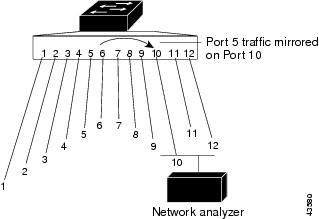
Figure 1. Example of Local SPAN Configuration on a Single Device.
All traffic on port 5 (the source port) is mirrored to port 10 (the destination port). A network analyzer on port 10 receives
all network traffic from port 5 without being physically attached to port 5.
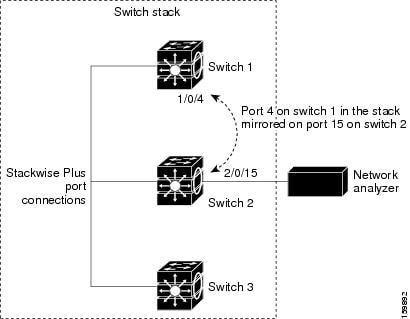
Figure 2. Example of Local SPAN Configuration on a Device Stack
SPAN Sessions
A SPAN session allows you to monitor traffic on one or more ports or VLANs, sending the monitored traffic to one or more destination
ports. A local SPAN session is an association of a destination port with source ports or source VLANs, all configured on a
single network device. These sessions gather specified ingress and egress packets, forming them into a stream of SPAN data
directed to the destination port.Key characteristics of SPAN sessions include:
Both switched and routed ports can be configured as SPAN sources and destinations.
SPAN sessions do not interfere with the normal operation of the device. However, an oversubscribed SPAN destination (for example,
a 10-Mb/s port monitoring a 100-Mb/s port) can result in dropped or lost packets.
When SPAN is enabled, each monitored packet is sent twice: once as normal traffic and once as a monitored packet. Monitoring
a large number of ports or VLANs could potentially generate significant network traffic.
You can configure SPAN sessions on disabled ports. However, a SPAN session becomes active only when the destination port and
at least one source port or VLAN for that session are enabled.
Monitored Traffic
SPAN sessions can monitor these traffic types:
Receive (Rx) SPAN—Receive (or ingress) SPAN monitors as much as possible all of the packets received by the source interface
or VLAN before any modification or processing is performed by the device. A copy of each packet received by the source is
sent to the destination port for that SPAN session.
Packets that are modified because of routing or Quality of Service (QoS)—for example, modified Differentiated Services Code
Point (DSCP)—are copied before modification.
Features that can cause a packet to be dropped during receive processing have no effect on ingress SPAN; the destination port
receives a copy of the packet even if the actual incoming packet is dropped. These features include IP standard and extended
input Access Control Lists (ACLs), ingress QoS policing, VLAN ACLs, and egress QoS policing.
Transmit (Tx) SPAN—Transmit (or egress) SPAN monitors as much as possible all of the packets sent by the source interface
after all modification and processing is performed by the device. A copy of each packet sent by the source is sent to the
destination port for that SPAN session. The copy is provided after the packet is modified.
Packets that are modified because of routing (for example, with modified time-to-live (TTL), MAC address, or QoS values) are
duplicated (with the modifications) at the destination port.
Features that can cause a packet to be dropped during transmit processing also affect the duplicated copy for SPAN. These
features include IP standard and extended output ACLs and egress QoS policing.
Both—In a SPAN session, you can also monitor a port or VLAN for both received and sent packets. This is the default.
By default, local SPAN sessions replicate source packets along with encapsulation:
Packets are sent on the destination port with the same encapsulation (untagged or IEEE 802.1Q) that they had on the source
port.
Packets of all types, including BPDU and Layer 2 protocol packets, are monitored.
Therefore, a local SPAN session can have a mixture of untagged and IEEE 802.1Q tagged packets appear on the destination port.
Device congestion can cause packets to be dropped at ingress source ports, egress source ports, or SPAN destination ports.
In general, these characteristics are independent of one another. For example:
A packet might be forwarded normally but dropped from monitoring due to an oversubscribed SPAN destination port.
An ingress packet might be dropped from normal forwarding, but still appear on the SPAN destination port.
An egress packet dropped because of device congestion is also dropped from egress SPAN.
In some SPAN configurations, multiple copies of the same source packet are sent to the SPAN destination port. For example,
a bidirectional (both Rx and Tx) SPAN session is configured for the Rx monitor on port A and Tx monitor on port B. If a packet
enters the device through port A and is switched to port B, both incoming and outgoing packets are sent to the destination
port. Both packets are the same unless a Layer 3 rewrite occurs, in which case the packets are different because of the packet
modification.
Source Ports
A source port (also called a monitored port) is a switched or routed port that you monitor for network traffic analysis.
In a local SPAN session, you can monitor source ports or VLANs for traffic in one or both directions.
The device supports any number of source ports (up to the maximum number of available ports on the device) and up to 1500
source VLANs.
A source port has these characteristics:
Each source port can be configured with a direction (ingress, egress, or both) to monitor.
It can be any port type (for example, EtherChannel, Gigabit Ethernet, and so forth).
The same source VLAN or source port cannot be part of two different SPAN sessions.
An EtherChannel member cannot be added as a SPAN source port.
It can be an access port, trunk port, routed port, or voice VLAN port.
It cannot be a destination port.
Source ports can be in the same or different VLANs.
You can monitor multiple source ports in a single session.
Source VLANs
VLAN-based SPAN (VSPAN) is the monitoring of the network traffic in one or more VLANs. The SPAN source interface in VSPAN
is a VLAN ID, and traffic is monitored on all the ports for that VLAN.
VSPAN has these characteristics:
All active ports in the source VLAN are included as source ports and can be monitored in either or both directions.
On a given port, only traffic on the monitored VLAN is sent to the destination port.
If a destination port belongs to a source VLAN, it is excluded from the source list and is not monitored.
If ports are added to or removed from the source VLANs, the traffic on the source VLAN received by those ports is added to
or removed from the sources being monitored.
You can monitor only Ethernet VLANs.
The number of source VLANs per session must not exceed 1,500. This limit is a combined total for both receive (RX) and transmit
(TX) directions.
Destination Ports
Each local SPAN session must have a destination port (also called a monitoring port) that receives a copy of traffic from
the source ports or VLANs and sends the SPAN packets to the user, usually a network analyzer.
A destination port has these characteristics:
A SPAN session can have one destination port per session. It can participate in only one SPAN session at a time (a destination
port in one SPAN session cannot be a destination port for a second SPAN session).
For a local SPAN session, the destination port must reside on the same device or device stack as the source port.
When a port is configured as a SPAN destination port, the configuration overwrites the original port configuration. When the
SPAN destination configuration is removed, the port reverts to its previous configuration. If a configuration change is made
to the port while it is acting as a SPAN destination port, the change does not take effect until the SPAN destination configuration
had been removed.
You cannot configure an EtherChannel group or an EtherChannel member interface as a SPAN destination.
It can be any Ethernet physical port. It cannot be a secure port or a source port.
When it is active, incoming traffic is disabled. The port does not transmit any traffic except that required for the SPAN
session. Incoming traffic is never learned or forwarded on a destination port.
It does not participate in any of the Layer 2 protocols (STP, VTP, CDP, DTP, PagP).
A destination port that belongs to a source VLAN of any SPAN session is excluded from the source list and is not monitored.
The maximum number of destination ports in a device or device stack is 64.
For local SPAN, source packets at the destination port appear with the original encapsulation (untagged, ISL, or IEEE802.1Q)
by default. The output of a local SPAN session can contain a mixture of untagged, ISL, or IEEE 802.1Q-tagged packets.
SPAN Interaction with Other Features
SPAN interacts with these features:
Routing—SPAN does not monitor routed traffic. VSPAN only monitors traffic that enters or exits the device, not traffic that
is routed between VLANs. For example, if a VLAN is being Rx-monitored and the device routes traffic from another VLAN to the
monitored VLAN, that traffic is not monitored and not received on the SPAN destination port.
STP—A destination port does not participate in STP while its SPAN session is active. The destination port can participate
in STP after the SPAN session is disabled. On a source port, SPAN does not affect the STP status.
CDP—A SPAN destination port does not participate in CDP while the SPAN session is active. After the SPAN session is disabled,
the port again participates in CDP.
VLAN and trunking—You can modify VLAN membership or trunk settings for source or destination ports at any time. However, changes
in VLAN membership or trunk settings for a destination port do not take effect until you remove the SPAN destination configuration.
Changes in VLAN membership or trunk settings for a source port immediately take effect, and the respective SPAN sessions automatically
adjust accordingly.
EtherChannel—You can configure an EtherChannel group as a source port. When a group is configured as a SPAN source, the entire
group is monitored.
If a physical port is added to a monitored EtherChannel group, the new port is added to the SPAN source port list. If a port
is removed from a monitored EtherChannel group, it is automatically removed from the source port list.
A physical port that belongs to an EtherChannel group cannot be configured as a SPAN source port. However, if a physical port
that belongs to an EtherChannel group is configured as a SPAN destination, it is removed from the group. After the port is
removed from the SPAN session, it rejoins the EtherChannel group. Ports removed from an EtherChannel group remain members
of the group, but they are in the inactive or suspended state.
If a physical port that belongs to an EtherChannel group is a destination port and the EtherChannel group is a source, the
port is removed from the EtherChannel group and from the list of monitored ports.
Multicast traffic can be monitored. For egress and ingress port monitoring, only a single unedited packet is sent to the SPAN
destination port. It does not reflect the number of times the multicast packet is sent.
A private-VLAN port cannot be a SPAN destination port.
A secure port cannot be a SPAN destination port.
An IEEE 802.1x port can be a SPAN source port. You can enable IEEE 802.1x on a port that is a SPAN destination port; however,
IEEE 802.1x is disabled until the port is removed as a SPAN destination.
SPAN and Device Stacks
Because the stack of switches represents one logical switch, local SPAN source ports and destination ports can be in different
switches in the stack. Therefore, the addition or deletion of switches in the stack can affect a local SPAN session. An active
session can become inactive when a switch is removed from the stack or an inactive session can become active when a switch
is added to the stack.
Restrictions for SPAN
Observe these restrictions when configuring SPAN sessions:
A device supports a maximum of 66 monitoring sessions, with up to 8 designated as source sessions to monitor and capture traffic
from specified source ports or VLANs.
Do not mix source ports and source VLANs within the same SPAN session.
A destination port cannot also be a source port within any SPAN session.
A SPAN session can have multiple destination ports, but a device stack supports a maximum of 64 destination ports.
An oversubscribed SPAN destination (for example, a 10-Mb/s port monitoring a 100-Mb/s port) can result in dropped or lost
packets.
A SPAN source port or source VLAN cannot be part of more than one SPAN session.
A SPAN session can have only one destination port, and must use a unique destination port.
An EtherChannel group cannot be a SPAN destination port.
An EtherChannel member cannot be a SPAN source port.
How to Configure SPAN
SPAN operates by mirroring traffic from specified network locations to a dedicated monitoring port. These stages describe
how SPAN works:
Identify sources: The network administrator configures one or more source ports or VLANs from which to mirror traffic. These
sources can include traffic entering the switch (ingress), traffic leaving the switch (egress), or both.
Only traffic that enters or leaves source ports or traffic that enters or leaves source VLANs can be monitored by using SPAN.
Traffic routed to a source VLAN cannot be monitored. For example, if incoming traffic is being monitored, traffic that gets
routed from another VLAN to the source VLAN cannot be monitored; however, traffic that is received on the source VLAN and
routed to another VLAN can be monitored.
Designate destination: The administrator specifies a single destination port on the switch. A monitoring device, such as a
network analyzer or an intrusion detection system, connects to this destination port.
You must dedicate the destination port for SPAN use. Except for traffic that is required for the SPAN session, destination
ports do not receive or forward other network traffic.
Traffic mirroring: The switch duplicates all traffic passing through the configured source ports or VLANs. It then sends these
duplicated packets to the designated destination port. The original traffic continues its intended path without interruption.
Analysis and active use: The monitoring device connected to the destination port captures and analyzes the mirrored traffic,
providing insights into network behavior, application performance, and potential security threats.
Traffic injection: You can also use the SPAN destination port to inject traffic from a network security device. For example,
if you connect a Cisco Intrusion Detection System (IDS) sensor appliance to a destination port, the IDS device can send TCP
reset packets to close down the TCP session of a suspected attacker.
Creating a local SPAN session
Follow these steps to create a SPAN session and specify the source (monitored) ports or VLANs and the destination (monitoring)
ports.
Procedure
Step 1
Enable
Example:
Device# configure terminal
Enables privileged EXEC mode.
Step 2
configure terminal
Example:
Device# configure terminal
Enters global configuration mode.
Step 3
no monitor session {session_number | all | local}
Example:
Device(config)# no monitor session all
Removes any existing SPAN configuration for the session.
Specifies the SPAN session and the source port (monitored port).
For session_number, the range is 1 to 66.
For interface-id , specify the source port to monitor. Valid interfaces include physical interfaces and port-channel logical
interfaces (port-channelport-channel-number). Valid port-channel numbers are 1 to 48.
For vlan-id, specify the source VLAN to monitor. The range is 1 to 4093.
Note
A single session can include multiple sources (ports or VLANs) defined in a series of commands, but you cannot combine source
ports and source VLANs in one session.
(Optional) [, | -]: Specifies a series or range of interfaces. Enter a space before and after the comma; enter a space before and after the
hyphen.
(Optional) both | rx | tx: Specifies the direction of traffic to monitor. If you do not specify a traffic direction, the source interface sends both
sent and received traffic.
both: Monitors both received and sent traffic.
rx: Monitors received traffic.
tx: Monitors sent traffic.
Note
You can use the monitor session session_numbersource command multiple times to configure multiple source ports.
Specifies the SPAN session and the destination port (monitoring port). The port LED changes to amber when the configuration
changes take effect. The LED returns to its original state (green) only after removing the SPAN destination configuration.
For local SPAN, you must use the same session number for the source and destination interfaces.
For session_number, specify the session number entered in step 4.
For interface-id, specify the destination port. The destination interface must be a physical port; it cannot be an EtherChannel, and it cannot
be a VLAN.
(Optional) [, | -]Specifies a series or range of interfaces. Enter a space before and after the comma; enter a space before and after the hyphen.
Step 6
end
Example:
Device(config)# end
Returns to privileged EXEC mode.
Step 7
how running-config
Example:
Device# show running-config
Verifies your entries.
Step 8
copy running-config startup-config
Example:
Device# copy running-config startup-config
(Optional) Saves your entries in the configuration file.
Configuration Examples for SPAN
The following sections provide configuration examples for SPAN.
This example shows how to set up SPAN session 1 for monitoring source port traffic to a destination port. First, any existing
SPAN configuration for session 1 is deleted, and then bidirectional traffic is mirrored from source Gigabit Ethernet port
1 to destination Gigabit Ethernet port 2, retaining the encapsulation method.
The monitoring of traffic received on port 1 is disabled, but traffic sent from this port continues to be monitored.
This example shows how to remove any existing configuration on SPAN session 2, configure SPAN session 2 to monitor received
traffic on all ports belonging to VLANs 1 through 3, and send it to destination Gigabit Ethernet port 2. The configuration
is then modified to also monitor all traffic on all ports belonging to VLAN 10.
This example shows how to remove any existing configuration on SPAN session 2, configure SPAN session 2 to monitor traffic
received on Gigabit Ethernet trunk port 2:

 Feedback