Simple Network Management Protocol

Understanding SNMP

SNMP (Simple Network Management Protocol) is a standard protocol used for monitoring and managing devices on IP networks.

What is SNMP?

Simple Network Management Protocol (SNMP) is an application-layer protocol for communication between managers and agents. An SNMP system consists of an SNMP manager, an SNMP agent, and a Management Information Base (MIB).

The SNMP manager can be part of a network management system (NMS), such as Cisco Prime Infrastructure. The agent and MIB reside on the device. To configure SNMP on the device, you define the relationship between the manager and the agent.

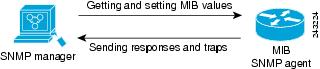
The SNMP agent contains MIB variables whose values the SNMP manager can request or change. A manager can get a value from an agent or store a value into the agent. The agent gathers data from the MIB, the repository for information about device parameters and network data. The agent can also respond to a manager's requests to get or set data.

An agent can send unsolicited traps to the manager. Traps are messages alerting the SNMP manager to a condition on the network. Traps can indicate improper user authentication, restarts, link status (up or down), MAC address tracking, closing of a Transmission Control Protocol (TCP) connection, loss of connection to a neighbor, or other significant events.

SNMP Versions

SNMP versions provide different capabilities for managing network devices. This software release supports SNMPv1, SNMPv2C, and SNMPv3.

  • SNMPv1: The Simple Network Management Protocol, is a Full Internet Standard defined in RFC 1157.

  • SNMPv2C: SNMPv2C updates SNMPv2Classic by replacing its Party-based Administrative and Security Framework with a community-string-based framework. It retains SNMPv2Classic's bulk retrieval and improved error handling.

    SNMPv2C includes:

    • SNMPv2: Version 2 of the Simple Network Management Protocol, a Draft Internet Standard defined in RFCs 1902 through 1907.

    • SNMPv2C: The community-string-based Administrative Framework for SNMPv2, an Experimental Internet Protocol defined in RFC 1901.

    Both SNMPv1 and SNMPv2C use a community-based security model. The community of managers able to access the agent’s Management Information Base (MIB) is defined by an IP address access control list and password.

    SNMPv2C includes a bulk retrieval function that retrieves tables and large quantities of information, minimizing the number of required round-trips. It also provides improved error handling with expanded error codes that distinguish different error conditions, which are reported through a single error code in SNMPv1.

  • SNMPv3: SNMPv3, Version 3 of the SNMP, is an interoperable standards-based protocol defined in RFCs 2273 to 2275. SNMPv3 provides secure access to devices by authenticating and encrypting packets over the network. It includes these security features:

    • message integrity: Ensures that a packet was not tampered with in transit.

    • authentication: Determines that the message is from a valid source.

    • encryption: Mixes the contents of a package to prevent it from being read by an unauthorized source.


      Note


      To select encryption, enter the priv keyword.


    SNMPv3 provides for both security models and security levels. A security model is an authentication strategy set up for a user and the group within which the user resides. A security level is the permitted level of security within a security model. A combination of the security level and the security model determines which security method is used when handling an SNMP packet. Available security models are SNMPv1, SNMPv2C, and SNMPv3.

The following table identifies characteristics and compares different combinations of security models and levels:

Table 1. Table 1. SNMP Security Models and Levels
Model Level Authentication Encryption Result
SNMPv1 noAuthNoPriv Community string No Uses a community string match for authentication.
SNMPv2C noAuthNoPriv Community string No Uses a community string match for authentication.
SNMPv3 noAuthNoPriv Username No Uses a username match for authentication.
SNMPv3 authNoPriv Message Digest 5 (MD5) or Secure Hash Algorithm (SHA) No Provides authentication based on the HMAC-MD5 or HMAC-SHA algorithms.
SNMPv3 authPriv MD5 or SHA Data Encryption Standard (DES) or Advanced Encryption Standard (AES)

Provides authentication based on the HMAC-MD5 or HMAC-SHA algorithms.

Allows specifying the User-based Security Model (USM) with these encryption algorithms:

  • DES 56-bit encryption in addition to authentication based on the CBC-DES (DES-56) standard.

  • 3DES 168-bit encryption

  • AES 128-bit, 192-bit, or 256-bit encryption

SNMP Manager Functions

The SNMP manager uses information in the MIB to perform various operations, as described in this table.

Table 2. SNMP Operations

Operation

Description

get-request

Retrieves a value from a specific variable.

get-next-request

Retrieves a value from a variable within a table. With this operation, an SNMP manager does not need to know the exact variable name; a sequential search is performed to find the needed variable from within a table.

get-bulk-request

Retrieves large blocks of data, such as multiple rows in a table, that would otherwise require the transmission of many small blocks of data.

Note


This command only works with SNMPv2 or later.

get-response

Replies to a get-request, get-next-request, and set-request sent by an NMS.

set-request

Stores a value in a specific variable.

trap

An unsolicited message sent by an SNMP agent to an SNMP manager when some event has occurred.


Note


We recommend that the SNMP Manager exclude the ciscoFlashFileDate MIB object from its query to avoid performance-related issues. This is because, though the ciscoFlashFileDate object is published in the MIB, the product does not support it.


SNMP Agent Functions

The SNMP agent can receive requests from one or more SNMP managers. Each request carries the NMS IP address, the number of times an NMS polls the agent, and a timestamp of polling. You can track this information for both IPv4 and IPv6 servers.

The SNMP agent responds to SNMP manager requests as follows:

  • Get a MIB variable: The SNMP agent retrieves the value of the requested MIB variable in response to an NMS request and responds to the NMS with that value.

  • Set a MIB variable: The SNMP agent changes the value of the MIB variable to the value requested by the NMS in response to an NMS message.

Use the show snmp stats hosts command to display the list of SNMP manager requests in the queue. Use the clear snmp stats hosts command to clear the queue.

The SNMP agent also sends unsolicited trap messages to notify an NMS that a significant event has occurred on the agent. Examples of trap conditions include, but are not limited to, when a port or module goes up or down, when spanning-tree topology changes occur, and when authentication failures occur.

SNMP MIB Variables Access

Cisco Prime Infrastructure 3.1 software is an example of an NMS. It uses device MIB variables to set device variables and to poll devices on the network for specific information. The results of a poll can be displayed as a graph and analyzed to troubleshoot internetworking problems, increase network performance, verify device configurations, and monitor traffic loads.

The SNMP agent gathers data from the MIB. The agent can send traps, or notifications of certain events, to the SNMP manager, which receives and processes the traps. Traps alert the SNMP manager to conditions on the network such as improper user authentication, restarts, link status (up or down), and MAC address tracking. The SNMP agent also responds to MIB-related queries sent by the SNMP manager in get-request , get-next-request , and set-request format.

Figure 1. SNMP Network

SNMP Flash MIB

The Cisco Flash MIB allows you to query flash file data from Cisco devices. The Flash MIB fetches all files from the flash file system.

To perform a Flash MIB walk, you must use the snmp mib flash cache command. This command prefetches all files into the local Flash MIB cache.

SNMP Notifications

SNMP allows the device to send notifications to SNMP managers when particular events occur. SNMP notifications can be sent as traps or inform requests. In command syntax, unless a command option allows you to select either traps or informs, the keyword traps refers to either traps or informs, or both. Use the snmp-server host command to specify whether to send SNMP notifications as traps or informs.


Note


SNMPv1 does not support informs.


Traps and Informs

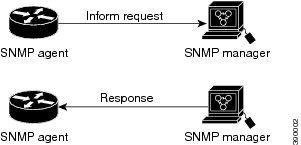
Traps are unreliable because the receiver does not send an acknowledgment when it receives a trap, and the sender cannot determine if the trap was received. When an SNMP manager receives an inform request, it acknowledges the message with an SNMP response protocol data unit (PDU). If the sender does not receive a response, the inform request can be sent again. Because informs can be resent, they are more likely than traps to reach their intended destination.

The characteristics that make informs more reliable than traps also consume more resources in the device and in the network. Unlike a trap, which is discarded as soon as it is sent, an inform request is held in memory until a response is received or the request times out. Traps are sent only once, but an inform might be resent or retried several times. The retries increase traffic and contribute to a higher overhead on the network. Therefore, traps and informs require a trade-off between reliability and resources. If it is important that the SNMP manager receive every notification, use inform requests. If traffic on the network or memory in the device is a concern and notification is not required, use traps.

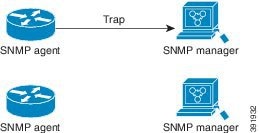
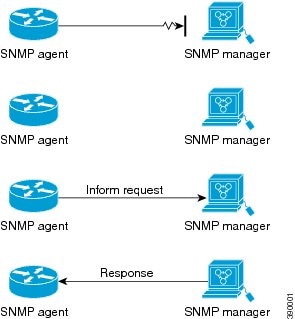
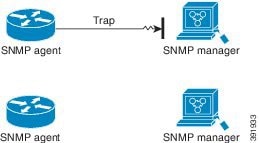
The figures below illustrate the differences between traps and informs.

The figure below shows that an agent successfully sends a trap to an SNMP manager. Although the manager receives the trap, it does not send an acknowledgment. The agent has no way of knowing that the trap reached its destination.

Figure 2. Trap Successfully Sent to SNMP Manager

In the figure below, the agent successfully sends an inform to the manager. When the manager receives the inform, a response is sent to the agent, and the agent knows that the inform reached its destination. Note that in this example, the traffic generated is twice as much as in the interaction shown in the figure above.

Figure 3. Inform Request Successfully Sent to SNMP Manager

The figure below shows an agent sending a trap to a manager that the manager does not receive. The agent has no way of knowing that the trap did not reach its destination. The manager never receives the trap because traps are not resent.

Figure 4. Trap Unsuccessfully Sent to SNMP Manager

The figure below shows an agent sending an inform to a manager that does not reach the manager. Because the manager did not receive the inform, it does not send a response. After a period of time, the agent resends the inform. The manager receives the inform from the second transmission and replies. In this example, more traffic is generated than in the scenario shown in the figure above, but the notification reaches the SNMP manager.

Figure 5. Inform Unsuccessfully Sent to SNMP Manager

Note


Whenever an SNMP process comes up, the reserved ports 161 and 162 are used. In addition to these two reserved ports, a dynamic port is also opened to run the SNMP proxy forwarder application.


SNMP ifIndex MIB Object Values

The SNMP agent's IF-MIB module comes up shortly after a reboot. As various physical interface drivers initialize, they register with the IF-MIB module, requesting an ifIndex number. The IF-MIB module assigns the next available ifIndex number on a first-come, first-served basis. Minor differences in driver initialization order from one reboot to another can result in the same physical interface getting a different ifIndex number than it had before the reboot, unless ifIndex persistency is enabled.

SNMP ENTITY-MIB Identifiers

The ENTITY-MIB contains information for managing physical entities, such as field-replaceable units (FRUs), fans, or power supplies on a device.

Each entity is identified by a unique index number, entPhysicalIndex, which accesses information about the entity in current and other MIBs. An online insertion and removal (OIR) of the entity results in the entity being assigned the next available entPhysicalIndex number, regardless of whether you insert a new entity or reinsert an existing entity.

SNMP and Syslog over IPv6

To support both IPv4 and IPv6, IPv6 network management requires both IPv6 and IPv4 transports. Syslog over IPv6 supports address data types for these transports.

Simple Network Management Protocol (SNMP) and syslog over IPv6 provide these features:

  • Support for both IPv4 and IPv6.

  • IPv6 transport for SNMP and modification of the SNMP agent to support traps for an IPv6 host.

  • SNMP- and syslog-related MIBs to support IPv6 addressing.

  • Configuration of IPv6 hosts as trap receivers.

For support over IPv6, SNMP modifies the existing IP transport mapping to simultaneously support IPv4 and IPv6. These SNMP actions support IPv6 transport management:

  • Opens User Datagram Protocol (UDP) SNMP socket with default settings.

  • Provides a new transport mechanism called SR_IPV6_TRANSPORT.

  • Sends SNMP notifications over IPv6 transport.

  • Supports SNMP-named access lists for IPv6 transport.

  • Supports SNMP proxy forwarding using IPv6 transport.

  • Verifies that the SNMP Manager feature works with IPv6 transport.

SNMP UDP ports

The SNMP process uses User Datagram Protocol (UDP) ports 161 and 162. Port 161 is for polling the device, and port 162 is for sending notifications from the agent to the server. These ports remain closed unless you configure one of the requisite commands. This design provides additional security by opening the ports only when needed, preventing a device from unnecessarily listening on a port.

Default SNMP Configuration

Table 3. Table 3. Default SNMP Configuration Settings.
Feature Default Setting
SNMP agent Disabled1.
SNMP trap receiver None configured.
SNMP traps None enabled except the trap for TCP connections (tty).
SNMP version If no version keyword is present, the default is Version 1.
SNMPv3 authentication If no keyword is entered, the default is the noauth (noAuthNoPriv) security level.
SNMP notification type If no type is specified, all notifications are sent.
1 This is the default when the device starts and the startup configuration does not have any snmp-server global configuration commands.

Restrictions for SNMP

  • SNMPv1 does not support informs.

  • SNMPv3 authentication is not supported in these scenarios:

    • If there is a change in the switch priority followed by a stack reload.

    • If a device with a lower MAC address is added to the stack, the device will be elected as the active switch if all the switches in the stack have the same priority.

  • To avoid SNMPv3 authentication failure, manually configure the SNMP engineID on the device before SNMPv3 user configuration. This configuration ensures that you can manage and administer the device, as the user is tied to the engineID.

  • The SNMP ENTITY-MIB is not supported for the Ethernet management port.

How to Configure SNMP

The following sections provide information on how to configure SNMP.

SNMP Configuration Guidelines

To open SNMP User Datagram Protocol (UDP) ports 161 and 162 and enable the SNMP agent, the device requires one of these global configuration commands:

snmp-server host, snmp-server user , snmp-server community , or snmp-server manager

When configuring SNMP, follow these guidelines:

  • Do not specify a notify view when configuring an SNMP group. The snmp-server host global configuration command auto-generates a notify view for the user and adds it to the group associated with that user. Modifying the group's notify view affects all users associated with that group.

  • To configure a remote user, specify the IP address or port number for the remote SNMP agent of the device where the user resides.

  • Before you configure remote users for a particular agent, configure the SNMP engine ID using thesnmp-server engineID global configuration command with the remote option. The remote agent's SNMP engine ID and user password compute the authentication and privacy digests. If you do not configure the remote engine ID first, the configuration command fails.

  • When configuring SNMP informs, configure the SNMP engine ID for the remote agent in the SNMP database before you send proxy requests or informs to it.

  • If a local user is not associated with a remote host, the device does not send informs for the auth (authNoPriv) and the priv (authPriv) authentication levels.

  • Exercise caution when changing the SNMP engine ID. A user's password (entered on the command line) converts to an MD5 or SHA security digest based on the password and the local engine ID. The command-line password is then destroyed, as required by RFC 2274. If the value of the engine ID changes, the security digests of SNMPv3 users become invalid. You must then reconfigure SNMP users using the snmp-server user username global configuration command. Similar restrictions require the reconfiguration of community strings when the engine ID changes.

  • When you configure the snmp-server host command with the default UDP port 162, the output of the show running-config command does not display the UDP port value. If you specify a UDP port value other than the default using the snmp-server host {host-addr} community-string udp-port value command, the UDP port number displays in the show running-config command output. You can configure the snmp-server host command with or without the default UDP port 162; however, you cannot configure both simultaneously.

The following examples are correct:

Device(config)# snmp-server host 10.10.10.10 community udp-port 163 
Device(config)# snmp-server host 10.10.10.10 community 
Device(config)# snmp-server host 10.10.10.10 community udp-port 163 
Device(config)# snmp-server host 10.10.10.10 community udp-port 162

The following examples are incorrect:

Device(config)# snmp-server host 10.10.10.10 community udp-port 163 
Device(config)# snmp-server host 10.10.10.10 community 
Device(config)# snmp-server host 10.10.10.10 community udp-port 162 
Device(config)# snmp-server host 10.10.10.10 community udp-port 163 
Device(config)# snmp-server host 10.10.10.10 community udp-port 162 
Device(config)# snmp-server host 10.10.10.10 community 

Configuring SNMP Groups and Users

Before you begin

You can specify an identification name (engine ID) for the local or remote SNMP server engine on the device. Configure an SNMP server group that maps SNMP users to SNMP views, and add new users to the SNMP group.

This section explains how to configure SNMP groups and users on the device.

Procedure

Command or Action Purpose
Step 1

enable

Example:

Device> enable

Enables privileged EXEC mode.

  • Enter your password if prompted.

Step 2

configure terminal

Example:

Device# configure terminal

Enters global configuration mode.
Step 3

snmp-server engineID { local engineid-string | remote ip-address [ udp-port port-number] engineid-string}

Example:

Device(config)# snmp-server engineID local 1234

Configures a name for either the local or remote copy of SNMP.

  • The engineid-string is a 24-character ID string with the name of the copy of SNMP. You need not specify the entire 24-character engine ID if it has trailing zeros. Specify only the portion of the engine ID up to the point where only zeros remain in the value. The Step Example configures an engine ID of 123400000000000000000000.

  • If you select remote , specify the ip-address of the device that contains the remote copy of SNMP and the optional User Datagram Protocol (UDP) port on the remote device. The default is 162.

Step 4

snmp-server group group-name { v1 | v2c | v3 { auth | noauth | priv} } [ read readview] [ write writeview] [ notify notifyview] [ access access-list]

Example:

Device(config)# snmp-server group public v2c access lmnop

Configures a new SNMP group on the remote device.

For group-name , specify the name of the group.

Specify one of the following security models:

  • v1 is the least secure of the possible security models.

  • v2c is the second least secure model. It allows transmission of informs and integers twice the normal width.

  • v3 , the most secure, requires you to select one of the following authentication levels:

auth —Enables the Message Digest 5 (MD5) and the Secure Hash Algorithm (SHA) packet authentication.

noauth —Enables the noAuthNoPriv security level. This is the default if no keyword is specified.

priv —Enables Data Encryption Standard (DES) packet encryption (also called privacy).

(Optional) Enter read readview with a string (not to exceed 64 characters) that is the name of the view in which you can only view the contents of the agent.

(Optional) Enter write writeview with a string (not to exceed 64 characters) that is the name of the view in which you enter data and configure the contents of the agent.

(Optional) Enter notify notifyview with a string (not to exceed 64 characters) that is the name of the view in which you specify a notify, inform, or trap.

(Optional) Enter access access-list with a string (not to exceed 64 characters) that is the name of the access list.

Step 5

snmp-server user username group-name { remote host [ udp-port port] } { v1 [ access access-list] | v2c [ access access-list] | v3 [ encrypted] [ access access-list] [ auth { md5 | sha} auth-password] } [ priv { des | 3des | aes { 128 | 192 | 256} } priv-password]

Example:

Device(config)# snmp-server user Pat public v2c

Adds a new user for an SNMP group.

The username is the name of the user on the host that connects to the agent.

The group-name is the name of the group to which the user is associated.

Enter remote to specify a remote SNMP entity to which the user belongs and the hostname or IP address of that entity with the optional UDP port number. The default is 162.

Enter the SNMP version number (v1 , v2c , or v3 ). If you enter v3 , you have these additional options:

  • encrypted specifies that the password appears in encrypted format. This keyword is available only when the v3 keyword is specified.

  • auth is an authentication level setting session that can be either the HMAC-MD5-96 (md5 ) or the HMAC-SHA-96 (sha ) authentication level and requires a password string auth-password (not to exceed 64 characters).

If you enter v3 you can also configure a private (priv ) encryption algorithm and password string priv-password using the following keywords (not to exceed 64 characters):

  • priv specifies the User-based Security Model (USM).

  • des specifies the use of the 56-bit DES algorithm.

  • 3des specifies the use of the 168-bit DES algorithm.

  • aes specifies the use of the DES algorithm. You must select either 128-bit, 192-bit, or 256-bit encryption.

(Optional) Enter access access-list with a string (not to exceed 64 characters) that is the name of the access list.

Note


The algorithms — md5 , des , 3des is not supported in a SNMPv3 group when the compliance shield is disabled. You need to enable the compliance shield using the crypto engine compliance shield enable command and reboot the device to configure the algorithms — md5 , des and 3des .

Step 6

end

Example:

Device(config)# end

Returns to privileged EXEC mode.
Step 7

show running-config

Example:

Device# show running-config

Verifies your entries.
Step 8

copy running-config startup-config

Example:

Device# copy running-config startup-config

(Optional) Saves your entries in the configuration file.

Opening or Closing SNMP UDP Ports

Beginning in user EXEC mode, follow these steps to open the SNMP UDP ports.

Procedure


Step 1

enable

Example:

Device> enable

Enables privileged EXEC mode.

Enter your password if prompted.

Step 2

configure terminal

Example:

Device# configure terminal

Enters global configuration mode.

Step 3

snmp-server {host | user | community | manager}

Example:

Device(config)# snmp-server host

Opens SNMP UDP ports 161 and 162.

Configuring any one of the options (host, user, community, manager) opens both ports.

To close the ports, enter the no form of all the options that you have configured. The ports remain open as long as even one of the keywords is configured.

If you enter the no snmp-server command, without any of the keywords, the SNMP process is shut down and not just the SNMP UDP ports.

Step 4

end

Example:

Device(config)# end

Returns to privileged EXEC mode.

Step 5

show udp

Example:

Device# show udp

Displays the SNMP UDP ports.

If one of the requisite commands is configured, ports 161 and 162 will display value listen under the remote field.

Step 6

copy running-config startup-config

Example:

Device# copy running-config startup-config

(Optional) Saves your entries in the configuration file.


Setting the Agent Contact and Location Information

Follow these steps to set the system contact and location of the SNMP agent so that these descriptions can be accessed through the configuration file.

Procedure


Step 1

enable

Example:

Device> enable

Enables privileged EXEC mode.

Enter your password if prompted.

Step 2

configure terminal

Example:

configure terminal

Example:

Device# configure terminal

Enters global configuration mode.

Step 3

snmp-server contact text

Example:

Device(config)# snmp-server contact Dial System Operator at beeper 21555

Sets the system contact string.

Step 4

snmp-server location text

Example:

Device(config)# snmp-server location Building 3/Room 222

Sets the system location string.

Step 5

end

Example:

Device(config)# end

Returns to privileged EXEC mode.

Step 6

show running-config

Example:

Device# show running-config

Verifies your entries.

Step 7

copy running-config startup-config

Example:

Device# copy running-config startup-config

(Optional) Saves your entries in the configuration file.


Limiting TFTP Servers Used Through SNMP

Follow these steps to limit the TFTP servers used for saving and loading configuration files through SNMP to the servers specified in an access list.

Procedure


Step 1

enable

Example:

Device> enable

Enables privileged EXEC mode.

Enter your password if prompted.

Step 2

configure terminal

Example:

Device# configure terminal

Enters global configuration mode.

Step 3

snmp-server tftp-server-list access-list-number

Example:

Device(config)# snmp-server tftp-server-list 44

Limits the TFTP servers used for configuration file copies through SNMP to the servers in the access list.

For access-list-number , enter an IP standard access list numbered from 1 to 99 and 1300 to 1999.

Step 4

access-list access-list-number { deny | permit} source [ source-wildcard]

Example:

Device(config)# access-list 44 permit 10.1.1.2

Creates a standard access list, repeating the command as many times as necessary.

  • For access-list-number , enter the access list number specified in Step 3.

  • The deny keyword denies access if the conditions are matched. The permit keyword permits access if the conditions are matched.

  • For source , enter the IP address of the TFTP servers that can access the device.

  • (Optional) For source-wildcard , enter the wildcard bits, in dotted decimal notation, to be applied to the source. Place ones in the bit positions that you want to ignore.

    The access list is always terminated by an implicit deny statement for everything.

Step 5

end

Example:

Device(config)# end

Returns to privileged EXEC mode.

Step 6

show running-config

Example:

Device# show running-config

Verifies your entries.

Step 7

copy running-config startup-config

Example:

Device# copy running-config startup-config

(Optional) Saves your entries in the configuration file.


Disabling the SNMP Agent

Follow these steps to disable the SNMP agent.

Before you begin

The SNMP Agent must be enabled before it can be disabled. The SNMP agent is enabled by the first snmp-server global configuration command entered on the device.

The no snmp-server global configuration command disables all running versions (Version 1, Version 2C, and Version 3) of the SNMP agent on the device and shuts down the SNMP process. You can reenable all versions of the SNMP agent by entering one of the following commands in global configuration mode: snmp-server host , or snmp-server user , or snmp-server community , or snmp-server manager . There is no Cisco IOS command specifically designated for enabling SNMP.

Procedure


Step 1

enable

Example:

Device> enable

Enables privileged EXEC mode.

Enter your password if prompted.

Step 2

configure terminal

Example:

Device# configure terminal

Enters global configuration mode.

Step 3

no snmp-server

Example:

Device(config)# no snmp-server

Disables the SNMP agent operation

Step 4

end

Example:

Device(config)# end 

Returns to privileged EXEC mode.

Step 5

show running-config

Example:

Device# show running-config

Verifies your entries.

Step 6

copy running-config startup-config

Example:

Device# copy running-config startup-config

(Optional) Saves your entries in the configuration file.


Monitoring SNMP Status

To display SNMP input and output statistics, including the number of illegal community string entries, errors, and requested variables, use the show snmp privileged EXEC command. You also can use the other privileged EXEC commands listed in the table to display SNMP information.

Table 4. Commands for displaying SNMP information

Command

Purpose

show snmp

Displays SNMP statistics.

show snmp engineID

Displays information on the local SNMP engine and all remote engines that have been configured on the device.

show snmp group

Displays information on each SNMP group on the network.

show snmp pending

Displays information on pending SNMP requests.

show snmp sessions

Displays information on the current SNMP sessions.

show snmp user

Displays information on each SNMP user name in the SNMP users table.

Note


You must use this command to display SNMPv3 configuration information for auth | noauth | priv mode. This information is not displayed in the show running-config output.

SNMP Examples

This example shows how to enable all versions of SNMP. The configuration permits any SNMP manager to access all objects with read-only permissions using the community string public . This configuration does not cause the device to send any traps.

Device(config)# snmp-server community public

This example shows how to permit any SNMP manager to access all objects with read-only permission using the community string public . The device also sends VTP traps to the hosts 192.180.1.111 and 192.180.1.33 using SNMPv1 and to the host 192.180.1.27 using SNMPv2C. The community string public is sent with the traps.

Device(config)# snmp-server community public 
Device(config)# snmp-server enable traps vtp 
Device(config)# snmp-server host 192.180.1.27 version 2c public 
Device(config)# snmp-server host 192.180.1.111 version 1 public 
Device(config)# snmp-server host 192.180.1.33 public 

This example shows how to allow read-only access for all objects to members of access list 4 that use the comaccess community string. No other SNMP managers have access to any objects. SNMP Authentication Failure traps are sent by SNMPv2C to the host cisco.com using the community string public.

Device(config)# snmp-server community comaccess ro 4 
Device(config)# snmp-server enable traps snmp authentication 
Device(config)# snmp-server host cisco.com version 2c public

This example shows how to send Entity MIB traps to the host cisco.com . The community string is restricted. The first line enables the device to send Entity MIB traps in addition to any traps previously enabled. The second line specifies the destination of these traps and overwrites any previous snmp-server host commands for the host cisco.com.

Device(config)# snmp-server enable traps entity 
Device(config)# snmp-server host cisco.com restricted entity 

This example shows how to enable the device to send all traps to the host myhost.cisco.com using the community string public :

Device(config)# snmp-server enable traps 
Device(config)# snmp-server host myhost.cisco.com public 

This example shows how to associate a user with a remote host and to send auth (authNoPriv) authentication-level informs when the user enters global configuration mode:

Device(config)# snmp-server engineID remote 192.180.1.27 00000063000100a1c0b4011b 
Device(config)# snmp-server group authgroup v3 auth 
Device(config)# snmp-server user authuser authgroup remote 192.180.1.27 v3 auth md5 mypassword 
Device(config)# snmp-server user authuser authgroup v3 auth md5 mypassword 
Device(config)# snmp-server host 192.180.1.27 informs version 3 auth authuser config 
Device(config)# snmp-server enable traps 
Device(config)# snmp-server inform retries 0

This example shows how to display the entries of SNMP Managers polled to an SNMP Agent:

Device# show snmp stats host 
Request Count Last Timestamp Address
2 00:00:01 ago 3.3.3.3
1 1w2d ago 2.2.2.2

This example shows the message displayed by the device when you configure any of the three algorithms — md5 , des , 3des in a SNMPv3 group when complaince shield is disabled:

Device(config)# snmp-server user md5user grp v3 auth md5 cisco1234 priv des 
Sep 1 00:14:51.582 IST: %SNMP-6-AUTHPROTOCOLMD5: Authentication protocol md5 support will be deprecated in future
Sep 1 00:14:51.582 IST: %SNMP-6-PRIVPROTOCOLDES: Privacy protocol des support will be deprecated in future
Sep 1 00:14:51.645 IST: %SNMP-5-WARMSTART: SNMP agent on host Switch is undergoing a warm start

This example shows the message displayed by the device when you configure any of the three algorithms — md5 , des , 3des in a SNMPv3 group when compliance shield is enabled. The crypto algorithms is supported along with a warning message:

Device(config)# snmp-server user md5user grp v3 auth md5 cisco1234
weaker algorithm MD5, DES and 3DES is not allowed for snmp user