IS-IS Route Tags

Feature history for IS-IS Route Tags

This table provides release and platform support information for the features explained in this module.

These features are available in all the releases subsequent to the one they were introduced in, unless noted otherwise.

Release

Feature name and description

Supported platform

Cisco IOS XE 26.2.1ea

IS-IS route tags: This feature support has been introduced.

Cisco C9550 Series Smart Switches

Cisco IOS XE 17.18.1

IS-IS route tags: IS-IS route tags are used in a route map to control IS-IS route redistribution or route leaking, resulting in network scalability and faster device update convergence.

Cisco C9350 Series Smart Switches

Cisco C9610 Series Smart Switches

Understand IS-IS for Route Tags

The IS-IS Support for Route Tags feature enables tagging of IS-IS route prefixes. These tags can be used in a route map to control IS-IS route redistribution or route leaking, resulting in network scalability and faster device update convergence.

Route redistribution

Devices are allowed to redistribute external prefixes, or routes, that are learned from any other routing protocol, static configuration, or connected interfaces. The redistributed routes are allowed in either a Level 1 device or a Level 2 device. Level 2 routes injected as Level 1 routes are called route leaking.

IS-IS caching of redistributed routes

IS-IS caches routes that are redistributed from other routing protocols or from another IS-IS level into a local redistribution cache that is maintained by IS-IS. Caching occurs automatically and requires no configuration. The caching of redistributed routes improves IS-IS convergence time when routes are being redistributed into IS-IS. IS-IS caching enhances the performance of link-state packet (LSP) protocol data unit (PDU) generation, which significantly boosts network scalability.

Prioritize the update of IP prefixes in the RIB

The time required for the IS-IS Routing Information Base (RIB) or routing table to update depends on the number of changed IS-IS prefixes or routes needing updates. Tag important IS-IS IP prefixes and prioritize these tagged prefixes. High-priority prefixes will then be updated first in the RIB. For example, the loopback addresses for the devices in a Multiprotocol Label Switching (MPLS) VPN environment are considered high-priority prefixes.

IS-IS priority-driven IP prefix RIB installation

In a network where devices run the IS-IS protocol, convergence is achieved when a consistent view of the topology is distributed to all devices in the network. When a network event causes a topology change, a number of steps must occur in order for convergence to occur. When When your device detects a topology change, such as an interface state change, it must inform other devices about the change by flooding updated routing information (in the form of link-state protocol data units [PDUs]) to other devices. All devices, including the device that detected the topology change, must use the updated topology information to recompute shortest paths (run a shortest path first [SPF]), providing the updated output of the SPF calculation to the device’s routing information base (RIB), which eventually causes the updated routing information to be used to forward packets. Until all devices have performed these basic steps, some destinations might be temporarily unreachable. Faster convergence benefits the network performance by minimizing the period of time during which stale topology information—the previous routing information that will be obsoleted by the updated routing information—is used to forward packets.

After performing an SPF, IS-IS must install updated routes in the RIB. If the number of prefixes advertised by IS-IS is large, the time between the installation of the first prefix and the last prefix is significant. Priority-driven IP prefix RIB installation allows a subset of the prefixes advertised by IS-IS to be designated as having a higher priority. Updates to the paths to these prefixes are installed before updates to prefixes that do not have this designation. riority-driven IP prefixes reduce convergence time for key IS-IS IP prefixes, resulting in faster updates for routes dependent on these prefixes. Faster updates ensure quicker forwarding of packets to destinations, minimizing the use of stale information.

Prefixes are characterized as having one of three levels of importance:

  1. High-priority prefixes: prefixes that are tagged with a tag designated for fast convergence.

  2. Medium-priority prefixes: any /32 prefixes that are not designated as high-priority prefixes.

  3. Low-priority prefixes: all other prefixes.

IS-IS updates the RIB by updating prefixes based on their level of importance.

When you assign a high-priority tag to some IS-IS IP prefixes, those prefixes with the higher priority are updated in the routing tables before prefixes with lower priority. In some networks, the high-priority prefixes are the provider edge (PE) loopback addresses. The convergence time is reduced for the important IS-IS IP prefixes and results in reduced convergence time for the update processes that occur in the global RIB and Cisco Express Forwarding.

IS-IS routes tagged to control redistribution

You can manage the redistribution of IS-IS routes by tagging them. The term "route leaking" refers to controlling distribution through the tagging of routes.

Route summarization to enhance scalability

Summarization enhances network scalability and reduces the frequency of routing updates across various areas or domains. For example, in multiarea IS-IS networks, a good addressing scheme can optimize summarization. This prevents an overly large Level 2 database from being unnecessarily populated with updates originating from Level 1 areas.

A device can summarize prefixes on redistribution, whether the prefixes originate from internal sources, local redistribution, or Level 1 device redistribution. Routes leaked from Level 2 to Level 1, as well as routes advertised into Level 2 from Level 1, can also be summarized.

Benefits of IS-IS Route Tags

You can tag IP addresses using the IS-IS for Route Tags feature to apply administrative policy with a route map.

Tag IS-IS routes to control their redistribution. You can configure a route map to either set a tag for an IS-IS IP prefix (route) or match the tag to redistribute IS-IS routes. The match tag and set tag commands existed for other protocols before the IS-IS Support for Route Tags feature, but they were not implemented for IS-IS. As a result, they did not function when specified in an IS-IS network.

Tagging summary routes allows using a route map to match tags and set route attributes.

IS-IS Route Tag characteristics

An IS-IS route tag number can be up to 4 bytes long. The tag value is set into a sub-TLV 1 for type, length, values (TLV) Type 135.

Only one tag can be set to an IS-IS IP route (prefix). The tag is included in LSP as protocol data units (PDUs) that advertise the route. A tag alone does not affect your network. You can use the route tag at area or Level 1/Level 2 boundaries by matching on the tag and then applying administrative policies such as redistribution, route summarization, or route leaking.

Generate new LSPs by configuring a tag for an interface using the isis tag command. This configuration introduces new information for the PDUs.

IS-IS route leaking based on a route tag

You can tag IS-IS routes to configure route leaking (redistribution). Because only the appropriate routes are distributed—or leaked—the result is network scalability and faster convergence for the device update. If you configure route leaking and you want to match on a tag, use a route map (not a distribute list).

IS-IS route tagging includes: tagging routes and referencing the tag to set route values or redistribute routes.

There are three methods to tag IS-IS routes, such as tagging routes directly for networks connected to an interface, setting a tag in a route map, and tagging a summary route. The tagging method is independent of how you use the tag.

After you tag the routes, you can use the tag to set values (such as metric, next hop, and so on) or redistribute routes. You can tag routes on one device and reference the tag on other devices to achieve specific network goals. For example, you could tag Device A's interface, match the tag on Device B to set values, and use a route map on Device C to redistribute routes based on those values.

Limit the number of routes redistributed into IS-IS

Injecting a large number of IP routes into IS-IS by redistributing Border Gateway Protocol (BGP) can severely flood the network. Limiting the number of redistributed routes prevents this potential problem. You can configure IS-IS to stop redistributing routes once the maximum configured value is reached. Alternatively, configure the software to generate a system warning when the maximum number of redistributed prefixes is reached.

In some cases when a limit is not placed on the number of redistributed routes, the link-state packet (LSP) might become full and routes might be dropped. You can specify which routes should be suppressed in that event so that the consequence of an LSP full state is handled in a graceful and predictable manner.

Redistribution usually causes the LSP full state. By default, external routes redistributed into IS-IS are suppressed if the LSP full state occurs. IS-IS can have 255 fragments for an LSP in a level. When no space is left in any of the fragments, an LSPFULL error message is generated.

Once the problem that caused the LSP full state is resolved, you can clear the LSPFULL state.


Note


You cannot both limit redistributed prefixes and choose to be warned only.


Exclude connected IP prefixes from LSP advertisements

Limit the number of IP prefixes in LSPs to speed up IS-IS convergence. Configuring interfaces as unnumbered will limit the prefixes. However, for network management reasons, you might want to have numbered interfaces and also want to prevent advertising interface addresses into IS-IS. Two alternative methods avoid the overpopulation of routing tables and thereby reduce IS-IS convergence time. Choose the best method for your network type by understanding the concepts described.

Small-scale method to reduce IS-IS convergence time

Explicitly configure an IS-IS interface with the no isis advertise-prefix command to prevent it from advertising its IP network to neighboring devices. The method works well for small networks, but it's impractical for large networks with dozens or hundreds of devices and potentially ten times as many physical interfaces.

Large-scale method to reduce IS-IS convergence time

To reduce IS-IS convergence, configure the IS-IS instance on a device to advertise only passive interfaces using the advertise-passive-only command. When a user enables IS-IS on a loopback interface, they usually configure the loopback as passive to prevent sending unnecessary hello PDUs, as there is no chance of a neighbor being behind it. This command relies on this configuration. To prevent the overpopulation of the routing tables, configure the advertise-passive-only per IS-IS instance if you want to advertise only the loopback and it has already been configured as passive.

Benefit of excluding IP prefixes from LSP advertisements

To reduce IS-IS convergence time, either prevent the advertising of IS-IS interface subnetworks or advertise only IS-IS prefixes belonging to passive (loopback) interfaces. The IS-IS Mechanisms to Exclude Connected IP Prefixes from LSP Advertisements feature is recommended in any case where fast convergence is required.

Prerequisites for IS-IS for Route Tags

  • Because the IS-IS route tag will be used in a route map, you must understand how to configure a route map.

  • Configure the metric-style wide command to use the route tag. (The metric-style narrow command is configured by default.) The tag value is set into sub-TLV 1 for type, length, values (TLV) Type 135.

  • You must understand the task for which you are using the route tag, such as route redistribution, route summarization, or route leaking.

  • Before tagging IS-IS routes, consider these decisions:

    • Your goal to set values for routes or redistribute routes (or both).

    • Where in your network you want to tag routes.

    • Where in your network you want to reference the tags.

    • Which tagging method you will use. This method determines which task to perform.

Configure IS-IS for Route Tags

This section provides configuration information about IS-IS for Route Tags.

Assign a high priority tag to an IS-IS IP prefix

Procedure

  Command or Action Purpose

Step 1

enable

Example:


Device> enable

Enables privileged EXEC mode.

Enter your password if prompted.

Step 2

configure terminal

Example:


Device# configure terminal

Enters global configuration mode.

Step 3

interface type number

Example:


Device(config)# interface Ethernet 0

Configures an interface type and enters interface configuration mode.

Step 4

ip router isis [area-tag ]

Example:


Device(config-if)# ip router isis tag13

Enables IS-IS as an IP routing protocol, and assigns a tag to a process, if required.

Note


If the area-tag argument is not specified, the process is referenced with a null tag. This name must be unique among all IP or Connectionless Network Service (CLNS) router processes for a given router.

Step 5

isis tag tag-value

Example:


Device(config-if)# isis tag 17

Sets a tag on the IP address configured for an interface when this IP prefix is put into an IS-IS LSP.

  • The tag-value argument requires an interger in a range from 1 to 4294967295 and serves as a tag on an IS-IS route.

Step 6

exit

Example:


Device(config-if)# exit

Returns to global configuration mode.

Step 7

router isis [area-tag ]

Example:


Device(config)# router isis marketing

Enables the IS-IS routing protocol and specifies an IS-IS process. Enters router configuration mode.

Note


If the area-tag argument is not specified, a null tag is assumed and the process is referenced with a null tag. This name must be unique among all IP or CLNS router processes for a given router.

Step 8

ip route priority high tag tag-value

Example:


Device(config-router)# ip route priority high tag 17

Assigns a high priority to prefixes associated with the specified tag value.

  • Assigns a high priority to IS-IS IP prefixes with a specific route tag in a range from 1 to 4294967295 that you specify for the tag-value argument.

Step 9

end

Example:


Device(config-router)# end

(Optional) Saves configuration commands to the running configuration file and returns to privileged EXEC mode.

Step 10

show isis rib [ip-address | ip-address-mask ]

Example:


Device# show isis rib 255.255.255.0

Displays paths for a specific route in the IP Version 4 IS-IS local RIB.

  • IS-IS maintains a local database for all IS-IS routing information. This local database is referred to as the IS-IS local RIB. It contains additional attributes that are not maintained in the global IP routing table. Access to the contents of the local RIB is used to support the show isis rib command, which is used here to verify routing information related to the Priority-Driven IP Prefix RIB Installation feature.

What to do next

To determine if IP prefixes advertised by IS-IS link-state packet (LSP) protocol data units (PDUs) are correctly updated in the IS-IS local Routing Information Base (RIB), use the debug isis rib local command.

Tag routes for networks directly connected to an interface

Procedure

  Command or Action Purpose

Step 1

enable

Example:


Device> enable

Enables privileged EXEC mode.

Enter your password if prompted.

Step 2

configure terminal

Example:


Device# configure terminal

Enters global configuration mode.

Step 3

interface type number

Example:


Device(config)# interface ethernet 0

Configures an interface.

Step 4

ip address ip-address mask

Example:


Device(config-if)# ip address 10.1.1.1 255.255.255.0

Sets a primary IP address for an interface.

  • In this example, the network 10.1.1.0 is tagged.

Step 5

ip address ip-address mask secondary

Example:


Device(config-if)# ip address 10.2.2.1 255.255.255.0 secondary

(Optional) Sets a secondary IP address for an interface.

  • In this example, the network 10.2.2.0 is tagged.

Step 6

isis tag tag-value

Example:


Device(config-if)# isis tag 120

Sets a tag on the IP addresses configured under this interface when those IP prefixes are put into an IS-IS LSP.

  • The tag must be an integer.

Step 7

end

Example:


Device(config-if)# end

(Optional) Exits configuration mode and returns to privileged EXEC mode.

Step 8

show isis database verbose

Example:


Device# show isis database verbose

(Optional) Displays details about the IS-IS link-state database, including the route tag.

  • Perform this step if you want to verify the tag.

Step 9

show ip route [ip-address [mask ] [longer-prefixes ] | protocol [process-id ] | list [access-list-number | access-list-name ]]

Example:


Device# show ip route 10.1.1.1 255.255.255.0

(Optional) Displays the current state of the routing table.

  • Perform this step if you want to verify the tag.

What to do next

You must reference the tag in a route map to set values, redistribute routes, or do both for it to benefit your network.

Tag routes using a route map

Procedure

  Command or Action Purpose

Step 1

enable

Example:


Device> enable

Enables privileged EXEC mode.

Enter your password if prompted.

Step 2

configure terminal

Example:


Device# configure terminal

Enters global configuration mode.

Step 3

route-map map-tag [permit | deny ] [sequence-number ]

Example:


Device(config)# route-map static-color permit 15

Defines the conditions for redistributing routes from one routing protocol into another or from one IS-IS level to another.

  • This command causes the router to enter route-map configuration mode.

Step 4

match tag tag-value [...tag-value ]

Example:


Device(config-route-map)# match tag 15

(Optional) Matches routes tagged with the specified tag numbers.

  • If you are setting a tag for the first time, you cannot match on tag; this step is an option if you are changing tags.

Step 5

Use an additional match command for each match criterion that you want.

(Optional) See the appropriate match commands in the Cisco IOS IP Routing: Protocol-Independent Command Reference

  • Repeat this step for each match criterion you that want.

Step 6

set tag tag-value

Example:


Device(config-route-map)# set tag 10

Specifies the tag number to set.

Step 7

Set another value, depending on what else you want to do with the tagged routes.

(Optional) See the following set commands in the Cisco IOS IP Routing: Protocol-Independent Command Reference

  • set level

  • set metric

  • set metric-type

Step 8

Repeat Step 7 for each value that you want to set.

(Optional)

Step 9

Repeat Steps 3 through 8 for each route-map statement that you want.

(Optional)

Step 10

end

Example:


Device(config-route-map)# end

(Optional) Exits configuration mode and returns to privileged EXEC mode.

Step 11

show isis database verbose

Example:


Device# show isis database verbose

(Optional) Displays details about the IS-IS link-state database, including the route tag.

  • Perform this step if you want to verify the tag.

Step 12

show ip route [ip-address [mask ] [longer-prefixes ] | protocol [process-id ] | [list access-list-number | [access-list-name ]]

Example:


Device# show ip route 10.1.1.1 255.255.255.0

(Optional) Displays the current state of the routing table.

  • Perform this step if you want to verify the tag.

What to do next

You must reference the tag in a route map to set values, redistribute routes, or do both for it to benefit your network.

Tag a summary address

Procedure

  Command or Action Purpose

Step 1

enable

Example:


Device> enable

Enables privileged EXEC mode.

Enter your password if prompted.

Step 2

configure terminal

Example:


Device# configure terminal

Enters global configuration mode.

Step 3

router isis [ area-tag ]

Example:


Device(config)# router isis

Enables IS-IS as an IP routing protocol and assigns a tag to a process, if required, and enters router configuration mode.

Step 4

metric-style wide

Example:


Device(config-router)# metric-style wide

Configures a router running IS-IS so that it generates and accepts type, length, and value object (TLV) 135 for IP addresses.

Step 5

summary-address address mask {level-1 | level-1-2 | level-2 } [tag tag-value ] [metric metric-value ]

Example:


Device(config-router)# summary-address 192.168.0.0 255.255.0.0 tag 12345 metric 321

Creates aggregate addresses for IS-IS.

Note


If a tagged route is summarized and the tag is not explicitly configured in the summary-address command, then the tag is lost.

Step 6

end

Example:


Device(config-router)# end

(Optional) Exits configuration mode and returns to privileged EXEC mode.

Step 7

show isis database verbose

Example:


Device# show isis database verbose

(Optional) Displays details about the IS-IS link-state database, including the route tag.

  • Perform this step if you want to verify the tag.

Step 8

show ip route [ip-address [mask ] [longer-prefixes ] | protocol [process-id ] | [list access-list-number | [access-list-name ]]

Example:


Device# show ip route 10.1.1.1 255.255.255.0

(Optional) Displays the current state of the routing table.

  • Perform this step if you want to verify the tag.

Use the tag to set values and or redistribute routes

Before you begin

You must have already applied a tag on the interface, in a route map, or on a summary route. See IS-IS routes tagged to control redistribution.

Procedure

  Command or Action Purpose

Step 1

enable

Example:


Device> enable

Enables privileged EXEC mode.

Enter your password if prompted.

Step 2

configure terminal

Example:


Device# configure terminal

Enters global configuration mode.

Step 3

route-map map-tag [permit | deny ] [sequence-number ]

Example:


Device(config)# route-map static-color permit 15

Defines the conditions for redistributing routes from one routing protocol into another or from one IS-IS level to another.

  • This command causes you to enter route-map configuration mode.

Step 4

match tag tag-value

Example:


Device(config-route-map)# match tag 120

(Optional) Applies the subsequent set commands to routes that match routes tagged with this tag number.

Step 5

Specify a match command for each match criterion that you want.

Step 6

Set a value, depending on what you want to do with the tagged routes.

  • set level

  • set metric

  • set metric-type

Step 7

Repeat Step 6 for each value that you want to set.

(Optional)

Step 8

Repeat Steps 3 through 7 for each route-map statement that you want.

(Optional)

Step 9

exit

Example:


Device(config-route-map)# exit

(Optional) Returns to global configuration mode.

Step 10

router isis

Example:


Device(config)# router isis

(Optional) Enables the IS-IS routing protocol and specifies an IS-IS process.

Step 11

metric-style wide

Example:


Device(config-router)# metric-style wide

Configures a router running IS-IS so that it generates and accepts type, length, and value object (TLV) 135 for IP addresses.

Step 12

redistribute protocol [process-id ] [level-1 | level-1-2 | level-2 ] [metric metric-value ] [metric-type type-value ] [route-map map-tag ]

Example:


Device(config-router)# redistribute static ip metric 2 route-map static-color

(Optional) Redistributes routes from one routing domain into another routing domain.

Limit the number of IS-IS redistributed routes

Procedure

  Command or Action Purpose

Step 1

enable

Example:


Device> enable

Enables privileged EXEC mode.

Enter your password if prompted.

Step 2

configure terminal

Example:


Device# configure terminal

Enters global configuration mode.

Step 3

router isis [area-tag]

Example:


Device(config)# router isis

Enables IS-IS as an IP routing protocol and assigns a tag to a process, if required.

  • Enters router configuration mode.

Step 4

redistribute protocol [process-id] {level-1 | level-1-2 | level-2} [as-number] [metric metric-value] [metric-type type-value] [match {internal | external 1 | external 2}] [tag tag-value] [route-map map-tag]

Example:


Device(config-router)# redistribute eigrp 10 level-1

Redistributes routes from one routing domain into another routing domain.

Step 5

redistribute maximum-prefix maximum [percentage] [warning-only | withdraw]

Example:


Device(config-router)# redistribute maximum-prefix 1000 80 

Sets a maximum number of IP prefixes that are allowed to be redistributed into IS-IS.

  • There is no default value for the maximum argument.

  • The percentage value defaults to 75 percent.

  • If the withdraw keyword is specified and the maximum number of prefixes is exceeded, IS-IS rebuilds the link-state protocol data unit (PDU) fragments without the external IP prefixes. That is, the redistributed prefixes are removed from the PDUs.

Note


If the warning-only keyword had been configured in this command, no limit would be enforced; a warning message would be logged.

Step 6

end

Example:


Device(config-router)# end

Exits router configuration mode.

Request a warning about the number of prefixes redistributed

Procedure

  Command or Action Purpose

Step 1

enable

Example:


Device> enable

Enables privileged EXEC mode.

Enter your password if prompted.

Step 2

configure terminal

Example:


Device# configure terminal

Enters global configuration mode.

Step 3

router isis [area-tag]

Example:


Device(config)# router isis

Enables IS-IS as an IP routing protocol and assigns a tag to a process, if required, and enters router configuration mode.

Step 4

redistribute protocol [process-id] {level-1 | level-1-2 | level-2} [as-number] [metric metric-value] [metric-type type-value] match {internal | external 1 | external 2}] [tag tag-value] [route-map map-tag]

Example:


Device(config-router)# redistribute eigrp 10 level-1

Redistributes routes from one routing domain into another routing domain.

Step 5

redistribute maximum-prefix maximum [percentage] [warning-only | withdraw]

Example:


Device(config-router)# redistribute maximum-prefix 1000 80 warning-only

Causes a warning message to be logged when the maximum number of IP prefixes are redistributed into IS-IS.

  • Because the warning-only keyword is included, no limit is imposed on the number of redistributed prefixes into IS-IS.

  • There is no default value for the maximum argument.

  • The percentage value defaults to 75 percent.

  • In this example configuration, two warnings are generated: one at 80 percent of 1000 (800 prefixes redistributed) and another at 1000 prefixes redistributed.

Step 6

lsp-full suppress {[external] [interlevel] | none}

Example:


Device(config-router)# lsp-full suppress external interlevel

(Optional) Controls which routes are suppressed when the link-state packet (LSP) protocol data unit (PDU) becomes full.

  • The default is external (redistributed routes are suppressed).

  • The interlevel keyword causes routes from another level to be suppressed.

  • The external and interval keywords can be specified together or separately.

Step 7

end

Example:


Device(config-router)# end

Exits router configuration mode.

Exclude connected IP prefixes on a small scale

Procedure

  Command or Action Purpose

Step 1

enable

Example:


Device> enable

Enables privileged EXEC mode.

Enter your password if prompted.

Step 2

configure terminal

Example:


Device# configure terminal

Enters global configuration mode.

Step 3

interface type number

Example:


Device(config)# interface Ethernet 0

Configures an interface type and enters interface configuration mode.

Step 4

ip address ip-address netmask

Example:


Device(config-if)# ip address 192.168.20.1 255.255.255.0

Sets a primary IP address for an interface.

  • The network mask can be indicated as a 4-part dotted decimal address or as a prefix. This example uses a 4-part dotted decimal number.

Step 5

no ip directed-broadcast

Example:


Device(config-if)# no ip directed-broadcast

(Optional) Disables the translation of a directed broadcast to physical broadcasts.

Step 6

ip router isis [area- tag ]

Example:


Device(config-if)# ip router isis

Configures an IS-IS routing process for IP on an interface and attaches an area designator to the routing process.

Step 7

no isis advertise prefix

Example:


Device(config-if)# no isis advertise prefix

Prevents the advertising of IP prefixes of connected networks in LSP advertisements per IS-IS interface.

Step 8

exit

Example:


Device(config-if)# exit

Returns to global configuration mode.

Step 9

Repeat Steps 3 through 8 for each interface on which you do not want to advertise IP prefixes.

(Optional)

Step 10

router isis [area-tag ]

Example:


Device(config)# router isis

Enables IS-IS as an IP routing protocol and assigns a tag to a process, if required.

  • Enters router configuration mode.

Step 11

net network-entity-title

Example:


Device(config-router)# net 47.0004.004d.0001.0001.0c11.1111.00

Configures an IS-IS network entity title (NET) for the routing process.

Step 12

end

Example:


Device(config-router)# end

(Optional) Saves configuration commands to the running configuration file, exits configuration mode, and returns to privileged EXEC mode.

Exclude connected IP prefixes on a large scale

Procedure

  Command or Action Purpose

Step 1

enable

Example:


Device> enable

Enables privileged EXEC mode.

Enter your password if prompted.

Step 2

configure terminal

Example:


Device# configure terminal

Enters global configuration mode.

Step 3

interface loopback number

Example:


Device(config)# interface loopback 0

Configures a loopback interface and enters interface configuration mode.

Step 4

ip address ip-address netmask

Example:


Device(config-if)# ip address 192.168.10.1 255.255.255.255

Sets a primary IP address for an interface.

  • The network mask can be indicated as a 4-part dotted decimal address or as a prefix. This example uses a 4-part dotted decimal number.

Step 5

no ip directed-broadcast

Example:


Device(config-if)# no ip directed-broadcast

(Optional) Disables the translation of a directed broadcast to physical broadcasts.

Step 6

exit

Example:


Device(config-if)# exit

Returns to global configuration mode.

Step 7

interface type number

Example:


Device(config)# interface Ethernet 0

Configures an interface type and enters interface configuration mode.

Step 8

ip address ip-address netmask

Example:


Device(config-if)# ip address 192.168.20.1 255.255.255.0

Sets a primary IP address for an interface.

  • The network mask can be indicated as a 4-part dotted decimal address or as a prefix. This example uses a 4-part dotted decimal number.

Step 9

no ip directed-broadcast

Example:


Device(config-if)# no ip directed-broadcast

(Optional) Disables the translation of a directed broadcast to physical broadcasts.

Step 10

ip router isis [area- tag ]

Example:


Device(config-if)# ip router isis

Configures an IS-IS routing process for IP on an interface and attaches an area designator to the routing process.

Step 11

exit

Example:


Device(config-if)# exit

Returns to global configuration mode.

Step 12

router isis [area- tag ]

Example:


Device(config)# router isis

Enables IS-IS as an IP routing protocol and assigns a tag to a process, if required, and enters router configuration mode.

Step 13

passive-interface [default ] type number

Example:


Device(config-router)# passive-interface loopback 0

Disables sending routing updates on an interface.

Step 14

net network-entity-title

Example:


Device(config-router)# net 47.0004.004d.0001.0001.0c11.1111.00

Configures an IS-IS NET for the routing process.

Step 15

advertise passive-only

Example:


Device(config-router)# advertise-passive-only

Configures IS-IS to advertise only prefixes that belong to passive interfaces.

Step 16

end

Example:


Device(config-router)# end

(Optional) Saves configuration commands to the running configuration file, exits configuration mode, and returns to privileged EXEC mode.

Monitor IS-IS network convergence time

Procedure

  Command or Action Purpose

Step 1

enable

Example:


Device> enable

Enables privileged EXEC mode.

Enter your password if prompted.

Step 2

configure terminal

Example:


Device# configure terminal

Enters global configuration mode.

Step 3

isis display delimiter [return count | character count]

Example:


Device(config)# isis display delimiter return 2

Makes output from multiarea displays easier to read by specifying the delimiter to use to separate displays of information.

Step 4

exit

Example:


Device(config)# exit

Returns to privileged EXEC mode.

Step 5

show isis database [level-1] [level-2] [l1] [l2] [detail] [lspid]

Example:


Device# show isis database detail

Displays the IS-IS link-state database.

Step 6

show isis [area-tag] route

Example:


Device# show isis financetag route

Displays the IS-IS Level 1 forwarding table for IS-IS learned routes.

Step 7

show isis [area-tag] [ipv6 | *] spf-log

Example:


Device# show isis spf-log

Displays how often and why the device has run a full shortest path first (SPF) calculation.

Step 8

show isis [process-tag] topology

Example:


Device# show isis financetag topology

Displays a list of all connected devices in all areas.

  • If a process tag is specified, output is limited to the specified routing process. When “null” is specified for the process tag, the output is displayed only for the device process that has no tag specified. If a process tag is not specified, the output is displayed for all processes.

Example

This sample output from the show isis spf-log command displays this information:

  • When the SPFs were executed

  • Total elapsed time for the SPF computation

  • Number of nodes that make up the topology in the SPF calculation

  • Number of triggers that caused the SPF calculation

  • Information regarding what triggered the SPF calculation


Device# show isis spf-log

   Level 1 SPF log
When      Duration  Nodes  Count     Last trigger LSP Triggers
00:15:46    3124     40      1          milles.00-00  TLVCODE
00:15:24    3216     41      5          milles.00-00  TLVCODE NEWLSP
00:15:19    3096     41      1          deurze.00-00  TLVCODE
00:14:54    3004     41      2          milles.00-00  ATTACHFLAG LSPHEADER
00:14:49    3384     41      1          milles.00-01  TLVCODE
00:14:23    2932     41      3          milles.00-00  TLVCODE
00:05:18    3140     41      1                        PERIODIC
00:03:54    3144     41      1          milles.01-00  TLVCODE
00:03:49    2908     41      1          milles.01-00  TLVCODE
00:03:28    3148     41      3           bakel.00-00  TLVCODE TLVCONTENT
00:03:15    3054     41      1          milles.00-00  TLVCODE
00:02:53    2958     41      1          mortel.00-00  TLVCODE

Configuration examples

Refer this section for configuration examples of IS-IS for Route Tags.

Example: Assign a high priority tag value to an IS-IS IP prefix

This example uses the ip route priority high command to assign a tag value of 200 to the IS-IS IP prefix:


interface Ethernet 0
 ip router isis
 isis tag 200
!
router isis
 ip route priority high tag 200

Example: Tag routes for networks directly connected to an interface

In this example, two interfaces are tagged with different tag values. By default, these two IP addresses would have been put into the IS-IS Level 1 and Level 2 database. However, by using the redistribute command with a route map to match tag 110, only IP address 172.16.10.5 255.255.255.0 is put into the Level 2 database.


interface ethernet 1/0
 ip address 192.168.129.1 255.255.255.0
 ip router isis
 isis tag 120
interface ethernet 1/1
 ip address 172.16.10.5 255.255.255.0
 ip router isis
 isis tag 110
router isis
 net 49.0001.0001.0001.0001.00
 redistribute isis ip level-1 into level-2 route-map match-tag
route-map match-tag permit 10
 match tag 110

Example: Redistribute IS-IS routes using a route map

In a scenario using route tags, you might configure some commands on one device and other commands on another device. You might have a route map that matches on a tag and sets a different tag on a device at the edge of a network. On different devices, you might configure the redistribution of routes based on a tag in a different route map.

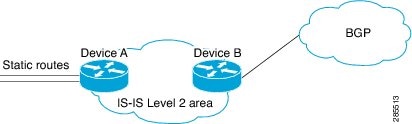
The figure illustrates a flat Level 2 IS-IS area. On the left edge are static routes from Device A to reach some IP prefixes. Device A redistributes the static routes into IS-IS. Device B runs the Border Gateway Protocol (BGP) and redistributes IS-IS routes into BGP and then uses the tag to apply different administrative policy based on different tag values.

Figure 1. Example of redistributing IS-IS routes using a route map

Device A


router isis
 net 49.0000.0000.0001.00
 metric-style wide
 redistribute static ip route-map set-tag
!
route-map set-tag permit 5
 set tag 10

Device B


router bgp 100
 redistribute isis level-2 route-map tag-policy
route-map tag-policy permit 20
 match tag 10
 set metric 1000

Example: Tag a summary address and apply a route map

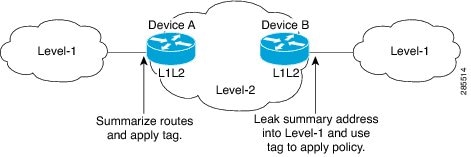
The figure illustrates two Level 1 areas and one Level 2 area between them. Device A and Device B are Level 1/Level 2 edge devices in the Level 2 area. On edge Device A, a summary address is configured. This reduces the number of IP addresses in the Level 2 IS-IS database. Also, a tag value of 100 is set to the summary address.

On Device B, the summary address is leaked into the Level 1 area, and the administrative policy applies based on the tag value.

Figure 2. Tag on a summary address

Device A


router isis
 net 49.0001.0001.0001.00
 metric-style wide
 summary-address 10.0.0.0 255.0.0.0 tag 100

Device B


router isis
 net 49.0002.0002.0002.0002.0
 metric-style wide
 redistribute isis ip level-2 into level-1 route-map match-tag
route-map match-tag permit 10
 match tag 100

Example: Filter and redistribute IS-IS routes using an access list and a route map

In this example, the first redistribute isis ip command controls the redistribution of Level 1 routes into Level 2. Only the routes with the tag of 90 and whose IP prefix is not 192.168.130.5/24 will be redistributed from Level 1 into Level 2.

The second redistribute isis ip command controls the route leaking from Level 2 into the Level 1 domain. Only the routes tagged with 60 or 50 will be redistributed from Level 2 into Level 1.


interface ethernet 1
 ip address 192.168.130.5 255.255.255.0
 ip router isis
 isis tag 60
!
interface ethernet 2
 ip address 192.168.130.15 255.255.255.0
 ip router isis
 isis tag 90
!
interface ethernet 3
 ip address 192.168.130.25 5 255.255.255.0
 ip router isis
 isis tag 50
!
router isis
 net 49.0001.0001.0001.0001.00
 metric-style wide
 redistribute isis ip level-1 into level-2 route-map redist1-2
 redistribute isis ip level-2 into level-1 route-map leak2-1
!
access-list 102 deny ip host 192.168.130.5 host 255.255.255.255
access-list 102 permit ip any any
!
route-map leak2-1 permit 10
 match tag 60
!
route-map leak2-1 permit 20
 match tag 50
!
route-map redist1-2 permit 10
 match ip address 102
 match tag 90

Example: IS-IS limit on the number of redistributed routes

This example demonstrates how to set a limit of 1200 prefixes for redistribution into an IS-IS.. Redistribution reaches 80 percent (960 prefixes) a warning message is logged by the system. When 1200 prefixes are redistributed, IS-IS rebuilds the link-state packet (LSP) fragments without external prefixes and no redistribution occurs.


router isis 1
 redistribute maximum-prefix 1200 80 withdraw

Example: Request a warning about the number of redistributed routes

This example demonstrates logging of two warning messages. The first message is triggered when redistributed prefixes reach 510, which is 85 percent of 600. The second message is triggered when prefixes reach 600. However, the number of redistributed prefixes is not limited. If the LSPFULL state occurs, external prefixes are suppressed.


router isis 1
 redistribute maximum-prefix 600 85 warning-only
 lsp-full suppress external

Example: Exclude connected IP prefixes on a small scale

This example uses the no isis advertise-prefix command on Ethernet interface 0. Only the IP address of loopback interface 0 is advertised.


!
interface loopback 0
 ip address 192.168.10.1 255.255.255.255
 no ip directed-broadcast
!
interface Ethernet 0
 ip address 192.168.20.1 255.255.255.0
 no ip directed-broadcast
 ip router isis 
 no isis advertise-prefix
.
.
.
router isis 
 passive-interface loopback 0
 net 47.0004.004d.0001.0001.0c11.1111.00
 log-adjacency-changes
!

Example: Exclude connected IP prefixes on a large scale

This example uses the advertise-passive-only command, which applies to the entire IS-IS instance, thereby preventing IS-IS from advertising the IP network of Ethernet interface 0. Only the IP address of loopback interface 0 is advertised.


!
interface loopback 0
 ip address 192.168.10.1 255.255.255.255
 no ip directed-broadcast
!
interface Ethernet0
 ip address 192.168.20.1 255.255.255.0
 no ip directed-broadcast
 ip router isis 
.
.
.
router isis 
 passive-interface Loopback0
 net 47.0004.004d.0001.0001.0c11.1111.00
 advertise-passive-only
 log-adjacency-changes
!