Configure BGP Large Community

Feature history for BGP large community

This table provides release and related information for the features explained in this module.

These features are available on all the releases subsequent to the one they were introduced in, unless noted otherwise.

Release

Feature

Feature Information

Cisco IOS XE 26.2.1ea

BGP Large Community: BGP Large Community feature support has been introduced

Cisco C9550 Series Smart Switches

Cisco IOS XE 17.18.1

BGP Large Community: The BGP large communities attribute provides the capability for tagging routes and modifying BGP routing policy on routers. They are similar attributes to BGP communities, but with a twelve octet size.

Cisco C9350 Series Smart Switches

Cisco C9610 Series Smart Switches

Use the Cisco Feature Navigator to find information about platform and software image support. To access Cisco Feature Navigator, go to https://cfnng.cisco.com/.

Restrictions for the BGP large community

When large communities are specified in commands, they are specified as three non-negative decimal integers separated by colons. For example as 1:2:3. Each integer is stored in 32 bits. The possible range for each integer is four octet decimal which can be from 0 to 4294967295.

BGP large community feature

A BGP large community feature is a routing attribute that

  • provides the capability for tagging routes and modifying BGP routing policy on routers

  • allows BGP large communities to be appended or removed selectively on the large community attribute as the route travels from router to router

  • uses a twelve octet size similar to BGP communities but without well-known large communities.

BGP large community structure

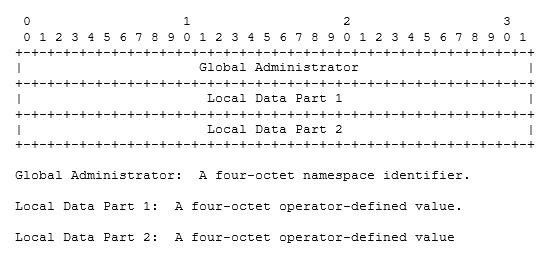
The BGP large communities are split logically into a 4 octet Global Administrator field and a 8 octet Local Administrator field. A 4 octet Autonomous System can fit into the Global Administrator field.

For more information on BGP large community, see the rfc8092 document.

Large community lists

A large community list is a BGP routing mechanism that

  • creates groups of large communities which can be used in a match clause of a route map

  • controls routing policy by allowing you to filter the routes you receive or advertise, or modify the attributes of the routes you receive or advertise, and

  • sets or deletes the large communities selectively.

Large community list types and characteristics

Large community lists have two types:

  • Standard large community lists are used to specify large communities.

  • Expanded large community lists are used to specify large communities using a regular expression.

A large community list can be either named or numbered and standard or expanded. All the rules of numbered large community lists apply to named large community lists, except that there is no limit on the number of named community lists that can be configured.


Note


A maximum of 100 numbered standard large community lists and 100 numbered expanded large community lists can be configured. A named large community list does not have this limitation.


BGP large community attribute

A BGP large community attribute is a BGP attribute that encodes the community value as a 12 octet number.

Large community attribute syntax

This image displays the syntax of the large community attribute.

The image illustrates the syntax of the BGP large community attribute, detailing its 12 octet encoding structure.

Configure BGP large community

These sections provide configuration information about BGP large community.

Enable BGP large community

Enable BGP large community support to allow the router to send and receive community attributes with BGP neighbors, providing enhanced routing policy control and traffic engineering capabilities.

BGP large community attributes provide a mechanism for grouping destinations and applying routing policies. This configuration enables the router to exchange community information with BGP peers for improved network management and policy implementation.

Before you begin

Follow these steps to enable BGP large community:

Procedure


Step 1

configure terminal

Example:


Device# configure terminal

Enters global configuration mode.

Step 2

router BGP autonomous-system-number

Example:


Device(config)# router bgp 64496

Enables BGP and assigns the AS number to the local BGP speaker. The AS number can be a 16-bit integer or a 32-bit integer in the form of a higher 16-bit decimal number and a lower 16-bit decimal number.

Step 3

neighbor IP address remote-AS autonomous-system-number

Example:


Device(config-router)# neighbor 209.165.201.1 remote-as 100

Enters global address family configuration mode. This command triggers an automatic notification and session reset for all BGP neighbors.

Step 4

address-family { ipv4 | ipv6 | l2vpn | nsap {unicast | multicast }}

Example:


Device(config-router-neighbor)# address-family ipv4 multicast

Enters global address family configuration mode. This command triggers an automatic notification and session reset for all BGP neighbors.

Note


It also supports other available address families.

Step 5

neighbor IP address activate

Example:


Device(config-router)# neighbor 209.165.201.1 activate

Enters global address family configuration mode and activates the BGP neighbor.

Step 6

neighbor IP address send-community {both | extended | standard}

Example:


Device(config-router-neighbor-af)# neighbor 209.165.201.1 send-community standard

Configures the router to send the large-community attribute to the neighbor 209.165.201.1.

  • Both—Sends both the extended large community and standard large community attributes to the neighbor.

  • Extended—Sends the extended community attribute to the neighbor.

  • Standard—Sends large community and also (regular) community attribute to the neighbor.

Step 7

exit

Example:


Device(config-router)# exit

Exits address-family mode and router configuration mode and enters global configuration mode.

Step 8

end

Example:


Device(config)# end

Exits configuration mode and enters privileged EXEC mode.


BGP large community is now enabled and configured to exchange community attributes with the specified neighbor. The router can send and receive community information for enhanced routing policy control.

Configure route-map with large community lists and matching a large community

This task enables you to configure a route-map that can match BGP large communities using large community lists, providing flexible routing policy control for BGP routes.

Route-maps with large community matching allow you to filter and control BGP routes based on large community attributes, which provide extended community functionality with a larger address space than standard communities.

Before you begin

Follow these steps to match a BGP large community:

Procedure


Step 1

configure terminal

Example:


Device# configure terminal

Enters global configuration mode.

Step 2

route-map map-tag [permit | deny] [sequence number]

Example:


Device(config)# route-map test permit 10

Enters the route-map configuration mode and defines the conditions for routes from one routing protocol into another.

Step 3

match large-community {name | numbered }

Example:


Device(config-route-map)# match large-community 1

Matches a large-community list. Defines the rules for an entry in the large-community lists and ensures that all the large communties match the large communities in the routes.

Step 4

exit

Example:


Device(config-router)# exit

Exits router configuration mode and enters global configuration mode.

Step 5

route-map map-tag [permit | deny] [sequence number]

Example:


Device(config)# route-map test permit 10

Enters the route-map configuration mode and defines the conditions for routes from one routing protocol into another.

Step 6

match large-community {name | numbered } exact match

Example:


Device(config-route-map)# match large-community 1 exact-match

Matches a large-community list. Defines the rules for an entry in the large-community lists and ensures that all the large communties match the large communities in the routes. The key word exact-match indicates that an exact match is required to match a BGP large community.

Step 7

end

Example:


Device(config-route-map)# end

Exits route map configuration mode and enters privileged EXEC mode.


The route-map is configured to match BGP large communities using the specified large community list. The route-map can now be applied to BGP routing policies to filter routes based on large community attributes.

Define BGP large community list

Define BGP large community lists to control routing policies based on large community attributes.

BGP large community supports named and numbered community lists that can be used for routing policy control.

Before you begin

Follow these steps to define the BGP large community list:

Procedure


Step 1

enable

Example:


Device> enable

Enables higher privilege levels, such as privileged EXEC mode.

Enter your password if prompted.

Step 2

configure terminal

Example:


Device# configure terminal

Enters global configuration mode.

Step 3

ip large-community-list {standard-list-number | standard standard-list-name } {deny | permit } community-number large-community

Example:

Numbered Large-community List

ip large-community-list 1 permit 1:2:3 5:6:7 
ip large-community-list 1 permit 4123456789:4123456780:4123456788

Named Large-community List

ip large-community-list standard LG_ST permit 1:2:3 5:6:7
ip large-community-list standard LG_ST permit 4123456789:4123456780:4123456788

Defining the large community based on the standard list number. If you attempt to configure more than 6 communities, the trailing communities that exceed the limit are not processed or saved to the running configuration file.

Step 4

ip large-community-list {expanded-list number | expanded expanded-list-name } {deny | permit} regexp

Example:

Numbered Extended Large-community List

ip large-community-list 100 permit ^5:.*:7$
ip large-community-list 100 permit ^5:.*:8$

Named Extended Large-community List

ip large-community-list expanded LG_EX permit ^5:.*:7$
ip large-community-list expanded LG_EX permit ^5:.*:8$

Defines the large communities based on regular expression and matches according to Cisco's regular expression implementation.

Step 5

exit

Example:


Device(config-router)# exit

Exits router configuration mode and enters global configuration mode.

Step 6

end

Example:


Device(config)# end 

Exits route map configuration mode and enters privileged EXEC mode.


The BGP large community list is defined and ready for use in routing policies.

Configure the route-map to set BGP large communities

This task allows you to configure a route-map that sets BGP large communities on routes, enabling you to apply community-based policies for BGP routing decisions.

Route-maps provide a method for controlling and modifying routing information. Large communities offer an extended community attribute that provides more flexible policy control compared to standard communities.

Before you begin

Follow these steps to configure the route-map to set BGP large communities:

Procedure


Step 1

configure terminal

Example:


Device# configure terminal

Enters global configuration mode.

Step 2

route-map map-tag [permit | deny] [sequence number]

Example:


Device(config)# route-map foo permit 10

Enters the route-map configuration mode and specifies a set of large communities to a route.

Step 3

set large-community {none | {xx:yy:zz }}

Example:


Device(config-route-map)# set large-community 1:2:3 5:6:7

A route-map set statement is used to set large communities in a route. It can specify a set of large communities to a route.

Step 4

exit

Example:


Device(config-router)# exit

Exits router configuration mode and enters global configuration mode.

Step 5

route-map map-tag [permit | deny] [sequence number]

Example:


Device(config)# route-map foo permit 10

Enters the route-map configuration mode and specifies a set of large communities to a route.

Step 6

set large-community {none | {xx:yy:zz | additive }}

Example:


Device(config-route-map)# set large-community 1:2:3 5:6:7 additive

A route-map set statement is used to set large communities in a route. It can specify a set of large communities to a route. Also, the keyword additive adds the large communities without removing the existing large communities.

Step 7

end

Example:


Device(config-route-map)# end

Exits route map configuration mode and enters privileged EXEC mode.


The route-map is configured to set BGP large communities on matching routes. The large communities can be used for policy-based routing and traffic engineering decisions.

Delete large communities

Delete BGP large communities from routes using route map configuration.

Use this procedure to remove specific large communities from BGP routes based on large-community-list matches.

Before you begin

Follow these steps to delete large communities:

Procedure


Step 1

configure terminal

Example:


Device# configure terminal

Enters global configuration mode.

Step 2

route-map map-tag [permit | deny] [sequence number]

Example:


Device(config)# route-map test permit 10

Enters the route-map configuration mode and defines the conditions for redistributing routes from one routing protocol into another.

Step 3

set large-comm-list community-list-name delete

Example:


Device(config-route-map)# set large-comm-list 1 delete
Device(config-route-map)# 

Deletes the large-communities based on large-community-list matches.

Step 4

exit

Example:


Device(config-router)# exit

Exits router configuration mode and enters global configuration mode.

Step 5

end

Example:


Device(config-route-map)# end

Exits route map configuration mode and enters privileged EXEC mode.


The route map is configured to delete large communities based on the specified large-community-list matches.

Verify the configuration of the BGP large community

To verify the BGP large community, use the show BGP large-community command. This example shows a list of routes that contain all of the large communities that are given in the command. The listed routes may contain additional large communities.

Use this command to display routes containing the specified large communities:

Device# show bgp large-community 1:2:3 5:6:7
BGP table version is 17, local router ID is 1.1.1.3
Status codes: s suppressed, d damped, h history, * valid, > best, i - internal, 
              r RIB-failure, S Stale, m multipath, b backup-path, f RT-Filter, 
              x best-external, a additional-path, c RIB-compressed, 
Origin codes: i - IGP, e - EGP, ? - incomplete
RPKI validation codes: V valid, I invalid, N Not found

     Network          Next Hop            Metric LocPrf Weight Path
 *>i 5.5.5.5/32       1.1.1.2                  0    100      0 ?
 *>i 5.5.5.6/32       1.1.1.2                  0    100      0 ?

This example displays the listed routes that contain only the given large communities when you add the keyword exact-match in configuration.

Device#show bgp large-community 1:2:3 5:6:7 exact-match
BGP table version is 17, local router ID is 1.1.1.3
Status codes: s suppressed, d damped, h history, * valid, > best, i - internal, 
              r RIB-failure, S Stale, m multipath, b backup-path, f RT-Filter, 
              x best-external, a additional-path, c RIB-compressed, 
Origin codes: i - IGP, e - EGP, ? - incomplete
RPKI validation codes: V valid, I invalid, N Not found

     Network          Next Hop            Metric LocPrf Weight Path
 *>i 5.5.5.5/32       1.1.1.2                  0    100      0 ?

In these examples, the routes 5.5.5.5/32 and 5.5.5.6/32 contain both the large communities 1:2:3 and 5:6:7. The route 5.5.5.6/32 contains some additional large communities.

This example displays a large-community list.

Device#show ip largecommunity-list 20
Large Community standard list 20
     permit 1:1:2
Device#show bgp large-community-list 20
Large Community standard list 20
     permit 1:1:2

Troubleshoot large communities

To debug the large communities, use debug ip bgp update command.

Device#debug ip bgp update

*Mar 10 23:25:01.194: BGP(0): 192.0.0.1 rcvd UPDATE w/ attr: nexthop 192.0.0.1, origin ?, metric 0, merged path 1, AS_PATH , community 0:44 1:1 2:3, large-community 3:1:244 3:1:245
*Mar 10 23:25:01.194: BGP(0): 192.0.0.1 rcvd 5.5.5.1/32
*Mar 10 23:25:01.194: BGP(0): Revise route installing 1 of 1 routes for 5.5.5.1/32 -> 192.0.0.1(global) to main IP table

Memory Display

The show ip bgp summary command displays large-community memory information.

Device #show ip bgp summary
BGP router identifier 1.1.1.1, local AS number 1
BGP table version is 3, main routing table version 3
2 network entries using 496 bytes of memory
2 path entries using 272 bytes of memory
1/1 BGP path/bestpath attribute entries using 288 bytes of memory
1 BGP community entries using 40 bytes of memory
2 BGP large-community entries using 96 bytes of memory
0 BGP route-map cache entries using 0 bytes of memory
0 BGP filter-list cache entries using 0 bytes of memory
BGP using 1096 total bytes of memory
BGP activity 3/1 prefixes, 3/1 paths, scan interval 60 secs
2 networks peaked at 13:04:52 Mar 11 2020 EST (00:07:25.579 ago)

Neighbor        V           AS MsgRcvd MsgSent   TblVer  InQ OutQ Up/Down  State/PfxRcd
192.0.0.2       4            2    1245    1245        3    0    0 18:47:56        0

Configuration example for BGP large community

This example shows how to configure route-maps using large-communities.

Setting large communities

A route-map set statement is used to set the large communities in a route. It can specify a set of large communities to a route.

The additive keyword adds the large communities without removing the existing large communities (for standard large community-lists only).

This example shows how to set large communities.

route-map foo permit 10 
 set large-community 1:2:3 5:6:7

route-map foo2 permit 10 
 set large-community 1:2:3 5:6:7 additive

Matching large communities

This example shows how to match large communities.

route-map foo permit 10 
 match large-community 1

route-map foo2 permit 10 
 match large-community 1 exact-match

Deleting large communities

This example shows how to delete a large community.

route-map foo
 set large-comm-list 1 delete

Numbered standard large community list

This example shows how to configure a numbered large community list.

ip large-community-list 1 permit 1:2:3 5:6:7 
ip large-community-list 1 permit 4123456789:4123456780:4123456788

Named standard large community list

This example shows how to configure a named standard large community list.

ip large-community-list standard LG_ST permit 1:2:3 5:6:7
ip large-community-list standard LG_ST permit 4123456789:4123456780:4123456788

Numbered expanded large community list

This example shows how to configure a numbered expanded large community list.

ip large-community-list 100 permit ^5:.*:7$
ip large-community-list 100 permit ^5:.*:8$

Named expanded large community list

This example shows how to configure a named expanded large community list.

ip large-community-list expanded LG_EX permit ^5:.*:7$
ip large-community-list expanded LG_EX permit ^5:.*:8$