Micro-Burst Monitoring

Micro-Burst Monitoring

The micro-burst monitoring feature allows you to monitor traffic to detect unexpected data bursts within a very small time window (microseconds). This allows you to detect traffic in the network that are at risk for data loss and for network congestion.

A micro-burst is detected when the buffer utilization in an egress queue rises above the configured rise-threshold (measured in bytes). The burst for the queue ends when the queue buffer utilization falls below the configured fall-threshold (measured in bytes).

The feature provides timestamp and instantaneous buffer utilization information about the various queues where micro-burst monitoring is enabled.

Depending on the switch, you can enable the micro-burst detection per-queue or per-switch.

Guidelines and Limitations for Micro-Burst Monitoring

The following are the guidelines and limitations for micro-burst monitoring:

  • Micro-burst monitoring is not supported on the Cisco Nexus 9508 switch (Cisco NX-OS Release NX-OS 7.0(3)F3(3).

  • Micro-burst monitoring and detection is supported on Cisco Nexus 9300-FX platform switches, Cisco Nexus 9300-FX2 platform switches, and Cisco Nexus 9364C switches.

  • show commands with the internal keyword are not supported.

  • Micro-burst monitoring is available with switches that contain the Network Forwarding Engine (NFE2). The minimum micro-burst that can be detected is 0.64 microseconds for 1 - 3 queues.

    On these switches, micro-burst monitoring is supported on unicast egress queues. It is not supported on multicast, CPU, or span queues.

  • Beginning with Cisco NX-OS Release 7.0(3)I5(1), micro-burst monitoring is available on the following switches that contain an Application Spine Engine (ASE2, ASE3) or a Leaf Spine Engine (LSE):

    Switch

    Measurable Minimum Burst Duration

    Cisco Nexus 92160YC-X

    86 µsec

    Cisco Nexus 92304QC

    96 µsec

    Cisco Nexus 9272Q

    96 µsec

    Cisco Nexus 9232C

    96 µsec

    Cisco Nexus 9236C

    96 µsec

    Cisco Nexus 93180YC-EX

    73 µsec

    Cisco Nexus 93108TC-EX

    78 µsec

    On these switches, micro-burst monitoring is supported on both unicast and multicast egress queues.

    In addition, early detection of long bursts is supported. For bursts lasting more than 5 seconds, an early burst start record is displayed after 5 seconds from the start of the burst and is updated when the burst actually ends.


    Note


    On these switches, micro-burst duration is not affected by the number of queues configured.


  • On switches that contain a Network Forwarding Engine (NFE2), micro-burst monitoring requires IO FPGA version 0x9 or later.

    Beginning with Cisco NX-OS Release 7.0(3)I5(1), micro-burst monitoring on switches that contain an Application Spine Engine (ASE2, ASE3) or a Leaf Spine Engine (LSE) require the following IO FPGA versions:

    Switch

    IO FPGA Version

    Cisco Nexus 92160YC-X

    0x16 or later

    Cisco Nexus 92304QC

    0x10 or later

    Cisco Nexus 9272Q

    0x15 or later

    Cisco Nexus 9232C

    0x6 or later

    Cisco Nexus 9236C

    0x14 or later

    Cisco Nexus 93180YC-EX

    0x8 or later

    Cisco Nexus 93108TC-EX

    0x9 or later

    For more information about EPLD programming to upgrade the FPGA, see the Cisco Nexus 9000 Series FPGA/EPLD Upgrade Release Notes.

  • The following are guidelines for micro-burst duration on switches that contain a Network Forwarding Engine (NFE2):


    Note


    Micro-burst duration is the duration of the burst that can be detected. For example, when micro-burst monitoring is configured for 1 - 3 queues, micro-bursts that exceed 0.64 microseconds are detected. Increasing the number of queues that are configured for micro-burst monitoring increases the duration of the burst that can be detected.


    1 - 3 queues

    0.64 microsecond duration

    8 queues with 10 ports each

    9.0 microsecond duration

    10 queues with 132 ports each

    140 microsecond (0.14 millisecond) duration

  • By default, the switch stores a maximum of 1000 burst records. The maximum number of records is configurable within a range of 200 - 2000 records.

    • At least, 20 burst records are stored for each queue even when the maximum number of burst records has been reached.

    • When the maximum number of burst records has been reached, the oldest record is deleted to allow the storage of a new record.

    • You can use the hardware qos burst-detect max-records number-of-records command to configure the maximum number of burst records to store.

    • You can use the show hardware qos burst-detect max-records command to display the maximum number of burst records that can be stored.

  • Too many back to back burst records while traffic is being drained from queues might result in jitter.

    To avoid jitter, configure the fall-threshold to be less than the rise-threshold. As a best practice, configure the fall-threshold to be approximately 20% of the rise-threshold value (bytes).

Configuring Micro-Burst Detection Per-Queue

You can enable micro-burst detection for all interfaces on the device.

You can enable independent micro-burst thresholds per queue on the following switches:

  • Cisco Nexus 9300-EX/ platform switches

  • Cisco Nexus 9300-GX/GX2 platform switches

  • Cisco Nexus 9400 platform switches

  • Cisco Nexus 9336C-FX switch

  • Cisco Nexus 93360YC-FX2 and Cisco Nexus 93216TC-FX2 switches from Release 9.3(7)

The parameters are defined under the individual queues in the queuing policy-maps.

SUMMARY STEPS

  1. configure terminal
  2. policy-map type queuing policy-map-name
  3. class type queuing class-name
  4. burst-detect rise-threshold rise-threshold-bytes bytes fall-threshold fall-threshold-bytes bytes
  5. exit
  6. exit
  7. interface ethernet slot/port
  8. service-policy type queuing output policy-map-name

DETAILED STEPS

  Command or Action Purpose

Step 1

configure terminal

Example:


switch# configure terminal
switch(config)#

Enters global configuration mode.

Step 2

policy-map type queuing policy-map-name

Example:


switch(config)# policy-map type queuing xyz   
switch(config-pmap-que)#     

Configures the policy map of type queuing and then enters policy-map mode for the policy-map name you specify.

Step 3

class type queuing class-name

Example:


switch(config-pmap-que)# class type queuing c-out-def 
switch(config-pmap-c-que)#

Configures the class map of type queuing and then enters policy-map class queuing mode.

Step 4

burst-detect rise-threshold rise-threshold-bytes bytes fall-threshold fall-threshold-bytes bytes

Example:


switch(config-pmap-c-que)# burst-detect rise-threshold 208 bytes fall-threshold 208 bytes

Specifies the rise-threshold and the fall-threshold for micro-burst detection.

Step 5

exit

Example:


switch(config-pmap-c-que)# exit
switch(config-pmap-que)#

Exits policy-map queue mode.

Step 6

exit

Example:


switch(config-pmap-que)# exit
switch(config)#

Exits policy-map queue mode.

Step 7

interface ethernet slot/port

Example:

switch(config)# interface ethernet 1/1
switch(config-if)# 

Configures the interface.

Step 8

service-policy type queuing output policy-map-name

Example:

switch(config-if)# service-policy type queuing output custom-out-8q-uburst

Adds the policy map to the input or output packets of the system.

Clearing Micro-Burst Detection

You can clear micro-burst detection for all interfaces or a selected interface.


Note


Even after removing the queuing policy from an interface, previous micro-burst statistics remain. Use the clear queuing burst-detect command to clear the remaining records.


Procedure

Command or Action Purpose

clear queuing burst-detect [slot] [ interface port [queue queue-id]]

Example:

Clears micro-burst information from all interfaces or the specified interface.

Example

  • Example for an interface:
    
    clear queuing burst-detect interface Eth1/2
    
  • Example for a queue:
    
    clear queuing burst-detect interface Eth1/2 queue 7
    

Verifying Micro-Burst Detection

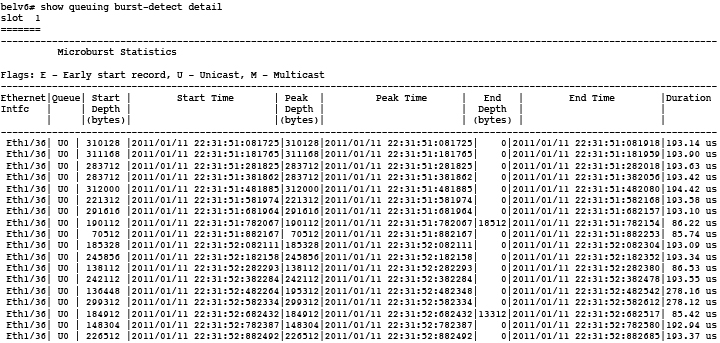
The following displays micro-burst monitoring information:

Command

Purpose

show queuing burst-detect

Displays micro-burst counters information for all interfaces.

  • Example for an interface:
    
    show queuing burst-detect interface Eth 1/2
    
  • Example for a queue:
    
    show queuing burst-detect interface Eth 1/2 queue 7
    

Example of Micro-Burst Detection Output

Example output of TOR switch.


Example of show queuing burst-detect nir detail command:
config# show queuing burst-detect nir

slot  1
=======

------------------------------------------------------------------------------------------------------------
          Microburst Statistics

Flags: E - Early start record, U - Unicast, M - Multicast
--------------------------------------------------------------------------------------------------------------------------------------------------------------------------
Ethernet |Queue|Start Depth|         Start Time         |Peak Depth|          Peak Time         |End Depth|         End Time           |Duration  
Interface|     |  (bytes)  |                            | (bytes)  |                            | (bytes) |                            |                 
--------------------------------------------------------------------------------------------------------------------------------------------------------------------------
   Eth1/6|  U6  |     416   | 2023/06/28 13:11:45:005625 |    3120  | 2023/06/28 13:11:45:005626 |     416 | 2023/06/28 13:11:45:005627 |        1.11 us
   Eth1/6|  U6  |     416   | 2023/06/28 13:11:45:005057 |    3120  | 2023/06/28 13:11:45:005058 |     416 | 2023/06/28 13:11:45:005059 |        1.44 us
Example of telemetry configuration on the switch to receive micro-burst data:
telemetry
destination-group 1
ip address receiver_ip_address port receiver_port protocol grpc encoding GPB-compact
sensor-group 1
data-source native
path microburst
subscription 1
dst-grp 1
snsr-grp 1 sample-interval 0