Configuring MLD

This chapter describes how to configure Multicast Listener Discovery (MLD) on Cisco NX-OS devices for IPv6 networks.

About MLD

MLD is an IPv6 protocol that a host uses to request multicast data for a particular group. Using the information obtained through MLD, the software maintains a list of multicast group or channel memberships on a per-interface basis. The devices that receive MLD packets send the multicast data that they receive for requested groups or channels out the network segment of the known receivers.

MLDv1 is derived from IGMPv2, and MLDv2 is derived from IGMPv3. IGMP uses IP Protocol 2 message types while MLD uses IP Protocol 58 message types, which is a subset of the ICMPv6 messages.

The MLD process is started automatically on the device. You cannot enable MLD manually on an interface. MLD is enabled automatically when you perform one of the following configuration tasks on an interface:

  • Enable PIM6

  • Statically bind a local multicast group

  • Enable link-local group reports

MLD Versions

The device supports MLDv1 and MLDv2. MLDv2 supports MLDv1 listener reports.

By default, the software enables MLDv2 when it starts the MLD process. You can enable MLDv1 on interfaces where you want only its capabilities.

MLDv2 includes the following key changes from MLDv1:

  • Support for Source-Specific Multicast (SSM), which builds shortest path trees from each receiver to the source, through the following features:

    • Host messages that can specify both the group and the source.

    • The multicast state that is maintained for groups and sources, not just for groups as in MLDv1.

  • Hosts no longer perform report suppression, which means that hosts always send MLD listener reports when an MLD query message is received.

For detailed information about MLDv1, see RFC 2710. For detailed information about MLDv2, see RFC 3810.

MLD Basics

The basic MLD process of a router that discovers multicast hosts is shown in the figure below.
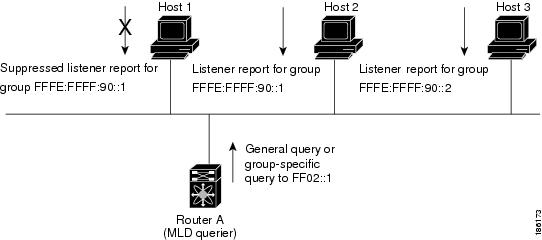
Figure 1. MLD Query-Response Process

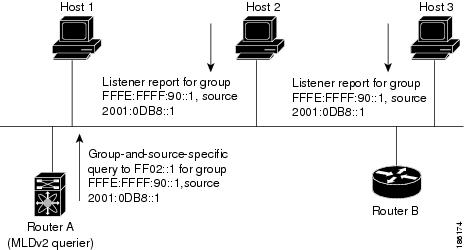
Hosts 1, 2, and 3 send unsolicited MLD listener report messages to initiate receiving multicast data for a group or channel. Router A, which is the MLD designated querier on the subnet, sends a general query message to the link-scope all-nodes multicast address FF02::1 periodically to discover which multicast groups hosts want to receive. The group-specific query is used to discover whether a specific group is requested by any hosts. You can configure the group membership timeout value that the router uses to determine if any members of a group or source exist on the subnet.

Host 1’s listener report is suppressed, and host 2 sends its listener report for group FFFE:FFFF:90::1 first. Host 1 receives the report from host 2. Because only one listener report per group needs to be sent to the router, other hosts suppress their reports to reduce network traffic. Each host waits for a random time interval to avoid sending reports at the same time. You can configure the query maximum response time parameter to control the interval at which hosts randomize their responses.


Note


MLDv1 membership report suppression occurs only on hosts that are connected to the same port.


Router A sends the MLDv2 group-and-source-specific query to the LAN. Hosts 2 and 3 respond to the query with listener reports to indicate that they want to receive data from the advertised group and source. This MLDv2 feature supports SSM.


Note


In MLDv2, all hosts respond to queries.


Figure 2. MLDv2 Group-and-Source-Specific Query

The software elects a router as the MLD querier on a subnet if it has the lowest IP address. As long as a router continues to receive query messages from a router with a lower IP address, it remains a nonquerier and resets a timer that is based on its querier timeout value. If the querier timer of a router expires, it becomes the designated querier. If that router later receives a host query message from a router with a lower IP address, it drops its role as the designated querier and sets its querier timer again.

Messages sent by the designated querier have a time-to-live (TTL) value of 1, which means that the messages are not forwarded by the directly connected routers on the subnet, and you can configure the frequency and number of query messages sent specifically for MLD startup. You can configure a short query interval at startup so that the group state is established as quickly as possible. Although usually unnecessary, you can tune the query interval used after startup to a value that balances responsiveness to host group membership and the traffic created on the network.


Caution


If you change the query interval, you can severely impact multicast forwarding in your network.


When a multicast host leaves a group, it should send a done message for MLDv1 or a listener report that excludes the group to the link-scope all-routers multicast address FF02::2. To check if this host is the last host to leave the group, the software sends an MLD query message and starts a timer that you can configure called the last member query response interval. If no reports are received before the timer expires, the software removes the group state. The router continues to send multicast traffic for a group until its state is removed.

You can configure a robustness value to compensate for the packet loss on a congested network. The robustness value is used by the MLD software to determine the number of times to send messages.

Link local addresses in the range FF02::0/16 have link scope, as defined by the Internet Assigned Numbers Authority (IANA). Network protocols on a local network segment use these addresses; routers do not forward these addresses because they have a TTL of 1. By default, the MLD process sends listener reports only for nonlink local addresses, but you can configure the software to send reports for link local addresses.

Prerequisites for MLD

MLD has the following prerequisites:

  • You are logged into the device.

  • For global configuration commands, you are in the correct virtual routing and forwarding (VRF) mode. The default configuration mode shown in the examples in this chapter applies to the default VRF.

Guidelines and Limitations for MLD

MLD has the following guidelines and limitations:

  • Excluding or blocking a list of sources according to MLDv2 (RFC 3810) is not supported.

  • Only the Cisco Nexus 9200, 9300, and 9300-EX Series switches support MLD.

  • The Cisco Nexus 3232C and 3264Q switches do not support MLD.

Default Settings for MLD

Table 1. Default MLD Parameters

Parameters

Default

MLD version

2

Startup query interval

30 seconds

Startup query count

2

Robustness value

2

Querier timeout

255 seconds

Query timeout

255 seconds

Query max response time

10 seconds

Query interval

125 seconds

Last member query response interval

1 second

Last member query count

2

Group membership timeout

260 seconds

Report link local multicast groups

Disabled

Immediate leave

Disabled

Configuring MLD Parameters

You can configure the MLD global and interface parameters to affect the operation of the MLD process.


Note


Before you can configure MLD snooping, enable the MLD feature using the ipv6 mld snooping and system mld snooping commands.


Configuring MLD Interface Parameters

Table 2. MLD Interface Parameters

Parameter

Description

MLD version

The MLD version that is enabled on the interface. MLDv2 supports MLDv1. The MLD version can be 1 or 2. The default is 2.

Static multicast groups

Multicast groups that are statically bound to the interface. You can configure the groups to join the interface with the (*, G) state or specify a source IP to join with the (S, G) state. You can specify a route-map policy name that lists the group prefixes, group ranges, and source prefixes to use with the match ip multicast command.

Note


Although you can configure the (S, G) state, the source tree is built only if you enable MLDv2.

You can configure a multicast group on all the multicast-capable routers on the network so that pinging the group causes all the routers to respond.

Static multicast groups on OIF

Multicast groups that are statically bound to the output interface. You can configure the groups to join the output interface with the (*, G) state or specify a source IP to join with the (S, G) state. You can specify a route-map policy name that lists the group prefixes, group ranges, and source prefixes to use with the match ip multicast command.

Although you can configure the (S, G) state, the source tree is built only if you enable MLDv2.

Note


Group prefixes in the route map must have a mask of 120 or longer.

Startup query interval

Startup query interval. By default, this interval is shorter than the query interval so that the software can establish the group state as quickly as possible. Values range from 1 to 18,000 seconds. The default is 30 seconds.

Startup query count

The number of queries sent at startup that are separated by the startup query interval. Values range from 1 to 10. The default is 2.

Robustness value

A robustness variable that you can tune to reflect expected packet loss on a congested network. You can increase the robustness variable to increase the number of times that packets are resent. Values range from 1 to 7. The default is 2.

Querier timeout

The number of seconds that the software waits after the previous querier has stopped querying and before it takes over as the querier. Values range from 1 to 65,535 seconds. The default is 255 seconds.

Query max response time

The maximum response time advertised in MLD queries. You can tune the burstiness of MLD messages on the network by setting a larger value so that host responses are spread out over a longer time. This value must be less than the query interval. Values range from 1 to 25 seconds. The default is 10 seconds.

Query interval

The frequency at which the software sends MLD host query messages. You can tune the number of MLD messages on the network by setting a larger value so that the software sends MLD queries less often. Values range from 1 to 18,000 seconds. The default is 125 seconds.

Last member query response interval

The query interval for response to an MLD query that the software sends after receiving a host leave message from the last known active host on the subnet. If no reports are received in the interval, the group state is deleted. You can use this value to tune how quickly the software stops transmitting on the subnet. The software can detect the loss of the last member of a group or source more quickly when the values are smaller. Values range from 1 to 25 seconds. The default is 1 second.

Last member query count

The number of times that the software sends an MLD query, separated by the last member query response interval, in response to a host leave message from the last known active host on the subnet. Values range from 1 to 5. The default is 2.

Caution


Setting this value to 1 means that a missed packet in either direction causes the software to remove the multicast state from the queried group or channel. The software can wait until the next query interval before the group is added again.

Group membership timeout

The group membership interval that must pass before the router decides that no members of a group or source exist on the network. Values range from 3 to 65,535 seconds. The default is 260 seconds.

Report link local multicast groups

An option that enables sending reports for groups in FF02::0/16. Link local addresses are used only by protocols on the local network. Reports are always sent for nonlink local groups. The default is disabled.

Report policy

An access policy for MLD reports that is based on a route-map policy.

Access groups

An option that configures a route-map policy to control the multicast groups that hosts on the subnet serviced by an interface can join.

Note


Only the match ip multicast group command is supported in this route map policy. The match ip address command for matching an ACL is not supported.

Immediate leave

An option that minimizes the leave latency of MLDv1 group memberships on a given MLD interface because the device does not send group-specific queries. When immediate leave is enabled, the device will remove the group entry from the multicast routing table immediately upon receiving a leave message for the group. The default is disabled.

Note


Use this command only when there is one receiver behind the interface for a given group.

1 To configure route-map policies, see the Cisco Nexus 9000 Series NX-OS Unicast Routing Configuration Guide.

Procedure

  Command or Action Purpose

Step 1

configure terminal

Example:

switch# configure terminal
switch(config)#

Enters global configuration mode.

Step 2

interface interface

Example:

switch(config)# interface ethernet 2/1
switch(config-if)#

Enters interface configuration mode.

Note


Use the commands listed from step-3 to configure the MLD interface parameters.

Step 3

ipv6 mld version value

Example:

switch(config-if)# ipv6 mld version 2

Sets the MLD version that is enabled on the interface. MLDv2 supports MLDv1. Values can be 1 or 2. The default is 2.

The no form of the command sets the version to 2.

Step 4

ipv6 mld join-group {group [source source] | route-map policy-name}

Example:


switch(config-if)# ipv6 mld join-group FFFE::1

Statically binds a multicast group to the interface. If you specify only the group address, the (*, G) state is created. If you specify the source address, the (S, G) state is created. You can specify a route-map policy name that lists the group prefixes, group ranges, and source prefixes to use with the match ip multicast command.

Note


A source tree is built for the (S, G) state only if you enable MLDv2.

Caution


The device CPU must handle the traffic generated by using this command.

Step 5

ipv6 mld static-oif {group [source source] | route-map policy-name}

Example:

switch(config-if)# ipv6 mld static-oif FFFE::1

Statically binds a multicast group to the outgoing interface, which is handled by the device hardware. If you specify only the group address, the (*, G) state is created. If you specify the source address, the (S, G) state is created. You can specify a route-map policy name that lists the group prefixes, group ranges, and source prefixes to use with the match ip multicast command.

Note


A source tree is built for the (S, G) state only if you enable MLDv2.

Note


The maximum number of groups supported per entry in the route map is 256.

Step 6

ipv6 mld startup-query-interval seconds

Example:

switch(config-if)# ipv6 mld startup-query-interval 25

Sets the query interval used when the software starts up. Values can range from 1 to 18,000 seconds. The default is 31 seconds.

Step 7

ipv6 mld startup-query-count count

Example:

switch(config-if)# ipv6 mld startup-query-count 3

Sets the query count used when the software starts up. Values can range from 1 to 10. The default is 2.

Step 8

ipv6 mld robustness-variable value

Example:

switch(config-if)# ipv6 mld robustness-variable 3

Sets the robustness variable. You can use a larger value for a network prone to packet loss. Values can range from 1 to 7. The default is 2.

Step 9

ipv6 mld querier-timeout seconds

Example:

switch(config-if)# ipv6 mld querier-timeout 300

Sets the querier timeout that the software uses when deciding to take over as the querier. Values can range from 1 to 65,535 seconds. The default is 255 seconds.

Step 10

ipv6 mld query-timeout seconds

Example:

switch(config-if)# ipv6 mld query-timeout 300

Sets the query timeout that the software uses when deciding to take over as the querier. Values can range from 1 to 65,535 seconds. The default is 255 seconds.

Note


This command has the same functionality as the ipv6 mld querier-timeout command.

Step 11

ipv6 mld query-max-response-time seconds

Example:

switch(config-if)# ipv6 mld query-max-response-time 15

Sets the response time advertised in MLD queries. Values can range from 1 to 25 seconds. The default is 10 seconds.

Step 12

ipv6 mld query-interval interval

Example:

switch(config-if)# ipv6 mld query-interval 100

Sets the frequency at which the software sends MLD host query messages. Values can range from 1 to 18,000 seconds. The default is 125 seconds.

Step 13

ipv6 mld last-member-query-response-time seconds

Example:

switch(config-if)# ipv6 mld last-member-query-response-time 3

Sets the query response time after sending membership reports before the software deletes the group state. Values can range from 1 to 25 seconds. The default is 1 second.

Step 14

ipv6 mld last-member-query-count count

Example:

switch(config-if)# ipv6 mld last-member-query-count 3

Sets the number of times that the software sends an MLD query in response to a host leave message. Values can range from 1 to 5. The default is 2.

Step 15

ipv6 mld group-timeout seconds

Example:

switch(config-if)# ipv6 mld group-timeout 300

Sets the group membership timeout for MLDv2. Values can range from 3 to 65,535 seconds. The default is 260 seconds.

Step 16

ipv6 mld report-link-local-groups

Example:

switch(config-if)# ipv6 mld report-link-local-groups

Enables sending reports for groups in 224.0.0.0/24. Reports are always sent for nonlink local groups. By default, reports are not sent for link local groups.

Step 17

ipv6 mld report-policy policy

Example:

switch(config-if)# ipv6 mld report-policy my_report_policy

Configures an access policy for MLD reports that is based on a route-map policy.

Step 18

ipv6 mld access-group policy

Example:

switch(config-if)# ipv6 mld access-group my_access_policy

Configures a route-map policy to control the multicast groups that hosts on the subnet serviced by an interface can join.

Note


Only the match ip multicast group command is supported in this route map policy. The match ip address command for matching an ACL is not supported.

Step 19

ipv6 mld immediate-leave

Example:

switch(config-if)# ipv6 mld immediate-leave

Enables the device to remove the group entry from the multicast routing table immediately upon receiving a leave message for the group. Use this command to mnimize the leave latency of MLDv1 group memberships on a given MLD interface because the device does not send group-specific queries. The default is disabled.

Note


Use this command only when there is one receiver behind the interface for a given group.

Step 20

(Optional) copy running-config startup-config

Example:

switch(config)# copy running-config startup-config
(Optional)

Copies the running configuration to the startup configuration.

Configuring an MLD SSM Translation

You can configure an SSM translation to provide SSM support when the router receives MLDv1 listener reports. Only MLDv2 provides the capability to specify group and source addresses in listener reports. By default, the group prefix range is FF3x/96.

Table 3. Example SSM Translations

Group Prefix

Source Address

FF30::0/16

2001:0DB8:0:ABCD::1

FF30::0/16

2001:0DB8:0:ABCD::2

FF30:30::0/24

2001:0DB8:0:ABCD::3

FF32:40::0/24

2001:0DB8:0:ABCD::4

The following table shows the resulting M6RIB routes that the MLD process creates when it applies an SSM translation to the MLD v1 listener report. If more than one translation applies, the router creates the (S, G) state for each translation.

Table 4. Example Result of Applying SSM Translations

MLDv1 Listener Report

Resulting M6RIB Route

FF32:40::40

(2001:0DB8:0:ABCD::4, FF32:40::40)

FF30:10::10

(2001:0DB8:0:ABCD::1, FF30:10::10)
(2001:0DB8:0:ABCD::2, FF30:10::10)

Procedure

  Command or Action Purpose

Step 1

configure terminal

Example:

switch# configure terminal
switch(config)#

Enters global configuration mode.

Step 2

ipv6 [icmp] mld ssm-translate group-prefix source-addr

Example:

switch(config)# ipv6 mld ssm-translate FF30::0/16 2001:0DB8:0:ABCD::1

Configures the translation of MLDv1 listener reports by the MLD process to create the (S, G) state as if the router had received an MLDv2 listener report.

Step 3

(Optional) show running-configuration ssm-translate

Example:

switch(config)# show running-configuration ssm-translate
(Optional)

Shows ssm-translate configuration lines in the running configuration.

Step 4

(Optional) copy running-config startup-config

Example:

switch(config)# copy running-config startup-config
(Optional)

Copies the running configuration to the startup configuration.

Verifying the MLD Configuration

To display the MLD configuration information, perform one of the following tasks:

show ipv6 mld groups [group | interface] [vrf vrf-name | all]

Displays the MLD attached group membership for a group or interface or for the default VRF, a selected VRF, or all VRFs.

show ipv6 mld local-groups

Displays the MLD local group membership.

The following example displays the show ipv6 mld groups command output. This output shows ten interfaces are sending MLD joins to group ff03:0:0:1::1 out of which nine interfaces are sending MLDv1 joins and the tenth interface is sending MLDv2 join with source 2005:0:0:1::2. There are nine entries for the group and tenth entry is appended as the source entry.

switch# show ipv6 mld groups vrf vrf1
MLD Connected Group Membership for VRF "VRF1" - 52 total entries
Type: S - Static, D - Dynamic, L - Local, T - SSM Translated, H - Host Proxy
      * - Cache Only
Group Address      Type Interface              Uptime    Expires   Last Reporter
ff03:0:0:1::1      D   Ethernet3/25.1         00:02:13  00:03:47  fe80::1
ff03:0:0:1::1      D   Ethernet3/25.3         00:02:13  00:04:12  fe80::2:0:0:1
ff03:0:0:1::1      D   Ethernet3/25.5         00:02:13  00:02:26  fe80::4:0:0:1
ff03:0:0:1::1      D   Ethernet3/25.4         00:02:13  00:03:31  fe80::3:0:0:1
ff03:0:0:1::1      D   Ethernet3/25.6         00:02:13  00:02:47  fe80::5:0:0:1
ff03:0:0:1::1      D   Ethernet3/25.7         00:02:13  00:03:10  fe80::6:0:0:1
ff03:0:0:1::1      D   Ethernet3/25.8         00:02:13  00:03:56  fe80::7:0:0:1
ff03:0:0:1::1      D   Ethernet3/25.9         00:02:13  00:03:28  fe80::8:0:0:1
  2005:0:0:1::2    D    Ethernet3/25.10        2d15h     00:03:37  fe80::9:0:0:1

Configuration Example for MLD

The following example shows how to configure MLD:


configure terminal
  ipv6 mld ssm-translate FF30::0/16 2001:0DB8:0:ABCD::1
  interface ethernet 2/1
    ipv6 mld version 2
    ipv6 mld join-group FFFE::1
    ipv6 mld startup-query-interval 25
    ipv6 mld startup-query-count 3
    ipv6 mld robustness-variable 3
    ipv6 mld querier-timeout 300
    ipv6 mld query-timeout 300
    ipv6 mld query-max-response-time 15
    ipv6 mld query-interval 100
    ipv6 mld last-member-query-response-time 3
    ipv6 mld last-member-query-count 3
    ipv6 mld group-timeout 300
    ipv6 mld report-link-local-groups
    ipv6 mld report-policy my_report_policy
    ipv6 mld access-group my_access_policy