Overview of the Cisco Nexus 9408 Switch
The Cisco Nexus 9408 (N9K-C9408) is a 4 rack unit (RU) 8-slot modular chassis switch, which is configurable with up to 128 200-Gigabit QSFP56 (256 100-Gigabit by breakout) ports or 64 400-Gigabit ports. This switch supports port-side intake airflow. The switch requires four AC power supplies for operation, and offers 2+2 power grid redundancy.
This switch includes these high-power optics and MACsec:
-
The N9K-X9400-16W LEM offers full MACsec (128 ports) for a full load chassis with no limitation for 200G optics. The 200G optics can be used on both 8D LEM and 16W LEM.
-
The N9K-X9400-8D LEM offers full MACsec (64 ports) for a full load chassis but with a limit of 400G high power optics within 32pcs among 8 slots (maximum of 32 ports of 20-W optics irrespective of MACsec), and the high power optics can go in any of the 400G ports.
-
The N9K-X9400-22L LEM offers full MACsec (22 front ports for a total of 176 ports) for a full load chassis with 10G, 25G, or 50G speed optics. If you use 50G optics, all the others ports in the MACsec must be 50 G.
-
Port mapping for the N9K-X9400-22L—Front port of each is in the same MAC: 1-4 , 5-8 , 9-10, 11-14, 15-18, 19-22. The exception is the 9-10 ports, which are still a stand-alone group.
-
Line Card Expansion Module Limitations
-
N9K-X9400-22L LEM:
-
Due to ASIC limitation, 50G cannot co-exist with 10G and/or 25G on the same MAC.
-
The breakout ports are not supported on the N9K-X9400-22L.
-
The N9K-X9400-22L LEM can only be used when the Nexus 9408 switch operates as a leaf.
-
-
On the N9K-X9400-16W LEM: the 200G optics can only be used next to each other and cannot be mixed with an optic of another speed in an adjacent port.
This switch can have up to 8 LEM slots which are online swappable. Use any combination of 200G/400G/50G LEMs in the 8 slots.
Default mode for this switch:
-
This default role of Nexus 9408 is as a spine switch.
-
Use the default uplinks of each LEM (5-8 for 8D LEM, 13-16 for 16W LEM and 15-22 for 22L LEM) for switch discovery as a leaf.
Leaf/Spine role considerations:
-
To change the switch from the default role, proceed as follows: the node appears as a discovered device in the fabric inventory view, set the role of the switch (spine or leaf) and the switch automatically reboots and comes up in the configured role.
-
If you connect a default spine (i.e., a dual role switch that by default is a spine, such as Nexus 9316D-GX) directly to an APIC, the change of the role to leaf and the reboot is performed automatically by APIC. After that, the node appears in “Nodes pending registration.” Register the node.
This figure shows the fan-side chassis features that you use when installing the chassis or replacing its modules.
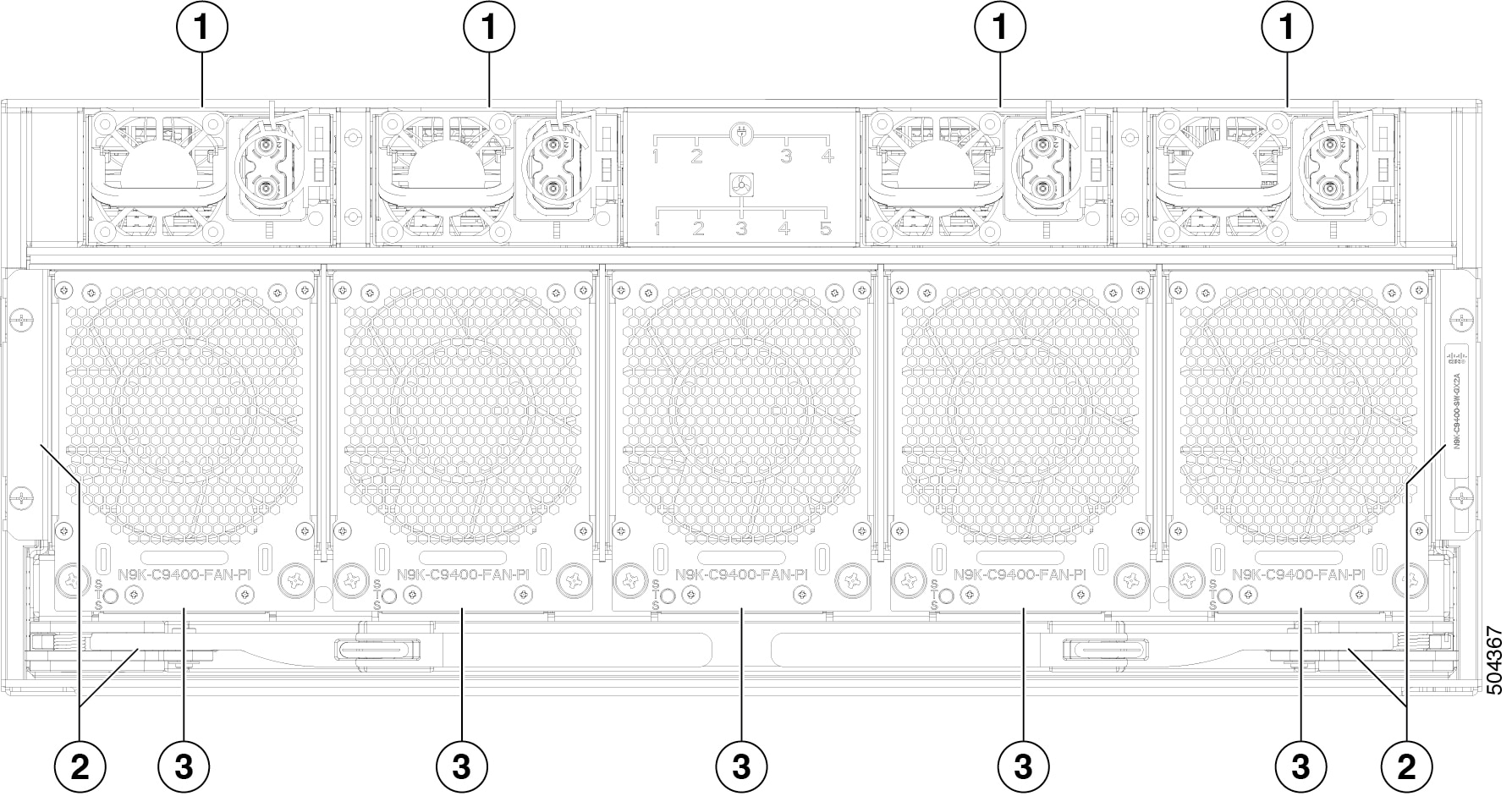
|
1 |
Power supply modules (4) |
2 |
Switch card |
|
3 |
Fan modules (5) |
This figure shows the port-side chassis features that you use when installing the chassis or replacing its modules.
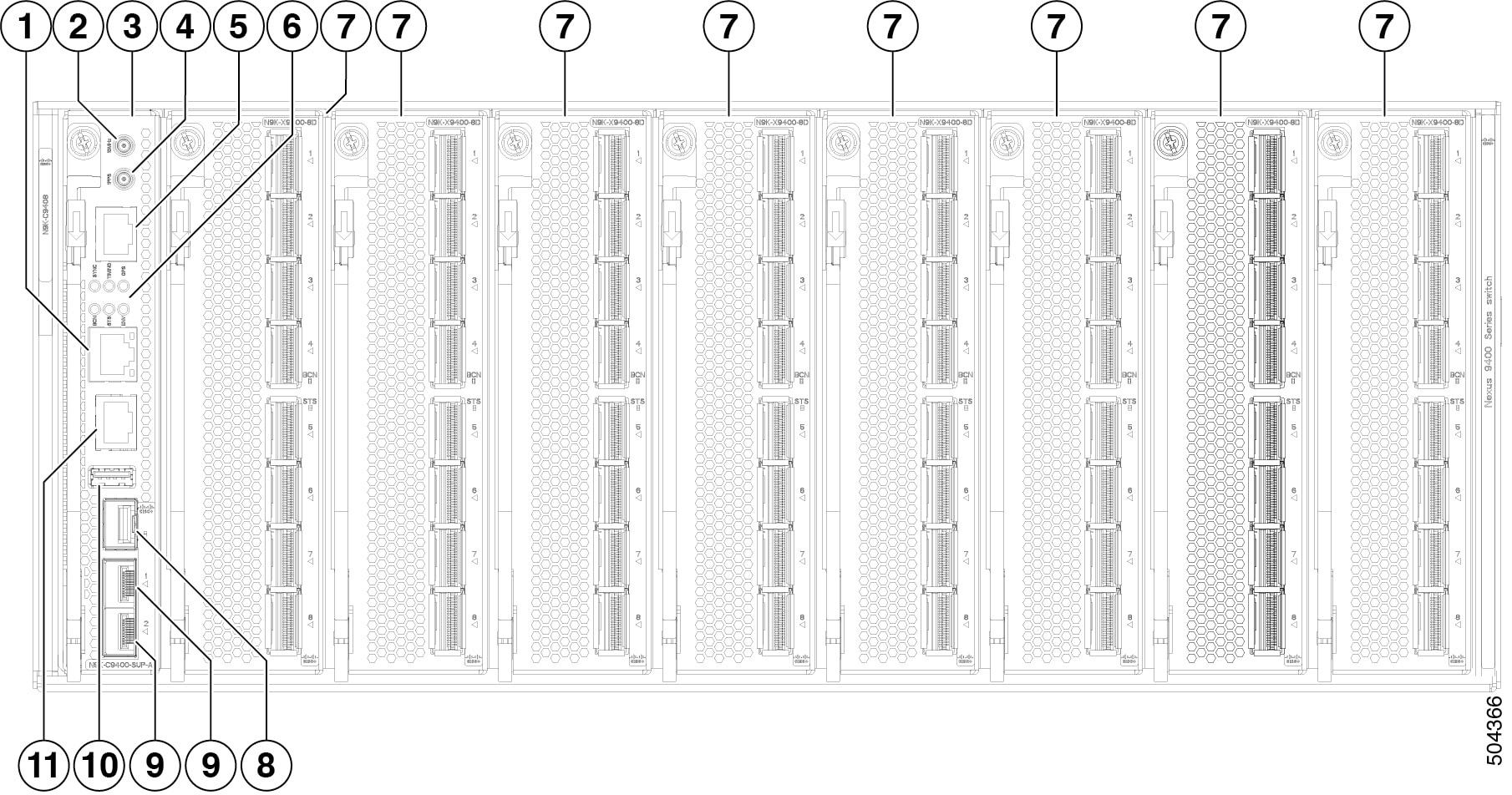
|
1 |
Management port (RJ45) |
2 |
GPS 10 MHz |
|
3 |
Supervisor module (N9K-C9408-SUP-A) |
4 |
GPS 1PPS |
|
5 |
ToD (RJ-45) |
6 |
SYNC, TIMING, GPS, BCN, STS, and ENV, LEDs |
|
7 |
Cisco Nexus line-card expansion module (LEM) (up to 8) N9K-X9400-8D is shown. N9K-X9400-16W and N9K-X9400-22L also available. |
8 |
Management port (SFP) |
|
9 |
10-Gigabit SFP+ ports |
10 |
USB 3.0 port (1)1 |
|
11 |
Console port (RS-232) |
This figure shows the side chassis features that you use when installing the chassis.
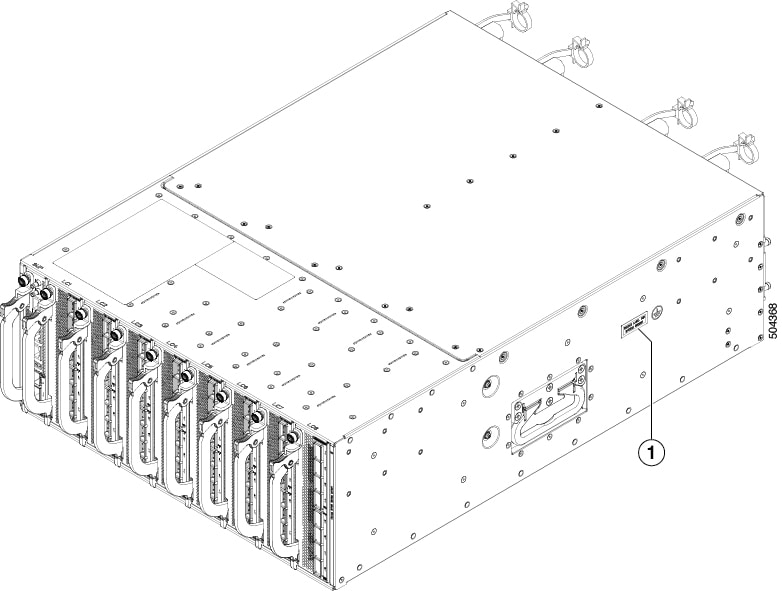
|
1 |
Grounding pad |
 Feedback