Secure Firewall 3100 Threat Defense Getting Started: Cloud-Delivered Firewall Management Center

PDF

Power on the firewall

Want to summarize with AI?

Log in

Overview

How to power on the Secure Firewall 3100 and confirm it started successfully by checking the front-panel LEDs for power and system status.

System power is controlled by a rocker power switch located on the rear of the firewall. The rocker power switch provides a soft notification that supports graceful shutdown of the system to reduce the risk of system software and data corruption.

Note

The first time you boot up the firewall, Firewall Threat Defense initialization can take approximately 15 to 30 minutes.

Before you begin

It's important that you provide reliable power for your firewall (for example, using an uninterruptable power supply (UPS)). Loss of power without first shutting down can cause serious file system damage. There are many processes running in the background all the time, and losing power does not allow the graceful shutdown of your system.

Procedure

1.

Attach the power cord to the firewall, and connect it to an electrical outlet.

2.

Turn the power on using the rocker power switch located on the rear of the chassis, adjacent to the power cord.
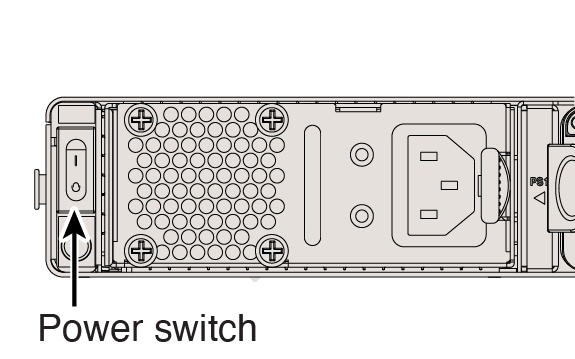
Figure 1. Power switch
Power button
3.

Check the LEDs for the current status.
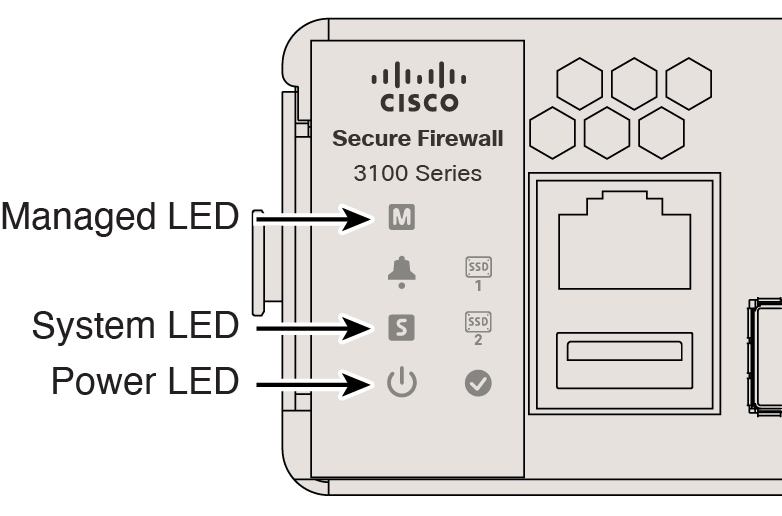
Figure 2. LEDs
LEDs
  • Power LED—Solid green means the firewall is powered on.

  • System (S) LED—See the following behavior:

    Table 1. System (S) LED Behavior

    LED Behavior

    Description

    Time After Device Powered On (minutes:seconds)

    Fast flashing green

    Booting up

    01:00

    Fast flashing amber (error condition)

    Failed to boot up

    01:00

    Solid green

    Application loaded

    15:00 - 30:00

    Solid amber (error condition)

    Application failed to load

    15:00 - 30:00

  • Managed (M) LED—After you connect the outside interface to the internet (see Cable the firewall), check the Managed LED to check the cloud connection status for zero-touch provisioning.

    Table 2. Zero-Touch Provisioning: Managed (M) LED behavior

    M LED

    Description

    Time after firewall powered on (minutes:seconds)

    Slow flashing green

    Connected to the Cisco cloud and ready for onboarding

    15:00 - 30:00

    Alternating green and amber

    (error condition)

    Failed to connect to the Cisco cloud

    15:00 - 30:00

    Solid green

    Onboarded

    20:00 - 45:00