Overview
Learn how to determine whether your Secure Firewall 1210/20 is running Firewall Threat Defense or ASA by connecting to the console port and identifying the CLI prompt.
Both applications, Firewall Threat Defense or ASA, are supported on the hardware. Connect to the console port and determine which application was installed at the factory.
Procedure
| 1. | Connect to the console port using either port type. 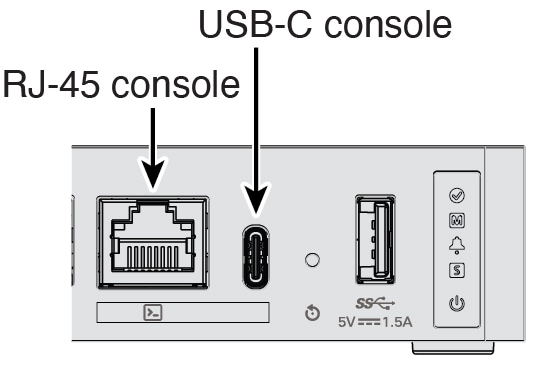
|
|
| 2. | See the CLI prompts to determine if your firewall is running Firewall Threat Defense or ASA. Firewall Threat Defense You see the firepower login (FXOS) prompt. You can disconnect without logging in and setting a new password. If you need to log in all the way, see Access the Firewall Threat Defense CLI. ASA You see the ASA prompt. |
|
| 3. | If you are running the wrong application, see Cisco Secure Firewall ASA and Secure Firewall Threat Defense Reimage Guide. |