Deploy Cisco Cyber Vision Sensor on Switches and Routers

PDF

Sensor deployment configuration examples

Want to summarize with AI?

Log in

Outlines essential network configuration examples for deploying Cisco Cyber Vision sensors, detailing VLAN settings, IP addressing, ERSPAN/RSPAN configurations, and deployment scenarios across various Cisco Catalyst switch series to ensure proper sensor communication and traffic monitoring.


This chapter provides examples of essential network configurations required to deploy Cisco Cyber Vision sensors on supported devices. Understanding these configurations is crucial for ensuring proper communication between the Center and the deployed sensors, as well as for effective traffic monitoring.

In these examples:

  • VLAN 49 is the collection VLAN.

  • VLAN 2508 is the mirroring VLAN.

  • 192.168.49.40 with the subnet mask 255.255.255.0 is the SVI management address, typically configured on the collection VLAN or on the network gateway.

  • 169.254.x.x IP range with the subnet mask 255.255.255.252 is used to configure ERSPAN origins and destinations.

The configuration examples provided in this guide demonstrate deploying sensors in Cisco Catalyst IE3x00, Cisco Catalyst IE9x00, and Cisco Catalyst 9x00 switches, in the following deployment scenarios:

  • Center and sensors are in the same network.

  • Center and sensors are in different networks.

  • (IE3x00 switches only) Platform and sensors are in different networks, requiring L3NAT-IOx.

For Cisco Catalyst 9300, specific examples are provided for ERSPAN and RSPAN configurations.

There are some important differences in sensor configurations, based on the network deployment setup and the devices on which the sensor is deployed.

Switch series

Center and sensors in the same network

Center and sensors in different networks

Cisco Catalyst IE3x00

Use the format-erspan command to encapsulate SPAN or RSPAN traffic in ERSPAN. The encapsulated traffic can then be sent to a destination address.

  • Use the format-erspan command to encapsulate SPAN or RSPAN traffic in ERSPAN. The encapsulated traffic can then be sent to a destination address.

  • Use ip route command to define a static route on the switch to reach the Cyber Vision Center's management network.

Cisco Catalyst IE9x00

None

Use ip route command to define a static route on the switch to reach the Cyber Vision Center's management network.

Cisco Catalyst 9x00

Use the ip routing command to enable Layer 3 routing capabilities on the switch, which is a prerequisite for ERSPAN to function.

Use the ip routing command to enable Layer 3 routing capabilities on the switch, which is a prerequisite for ERSPAN to function.


Center and sensor on the same network

Cisco Catalyst IE3x00 Series Switches

This example demonstrates deploying Cyber Vision sensors when the Center and Cisco Catalyst IE3x00 switches are in the same network:

Note

By default, trunk ports use VLAN 1 for untagged traffic. If the sensor must communicate with the Center on VLAN 1, to avoid conflicts, change the native VLAN to a different ID using the switchport trunk native vlan xxx command.

configure terminal
vtp mode off
vlan 2508
name mirror_vlan
remote-span
exit
interface AppGigabitEthernet 1/1
switchport mode trunk
monitor session 1 source interface Gi1/7-10 both
monitor session 1 destination remote vlan 2508
monitor session 1 destination format-erspan 169.254.1.2
vlan 49
name CyberVision_Collect
exit
interface vlan49
ip address 192.168.49.40 255.255.255.0
exit
interface GigabitEthernet1/3
description To_Cybervision_center_Eth1
switchport access vlan 49
switchport mode access
end
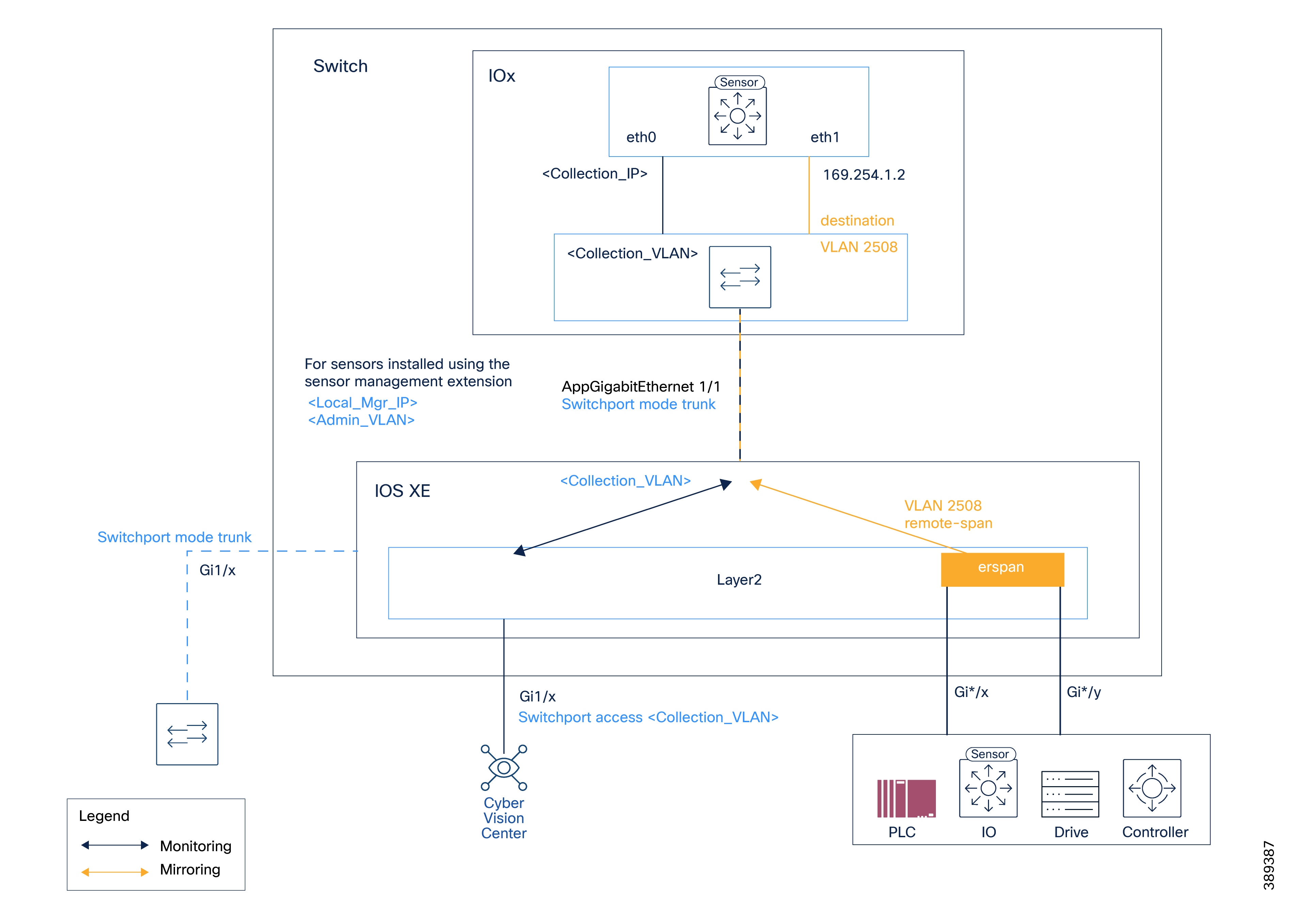
Figure 1. Example architecture when the Center and IE3x00 switches are in the same network
Cisco Catalyst IE9x00 Series Switches

This example demonstrates deploying Cyber Vision sensors when the Center and Cisco Catalyst IE9x00 switches are in the same network:

configure terminal
ip routing
vlan 2508
exit
interface vlan2508
ip address 169.254.1.1 255.255.255.252
no shutdown
exit
interface AppGigabitEthernet 1/0/1
switchport mode trunk
exit
monitor session 1 type erspan-source
source interface Gi1/0/7 - 10 both
no shutdown
destination erspan-id 2
mtu 9000
ip address 169.254.1.2
origin ip address 169.254.1.1
exit
exit
interface GigabitEthernet1/0/3
switchport access vlan 49
no shutdown
exit
exit
write mem
Cisco Catalyst 9x00 Series Switches

This section provides examples of deploying Cyber Vision sensors when the Center and Catalyst IE9x00 switches are in the same network.

This example demonstrates ERSPAN configuration:

configure terminal
ip routing
vlan 2508
exit
interface vlan2508
ip address 169.254.1.1 255.255.255.252
no shutdown
exit
interface AppGigabitEthernet 1/0/1
switchport mode trunk
exit
monitor session 1 type erspan-source
source interface Gi1/0/7 - 10 both
no shutdown
destination erspan-id 2
mtu 9000
ip address 169.254.1.2
origin ip address 169.254.1.1
exit
exit
interface GigabitEthernet1/0/3
switchport access vlan 49
no shutdown
exit
exit
write mem

This example demonstrates RSPAN configuration:

configure terminal
vlan 2508
name mirror_vlan remote-span
exit
interface AppGigabitEthernet 1/1
switchport mode trunk
monitor session 1 source interface Gi1/0/7 - 10 both
monitor session 1 destination remote vlan 2508
vlan 49
name CyberVision_Collect
exit
interface vlan49
ip address 192.168.49.40 255.255.255.0
exit
interface GigabitEthernet1/3
description To_Cybervision_center_Eth1
switchport access vlan 49
switchport mode access
end

Center and sensors on different networks

Catalyst IE3x00 Series Switches

This example demonstrates deploying Cyber Vision sensors when the Center and Cisco Catalyst IE3x00 switches are in different networks:

Note

By default, trunk ports use VLAN 1 for untagged traffic. If the sensor must communicate with the Center on VLAN 1, to avoid conflicts, change the native VLAN to a different ID using the switchport trunk native vlan xxx command.

configure terminal
vtp mode off
vlan 2508
name mirror_vlan remote-span
exit
interface AppGigabitEthernet 1/1
switchport mode trunk
monitor session 1 source interface Gi1/7-10 both
monitor session 1 destination remote vlan 2508
monitor session 1 destination format-erspan 169.254.1.2
Vlan 10
name Management_Vlan
!
Vlan 49
name CyberVision_Collect
!
interface Vlan49
ip address 192.168.49.40 255.255.255.0
!
interface Vlan10
ip address 172.16.1.250 255.255.255.0
!
interface GigabitEthernet1/3
description To_Router
switchport mode Trunk
switchport trunk allowed vlan 49,10
!
ip route 10.2.1.0 255.255.255.0 172.16.1.254
Catalyst IE9x00 Series Switches

This example demonstrates deploying Cyber Vision sensors when the Center and Cisco Catalyst IE9x00 switches are in different networks:

configure terminal
ip routing
vlan 2508
exit
interface Vlan2508
ip address 169.254.1.1 255.255.255.252
no shutdown
exit
interface AppGigabitEthernet 1/0/1
switchport mode trunk
exit
monitor session 1 type erspan-source
source interface Gi1/0/7 - 10 both
no shutdown
destination erspan-id 2 mtu 9000 ip address 169.254.1.2 origin ip address 169.254.1.1
exit
exit
Vlan 10
name Management_Vlan
!
Vlan 49
name Collection_Vlan
!
interface Vlan10
ip address 172.16.1.250 255.255.255.0
!
interface Vlan49
ip address 192.168.49.40 255.255.255.0
!
interface GigabitEthernet1/0/3
description To_Router_center_Eth1
exit
ip route 10.2.1.0 255.255.255.0 172.16.1.254
exit
write mem
Catalyst 9x00 Series Switches

This section provides examples of deploying Cyber Vision sensors when the Center and Catalyst 9x00 switches are in different networks.

This example demonstrates ERSPAN configuration:

configure terminal
ip routing
vlan 2508
exit
interface Vlan2508
ip address 169.254.1.1 255.255.255.252
no shutdown
!
interface AppGigabitEthernet 1/0/1
switchport mode trunk
!
monitor session 1 type erspan-source
source interface Gi1/0/7 - 10 both
no shutdown
destination erspan-id 2 mtu 9000 ip address 169.254.1.2 origin ip address 169.254.1.1
!
!
Vlan 10
name Switch_Management_Vlan
!
Vlan 49
name NATed_CyberVision_Collect
interface Vlan49
ip address 192.168.49.40 255.255.255.0
!
interface Vlan10
ip address 172.16.1.250 255.255.255.0
!
interface GigabitEthernet1/0/3
description To_Router_center_Eth1
switchport mode trunk
switchport trunk allowed vlan 49,10

This example demonstrates RSPAN configuration:

configure terminal
vlan 2508
name mirror_vlan remote-span
!
interface AppGigabitEthernet 1/1
switchport mode trunk
!
monitor session 1 source interface Gi1/0/7 - 10 both
monitor session 1 destination remote vlan 2508
!
Vlan 10
name Switch_Management_Vlan
!
Vlan 49
name NATed_CyberVision_Collect
interface Vlan49
ip address 192.168.49.40 255.255.255.0
!
interface Vlan10
ip address 172.16.1.250 255.255.255.0
!
interface GigabitEthernet1/3
description To_Router_center_Eth1
switchport mode trunk
switchport trunk allowed vlan 49,10

(IE3x00 only) Platform and sensors in different networks

This example demonstrates deploying Cyber Vision sensors when Cisco Catalyst IE3x00 switches are in multiple networks.

Note

By default, trunk ports use VLAN 1 for untagged traffic. If the sensor must communicate with the Center on VLAN 1, to avoid conflicts, change the native VLAN to a different ID using the switchport trunk native vlan xxx command.

configure terminal
vtp mode off
vlan 2508
name mirror_vlan remote-span
exit
Vlan 49
name NATed_CyberVision_Collect
interface Vlan49
ip address 192.168.49.40 255.255.255.0
Vlan 2507
name CyberVision_Collect
interface Vlan2507
ip address 169.254.0.1 255.255.255.252
interface AppGigabitEthernet 1/1
switchport mode trunk
monitor session 1 source interface Gi1/7-10 both
monitor session 1 destination remote vlan 2508
monitor session 1 destination format-erspan 169.254.1.2
interface GigabitEthernet1/3
description To_Router_center_Eth1
switchport mode access
switchport access vlan 49
!
l3nat-iox
app-ip 169.254.0.2
svi-ip 192.168.49.40
app-name CCV-ONPREM
server-ip 10.2.1.100