Outlines the multi-stage process for deploying Cyber Vision sensors, including preparing switches and routers, configuring traffic monitoring, and provisioning sensor applications for active discovery and packet capture on single or multiple devices.
Summary
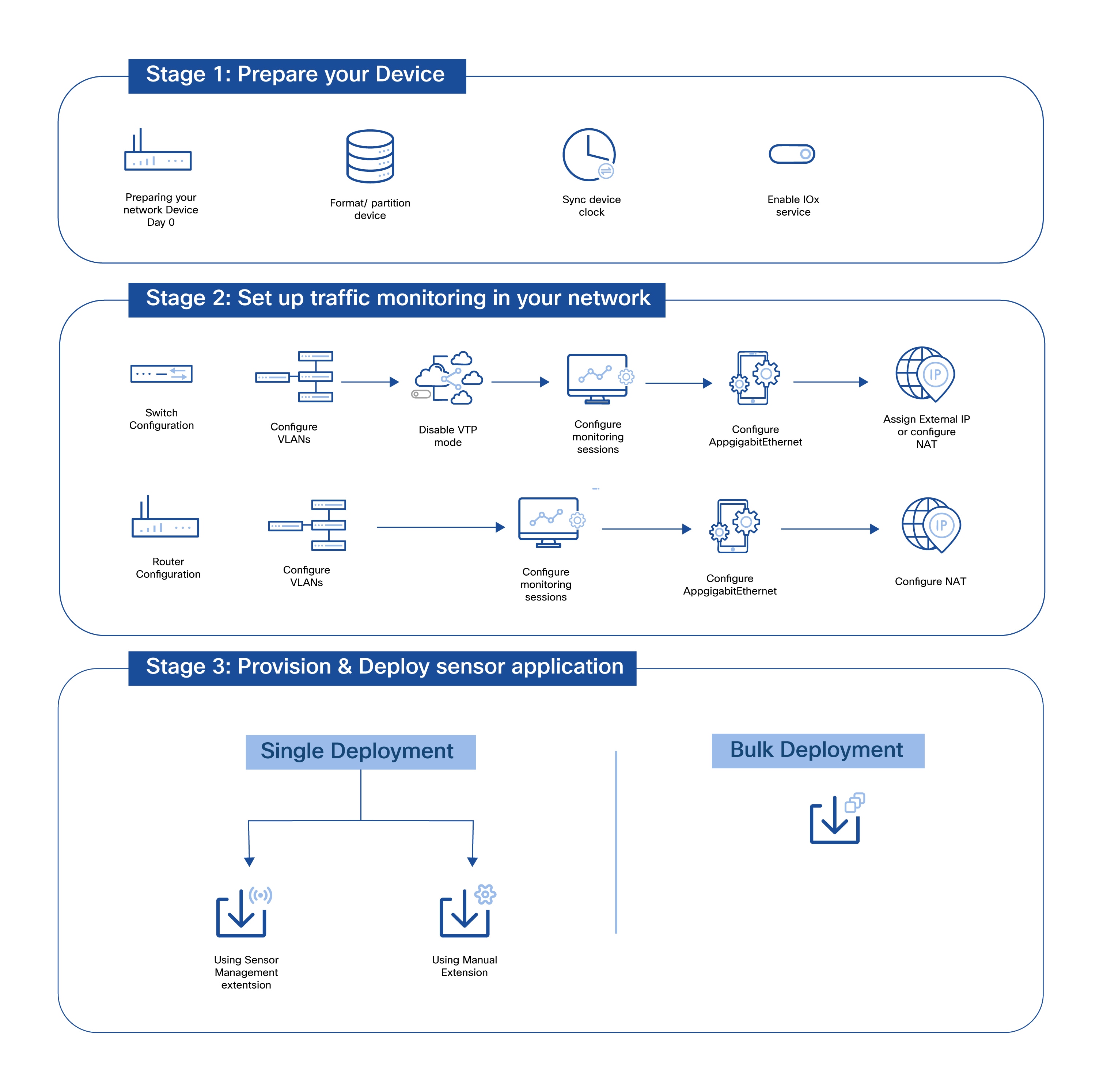
Deploying Cyber Vision sensor applications on network devices is a multi-stage process that involves preparing your devices, configuring network traffic monitoring, and provisioning sensors that are capable of active discovery and packet capture.Workflow
-
Prepare the devices
The following steps are crucial for successful deployment of sensors on your switches and routers:
-
(Switches only) Format or partition switch memory.
-
NTP Synchronization: Synchronize device and Center clock to ensure accurate reporting.
-
Enable IOx services on the device.
-
- Set up traffic monitoring
Configure traffic monitoring at the device level by setting up:
-
Mirroring VLANs or interfaces
-
Collection VLANs or interfaces
-
Gateways, where applicable
-
External IP address or NAT to allow connection to the Cyber Vision Center
-
- Provision and deploy the sensor application
You can provision sensors on one device at a time, or on multiple devices. For Cyber Vision Release 5.5 and earlier, the recommended provisioning and deployment method is to use the Sensor Management extension.
For testing purposes or in case of connectivity issues, you can carry out a manual deployment process.
Starting with Cisco Cyber Vision Release 5.6.0, the sensor-management extension is no longer available in the classic UI for deploying sensor applications. Sensors migrated from the classic UI Sensor Management extension are fully integrated into the sensor-host model available in the new UI Sensor Management page. However, manual sensor deployment, Docker sensor deployment, and Sensor VM deployment remain available in classic UI.
Use the deployment method that corresponds to your Cyber Vision version:
-
Cyber Vision 5.6 and later: Use the bulk onboarding and sensor deployment feature in the new UI ().
-
Cyber Vision 5.5 and earlier: Use the Sensor Management extension in the classic UI ().
-