Learn how to use the Firewall Management dashboard to view tenant-level insights, alerts, actions, inventory, VPN activity, change logs, and security events.
The Firewall dashboard is your central hub for monitoring and managing tenant-level details across various categories. Upon logging in, you can access a customizable dashboard that offers critical insights and actions to optimize security and operational efficiency.
From the left pane, click Dashboard.
Customize the dashboard
Make your dashboard fit your specific needs by customizing the visible widgets.
-
On the Home page, click Customize.
-
Select or deselect the widgets you want to view on the dashboard.
-
You can drag and drop the widgets to arrange them as you prefer.
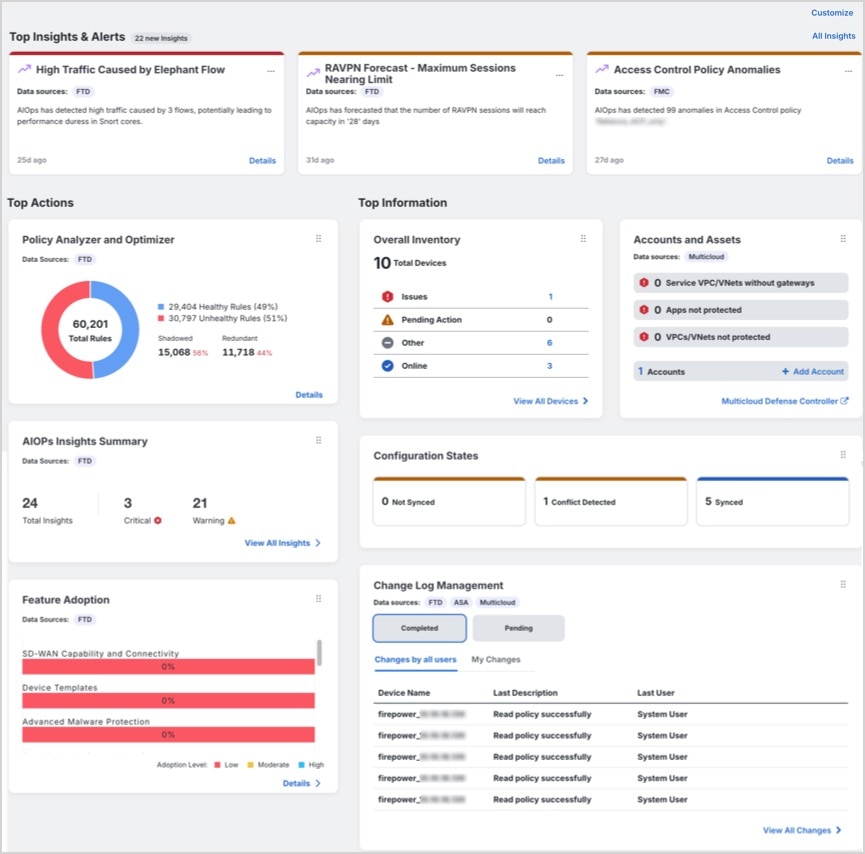
The dashboard is divided into three main sections: Top Insights & Alerts, Top Actions, and Top Information. Each section provides different categories of insights to help you maintain optimal security and operational control.
Top Insights & Alerts
This section is visible only if AgenticOpsInsights is enabled for your tenant. You can view insights related to high traffic caused by elephant flows, RA VPN forecast, access control policy anomalies, high CPU and memory usage, snort CPU and memory usage.
Top Actions
This section is visible only if AgenticOps Insights is enabled for your tenant. If enabled, you can view the following widgets:
-
Policy Analyzer and Optimizer: Analyzes security policies, detects anomalies, and and recommends changes that can improve firewall performance.
For more information, refer to Policy Analyzer and Optimizer.
-
AgenticOps Insights: Shows active insights and trends by category, including Configuration, Health & Operations, and Traffic & Capacity.
For more information, refer to AgenticOpsInsights.
-
Feature Adoption: Shows feature adoption rates so you can assess and improve usage.
For more information, refer to Assess and Improve Feature Adoption.
Top Information
This section provides detailed insights into various tenant-level metrics. Depending on the features that are enabled for your tenant, you can view the following widgets:
-
Configuration States: Compares device configurations with the configurations maintained by Security Cloud Control so that you can identify inconsistencies or conflicts.
For more information, refer to Device Management.
-
Change Log Management: Shows completed and pending change logs so that you can track operational changes. The widget displays Completed and Pending change logs.
For more information, refer to Change Logs.
-
RA VPN Sessions: Shows Remote Access VPN session activity.
For more information, refer to RA VPN Sessions.
-
Overall Inventory: Shows the total number of devices and groups them by Issues, Pending Actions, Other, and Online.
For more information, refer to All Devices.
-
Site-to-Site VPN: Shows the total number of VPN tunnels and the percentage of tunnels that are Active and Idle. The widget displays the total number of VPN tunnels and the percentage that are Active and Idle.
For more information, refer to Site-to-site VPN.
-
Accounts and Assets:
-
Helps you to track and manage your multicloud accounts and resources effectively. You can launch the Multicloud Defense Controller from here.
-
Click +Add Account to add a new account.
For more information, refer to Multicloud Defense Controller.
-
-
Top Risky Destinations: Helps you identify and monitor the top risky destinations that are granted access. The widget lists Applications and URL Categories and allows you to filter data for the last 90, 60, or 30 days. You can filter between Allowed (default) and Blocked traffic.
-
Top Intrusion and Malware Events: Helps you to monitor and respond to top intrusion and malware events. The widget displays Intrusion Events and Malware Events and allows you to filter data for the last 90, 60, and 30 days. You can filter between Allowed (default) and Blocked events.
Announcements
Click the Announcements icon to look at the most recent Security Cloud Control features and updates. Links to related doucmentation is provided if you need more information on any of the items listed.