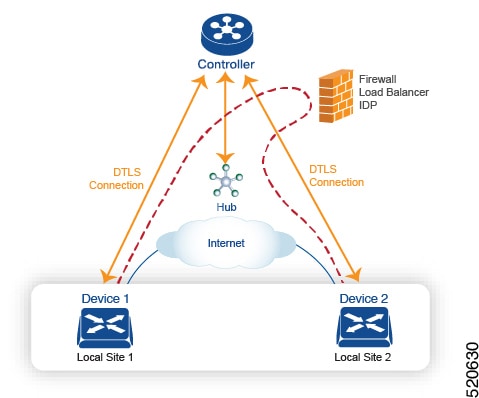
Configure service chaining
Here is the workflow for configuring service chaining for a device managed by Cisco Catalyst SD-WAN:
-
Service devices are accessed through a specific VRF. In the VPN template that corresponds to the VRF for a service device, configure service chaining, specifying the service type and device addresses. By default, the tracking feature adds each service device status update to the service log. You can disable this in the VPN template.
-
Attach the VPN template to the device template for the device managed by Cisco Catalyst SD-WAN.
-
Apply the device template to the device.
Configure service chaining using templates
To configure service chaining for a device.
-
In Cisco SD-WAN Manager, create a VPN template.
-
Click Service.
-
In the Service section, click New Service and configure the following:
-
Service Type: Select the type of service that the service device is providing.
-
IP Address: IP Address is the only working option.
-
IPv4 Address: Enter between one and four addresses for the device.
-
Tracking: Determines whether the periodic health updates of the service device are recorded in the system log. Default: On

Note
Maximum number of services: 8
-
-
Click Add. The service appears in the table of configured services.
Configure service chaining for Cisco IOS XE Catalyst SD-WAN devices using CLI commands
Configure service chaining for Cisco IOS XE Catalyst SD-WAN devices using CLI commands
The following table shows how configuration of service chaining by CLI corresponds to configuration in Cisco SD-WAN Manager. CLI configuration differs between Cisco IOS XE Catalyst SD-WAN devices and Cisco vEdge devices. The CLI example below is for a Cisco IOS XE Catalyst SD-WAN device.
|
CLI (Cisco IOS XE Catalyst SD-WAN device) |
Cisco SD-WAN Manager |
||
|---|---|---|---|
|
In Cisco SD-WAN Manager, configure service insertion in the VPN template for a specific VRF—VRF 10 in this example. Select the service type from the drop-down —firewall in this example. |
||
|
When adding a service in the VPN template Service, select On or Off for Tracking. |
||
|
In the VRF template Service, enter one or more IP addresses for the service device providing a specific service. |
CLI example
sdwan
  service firewall vrf 10
  ipv4 address 10.0.2.1 10.0.2.2
commit
Service chaining configuration examples
Service chaining control policies direct data traffic to service devices that can be located in various places in the network before the traffic is delivered to its destination. For service chaining to work, you configure a centralized control policy on the Cisco SD-WAN Controller, and you configure the service devices themselves on the device collocated in the same site as the device. To ensure that the services are advertised to the Cisco SD-WAN Controller, the IP address of the service device must resolve locally.
This topic provides examples of configuring service chaining.
Route intersite traffic through a service
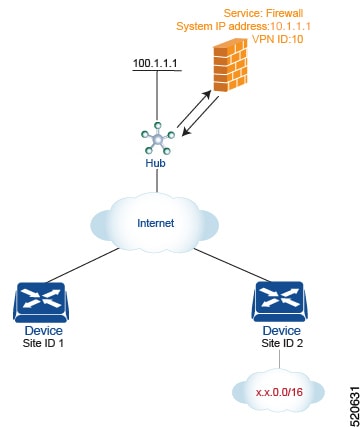
For this scenario, you configure the following:
-
On the hub router, you configure the IP address of the firewall device.
-
On the Cisco SD-WAN Controller, you configure a control policy that redirects traffic destined from Site 1 to Site 2 through the firewall service.
-
On the Cisco SD-WAN Controller, you apply the control policy to Site 1.
Here is the configuration procedure:
-
On the hub router, provision the firewall service, specifying the IP address of the firewall device. With this configuration, OMP on the hub router advertises one service route to the Cisco SD-WAN Controller. The service route contains a number of properties that identify the location of the firewall, including the TLOC of the hub router and a service label of svc-id-1, which identifies the service type as a firewall. (As mentioned above, before advertising the route, the device ensures that the firewall's IP address can be resolved locally.)
sdwan service firewall vrf 10 ipv4 address 10.1.1.1 -
On the Cisco SD-WAN Controller, configure a control policy that redirects data traffic traveling from Site 1 to Site 2 through the firewall. Then, also on the Cisco SD-WAN Controller, apply this policy to Site 1.
policy
  lists
    site-list firewall-sites
      site-id 1
  control-policy firewall-service
    sequence 10
      match route
        site-id 2
      action accept
        set service FW vpn 10
    default-action accept
apply-policy
  site-list firewall-sites control-policy firewall-service out
This policy configuration does the following:
-
Create a site list called firewall-sites that is referenced in the apply-policy command and that enumerates all the sites that this policy applies to. If you later want to scale this policy so that all traffic destined to Site 2 from other sites should also first pass through the firewall, all you need to do is add the additional site IDs to the firewall-sites site list. You do not need to change anything in the control-policy firewall-service portion of the configuration.
-
Define a control policy named firewall-service. This policy has one sequence element and the following conditions:
-
Match routes destined for Site 2.
-
If a match occurs, accept the route and redirect it to the firewall service provided by the Hub router, which is located in VPN 10.
-
Accept all nonmatching traffic. That is, accept all traffic not destined for Site 2.
-
-
Apply the policy to the sites listed in firewall-list, that is, to Site 1. The Cisco SD-WAN Validator applies the policy in the outbound direction, that is, on routes that it redistributes to Site 1. In these routes:
-
The TLOC is changed from Site 2’s TLOC to the hub router’s TLOC. This is the TLOC that the Cisco SD-WAN Controller learned from the service route received from the hub router. It is because of the change of TLOC that traffic destined for Site 2 is directed to the hub router
-
The label is changed to svc-id-1, which identifies the firewall service. This label causes the hub router to direct the traffic to the firewall device.
-
When the hub router receives the traffic, it forwards it to the address 10.1.1.1, which is the system IP address of the firewall. After the firewall has finished processing the traffic, the firewall returns the traffic to the hub router, and this router then forwards it to its final destination, which is Site 2.
-
Route inter-VPN traffic through a service chain with one service per node
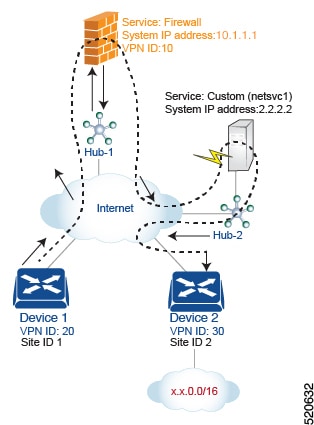
For this policy to work:
-
VPN 10, VPN 20, and VPN 30 must be connected by an extranet, such as the Internet
-
VPN 10 must import routes from VPN 20 and VPN 30. Routes can be selectively imported if necessary.
-
VPN 20 must import routes from VPN 30. Routes can be selectively imported if necessary.
-
VPN 30 must import routes from VPN 20. Routes can be selectively imported if necessary.
For this scenario, you configure four things:
-
You configure the IP address of the firewall device on the Hub-1 router.
-
You configure the IP address of the custom service device on the Hub-2 router.
-
On the Cisco SD-WAN Controller, you configure a control policy that redirects traffic destined from Site 1 to Site 2 through the firewall device.
-
On the Cisco SD-WAN Controller, you configure a second control policy that redirects traffic to the custom service device.
Here is the configuration procedure:
-
Configure the firewall service on Hub-1. With this configuration, OMP on the Hub-1 router advertises a service route to the Cisco SD-WAN Controller. The service route contains a number of properties that identify the location of the firewall, including the TLOC of the hub router and a service label of svc-id-1, which identifies the service type as a firewall.
sdwan service firewall vrf 10 ipv4 address 10.1.1.1 -
Configure the custom service netsvc1 on Hub-2. With this configuration, OMP on the Hub-2 router advertises a service route to the Cisco SD-WAN Controller. The service route contains the TLOC of the Hub-2 and a service label of svc-id-4, which identifies the custom service.
sdwan service netsvc1 vrf 10 ipv4 address 2.2.2.2 -
Create a control policy on the Cisco SD-WAN Controller for first service in the chain—the firewall—and apply it to Site 1, which is the location of the device-1 router:
policy
  lists
    site-list firewall-custom-service-sites
      site-id 1
  control-policy firewall-service
    sequence 10
      match route
        vpn 30
        site-id 2
      action accept
        set service FW
    default-action accept
apply-policy
  site-list firewall-custom-service-sites control-policy firewall-service out
This policy configuration does the following:
-
Create a site list called firewall-custom-service-sites that is referenced in the apply-policy command and that enumerates all the sites that this policy applies to.
-
Define a control policy named firewall-service that has one sequence element and the following conditions:
-
Match routes destined for both VPN 30 and Site 2.
-
If a match occurs, accept the route and redirect it to a firewall service.
-
If a match does not occur, accept the traffic.
-
-
Apply the policy to the sites in the firewall-custom-service-sites site list, that is, to Site 1. The Cisco SD-WAN Controller applies this policy in the outbound direction, that is, on routes that it redistributes to Site 1. In these routes:
-
The TLOC is changed from Site 2’s TLOC to the Hub-1 router’s TLOC. This is the TLOC that the Cisco SD-WAN Controller learned from the service route received from the hub. It is because of the change of TLOC that traffic destined for Site 2 is directed to the Hub-1 router.
-
The label is changed to svc-id-1, which identifies the firewall service. This label causes the Hub-1 router to direct the traffic to the firewall device.
-
When the Hub-1 router receives the traffic, it forwards it to the address 10.1.1.1, which is the system IP address of the firewall. After the firewall completes processing the traffic, it returns the traffic to the Hub-1 router, which, because of the policy defined in the next step, forwards it to the Hub-2 router.
-
-
Create a control policy on the Cisco SD-WAN Controller for the second service in the chain, which is the custom service, and apply it to the site of the Hub-1 router:
policy
  site-list custom-service
    site-id 3
  control-policy netsvc1-service
    sequence 10
      match route
        vpn 30
        site-id 2
      action accept
        set service netsvc1
    default-action accept
apply-policy
  site-list custom-service control-policy netsvc1-service out
This policy configuration does the following:
-
Create a site list called custom-service that is referenced in the apply-policy command and that enumerates all the sites that this policy applies to.
-
Define a control policy named netsvc1-service that has one sequence element and the following conditions:
-
Match routes destined for both VPN 30 and Site 2.
-
If a match occurs, accept the route and redirect it to the custom service.
-
If a match does not occur, accept the traffic.
-
-
Apply the policy to the sites in the custom-service list, that is, to Site 3. The Cisco SD-WAN Controller applies this policy in the outbound direction, that is, on routes that it redistributes to Site 3. In these routes:
-
The TLOC is changed from Site 2’s TLOC to the Hub-2 router’s TLOC. This is the TLOC that the Cisco SD-WAN Controller learned from the service route received from the Hub-2 router. It is because of the change of TLOC that traffic destined for Site 2 is directed to the Hub-2 router.
-
The label is changed to svc-id-4, which identifies the custom service. This label causes the Hub-2 to direct the traffic to the device that is hosting the custom service
-
When the Hub-2 routers receives the traffic, it forwards it to the address 2.2.2.2, which is the system IP address of the device hosting the custom service. After the traffic has been processed, it is returned to the Hub-2 router, which then forwards it to its final destination, Site 2.
-
Route inter-VPN traffic through a service chain with multiple services per node
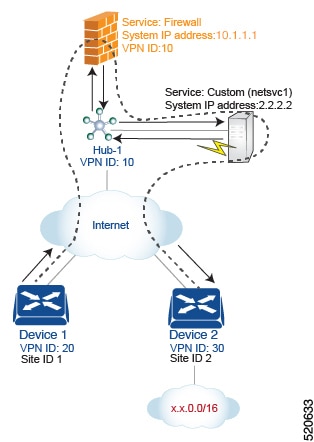
For this policy to work:
-
VPN 10, VPN 20, and VPN 30 must be connected by an extranet, such as the Internet.
-
VPN 10 must import routes from VPN 20 and VPN 30. Routes can be selectively imported if necessary.
-
VPN 20 must import routes from VPN 30. Routes can be selectively imported if necessary.
-
VPN 30 must import routes from VPN 20. Routes can be selectively imported if necessary.
For this scenario, you configure the following:
-
On the hub router, you configure the firewall and custom services.
-
On the Cisco SD-WAN Controller, you configure a control policy that redirects data traffic from Site 1 that is destined to Site 2 through the firewall.
-
On the Cisco SD-WAN Controller, you configure a data policy that redirects data traffic to the custom service.
Here is the configuration procedure:
-
On the hub router, configure the firewall and custom services:
sdwan
service firewall vrf 10
  ipv4 address 10.1.1.1
service netsvc1 vrf 10
  ipv4 address 2.2.2.2
With this configuration, OMP on the hub router advertises two service routes to the Cisco SD-WAN Controller, one for the firewall and the second for the custom service netsvc1. Both service routes contain the TLOC of the Hub-1 router and a service label that identifies the type of service. For the firewall service, the label is svc-id-1, and for the custom service, the label is svc-id-4.
-
On the Cisco SD-WAN Controller, configure a control policy controller to reroute traffic destined for VPN 30 (at Site 2) to firewall service that is connected to Hub-1 (at Site 3), and apply this policy to Site 1:
policy lists site-list device-1 site-id 1 control-policy firewall-service sequence 10 match route vpn 30 action accept set service FW apply-policy site-list device-1 control-policy firewall-service out -
On the Cisco SD-WAN Controller, configure a data policy that redirects, or chains, the data traffic received from the firewall device to the custom service netsvc1. Then apply this policy to Hub-1. This data policy routes packets headed for destinations in the network x.x.0.0/16 to the IP address 2.2.2.2, which is the system IP address of the device hosting the custom service.
policy
  lists
    site-list device-2
      site-id 2
    site-list Hub-1
      site-id 3
    prefix-list svc-chain
      ip-prefix x.x.0.0/16
    vpn-list vpn-10
      vpn 10
  data-policy netsvc1-policy
    vpn-list vpn-10
      sequence 1
        match
          ip-destination x.x.0.0/16
        action accept
          set next-hop 2.2.2.2
apply-policy
  site-list Hub-1 data-policy netsvc1-policy from-service
Active or backup scenario with service chaining
When using set service action to configure active or backup control policy with set service action for service chaining, if total number of available paths (summary of active and standby paths) is more than configured send-path-limit, do not set preference directly to routes. Ensure to use set tloc-list action to set preferences together with set service action. Otherwise, you may see cases where either only active or only backup paths are advertised to a particular spoke router.
For example, in the Cisco SD-WAN Controller OMP table, there are eight active and backup paths. Based on the best-path calculation, the paths are sorted in the following order:
backup1, backup2, backup3, backup4, active1, active2, active3, active4
When send-path-limit 4 is configured, if you apply the first policy, only the four backup paths are sent. If you apply the second policy, two active and two backup paths are sent.
Example of policy susceptible for failures if send-path-limit is lower than total number of active and backup paths:
control-policy SET_SERVICE_ACTIVE-BACKUP
  sequence 10
   match route
    prefix-list _AnyIpv4PrefixList
    site-list   HUBS_PRIMARY
    tloc-list   INTERNET_TLOCS
   !
   action accept
    set
     preference 200
     service FW vpn 10
    !
   !
  !
  sequence 20
   match route
    prefix-list _AnyIpv4PrefixList
    site-list   HUBS_SECONDARY
    tloc-list   INTERNET_TLOCS
   !
   action accept
    set
     preference 100
     service FW vpn 10
    !
   !
  !
  default-action accept
!
!
Example of the same policy but fixed according to recommendations:
policy
lists
  tloc-list HUBS_PRIMARY_INTERNET_TLOCS
   tloc 10.0.0.0 color biz-internet encap ipsec preference 200
   tloc 10.0.0.1 color biz-internet encap ipsec preference 200
  !
  tloc-list HUBS_SECONDARY_INTERNET_TLOCS
   tloc 10.255.255.254 color biz-internet encap ipsec preference 100
   tloc 10.255.255.255 color biz-internet encap ipsec preference 100
  !
!
control-policy SET_SERVICE_ACTIVE-BACKUP_FIXED
  sequence 10
   match route
    prefix-list _AnyIpv4PrefixList
    site-list   HUBS_PRIMARY
    tloc-list   INTERNET_TLOCS
   !
   action accept
    set
     service FW vpn 10 tloc-list HUBS_PRIMARY_INTERNET_TLOCS
    !
   !
  !
  sequence 20
   match route
    prefix-list _AnyIpv4PrefixList
    site-list   HUBS_SECONDARY
    tloc-list   INTERNET_TLOCS
   !
   action accept
    set
     service FW vpn 10 tloc-list HUBS_SECONDARY_INTERNET_TLOCS
    !
   !
  !
  default-action accept
!
! Feedback