The documentation set for this product strives to use bias-free language. For the purposes of this documentation set, bias-free is defined as language that does not imply discrimination based on age, disability, gender, racial identity, ethnic identity, sexual orientation, socioeconomic status, and intersectionality. Exceptions may be present in the documentation due to language that is hardcoded in the user interfaces of the product software, language used based on RFP documentation, or language that is used by a referenced third-party product. Learn more about how Cisco is using Inclusive Language.
The search box in the SD-WAN Manager header enables you to search for information related to devices, network, and so on. The integration of role-based access
control (RBAC) ensures that only authorized users can access data.
TAC case access for AI Assistant in Cisco SD-WAN Manager
Cisco Catalyst SD-WAN Manager Release 20.18.2
With the AI Assistant you can open, view, and close Technical Assistance Center (TAC) cases.
Note
The foundational infrastructure of AI Assistant is included in this release. As a cloud-delivered component of Cisco Catalyst
SD-WAN Manager, AI Assistant's capabilities will continue to expand, providing even greater value for customers.
Access to Cisco Support Assistant
Cisco Catalyst SD-WAN Manager Release 26.1.1.1
Support Assistant is a support tool that integrates TAC support functions directly into SD-WAN Manager. In previous releases, using Support Assistant required installing a browser extension. This is no longer needed. With Support
Assistant, you can open TAC cases, record screens, and upload logs directly from SD-WAN Manager.
SD-WAN Manager header
Describes the tools available in the header of the SD-WAN Manager page, as viewed in a browser.
Icon
Description
Search
Use the search field to find information on devices, network, configurations, and so on within SD-WAN Manager. SD-WAN Manager maintains search history for each user session.
The search results only include information a user is authorized to view, based on role-based access control (RBAC). In a
multitenant environment, when a tenant uses the search, SD-WAN Manager returns results related to that tenant only.
AI Assistant
The Cisco AI Assistant is available within SD-WAN Manager. It can help with management tasks like configuration, optimization,
task automation, and troubleshooting. The AI Assistant supports operational and management tasks such as monitoring, troubleshooting,
and TAC case management.
Tasks
Shows a list of active and completed tasks.
Help
Shows product help, software version, online documentation, and so on. Allows access to Cisco Support Assistant.
Notifications
Shows the details of active and cleared alarms.
User Profile drop-down list
Sign out, or edit your profile.
Cisco Support Assistant
Describes Cisco Support Assistant, an in-product support tool that integrates TAC support functions directly into SD-WAN Manager.
To access Support Assistant, select TAC Support from the Help menu in the header. Support Assistant supports these functions in SD-WAN Manager:
Open support case: Open TAC cases directly from SD-WAN Manager. You can attach relevant logs and files easily, ensuring faster case resolution with minimal manual steps.
Record screen: Record on-screen activities to demonstrate issues visually during case submission. These recordings help TAC engineers quickly
understand the problem context for more efficient troubleshooting.
Upload local file: Upload diagnostic files and configuration logs to Cisco TAC. Secure file transfer is integrated directly within SD-WAN Manager. Share your files while maintaining compliance and privacy standards.
For more information on Support Assistant functions, refer to the Cisco Support Assistant website.
Note
Support Assistant is enabled when you authenticate within SD-WAN Manager. You need to re-authenticate in each SD-WAN Manager
session to use Support Assistant.
AI Assistant
Describes the AI Assistant available in SD-WAN Manager.
Cisco AI Assistant for SD-WAN Manager
The Cisco AI Assistant is a proprietary conversational AI interface designed to help optimize network management and promote
proactive troubleshooting. Through AI-powered responses, recommendations, and insights, the AI assistant helps streamline
network operations.
With AI‑driven troubleshooting, the AI Assistant accelerates issue identification and resolution, helping administrators and
engineers reduce troubleshooting time, minimize downtime, and maintain optimal network performance.
The AI assistant for SD-WAN Manager is available for Cisco SD-WAN Cloud and Cloud-Pro installations, and for on-premises self-hosted
SD-WAN deployments that have cloud connectivity and have enabled cloud services. To enable AI Assistant functionality for
on-premises deployments, choose Administration > Settings from the SD-WAN Manager menu, choose Cloud Services from the Data Collection & Statistics list, and enable the Cloud Services option.
Access the AI Assistant
At the top of the SD-WAN Manager dashboard, select the AI Assistant icon.
Figure 1. AI Assistant icon
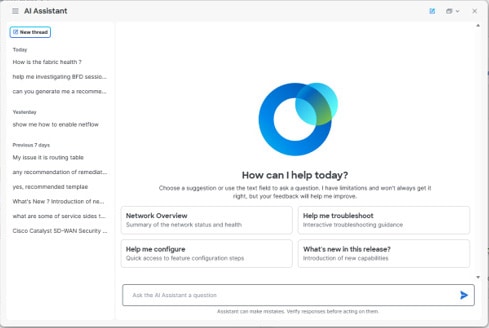
The AI Assistant opens.
Figure 2. AI Assistant
Select New Thread to start a new conversation with the AI Assistant, then choose one of the suggested topics or enter your question or task
in the text box.
Your previous queries appear in the chat history pane.
The AI Assistant helps reduce management workload, increase productivity, and improve your networking experience. Start a
conversation with the AI Assistant by asking, “What can you help me with?” to learn about its capabilities.
AI Assistant tasks in SD-WAN Manager
The AI Assistant can perform various tasks in SD-WAN Manager:
Documentation search: Get information about SD-WAN features and capabilities:
What is Cloud OnRamp for SaaS?
How do I configure Cloud OnRamp for SaaS?
How do I configure Application Aware Routing?
Monitoring and troubleshooting your network: Get information about network and application health:
What is the health of my network?
Are there any link issues in the last 24 hours?
Are there any application performance issues in the last 7 days?
Note
To monitor and troubleshoot the network with the AI Assistant, enable Cloud Services with Analytics onboard.
TAC case management: Open, view, or close a TAC case.
To open a TAC case, you must have a support contract or product under warranty. The cisco.com user account that is used to
sign on to the Support Case Manager portal must have permission to create, view, and close TAC cases.
If you provide insufficient information to open a case, the AI assistant provides a TAC portal link with auto-filled information
for request completion. You need to complete an authentication workflow for TAC-related actions.
Note
Updating or uploading attachment files for existing TAC cases is not supported through the AI Assistant.
AI Assistant prompting
A prompt is a question or any text input that you provide to the Cisco AI Assistant to initiate a conversation or request
information. The way you format and construct a prompt plays a crucial role in determining the response from the AI Assistant.
An effective prompt should include these components:
Subject: Be clear and specific about what you're asking for.
Context: Provide necessary background information.
Purpose: State what you want to achieve with your prompt.
By providing precise input and context, you significantly increase the chances of receiving a targeted, relevant, and useful
answer from the AI Assistant. Follow these additional guidelines to get the best results:
Be specific and provide context: Draft your prompt with relevant information, using the correct device names, policy names,
and so on to help the AI Assistant understand your request better.
Use proper syntax: While AI Assistant can understand colloquial language, clear and grammatically correct sentences can improve
response accuracy.
Clarify the desired output: If you have a preferred format for the response, such as a list, a detailed explanation, or tables,
mention it in your prompt.
Provide feedback: If the response doesn't meet your expectations, you can provide feedback or ask for clarification in your
next prompt.
Request unique values: Include the keyword “unique” to request unique values from the AI Assistant.
Use sequential questioning: Pose multiple inquiries as separate, follow-up questions to enhance clarity and context, rather
than combining them into a single complex query.
Use explicit multi-attribute queries: When requesting information about multiple characteristics or properties simultaneously,
clearly state “both” or “all of the following”. Otherwise, the AI Assistant might select an attribute at random to respond
to.
Example scenarios for using AI Assistant
Here are some typical scenarios where AI Assistant can help you manage your SD-WAN deployment.
Table 2. Example scenarios for using AI Assistant
Scenario
Prompt
Result
Monitor application performance and SLA.
“How are my applications performing, and are there any SLA violations in my SD-WAN network?"
The AI Assistant analyzes application telemetry such as latency, packet loss, and other performance metrics to detect SLA
violations. It highlights affected applications and helps prioritize remediation for business‑critical services.
Summarize current network status and get recommendations.
“Give me a summary of network and application health.”
The AI Assistant displays the steps it is taking to analyze and process the query. In this case, it recognizes the need to
pull analytic data from a 24-hour window. Next, it determines the additional queries needed to identify any problem areas.
Finally, it presents the key health metrics in a table along with lists of top applications by usage and key insights.
Troubleshoot and resolve issues.
“Are there any circuits with high latency?”
The AI Assistant analyzes data and identifies tunnels that show high latency. It then lists likely root causes and recommended
actions to address the issue. You are given the option to open a support case or adjust traffic steering policies.
AI Assistant FAQs
How accurate are the recommendations from AI Assistant?
The AI Assistant is designed to provide suggestions by leveraging pre-trained models tuned for networking-specific tasks,
integrating with real-time system data when applicable, as well as drawing from networking industry best practices and product
documentation to help generate responses. While the AI Assistant aims to provide grounded information, you must validate its
suggestions and actions, especially for critical configurations or troubleshooting.
Is my data being used to train the AI Assistant?
No, your data is not used to train the AI Assistant. Cisco handles your data responsibly. Refer to the Cisco AI Assistant Offer Disclosure for more information.


 Feedback