Configuring Cloud Native BNG User Plane and Key Features

This chapter describes the configuration procedures to achieve the cnBNG user plane functionality on Cisco ASR 9000 Series Routers.

For details on cnBNG user plane commands, see the Cloud Native BNG Command Reference for Cisco ASR 9000 Series Routers.

Configure cnBNG User Plane

Before you begin:

You must follow these guidelines for configuring cnBNG user plane:

  • You must perform a complete reimage followed by a reboot of the router if you are switching between physical BNG to cnBNG, or the other way around.

  • Ensure that the cnBNG package is installed and activated on the user plane. See the Installing Cloud Native BNG User Plane Packages chapter for detailed procedure.

  • The system does not support the removal of configurations while active sessions are present. You must delete all active sessions and dissociate the CP-UP connection prior to any configuration change or commit replace procedure.

Configuration Procedure

You must perform the following tasks for the UP to spawn the NAL process, to establish connection with the CP, and to provision the subscriber requests.

Configure Basic User Plane Settings

The basic user plane configuration for cnBNG involves these high-level tasks:

  • Configuring the server endpoints of CP to which UP can send PFCP or GTP-U messages to enable cnBNG on the router.

  • Configuring a loopback interface for each VRF.

  • Configuring a route tag for subscriber summary routes.

  • Configuring the access-interface to enable IPoE and PPPoE subscribers.

The cnBNG endpoint configurations on the UP are delivered to the cnBNG SPA component for initiating connection with the CP.

Configuration Procedure

This section describes the steps for the basic user plane configuration, which include certain mandatory and optional configurations.

Mandatory Configurations:

  • Specifying a unique name for the UP-server instance.

  • Specifying the details of the UP server (such as IP address, GTP port, and PFCP port) to which the CP can send PFCP or GTP-U messages.

  • Specifying the details of CP server to which the UP can send PFCP or GTP-U messages.

  • Specifying the retry count for CP-UP association.

  • Enabling secondary address programming.

  • Specifying a name for the auto-loopback VRF.

  • Configuring a loopback interface to associate with the above VRF.

  • Specifying a primary address for the loopback interface.

Optional Configuration:

  • Configuring a route summary tag for the routes to add in the routing table

Configuration Example

Configuration example with IPv4 transport.


Router#configure
Router(config)#cnbng-nal location 0/RSP0/CPU0
Router(config-cnbng-nal-local)#hostidentifier asr9k-1
Router(config-cnbng-nal-local)#cp-server primary ipv4 198.51.100.1
Router(config-cnbng-nal-local)#up-server ipv4 192.0.2.1 gtp-port 15002 pfcp-port 15003 vrf default
Router(config-cnbng-nal-local)#secondary-address-update-enable
Router(config-cnbng-nal-local)#cp-association retry-count 10
Router(config—cnbng-nal-local)#auto-loopback vrf test
Router(config—cnbng-nal-local-auto-loopback-vrf)#interface Loopback2
Router(config—cnbng-nal-local-auto-loopback-vrf-int)#primary-address 127.0.0.1
Router(config—cnbng-nal-local-auto-loopback-vrf-int)#exit
Router(config—cnbng-nal-local-auto-loopback-vrf)#exit
/* Auto-loopback configuration for default VRF */
Router(config—cnbng-nal-local)#auto-loopback vrf default
Router(config—cnbng-nal-local-auto-loopback-vrf)#interface Loopback1
Router(config—cnbng-nal-local-auto-loopback-vrf-int)#primary-address 10.0.0.1
Router(config—cnbng-nal-local-auto-loopback-vrf-int)#exit
Router(config—cnbng-nal-local-auto-loopback-vrf)#exit
Router(config-cnbng-nal-local)#route-summary tag 4
Router(config-cnbng-nal-local)#commit

Configuration example with IPv6 transport.

Starting from Release 24.3.1, we support IPv6 transport for the interface between cnBNG and user plane.


Router#configure
Router(config)#cnbng-nal location 0/RSP0/CPU0
Router(config-cnbng-nal-local)#hostidentifier asr9k-1
Router(config-cnbng-nal-local)#cp-server primary ipv6 1::2
Router(config-cnbng-nal-local)#up-server ipv6 1:1
Router(config-cnbng-nal-local)#secondary-address-update-enable
Router(config-cnbng-nal-local)#cp-association retry-count 10
Router(config—cnbng-nal-local)#auto-loopback vrf test
Router(config—cnbng-nal-local-auto-loopback-vrf)#interface Loopback2
Router(config—cnbng-nal-local-auto-loopback-vrf-int)#primary-address 1::3
Router(config—cnbng-nal-local-auto-loopback-vrf-int)#exit
Router(config—cnbng-nal-local-auto-loopback-vrf)#exit

/* Auto-loopback configuration for default VRF */
Router(config—cnbng-nal-local)#auto-loopback vrf default
Router(config—cnbng-nal-local-auto-loopback-vrf)#interface Loopback1
Router(config—cnbng-nal-local-auto-loopback-vrf-int)#primary-address 1::4
Router(config—cnbng-nal-local-auto-loopback-vrf-int)#exit
Router(config—cnbng-nal-local-auto-loopback-vrf)#exit
Router(config-cnbng-nal-local)#route-summary tag 4
Router(config-cnbng-nal-local)#commit

Running Configuration


Router#show running-config cnbng-nal location 0/RSP0/CPU0
cnbng-nal location 0/RSP0/CPU0
 hostidentifier asr9k-1
 up-server ipv4 192.0.2.1 vrf default
  gtp-port 15002
  pfcp-port 15003
 cp-server primary ipv4 198.51.100.1
 secondary-address-update-enable
cp-association retry-count 10
auto-loopback vrf test
 interface Loopback2
  primary-address 127.0.0.1
 !
!
auto-loopback vrf default
 interface Loopback1
  primary-address 10.0.0.1
 !
!
route-summary tag 4
!

Running configuration for IPv6 Transprot


Router#show running-config cnbng-nal location 0/RSP0/CPU0
cnbng-nal location 0/RSP0/CPU0
 hostidentifier asr9k-1
 up-server ipv6 1::1 vrf default
  gtp-port 15002
  pfcp-port 15003
 cp-server primary ipv4 1::2
 secondary-address-update-enable
cp-association retry-count 10
auto-loopback vrf test
 interface Loopback2
  primary-address 1::3
 !
!
auto-loopback vrf default
 interface Loopback1
  primary-address 1::4
 !
!
route-summary tag 4
!

Configure Access-Interface

This section describes how to configure the access-interface and to enable PPPoE on the cnBNG user plane.

Configuration Example


Router#configure
Router(config)#interface Bundle-Ether1.1
Router(config-subif)#ipv4 point-to-point
Router(config-subif)#ipv4 unnumbered Loopback1
Router(config-subif)#ipv6 enable
Router(config-subif)#encapsulation dot1q 1
Router(config-subif)#ipsubscriber
Router(config-cnbng-nal-ipsub)#ipv4 l2-connected
Router(config-cnbng-nal-ipsub-l2conn)#initiator dhcp
Router(config-cnbng-nal-ipsub-l2conn)#exit
Router(config-cnbng-nal-ipsub)#ipv6 l2-connected
Router(config-cnbng-nal-ipsub-ipv6-l2conn)#initiator dhcp
Router(config-cnbng-nal-ipsub-ipv6-l2conn)#exit
Router(config-cnbng-nal-ipsub)#exit

/* Enable PPPoE */
Router(config-subif)#pppoe enable
Router(config-subif)#commit

Running Configuration


Router#show running-config interface be1.1
interface Bundle-Ether1.1
 ipv4 point-to-point
 ipv4 unnumbered Loopback1
 ipv6 enable
 encapsulation dot1q 1
 ipsubscriber
  ipv4 l2-connected
   initiator dhcp
  !
  ipv6 l2-connected
   initiator dhcp
  !
 !
 pppoe enable
! 

Configure Loopback Interface

This section describes how to configure the loopback interface for cnBNG user plane.


Note


You must not configure any IP address under loopback interface.


Configuration Example


Router#configure
Router(config)#interface loopback 2
Router(config-if)#ipv6 enable
Router(config-if)#commit

Running Configuration


Router#show running-config interface loopback 2
interface Loopback2
 ipv6 enable
!

Enable Multiple Loopback Interfaces for Cloud Native BNG

Table 1. Feature History Table

Feature Name

Release Information

Feature Description

Multiple Loopback Interfaces for Cloud Native BNG

Release 7.6.2

By configuring multiple loopbacks under the same VRF and splitting a large network into smaller chunks, you can increase the number of IP addresses using IP subnet pools, thus improving address allocation and managing network bandwidth efficiently.

In earlier releases, Cloud Native BNG supported only a single loopback for a given VRF.

You can configure multiple loopback interfaces under cnbng-nal configuration mode for default and non-default VRF.


Note


A maximum of 47 loopback interfaces are supported under the cnbng-nal configuration mode.


Configuration for default VRF


Router#configure
Router(config)#cnbng-nal location 0/rsp0/CPU0
Router(config-cnbng-nal-local)#auto-loopback vrf default
Router(config-cnbng-nal-auto-loopback-vrf)#interface loopback 0
Router(config-cnbng-nal-auto-lb-vrf-int)#primary-address 10.0.0.1
Router(config-cnbng-nal-auto-lb-vrf-int)#exit
Router(config-cnbng-nal-auto-loopback-vrf)#interface loopback 1
Router(config-cnbng-nal-auto-lb-vrf-int)#primary-address 10.0.0.2
Router(config-cnbng-nal-auto-lb-vrf-int)#exit
Router(config-cnbng-nal-auto-loopback-vrf)#interface loopback 2
Router(config-cnbng-nal-auto-lb-vrf-int)#primary-address 10.0.0.3
Router(config-cnbng-nal-auto-lb-vrf-int)#

Running Configuration

/* Configuration for default VRF */
cnbng-nal location 0/rsp0/CPU0
 auto-loopback vrf default
  interface loopback 0
    primary-address 10.0.0.1
    !
  interface loopback 1
    primary-address 10.0.0.2
    !
  interface loopback 2
    primary-address 10.0.0.3
    !

Configuration for non-default VRF

Router(config)#cnbng-nal location 0/RSP0/CPU0
Router(config-cnbng-nal-local)# hostidentifier cnBNG-SRG1
Router(config-cnbng-nal-local)# up-server ipv4 10.1.1.1 vrf default
Router(config-cnbng-nal-local)# cp-server primary ipv4 201.201.201.65
Router(config-cnbng-nal-local)# auto-loopback vrf vrftwo
Router(config-cnbng-nal-auto-loopback-vrf)# interface Loopback16
Router(config-cnbng-nal-auto-lb-vrf-int)# primary-address 10.0.0.1
Router(config-cnbng-nal-auto-lb-vrf-int)# interface Loopback17
Router(config-cnbng-nal-auto-lb-vrf-int)# primary-address 10.0.0.2
Router(config-cnbng-nal-auto-lb-vrf-int)# interface Loopback18
Router(config-cnbng-nal-auto-lb-vrf-int)# primary-address 10.0.0.3
Router(config-cnbng-nal-auto-lb-vrf-int)#

Running Configuration


cnbng-nal location 0/RSP0/CPU0
 hostidentifier cnBNG-SRG1
 up-server ipv4 19.1.1.1 vrf default
 cp-server primary ipv4 201.201.201.65
 auto-loopback vrf RJIL-VRF-OLT-MGMT
  interface Loopback16
   primary-address 1.1.0.1
  !
  interface Loopback17
   primary-address 2.1.0.1
  !
  interface Loopback18
   primary-address 3.1.0.1

Verification

/* Verification for default VRF */
Router#show cnbng-nal dynamic-routes summary
 
Location: 0/RSP0/CPU0
-----------------------
 
Counter Name            Value    
--------------------------------
V4 OC Entries           64       
V6 OC Entries           0        
V4 Primary Entries      0        
V4 Secondary Entries    64      <<< This the total secondary addresses pushed from CP for each subnet
V4 RIB Entries          64      <<< This is the total number of v4 subnets pushed from CP
V6 RIB Entries          128     <<< This is the total number of v4 subnets pushed from CP
OC replay entry count   96       

The following example shows the details of each route entry:


/* Verification for non-default VRF */
Router#show cnbng-nal dynamic-routes afi ipv4
 
Location: 0/RSP0/CPU0
-----------------------
 
Index                    : 1
Interface                : Loopback24
VRF                      : vrfone
AFI                      : IPv4
Prefix                   : 10.0.0.0/20
Secondary address        : 10.0.0.1
Route tag                : 41
State                    : RIB_REQ_COMPLETE
SRG group name           :
Route metric             : 0
 
 
[Event History]
| Event Name                              | Time Stamp
            
| Route OC request sent                   | Jun 15 15:29:10.144   
| Added secon V4 addrs on lb              | Jun 15 15:29:10.144   
| Route update succeed                    | Jun 15 15:29:10.144   
| V4 route add success                    | Jun 15 15:29:10.144   
============================================
 
Router#show cnbng-nal dynamic-routes afi ipv6
Thu Jun 16 08:06:25.312 GMT
 
Location: 0/RSP0/CPU0
-----------------------
 
Index                    : 1
Interface                : Loopback20
VRF                   : vrfone
AFI                      : IPv6
Prefix                   : 4001::/52
Secondary address        : NA
Route tag                : 31
State                    : RIB_REQ_COMPLETE
SRG group name           :
Route metric             : 0
 

[Event History]
| Event Name                              | Time Stamp
            
| Added secon V6 addrs on lb              | Jun 15 15:29:05.152   
| Skip V6 rt install (standby)            | Jun 15 15:29:05.152   
| Route update succeed                    | Jun 15 15:29:05.152   
============================================
/* Verification for non-default VRF */
Router#nshow cnbng-nal dynamic-routes afi ipv4 
Mon Aug  8 05:13:59.576 GMT

Location: 0/RSP0/CPU0
-----------------------

Index                    : 1
Interface                : Loopback16
VRF                      : vrftwo
AFI                      : IPv4
Prefix                   : 10.0.0.0/20
Secondary address        : 10.0.0.1
Route tag                : 32
State                    : RIB_REQ_COMPLETE
SRG group name           : group32
Route metric             : 0


[Event History]
| Event Name                              | Time Stamp
             
| Route OC request sent                   | Aug  4 15:39:24.288    
| Added secon V4 addrs on lb              | Aug  4 15:39:24.288    
| Route update succeed                    | Aug  4 15:39:24.416    
| V4 route add success                    | Aug  4 15:39:24.416    
============================================

Index                    : 2
Interface                : Loopback17
VRF                      : vrftwo
AFI                      : IPv4
Prefix                   : 10.0.0.0/20
Secondary address        : 10.0.0.1
Route tag                : 32
State                    : RIB_REQ_COMPLETE
SRG group name           : group32
Route metric             : 0


[Event History]
| Event Name                              | Time Stamp
             
| Route OC request sent                   | Aug  4 15:39:26.976    
| Added secon V4 addrs on lb              | Aug  4 15:39:26.976    
| Route update succeed                    | Aug  4 15:39:26.976    
| V4 route add success                    | Aug  4 15:39:26.976    
============================================

Configure DHCP

This section describes the steps to configure DHCP for cnBNG BNG user plane.

The basic DHCP configurations include these steps:

  • Creating a cnBNG profile

  • Assigning the cnBNG profile to access-interfaces

Configuration Example


Router(config)#dhcp ipv4
/* Create a cnBNG profile */
Router(config-dhcpv4)#profile cnbng_1 cnbng
Router(config-dhcpv4-cnbng-profile)#exit
/* Assign the cnBNG profile to access-interfaces */
Router(config-dhcpv4)#interface bundle-Ether 1.1 cnbng profile cnbng_1
Router(config-dhcpv4)#interface bundle-Ether 2.1 cnbng profile cnbng_1
Router(config-dhcpv4)#commit

Similarly, you can configure the DHCP IPv6 profiles.

Running Configuration


Router#show run dhcp ipv4
Wed Oct 14 16:48:56.814 UTC
dhcp ipv4
 profile cnbng_1 cnbng
 !
 interface Bundle-Ether1.1 cnbng profile cnbng_1
 interface Bundle-Ether2.1 cnbng profile cnbng_1
!


Router#show run dhcp ipv6
Wed Oct 14 16:49:19.095 UTC
dhcp ipv6
 profile cnbng_1 cnbng
 !
 interface Bundle-Ether1.1 cnbng profile cnbng_1
 interface Bundle-Ether2.1 cnbng profile cnbng_1
!

Configure Subscriber Gateway Address and Subnet Route

Table 2. Feature History Table

Feature Name

Release Information

Feature Description

Disable Notifications for Dynamic Programming of Subscriber Gateway Address

Release 7.4.2

This feature allows you to disable the notifications exchanged internally between software components when the user plane (UP) of a cloud-native BNG (cnBNG) network programs the gateway address for its subscriber. It prevents excessive notifications when many active subscribers are on the UP, thus reducing the overhead on UP resources.

The feature introduces the following command:

In cnBNG, the IP address management is more dynamic. Hence, the loopback interface for IPoE or PPPoE subscribers isn’t provisioned in the user profile of the subscriber with static configuration. cnBNG user plane selects the loopback based on the subnet allocated to a loopback dynamically at cnBNG user plane.


Note


For every VRF, one loopback must be present on the UP.


Consider this example,


On RSP0:
Tue Jul 28 05:55:13.015 UTC
cnbng-nal location 0/RSP0/CPU0
hostidentifier asr9k-1
up-server ipv4 192.0.2.1 vrf default
cp-server primary ipv4 198.51.100.1
auto-loopback vrf default
  interface Loopback1
   primary-address 10.0.0.1
  !
!
On RSP1:
Tue Jul 28 05:56:13.015 UTC
cnbng-nal location 0/RSP1/CPU0
hostidentifier asr9k-1
up-server ipv4 192.0.2.1 vrf default
cp-server primary ipv4 198.51.100.1
auto-loopback vrf default
  interface Loopback1
   primary-address 10.0.0.1
  !
!

In this example, the CP assigns 10.11.12.0/24 as subnet, and 10.11.12.1/32 as gateway address to subscribers under the default VRF. This gateway address serves as the DHCPv4 server address for DHCPv4 OFFER or ACK messages. The cnbng-nal process uses Operations Center (OC) to configure this gateway address as secondary IP address on the loopback and route provision APIs to program the entry in the L3 routing table.


Note


The system supports a maximum of 32 secondary IP addresses under an interface.


Router#show ipv4 interface loopback 1
Tue Jul 28 05:29:58.741 UTC
Loopback1 is Up, ipv4 protocol is Up 
  Vrf is default (vrfid 0x60000000)
  Internet address is 10.0.0.1/32
  Secondary address 10.11.12.1/32  


Router#show route vrf all ipv4 subscriber 
A    10.11.12.0/24 [1/0] via 0.0.0.0, 00:10:29


Note


The dynamic programming of the subnet (secondary gateway) under the loopback causes a major churn on the UP if large scale of active subscribers is present on the node. Hence, the secondary address programming is disabled, by default.


Enable Secondary Address Programming

It’s mandatory to enable the secondary address programming on cnBNG user plane. To enable that, use the secondary-address-update enable command under the cnbng-nal configuration mode.

Configuration Example


Router#configure
Router(config)#cnbng-nal location 0/RSP0/CPU0
Router(config-cnbng-nal)#secondary-address-update enable
Router(config-cnbng-nal)#commit

Running Configuration


Router#show running-config cnbng-nal location 0/RSP0/CPU0
cnbng-nal location 0/RSP0/CPU0
 secondary-address-update enable
!

Note


From Release 7.4.2 onwards, you can disable internal notifications on the UP while it programs the secondary address on the loopback interface by configuring the command disable-secondary-address-notification .


Disable Notifications for Dynamic Programming of Subscriber Gateway Address

In a cnBNG network, the CP assigns the gateway address for each subscriber. The UP dynamically programs gateway address assigned to each subscriber as a secondary IP address on its loopback interface. During this configuration, UP internally exchanges notification messages between various software components. The more the number of active subscribers on the UP, the more the notifications. To preserve valuable time and resources of the UP, you can disable notifications using the command disable-secondary-address-notification in the cnbng-nal-local config mode.

Configuration Example


Router#configure
Router(config)#cnbng-nal location 0/RSP0/CPU0
Router(config-cnbng-nal-local)#disable-secondary-address-notification
Router(config-cnbng-nal-local)#commit

Running Configuration

The following running configuration on cnBNG UP includes basic UP configuration as well:


Router#show running-config cnbng-nal location 0/RSP0/CPU0
cnbng-nal location 0/1/CPU0
 hostidentifier RTR1
 auto-loopback vrf test
  interface Loopback1
   primary-address 10.1.1.1
  !
 !
 auto-loopback vrf default
  interface Loopback0
   primary-address 10.30.30.1
  !                                                                                                                
 !                                                                                                                 
 up-server ipv4 10.11.11.1 gtp-port 15002 pfcp-port 15003 vrf default
 cp-server primary ipv4 10.11.11.2
 enable-test-server
 disconnect-history file-logging-enable
 secondary-address-update enable
 disable-secondary-address-notification
 route-summary tag 111
 cp-association retry-count 5 
!

Configure Route Summary

This section describes the steps to configure route summary for the cnBNG user plane.

The NAL handles the following routes:

  • Individual subscriber routes

  • Summary routes for subscriber pool subnet

The subscriber routes are part of the subscriber provisioning message, which includes:

  • WAN IP address (/32 or /128 subnet)

  • LAN IP (prefix delegation)

The summary routes are for the subscriber pool subnet which are exported to the core network to download traffic towards the subscriber. On physical BNG, the subscriber pool subnets were configured as static routes and redistributed through BGP or IGP. With cnBNG and auto-loopback selection, these subnets for the subscribers are added dynamically to the loopback. Every time a new subscriber pool subnet is added to the loopback, the same is added to the RIB with the tag that is provided by the CP. If tag is ‘0’, the NAL uses the tag configured under the cnbng-nal. Routes with this tag can be exported to the core using the Routing Protocol for Low-Power and Lossy Networks (RPLs).

To configure route summary, use the route-summary command under the cnbng-nal configuration mode.

Configuration Example


Router#configure
Router(config)#cnbng-nal location 0/RSP0/CPU0
Router(config-cnbng-nal)#route-summary tag 10
Router(config-cnbng-nal)#commit

Running Configuration


Router#show running-config cnbng-nal location 0/RSP0/CPU0
cnbng-nal location 0/RSP0/CPU0
 route-summary tag 10
!

After the first subnet is installed on NAL, the following routes are added to the system:


A 10.11.12.0/24 [1/0] via 0.0.0.0, 0d01h

Export Routes to Core Network

This section describes how to export routes to core network as part of enabling cnBNG user plane functionality.

Configuration Example


Router#configure
Router(config)#route-policy test-policy-cnbng
Router(config-rpl)#if tag eq 10 then
Router(config-rpl-if)#set community (123:100)
Router(config-rpl-if)#done
Router(config-rpl-if)#endif
Router(config-rpl)#end-policy
Router(config)#commit

Router(config)#router ospf 10
Router(config-ospf)#vrf test-vrf-cnbng
Router(config-ospf-vrf)#redistribute subscriber route-policy test-policy-cnbng
Router(config-ospf-vrf)#commit

Running Configuration


Router#show running-config route-policy test-policy-cnbng
route-policy test-policy-cnbng                                                                                                   
     if tag eq 10  then                                                                                                           
       set community (123:100)                                                                                                
       done                                                                                                                     
     endif                                                                                                                      
   end-policy
   ! 

Router#show running-config router ospf
router ospf 10
 vrf test-vrf-cnbng
  redistribute subscriber route-policy test-policy-cnbng
  !

Configure ARP Scale Mode

This section describes the steps to configure ARP scale mode for the cloud-native BNG user plane.

To disable interface entry creation by ARP for each subscriber interface on the data plane (line cards), you must enable ARP scale mode for the subscriber using the arp scale-mode-enable command in subscriber configuration mode.

Configuration Example


Router#configure
Router(config)#subscriber
Router(config-subscriber)#arp scale-mode-enable
Router(config-subscriber)#commit

Running Configuration


Router#show running-config subscriber 
Sat Aug 22 06:36:21.422 UTC
subscriber
arp scale-mode-enable
!

Configure Cloud Native BNG over Pseudowire Headend

Table 3. Feature History Table

Feature Name

Release Information

Feature Description

Establishing Cloud Native BNG Sessions over Pseudowire Headend (PWHE)

Release 7.4.2

This feature establishes Cloud Native BNG subscriber sessions on PWHE interfaces. PWHE enables an easy and scalable mechanism for tunneling cnBNG traffic into a common IP, MPLS, or L2 network.

Cloud Native BNG provides subscriber support over Pseudowire Headend (PWHE). PWHE provides L3 connectivity to customer edge nodes through a pseudowire connection. PWHE terminates the L2VPN circuits that exist between the access-provide edge (A-PE) nodes, to a virtual interface, and performs routing on the native IP packet. Each virtual interface can use one or more physical interfaces towards the access cloud to reach customer Router through the A-PE nodes.

This figure shows a sample topology for Cloud Native BNG over Pseudowire Headend:
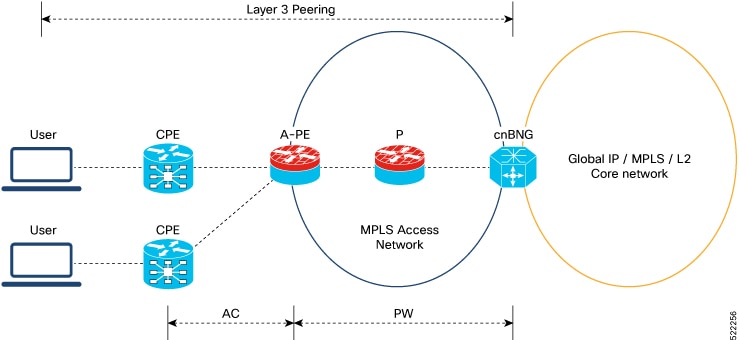
Figure 1. Sample Topology for Cloud Native BNG over Pseudowire Headend:

Restrictions

You can not configure eight ECMP links on the same PE device.

Configuration Example

This section provides the sample configurations for BNG over Pseudowire Headend:

The following is the sample configuration to allow IPOE or PPPOE subsciber to bring up from the PWHE access interface on the cnBNG:


Router#configure
Router(config)#interface PW-Ether100.102
Router(config-subif)#ipv4 unnumbered Loopback100
Router(config-subif)#ipv6 enable
Router(config-subif)#load-interval 30
Router(config-subif)#ipsubscriber
Router(config-cnbng-nal-ipsub)#ipv4 l2-connected
Router(config-cnbng-nal-ipsub-l2conn)#initiator dhcp
Router(config-cnbng-nal-ipsub-l2conn)#exit
Router(config-cnbng-nal-ipsub)#ipv6 l2-connected
Router(config-cnbng-nal-ipsub-ipv6-l2conn)#initiator dhcp
Router(config-cnbng-nal-ipsub-ipv6-l2conn)#exit
Router(config-cnbng-nal-ipsub)#exit
Router(config-subif)#pppoe enable
Router(config-subif)#encapsulation ambiguous dot1q any second-dot1q 102
Router(config-subif)#commit

This example shows the configuration of DHCPv4 on PWHE interfaces:


Router#configure
Router(config)#dhcp ipv4
Router(config-dhcpv4)#profile cn4 cnbng
Router(config-dhcpv4-cnbng-profile)#exit
Router(config-dhcpv4)#interface PW-Ether100.102 cnbng profile cn4
Router(config-dhcpv4)#interface PW-Ether100.103 cnbng profile cn4
Router(config-dhcpv4)#interface PW-Ether100.104 cnbng profile cn4
Router(config-dhcpv4)#commit

This example shows the configuration of DHCPv6 on PWHE interface:


Router#configure
Router(config)#dhcp ipv6
Router(config-dhcpv6)#profile cn4 cnbng
Router(config-dhcpv6-cnbng-profile)#exit
Router(config-dhcpv6)#interface PW-Ether100.102 cnbng profile cn6
Router(config-dhcpv6)#interface PW-Ether100.103 cnbng profile cn6
Router(config-dhcpv6)#commit

Running Configuration

The following example displays the running configuration of pw-ether interface.


Router#show running-config interface PW-Ether 100.102
Thu Feb  3 11:33:58.450 IST
interface PW-Ether100.102
 ipv4 unnumbered Loopback100
 ipv6 enable
 load-interval 30
 ipsubscriber
  ipv4 l2-connected
   initiator dhcp
  !
  ipv6 l2-connected
   initiator dhcp
  !
 !
 pppoe enable
 encapsulation ambiguous dot1q any second-dot1q 102
!

Configure DHCPv4 on PWHE interface:


Router#show run dhcp ipv4
Thu Feb  3 11:55:01.903 IST
dhcp ipv4
 profile cn4 cnbng
 !
 interface PW-Ether100.102 cnbng profile cn4
 interface PW-Ether100.103 cnbng profile cn4
 interface PW-Ether100.104 cnbng profile cn4
!

Configure DHCPv6 on PWHE interface:


Router#show run dhcp ipv6
Thu Feb  3 11:55:07.906 IST
dhcp ipv6
 profile cn6 cnbng
 !
 interface PW-Ether100.102 cnbng profile cn6
 interface PW-Ether100.103 cnbng profile cn6
!
Multiple Control Plane associations

Multiple Control Plane association is a deployment capability that

  • allows a single User Plane (UP) to simultaneously connect to multiple Control Plane (CP) instances

  • enables Subscriber Redundancy Groups (SRG) to be mapped flexibly across different CPs, and

  • improves scalability, redundancy, and migration flexibility in Broadband Network Gateway (BNG) environments.

Benefits of multiple CP associations

Table 4. Feature History

Feature Name

Release Information

Description

Multiple Control Plane associations

Release 26.2.1

You can now improve cnBNG redundancy and flexibility by enabling a single User Plane (UP) to connect to multiple Control Plane (CP) instances at the same time. This allows Subscriber Redundancy Groups (SRG) to be mapped more flexibly across different CPs.

Traditionally, a UP could connect to only one CP instance, which limited the ability to support complex SRG peering or to optimize resource utilization in large, distributed networks. With this enhancement, a UP can maintain up to 10 logical associations with different CP instances or SRG instances. Each logical association acts as a separate UP context from the CP perspective.

These are the key benefits:

  • Enhanced network resilience through improved redundancy.

  • Reduced operational complexity by simplifying migration processes.

  • Support for scalable deployment across different environments.

Restrictions for multiple CP associations

These restrictions apply when configuring multiple CP associations with a single UP:

  • Only IP over Ethernet (IPoE) hot standby SRG sessions are supported across multiple UP instances. PPPoE, LNS, and LAC session types are not supported in this mode.

  • Warm standby is not supported when using logical UP instances.

  • Support for non-SRG subscribers is available only on the default instance (ID 0).

  • Simultaneous reconciliation of subscriber, route, and SRG information is not supported. For example, if subscriber reconciliation is in progress, route resynchronization and SRG group synchronization cannot start until subscriber reconciliation is complete.

  • Changing a UP name on the CP while the association is up is not supported.

  • Two UP instance IDs cannot share the same cp-server IP address. Configurations with duplicate cp-server IP addresses will be rejected.

Configure and verify multiple CP associations for a UP

To configure the Multiple CP associations feature, you must complete these tasks:

Configure multiple CP associations for a UP

Set up one or more logical associations between a UP and multiple CP instances to enable advanced redundancy and scalability.

Use this task when you want a UP node to support multiple CP clusters or SRG instances simultaneously, such as during migration or when optimizing SRG group mapping.

Before you begin

Ensure you have these prerequisites:

  • Confirm the number and addresses of CP instances you wish to connect.

Follow these steps to configure multiple CP associations for a UP.

Procedure

Step 1

On the UP, configure the default (global) association parameters (instance-id 0).

Example:
Router# configure
Router(config)# cnbng-nal location 0/RSP0/CPU0 
Router(config-cnbng-nal-local)# hostidentifier asr9k-1-cp-1-inst-0 
Router(config-cnbng-nal-local)# up-server ipv4 10.1.1.51 vrf default gtp-port 15002 pfcp-port 15003
Router(config-cnbng-nal-local)# cp-server primary ipv4 192.0.2.1 
Router(config-cnbng-nal-local)# cp-association retry-count 6 

By default, the device uses instance ID 0 if no up-instance-id is specified.

Note


You can also configure up-server at the global level. If up-server is not configured locally, the individual UP instance inherits the global up-server setting.

Step 2

Configure additional logical UP instances to support multiple CP-UP association.

Example:
Router# configure
Router(config)# cnbng-nal location 0/RSP0/CPU0 
Router(config-cnbng-nal-local)# up-instance-id 1
Router(config-cnbng-nal-local)# hostidentifier asr9k-1-cp-1-inst-1 
Router(config-cnbng-nal-local)# up-server ipv4 10.1.1.52 vrf default gtp-port 15002 pfcp-port 15003
Router(config-cnbng-nal-local)# cp-server primary ipv4 192.0.2.2 
Router(config-cnbng-nal-local)# cp-association retry-count 6 

Repeat this step for each additional logical UP instance. Assign a unique up-instance-id (1–15) and hostidentifier per instance.

Example:
Router# configure
Router(config)# cnbng-nal location 0/RSP0/CPU0 
Router(config-cnbng-nal-local)# up-instance-id 2
Router(config-cnbng-nal-local)# hostidentifier asr9k-1-cp-1-inst-2 
Router(config-cnbng-nal-local)# up-server ipv4 10.1.1.53 vrf default gtp-port 15002 pfcp-port 15003
Router(config-cnbng-nal-local)# cp-server primary ipv4 192.0.2.3 
Router(config-cnbng-nal-local)# cp-association retry-count 6 

Step 3

On the UP, configure SRG groups to be mapped to UP instances.

Example:

Associating a group to default UP instance:

Router# configure
Router(config)# cnbng-nal location 0/RSP0/CPU0 
Router(config-cnbng-nal-local)# subscriber-redundancy
Router(config-cnbng-nal-sub-red)# group group2001 
Router(config-cnbng-nal-srg-grp)# virtual-mac 0000.1111.03e9 
Router(config-cnbng-nal-srg-grp)# access-tracking track_group2001  
Router(config-cnbng-nal-srg-grp)# access-interface-list
Router(config-cnbng-nal-srg-grp-intf)# interface Bundle-Ether40.2001
Example:

Associating a group to UP instance 1:

Router# configure
Router(config)# cnbng-nal location 0/RSP0/CPU0 
Router(config-cnbng-nal-local)# up-instance-id 1 
Router(config-cnbng-nal-local)# subscriber-redundancy
Router(config-cnbng-nal-sub-red)# group group2002 
Router(config-cnbng-nal-srg-grp)# virtual-mac 0000.1111.03ea
Router(config-cnbng-nal-srg-grp)# access-tracking track_group2002  
Router(config-cnbng-nal-srg-grp)# access-interface-list
Router(config-cnbng-nal-srg-grp-intf)# interface Bundle-Ether40.2002

Step 4

On the CP, configure each UP instance as a separate UP.

Important


The user-plane hostname configured on the CP must exactly match the hostidentifier configured for the corresponding UP instance on the UP.

Example:
user-plane
  instance 0
    user-plane asr9k-1-cp-1-inst-0
      peer-address ipv4 10.1.1.51
      subscriber-profile SUBS_PROF_1
      exit
      subscriber-redundancy
        group group2001
          preferred-role-active
          peer-identifier peer2001-x
          port-id-map port-name Bundle-Ether40.2001 1
        exit
      exit

  instance 1
    user-plane asr9k-1-cp-1-inst-1
      peer-address ipv4 10.1.1.52
      subscriber-profile SUBS_PROF_1
      exit
      subscriber-redundancy
        group group2002
          peer-identifier peer2002-x
          port-id-map port-name Bundle-Ether40.2002
        exit
      exit

Step 5

(Optional) On the UP, configure per-instance flow control thresholds.

Example:
Router(config-cnbng-nal-instance-id)# up-cp-notification flow-control 100 
Router(config-cnbng-nal-instance-id)# up-cp-stats flow-control 150  

Adjust per-instance flow and statistics thresholds as needed for scale and performance requirements.

Step 6

(Optional) On the UP, configure global flow control thresholds if required.

Use only if you require system-wide aggregate limits.

Example:
Router(config-cnbng-nal-local)# up-cp-notification global-flow-control 500 
Router(config-cnbng-nal-local)# up-cp-stats global-flow-control 250 

Step 7

On the UP, execute the cnbng-nal cp-association start [ up-instance-id 1 ] location 0/RSP0/CPU0 command to bring up the association.


Verify multiple CP associations to a UP

Ensure each logical UP instance is correctly associated and operating with its SRG CP peer. Diagnose and resolve issues related to SRG mapping, session and route allocation, and association failures.

Procedure

Step 1

Verify CP-UP association status for a specific or all UP instances.

Example:
Router# show cnbng-nal cp connection status up-instance-id 1

Tue Jun  2 08:25:19.093 IST
Location: 0/0/CPU0

UP Instance ID: 1

User-Plane configurations:
-------------------------
 IP 		: 21.21.21.1        
 GTP Port 	: 15002
 PFCP Port 	: 15003
 VRF 		: default

Control-Plane configurations:
----------------------------
 PRIMARY IP 	: 21.21.21.2        
 GTP Port 	: 2152
 PFCP Port 	: 8805 
 
 Association retry count: 5

 Connection Status: Up
 Connection Status time stamp:  Mon Jun  1 19:23:18 2026

 Connection Prev Status: Init
 Connection Prev Status time stamp:  Mon Jun  1 19:20:48 2026

 Association status: Active
 Association status time stamp: Mon Jun  1 19:23:18 2026

 GTPu socket bind rc: Success
 PFCP socket bind rc: Success

[NAL-CP-INST-EVENTS]

| Event Name                     | Time Stamp              | User Data
| Association Active             | Jun  1 19:23:18.090052  | -- NA --
| Transport Up                   | Jun  1 19:23:18.091136  | -- NA --

Router# show cnbng-nal cp connection status up-instance-id all

Tue Jun  2 08:25:26.696 IST
Location: 0/0/CPU0
================================================================================
UP Instance ID: 1

User-Plane configurations:
-------------------------
 IP 		: 21.21.21.1        
 GTP Port 	: 15002
 PFCP Port 	: 15003
 VRF 		: default

Control-Plane configurations:
----------------------------
 PRIMARY IP 	: 21.21.21.2        
 GTP Port 	: 2152
 PFCP Port 	: 8805 
 
 Association retry count: 5

 Connection Status: Up
 Connection Status time stamp:  Mon Jun  1 19:23:18 2026

 Connection Prev Status: Init
 Connection Prev Status time stamp:  Mon Jun  1 19:20:48 2026

 Association status: Active
 Association status time stamp: Mon Jun  1 19:23:18 2026

 GTPu socket bind rc: Success
 PFCP socket bind rc: Success

[NAL-CP-INST-EVENTS]

| Event Name                     | Time Stamp              | User Data
| Association Active             | Jun  1 19:23:18.090052  | -- NA --
| Transport Up                   | Jun  1 19:23:18.091136  | -- NA --

UP Instance ID: 2

User-Plane configurations:
-------------------------
 IP 		: 31.31.31.1        
 GTP Port 	: 15004
 PFCP Port 	: 15005
 VRF 		: default

Control-Plane configurations:
----------------------------
 PRIMARY IP 	: 31.31.31.2        
 GTP Port 	: 2152
 PFCP Port 	: 8805 
 
 Association retry count: 5

 Connection Status: Up
 Connection Status time stamp:  Mon Jun  1 19:23:18 2026

 Connection Prev Status: Init
 Connection Prev Status time stamp:  Mon Jun  1 19:20:48 2026

 Association status: Active
 Association status time stamp: Mon Jun  1 19:23:18 2026

 GTPu socket bind rc: Success
 PFCP socket bind rc: Success

[NAL-CP-INST-EVENTS]

| Event Name                     | Time Stamp              | User Data
| Association Active             | Jun  1 19:23:18.092553  | -- NA --
| Transport Up                   | Jun  1 19:23:18.093636  | -- NA --

Expected result: Each UP instance reports an ESTABLISHED state with its assigned CP group. If state is FAILED or ATTEMPTING, proceed to troubleshooting.

Step 2

Verify SRG group assignments and operational roles.

Example:
Router# show cnbng-nal srg-group

Tue Jun  2 08:25:37.200 IST
====================
Location: 0/0/CPU0
====================

Group-name   SRG role  Access OT  Core OT  Subs Count V4 routes V6 routes UP Inst ID  
-----------------------------------------------------------------------------
Router# show cnbng-nal srg-group up-instance-id 1

Tue Jun  2 08:25:41.905 IST
====================
Location: 0/0/CPU0
====================

Group-name  SRG role  Access OT  Core OT  Subs Count V4 routes V6 routes UP Inst ID  
---------------------------------------------------------------------------------
group1       Active    Up         Up       1          2         2         1           

Total Entries : 1

Summary
-------
Category                  Total      Active     Standby    None      
------------------------------------------------------------------
Groups                    1          1          0          0         
Subscribers               1          1          0          0         
V4 subnet routes          2          2          0          0         
V6 subnet routes          2          2          0          0         
Router# show cnbng-nal srg-group detail up-instance-id 1

Tue Jun  2 08:25:55.846 IST
====================
Location: 0/0/CPU0
====================

SRG group name                    : group1
SRG group admin state             : UP_CP_Configured
SRG group state                   : Up
SRG role                          : Active
SRG ID                            : 0x00000fa1
UP Instance ID                    : 1
SRG VRF name                      : **srg_4001
SRG mode                          : HOT
Last SRG role update time         : Jun 01 19:28:26.046033
Virtual mac                       : 0AAA.0BBB.0C01
V4 Table Id                       : 0xe0000012
V6 Table Id                       : 0xe0800012
V4 Proto Id                       : 0x00000002
V6 Proto Id                       : 0x00000001
Subscriber count                  : 1
Warm Subscriber count             : 0
IPV4 route count                  : 2
IPV6 route count                  : 2
Damping timer interval            : 120 Sec
Subnet route tag                  : 0
Route export on Standby enable    : False
Fast switchover enable            : True
Ready for role change             : Yes [Success]
FSM State                         : COMPLETE
Update Request State              : IDLE
Stats state                       : IDLE
Sub disconnect resp pend          : NA
Sub count for keep alive start    : 0
Group for routed subscribers      : FALSE

Access tracking object
----------------------
    Object name                     : track1
    Tracking state                  : Up
    Last tracking state update time : Jun 01 19:26:49.537142

Core tracking object
--------------------
    Object name                     : core1
    Tracking state                  : Up
    Last tracking state update time : Jun 01 19:26:49.537217

Access Interfaces
-----------------
    Bundle-Ether1.1

IM counters
------------
    Total errors                    : 0

RIB counters
------------
    Total entries                   : 0
    Pending                         : 0
    Total errors                    : 0

Terminate counters
------------------
    IM terminate                    : 0
    RIB terminate                   : 0
    Stats terminate                 : 0

Flags
-----
Value: [0x0000007C]

 [VRF_CREATE | V4_RIB_CREATE | V6_RIB_CREATE | 
  V4_RIB_COMPLETE | V6_RIB_COMPLETE]

Checkpoint Flags
----------------
Value: [0x00000000]
 None

CP Recon data
-------------
    Duration                        : 0 secs
    Replay reqs in progress         : 0
    Replay subs in progress         : 0
    CP Recon Flags                  : 0x0

Subscriber transaction Info
---------------------------
    Subscribers in transaction      : 0
    Subscribers in AF down queue    : 0
    Subscribers in disc queue       : 0

Group role switchover stats Info
--------------------------------
    Last stats interaction time(A->S)   : 1.060 secs
    Last stats interaction time(S->A)   : 0.060 secs
    Max stats interaction time(A->S)    : 1.060 secs (Jun 01 19:25:40.854170)
    Max stats interaction time(S->A)    : 0.060 secs (NA)

Group role switchover RIB Info
------------------------------
    Last rib interaction time(A->S)     : 0.06103 secs
    Last rib interaction time(S->A)     : 0.060 secs
    Max rib interaction time(A->S)      : 0.06103 secs (Jun 01 19:25:40.853550)
    Max rib interaction time(S->A)      : 0.060 secs (NA)

    Active role change count            : 9
    Standby role change count           : 8

[SRG-GROUP-EVENTS]

| Event Name                               | Time Stamp              | User Data
| Group create                             | Jun  1 19:22:58.093098  | -- NA --
| V4 backup vrf create                     | Jun  1 19:22:58.093283  | -- NA --
| V6 backup vrf create                     | Jun  1 19:22:58.093311  | -- NA --
| V4 backup vrf create rsp                 | Jun  1 19:22:58.109535  | -- NA --
| V4 backup rib tbl create                 | Jun  1 19:22:58.109582  | -- NA --
| V6 backup vrf create rsp                 | Jun  1 19:22:58.109585  | -- NA --
| V6 backup rib tbl create                 | Jun  1 19:22:58.109593  | -- NA --
| V4 backup rib tbl create rsp             | Jun  1 19:22:58.112594  | -- NA --
| V6 backup rib tbl create rsp             | Jun  1 19:22:58.211073  | -- NA --
| State update held, transport down        | Jun  1 19:24:07.182998  | -- NA --
| Role none                                | Jun  1 19:24:15.954512  | -- NA --
| CP action add                            | Jun  1 19:24:29.121120  | -- NA --
| Subs rib route deletion started          | Jun  1 19:25:40.853550  | -- NA --
| Subs rib route deletion completed        | Jun  1 19:25:40.957261  | -- NA --
| Fast swo timer expiry, Role Active       | Jun  1 19:25:56.235268  | -- NA --
| Notify: State Down                       | Jun  1 19:26:39.621205  | in_prog:F,comp:T,role:stdby,state:down
| Role standby                             | Jun  1 19:28:04.552720  | -- NA --
| Role standby start                       | Jun  1 19:28:04.552762  | -- NA --
| Role standby end                         | Jun  1 19:28:04.553567  | -- NA --
| Role active                              | Jun  1 19:28:26.046033  | -- NA --
| Role active start                        | Jun  1 19:28:26.046107  | -- NA --
| Role active end                          | Jun  1 19:28:26.046878  | -- NA --
| Notify: State Up                         | Jun  1 19:28:31.046323  | in_prog:F,comp:T,role:act,state:up
| State change ack'ed                      | Jun  1 19:28:31.046495  | -- NA --
| Sent srg role response to CP             | Jun  1 19:28:37.642414  | in_prog:F,comp:T,role:act,state:up

=======================================================================

Total Entries : 1
Router# show cnbng-nal srg-group detail up-instance-id all

Tue Jun  2 08:25:58.913 IST
====================
Location: 0/0/CPU0
====================

SRG group name                    : group1
SRG group admin state             : UP_CP_Configured
SRG group state                   : Up
SRG role                          : Active
SRG ID                            : 0x00000fa1
UP Instance ID                    : 1
SRG VRF name                      : **srg_4001
SRG mode                          : HOT
Last SRG role update time         : Jun 01 19:28:26.046033
Virtual mac                       : 0AAA.0BBB.0C01
V4 Table Id                       : 0xe0000012
V6 Table Id                       : 0xe0800012
V4 Proto Id                       : 0x00000002
V6 Proto Id                       : 0x00000001
Subscriber count                  : 1
Warm Subscriber count             : 0
IPV4 route count                  : 2
IPV6 route count                  : 2
Damping timer interval            : 120 Sec
Subnet route tag                  : 0
Route export on Standby enable    : False
Fast switchover enable            : True
Ready for role change             : Yes [Success]
FSM State                         : COMPLETE
Update Request State              : IDLE
Stats state                       : IDLE
Sub disconnect resp pend          : NA
Sub count for keep alive start    : 0
Group for routed subscribers      : FALSE

Access tracking object
----------------------
    Object name                     : track1
    Tracking state                  : Up
    Last tracking state update time : Jun 01 19:26:49.537142

Core tracking object
--------------------
    Object name                     : core1
    Tracking state                  : Up
    Last tracking state update time : Jun 01 19:26:49.537217

Access Interfaces
-----------------
    Bundle-Ether1.1

IM counters
------------
    Total errors                    : 0

RIB counters
------------
    Total entries                   : 0
    Pending                         : 0
    Total errors                    : 0

Terminate counters
------------------
    IM terminate                    : 0
    RIB terminate                   : 0
    Stats terminate                 : 0

Flags
-----
Value: [0x0000007C]

 [VRF_CREATE | V4_RIB_CREATE | V6_RIB_CREATE | 
  V4_RIB_COMPLETE | V6_RIB_COMPLETE]

Checkpoint Flags
----------------
Value: [0x00000000]
 None

CP Recon data
-------------
    Duration                        : 0 secs
    Replay reqs in progress         : 0
    Replay subs in progress         : 0
    CP Recon Flags                  : 0x0

Subscriber transaction Info
---------------------------
    Subscribers in transaction      : 0
    Subscribers in AF down queue    : 0
    Subscribers in disc queue       : 0

Group role switchover stats Info
--------------------------------
    Last stats interaction time(A->S)   : 1.060 secs
    Last stats interaction time(S->A)   : 0.060 secs
    Max stats interaction time(A->S)    : 1.060 secs (Jun 01 19:25:40.854170)
    Max stats interaction time(S->A)    : 0.060 secs (NA)

Group role switchover RIB Info
------------------------------
    Last rib interaction time(A->S)     : 0.06103 secs
    Last rib interaction time(S->A)     : 0.060 secs
    Max rib interaction time(A->S)      : 0.06103 secs (Jun 01 19:25:40.853550)
    Max rib interaction time(S->A)      : 0.060 secs (NA)

    Active role change count            : 9
    Standby role change count           : 8

[SRG-GROUP-EVENTS]

| Event Name                               | Time Stamp              | User Data
| Group create                             | Jun  1 19:22:58.093098  | -- NA --
| V4 backup vrf create                     | Jun  1 19:22:58.093283  | -- NA --
| V6 backup vrf create                     | Jun  1 19:22:58.093311  | -- NA --
| V4 backup vrf create rsp                 | Jun  1 19:22:58.109535  | -- NA --
| V4 backup rib tbl create                 | Jun  1 19:22:58.109582  | -- NA --
| V6 backup vrf create rsp                 | Jun  1 19:22:58.109585  | -- NA --
| V6 backup rib tbl create                 | Jun  1 19:22:58.109593  | -- NA --
| V4 backup rib tbl create rsp             | Jun  1 19:22:58.112594  | -- NA --
| V6 backup rib tbl create rsp             | Jun  1 19:22:58.211073  | -- NA --
| State update held, transport down        | Jun  1 19:24:07.182998  | -- NA --
| Role none                                | Jun  1 19:24:15.954512  | -- NA --
| CP action add                            | Jun  1 19:24:29.121120  | -- NA --
| Subs rib route deletion started          | Jun  1 19:25:40.853550  | -- NA --
| Subs rib route deletion completed        | Jun  1 19:25:40.957261  | -- NA --
| Fast swo timer expiry, Role Active       | Jun  1 19:25:56.235268  | -- NA --
| Notify: State Down                       | Jun  1 19:26:39.621205  | in_prog:F,comp:T,role:stdby,state:down
| Role standby                             | Jun  1 19:28:04.552720  | -- NA --
| Role standby start                       | Jun  1 19:28:04.552762  | -- NA --
| Role standby end                         | Jun  1 19:28:04.553567  | -- NA --
| Role active                              | Jun  1 19:28:26.046033  | -- NA --
| Role active start                        | Jun  1 19:28:26.046107  | -- NA --
| Role active end                          | Jun  1 19:28:26.046878  | -- NA --
| Notify: State Up                         | Jun  1 19:28:31.046323  | in_prog:F,comp:T,role:act,state:up
| State change ack'ed                      | Jun  1 19:28:31.046495  | -- NA --
| Sent srg role response to CP             | Jun  1 19:28:37.642414  | in_prog:F,comp:T,role:act,state:up

=======================================================================

SRG group name                    : group2
SRG group admin state             : UP_Configured
SRG group state                   : Up
SRG role                          : None
SRG ID                            : 0x00000fa2
UP Instance ID                    : 2
SRG VRF name                      : -NA- (fast-switchover disabled)
SRG mode                          : HOT
Last SRG role update time         : Jun 01 19:24:15.954725
Virtual mac                       : 0AAA.0BBB.0A02
V4 Table Id                       : 0x00000000
V6 Table Id                       : 0x00000000
V4 Proto Id                       : 0x0000ffff
V6 Proto Id                       : 0x0000ffff
Subscriber count                  : 0
Warm Subscriber count             : 0
IPV4 route count                  : 0
IPV6 route count                  : 0
Damping timer interval            : 120 Sec
Subnet route tag                  : 0
Route export on Standby enable    : False
Fast switchover enable            : False
Ready for role change             : Yes [Success]
FSM State                         : UNKNOWN
Update Request State              : IDLE
Stats state                       : IDLE
Sub disconnect resp pend          : NA
Sub count for keep alive start    : 0
Group for routed subscribers      : FALSE

Access tracking object
----------------------
    Object name                     : track1
    Tracking state                  : Up
    Last tracking state update time : Jun 01 19:26:49.537187

Core tracking object
--------------------
    Object name                     : core1
    Tracking state                  : Up
    Last tracking state update time : Jun 01 19:26:49.537261

Access Interfaces
-----------------
    Bundle-Ether1.2

IM counters
------------
    Total errors                    : 0

RIB counters
------------
    Total entries                   : 0
    Pending                         : 0
    Total errors                    : 0

Terminate counters
------------------
    IM terminate                    : 0
    RIB terminate                   : 0
    Stats terminate                 : 0

Flags
-----
Value: [0x00000000]
 None

Checkpoint Flags
----------------
Value: [0x00000048]

 [STATE_RESP_PENDING | ROLE_CHG_IN_PROG]

CP Recon data
-------------
    Duration                        : 0 secs
    Replay reqs in progress         : 0
    Replay subs in progress         : 0
    CP Recon Flags                  : 0x0

Subscriber transaction Info
---------------------------
    Subscribers in transaction      : 0
    Subscribers in AF down queue    : 0
    Subscribers in disc queue       : 0

Group role switchover stats Info
--------------------------------
    Last stats interaction time(A->S)   : 0.060 secs
    Last stats interaction time(S->A)   : 0.060 secs
    Max stats interaction time(A->S)    : 0.060 secs (NA)
    Max stats interaction time(S->A)    : 0.060 secs (NA)

Group role switchover RIB Info
------------------------------
    Last rib interaction time(A->S)     : 0.060 secs
    Last rib interaction time(S->A)     : 0.060 secs
    Max rib interaction time(A->S)      : 0.060 secs (NA)
    Max rib interaction time(S->A)      : 0.060 secs (NA)

    Active role change count            : 0
    Standby role change count           : 1

[SRG-GROUP-EVENTS]

| Event Name                               | Time Stamp              | User Data
| Group create                             | Jun  1 19:22:58.095173  | -- NA --
| V4 backup vrf create                     | Jun  1 19:22:58.095296  | -- NA --
| V6 backup vrf create                     | Jun  1 19:22:58.095324  | -- NA --
| Role standby start                       | Jun  1 19:24:07.754079  | -- NA --
| Role standby                             | Jun  1 19:24:07.754079  | -- NA --
| Role standby end                         | Jun  1 19:24:07.755454  | -- NA --
| CP action add                            | Jun  1 19:24:07.755455  | -- NA --
| Sent srg role response to CP             | Jun  1 19:24:07.755510  | in_prog:T,comp:F,role:stdby,state:up
| State update held, transport down        | Jun  1 19:24:07.756603  | -- NA --
| Role none                                | Jun  1 19:24:15.954725  | -- NA --

=======================================================================

Total Entries : 2

Check for correct mapping to UP instances and proper Active/Standby roles.

Step 3

Verify dynamic route distribution across UP instances.

Example:
Router# show cnbng-nal dynamic-routes summary up-instance-id all

Tue Jun  2 08:26:15.612 IST

Location: 0/0/CPU0
-----------------------

Counter Name             Value     
---------------------------------
V4 OC Entries            2         
V6 OC Entries            2         
V4 Primary Entries       0         
V4 Secondary Entries     2         
V4 RIB Entries           2         
V6 RIB Entries           2         
OC replay entry count    0         
V6 OC replay entry count 0         
V6 Enabled Entries       0         

Router# show cnbng-nal dynamic-routes summary up-instance-id 1   

Tue Jun  2 08:26:23.611 IST
Location: 0/0/CPU0
-----------------------
Counter Name             Value     
---------------------------------
V4 OC Entries            2         
V6 OC Entries            2         
V4 Primary Entries       0         
V4 Secondary Entries     2         
V4 RIB Entries           2         
V6 RIB Entries           2         
OC replay entry count    0         
V6 OC replay entry count 0         
V6 Enabled Entries       0         

Routes must be correctly distributed per instance. Look for overlaps or missing entries.

Step 4

Verify subscriber session distribution and status.

Example:
Router# show cnbng-nal subscriber all up-instance-id all      

Tue Jun  2 08:26:39.880 IST

=====================
Location: 0/0/CPU0
=====================
Codes: CN - Connecting, CD - Connected, AC - Activated,
       ID - Idle, DN - Disconnecting, IN - Initializing
       UN - Unknown


CPID(hex)  Interface               State  Mac Address     Subscriber IP Addr / Prefix (Vrf) Ifhandle
---------------------------------------------------------------------------------------------------
d2         BE1.1.ip3221227008      AC     001b.0000.00d2  100.0.0.210 (default) 0x2b0     
                                                          200.0.210.0/24 (Framed IPv4)
                                                          201.0.210.0/24 (Framed IPv4)
                                                          202.0.210.0/24 (Framed IPv4)
                                                          203.0.210.0/24 (Framed IPv4)
                                                          cafe:feed::d2 (IANA)
                                                          cafe:bead:0:d2::/128 (IAPD)
                                                          1:cee:bad:c0de:0:d2::/96 (Framed IPv6)
                                                          1:cee:bad:c0de:100:d2::/96 (Framed IPv6)
                                                          1:cee:bad:c0de:200:d2::/96 (Framed IPv6)
                                                          1:cee:bad:c0de:300:d2::/96 (Framed IPv6)
Session-count: 1
Router# show cnbng-nal subscriber all up-instance-id 1   

Tue Jun  2 08:26:42.928 IST
=====================
Location: 0/0/CPU0
=====================
Codes: CN - Connecting, CD - Connected, AC - Activated,
       ID - Idle, DN - Disconnecting, IN - Initializing
       UN - Unknown


CPID(hex)  Interface               State  Mac Address     Subscriber IP Addr / Prefix (Vrf) Ifhandle
---------------------------------------------------------------------------------------------------
d2         BE1.1.ip3221227008      AC     001b.0000.00d2  100.0.0.210 (default) 0x2b0     
                                                          200.0.210.0/24 (Framed IPv4)
                                                          201.0.210.0/24 (Framed IPv4)
                                                          202.0.210.0/24 (Framed IPv4)
                                                          203.0.210.0/24 (Framed IPv4)
                                                          cafe:feed::d2 (IANA)
                                                          cafe:bead:0:d2::/128 (IAPD)
                                                          1:cee:bad:c0de:0:d2::/96 (Framed IPv6)
                                                          1:cee:bad:c0de:100:d2::/96 (Framed IPv6)
                                                          1:cee:bad:c0de:200:d2::/96 (Framed IPv6)
                                                          1:cee:bad:c0de:300:d2::/96 (Framed IPv6)
Session-count: 1
Router# show cnbng-nal subscriber all summary up-instance-id all

Tue Jun  2 08:26:55.300 IST
=====================
Location: 0/0/CPU0
=====================

                Type            PPPoE                    IPoE                   LAC             LNS
                ====            =====                    ====                   ===             ===
                                                L2-Conn         Routed
                                                =======         ======

Session Counts by State:
        initializing		0		0		0		0		0
          connecting		0		0		0		0		0
           connected		0		0		0		0		0
           activated		0		1		0		0		0
                idle		0		0		0		0		0
       disconnecting		0		0		0		0		0
              Total:		0		1		0		0		0


Session Counts by Address-Family:
                none		0		0		0		0		0
                ipv4		0		0		0		0		0
                ipv6		0		0		0		0		0
                dual		0		1		0		0		0
                 lac		0		0		0		0		0
              Total:		0		1		0		0		0

Router# show cnbng-nal subscriber all summary up-instance-id 1

Tue Jun  2 08:26:58.062 IST
=====================
Location: 0/0/CPU0
=====================

                Type            PPPoE                    IPoE                   LAC             LNS
                ====            =====                    ====                   ===             ===
                                                L2-Conn         Routed
                                                =======         ======

Session Counts by State:
        initializing		0		0		0		0		0
          connecting		0		0		0		0		0
           connected		0		0		0		0		0
           activated		0		1		0		0		0
                idle		0		0		0		0		0
       disconnecting		0		0		0		0		0
              Total:		0		1		0		0		0


Session Counts by Address-Family:
                none		0		0		0		0		0
                ipv4		0		0		0		0		0
                ipv6		0		0		0		0		0
                dual		0		1		0		0		0
                 lac		0		0		0		0		0
              Total:		0		1		0		0		0

Router# show cnbng-nal subscriber all detail up-instance-id 1

Tue Jun  2 08:27:21.590 IST
=====================
Location: 0/0/CPU0
=====================
Interface:                 Bundle-Ether1.1.ip3221227008
UPID:                      0xc0000600
CPID:                      0x000000d2
UP Instance ID:            1
Type:                      IPoE
  Sub-type:                L2 Connected
IPv4 Address:              100.0.0.210
IPv4 Framed Route:        
  Prefix:                  200.0.210.0/24
  Next Hop:                3.1.1.1
  Tag:                     0
  Metric:                  0
  Distance:                0
  Next Hop VRF:            
  Prefix:                  201.0.210.0/24
  Next Hop:                3.1.1.1
  Tag:                     0
  Metric:                  0
  Distance:                0
  Next Hop VRF:            
  Prefix:                  202.0.210.0/24
  Next Hop:                3.1.1.1
  Tag:                     0
  Metric:                  0
  Distance:                0
  Next Hop VRF:            
  Prefix:                  203.0.210.0/24
  Next Hop:                3.1.1.1
  Tag:                     0
  Metric:                  0
  Distance:                0
  Next Hop VRF:            
IPv6 IANA Address:         cafe:feed::d2
IPv6 IAPD Prefix:          cafe:bead:0:d2::/128
IPv6 Slaac Prefix:         ::/0
CPE link local Address:    ::
IPv6 Framed Route:        
  Prefix:                  1:cee:bad:c0de:0:d2::/96
  Next Hop:                192::1
  Tag:                     0
  Metric:                  0
  Distance:                0
  Next Hop VRF:            
  Prefix:                  1:cee:bad:c0de:100:d2::/96
  Next Hop:                192::1
  Tag:                     0
  Metric:                  0
  Distance:                0
  Next Hop VRF:            
  Prefix:                  1:cee:bad:c0de:200:d2::/96
  Next Hop:                192::1
  Tag:                     0
  Metric:                  0
  Distance:                0
  Next Hop VRF:            
  Prefix:                  1:cee:bad:c0de:300:d2::/96
  Next Hop:                192::1
  Tag:                     0
  Metric:                  0
  Distance:                0
  Next Hop VRF:            
IPv4 State:                UP, Mon Jun  1 19:28:40 2026
IPv6 State:                UP, Mon Jun  1 19:28:40 2026
Mac Address:               001b.0000.00d2
Inner VLAN ID:             Not Set
Outer VLAN ID:             1
Outer VLAN Cos:            0
Outer VLAN DEI:            0
Created:                   Mon Jun  1 19:28:40 2026
State:                     Activated
Ifhandle:                  0x000002b0
VRF:                       default
Access-interface:          Bundle-Ether1.1
SRG role:                  Active
SRG group name:            group1
IPOE-AFI-Cap:              SUB_AFI_IPV4_IPV6
Loopback-name:             Loopback0
IPV4-GW-addr:              100.0.0.1
 Attribute List: 0xdade20
1:  ipv4-unnumbered len=  9  value= Loopback0
2:  ipv6-enable     len=  4  value= 1(1)
3:  sub-ipv4-gateway len= 12  value= 100.0.0.1/32

Session Accounting:       disabled
Interim Interval:          0 secs
Interim fail count: None
Last interim failed reason: NA
Last stats:
  BytesIn: 0
  BytesOut: 0
  BytesInGiga: 0
  BytesOutGiga: 0

Activated Services: NA
Feature IDs activated : NA

[NAL-SUBSCRIBER-EVENTS]

| Event Name                     | Time Stamp              | User Data
| Transaction start              | Jun  1 19:28:40.024840  | txn id: 0x33, src_port: 0x33
| Interface create req           | Jun  1 19:28:40.024913  | -- NA --
| Interface create resp          | Jun  1 19:28:40.087462  | rc: OK
| SVM create req                 | Jun  1 19:28:40.087533  | -- NA --
| Sub GW addr add                | Jun  1 19:28:40.087547  | addr: 100.0.0.1/32
| UP Install req                 | Jun  1 19:28:40.087598  | -- NA --
| UP Install resp                | Jun  1 19:28:40.213931  | rc: OK
| UP Assoc req                   | Jun  1 19:28:40.213958  | -- NA --
| UP Assoc resp                  | Jun  1 19:28:40.215440  | rc: OK
| Produce done req               | Jun  1 19:28:40.215456  | req id: 0x3
| Produce done - Cfg gen         | Jun  1 19:28:40.268242  | rc: OK, req id: 0x3
| Produce done resp              | Jun  1 19:28:40.327444  | rc: OK, req id: 0x3
| SVM create resp                | Jun  1 19:28:40.327446  | rc: OK
| IPv6 Caps Up                   | Jun  1 19:28:40.328977  | vrf table id: 0xe0800000
| IPv4 caps wait                 | Jun  1 19:28:40.328978  | -- NA --
| IPv4 Caps Up                   | Jun  1 19:28:40.329475  | vrf table id: 0xe0000000
| Init data req                  | Jun  1 19:28:40.329947  | -- NA --
| Init data resp                 | Jun  1 19:28:40.383178  | rc: OK
| IPv4 route req                 | Jun  1 19:28:40.383188  | addr: 100.0.0.210/32
| IPv4 framed route req          | Jun  1 19:28:40.383250  | addr: 203.0.210.0/24
| IPv6 route req                 | Jun  1 19:28:40.383262  | addr: cafe:feed::d2/128
| IPv6 PD route req              | Jun  1 19:28:40.383336  | addr: cafe:bead:0:d2::/128
| IPv6 framed route req          | Jun  1 19:28:40.383361  | addr: 1:cee:bad:c0de:300:d2::/96
| IPv4 route resp                | Jun  1 19:28:40.484099  | rc: OK
| IPv4 framed route resp         | Jun  1 19:28:40.484182  | rc: OK, addr: 203.0.210.0/24
| IPv6 route resp                | Jun  1 19:28:40.484195  | rc: OK
| IPv6 PD route resp             | Jun  1 19:28:40.484215  | rc: OK
| IPv6 framed route resp         | Jun  1 19:28:40.484241  | rc: OK, addr: 1:cee:bad:c0de:300:d2::/96
| IPv4 Up                        | Jun  1 19:28:40.484247  | -- NA --
| IPv6 ND session req            | Jun  1 19:28:40.484300  | -- NA --
| IPv6 ND session resp           | Jun  1 19:28:40.484617  | rc: OK
| IPv6 Up                        | Jun  1 19:28:40.484618  | -- NA --
| Session up notified            | Jun  1 19:28:40.484620  | -- NA --
| Transaction stop               | Jun  1 19:28:40.484869  | rc: OK, txn id: 0x33, src_port: 0x33
===================__#__=======================


Session-count: 1

Sessions should align with expected UP instance and SRG group associations.

Step 5

Review PFCP message, reconciliation, and notification history.

Example:
Router# show cnbng-nal spa pfcp-api structure dump all up-instance-id 1

Tue Jun  2 08:27:51.777 IST
Entry               : 1 (NAL Response for session create request),
Timestamp           : Jun 01 19:28:40.484898,
UPID                : 0xc0000600
CPID                : 0xd2
Session Txn id      : 261
Return value        : SPA_RC_SUCCESS
Access Interface    : Bundle-Ether1.1
Router name         : 
Error message       : 

Up-Instance-ID      : 1
===========================================================================
Entry               : 2 (SPA Create Request),
Timestamp           : Jun 01 19:28:40.024568,
UPID                : 0x00000000
CPID                : 0x000000d2
Msg Txn id          : 51
Source port id      : 51
Session Txn id      : 261
Oper code           : SPA_OPER_TYPE_CREATE
IPOE AFI Cap        : SPA_SUB_AFI_IPV4_IPV6

Feature mask        : 0x1ee00
SRG report id       : 0
Feature flags
-------------
[SPA_FEATURE_IPv4_ADDR | SPA_FEATURE_IANA_ADDR | SPA_FEATURE_IAPD_ADDR | SPA_FEATURE_V4_ROUTE | 
 SPA_FEATURE_V6_ROUTE | SPA_FEATURE_SRG | SPA_FEATURE_OUTER_VLAN]

IPv4 address Info
-----------------
Oper code           : SPA_OPER_TYPE_CREATE
IPv4 address        : 100.0.0.210

IPv6 address Info
-----------------
Oper code           : SPA_OPER_TYPE_CREATE
IPv6 address(iana)  : cafe:feed::d2
IPv6 address(iapd)  : cafe:bead:0:d2::
Link local          : ::
Prefix length       : 128

Session Data
------------
Access interface    : Bundle-Ether1.1
Mac address         : 001b.0000.00d2
VRF name            : 
Session type        : SPA_SESSION_TYPE_IPOE
SRG group name      : group1

    Vlan Info
    ---------
    Outer vlan          : 1

IPv4 route Info
---------------
Oper code           : SPA_OPER_TYPE_CREATE
VRF name            : default
IPv4 address        : 200.0.210.0
Prefix length       : 24
Next hop            : 3.1.1.1
Tag                 : 0
Metric              : 0
Next hop VRF name   : 
Distance            : 0

IPv4 route Info
---------------
Oper code           : SPA_OPER_TYPE_CREATE
VRF name            : default
IPv4 address        : 201.0.210.0
Prefix length       : 24
Next hop            : 3.1.1.1
Tag                 : 0
Metric              : 0
Next hop VRF name   : 
Distance            : 0

IPv4 route Info
---------------
Oper code           : SPA_OPER_TYPE_CREATE
VRF name            : default
IPv4 address        : 202.0.210.0
Prefix length       : 24
Next hop            : 3.1.1.1
Tag                 : 0
Metric              : 0
Next hop VRF name   : 
Distance            : 0

IPv4 route Info
---------------
Oper code           : SPA_OPER_TYPE_CREATE
VRF name            : default
IPv4 address        : 203.0.210.0
Prefix length       : 24
Next hop            : 3.1.1.1
Tag                 : 0
Metric              : 0
Next hop VRF name   : 
Distance            : 0

IPv6 route Info
---------------
Oper code           : SPA_OPER_TYPE_CREATE
VRF name            : default
IPv6 address        : 1:cee:bad:c0de:0:d2::
Prefix length       : 96
Next hop            : 192::1
Tag                 : 0
Metric              : 0
Next hop VRF name   : 
Distance            : 0

IPv6 route Info
---------------
Oper code           : SPA_OPER_TYPE_CREATE
VRF name            : default
IPv6 address        : 1:cee:bad:c0de:100:d2::
Prefix length       : 96
Next hop            : 192::1
Tag                 : 0
Metric              : 0
Next hop VRF name   : 
Distance            : 0

IPv6 route Info
---------------
Oper code           : SPA_OPER_TYPE_CREATE
VRF name            : default
IPv6 address        : 1:cee:bad:c0de:200:d2::
Prefix length       : 96
Next hop            : 192::1
Tag                 : 0
Metric              : 0
Next hop VRF name   : 
Distance            : 0

IPv6 route Info
---------------
Oper code           : SPA_OPER_TYPE_CREATE
VRF name            : default
IPv6 address        : 1:cee:bad:c0de:300:d2::
Prefix length       : 96
Next hop            : 192::1
Tag                 : 0
Metric              : 0
Next hop VRF name   : 
Distance            : 0
....
Router# show cnbng-nal spa notif-history type keep-alive-failure up-instance-id 1

Tue Jun  2 08:28:19.816 IST
---- Total entries: 0 ----
Router# show cnbng-nal spa notif-history type subscriber-event up-instance-id 1  

Tue Jun  2 08:28:29.198 IST
---- Total entries: 0 ----

Identify unusual message logs or recon reports that could indicate communication or failover issues.

Step 6

Check UP instance process information and flow control status.

Example:
Router# show cnbng-nal process-info detail

Tue Jun  2 08:28:38.242 IST
Location: 0/0/CPU0

 HA Pre_Init Role	   : PRIMARY
 HA Role		   : PRIMARY
 Restart-flag		   : FALSE
 Node-Id		   : 0
 Disc-Hist File-logging	   : Enable
 Test-server config-enabled: FALSE

 Proc-flags	: 87FFFF9F

    OT Connection Status: UP
    IM Connection Status: UP
    IPv4 RIB Connection Status: UP
    IPv6 RIB Connection Status: UP
    SUBDB Connection Status: UP
    Stats Connection Status: UP
    L2TP FIB Connection Status: DOWN
    L2TP Netio Connection Status: DOWN
    SPIO PPPoE Connection Status: UP
    SPIO PPP Connection Status: UP

 SVM SUBDB PDone Req-ID			  : 3
 SVM Reconcilation Last UPID		  : 0x0
 SVM Reconcilation Pending-Req count      : 0
 SVM Reconcilation Request Max		  : 3072
 RSI File-Descriptor			  : 158
 Bulk-Disconnect Start-time		  : Tue Jun  2 08:28:38 2026
 Clear-session Stats Timer-Running 	  : FALSE
 Clear-feature Stats Timer-Running 	  : FALSE
 Statistics Flags			  : 0x00000005
 SPA message Local seq-no		  : 0
 SPA message Global seq-no		  : 0
 Stats Hold time-out			  : 200 secs
 Stats Hold Request count		  : 0
 Stats Hold Request max			  : 1000
 Stats Stop Request count		  : 0
 Stats Interim Request count		  : 0
 Stats Clear Session Request count	  : 0
 Stats Clear Feature Request count	  : 0
 Interim Inflight Quota			  : 4000
 Interim Inflight LWM			  : 4000
 Pending Interim Queue Depth		  : 0
 Pending Interim Enqueue count		  : 0
 Pending Interim Dequeue count		  : 0
 Pending Interim Drop count		  : 0
 Pending Interim Dup-Skip count		  : 0
 SRG Stats Request Q-size		  : 0
 SRG Stats Retry Q-size			  : 0
 Sub-context Replay-In-Progess		  : 0
 Sub-context Cache Q-size		  : 1 
 Sub-context Stale Q-size		  : 0

 Session stats:
 ===============
 Create in progress: 0      [Peak: 1      Timestamp: Jun 01 19:25:10.448945]
 Delete in progress: 0      [Peak: 1      Timestamp: Jun 01 19:25:14.858014]
 Update in progress: 0      [Peak: 0      Timestamp: -NA-]
 Total in progress:  0      [Peak: 1      Timestamp: Jun 01 19:25:10.448945]

 CP Recon data:
 ===============
 Duration                  : 300 secs
 Replay reqs in progress   : 0
 Replay subs in progress   : 0
 Flags                     : 0x6

 Notification flow control data:
 ==============================
 Sub disconnect notification count       : 0
 LCP timeout notification count          : 0
 Sub disconnect notification drop count  : 0
 LCP timeout notification drop count     : 0
 Timer expiry count                      : 0
 Timer running                           : No
 LCP outstanding ka notification count   : 0
 Notification global rate limit          : 1200

 Stats flow control data:
 ========================
 Interim stats message count      : 0
 SRG stats message count          : 0
 Stats oustanding message count   : 0
 Stats global rate limit          : 1250

 SRG Stats flow control data
 ===========================
 Max outstanding requests  : 600      
 In-flight requests        : 0        
 Peak requests             : 0        
 Peak timestamp            : -NA-

 Inflight flow configurations
 ============================
 Maximum creates in-flight      : 600
 Maximum updates in-flight      : 1000
 Maximum deletes in-flight      : 3000
 Maximum warm create in-flight  : 100
 Delete batch timer             : 400
 Delete batch size              : 800

 Warm role change inflight data
 ==============================
 Warm create in-progress        : 0

 Features enabled on platform:
 =============================
 IPoE L2 Terminated        : ENABLED  
 PPPoE-PTA                 : ENABLED  
 L2TP-LAC                  : ENABLED  
 L2TP-LNS                  : ENABLED  

 Standby group cached SPA request statistics
 ===========================================
 Max cache requests        : 200      
 Inflight count            : 0        
 Create cache count        : 0        
 Update cache count        : 0        

 UP Instance specific statistics:
 ===========================================

 UP Instance ID                         : 1
 Notification rate limit                : 20
 Stats rate limit                       : 20
 Interim stats message count            : 0
 SRG stats message count                : 0
 LCP outstanding ka notification count  : 0
 Stats outstanding message count        : 0
 Create outstanding message count       : 0
 Update outstanding message count       : 0
 Delete outstanding message count       : 0
 Active session count                   : 1

 UP Instance ID                         : 2
 Notification rate limit                : 20
 Stats rate limit                       : 20
 Interim stats message count            : 0
 SRG stats message count                : 0
 LCP outstanding ka notification count  : 0
 Stats outstanding message count        : 0
 Create outstanding message count       : 0
 Update outstanding message count       : 0
 Delete outstanding message count       : 0
 Active session count                   : 0

 ===========================================

Investigate abnormal states or threshold limits that could signal resource or configuration issues.

Step 7

If any UP association is not in ESTABLISHED state, validate critical configuration parameters:

  • Confirm hostidentifier values match on both UP and CP for each instance.

  • Validate that cp-server primary address, up-server IP, and SRG mapping are unique and correct for each instance.

  • Check for port or IP conflicts, missing exit commands, or duplicate values.

Expected result: The instance re-associates after correcting discrepancies.

Step 8

If association or SRG mapping fails repeatedly, verify CP connectivity and logs.

  • Ping cp-server and up-server addresses to confirm reachability.

  • Check system and debug logs for errors (for example, PFCP handshake failures).

  • Ensure CP node process health and end-to-end connectivity.

Expected result: Connectivity and process issues are identified and resolved, restoring association.


Adding a new CP-UP association without disrupting existing connections

When you need to establish a new CP-UP association while an existing association is already active, this feature allows each CP GR instance to form its own connection to the User Plane.

If an association from CP GR instance 1 is already running, simply configure and bring up the new association for another CP GR instance. There is no need to change or interrupt the existing connection.

The new association can onboard additional SRG groups to provide greater redundancy or scalability. You can introduce the second association at any time so the active association remains unaffected.

Percentage-based QoS allocation for shared policy instances

A shared policy instance (SPI) is a policy-driven QoS mechanism that

  • distributes a single pool of QoS resources across multiple groups of BNG subscriber sessions using percentage-based allocation

  • allows these groups to share the allocated QoS resources collectively, and

  • supports aggregate shaping or policing of all included subscriber sessions to a unified bandwidth or rate limit.

Table 5. Feature History Table

Feature Name

Release Information

Feature Description

Percentage-based QoS allocation for shared policy instances

Release 25.4.1

You can now streamline QoS policy management and ensure consistent rate enforcement across subscriber sessions with different port speeds by configuring shaping or policing rates as percentages in QoS policies for both ingress and egress directions. This enhancement replaces the previous requirement of using absolute values and allows a single policy map to be applied across multiple interfaces.

Overcoming challenges with percentage-based QoS allocation for SPI

Prior to Release 25.4.1, Shared Policy Instance (SPI) configurations were limited to absolute shaper or policer values. This limitation posed a significant challenge for customers with diverse access interface speeds, such as 1G, 10G, and 100G, where SPI parameters were tied to the parent subscriber session's fixed capacity.

With Release 25.4.1, this challenge is addressed by enabling the configuration of shaping or policing rates as percentages in QoS policies for both ingress and egress directions.

Benefits of percentage-based QoS allocation for SPI

Percentage-based QoS allocation for SPI offers several key benefits.

  • Streamlined QoS policy management: Allows a single policy map across multiple interfaces and subscriber sessions, removing the need for separate configurations based on absolute values or interface speeds.

  • Consistent rate enforcement: Ensures uniform rate application across subscriber sessions, adapting dynamically to different port speeds.

  • Universal policy application: Allows a single policy map to be applied universally across multiple interfaces and subscriber sessions, eliminating the need for separate configurations based on absolute values or specific interface speeds.

Suppose a BNG manages 100 subscriber sessions and has a shared policy instance allocating 1 Gbps of bandwidth. If Group A is allocated 60% and Group B 40%, then Group A can use up to 600 Mbps collectively, and Group B up to 400 Mbps, regardless of the number of sessions in each group.

Restrictions for percentage-based QoS allocation for shared policy instances

  • Configure percentage-based shaping and policing rates for QoS only if the subscriber has SPI enabled.

  • The SPI feature is supported only for bundle subscribers.

How SPI use percentage-based QoS allocation

Summary

The key components involved in the process are:

  • Network administrator: Defines QoS policies and shaping/policing rates.

  • Network device: Receives and applies QoS policies, calculates bandwidth rates, enforces policies on hardware.

  • Subscriber session: Receives the applied QoS policy and operates under the enforced bandwidth rules.

Network administrators configure QoS policies with percentage-based shaping and policing rates, which are then applied to SPI-enabled subscriber sessions. The network device dynamically calculates the actual absolute bandwidth by applying these percentages to the parent interface's capacity, and subsequently programs and enforces these determined values on the underlying hardware.

Workflow

These stages describe how shared policy instance works.

  1. Policy configuration
    • The network administrator configures QoS policies.
    • The network administrator specifies shaping or policing rates as a percentage (for example, 10%, 50%) of bandwidth, rather than fixed absolute values.
  2. Policy deployment
    • The network administrator applies the percentage-based QoS policy.
    • The policy is applied to subscriber sessions that are configured to use SPI.
  3. Dynamic rate determination
    • The network device receives the activated policy on a subscriber session.
    • The network device automatically calculates the actual, absolute bandwidth rate.
    • This calculation applies the configured percentage to the current or configured bandwidth of the physical parent session to which the subscriber is connected.
  4. Hardware implementation
    • The network device programs the dynamically determined absolute bandwidth values.
    • The network device enforces these values on the underlying network hardware.

Enable percentage-based QoS allocation for SPI

Procedure


Step 1

Define a feature-template on cnBNG CP to apply QoS policies using the shared policy instance mechanism. Associate them with specific SPI groups

This step defines the QoS policies and associates them with specific SPI groups (GRP1 and GRP2). Specify shaping or policing rates as percentages in these policies.

Example:

cnbng-cp(config)#profile feature-template default-qos
cnbng-cp(config)#qos
cnbng-cp(config)#in-policy policer-policy-in shared-policy-instance GRP1
cnbng-cp(config)#out-policy shaper-policy-out shared-policy-instance GRP2
cnbng-cp(config)#exit
cnbng-cp#exit

Step 2

Configure percentage-based rates in QoS policies on cnBNG UP.

Example:


Router-cnBNG-up#configure
Router-cnBNG-up(config-pmap)#policy-map policer-policy-in
Router-cnBNG-up(config-pmap)#class class-default
Router-cnBNG-up(config-pmap-c)#police rate percent 20 
Router-cnBNG-up(config-pmap-c-police)#exit
Router-cnBNG-up(config-pmap)#end-policy-map

Router-cnBNG-up#configure
Router-cnBNG-up(config)#policy-map shaper-policy-out
Router-cnBNG-up(config-pmap)#class class-default
Router-cnBNG-up(config-pmap-c)#shape average percent 30  
Router-cnBNG-up(config-pmap-c)#exit
Router-cnBNG-up(config-pmap)#end-policy-map

Step 3

Verify the configured rates for each subscriber to ensure the policies are applied successfully.

Example:


Router-cnBNG-up#show cnbng-nal subscriber all                                                                                                                                                                      
Tue Jun 17 05:04:03.274 UTC

Location: 0/RSP0/CPU0
Codes: CN - Connecting, CD - Connected, AC - Activated,
       ID - Idle, DN - Disconnecting, IN - Initializing
       UN - Unknown


CPID(hex)  Interface               State  Mac Address     Subscriber IP Addr / Prefix (Vrf) Ifhandle
---------------------------------------------------------------------------------------------------
1          BE1.1.pppoe2147531664   AC     1234.1234.aabb  100.0.0.1 (default) 0x2f060   
Session-count: 1


Router-cnBNG-up#show qos-ea interface BE1.1.pppoe2147531664 input member tenGigE 0/1/0/0 
Interface: TenGigE0_1_0_0 input policy: policer-policy-in
Total number of classes:   1
Total number of UBRL classes:  0
Total number of CAC classes:   0
-------------------------------------------------------
Policy name: policer-policy-in
Hierarchical depth 1
Interface type unknown
Interface rate 10000000 kbps
Port Shaper rate 0 kbps
Interface handle 0x0002F060
ul_ifh 0x060000C0, ul_id  0x00000000
uidb index 0xFFBB
qos_ifh 0x10002000ffbb
Local port 0, NP 0
Policy map id 0x1020, format 8, uidb index 0xFFBB
-------------------------------------------------------
 Index 0 Level 0 Class name class-default service_id 0x0 Policy name policer-policy-in
 Node flags: LEAF DEFAULT DEFAULT-ALL 
 Stats flags: policer-policy-in type 1 Max category 0 
 Node Config: 
 Police Color aware 0 Type 1 CIR/CBS/PIR/PBS: 2000000kbps/25000000B/0kbps/0B 
 Node Result: Class-based stats:Stat ID 0x00C68DCC  
 Queue: N/A Stat ID(Commit/Excess/Drop): 0x00000000/0x00000000/0x00000000 
 Police ID (Token/Conform/Exceed/Violate): 0x00200001/0x00C68DCC/0x00C68DCD/0x00C68DCE
-------------------------------------------------------

Router-cnBNG-up#show qos-ea interface BE1.1.pppoe2147531664 output member tenGigE 0/1/0/0
Tue Jun 17 05:04:35.338 UTC
Interface: TenGigE0_1_0_0 output policy: shaper-policy-out
Total number of classes:   1
Total number of UBRL classes:  0
Total number of CAC classes:   0
-------------------------------------------------------
Policy name: shaper-policy-out
Hierarchical depth 1
Interface type unknown
Interface rate 10000000 kbps
Port Shaper rate 0 kbps
Interface handle 0x0002F060
ul_ifh 0x060000C0, ul_id  0x00000000
uidb index 0xFFBB
qos_ifh 0x10802000ffbb
Local port 0, NP 0
Policy map id 0x1420, format 8, uidb index 0xFFBB
-------------------------------------------------------
 Index 0 Level 0 Class name class-default service_id 0x0 Policy name shaper-policy-out
 Node flags: LEAF Q_LEAF DEFAULT DEFAULT-ALL 
 Stats flags: Queuing enabled 
 Node Config: 
 Shape: CIR/CBS/PIR/PBS: 0kbps/37500000B/3000000kbps/37500000B 
 WFQ: BW/Sum of BW/Excess ratio: 0kbps/0kbps/1 
 Queue limit 37500000 Guarantee 0
 Node Result: Class-based stats:Stat ID 0x00C68DCF  
 Queue: Q-ID 0x0005e012 Stat ID(Commit/Excess/Drop): 0x00165222/0x00000000/0x009E0848 
-------------------------------------------------------

Verify cnBNG User Plane Configuration

This section describes the show commands to be executed on the router to verify cloud native BNG user plane configuration.

For details on cnBNG commands, see the Cloud Native BNG Command Reference for Cisco ASR 9000 Series Routers.

Verify cnBNG NAL Process Information

You can use the following commands to verify the NAL process information on cnBNG user plane.

  • 
    Router#show cnbng-nal process-info location 0/RSP0/CPU0 
    Mon Aug  3 00:12:42.080 UTC
    
    Location: 0/RSP0/CPU0
    
     HA Pre_Init Role          : PRIMARY
     HA Role                   : PRIMARY
     Restart-flag              : FALSE
     card_type                 : 0
     Node-Id                   : 0
     Disc-Hist File-logging    : FALSE
     Test-server config-enabled: FALSE
    
     Proc-flags     : 8000FFBF
    
        OT Connection Status: UP
        IM Connection Status: UP
        IPv4 RIB Connection Status: UP
        IPv6 RIB Connection Status: UP
        SUBDB Connection Status: UP
    
    
  • 
    Router#show cnbng-nal process-readiness 
    Mon Aug  3 00:12:00.778 UTC
    
    Location: 0/RSP1/CPU0
    
    NAL resync pending flags:
            Service Resync Pending
            Interface Resync Pending
            IPv4 Route Resync Pending
            IPv6 Route Resync Pending
    
    SIR status: not ready
    
    Location: 0/RSP0/CPU0
    NAL resync pending flags:
            NONE
    
    SIR status: ready
    
    
  • 
    Router#show processes cnbng_nal
    Fri Sep 11 09:22:45.139 UTC
                      Job Id: 456
                         PID: 1543
    
    Router#show processes memory 1543
    Fri Sep 11 09:24:12.398 UTC
    JID      Text(KB)   Data(KB)  Stack(KB) Dynamic(KB) Process                       
    ------ ---------- ---------- ---------- ----------- ------------------------------
    456           992    1700604        200       19999 cnbng_nal  


Verify Control Plane Connection Status

You can use the following command to verify the connection status of cnBNG control plane.

  • 
    Router#show cnbng-nal cp connection status 
    Fri Feb 19 11:27:31.178 UTC
    
    Location: 0/RSP0/CPU0
    
    
    User-Plane configurations:
    -------------------------
    IP             : 10.105.227.96     
     GTP Port       : 2152
    PFCP Port      : 8805
    VRF            : default
    
    
    Control-Plane configurations:
    ----------------------------
    PRIMARY IP     : 10.84.102.235     
     GTP Port       : 2152
    PFCP Port      : 8805 
     
     Association retry count: 10
    
    Connection Status: Up
    Connection Status time stamp: Thu Feb 11 12:46:19 2021
    
    Connection Prev Status : Down
    Connection Prev Status time stamp: Thu Feb 11 12:44:55 2021
    
    Association status: Active
    Association status time stamp: Thu Feb 11 12:46:18 2021


Verify Subscriber Information

You can use the following commands to verify subscriber information on the cnBNG user plane.

  • 
    Router#show cnbng-nal subscriber access-interface bundle-Ether 1.1
    Mon Aug  3 00:04:42.558 UTC
    =====================
    Location: 0/RSP0/CPU0
    =====================
    
                    Type            PPPoE           IPoE
                    ====            =====           ====
    
    Session Counts by State:
            initializing            0               0
              connecting            0               0
               connected            0               0
               activated            0               8000
                    idle            0               0
           disconnecting            0               0
                  Total:            0               8000
    
    
    Session Counts by Address-Family:
                    none            0               0
                    ipv4            0               0
                    ipv6            0               8000
                    dual            0               0
                  Total:            0               8000
    
    
    =====================
    Location: 0/RSP1/CPU0
    =====================
    
                    Type            PPPoE           IPoE
                    ====            =====           ====
    
    Session Counts by State:
            initializing            0               0
              connecting            0               0
               connected            0               0
               activated            0               8000
                    idle            0               0
           disconnecting            0               0
                  Total:            0               8000
    
    
    Session Counts by Address-Family:
                    none            0               0
                    ipv4            0               0
                    ipv6            0               8000
                    dual            0               0
                  Total:            0               8000
    
    
  • 
    Router#show cnbng-nal subscriber all
    Fri Sep 11 06:07:52.343 UTC
       Codes: CN - Connecting, CD - Connected, AC - Activated,                                                                      
            ID - Idle, DN - Disconnecting, IN - Initializing                                                                      
                                                                                                                                    
                                                                                                                                    
    CPID(hex)Interface            State Mac Address    Subscriber IP Addr / Prefix (Vrf) Ifhandle                         
    ---------------------------------------------------------------------------------------------                          
    1005ca0  BE2.500.ip2149474448 AC    0010.942e.3b00 13.0.92.160 (default) 0x225e60                                     
                                                       1:4::5c9f (IANA)                                                   
                                                       2003:db0:0:5c9e::/64 (IAPD)                                        
    10053b2  BE2.500.ip2149466000 AC    0010.942e.3689 13.0.83.175 (default) 0xfdfe0                                      
                                                       1:4::53b1 (IANA)                                                   
                                                       2003:db0:0:53b0::/64 (IAPD)                                        
    1004c81  BE2.600.ip2149013936 AC    0010.942e.5230 13.0.76.129 (default) 0x4079a0                                     
                                                       1:4::4c80 (IANA)                                                   
                                                       2003:db0:0:4c7f::/64 (IAPD)                                        
    1004aaa  BE2.500.ip2149353232 AC    0010.942e.3205 13.0.74.169 (default) 0x5192e0                                     
                                                       1:4::4aa9 (IANA)                                                   
                                                       2003:db0:0:4aa8::/64 (IAPD)                                        
    1004927  BE2.600.ip2149518576 AC    0010.942e.50b1 13.0.73.116 (default) 0x219ba0                                     
                                                       1:4::4926 (IANA)                                                   
                                                       2003:db0:0:4925::/64 (IAPD)                                        
    10047e4  BE2.800.ip2149422928 AC    0010.9431.a7c7 13.0.71.228 (default) 0x41ff60                                     
                                                       1:4::47e4 (IANA)                                                   
                                                       2003:db0:0:47e2::/64 (IAPD)                                        
    1004777  BE2.600.ip2149520224 AC    0010.942e.5021 13.0.71.115 (default) 0x41420                                      
                                                       1:4::4776 (IANA)                                                   
                                                       2003:db0:0:4775::/64 (IAPD)                                        
    1003a6d  BE2.800.ip2149369728 AC    0010.9431.a3a1 13.0.58.105 (default) 0x141360                                     
                                                       1:4::3a6d (IANA)                                                   
                                                       2003:db0:0:3a6a::/64 (IAPD)                                        
    10038b7  BE2.600.ip2149362240 AC    0010.942e.4bb2 13.0.56.178 (default) 0x259aa0                                     
                                                       1:4::38b6 (IANA)                                                   
                                                       2003:db0:0:38b5::/64 (IAPD)                                        
    10028ba  BE2.500.ip2149210768 AC    0010.942e.2873 13.0.40.185 (default) 0x129620                                     
                                                       1:4::28b9 (IANA)                                                   
                                                       2003:db0:0:28b8::/64 (IAPD)                                        
    100247b  BE2.600.ip2149396320 AC    0010.942e.46a3 13.0.36.113 (default) 0x4b8e0                                      
                                                       1:4::2471 (IANA)                                                   
                                                       2003:db0:0:2470::/64 (IAPD)                                        
    100207a  BE2.500.ip2149356496 AC    0010.942e.2663 13.0.32.117 (default) 0x1a9460                                     
                                                       1:4::2079 (IANA)                                                   
                                                       2003:db0:0:2078::/64 (IAPD)                                        
    1001d3f  BE2.600.ip2149251360 AC    0010.942e.44d4 13.0.29.61 (default) 0xcc760        
    
    
  • 
    Router#show cnbng-nal subscriber all summary  
    Sun Aug  2 16:26:44.281 UTC
    =====================
    Location: 0/RSP0/CPU0
    =====================
    
                    Type            PPPoE           IPoE
                    ====            =====           ====
    
    Session Counts by State:
            initializing            0               0
              connecting            0               0
               connected            0               0
               activated            0               130
                    idle            0               0
           disconnecting            0               0
                  Total:            0               130
    
    Session Counts by Address-Family:
                    none            0               0
                    ipv4            0               130
                    ipv6            0               0
                    dual            0               0
                  Total:            0               130
    
    =====================                                                                                                      
       Location: 0/RSP0/CPU0                                                                                                      
       =====================                                                                                                      
                                                                                                                             
                       Type        PPPoE       IPoE                                                                               
                       ====        =====       ====                                                                               
                                                                                                                                  
       Session Counts by State:                                                                                                   
               initializing        0           0                                                                                      
                 connecting        0           0                                                                                      
                  connected        226         0                                                                                      
                  activated        31774       0                                                                                  
                       idle        0           0                                                                                      
              disconnecting        0           0                                                                                      
                     Total:        32000       0                                                                                  
                                                                                                                                
       Session Counts by Address-Family:                                                                                          
                       none        226         0                                                                                      
                       ipv4        7774        0                                                                                  
                       ipv6        0           0                                                                                      
                       dual        24000       0                                                                                  
                     Total:        32000       0                                                                                  
    
    
  • 
    Router#show cnbng-nal subscriber all detail 
    Mon Aug  3 00:00:14.624 UTC
    Location: 0/2/CPU0
    ===================
    Location: 0/RSP1/CPU0
    ===================
    Interface:                 Bundle-Ether1.1.ip2148413040
    UPID:                      0x800e2e70
    CPID:                      0x0100918f
    PPPOE Session Id:          0x0000
    Type:                      IPoE
    IPv4 Address:              0.0.0.0
    IPv4 Framed Route:        
      Prefix:                  0.0.0.0/0
      Next Hop:                0.0.0.0
      Tag:                     0
    IPv6 IANA Address:         1:5::345c
    IPv6 IAPD Prefix:          2004:cd0:0:188d::/64
    CPE link local Address:    ::
    IPv6 Framed Route:        
      Prefix:                  ::/0
      Next Hop:                ::
      Tag:                     0
    IPv6 State:                UP, Sat Jul 25 02:09:55 2020
    Mac Address:               5065.aaab.d864
    Inner VLAN ID:             Not Set
    Outer VLAN ID:             100
    Outer VLAN Cos:            0
    Outer VLAN DEI:            1
    Created:                   Sat Jul 25 02:09:54 2020
    State:                     Activated
    Ifhandle:                  0x000b75a0
    VRF:                       default
    Access-interface:          Bundle-Ether1.1
     Attribute List: 0x5556aed3f878
    1:  ipv6-enable     len=  4  value= 1(1)
    2:  ipv4-unnumbered len=  9  value= Loopback1
    3:  strict-rpf      len=  4  value= 1(1)
    4:  ipv6-strict-rpf len=  4  value= 1(1)
    5:  ipv4-icmp-unreachable len=  4  value= 1(1)
    6:  ipv6-unreachable len=  4  value= 1(1)
    7:  ipv4-mtu        len=  4  value= 1500(5dc)
    8:  ipv6-mtu        len=  4  value= 1500(5dc)
    Session Accounting:        enabled
    Interim Interval:          1800 secs
    Last interim timestamp:    Sun Aug  2 23:39:46 2020
    Interim fail count: None
    Last interim failed reason: NA
    Last stats:
      BytesIn: 0
      BytesOut: 384570
      BytesInGiga: 0
      BytesOutGiga: 0
    Feature IDs activated :
      0x800e2e71
      0x800e2e72
    
    
  • 
    Router#show cnbng-nal subscriber type ipoe summary 
    Mon Aug  3 00:06:15.032 UTC
    =====================
    Location: 0/RSP0/CPU0
    =====================
    
                    Type            PPPoE           IPoE
                    ====            =====           ====
    
    Session Counts by State:
            initializing            0               0
              connecting            0               0
               connected            0               0
               activated            0               8000
                    idle            0               0
           disconnecting            0               0
                  Total:            0               8000
    
    Session Counts by Address-Family:
                    none            0               0
                    ipv4            0               0
                    ipv6            0               8000
                    dual            0               0
                  Total:            0               8000
    
    =====================
    Location: 0/RSP1/CPU0
    =====================
    
                    Type            PPPoE           IPoE
                    ====            =====           ====
    
    Session Counts by State:
            initializing            0               0
              connecting            0               0
               connected            0               0
               activated            0               8000
                    idle            0               0
           disconnecting            0               0
                  Total:            0               8000
    
    Session Counts by Address-Family:
                    none            0               0
                    ipv4            0               0
                    ipv6            0               8000
                    dual            0               0
                  Total:            0               8000
    
    Router#
  • 
    Router#show cnbng-nal subscriber type pppoe summary 
    Mon Aug  3 00:06:15.032 UTC
    =====================
    Location: 0/RSP0/CPU0
    =====================
    
                    Type            PPPoE           IPoE
                    ====            =====           ====
    
    Session Counts by State:
            initializing            0               0
              connecting            0               0
               connected            0               0
               activated            31031           0
                    idle            0               0
           disconnecting            0               0
                  Total:            31031           0
    
    Session Counts by Address-Family:
                    none            0               0
                    ipv4            31031           0
                    ipv6            0               0
                    dual            0               0
                  Total:            31031           0
    
    Router#
    
  • 
    Router#show cnbng-nal subscriber disconnect-history unique 
    Mon Aug  3 00:07:22.716 UTC
    
    Location: 0/RSP1/CPU0
    
    | Count|       Last Interface        | Disconnected Reason |            Last Time 
                                                                            Disconnected
     Location: 0/1/CPU0
     Location: 0/RSP0/CPU0
    
    | Count|       Last Interface        | Disconnected Reason |            Last Time 
                                                                            Disconnected
    35494    Bundle-Ether1.1.ip2148328848  Disconnect by CP                 Sat Jul 25 
                                                                            02:04:55 2020
     
    14154    Bundle-Ether1.1.ip2148324096  Disconnect by clear CLI          Sat Jul 25 
                                                                            02:05:48 2020
     
     2777    Bundle-Ether1.1.ip2148194512  Disconnect due to create failure Sat Jul 25 
                                                                            01:38:29 2020
    
  • 
    Router#show cnbng-nal subscriber disconnect-history last location 
    Mon Aug  3 00:08:42.655 UTC
    
    Disconnect-reason:         Disconnect by clear CLI
    Disconnect-timestamp:      Sat Jul 25 02:05:48 2020
      Message Txn ID: 55663
      Session Txn ID: 1
      Failed at: Sat Jul 25 01:57:03 2020
      Feature Mask: 0x0
      SVM State: 0
      IPSUB flags: 0x600a200
      Pending callback: 0x2
      Data: 
    
    Interface:                 Bundle-Ether1.1.ip2148324096
    UPID:                      0x800cd300
    CPID:                      0x01007bd8
    PPPOE Session Id:          0x0000
    Type:                      IPoE
    IPv4 Address:              0.0.0.0
    IPv4 Framed Route:        
      Prefix:                  0.0.0.0/0
      Next Hop:                0.0.0.0
      Tag:                     0
    IPv6 IANA Address:         1:5::3de5
    IPv6 IAPD Prefix:          2004:cd0:0:616::/64
    CPE link local Address:    ::
    IPv6 Framed Route:        
      Prefix:                  ::/0
      Next Hop:                ::
      Tag:                     0
    IPv6 State:                UP, Sat Jul 25 01:57:03 2020
    Mac Address:               5065.aaab.cfbb
    Inner VLAN ID:             Not Set
    Outer VLAN ID:             100
    Outer VLAN Cos:            0
    Outer VLAN DEI:            1
    Created:                   Sat Jul 25 02:05:48 2020
    State:                     Init
    Ifhandle:                  0x000323a0
    VRF:                       default
    Access-interface:          Bundle-Ether1.1
     Attribute List: 0x559125764408
    1:  ipv6-enable     len=  4  value= 1(1)
    2:  ipv4-unnumbered len=  9  value= Loopback1
    3:  strict-rpf      len=  4  value= 1(1)
    4:  ipv6-strict-rpf len=  4  value= 1(1)
    5:  ipv4-icmp-unreachable len=  4  value= 1(1)
    6:  ipv6-unreachable len=  4  value= 1(1)
    7:  ipv4-mtu        len=  4  value= 1500(5dc)
    8:  ipv6-mtu        len=  4  value= 1500(5dc)
    Session Accounting:        enabled
    Interim Interval:          1800 secs
    Last interim timestamp:    Sat Jul 25 02:05:47 2020
    Interim fail count: None
    Last interim failed reason: NA
    Last stats:
      BytesIn: 0
      BytesOut: 540
      BytesInGiga: 0
      BytesOutGiga: 0
    Feature IDs activated :
      0x800cd301
      0x800cd302
    
    [Event History]
    UPID:  0x800cd300
    
    | Event Name               | Time Stamp             | S, M
    | Create                   | Jul 25 01:57:02.999679 | 0, 0
    | New Session Request      | Jul 25 01:57:02.999686 | 0, 0
    | Interface create         | Jul 25 01:57:02.999823 | 0, 0
    | SVM create               | Jul 25 01:57:03.018268 | 0, 0
    | UP Install(req)          | Jul 25 01:57:03.018321 | 0, 0
    | UP Install(CB)           | Jul 25 01:57:03.019220 | 0, 0
    | Last Assoc(req)          | Jul 25 01:57:03.019232 | 0, 0
    | Last Assoc(CB)           | Jul 25 01:57:03.020160 | 0, 1
    | Produce done(req)        | Jul 25 01:57:03.020233 | 0, 0
    | IPv4 Caps Up             | Jul 25 01:57:03.188034 | 0, 0
    | IPv6 Caps Up             | Jul 25 01:57:03.233210 | 0, 0
    | Init data req            | Jul 25 01:57:03.254482 | 0, 1
    | Init data cb             | Jul 25 01:57:03.369027 | 0, 1
    | Client Session up        | Jul 25 01:57:03.379152 | 0, 0
    | Produce done             | Jul 25 01:57:03.977629 | 0, 0
    | IPv6 Up                  | Jul 25 01:57:03.977643 | 0, 0
    | Session up notified      | Jul 25 01:57:03.977650 | 0, 0
    | Stats start              | Jul 25 01:57:03.977841 | 0, 0
    | Disconnect notified      | Jul 25 02:05:47.548202 | 0, 0
    | Disconnect ack           | Jul 25 02:05:47.550293 | 0, 0
    | IPv4 Caps Down           | Jul 25 02:05:47.652232 | 0, 0
    | IPv6 Caps Down           | Jul 25 02:05:47.652333 | 0, 0
    | Final stats              | Jul 25 02:05:47.753805 | 0, 0
    | SVM delete               | Jul 25 02:05:47.780713 | 0, 0
    | SVM cleanup              | Jul 25 02:05:48.283050 | 0, 0
    Help: S - Sticky Event, M - Multiple Occurrence
    
    
  • 
    Router#show cnbng-nal subscriber fadb 
    Mon Aug  3 00:03:12.858 UTC
    
    Location: 0/RSP1/CPU0
    ==================
    
    UPID:       0x800ec810
    Service-ID: 0x04000003  Service-Name: JHV_VOICE
    Feature-ID: 0x800ec812
     Attribute List: 0x559cba6d0008
    1:  feature-acct-bitmask len=  4  value= 805306413(3000002d)
    Accounting:                enabled
    Interim fail count: None
    Last interim failed reason: None
    Last stats:
      BytesIn: 0
      BytesOut: 0
      BytesInGiga: 0
      BytesOutGiga: 0
    
    UPID:       0x800e9470
    Service-ID: 0x04000003  Service-Name: JHV_VOICE
    Feature-ID: 0x800e9472
     Attribute List: 0x559cba6d0008
    1:  feature-acct-bitmask len=  4  value= 805306413(3000002d)
    Accounting:                enabled
    Interim fail count: None
    Last interim failed reason: None
    Last stats:
      BytesIn: 0
      BytesOut: 0
      BytesInGiga: 0
      BytesOutGiga: 0
    
    UPID:       0x800e7ee0
    Service-ID: 0x04000003  Service-Name: JHV_VOICE
    Feature-ID: 0x800e7ee2
     Attribute List: 0x559cba6d0008
    1:  feature-acct-bitmask len=  4  value= 805306413(3000002d)
    Accounting:                enabled
    Interim fail count: None
    Last interim failed reason: None
    Last stats:
      BytesIn: 0
      BytesOut: 0
      BytesInGiga: 0
      BytesOutGiga: 0
    
    UPID:       0x800e16e0
    Service-ID: 0x04000004  Service-Name: LIVE_TV
    Feature-ID: 0x800e16e1
     Attribute List: 0x559cba6d0008
    1:  feature-acct-bitmask len=  4  value= 0(0)
    Accounting:                disabled
    Interim fail count: None
    Last interim failed reason: None
    Last stats:
      BytesIn: 0
      BytesOut: 0
      BytesInGiga: 0
      BytesOutGiga: 0
    
    UPID:       0x800dda90
    Service-ID: 0x04000003  Service-Name: JHV_VOICE
    Feature-ID: 0x800dda91
     Attribute List: 0x559cba6d0008
    1:  feature-acct-bitmask len=  4  value= 805306413(3000002d)
    Accounting:                enabled
    Interim fail count: None
    Last interim failed reason: None
    Last stats:
      BytesIn: 0
      BytesOut: 0
      BytesInGiga: 0
      BytesOutGiga: 0
    
    UPID:       0x800dd4e0
    Service-ID: 0x04000004  Service-Name: LIVE_TV
    Feature-ID: 0x800dd4e1
     Attribute List: 0x559cba6d0008
    1:  feature-acct-bitmask len=  4  value= 0(0)
    Accounting:                disabled
    Interim fail count: None
    Last interim failed reason: None
    Last stats:
      BytesIn: 0
      BytesOut: 0
      BytesInGiga: 0
      BytesOutGiga: 0


Verify cnBNG NAL Counters

You can use the following commands to verify various NAL counters on the cnBNG user plane:

  • 
    Router#show cnbng-nal counters type all
    Sun Aug  2 20:42:49.548 UTC
    
    Location: 0/RSP0/CPU0
    
    Subscriber Counters
    -------------------
    
    Counter name                       Value
    ============                       =====
    INTF Delete                        500
    IPv4 caps down                     500
    IPv6 caps down                     500
    IPv4 Rou del                       500
    IPv6 Rou del                       500
    Blkdis q empty                     1
    DB cache hit                       17113
    
    Error Counters
    --------------
    
    Counter name                       Value
    ============                       =====
    
    Accounting Counters
    -------------------
    
    Counter name                       Value
    ============                       =====
    Sess Stop req                      500
    Feat Stop req                      500
    Stop req                           3000
    Stop cb                            3000
    Final cb                           3000
    Feat Final cb                      500
    Sess Final cb                      2500
    
    SVM Counters
    ------------
    
    Counter name                       Value
    ============                       =====
    Sess deleted                       500
    Delete CB                          500
    Feat deleted                       1000
    Cleanup                            500
    Sess stats, before svm             500
    Feat stats, before svm             500
    
    SPA Counters
    ------------
    
    Counter name                       Value
    =============                      =====
    SPA Delete Req                     500
    SPA Update Req                     500
    Sub Delete Res                     500
    Sub Update Res                     500
    Blkdic adm more                    39
    GTPu pkt sent                      1000
    PFCP pkt sent                      1463
    GTPu pkt punt                      500
    PFCP pkt punt                      1463
    DHCPv4 pkt punt                    500
    DHCPv6 pkt punt                    500
    DHCPv6 pkt inj                     500
    Alloc count                        3463
    Free count                         3463
    Mutex lock                         6741
    Mutex unlock                       6741
    Timer start                        463
    Timer expiry                       463
    Sub Update IPOE OK                 500
    Sub Delete IPOE OK                 500
    
    CP Recon Counters
    ------------------
    
    Counter name                       Value
    =============                      =====
    
    Histogram/API Performance Stats
    -------------------------------
    
    API name       1ms       10ms  100ms  1s  5s  10s  20s  50s  100s      
    ========       ===       ====  =====  ==  ==  ===  ===  ===  ====      
    Per trans      410       90    0      500 0   0    0    0    0         
    Sub Create     0         0     0      0   0   0    0    0    0         
    Sub Update     445       55    0      0   0   0    0    0    0         
    Sub Delete     0         0     0      500 0   0    0    0    0         
    IPOE Int Crt   0         0     0      0   0   0    0    0    0         
    IPOE Int Upd   0         0     0      0   0   0    0    0    0         
    IPOE Int Del   0         0     0      500 0   0    0    0    0         
    PPPOE Int Crt  0         0     0      0   0   0    0    0    0         
    PPPOE Int Upd  0         0     0      0   0   0    0    0    0         
    PPPOE Int Del  0         0     0      0   0   0    0    0    0         
    Sess Create    0         0     0      0   0   0    0    0    0         
    Sess Update    0         0     0      0   0   0    0    0    0         
    Sess Delete    0         0     10     490 0   0    0    0    0         
    V4 RT Inst     0         0     0      0   0   0    0    0    0         
    V4 RT Del      0         6     320    174 0   0    0    0    0         
    V4 FR Inst     0         0     0      0   0   0    0    0    0         
    V4 FR Del      0         0     0      0   0   0    0    0    0         
    V6 RT Inst     0         0     0      0   0   0    0    0    0         
    V6 RT Del      0         6     310    184 0   0    0    0    0         
    V6 PD RT Inst  0         0     0      0   0   0    0    0    0         
    V6 PD RT Del   0         0     0      0   0   0    0    0    0         
    V6 FR Inst     0         0     0      0   0   0    0    0    0         
    V6 FR Del      0         0     0      0   0   0    0    0    0         
    CDM Lookup     0         0     0      0   0   0    0    0    0         
    CDM Insert     0         0     0      0   0   0    0    0    0         
    CDM Update     1469      31    0      0   0   0    0    0    0         
    Eval Lookup    0         0     0      0   0   0    0    0    0         
    
    
  • 
    Router#show cnbng-nal counters type all | beg SPA LIB
    Sun Aug  2 20:44:07.902 UTC
    SPA LIB Counters
    ----------------
    
    Counter name                       Value
    =============                      =====
    pfcp_rx_counter                    6899
    pfcp_tx_counter                    6900
    gtpu_tx_counter                    9048
    gtpu_rx_counter                    7510
    pfcp_keepalive_tx_counter          891
    pfcp_keepalive_rx_counter          890
    
    SPA API counters
    ----------------------
    
    
  • 
    Router#show cnbng-nal counters type spa 
    Sun Aug  2 20:42:13.703 UTC
    
    Location: 0/RSP0/CPU0
    
    SPA Counters
    ------------
    
    Counter name                       Value
    =============                      =====
    SPA Delete Req                     500
    SPA Update Req                     500
    Sub Delete Res                     500
    Sub Update Res                     500
    Blkdic adm more                    39
    GTPu pkt sent                      1000
    PFCP pkt sent                      1461
    GTPu pkt punt                      500
    PFCP pkt punt                      1461
    DHCPv4 pkt punt                    500
    DHCPv6 pkt punt                    500
    DHCPv6 pkt inj                     500
    Alloc count                        3461
    Free count                         3461
    Mutex lock                         6727
    Mutex unlock                       6727
    Timer start                        461
    Timer expiry                       461
    Sub Update IPOE OK                 500
    Sub Delete IPOE OK                 500


P-BNG and cnBNG coexistence

P-BNG and cnBNG coexistence is a BNG capability that

  • supports the simultaneous operation of physical BNG (P-BNG) and Cloud-Native BNG (cnBNG) on a single router

  • ensures each interface uses only one BNG type at a time to prevent configuration conflicts, and

  • allows for a gradual transition from traditional p-BNG to cnBNG architectures with minimal service disruption.

Table 6. Feature History Table

Feature name

Release information

Feature description

P-BNG and cnBNG coexistence

Release 26.2.1

Enhances network agility and migration efficiency by enabling the simultaneous operation of physical BNG and Cloud-Native BNG (cnBNG) on a single router. This feature provides a flexible mechanism for a phased transition with minimal disruption to cloud-native architectures, supporting interface-level configuration exclusivity, service continuity, and unified subscriber management across hybrid deployments.

Need for P-BNG and cnBNG coexistence

Service providers are increasingly adopting cnBNG architectures to improve network agility, scalability, and resource efficiency. Migration from traditional physical BNG architectures to cloud-native environments requires a strategy that minimizes service impact.

Phased migration: You can migrate subscriber groups gradually, which eliminates the need for high-risk migrations and helps you maintain service continuity.

Operational flexibility: During long-term transition phases, your network may require a mix of legacy and cloud-native architectures. This feature allows both systems to operate simultaneously on a single platform, providing the flexibility to manage hybrid environments.

Benefits

  • Seamless migration: Supports gradual migration from P-BNG to cnBNG at the SRG group level with minimal service disruption.

  • Operational clarity: Clear identification of interface types prevents configuration conflicts.

  • Backward compatibility: Existing P-BNG configurations continue to function unchanged.

  • High availability: Maintains service continuity through SRG failover mechanisms during upgrades and migrations.

  • Support for mixed subscribers: Enables concurrent handling of IPoE subscribers for both P-BNG and cnBNG, as well as PPPoE PTA, LAC, and LNS specifically for cnBNG subscribers.

Limitations of P-BNG and cnBNG coexistence

  • The coexistence solution supports IPoE subscribers for both P-BNG and cnBNG, PPPoE PTA for cnBNG, and LAC/LNS for cnBNG. PPPoE and LAC support for P-BNG subscribers relies on existing P-BNG RPMs.

  • Mixed subscriber counts of P-BNG and cnBNG must not exceed the maximum scale limits defined for each profile.

  • Certain dynamic configuration changes are restricted when subscribers are active:

  • Subscriber Redundancy Group (SRG) cannot be deleted or modified (including virtual MAC, access tracking, damping timer) while subscribers are present in those groups.

  • Interfaces cannot be added or deleted from SRG groups while active subscribers are present on those interfaces.

  • Route tags cannot be modified when dynamic routes are present; dynamic routes must be cleared first.

Enable P-BNG and cnBNG coexistence

Use this task to migrate subscriber groups from P-BNG to cnBNG at the SRG group-level gradually with minimal service interruption while existing P-BNG configurations continue to function.

This task migrates subscribers from PBNG SRG group 1 on UP1 to cnBNG SRG group 17. During the migration, UP2 temporarily handles subscriber traffic for the group. After the cnBNG configuration is added and the control plane creates the new group, subscriber sessions are restarted and recreated as cnBNG sessions. Then you configure the cnBNG peer group on UP2 and run SRG synchronization from the control plane.

Before you begin

Before you start the migration, ensure that you check the status of these

  • cnBNG control plane operational and connected to both BNGs

  • CP-UP PFCP session established

  • Existing cnBNG groups (if any) operational

  • Maintenance window scheduled

  • Configuration backup taken for both BNGs

Ensure that you have these information for each group to be migrated:

Table 7.

Attribute

Values for the example in this section

p-BNG SRG Group ID

1

New cnBNG SRG Group ID

17

Access Interface

Bundle-Ether20.1

VMAC

0002.0100.1015

Route Tag

117

VRF

default / RJIL-VRF-OLT-MGMT

Loopback

Loopback1

Current p-BNG Primary

BNG1 / BNG2

Access Tracking Object

access-17

Core Tracking Object

CORE

DHCP v4 Proxy Profile

ipoe_proxy1

DHCP v6 Proxy Profile

ipoev6_proxy1001015

CP Subscriber Profile

DUAL_STACK_SUB_GR_SET

Resource ID (per LC)

0, 1, 2...

Follow these steps to configure P-BNG and cnBNG coexistence.

Procedure


Step 1

Use the subscriber redundancy switchover command to move the subscriber traffic for SRG group 1 from UP1 to UP2.

Example:


pbng-UP1# subscriber redundancy switchover group 1

Step 2

Verify that UP1 is no longer handling subscriber traffic for SRG group 1.

Confirm that UP1 changes to standby and UP2 becomes active for the group before you modify the configuration on UP1.

Example:


pbng-UP1#show subscriber redundancy group  
  
Subscriber Redundancy Agent Group Summary
Flags    : E - Enabled, D - Disabled, M - Preferred Master, S - Preferred Slave
           H - Hot Mode, W - Warm Mode, T - Object Tracking Enabled
P/S      : Peer Status
           I - Initialize, Y - Retry, X - Cleanup, T - Connecting
           L - Listening, R- Registered, C - Connected, E - Established
I/F Count: Interface Count
SS Count : Subscriber Session Count
----------------------------------------------------------------------------------------------------------------------
   Node Name   | Group ID | Role | Flags  |         Peer Address        | P/S | I/F Count |  SS Count  | Sync Pending
----------------------------------------------------------------------------------------------------------------------
 0/RSP0/CPU0            1  Slave   ESHT           10.1.1.2                 E            1         4000               0
----------------------------------------------------------------------------------------------------------------------

Step 3

Delete the configuration for P-BNG SRG group 1 on UP1

  1. Disable the subscriber redundancy group on UP1.

    Example:

    
    pbng-UP1# #configure
    pbng-UP1(config)# subscriber redundancy group 1
    pbng-UP1(config-subscr-red)# disable
    
  2. Clear p-BNG sessions on the primary BNG.

    Example:

    
    pbng-UP1#clear subscriber session identifier access-interface Bundle-Ether20.1 force
  3. Verify that there are zero sessions on the access interface after you clear the sessions using the show subscriber redundancy group command.

Note


When you delete the P-BNG configuration for the group on UP1, the sessions created under group 1 on UP1 are also deleted.

Step 4

Configure cnBNG SRG group 17 on UP1 and control plane.

Configure the user plane first. Then, add the same group on the control plane.

  1. Add the SRG configuration on user plane for SRG group 17.

    Example:

    cnbng-UP1#configure
    cnbng-UP1(config)#cnbng-nal location 0/0/CPU0
    cnbng-UP1(config-cnbng-nal-local)#subscriber-redundancy
    cnbng-UP1(config-cnbng-nal-sub-red)#group group17
    cnbng-UP1(config-cnbng-nal-srg-grp)#virtual-mac 0xxx.xxxx.0c01
    cnbng-UP1(config-cnbng-nal-srg-grp)# core-tracking core1
    cnbng-UP1(config-cnbng-nal-srg-grp)#access-tracking track1
    cnbng-UP1(config-cnbng-nal-srg-grp)#access-interface-list
    cnbng-UP1(config-cfg-srg-grp-intf)#interface Bundle-Ether20.1
    cnbng-UP1(config-cfg-srg-grp-intf)# exit
    
  1. Create the SRG configuration on the control plane.

    Example:

    cnbng-Up1#configure
    user-plane instance UP1
     user-plane CNBNG-UP1
      port-id Bundle-Ether20.1
       subscriber-profile DUAL_STACK_SUB_GR_SET
      exit
      subscriber-redundancy
       group 17
        preferred-role-active
        revertive-timer 720
        peer-identifier Group_17
        port-id-map port-name Bundle-Ether20.1 17
       exit
    
  2. Synchronize the routes between the control plane and the user plane.

    Example:

    cnbng-CP#subscriber route-synchronize upf CNBNG-BNG1


    The control plane sends a create message to the user plane to create the SRG group.

Step 5

Shut down the access interface on UP2 so that the SRG group1 becomes standby.

Step 6

Delete the SRG group configuration on UP2.

  1. Disable the subscriber redundancy group on both BNGs.

    Example:

    pbng-UP2#configure
    pbng-UP2(config)#subscriber redundancy group 1
    pbng-UP2(config-subscr-red)# disable
    
  2. Clear p-BNG sessions on the primary BNG.

    Example:

    pbng-UP2#clear subscriber session identifier access-interface Bundle-Ether20.1 force
  3. Verify that there are zero sessions on the access interface after you clear the sessions.

Step 7

Restart the CPE to recreate subscriber sessions as cnBNG sessions on UP1.

Step 8

Configure cnBNG SRG group 17 on UP1 and control plane.

Configure the user plane first, then add the same group on the control plane.

  1. Add the SRG configuration on user plane for the SRG group 17.

    Example:

    cnbng-UP2#configure
    cnbng-UP2(config)#cnbng-nal location 0/0/CPU0
    cnbng-UP2(config-cnbng-nal-local)#subscriber-redundancy
    cnbng-UP2(config-cnbng-nal-sub-red)#group group17
    cnbng-UP2(config-cnbng-nal-srg-grp)#virtual-mac 0xxx.xxxx.0c01
    cnbng-UP2(config-cnbng-nal-srg-grp)# core-tracking core1
    cnbng-UP2(config-cnbng-nal-srg-grp)#access-tracking track1
    cnbng-UP2(config-cnbng-nal-srg-grp)#access-interface-list
    cnbng-UP2(config-cfg-srg-grp-intf)#interface Bundle-Ether20.1
    cnbng-UP2(config-cfg-srg-grp-intf)# exit
    
  1. Create SRG configuration on control plane.

    Example:

    Cnbng-Up1#configure
    user-plane instance UP2
     user-plane CNBNG-UP2
      port-id Bundle-Ether20.1
       subscriber-profile DUAL_STACK_SUB_GR_SET
      exit
      subscriber-redundancy
       group 17
        preferred-role-active
        revertive-timer 720
        peer-identifier Group_17
        port-id-map port-name Bundle-Ether20.1 17
       exit
    

Step 9

Synchronize the routes between the control plane and the user plane.

Example:

cnbng-CP#subscriber route-synchronize upf CNBNG-BNG2

Verify the status of route synchronization.


cnbng-CP#show subscriber route-synchronize upf upf-name status

After migration, subscriber sessions are recreated as cnBNG sessions for SRG group 17.