Change of authorization
A Change of authorization (CoA) is a network policy mechanism to change the attributes of an authentication, authorization, and accounting (AAA) session. When a policy changes for a user or user group in AAA, administrators can send the CoA packets from the AAA server such as a Cisco Secure Access Control Server (ACS) to reinitialize authentication and apply the new policy.
CoA also helps in:
-
Supporting actions such as session query, reauthentication, termination, port bounce, and port shutdown.
-
Enabling dynamic activation or deactivation of service templates.
Change of authorization is part of Identity-Based Networking Services and helps enforce policy changes in real time. This feature allows administrators to respond to changes in user roles, device states, or network conditions.
|
Feature name |
Release information |
Feature description |
|---|---|---|
|
CoA Support |
Release 26.1.1 |
This feature supports Change of Authorization (CoA), which is a network policy mechanism that:
Change of Authorization enforces policy changes in real time, allowing administrators to respond promptly to changes in user roles, device states, or network conditions. |
Information about change of authorization
How change of authorization reauthentication work
Summary
Change of authorization reauthentication enables dynamic policy changes in AAA sessions after initial authentication.
-
When a policy changes for a user or user group in AAA, administrators can send RADIUS CoA packets from the AAA server.
-
The AAA server, such as Cisco Identity Services Engine, uses CoA packets to reinitialize authentication and apply the new policy.
-
The RADIUS interface provides various primitives that can be used during a CoA event.
-
These primitives and their functions are essential for effectively applying new policies to users or groups during a session.
Workflow
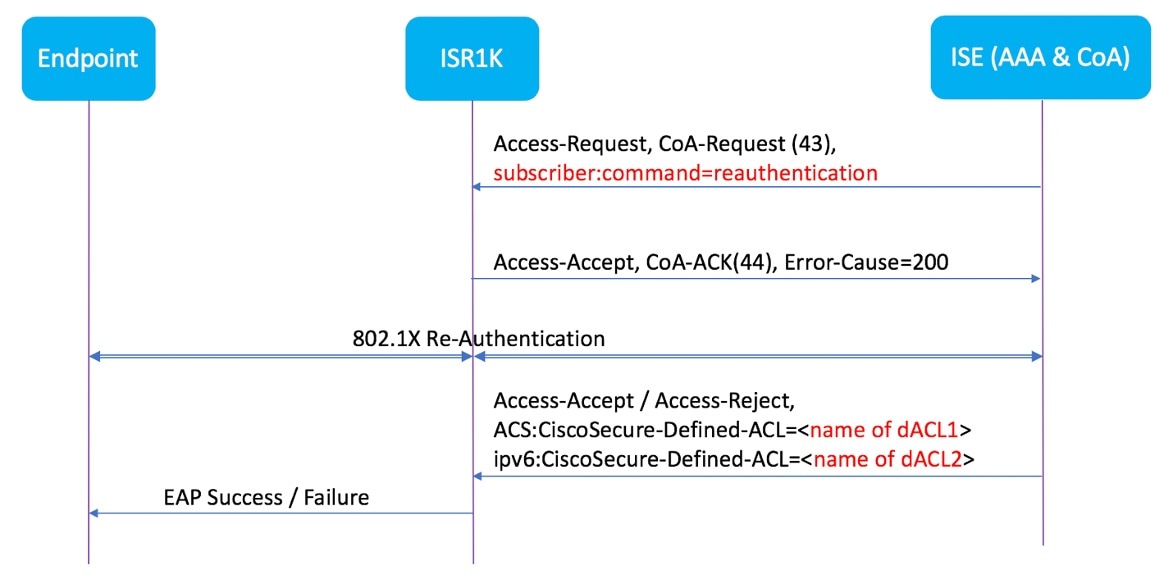
- The administrator changes a user or user group policy in the AAA system.
- The AAA server sends a RADIUS CoA packet to the network device, specifying policy updates.
- The device receives the CoA packet and reinitializes authentication, applying the new policy.
- The RADIUS interface returns either a CoA-ACK (acknowledgement) or CoA-NAK (nonacknowledgement) as a response.
Result
By default, the RADIUS interface is enabled on the device. However, some basic configuration is required for the following attributes:
-
Security and Password
-
Accounting
-
CoA acknowledgement (ACK) [CoA-ACK]
-
CoA nonacknowledgement (NAK) [CoA-NAK]
What’s next
After posture assessment is succeessful, full network access is pushed down to the device for specific client through CoA re-authentication command based on its compliance state derived from last assessment. It is optional to enforce downloadable ACLs with Permit-ALL or limited access to certain resources to corresponding clients. Per-session CoA requests are supported for session identification, session termination, host reauthentication, port shutdown, and port bounce. This model comprises one request (CoA-Request) and two possible response codes:
Change of authorization requests
A Change of authorization is a network policy mechanism that:
-
facilitates endpoint re-authentication based on posture assessment,
-
integrates with Cisco AnyConnect and Cisco ISE, version 2.6 and
-
enhances security through customizable security policies per client.
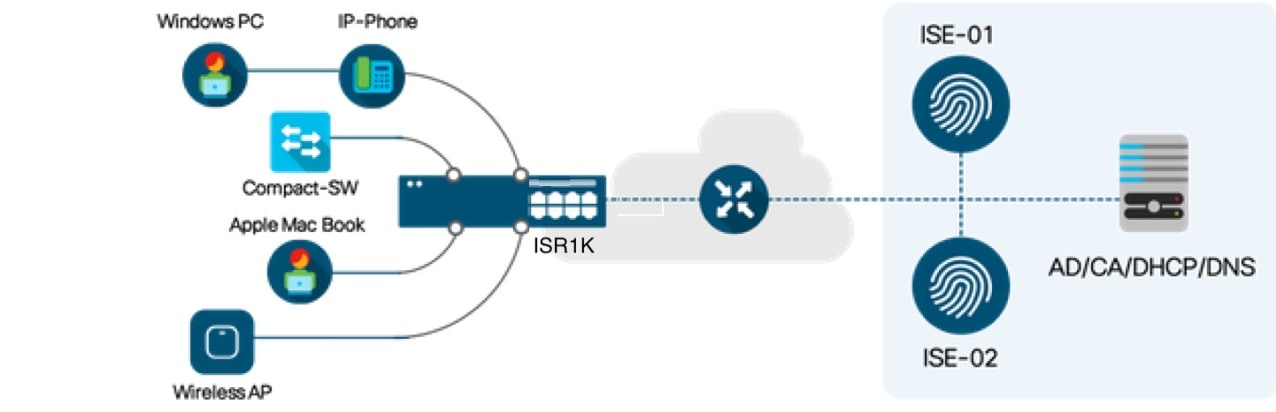
Topology diagram of Cisco IR1800 Router as a branch router
Limitations for change of authorization
When configuring the Change of Authorization feature, ensure that you observe these restrictions:
-
Only platforms with SKUs that support TCAM can use downloadable ACLs (DACL) and redirect ACLs with change of authorization.
-
The switch ASIC TCAM supports a maximum of 255 IPv4 ACL entries in total.
-
Multi-Auth VLAN is not supported with change of authorization.
-
VLAN changes may not occur consistently with multiple iterations on the same client interface.
How to configure change of authorization
Create RADIUS server group
Use this procedure to create a RADIUS server group and add a RADIUS server to the group.
Procedure
|
Step 1 |
Use the configure terminal command to enter global configuration mode. Example: |
|
Step 2 |
Use the radius server server-name command to configure a RADIUS server. Example: |
|
Step 3 |
Use the address ipv4 ip auth-port port acct-port port command to set the RADIUS server’s IP address and authentication/accounting ports. Example: |
|
Step 4 |
Use the aaa group server radius radius-group server name RADIUS-server-name command to create a RADIUS server group and add the RADIUS server to it. Example: |
|
Step 5 |
Use the key <secret-key> command to specify the shared secret key (encrypted) for the RADIUS server. Example: |
What to do next
Configure 802.1X authentication using a RADIUS server
Configure 802.1X authentication using a RADIUS server
Follow this procedure to enable and set up 802.1X authentication using a RADIUS server on a Cisco device.
Before you begin
-
Ensure that your device is in global configuration mode.
-
Ensure that the RADIUS server is reachable from the device and is configured to accept requests.
-
Ensure that a RADIUS server group is already created.
Procedure
|
Step 1 |
Use the dot1x system-auth-control command to enable 802.1X authentication on the router. Example: |
|
Step 2 |
Use the aaa new-model command to enable authentication, authorization, and accounting (AAA) globally. Example: |
|
Step 3 |
Use the aaa authentication dot1x default group radius-server-group-name command to specify that 802.1X authentication requests use the RADIUS server group by default. Example: |
|
Step 4 |
Use the aaa authorization network default group radius-server-group-name command to specify that 802.1X authorization requests use the RADIUS server group by default. Example: |
|
Step 5 |
Use the aaa authorization auth-proxy default group radius-server-group-name command to specify that the authorization of the authentication proxy requests use RADIUS server group by default, enabling dynamic user access control via the specified RADIUS server group. Example: |
|
Step 6 |
Use the aaa accounting auth-proxy default start-stop group radius-server-group-name command to specify that the accounting of the authentication proxy requests use RADIUS server group by default, enabling dynamic user access control via the specified RADIUS server group. Example:This command enables the device to generate accounting records when an authentication proxy cache is created and deleted, capturing user session information dynamically via the specified RADIUS server group. |
|
Step 7 |
Use the aaa accounting dot1x default start-stop group radius-server-group-name command to enable accounting for 802.1X authentication sessions. Example:This command sends both start and stop accounting records to the specified RADIUS server group, allowing tracking of user authentication sessions on the network. |
|
Step 8 |
Use the key <secret-key> command to specify the shared secret key (encrypted) for the RADIUS server. Example: |
Configure 802.1X authentication on an access port
Follow this procedure to configure a switch interface for 802.1X authentication in single-host mode with port security.
Before you begin
-
Ensure that your device is in global configuration mode.
-
Ensure that global AAA and 802.1X configurations are completed prior to configuring the interface.
Procedure
|
Step 1 |
Use the interface interface-type port command to enter the interface configuration mode for the specified interface. Example: |
|
Step 2 |
Use the switchport mode access command to set the port to access mode for end devices. Example: |
|
Step 3 |
Use the switchport access vlan vlan-id command to assign the specified VLAN as the access port. Example: |
|
Step 4 |
Use the authentication order dot1x mab command to specify the order in which authentication methods are attempted. Example:In this case, the switch first tries 802.1X (dot1x) authentication, and if that fails or is not supported by the device, it falls back to MAC Authentication Bypass (MAB). |
|
Step 5 |
Use the authentication priority dot1x mab command to set the priority order of authentication methods on a port. Example:In this case, the switch first configures the port to prioritize dot1x authentication first, and if that method is interrupted or fails, it will then attempt MAB. |
|
Step 6 |
Use the authentication port-control auto command to require dot1x authentication before granting access. Example: |
|
Step 7 |
Use the mab command to enable MAC-based authentication on the interface. Example: |
|
Step 8 |
Use the dot1x pae authenticator command to enable 802.1X authentication in authenticator mode. Example: |
|
Step 9 |
Use the access-session host-mode single-host command to limit the port to one authenticated device at a time. Example: |
|
Step 10 |
Use the description text command to add a descriptive label to the interface configuration. Example: |
Configure RADIUS change of authorization
Use this procedure to configure RADIUS change of authorization.
Procedure
|
Step 1 |
Use the configure terminal command to enter global configuration mode. Example: |
||
|
Step 2 |
Use the aaa new-model command to enable authentication, authorization, and accounting (AAA) globally. Example: |
||
|
Step 3 |
Use the aaa server radius dynamic-author command to enter dynamic authorization local server configuration mode and specify a RADIUS client from which a device accepts Change of Authorization (CoA) and disconnect requests. Example:This command configures the device as a AAA server to facilitate interaction with an external policy server. |
||
|
Step 4 |
Use the client { ip-address | name [ vrf vrf-name ]} server-key string command to configure the RADIUS key to be shared between a device and RADIUS clients. Example: |
||
|
Step 5 |
(Optional) Use the port port-number command to specify the port on which a device listens for RADIUS requests from configured RADIUS clients. Example:
|
Configuration examples for change of authorization
RADIUS server status example
This example shows how to check if the RADIUS server is active.
Device# show aaa servers
RADIUS: id 1, priority 1, host 10.75.28.231, auth-port 1812, acct-port 1813, hostname host
State: current UP
duration 188755s, previous duration 0s
Dead: total time 0s, count 0
Platform State from SMD: current UP, duration 188755s, previous duration 0s
Verification of change of authorization
Successful 802.1X authentication and CoA reauthentication
Verify successful 802.1X authentication and CoA reauthentication
Device# show access-session interface GigabitEthernet0/1/0 details
Interface:  GigabitEthernet0/1/0
MAC Address:  00a1.b2c3.d4e5
IPv4 Address: 10.10.10.25
User-Name:  host_8021x_client
Status:  Authorized
Domain:  DATA
Oper host mode:  single-host
Oper control dir:  both
Session timeout:  N/A
Idle timeout:  N/A
Common Session ID:  0A01000A00000012A4E3D6B7
Acct Session ID:  0x00000012
Handle:  0xB4000012
Current Policy:  802.1X_AUTH_POLICY

Local Policies:
Service Template:  DOT1X-DEFAULT (activated)

Server Policies:
VLAN Group:  VLAN_10
ACL:  ACL_PERMIT_ALL
URL Redirect ACL:  N/A
Troubleshoot RADIUS change of authorization configuration
Use these comands to monitor and troubleshoot the RADIUS Change of Authorization feature.
|
Command |
Purpose |
|---|---|
|
debug aaa coa |
Displays debug information for CoA processing. |
|
debug aaa authentication |
Displays debug information related to AAA (Authentication, Authorization, and Accounting) authentication processes. It helps to learn the methods of authentication being used and troubleshoot authentication issues by showing detailed logs of authentication events as they occur. |
|
show aaa attributes protocol radius |
Displays the mapping between an authentication, authorization, and accounting (AAA) attribute number and the corresponding AAA attribute name. |
 Feedback