Line Card LEDs
The LEDs of the 1.2T line card, and 1.2TL line card and OTN-XP line card are discussed here.
|
Feature Name |
Release Information |
Description |
|---|---|---|
|
Attention LED |
Cisco IOS XR Release 7.7.1 |
The attention LED is available on all ports of the NCS 1004 line cards. This LED can be selectively turned on for a specific QSFP port or simultaneously on all of the QSFP ports using the hw-module location command. When turned on, the LED flashes yellow. This LED flashing functionality helps field engineers quickly identify a specific port on the line card for troubleshooting, especially in a cluttered environment. |
LEDs of 1.2T, 1.2TL, and 2-QDD-C Line Cards
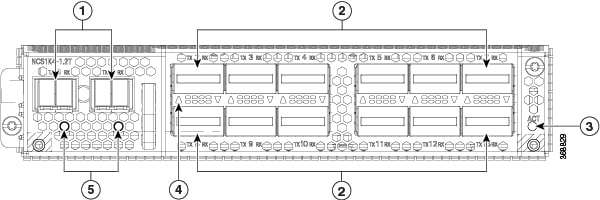
The front view of the 1.2T line card is as below.
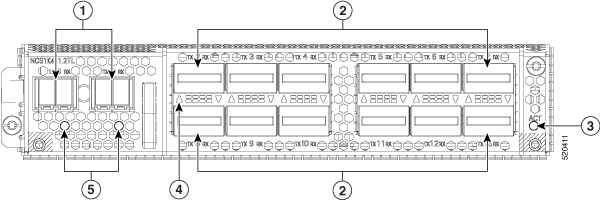
The front view of the 1.2TL line card is as below.
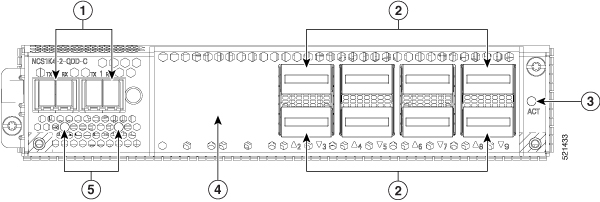
The front view of the 2-QDD-C line card is as below.
|
1 |
Trunk ports (0 and 1) |
|
2 |
|
|
3 |
ACT LED |
|
4 |
QSFP port LEDs The LEDs for the QSFPs are embedded in the card cage. The triangles shown upwards or downwards (in 2-QDD-C, 1.2T and 1.2TL line cards) indicate the status of the corresponding QSFP. |
|
5 |
Trunk port LEDs |
|
LED |
Color |
Status |
|
|---|---|---|---|
|
Attention LED |
Yellow Flashing |
Used by the field engineers to identify a specific port in the line card. This is used for troubleshooting purposes.
|
|
|
ACT LED |
Amber (solid) |
The line card is booting. This colour appears as soon as the line card is inserted in to the chassis. |
|
|
Flashing Red |
The line card is in the booting phase. |
||
|
Green |
The line card is up and operational (not associated to the traffic status). |
||
|
QSFP and Trunk port LEDs |
Off |
The port has not been provisioned. |
|
|
Red |
Major alarm that could lead to a traffic-impacting situation. |
||
|
Green |
Indicates that the module is operational and has no alarm. |
||
|
Amber (solid) |
Indicates a minor alarm (such as low Rx or Tx power), which could lead to a traffic impacting situation. |
||
|
Amber (flashing) |
This is used for troubleshooting, to identify the faulty port of a line card. Use the controller optics command in the configuration mode to point to a faulty port in the line card. The port is configured in maintenance mode or the attention LED is enabled for this port.
|
LEDs of OTN-XP Line Card
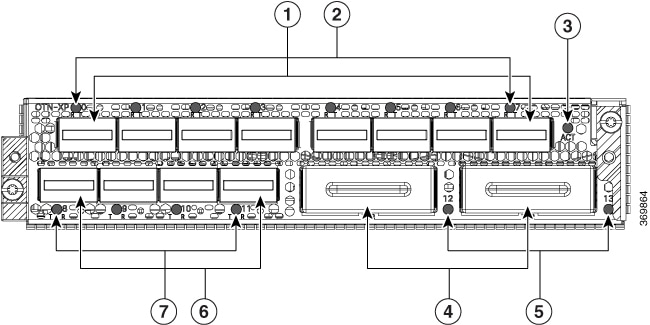
The front view of the OTN-XP line card is as below.
|
1 |
Eight QSFP-28 ports (0 to 7) Ports 1 and 5 are client ports for 100G TXP. |
|
2 |
Corresponding LEDs for the eight QSFP-28 ports. Each QSFP-28 port has Attention LED. |
|
3 |
ACT LED |
|
4 |
Two CFP2 ports (12 and 13) Both are trunk ports. |
|
5 |
Corresponding LEDs for the two CFP2 ports |
|
6 |
Four QSFP-DD ports (8 to 11) QSFP-DD trunk ports are ports 9 and 11. |
|
7 |
Corresponding LEDs for the four QSFP-DD ports. |
|
LED |
Colour |
Status |
|---|---|---|
|
Attention LED |
Red |
The corresponding port is shut down. |
|
Green |
The corresponding port is working. |
|
|
Yellow Flashing |
Used by the field engineers to identify a specific port in the line card. This is used for troubleshooting purposes.
|
|
|
ACT LED |
Flashing Red |
The line card is booting. This colour appears as soon as the line card is inserted in to the chassis. |
|
Amber (solid) |
Indicates that the line card is in the booting phase. |
|
|
Green |
Indicates that the line card is up and operational (not associated to the traffic status). |
|
|
QSFP and CFP2 port LEDs |
Off |
This indicates that the port has not been provisioned. |
|
Red |
Indicates a major alarm, which could be a traffic impacting situation. |
|
|
Green |
Indicates that the module is operational and has no alarm. |
|
|
Amber (solid) |
Indicates a minor alarm (such as low Rx or Tx power), which could lead to a traffic impacting situation. |
|
|
Amber (flashing) |
This is used for troubleshooting, to identify the faulty port in the line card. Use the controller optics command in the configuration mode to point to a faulty port in the line card. |
LEDs of QXP-K9 Line Card
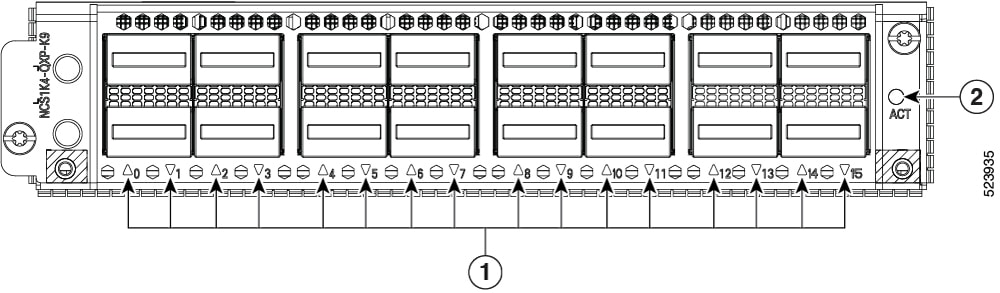
The front view of the QXP-K9 line card is as below.
|
1 |
16 QSFP-DD ports (0 to 15) |
|
2 |
ACT LED |
|
LED |
Color |
Status |
|---|---|---|
|
ACT LED |
Flashing Red |
The line card is booting. This color appears as soon as the line card is inserted in to the chassis. |
|
Amber (solid) |
Indicates that the line card is in the booting phase. |
|
|
Green |
Indicates that the line card is up and operational (not associated to the traffic status). |
|
|
QSFP-DD port LEDs |
Off |
This indicates that the port has not been provisioned. |
|
Red |
Indicates a major alarm, which could be a traffic impacting situation. |
|
|
Green |
Indicates that the module is operational and has no alarm. |
|
|
Amber (solid) |
Indicates a minor alarm (such as low Rx or Tx power), which could lead to a traffic impacting situation. |
|
|
Amber (flashing) |
This is used for troubleshooting, to identify the faulty port of a line card. Use the controller optics command in the configuration mode to point to a faulty port in the line card. |
 Feedback