
Cisco NCS 540 Series Routers Licensing Quick Reference
Licensing for Cisco IOS XR Routers
This article provides information on available licenses and deployment solutions on Cisco IOS XR Routers.
Cisco IOS XR licensing is structured to provide flexibility and scalability for network operators, with a focus on high-end routers.
Cisco Network Convergence System 540 Series Routers
The Cisco Network Convergence System (NCS) 540 Series routers are a family of fixed-form-factor routers designed for the service provider market. These routers offer high-density, small-footprint solutions for deployment in provider edge and access networks. These routers are optimized for the 5G and multicloud era, providing high throughput, low latency, and a rich set of features to support various applications, including mobile backhaul, residential, and business services.
The Cisco Network Convergence System (NCS) 540 Series Routers include:
- NCS 540 Small Density Routers: These are compact routers designed for smaller-scale deployments, offering various interface options in a small form factor.
- NCS 540 Medium Density Routers: These routers provide a balance between port density and form factor, suitable for a range of edge and aggregation applications.
- NCS 540 High-Density Routers: These routers are aimed at high-capacity needs, offering greater port density and throughput for demanding environments.
- NCS 540 Small Form-Factor Pluggable (SFP) Routers: These routers are designed to accommodate a range of SFP and SFP+ interfaces, providing flexibility for different optical networking requirements.
- NCS 540 Fixed Chassis Routers: These are nonmodular routers with a fixed set of ports and features, optimized for specific use cases.
Licensing Solutions and Offerings
Cisco IOS XR offers licensing solutions for you to manage your licenses.
- Smart Licensing: A flexible and convenient cloud-based software licensing model that simplifies the management of software licenses across your organization. It automatically creates a pool of licenses or entitlements for use throughout the organization. With Smart Licensing, you only pay for the features you currently need, with the option to upgrade as necessary, ensuring the security of your investment. For more information, see Smart Licensing.
- Smart Licensing Using Policy: An enhanced version of Smart Licensing that enables immediate use of devices right out of the box. This licensing solution streamlines the process, making it easier to manage your licenses. For more information, see Smart Licensing Using Policy.
- Specific License Reservation (SLR): A solution specifically designed for classified environments where electronic communication is restricted. In such environments, routers are unable to communicate directly with the Cisco Smart Software Manager (CSSM) or through SSM On-Prem. SLR enables the use of all entitlements on the router without the need for communication with Cisco.
- Smart Licensing Perpetual mode: An operational mode of Smart Licensing Using Policy where compliance and enforcement actions are disabled. This mode applies to perpetual license customers who choose not to deploy Smart Licensing Using Policy registration or reporting workflows. For more information, see Smart Licensing Perpetual mode.
Key Differences between Licensing Solutions
|
License Attributes |
Smart Licensing Using Policy |
Smart Licensing |
Specific License Reservation |
|---|---|---|---|
|
Activation of licenses |
Creates a trust relationship with CSSM |
Registers with CSSM |
Generates code from the device to reserve licenses in CSSM |
|
Supported deployments |
|
|
Offline deployment for air-gapped environments |
|
License communication transport mode |
|
|
Not applicable for SLR |
|
License reporting |
Generates RUM reports from the device and synchronizes with CSSM |
Generates Product Instance reports from CSSM or SSM On-Prem |
Not applicable for SLR |
|
Models supported |
Flexible Consumption Model 1 |
Flexible Consumption Model 1 |
Not applicable |
 Note
NoteStarting with Release 25.3.1, IOS XR software no longer supports Call Home transport mode. Please configure CSLU or Smart Transport mode to ensure seamless operation of the licensing solution.
What are the Flexible Consumption Models?
The Flexible Consumption Model (FCM) is a modern licensing framework that enables you to tailor your software expenditures to real-time requirements. It provides the agility to scale software services based on fluctuating business needs, often using a subscription or usage-based payment structure. This approach offers financial flexibility, as you only pay for the software you use, and can quickly adjust subscriptions as the business landscape changes. This model of licensing is available at a low initial investment, provides easy scalability, and allows you to increase consumption of licenses as you expand.
FCM is enabled by default on the NCS 540 Series routers.
Key Features of FCM
- Pay-as-you-grow: Enables you to lower initial costs and add more capacity over time.
- Simplify operations: FCM delivers the carrier-class IOS-XR software feature set with two software suites, Essentials and Advantage, that simplify license management.
- Utilize capital efficiently: License pooling enables an efficient way to share licenses across the network.
- Protect investment: Software portability provides investment protection by enabling porting of licenses to next-generation hardware. For more information, see Cisco IOS XR Software Flexible Consumption Model Data Sheet.
Smart Licensing, Smart Licensing Using Policy and Flexible Consumption Model
Flexible Consumption Model (FCM) is a consumption model that lets you pay for software based on actual use, offering flexibility and cost efficiency.
The Smart Licensing and Smart Licensing Using Policy solutions facilitate FCM by providing a centralized way to manage licenses with ease. Combined, they deliver a user-friendly and adaptable licensing system.
FCM requires Smart Licensing registration and license usage reporting. A network under FCM is considered compliant if the FCM-enabled devices in the network are registered to Smart Licensing and are reporting the usage.
Similarly, FCM requires devices enabled with Smart Licensing Using Policy to have trust enablement and generate the first license usage report within 90 days.
Flexible Consumption model licenses are checked for usage on a daily basis. The daily license usage is reported to the Smart Licensing Manager at Cisco.com.
In short, the FCM adjusts software costs to actual usage, while Smart Licensing streamlines license management. Together, they provide a flexible and simplified licensing approach.
Comparison of FCM models and license suites
Components of FCM licensing
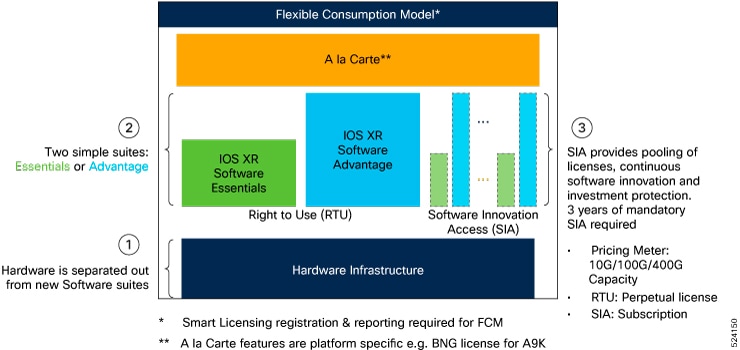
Both FCM 1 and FCM 2 comprise of these components:
- The hardware.
- The perpetual software component, known as Right To Use (RTU), which provides indefinite software licensing.
- The recurring software component, known as Software Innovation Access (SIA), which allows continuous software upgrades, license pooling, and faster access to new features for the subscription term.
For FCM 1, some product families may include, optional, a-la-carte software perpetual licenses for specialized platform-specific features.
License suite tiers
FCM follows a hierarchical structure where each higher-tier license encompasses the features and capabilities of the lower tiers.
- Essentials suite: The foundational tier, offering basic features and capabilities. The Essentials license suite serves fundamental transport needs. It includes the IOS XR comprehensive suite of routing and management services.
- Advantage suite: This tier includes everything in the Essentials tier, plus additional advanced features. The Advantage license suite enhances applications and network resilience. It includes all features of Essentials Software licenses with extra advanced routing and management services.
All license suites use a nested structure, wherein each higher-tier suite includes the features and capabilities of the tiers below it.
RTU Licenses
RTU (Right-to-Use) licenses are software licenses that grant customers the flexibility to scale functionality incrementally, ensuring customers pay only for what they use, especially when enabling features like advanced networking, higher bandwidth, or optical interfaces.
These are the types of RTU licenses.
- Essential licenses: These are the base licenses that are required by every active port for its operation. For example,
- Advantage (earlier known as Advanced licenses) without essential licenses: These licenses are required on top of Essential Licenses for ports that use advanced features like L3VPN.
- Advantage with essential combination licenses: These licenses are packaged together as a combined entitlement.
- Tracking licenses: These licenses are required for hardware operation.
Flexible Consumption Model Licenses
The table shows the various Flexible Consumption model licenses for Cisco NCS 540 Series Routers:
|
Flexible Consumption Model Licenses |
Consumption Pattern |
|---|---|
|
Essential Licenses:
Advantage Licenses:
|
License consumption checks are performed on the chassis. |
Hardware Tracking Licenses: These licenses are for the chassis.
|
Licensing consumption is checked on every chassis. For example, the N540-24Z8Q2C-TRK license is tracked on the chassis. |
- Starting with Release 24.3.1, tracking licenses are no longer used.
Advantage with Essential Licenses
This table shows Advantage with Essential licenses entitlement and description.
|
License Product ID |
License Entitlement |
License Description |
|---|---|---|
|
ADN-AC-10G-RTU-1 |
1 ESS RTU Tag + 1 ADV RTU Tag |
Access Advantage with Essentials SW RTU v1.0 10G |
|
ADN-AC-10G-SIA-3 |
1 ESS SIA 3 Tag + 1 ADV SIA 3 Tag |
Access Advantage with Essentials SIA 10G 3-5 year term |
|
ADN-AC-10G-SIA-5 |
1 ESS SIA 3 Tag + 1 ADV SIA 3 Tag |
Access Advantage with Essentials SIA 10G 5-10 year term |
|
ADN-AC-10G-SIA-ST |
1 ESS SIA 3 Tag + 1 ADV SIA 3 Tag |
Access Advantage with Essentials SIA 10G 1-35 month term |
|
ESS-ADN-AC-10G-RT |
1 ADV RTU Tag |
Access Essentials to Advantage Upgrade RTU per 10G |
|
ESS-ADN-AC-10G-SST |
1 ADV SIA 3 Tag |
Access Essentials to Advantage Upgrade SIA 10G 5-10 yrs |
|
ESS-ADN-AC-10G-S3 |
1 ADV SIA 3 Tag |
Access Essentials to Advantage Upgrade SIA 10G 1-35 month term |
|
ESS-ADN-AC-10G-S5 |
1 ADV SIA 3 Tag |
Access Essentials to Advantage Upgrade SIA 10G 3-5 yrs |
Guidelines
These are the guidelines for deploying the license on NCS 540 Series routers.
- Starting with Release 24.3.1, tracking licenses are no longer used.
-
If you are using Layer 3 VPN features with VRF, then licenses vary depending the VRF tables.
Software Features and License Usage
If Software Feature is
and Configuration is
then use License
Layer 3 VPN with VRF or VRF-Lite
Less than (or equal to) eight VRF tables
ESS-AC-10G-RTU-1
More than eight VRF tables
ADV-AC-10G-RTU-1
FCM license consumption rules
Understanding the FCM license consumption rules helps you calculate the number of licenses required for your device. Both SIA and RTU licenses follow the same calculation logic and so you will require the same number of SIA and RTU licenses.
FCM 1 licensing includes these types of feature licenses:
- Per-system feature licenses: These licenses apply to the entire router and are consumed based on the total number of active interfaces for that feature. All active interfaces collectively consume these licenses.
- Per-port feature licenses: These licenses apply to specific interfaces on which the corresponding feature is configured and active.
Calculate per-system and per-port feature license consumption
The router calculates per-system and per-port feature license consumption based on feature priority and bandwidth. Follow this procedure to calculate the number of per-system and per-port licenses consumed by your device.
Step 1 | Obtain the total count of interfaces that consume per-system and per-port licenses from these tables listed by feature priority. When multiple features operate on the same interface, the router applies a priority order. Count only the highest priority feature for license consumption by that interface. These tables list the features in the priority order that the router follows, with per-system features having a higher priority over per-port features:
| ||||||||||||||||||||||||
Step 2 | Calculate the total bandwidth for per-system and per-port features from the number of interfaces obtained in the previous step. | ||||||||||||||||||||||||
Step 3 | Apply these bandwidth rules to obtain the number of per-system and per-port feature licenses consumed by your device.
For example:
|
Software Innovation Access
Software Innovation Access (SIA) subscription are FCM licenses that provide access to your network's latest software upgrades and features. SIA licenses enable the consumption of Right-to-Use (RTU) licenses for your devices to access software innovation and avail support for your devices throughout the term of subscription.
Benefits of SIA Licenses
- Access to software innovation: provides access to continuous software upgrades which contain latest features, security enhancements, and bug fixes for all your devices at a network level.
- Pooling of licenses: enables Right-to-Use (RTU) licenses to be shared across your FCM network from a common license pool through the virtual account.
- Protects your investment: enables the portability of perpetual RTU licenses purchased for your current device to a next-generation router when you expand or upgrade your network.
Types of SIA Licenses
The types of SIA licenses are
- Essential SIA license
- Advantage SIA license
SIA License Term
The initial term of a SIA subscription is for a term of three years. You can renew the subscription by contacting your Cisco account representative. An equal number of SIA licenses and corresponding RTU licenses are required to enjoy the benefits, and ensure that your network is in compliance.
If your device is in a state of SIA Out-of-Compliance (OOC) the benefits cease.
Managing SIA Entitlements
SIA entitlement management manages software upgrades for FCM. Software upgrades are possible when the device is in an In-Compliant State.
The table shows the SIA Compliance factors and its states.
|
Compliance |
SIA In-Compliance State |
SIA Out-of-Compliance State |
|---|---|---|
|
License Usage Consumption |
The device consumes fewer licenses than purchased. |
The number of SIA licenses consumed exceeds the number of SIA licenses purchased. OOC can also occur when the RTU licenses consumed is higher than the number of SIA licenses purchased. |
|
Reporting |
The device reports regularly. |
The term of the SIA license expires and you haven’t renewed the subscription. |
|
Grace Period |
NA |
The SIA License Grace period of 90 days expires. |
|
License Authorization Status |
NA |
License Authorization Status is:
|
When the device enters an OOC state, a grace period of 90 days (cumulative of all the previous occurrences) begins. During this period, SIA license benefits can still be availed. The system attempts to renew the authorization period by connecting with the CSSM during the grace period, or even after the grace period has expired. If an attempt isn’t successful, it remains in an OOC state. If the attempt is successful, a new authorization period begins and the device is In-Compliance.
When are Software Upgrades Blocked?
A software upgrade for a device is blocked in these situations.
- Software upgrades are blocked for all devices in the product family in the virtual account when the devices are Out-of-Compliance.
- Software upgrades are blocked when the device does not report within 90 days.
Usage Guidelines for Device Compliance
These are the guidelines for device compliance.
|
If... |
Then... |
|---|---|
|
the SIA license grace period has expired |
register your device with CSSM. |
|
the SIA license has expired or the number of SIA licenses consumed is more than the number of SIA licenses that are purchased |
contact your Cisco Account Representative to purchase or renew the required license. |
|
the authorization code has insufficient counts for the request |
generate the code with sufficient counts. |
|
the authorization has expired |
connect the device with CSSM. |
NoteWhen you order SIA5 licenses in CSSM, your device may still display SIA3 in the output of the show license command. However, CSSM enforces license compliance based on the SIA5 entitlement. You can validate your device against the SIA5 entitlement in CSSM, even if the device shows SIA3 locally.
Verify the Compliance Status
Verify the device compliance status, using the show license platform summary command.
Examples
Status: In-Compliance
Router# show license platform summary
Fri Feb 19 15:47:37.107 UTC
Collection: LAST: Fri Feb 19 2021 15:46:43 UTC
            NEXT: Fri Feb 19 2021 15:47:43 UTC
Reporting:  LAST: Fri Feb 19 2021 15:46:43 UTC
            NEXT: Fri Feb 19 2021 15:47:43 UTC
SIA Status: In Compliance
                                                                   Count
Feature/Area     Entitlement                                     Last Next
============ =================================================== ==== ====
FCM          N540X-6Z18G-SYS-A Base Hardware Tracking PID           1    0
Status: Out-of-Compliance (Grace Period Remaining)
Router# show license platform summary
Fri Feb 19 18:15:00.515 UTC
Collection: LAST: Fri Feb 19 2021 18:14:48 UTC
            NEXT: Fri Feb 19 2021 18:15:48 UTC
Reporting:  LAST: Fri Feb 19 2021 18:14:48 UTC
            NEXT: Fri Feb 19 2021 18:15:48 UTC
**********************************IMPORTANT************************************
SIA Status: Out of Compliance(Remaining Grace Period: 89 days, 23 hours)
            SIA license(s) status is Not Authorized.
            SW Upgrade will still be allowed as SIA Grace Period is remaining
*******************************************************************************
                                                                   Count
Feature/Area     Entitlement                                     Last Next
============ =================================================== ==== ====
FCM          NCS 540 Core & Agg Netw SW&Autom Ess 1.0 Perp RTU (    7    0
FCM          NCS 540 Core & Agg Netw SW&Autom Adv 1.0 Perp RTU (    7    0
FCM          Access Essentials SIA per 10G                          7    0
FCM          Access Advanced SIA per 10G                            7    0
Status: Out-of-Compliance (Grace Period expired and upgrades are blocked)
Router# show license platform summary
Fri Feb 19 18:15:00.515 UTC
Collection: LAST: Fri Feb 19 2021 18:18:48 UTC
            NEXT: Fri Feb 19 2021 18:19:48 UTC
Reporting:  LAST: Fri Feb 19 2021 18:18:48 UTC
            NEXT: Fri Feb 19 2021 18:19:48 UTC
**********************************IMPORTANT************************************
SIA Status: Out of Compliance(Grace Period Expired)
            SW Upgrades are blocked as SIA license(s) are in "Not Authorized" state
*******************************************************************************

                                                                   Count
Feature/Area     Entitlement                                     Last Next
============ =================================================== ==== ====
FCM          NCS 540 Core & Agg Netw SW&Autom Ess 1.0 Perp RTU (    7    0
FCM          NCS 540 Core & Agg Netw SW&Autom Adv 1.0 Perp RTU (    7    0
FCM          Access Essentials SIA per 10G                          7    0
FCM          Access Advanced SIA per 10G                            7    0
Achieving and Maintaining Network Licenses Compliance
To ensure network compliance, it is important to use a quantity less than or equal to the total amount of perpetual (RTU) licenses and subscription (SIA) licenses, and report license usage regularly.
The benefits of maintaining network compliance include license pooling, portability of RTU, and access to software upgrades. If the network is out of compliance (OOC), these benefits are restricted.
Network compliance is measured at the virtual account level and enforced based on the product family. For example, consider a virtual account that contains ASR 9000 devices and NCS 540 devices. In this example, the NCS 540 devices are compliant, but one of the ASR 9000 devices uses more SIAs than that are available in the Smart account. Once all granted grace periods are exhausted, the enforcement conditions such as no license pooling, no RTU portability, and software upgrade restriction for all ASR 9000 devices within that virtual account are instituted. In this example, the NCS 540 devices in the same virtual account aren’t impacted by the OOC condition, nor are the other ASR 9000 devices that reside in different virtual accounts.
A product family in a virtual account is considered in compliance when four factors are valid:
- The devices are registered with the smart licensing server (On-Prem or CSSM).
- The number of current SIA licenses in use is less than or equal to the number of available SIA licenses in your virtual account.
- The number of current RTU licenses in use is less than or equal to the number of available RTU licenses in your virtual account.
- The devices are reporting license usage within 90 days.
Thus, network compliance for a product family in a given virtual account is present when all devices are using no more RTUs & SIAs that have been purchased, and those devices are reporting usage at least every 90 days.
Revision History
|
Feature Name |
Release Information |
Feature Description |
|---|---|---|
| Release 25.4.1 |
Smart Licensing Perpetual Mode simplifies licensing operations for customers with full-capacity perpetual licenses that cover the entire chassis or all line cards. These customers do not need to enable Smart Licensing Using Policy or report usage, which reduces administrative overhead across these deployments. |
|
| Smart Licensing Using Policy support on N540-24Q2C2DD-SYS | Release 25.1.1 |
Smart Licensing Using Policy support is now extended on the Cisco NCS 540 router variant:
|
| Smart Licensing Using Policy | Release 24.1.1 |
Cisco Smart Licensing Using Policy (SLP) is an enhancement to the existing Cisco Smart Licensing model. It streamlines the licensing process for Cisco IOS XR products by introducing a more flexible and automated approach. With SLP, you no longer need to register your device during installation, and there is no evaluation license state or period. |
|
Cisco Smart Licensing on QDD-400G-ZR-S, QDD-400G-ZRP-S, and DP04QSDD-HE0 Optics |
Release 7.10.1 |
Support for Smart Licensing is now extended to the hardware having following optics:
|
|
Support for Flexible Consumption Model on N540-6Z18G-SYS-A/D |
Release 7.9.1 |
Support for Flexible Consumption Model (FCM) is now extended to the following Cisco NCS 540 variant:
|
| Smart License support on N540X-4Z14G2Q-A/D and N540-24Q8L2DD-SYS | Release 7.4.1 |
Smart Licensing support is now extended on the following Cisco NCS 540 router variants:
|
|
Support for Flexible Consumption Model on N540X-4Z14G2Q-SYS-A/D |
Release 7.4.1 |
Support for Flexible Consumption Model (FCM) is now extended to the following Cisco NCS 540 variants:
|
| Support for Flexible Consumption Model on N540-24Q8L2DD-SYS | Release 7.4.1 | Support for Flexible Consumption Model (FCM) is now extended to the following Cisco NCS 540 variants:
|
| Essential and Advantage smart licenses in a combined entitlement | Release 7.4.1 |
With this release, the Advanced licenses are now referred to as the Advantage licenses, without essential entitlement. Also, a new license model – Advantage with Essentials, has been introduced that contains both Essential and Advantage licenses as a combined entitlement in a single PID. This simplifies the license procurement and management effort by eliminating the need to procure separate PIDs for Essential and Advantage licenses. |
| Release 7.3.1 |
SIA license grants you access to the latest software upgrades which contain new features, bug fixes, and security enhancements for devices on your network. Also, it enables the consumption of Advantage and Essential Right-to-Use (RTU) licenses on your device, and allows portability of these RTU licenses from one device to another. |
|
| Specific License Reservation | Release 7.3.1 |
Specific License Reservation is a solution designed for classified environments that don’t allow electronic communication in or out of the environment. |
|
Release 6.3.2 |
Smart Licensing is a cloud-based, flexible software licensing model that enables you to activate and manage Cisco software licenses across their organization. Smart Licensing solution allows you to easily track the status of your license and software usage trends. |