Optionality in NX-OS software
Optionality is a feature in NX-OS software that
-
uses modular packages for selective feature upgrades
-
supports both base and full modes, and
-
enables independent upgrade or removal of optional RPMs without service disruption.
Beginning with NXOS Release 9.2(1), NX-OS software image supports modular package management. NX-OS software now provides flexibility to add, remove, and upgrade the features selectively without changing the base NX-OS software.
Using modular NX-OS software provides several advantages:
-
Leaner NX-OS software
-
Asynchronous delivery of the features and the fixes—provide quick fixes that are independent of the releases, including new features
-
Reduced footprint of binaries and libraries at run time
Modes
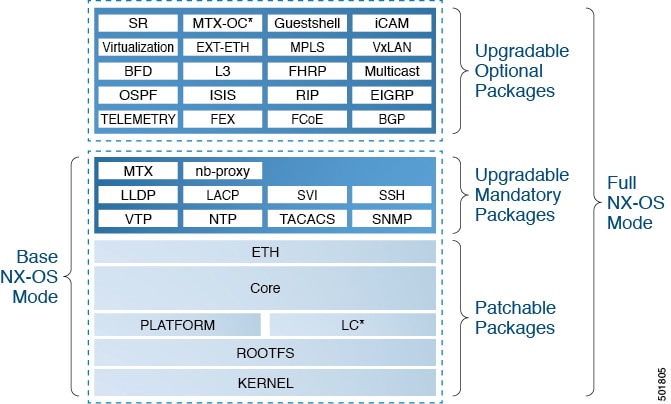
NX-OS software is provisioned to boot the NX-OS software in two modes as described in the illustration:
-
Base NX-OS mode
-
Full NX-OS mode
-
Base NX-OS mode contains:
-
Upgradable mandatory packages
-
Patchable packages
-
-
Full NX-OS mode contains:
-
Upgradable optional packages
-
Upgradable mandatory packages
-
Patchable packages
-
 Note |
The default mode is full NX-OS mode. |
In base NX-OS mode, basic Layer 2 and Layer 3 features are available. All dynamic routing features (for example, BGP, OSPF, EIGRP, RIP, and ISIS ) and other optional feature RPMs are not available by default. You have to install the optional feature RPMs on top of the base image.
In full NX-OS mode, all feature RPMs are installed during boot time when Ethernet plugin is activated by the plug-in manager. There is no change in the user behavior as compared to the previous releases.
 Feedback