Getting Started

This is a post-installation document intended to cover the steps required to get up and running with the Cisco Crosswork Planning Collector application. It provides instructions on how to configure the collectors to generate network models according to your specifications.

Core capabilities of Cisco Crosswork Planning

Cisco Crosswork Planning provides tools to create a model of the existing network by continuously monitoring the network and its traffic demands. At any given time, this network model contains all relevant information about a network, including topology, configuration, and traffic information. You can use this information as a basis for analyzing the impact on the network due to changes in traffic demands, paths, node and link failures, network optimizations, or other changes.

Key features

Some important features of Cisco Crosswork Planning include:

  • Traffic engineering and network optimization: Compute TE LSP configuration to meet service level requirements, perform capacity management, and perform local or global optimization in order to maximize efficiency of deployed network resources.

  • Demand engineering: Examine the impact on network traffic flow of adding, removing, or modifying traffic demands on the network.

  • Topology and predictive analysis: Observe the impact to network performance of changes in the network topology, which is driven either by design or by network failures.

  • TE tunnel programming: Examine the impact of modifying tunnel parameters, such as the tunnel path and reserved bandwidth.

  • Class of service (CoS)-aware bandwidth on demand: Examine existing network traffic and demands, and admit a set of service-class-specific demands between routers.

Components

Cisco Crosswork Planning comprises two primary components:

  • Cisco Crosswork Planning Collector: This component consists of a set of services that create, maintain, and archive a model of the current network. It achieves this through continual monitoring and analysis of the network and the traffic demands placed on it.

  • Cisco Crosswork Planning Design: This component helps network engineers and operators predict growth in their network, simulate failures, and optimize the network design to meet performance objectives while minimizing cost.

Cisco Crosswork Planning system overview

Cisco Crosswork Planning runs on the Cisco Crosswork infrastructure and is part of the Cisco Crosswork Network Automation suite of products.

The Cisco Crosswork Planning Design and Cisco Crosswork Planning Collector applications are packaged as separate components and can be enabled or disabled according to your needs. These two applications run independently of each other. The communication between Cisco Crosswork Planning Design and the archive on the Cisco Crosswork Planning Collector to import network models happens over well-defined APIs.
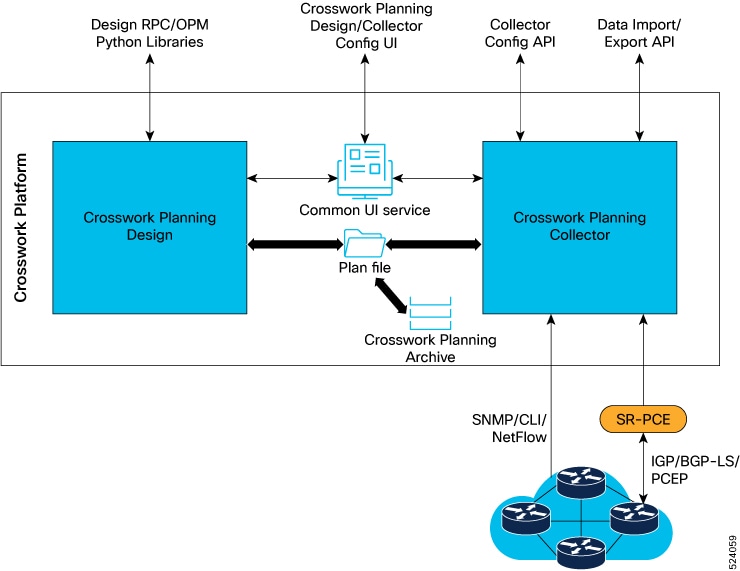
Figure 1. System overview
System overview

Collectors

A Collector is a package that populates parts of the abstract network model by querying the network.

Typically, collectors operate in this manner:

  1. They read a source network model, also known as a source model.

  2. They augment this source model with information obtained from the actual network.

  3. They produce a destination network model with the resulting model. This is also known as a destination model.

Types of collectors

Cisco Crosswork Planning includes several different collectors, including:

  • Topology collectors: These collectors populate a basic network model with topology information, such as nodes, interfaces, and circuits. This is based on the discovered IGP database augmented by SNMP queries and SR-PCE. The topology collectors do not have a source model.

  • LSP collector: This collector augments a source model with LSP information, producing a destination model with the extra information.

  • Traffic collector: This collector augments a source model with traffic statistics polled from the network, producing a new destination model with extra information.

  • Layout collector: This collector adds layout properties to a source model to improve visualization. It produces a new destination model with these additional layout information. As the source model changes, the collector updates the layout properties of the destination model accordingly.

For a complete list of all the collectors supported in Cisco Crosswork Planning, see Collector descriptions.

Network models and plan files

A network model is an output that

  • is generated by the Cisco Crosswork Planning Collector application

  • combines information from various collectors, and

  • reflects the configuration and topology of a real network.

A model building chain refers to an arrangement of collectors organized in such a way as to produce a network model with the desired information.

The system saves the resulting network model in a plan file format (.pln), which you can view or download from the Cisco Crosswork Planning Design application.

Aggregation components

This section describes the roles and functions of the Delta Aggregation Rules Engine (DARE) and the Simple Aggregation Engine (SAgE) in Cisco Crosswork Planning.

The aggregation engines consolidate network data collected from various sources to generate comprehensive network models.

Delta Aggregation Rules Engine (DARE)

The DARE aggregator is a Cisco Crosswork Planning component that brings together various collectors, selects model information from each of them, and consolidates the information into a single model. It primarily consolidates all topology collectors' data.

Simple Aggregation Engine (SAgE)

The SAgE aggregator is a Cisco Crosswork Planning component which consolidates all the network information such as traffic, inventory, layout, multicast, NetFlow, and demands. It aggregates these changes along with the topology changes from DARE network into the final network.

SAgE aggregator enables running traffic collection, inventory collection, layout, and so on in parallel.

By default, all collectors are included in the aggregation during collection configuration. You can choose to exclude any collector from aggregation while scheduling the collection. For details, see Aggregate collector outputs.

Generation of network models

Network models are generated on completion of each level of aggregation. The first model is generated as the output of DARE aggregation. This file serves as a data source for components such as traffic, inventory, layout, NetFlow, and demands. Once the SAgE aggregation is complete, it generates the second file, the network model, which is the final output of the aggregated data collected.

Log in to Cisco Crosswork Planning

Cisco Crosswork Planning is a browser-based application. For details on supported browser versions, see the "Supported web browsers" section in the Cisco Crosswork Planning 7.2 Installation Guide.

Complete these steps to access the UI after installing Cisco Crosswork Planning.

Procedure


Step 1

Open a web browser and enter https://<Crosswork Management Network Virtual IP (IPv4)>:30603/.

When you access Cisco Crosswork Planning from your browser for the first time, you may see a warning that the site is untrusted. If this occurs, follow the prompts to add a security exception and download the self-signed certificate from the server. After you do this, the browser accepts the Cisco Crosswork Planning server as a trusted site in all subsequent logins.

Step 2

Log in to Cisco Crosswork Planning.

  1. Enter the administrator username admin and the default password admin.

  2. Click Login.

  3. When prompted to change the administrator's default password, enter the new password in the fields provided and then click OK.

    Note


    Use a strong VM password (a minimum of eight characters, including uppercase and lowercase letters, numbers, and at least one special character). Avoid using passwords similar to dictionary words (for example, "Pa55w0rd!") or relatable words.

The Crosswork Manager page appears.

Step 3

Click the Crosswork Health tab, and click the Crosswork Platform Infrastructure tab to view the health status of the microservices running on Cisco Crosswork Planning.

Step 4

(Optional) Change the name assigned to the admin account to something more relevant.


You gain access to Cisco Crosswork Planning and you can begin planning or managing tasks as needed.

What to do next

To log out, in the top-right corner of the main page, click > Logout.


Note


Logging out does not close the plan file you are working on; the file remains open.


Dashboards

A Dashboard is a UI page that

  • provides a quick operational summary of Cisco Crosswork Planning

  • allows you to navigate directly to relevant pages and functions, and

  • consists of multiple dashlets that vary according to the installed application.

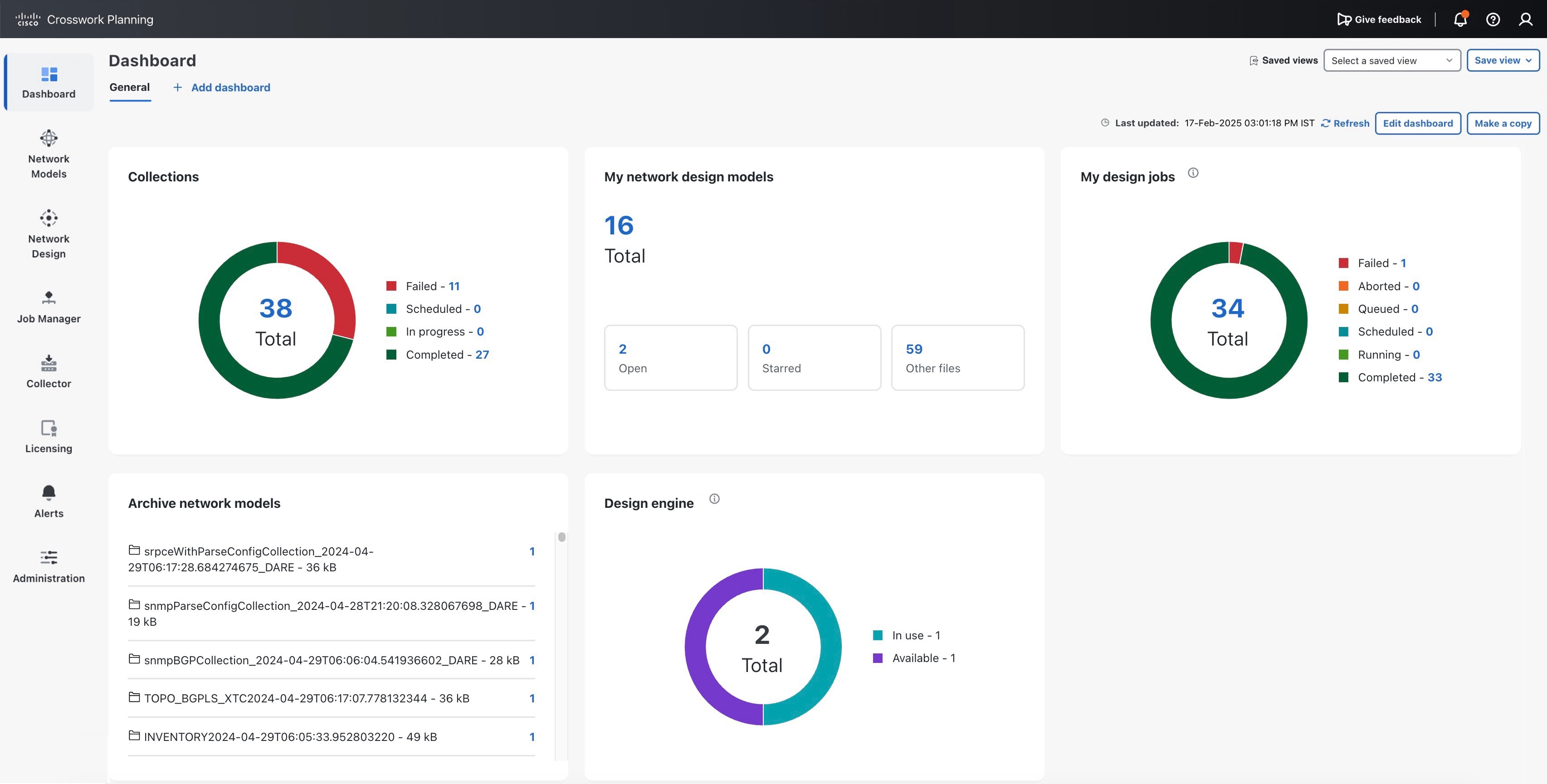
The Collections and Archive network models dashlets appear only if you have installed the Cisco Crosswork Planning Collector application. Similarly, the My network design models, My design jobs, and Design engine dashlets appear only if you have installed the Cisco Crosswork Planning Design application.

Figure 2. Dashboard view
Crosswork Planning Dashboard

Dashlet navigation

Links in each dashlet allow you to navigate to the desired pages easily. For example, in Dashboard view, link 27 in the Collections dashlet indicates that there are 27 successfully completed collections in the Collections page. If you click this number, the list of successfully completed collections is displayed.

Dashlet customization

Use the Edit dashboard button at the top right corner to customize how the dashlets appear.