Cisco Crosswork Hierarchical Controller 8.0.1 Release Notes
Available Languages
Bias-Free Language
The documentation set for this product strives to use bias-free language. For the purposes of this documentation set, bias-free is defined as language that does not imply discrimination based on age, disability, gender, racial identity, ethnic identity, sexual orientation, socioeconomic status, and intersectionality. Exceptions may be present in the documentation due to language that is hardcoded in the user interfaces of the product software, language used based on RFP documentation, or language that is used by a referenced third-party product. Learn more about how Cisco is using Inclusive Language.
- US/Canada 800-553-2447
- Worldwide Support Phone Numbers
- All Tools
 Feedback
 Feedback
This document provides information about:
● Enhancements in this release
● Patch installation procedure with detailed steps to upgrade from 8.0 to 8.0.1
● Known limitations and issues resolved in this release
Version Highlights
Enhanced AGG (LAG) Topology Discovery for Cisco Crosswork Network Controller Adapter
This release introduces improvements to the AGG (LAG) topology discovery in the Cisco Crosswork Network Controller adapter, offering a comprehensive view of aggregation ports and links in the network.
Ensure that you meet the following prerequisites:
1. Enable the "Enable Inventory and Topology Collection" option in the Crosswork Network Controller adapter.
2. Enable link discovery in Crosswork Network Controller to obtain topology information in Crosswork Hierarchical Controller. For more information on how to do this, see the Cisco Crosswork Network Controller Administration Guide.
Crosswork Hierarchical Controller 8.0 can be upgraded to version 8.0.1
Upgrading Crosswork Hierarchical Controller from version 8.0 to version 8.0.1, requires you to copy and upload the system pack to one of the nodes, pull it to the other instances, and then apply the upgrade on all nodes.
Note: Also download the adapter service packs. These will be required after the upgrade, and before you re-enable the adapters. The installation command MUST use the adapter names that are in use prior to upgrading, so record the names that appear in Device Manager.
Before you begin:
1. Download the HCO V8.0.1 system pack from cisco.com.
2. Check:
a. System status i s Running.
sedo system status
b. Crosswork Hierarchical Controller version is 8.0.0
sedo hco version
To upgrade Crosswork Hierarchical Controller 8.0 to 8.0.1:
1. Make a full backup of the system:
sedo backup create full
2. Download the backup.
sedo backup download -P <Add password> <add backup name>
The backup file is available in the /nxf folder. Copy the backup file to an easily accessible and secure location on your system.
3. Disable all the adapters. For each adapter:
a. In the applications bar in Crosswork Hierarchical Controller, select Device Manager > Adapters.
b. Select the required adapter in the Adapters list on the left.
c. Select the General tab.
d. Deselect the Enabled checkbox.
e. Click Save.
4. Disable all the adapters on the pods.
sudo kubectl --kubeconfig /etc/kubernetes/admin.conf -n zone-b scale statefulset {adapter} --replicas=0
5. Copy the system pack provided to one of the instances (e.g. node1).
6. Upload the system pack (from the node it was copied to, e.g. node1):
sudo sedo system upgrade upload <system-pack-name>
7. List the available upgrades:
sudo sedo system upgrade list
8. Pull the system pack on all other instances (there is no need to pull it to the instance on which it was uploaded):
sudo sedo system upgrade pull <system-pack-name>
9. Apply the upgrade (on all nodes):
sudo sedo --kubeconfig /etc/kubernetes/admin.conf system upgrade apply
Note: Before you proceed to the next step, check the system status and ensure that the HCO pods are not running.
sedo system status
10. Reboot to complete (all nodes):
sudo reboot
Post-Upgrade Tasks
1. Check:
sedo version
sedo system status
Verify that the version is 8.0.1 and the system status is Running.
2. Check the logs in the folder: nxf-system/controller to be sure there are no issues encountered during the upgrade.
3. Download the adapter service packs.
4. Install the adapter service packs. The installation command MUST use the name that was in use prior to upgrading (if this is not the default adapter name, that is, if the DYNAMIC_APP_GUID param was used in the original installation to modify the name, install the new service pack with DYNAMIC_APP_GUID=[adapter name as it was displayed in Device Manager on v8].
5. Wait until the adapter pods are re-created using the newly installed service pack, and then validate that the adapter pods are restarted:
sedo system status command
6. Re-enable the adapters in Device Manager.
Issues Resolved
● CSCwm86247. R_LOGICAL links are not created on top of R_AGG links when no ARPs are available.
● CSCwj31588. When using the SHQL REST endpoint to query inventory data, the JSON output contains duplicate type properties for each object.
● CSCwn01357. The SRLG app fails to execute shared risk analysis on Crosswork Network Controller LSPs and IGP links, resulting in no displayed results, even when the same devices are used.
● CSCwk76550. The Explorer app restarts when it attempts to list ports for routers discovered via the Crosswork Network Controller adapter.
● CSCwm58418. The Crosswork Network Controller adapter adds dummy devices in every poll cycle.
● CSCwm50537. The Crosswork Network Controller adapter uses both AGG and LOG ports to model bundle sub-interfaces.
● CSCwm40304. VPN service discovery encounters issues when the vpn-node-id tag is missing in the service.
● CSCwm34986. The Crosswork Network Controller adapter skips creating a physical port when the description of the port contains a period ('.').
● CSCwm32430. The Crosswork Network Controller adapter incorrectly alters the device name in the GUID of Inventory Router by replacing hyphens ('-') with underscores ('_').
● CSCwm32419. Device Manager update fails intermittently for IGP devices
● CSCwm84959. The optical persistor fails to persist data when multiple optical adapters are present, and one of them includes a SONET/SDH service over OTN.
● CSCwm58633. Unreachable devices appear as reachable when device handling is managed by an external controller.
● CSCwk32218. A null pointer exception occurs in Brain when executing SHQL queries using the exists keyword, such as inventory_item[.deviceType exists].
● SDN-6215. Model: Added SONET types to SDH service intent.
● SDN-6155. Introduced a new configuration variable eastbound.3d.sites_zoom_level for use in the Explorer app.
● ADPT-4346. Several IGP ports and links are missing in the Crosswork Network Controller adapter.
● CSCwm34793. The Crosswork Network Controller’s utils.py is missing the @staticmethod annotation for the get_port_speed function.
● CSCwm09370. The Multilayer view is unavailable for certain RSVP LSPs in the Crosswork Network Controller adapter.
● CSCwk05321. An update in the Crosswork Network Controller adapter causes IGP devices to be skipped when assigning them to Crosswork Network Controller.
● CSCwi25910. Enabling the Crosswork Network Controller adapter without credentials causes the device manager list to flash repeatedly.
● CSCwk98868. The Crosswork Network Controller adapter uses an incorrect API instead of the Restconf NBI API to retrieve RSVP TE Tunnels data.
● CSCwk94456. RSVP-TE data is not saved because there is no valid SR-MPLS information for the device.
● CSCwj53923. Topology discovery fails with incomplete topology information in the Crosswork Network Controller adapter due to token expiry.
This section outlines the known limitations of the 8.0.1 release. For the complete list of limitations and operational considerations in the 8.0 release, refer to the Cisco Crosswork Hierarchical Controller 8.0 Release notes.
● CSCwn61638. The Root Cause Application (RCA) does not display any details of affected links for LAG or any resource listed under RCA application. This is due to a limitation in the Crosswork Network Controller which is being tracked with CSCwn76141.
Cisco Crosswork Network Controller
● CSCwn61457, CSCwn63879. There is a delay in updating changes such as LAG creation and port modifications from the Cisco Crosswork Network Controller to the Crosswork Hierarchical Controller.
As a workaround, force a sync on the device with the following APIs.
1. Retrieve Device by Address
Endpoint:
GET /crosswork/inventoryRestServiceSub/ifm/inventory-rest/devices?deviceAddress={deviceAddress}
deviceAddress: The IP address of the target device.
Response:
owningEntityID: This contains the deviceIds and the corresponding deviceAddress.
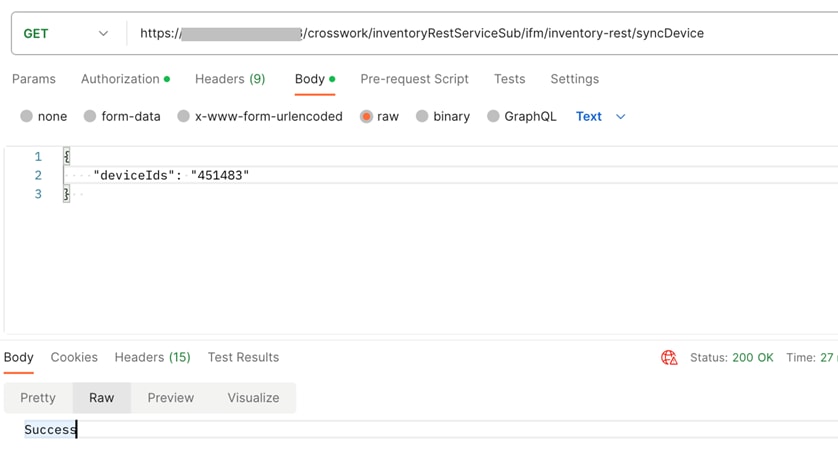
2. Sync a Device
Endpoint:
POST /crosswork/inventoryRestServiceSub/ifm/inventory-rest/syncDevice
Payload (Body - Raw):
Release Collaterals
All the Cisco Crosswork Hierarchical Controller 8.0 documents are relevant and can be used.
This includes:
| Documents |
| Cisco Crosswork Hierarchical Controller 8.0 Network Visualization Guide |
| Cisco Crosswork Hierarchical Controller 8.0 Administration Guide |
| Cisco Crosswork Hierarchical Controller 8.0 Assurance and Performance Guide |
| Cisco Crosswork Hierarchical Controller 8.0 Service Provisioning Guide |
| Cisco Crosswork Hierarchical Controller 8.0 Analytics Guide |
| Cisco Crosswork Hierarchical Controller 8.0 NBI and SHQL Reference Guide |
| Cisco Crosswork Hierarchical Controller 8.0 Installation Guide |