Audio Video Bridging for IE9300

Introduction to Audio Video Bridging Networks

Audio video bridging

Audio and video bridging (AVB) is an IEEE 802.1BA standard that

  • enables high-quality audio and video streaming over Ethernet for both consumer and professional applications,

  • allows endpoints and network equipment to operate together for interoperable deployments, and

  • replaces traditional analog single-purpose point to point one way, simplifying cabling and network management.

AVB deployment requirements and limitations

AVB deployments have specific requirements and limitations:

  • AVB is supported on SKUs running Network Advantage license.

  • AVB is supported on a total of 16 ports (12 downlinks and 4 uplinks) and on an STP enabled network.

  • Currently, AVB operates only with MSTP and RSTP.

  • AVB is supported only when the MTU is set to 1500. AVB is not supported when the MTU is configured higher than 1500 or in SD-Access deployments.

  • All switches between the talkers and listeners must be AVB aware for the MSRP streams to be established.

  • MVRP is an optional protocol, but it is recommended because it automatically manages the VLANs across all AVB nodes.

  • The switch supports a maximum of 256 streams; the exact number is limited by a bandwidth reservation of 75 percent on each port.

  • AVB Class-A and Class-B reservations occur on a first-come, first-served basis. If a Class-B reservation occurs when bandwidth is limited, and a Class-A request comes later, the Class-A reservation is rejected.

  • The PTPv1 clock must be in forward mode if it is in use.

AVB is not supported for these configurations:

  • On 2.5-gigabit (multi-gigabit) ports.

  • On ports where copper SFP is used.

  • Not supported with interface speed of 10 or 100 Mbps.

  • On stacked systems.

  • On Port-Channel interfaces.

  • Does not interoperate with redundancy protocols such as REP, PRP, and others.

Audio video bridging supported platforms

AVB is supported on the Network Advantage license.

Table 1. Supported platforms for AVB:

PID ID

Product ID

No. of ports * Speed

Downlinks

AVB support

1

IE-9310-26S2C

1G SFP/ 4 ports/ 25 - 28

1G SFP/ 22 ports / 1 - 22

Yes. First 12 downlink ports and 4 uplink ports.

1G Combo/ 2 ports / 23 -24

2

IE-9320-26S2C

1G SFP/4 X 1Gig SFP (Ports 25-28)

1G SFP/ 20 ports / 1 - 20

No AVB Support.

1G SFP/ 2 ports / 21- 22

1G Combo/ 2 ports / 23-24

3

IE-9320-22S2C4X

10G SFP+/ 4 X 10 Gig SFP/ 25 - 28

1G SFP/ 22 ports / 1 - 22

No AVB Support.

1G Combo/ 2 ports / 23 -24

4

IE-9320-24T4X

10G SFP+/ 4 ports/ 25 - 28

1G Copper/24 port/1-24

Yes. First 12 downlink ports and 4 uplink ports.

5

IE-9320-24P4X

10G SFP+/ 4 ports/ 25 - 28

1G Copper/24 port/1-24

Yes. First 12 downlink ports and 4 uplink ports.

6

IE-9320-16P8U4X

10G SFP+/ 4 ports/ 25 - 28

1G Copper/16 port/1-16

Yes. First 12 downlink ports and 4 uplink ports.

2.5G Copper/8 port/17-24

No support on multi-gigabit ports.

7

IE-9320-24P4S

1G SFP/ 4 ports/ 25 - 28

1G Copper/24 port/1-24

Yes. First 12 downlink ports and 4 uplink ports.

Audio video bridging benefits

Audio video bridging benefits are advantages of a mechanism that enables Ethernet based audio-video transmission with

  • guaranteed maximum latency

  • time synchronized operations

  • bandwidth guaranteed transmission, and

  • professional-grade quality.

Components of audio video bridging network

An Audio Video Bridging (AVB) network is a communication system that

  • operates only in domains where every device is AVB capable

  • comprises AVB talkers, AVB listeners, AVB switches, and the grandmaster clock source, and

  • provides deterministic streaming of audio and video data using IEEE 802.1 AVB standards.

AVB network component types

The AVB network consists of four primary component types:

  • AVB Talker: An AVB end station that is the source or producer of a stream. Examples include microphones and video cameras.

  • AVB Listener: An AVB end station that is the destination or consumer of a stream. Examples include speakers and video screens.

  • AVB Switch: An Ethernet switch that complies with IEEE 802.1 AVB standards (IE-9300).

  • AVB stream: A data stream associated with a stream reservation compliant with the Stream Reservation Protocol (SRP).


    Note


    In some instances, the word bridge is used. In this context, it refers to a switch.


The IEEE 802.1BA specification requires that an AVB talker must be grandmaster capable. In a typical deployment a network node can also be the grandmaster, provided it can either source or derive timing from a grandmaster capable device and provide the timing to the AVB network using IEEE 802.1AS.

AVB network configurations

This figure shows a simple illustration of AVB network with different components.
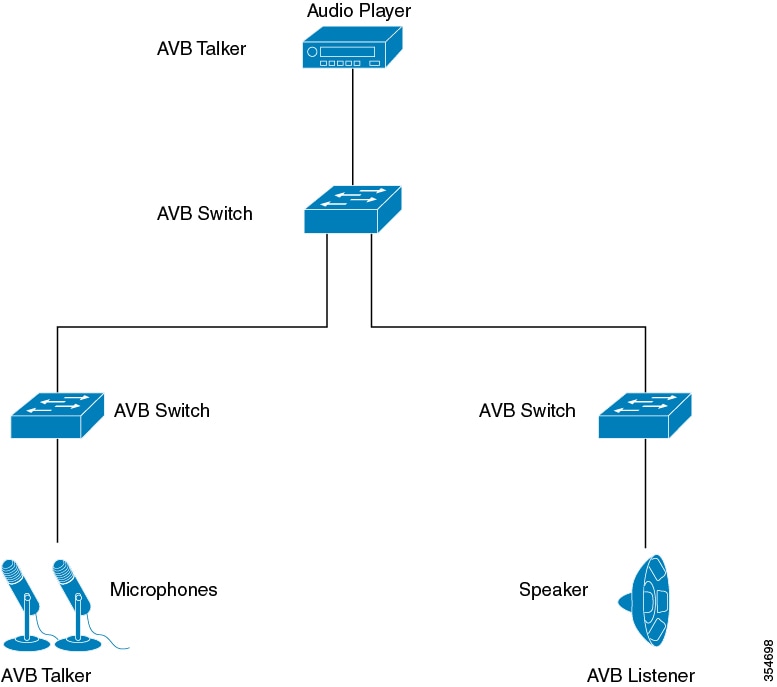
Figure 1. AVB network

AVB Network

In many instances, the audio or video end points (Microphone, speaker, and so on) are analog devices. AVB end-point vendors introduce Digital Signal Processors (DSP) and I/O devices that provide extensive audio or video processing and aggregate the end-points into an AVB Ethernet interface, as illustrated in the figure.
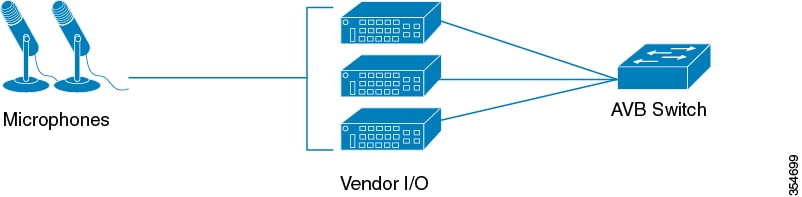
Figure 2. Vendor audio I/O system

Vendor Audio I/O System

Generalized precision time protocol

Generalized Precision Time Protocol (gPTP) is an IEEE 802.1AS standard that

  • provides a mechanism to synchronize clocks of the bridges and endpoint devices in an AVB network,

  • defines the mechanism to elect the grandmaster clock (using the Best Master Clock Algorithm, or BMCA) among time-aware bridges, talkers, and listeners, and

  • establishes a timing hierarchy where the grandmaster distributes time to downstream nodes to enable synchronization.

gPTP synchronization process

Time synchronization requires determining the link delay and switch delays in the network nodes. A gPTP switch is an IEEE 1588 boundary clock, which also determines the link delay using the peer-to-peer delay mechanism. The delays computed are included in the correction field of the PTP messages and relayed to the endpoints. Devices such as talkers and listeners use this gPTP time as a shared clock reference to relay and recover media clocks. Currently, gPTP defines only domain 0, which is what supported switches use.

The peer-to-peer delay mechanism operates even on STP-blocked ports, although other PTP messages are not sent over blocked ports.

In a PTP domain, the BMCA organizes clocks and ports hierarchically, assigning the following roles:

Clocks:

  • Grandmaster GM or Grandmaster Clock (GM or GMC)

  • Boundary Clock (BC)

Port states:

  • Master (M)

  • Slave (S)

  • Passive (P)

Multiple stream reservation protocol

Multiple Stream Reservation Protocol (MSRP) is a network protocol that

  • provides a mechanism that allows end stations to reserve network resources. These resources guarantee the transmission and reception of data streams across a network with the requested QoS.

  • serves as one of the core protocols required on an AVB device, such as a talker, listener, or switch

  • allows talkers to advertise streams across a network of AVB switches and listeners to register for receiving the streams.

MSRP functions

MSRP is the key software protocol module for supporting AVB. This protocol enables stream establishment and teardown and provides the following functions:

  • Interfaces with gPTP to update the latency information for the streams.

  • Interfaces with the QoS module to set up the hardware resources that would guarantee requested bandwidth for the streams.

  • Provides the QoS shaping parameters required for the credit-based shaper.

Functions of multiple stream reservation protocol

MSRP performs these functions:

  • Allows talkers to advertise streams and listeners to discover and register for streams.

  • Establishes a path through an Ethernet between a talker and one or more listeners.

  • Provides guaranteed bandwidth for AVB streams.

  • Guarantees an upper bound on latency.

  • Discovers and reports the worst-case end-to-end latency between the talker and each of its listeners.

  • Reports failure reason and location when a path between the talker and a listener cannot satisfy bandwidth requirements.

  • Supports multiple classes of traffic with different latency targets.

  • Protects best effort traffic from starvation by limiting AVB traffic.

  • MSRP does not forward Talker declarations along STP blocked ports. When an STP TCN notification occurs, MSRP generates declarations to tear down, change, or set up streams.

Hierarchical QoS

Hierarchical QoS is a two-level parent-child policy framework that

  • segregates audio and video traffic streams (SR-Class A, SR-Class B) and network control packets from standard best-effort Ethernet traffic (Non-SR),

  • provides granular traffic management at multiple policy levels, and

  • allows parent classes to shape multiple queues in child policies while applying specific actions on aggregate and class-specific traffic.

AVB stream classes and latency targets

AVB networks guarantee bandwidth and minimum bounded latency for the time-sensitive audio and video streams. AVB defines Class A and Class B as the time-sensitive streams, based on the worst-case latency targets of the traffic from talker to listener.

The latency targets for the two streams are as follows:

  • SR-Class A: 2 milliseconds

  • SR-Class B: 50 milliseconds

The sum of the worst-case latency contributions per hop should result in an overall end-to-end latency of 2 milliseconds or less for SR-Class A and 50 milliseconds or less for SR-Class B. A typical AVB deployment of 7 hops from talker to listener meets these latency requirements.

The priority code points map the traffic to the specific stream. Frame forwarding behavior is based on this priority. A credit-based shaper is used to shape the transmission of these streams in accordance with the bandwidth that has been reserved on a given outbound queue so that the latency targets are met.

You can use hierarchical policies to:

  • Allow a parent class to shape multiple queues in a child policy.

  • Apply specific policy map actions on the aggregate traffic.

  • Apply class-specific policy map actions.

You can modify only ingress and egress HQoS child policy's class-map and its actions using policy-map AVB-Output-Child-Policy and policy-map AVB-Input-Child-Policy command.


Note


You should not modify the PCP in child policy to map with the PCP configured in the Parent Policy, for example, SR Class A with CoS 3 and SR Class B with CoS 2.


Hierarchical policing

Hierarchical policing is supported on ingress and egress interfaces. Hierarchical QoS separates the SR and Non-SR class related rules into parent and child policies respectively. AVB SR classes are completely controlled by MSRP client and hence, parent policies containing SR class attributes are governed by MSRP. The end user has complete control over child policies which contain Non-SR class attributes and can modify only the child policies.

AVB HQoS child policies are user modifiable and NVGENed to preserve the configuration if user saves the configuration to the startup-config. As a result, AVB HQoS child policy configurations are retained even after a reload.

Multiple VLAN registration protocol

Multiple VLAN Registration Protocol (MVRP) is an application based on MRP that

  • provides a mechanism for dynamic maintenance of the contents of dynamic VLAN registration entries for each VLAN ID.

  • propagates VLAN information to other bridges, and

  • allows MVRP-aware devices to dynamically establish and update their knowledge of the set of VLAN IDs associated with VLANs that currently have active members.

MVRP implementation requirements

MVRP has specific implementation requirements based on the network context:

  • MVRP is mandatory on the talkers and the listeners from an AVB perspective.

  • On VLAN-aware switches, MVRP is required by IEEE 802.1Q, regardless of AVB.

  • You can implement AVB by manually configuring VLANs on the switches.


Note


VTP must be disabled or set to transparent mode for MVRP to function properly.


Configuring the AVB Network

AVB configuration options and settings

This reference provides the configuration options and settings available for AVB implementation and deployment.

You can use these tasks to configure AVB.

Enable audio video bridging

Enable AVB functionality to support time-sensitive networking applications on the switch.

You can enable AVB using the below command on the switch.

Procedure


Step 1

Use the enable command to access privileged EXEC mode.

Example:


Device> enable

Step 2

Use the configure terminal to access global configuration mode.

Example:


Switch# configure terminal

Enters global configuration mode.

Step 3

Use the avb command to enable AVB on the switch.

Example:


Switch(config)# avb

Step 4

Use the end command to exit to privileged EXEC mode.

Example:


Switch(config)# end

Configure audio video bridging

Configure the interfaces along the connectivity path for AVB devices as dot1q trunk ports to enable Audio Video Bridging functionality on the switch.

You can configure the interfaces along the connectivity path for AVB devices as dot1q trunk ports by using the below commands.

Procedure


Step 1

Use the enable command to access privileged EXEC mode.

Example:


Device> enable

Step 2

Use the configure terminal command to access global configuration mode.

Example:


Switch# configure terminal

Step 3

Use the interface interface-id to enter interface configuration mode for the interface connected along the AVB path.

Example:


Switch(config)# interface Gig1/0/1

Step 4

Use the switchport mode trunk to configure the interface as a dot1q trunk port.

Example:


Switch(config-if)# switchport mode trunk

Step 5

Use the exit command to return to global configuration mode.

Example:


Switch(config-if)# exit

Step 6

Use the vlan 2 to configure VLAN 2 on the switch.

Example:


Switch(config)# vlan 2

Note


VLAN 2 is the default AVB VLAN. If you need to configure another VLAN as the default AVB VLAN, use the command in Step 7.

Step 7

(Optional) Use the avb vlan VLAN-id command to set a VLAN other than VLAN 2 as the default AVB VLAN.

Example:


Switch(config)# avb vlan 10

The range for VLAN-id varies from 2 to 4094.

Step 8

Use the avb to enable AVB on the specified VLAN.

Example:


Switch(config-vlan)# avb

Step 9

Use the end command to exit to privileged EXEC mode.

Example:


Switch(config-vlan)# end

gPTP configuration options

This section provides the configuration details required to enable precise time synchronization across network devices using gPTP.

You can use these tasks to configure gPTP.

Enable gPTP

Enable gPTP to provide precise timing synchronization for AVB applications on the network.

When AVB is enabled on the switch, gPTP is enabled automatically. However, you can also enable gPTP globally using the commands provided in this procedure.


Note


The following configuration sections are optional and ideally need not be modified, if AVB is enabled.


Procedure


Step 1

Use the enable command to access privileged EXEC mode.

Example:

Device>enable

Step 2

Use the configure terminal command to access global configuration mode.

Example:


Switch# configure terminal

Step 3

Use the [no]ptp clock boundary domain 0 profile dot1as command to enable gPTP globally.

Example:


Switch(config)# ptp clock boundary domain 0 profile dot1as

gPTP is enabled globally when you enable AVB. Use the no form of this command to disable gPTP globally.

Step 4

Use the end command to exit to privileged EXEC mode.

Example:


Switch(config)# end

Step 5

Use the enable command to access privileged EXEC mode.

Example:

Device> enable

Step 6

Use the configure terminal command to access global configuration mode.

Example:

Switch# configure terminal

Step 7

Use the interface interface-id to enter interface configuration mode.

Example:

Switch(config)# interface Gig1/0/1

Step 8

Use the ptp enable command to enable gPTP on the interface.

Example:

Switch(config-if)# ptp enable
Use the no form of this command to disable gPTP on a port.
Switch(config-if)# no ptp enable

Step 9

Use the end command to exit to privileged EXEC mode.

Example:

Switch(config-if)# end

Precision time protocol clock configuration

Enabling the AVB command on the Cisco Catalyst IE9300 Rugged Series automatically enables the dot1as protocol on all AVB supported interfaces by default.

How to configure hierarchical QoS

This section provides configurational information about hierarchical QoS:

Enabling hierarchical QoS

When AVB is enabled on the switch, Hierarchical QoS for AVB also gets enabled.

Hierarchical QoS policy formats

Hierarchical QoS policies allow you to apply multiple levels of quality of service configuration to network traffic, providing granular control over traffic marking and queuing behaviors.

This example shows hierarchical remarking policy at the ingress interface.

policy-map AVB-Input-Child-Policy
 class VOIP-DATA-CLASS
    set dscp EF
 class MULTIMEDIA-CONF-CLASS
    set dscp AF41
 class BULK-DATA-CLASS
    set dscp AF11
 class TRANSACTIONAL-DATA-CLASS
    set dscp AF21
 class SCAVENGER-DATA-CLASS
    set dscp CS1
 class SIGNALING-CLASS
    set dscp CS3
 class class-default
    set dscp default

policy-map AVB-Input-Policy-Remark-AB
 class AVB-SR-A-CLASS
    set cos 0 (set 0 for boundary & SR class A PCP value for core port)
 class AVB-SR-B-CLASS
    set cos 0 (set 0 for boundary & SR class B PCP value for core port)
 class class-default
    service-policy AVB-Input-Child-Policy

policy-map AVB-Input-Policy-Remark-A
 class AVB-SR-A-CLASS
    set cos 0 (set 0 for boundary & SR class A PCP value for core port)
 class class-default
    service-policy AVB-Input-Child-Policy

policy-map AVB-Input-Policy-Remark-B
 class AVB-SR-B-CLASS
    set cos 0 (set 0 for boundary & SR class B PCP value for core port)
 class class-default
    service-policy AVB-Input-Child-Policy

policy-map AVB-Input-Policy-Remark-None
 class class-default
    service-policy AVB-Input-Child-Policy

This example shows hierarchical queuing policy at the egress interface.

policy-map AVB-Output-Child-Policy
 class VOIP-PRIORITY-QUEUE
   bandwidth remaining percent 30
   queue-buffers ratio 10
 class MULTIMEDIA-CONFERENCING-STREAMING-QUEUE
   bandwidth remaining percent 15
   queue-limit dscp AF41 percent 80
   queue-limit dscp AF31 percent 80
   queue-limit dscp AF42 percent 90
   queue-limit dscp AF32 percent 90
   queue-buffers ratio 10
 class TRANSACTIONAL-DATA-QUEUE
   bandwidth remaining percent 15
   queue-limit dscp AF21 percent 80
   queue-limit dscp AF22 percent 90
   queue-buffers ratio 10
 class BULK-SCAVENGER-DATA-QUEUE
   bandwidth remaining percent 15
   queue-limit dscp AF11 percent 80
   queue-limit dscp AF12 percent 90
   queue-limit dscp CS1 percent 80
   queue-buffers ratio 15
 class class-default
   bandwidth remaining percent 25
   queue-buffers ratio 25

policy-map AVB-Output-Policy
 class AVB-SR-A-CLASS
   priority level 1 (Shaper value based on stream registration)
 class AVB-SR-B-CLASS
   priority level 2 (Shaper value based on stream registration)
 class CONTROL-MGMT-QUEUE
   priority level 3 percent 15
 class class-default
   bandwidth remaining percent 100
   queue-buffers ratio 80
   service-policy AVB-Output-Child-Policy

How to configure multiple VLAN registration protocol

This section provides configurational information about MVRP:

Enable multiple VLAN registration protocol

This task enables MVRP on switches to allow automatic VLAN propagation across the network topology.

You can enable MVRP on the switches in the topology to enable VLAN propagation using the below command.


Note


You must change VTP mode to transparent or off, before enabling dynamic VLAN creation via MVRP.

Procedure


Step 1

Use the enable command to access privileged EXEC mode.

Example:


Device> enable

Step 2

Use the configure terminal command to access global configuration mode.

Example:


Switch# configure terminal

Step 3

Use the mvrp global command to enter MVRP global configuration mode.

Example:


Switch(config)# mvrp global

Step 4

Use the vtp mode { transparent | off} command to set VTP to transparent or off mode.

Example:


Switch(config)# vtp mode transparent

Example:


Switch(config)# vtp mode off

Step 5

Use the mvrp vlan create command to enable MVRP VLAN creation on the switch.

Example:


Switch(config)# mvrp vlan create

Configure multiple VLAN registration protocol on an interface

Configure MVRP on switch interfaces to enable automatic VLAN registration and management across the network.

You can configure MVRP on the switch interfaces using the below commands.

Procedure


Step 1

Use the enable command to access privileged EXEC mode.

Example:


Device> enable

Step 2

Use the configure terminal to access global configuration mode.

Example:


Switch# configure terminal

Step 3

Use the interface interface-id to enter interface configuration mode for the interface on which MVRP must be configured.

Example:


Switch(config)# interface Gi1/0/1

Step 4

Use the MVRP registration {fixed | forbidden | normal} command to configure the MVRP registration type.

Example:


Switch(config-if)# mvrp registration fixed

The registration options are:

  • fixed - Configures fixed registration.

  • forbidden - Configures forbidden registration.

  • normal - Configures normal registration.

Step 5

Use the MVRP timer {join | leave | leave-all | periodic} to configure the MVRP timer.

Example:


Switch(config-if)# mvrp timer join

The timer options are:

  • join - Controls the interval between transmit opportunities applied to the ASM.

  • leave - Controls how long the RSM waits in the LV state before transitioning to the MT state.

  • leave-all - Controls the frequency at which the LeaveAll state machine generates LeaveAll PDUs.

  • periodic - Configures the periodic timer.

Step 6

Use the exit command to return to global configuration mode.

Example:


Switch(config-if)# exit

Monitoring the AVB Network

Monitor audio video bridging

To display AVB details, use these commands.

Command

Purpose

show AVB domain

Displays the AVB domain.

show AVB stream

Displays the AVB stream information.

Monitor generalized precision time protocol

To display the gPTP protocol details, use these commands.

Command

Purpose

show ptp clock running

Displays a brief status of ptp clock on the interfaces.

show ptp clock dataset

Displays ptp clock information.

show ptp clock dataset parent

Displays the parent clock information.

show ptp lan port interface gi1/0/1

Displays the ptp port information.

Monitor multiple stream reservation protocol

To display the MSRP details, use these commands.

Command

Purpose

show msrp streams

Displays MSRP stream information.

show msrp streams detailed

Displays detailed MSRP stream information.

show msrp streams brief

Displays MSRP stream information in brief.

show msrp port bandwidth

Displays MSRP port bandwidth information.

Monitor hierarchical QoS

To display the HQoS details, use these commands.

Command

Purpose

show run

Displays all the child policy map details.

show policy-map

Displays the details of the policy map configuration.

show platform hardware fed switch active qos queue stats interface interface-id

Displays the QoS statistics for different queue mappings in AVB.

show platform hardware fed switch active qos queue config interface interface-id

Displays the QoS queue configurations.

show policy-map interface interface-id [input | output]

Displays the AVB QoS statistics. Packet counters are accounted for ingress, and byte counters are accounted for egress in QoS statistics.

Monitor multiple VLAN registration protocol

To display the MVRP details, use these commands.

Command

Purpose

show mvrp summary

Displays MVRP summary information.

show mvrp interface

Displays interface MVRP information.

Examples of AVB Configurations and Monitoring

Examples for audio video bridging

This reference provides examples showing how to view AVB domain information and stream details for AVB configuration.

This example shows how you can view the AVB domain.


Switch# show avb domain 

AVB Class-A
    Priority Code Point     : 3
    VLAN                    : 2
    Core ports              : 1
    Boundary ports          : 67

AVB Class-B
    Priority Code Point     : 2
    VLAN                    : 2
    Core ports              : 1
    Boundary ports          : 67

--------------------------------------------------------------------------------
Interface    State       Delay    PCP  VID  Information
--------------------------------------------------------------------------------
Gig1/0/1        down      N/A                        Oper state not up
Gig1/0/2        down      N/A                        Oper state not up
Gig1/0/3        down      N/A                        Oper state not up
Gig1/0/4        down      N/A                        Oper state not up
Gig1/0/5          up      N/A                    Port is not asCapable
Gig1/0/6        down      N/A                        Oper state not up
Gig1/0/7        down      N/A                        Oper state not up
Gig1/0/8        down      N/A                        Oper state not up
Gig1/0/9        down      N/A                        Oper state not up
Gig1/0/10       down      N/A                        Oper state not up
Gig1/0/11       down      N/A                        Oper state not up
Gig1/0/12       down      N/A                        Oper state not up                                       
   Class-  A        core             3    2                               
   Class-  B        core             2    2                               
Gig1/0/1        down      N/A                        Oper state not up
Gig1/0/2        down      N/A                        Oper state not up
Gig1/0/3        down      N/A                        Oper state not up
Gig1/0/4        down      N/A                        Oper state not up
Gig1/0/5          up      N/A                    Port is not asCapable
Gig1/0/6        down      N/A                        Oper state not up
Gig1/0/7        down      N/A                        Oper state not up
Gig1/0/8        down      N/A                        Oper state not up
Gig1/0/9        down      N/A                        Oper state not up
Gig1/0/10       down      N/A                        Oper state not up
Gig1/0/11       down      N/A                        Oper state not up
Gig1/0/12       down      N/A                        Oper state not up

This example shows how you can view the AVB stream information.


Switch# show avb stream

Stream ID:         0011.0100.0001:1    Incoming Interface:    Gi1/0/1
    Destination  : 91E0.F000.FE00
    Class        : A
    Rank         : 1
    Bandwidth    : 6400 Kbit/s

    Outgoing Interfaces:
    ----------------------------------------------------------------------------
    Interface         State      Time of Last Update         Information
    ----------------------------------------------------------------------------
    Gig1/0/1           Ready      Tue Apr 26 01:25:40.634                              

Stream ID:         0011.0100.0002:2    Incoming Interface:    Gi1/0/1
    Destination  : 91E0.F000.FE01
    Class        : A
    Rank         : 1
    Bandwidth    : 6400 Kbit/s

    Outgoing Interfaces:
    ----------------------------------------------------------------------------
    Interface         State      Time of Last Update         Information
    ----------------------------------------------------------------------------
    Gig1/0/1           Ready      Tue Apr 26 01:25:40.634  

Verify generalized precision time protocol

This example demonstrates various commands to verify and monitor gPTP status on network devices. These commands help administrators view clock information, parent dataset details, port states, and interface-specific configuration.

This command can be used to view PTP clock information.

Switch# show ptp lan clock 
 
PTP CLOCK INFO
  PTP Device Type: Boundary clock
  PTP Device Profile: IEEE 802/1AS Profile
  Clock Identity: 0x4:6C:9D:FF:FE:4F:95:0
  Clock Domain: 0
  Number of PTP ports: 38
  PTP Packet priority: 4
  Priority1: 128
  Priority2: 128
  Clock Quality:
  Class: 248
  Accuracy: Unknown
  Offset (log variance): 16640
  Offset From Master(ns): 0
  Mean Path Delay(ns): 0
  Steps Removed: 3
  Local clock time: 00:12:13 UTC Jan 1 1970

This command can be used to view the parent Precision Time Protocol (PTP) clock information.

Switch# show ptp clock dataset parent 
 
PTP PARENT PROPERTIES
  Parent Clock:
  Parent Clock Identity: 0xB0:7D:47:FF:FE:9E:B6:80
  Parent Port Number: 3
  Observed Parent Offset (log variance): 16640
  Observed Parent Clock Phase Change Rate: N/A

  Grandmaster Clock:
  Grandmaster Clock Identity: 0x4:6C:9D:FF:FE:67:3A:80
  Grandmaster Clock Quality:
        Class: 248
        Accuracy: Unknown
        Offset (log variance): 16640
        Priority1: 0
        Priority2: 128

This command can be used to see a brief status of the Precision Time Protocol (PTP) clock running on the interfaces.

Switch# show ptp lan port int gi1/0/1
 
PTP PORT DATASET: GigabitEthernet1/0/1
  Port identity: clock identity: 0x4:6C:9D:FF:FE:4E:3A:80
  Port identity: port number: 28
  PTP version: 2
  Port state: MASTER
  Delay request interval(log mean): 5
  Announce receipt time out: 3
  Peer mean path delay(ns): 0
  Announce interval(log mean): 1
  Sync interval(log mean): 0
  Delay Mechanism: Peer to Peer
  Peer delay request interval(log mean): 0
  Sync fault limit: 500000000

This command can be used to see a brief status of the Precision Time Protocol (PTP) clock running on the interfaces.

Switch# show ptp clock running
                      PTP Boundary Clock [Domain 0]  [Profile: dot1as]
         State          Ports          Pkts sent      Pkts rcvd      Redundancy Mode
         FREERUN        28             30846          4791           Hot standby
                               PORT SUMMARY
                                                                        PTP Master
Name  Tx Mode      Role         Transport    State         Sessions     Port Addr
1     mcast        negotiated   Ethernet     Faulty        1            UNKNOWN
2     mcast        negotiated   Ethernet     Faulty        1            UNKNOWN
3     mcast        negotiated   Ethernet     Faulty        1            UNKNOWN
4     mcast        negotiated   Ethernet     Faulty        1            UNKNOWN
5     mcast        negotiated   Ethernet     Faulty        1            UNKNOWN
6     mcast        negotiated   Ethernet     Master        1            UNKNOWN

This command can be used to see a brief status of the Precision Time Protocol (PTP) LAN port on the interfaces.

Switch# show ptp lan port int gi1/0/17
PTP PORT DATASET: GigabitEthernet1/0/17
    Port identity: clock identity: 0xcc:36:cf:ff:fe:8a:16:3f
    Port identity: port number: 17
    PTP version: 2
    Port state: MASTER
    Announce receipt time out: 3
    Peer mean path delay(ns): 27
    Neighbor Rate Ratio: 0.999990788 (-9 PPM)
    Announce interval(log mean): 0
    Sync interval(log mean): -3
    Delay Mechanism: End to End
    Peer delay request interval(log mean): 0
    Sync fault limit: 1000
    Sync receipt time out: 3
    Port 802.1AS capable: TRUE
    Peer delay request allowed lost responses: 3
    Peer delay request lost responses: 0
    Rogue master block: FALSE
    Ingress phy latency: -120
    Egress phy latency: -4 

Verify multiple stream reservation protocol

The commands in this section display MSRP stream information and port bandwidth details.

This example shows how you can view the MSRP stream information.


Switch# show msrp streams

--------------------------------------------------------------------------------
Stream ID Talker Listener
Advertise Fail Ready ReadyFail AskFail
R | D R | D R | D R | D R | D
--------------------------------------------------------------------------------
yy:yy:yy:yy:yy:yy:0001 1 | 2 0 | 0 1 | 0 0 | 1 1 | 0
zz:zz:zz:zz:zz:zz:0002 1 | 0 0 | 1 1 | 0 0 | 0 0 | 1

This example shows how you can view the detailed MSRP stream information.


Switch# show msrp streams detail 

Stream ID:         0011.0100.0001:1
    Stream Age: 01:57:46 (since Mon Apr 25 23:41:11.413)
    Create Time: Mon Apr 25 23:41:11.413
    Destination Address: 91E0.F000.FE00
    VLAN Identifier: 1
    Data Frame Priority: 3 (Class A)
    MaxFrameSize: 100
    MaxIntervalFrames: 1 frames/125us
    Stream Bandwidth: 6400 Kbit/s
    Rank: 1
    Received Accumulated Latency: 20
    Stream Attributes Table:
    ----------------------------------------------------------------------------
    Interface          Attr State    Direction    Type 
    ----------------------------------------------------------------------------
      Gi1/0/1          Register       Talker      Advertise 
      Attribute Age: 01:57:46 (since Mon Apr 25 23:41:11.413)
      MRP Applicant: Very Anxious Observer, send None
      MRP Registrar: In
      Accumulated Latency: 20
    ----
      Gi1/0/1         Declare         Talker      Advertise 
      Attribute Age: 00:19:52 (since Tue Apr 26 01:19:05.525)
      MRP Applicant: Quiet Active, send None
      MRP Registrar: In
      Accumulated Latency: 20
    ----
      Gi1/0/1         Register        Listener    Ready 
      Attribute Age: 00:13:17 (since Tue Apr 26 01:25:40.635)
      MRP Applicant: Very Anxious Observer, send None
      MRP Registrar: In
    ----
      Gi1/0/1         Declare         Listener    Ready 
      Attribute Age: 00:13:17 (since Tue Apr 26 01:25:40.649)
      MRP Applicant: Quiet Active, send None
      MRP Registrar: In

This example shows how you can view the MSRP stream information in brief.

Switch# show msrp streams brief 

Legend: R = Registered, D = Declared.
--------------------------------------------------------------------------------
Stream ID              Destination         Bandwidth   Talkers   Listeners  Fail
                       Address              (Kbit/s)    R | D      R | D
--------------------------------------------------------------------------------
0011.0100.0001:1       91E0.F000.FE00     6400          1 | 1      1 | 1    No 
0011.0100.0002:2       91E0.F000.FE01     6400          1 | 1      1 | 1    No 
0011.0100.0003:3       91E0.F000.FE02     6400          1 | 1      1 | 1    No 
0011.0100.0004:4       91E0.F000.FE03     6400          1 | 1      1 | 1    No 
0011.0100.0005:5       91E0.F000.FE04     6400          1 | 1      1 | 1    No 
0011.0100.0006:6       91E0.F000.FE05     6400          1 | 1      1 | 1    No 
0011.0100.0007:7       91E0.F000.FE06     6400          1 | 1      1 | 1    No 
0011.0100.0008:8       91E0.F000.FE07     6400          1 | 1      1 | 1    No 
0011.0100.0009:9       91E0.F000.FE08     6400          1 | 1      1 | 1    No 
0011.0100.000A:10      91E0.F000.FE09     6400          1 | 1      1 | 1    No 

This example shows how you can view the MSRP port bandwidth information.


Switch# show msrp port bandwidth 

--------------------------------------------------------------------------------
Ethernet      Capacity       Assigned       Available       Reserved   
Interface     (Kbit/s)        A | B          A | B           A | B
--------------------------------------------------------------------------------
Gig1/0/1     10000000         75 | 0         75 | 75          0 | 0  
Gig1/0/2     10000000         75 | 0         75 | 75          0 | 0  
Gig1/0/3     1000000          75 | 0         75 | 75          0 | 0  
Gig1/0/4     10000000         75 | 0         75 | 75          0 | 0  
Gig1/0/5     10000000         75 | 0         75 | 75          0 | 0  
Gig1/0/6     10000000         75 | 0         75 | 75          0 | 0  
Gig1/0/8     10000000         75 | 0         75 | 75          0 | 0  
Gig1/0/9     10000000         75 | 0         75 | 75          0 | 0  
Gig1/0/10    10000000         75 | 0         75 | 75          0 | 0  
Gig1/0/11    10000000         75 | 0         75 | 75          0 | 0  
Gig1/0/12    10000000         75 | 0         75 | 75          0 | 0  

Example: Verifying hierarchical QoS

Documents how to verify and view policy-map and class-map configuration details for hierarchical QoS with AVB enabled or disabled.

This example describes how to view all policy-map configuration details when AVB is enabled.

Switch# show policy-map

  Policy Map AVB-Input-Policy-Remark-B
    Class AVB-SR-CLASS-A
      set cos 3
    Class AVB-SR-CLASS-B
      set cos 0
    Class class-default
      service-policy AVB-Input-Child-Policy
  Policy Map AVB-Input-Policy-Remark-A
    Class AVB-SR-CLASS-A
      set cos 0
    Class AVB-SR-CLASS-B
      set cos 2
    Class class-default
      service-policy AVB-Input-Child-Policy
  Policy Map AVB-Output-Policy-Default
    Class AVB-SR-CLASS-A
      priority level 1 1 (%)
    Class AVB-SR-CLASS-B
      priority level 2 1 (%)
    Class AVB-CONTROL-MGMT-QUEUE
      priority level 3 15 (%)
    Class class-default
      bandwidth remaining 100 (%)
      queue-buffers ratio 70
      service-policy AVB-Output-Child-Policy
  Policy Map AVB-Input-Policy-Remark-AB
    Class AVB-SR-CLASS-A
      set cos 0
    Class AVB-SR-CLASS-B
      set cos 0
    Class class-default
      service-policy AVB-Input-Child-Policy
  Policy Map AVB-Input-Policy-Remark-None
    Class AVB-SR-CLASS-A
      set cos 3
    Class AVB-SR-CLASS-B
      set cos 2
    Class class-default
      service-policy AVB-Input-Child-Policy
  Policy Map AVB-Input-Child-Policy
    Class AVB-VOIP-DATA-CLASS
      set dscp ef
    Class AVB-MULTIMEDIA-CONF-CLASS
      set dscp af41
    Class AVB-BULK-DATA-CLASS
     set dscp af11
    Class AVB-TRANSACTIONAL-DATA-CLASS
      set dscp af21
    Class AVB-SCAVENGER-DATA-CLASS
      set dscp cs1
    Class AVB-SIGNALING-CLASS
      set dscp cs3
    Class class-default
      set dscp default
  Policy Map AVB-Output-Child-Policy
    Class AVB-VOIP-PRIORITY-QUEUE
      bandwidth remaining 30 (%)
      queue-buffers ratio 30
    Class AVB-MULTIMEDIA-CONF-STREAMING-QUEUE
      bandwidth remaining 15 (%)
      queue-limit dscp af41 percent 80
      queue-limit dscp af31 percent 80
      queue-limit dscp af42 percent 90
      queue-limit dscp af32 percent 90
      queue-buffers ratio 15
    Class AVB-TRANSACTIONAL-DATA-QUEUE
      bandwidth remaining 15 (%)
      queue-limit dscp af21 percent 80
      queue-limit dscp af22 percent 90
      queue-buffers ratio 15
    Class AVB-BULK-SCAVENGER-DATA-QUEUE
      bandwidth remaining 15 (%)
      queue-limit dscp af11 percent 80
      queue-limit dscp af12 percent 90
      queue-limit dscp cs1 percent 80
      queue-buffers ratio 15
    Class class-default
      bandwidth remaining 25 (%)
      queue-buffers ratio 25

This example describes how to view all policy-map configuration details when AVB is disabled.

Switch# show policy-map
                
Building configuration...
Current configuration : 2079 bytes
!
policy-map AVB-Input-Child-Policy
class AVB-VOIP-DATA-CLASS
  set dscp ef
class AVB-MULTIMEDIA-CONF-CLASS
  set dscp af41
class AVB-BULK-DATA-CLASS
  set dscp af11
class AVB-TRANSACTIONAL-DATA-CLASS
  set dscp af21
class AVB-SCAVENGER-DATA-CLASS
  set dscp cs1
class AVB-SIGNALING-CLASS
  set dscp cs3
class class-default
  set dscp default
policy-map AVB-Output-Child-Policy
class AVB-VOIP-PRIORITY-QUEUE
  bandwidth remaining percent 30
  queue-buffers ratio 30
class AVB-MULTIMEDIA-CONF-STREAMING-QUEUE
  bandwidth remaining percent 15 
  queue-limit dscp af41 percent 80
  queue-limit dscp af31 percent 80
  queue-limit dscp af42 percent 90
  queue-limit dscp af32 percent 90
  queue-buffers ratio 15
class AVB-TRANSACTIONAL-DATA-QUEUE
  bandwidth remaining percent 15 
  queue-limit dscp af21 percent 80
  queue-limit dscp af22 percent 90
  queue-buffers ratio 15
class AVB-BULK-SCAVENGER-DATA-QUEUE
  bandwidth remaining percent 15 
  queue-limit dscp af11 percent 80
  queue-limit dscp af12 percent 90
  queue-limit dscp cs1 percent 80
  queue-buffers ratio 15
class class-default
  bandwidth remaining percent 25 
  queue-buffers ratio 25
!
end

This example describes how to view all class-map configuration details when AVB is enabled.


Switch# show class-map
                
Class Map match-any AVB-VOIP-DATA-CLASS (id 31)
   Match   dscp ef (46)
   Match cos  5 
Class Map match-any AVB-BULK-DATA-CLASS (id 33)
   Match access-group name AVB-BULK-DATA-CLASS-ACL
Class Map match-any AVB-VOIP-PRIORITY-QUEUE (id 37)
   Match   dscp cs4 (32) cs5 (40) ef (46)
   Match   precedence 4  5 
   Match cos  5 
Class Map match-any AVB-MULTIMEDIA-CONF-CLASS (id 32)
   Match access-group name AVB-MULTIMEDIA-CONF-CLASS-ACL
Class Map match-any AVB-SIGNALING-CLASS (id 36)
   Match access-group name AVB-SIGNALING-CLASS-ACL
Class Map match-any AVB-MULTIMEDIA-CONF-STREAMING-QUEUE (id 38)
   Match   dscp af41 (34) af42 (36) af43 (38)
   Match   dscp af31 (26) af32 (28) af33 (30)
   Match cos  4 
Class Map match-any AVB-BULK-SCAVENGER-DATA-QUEUE (id 40)
   Match   dscp cs1 (8) af11 (10) af12 (12) af13 (14)
   Match   precedence 1 
   Match cos  1
Class Map match-any AVB-TRANSACTIONAL-DATA-CLASS (id 34)
   Match access-group name AVB-TRANSACTIONAL-DATA-CLASS-ACL
Class Map match-any AVB-TRANSACTIONAL-DATA-QUEUE (id 39)
   Match   dscp af21 (18) af22 (20) af23 (22)
Class Map match-any AVB-SR-CLASS-B (id 42)
   Match cos  2 
Class Map match-any AVB-SR-CLASS-A (id 41)
   Match cos  3
Class Map match-any AVB-SCAVENGER-DATA-CLASS (id 35)
   Match access-group name AVB-SCAVENGER-DATA-CLASS-ACL
Class Map match-any AVB-CONTROL-MGMT-QUEUE (id 43)
   Match ip  dscp cs2 (16)
   Match ip  dscp cs3 (24)
   Match ip  dscp cs6 (48)
   Match ip  dscp cs7 (56)
   Match ip  precedence 6
   Match ip  precedence 7
   Match ip  precedence 3
   Match ip  precedence 2
   Match cos  6 
   Match cos  7

This example describes how to view all class-map configuration details when AVB is disabled.


Switch# show class-map
                
Building configuration...
Current configuration : 2650 bytes
!
class-map match-any AVB-VOIP-DATA-CLASS
match dscp ef
 match cos  5
class-map match-any AVB-BULK-DATA-CLASS
match access-group name AVB-BULK-DATA-CLASS-ACL
class-map match-any AVB-VOIP-PRIORITY-QUEUE
match dscp cs4  cs5  ef 
 match precedence 4  5
 match cos  5 
class-map match-any AVB-MULTIMEDIA-CONF-CLASS
match access-group name AVB-MULTIMEDIA-CONF-CLASS-ACL
class-map match-any AVB-SIGNALING-CLASS
match access-group name AVB-SIGNALING-CLASS-ACL
class-map match-any AVB-MULTIMEDIA-CONF-STREAMING-QUEUE
match dscp af41  af42  af43 
 match dscp af31  af32  af33 
 match cos  4
class-map match-any AVB-BULK-SCAVENGER-DATA-QUEUE
match dscp cs1  af11  af12  af13 
 match precedence 1
 match cos  1 
class-map match-any AVB-TRANSACTIONAL-DATA-CLASS
match access-group name AVB-TRANSACTIONAL-DATA-CLASS-ACL
class-map match-any AVB-TRANSACTIONAL-DATA-QUEUE
match dscp af21  af22  af23
class-map match-any AVB-SCAVENGER-DATA-CLASS
match access-group name AVB-SCAVENGER-DATA-CLASS-ACL
end

This example describes how to view all AVB QoS statistics.

Switch# show policy-map interface gigabitEthernet 1/0/12
                
Gig1/0/12
  Service-policy input: AVB-Input-Policy-Remark-AB
    Class-map: AVB-SR-CLASS-A (match-any)
      0 packets
      Match: cos  3
        0 packets, 0 bytes
        5 minute rate 0 bps
      QoS Set
        cos 0
    Class-map: AVB-SR-CLASS-B (match-any)
      0 packets
      Match: cos  2
        0 packets, 0 bytes
        5 minute rate 0 bps
      QoS Set
        cos 0
    Class-map: class-default (match-any)
      0 packets
      Match: any
      Service-policy : AVB-Input-Child-Policy
        Class-map: AVB-VOIP-DATA-CLASS (match-any)
          0 packets
          Match:  dscp ef (46)
            0 packets, 0 bytes
            5 minute rate 0 bps
          Match: cos  5
            0 packets, 0 bytes
            5 minute rate 0 bps
          QoS Set
            cos 3
        Class-map: AVB-MULTIMEDIA-CONF-CLASS (match-any)
          0 packets
          Match: access-group name AVB-MULTIMEDIA-CONF-CLASS-ACL
            0 packets, 0 bytes
            5 minute rate 0 bps
          QoS Set
            dscp af41
        Class-map: AVB-BULK-DATA-CLASS (match-any)
          0 packets
          Match: access-group name AVB-BULK-DATA-CLASS-ACL
            0 packets, 0 bytes
            5 minute rate 0 bps
          QoS Set
            dscp af11
        Class-map: AVB-TRANSACTIONAL-DATA-CLASS (match-any)
          0 packets
          Match: access-group name AVB-TRANSACTIONAL-DATA-CLASS-ACL
            0 packets, 0 bytes
            5 minute rate 0 bps
          QoS Set
            dscp af21
        Class-map: AVB-SCAVENGER-DATA-CLASS (match-any)
          0 packets
          Match: access-group name AVB-SCAVENGER-DATA-CLASS-ACL
            0 packets, 0 bytes
            5 minute rate 0 bps
          QoS Set
            dscp cs1
        Class-map: AVB-SIGNALING-CLASS (match-any)
          0 packets
          Match: access-group name AVB-SIGNALING-CLASS-ACL
            0 packets, 0 bytes
            5 minute rate 0 bps
          QoS Set
            dscp cs3
        Class-map: class-default (match-any)
          0 packets
          Match: any
          QoS Set
            dscp default
  Service-policy output: AVB-Output-Policy-Default
    queue stats for all priority classes:
      Queueing
      priority level 3
      (total drops) 0
      (bytes output) 7595
    queue stats for all priority classes:
      Queueing
      priority level 2
      (total drops) 0
      (bytes output) 0
    queue stats for all priority classes:
      Queueing
      priority level 1
      (total drops) 0
      (bytes output) 0
    Class-map: AVB-SR-CLASS-A (match-any)
      0 packets
      Match: cos  3
        0 packets, 0 bytes
        5 minute rate 0 bps
      Priority: 1% (10000 kbps), burst bytes 250000,
      Priority Level: 1 
    Class-map: AVB-SR-CLASS-B (match-any)
      0 packets
      Match: cos  2
        0 packets, 0 bytes
        5 minute rate 0 bps
      Priority: 1% (10000 kbps), burst bytes 250000,
      Priority Level: 2
    Class-map: AVB-CONTROL-MGMT-QUEUE (match-any)
      0 packets
      Match: ip dscp cs2 (16)
        0 packets, 0 bytes
        5 minute rate 0 bps
      Match: ip dscp cs3 (24)
        0 packets, 0 bytes
        5 minute rate 0 bps
      Match: ip dscp cs6 (48)
        0 packets, 0 bytes
        5 minute rate 0 bps
      Match: ip dscp cs7 (56)
        0 packets, 0 bytes
        5 minute rate 0 bps
      Match: ip precedence 6
        0 packets, 0 bytes
        5 minute rate 0 bps
      Match: ip precedence 7 
        0 packets, 0 bytes
        5 minute rate 0 bps
      Match: ip precedence 3
        0 packets, 0 bytes
        5 minute rate 0 bps
      Match: ip precedence 2
        0 packets, 0 bytes
        5 minute rate 0 bps
      Match: cos  6
        0 packets, 0 bytes
        5 minute rate 0 bps
      Match: cos  7
        0 packets, 0 bytes
        5 minute rate 0 bps
      Priority: 15% (150000 kbps), burst bytes 3750000,
      Priority Level: 3
    Class-map: class-default (match-any)
      0 packets
      Match: any
      Queueing
      (total drops) 0
      (bytes output) 0
      bandwidth remaining 80%
      queue-buffers ratio 70
      Service-policy : AVB-Output-Child-Policy
        Class-map: AVB-VOIP-PRIORITY-QUEUE (match-any)
          0 packets
          Match:  dscp cs4 (32) cs5 (40) ef (46)
            0 packets, 0 bytes
            5 minute rate 0 bps
          Match:  precedence 4  5
            0 packets, 0 bytes
            5 minute rate 0 bps
          Match: cos  5
            0 packets, 0 bytes
            5 minute rate 0 bps
          Queueing
          (total drops) 0
          (bytes output) 0
          bandwidth remaining 30%
          queue-buffers ratio 30
        Class-map: AVB-MULTIMEDIA-CONF-STREAMING-QUEUE (match-any)
          0 packets
          Match:  dscp af41 (34) af42 (36) af43 (38)
            0 packets, 0 bytes
            5 minute rate 0 bps
          Match:  dscp af31 (26) af32 (28) af33 (30)
            0 packets, 0 bytes
            5 minute rate 0 bps
          Match: cos  4
            0 packets, 0 bytes
            5 minute rate 0 bps
          Queueing
          queue-limit dscp 26 percent 80
          queue-limit dscp 28 percent 90
          queue-limit dscp 34 percent 80
          queue-limit dscp 36 percent 90
          (total drops) 0
          (bytes output) 0
          bandwidth remaining 15%
          queue-buffers ratio 15
        Class-map: AVB-TRANSACTIONAL-DATA-QUEUE (match-any)
          0 packets
          Match:  dscp af21 (18) af22 (20) af23 (22)
            0 packets, 0 bytes
            5 minute rate 0 bps
          Match: cos  0
            0 packets, 0 bytes
            5 minute rate 0 bps
          Queueing
          queue-limit dscp 18 percent 80
          queue-limit dscp 20 percent 90
          (total drops) 0
          (bytes output) 0
          bandwidth remaining 15%
          queue-buffers ratio 15
        Class-map: AVB-BULK-SCAVENGER-DATA-QUEUE (match-any)
          0 packets
          Match:  dscp cs1 (8) af11 (10) af12 (12) af13 (14)
            0 packets, 0 bytes
            5 minute rate 0 bps
          Match:  precedence 1
            0 packets, 0 bytes
            5 minute rate 0 bps
          Match: cos  1
            0 packets, 0 bytes
            5 minute rate 0 bps
          Queueing
          queue-limit dscp 8 percent 80
          queue-limit dscp 10 percent 80
          queue-limit dscp 12 percent 90
          (total drops) 0
          (bytes output) 0
          bandwidth remaining 15%
          queue-buffers ratio 15
        Class-map: class-default (match-any) 
          0 packets
          Match: any 
          Queueing
          (total drops) 0
          (bytes output) 0
          bandwidth remaining 25%
          queue-buffers ratio 25

This is a sample output from the show platform hardware fed switch active qos queue config interface interface-id command.

Switch# show platform hardware fed switch active qos queue config interface t1/0/11
  DATA Port:2 GPN:11 AFD:Disabled QoSMap:2 HW Queues: 16 - 23
  DrainFast:Disabled PortSoftStart:1 - 3600
---------------------------------------------------------- 
   DTS  Hardmax  Softmax   PortSMin  GlblSMin  PortStEnd 
  ----- --------  --------  --------  --------  ---------  
 0   0  9    33   3    33    0    0   0     0   1  4800
 1   0  9    33   4  2400   99   99   0     0   1  4800    
 2   1  6    30   4  2400   90   90   0     0   1  4800        
 3   1  5     0   4  2400  189  189  63    63   1  4800    
 4   1  5     0   4  2400   90   90  30    30   1  4800
 5   1  5     0   4  2400   90   90  30    30   1  4800    
 6   1  5     0   4  2400   90   90  30    30   1  4800      
 7   1  5     0   4  2400  153  153  51    51   1  4800 
 Priority   Shaped/shared   weight  shaping_step    
 --------   -------------   ------  ------------     
 0      1     Shaped         16383         163          
 1      2     Shaped         16383         163       
 2      3     Shaped           125         153     
 3      7     Shared            50           0    
 4      7     Shared           100           0  
 5      7     Shared           100           0   
 6      7     Shared           100           0  
 7      7     Shared            60           0 

This is a sample output from the show platform hardware fed switch active qos queue stats interface interface-id command.

Switch# show platform hardware fed switch active qos queue stats interface t1/0/15
DATA Port:8 Enqueue Counters
-------------------------------   
Queue Buffers Enqueue-TH0 Enqueue-TH1 Enqueue-TH2       
----- ------- ----------- ----------- -----------
    0       1           0           0 23788459506
    1       0           0           0 30973507838    
    2       0           0    12616270    13164040
    3       0           0           0           0
    4       0           0           0           0  
    5       0           0           0           0  
    6       0           0           0           0  
    7       0           0           0      119616 
DATA Port:8 Drop Counters
-------------------------------     
Queue Drop-TH0    Drop-TH1    Drop-TH2    SBufDrop    QebDrop 
----- ----------- ----------- ----------- ----------- -----------
    0           0           0           0           0           0
    1           0           0           0           0           0
    2           0           0           0           0           0
    3           0           0           0           0           0
    4           0           0           0           0           0

Verify multiple VLAN registration protocol

This example shows how you can view the MVRP summary information and interface MVRP information.

This example shows how you can view the MVRP summary information.


Device# show mvrp summary          

MVRP global state           : enabled
MVRP VLAN creation          : enabled
VLANs created via MVRP      : 2,567
MAC learning auto provision : disabled
Learning disabled on VLANs  : none

This example shows how you can view the interface MVRP information.


Device# show mvrp interface        

Port         Status    Registrar State
gig1/0/1     on              normal
gig1/0/2     on              normal
gig1/0/3     on              normal
gig1/0/4     on              normal
gig1/0/5     on              normal
gig1/0/6     on              normal
gig1/0/7     on              normal
gig1/0/8     on              normal
gig1/0/9     on              normal
gig1/0/10     on              normal
gig1/0/11     on              normal
gig1/0/12     on              normal
gig1/0/13      off             normal

Port         Join Timeout       Leave Timeout   Leaveall Timeout   Periodic
                                                                   Timeout
Gi1/0/1     20                 60              1000               100
Gi1/0/1      20                 60              1000               100

Port         Vlans Declared
Gi1/0/1     1-2,567,900
Gi1/0/1      none

Port         Vlans Registered
Gi1/0/1     2,567
Gi1/0/1      none

Port         Vlans Registered and in Spanning Tree Forwarding State
Gi1/0/1     2,567
Gi1/0/1      none