Caspida Password Expiration in Splunk User Behavior Analytics
Available Languages
Applicability
UBADescription
When the Caspida password expired in node-2 on the UBA 3-node cluster environment, there is a failure in the passwordless SSH connection from node-1 to node-2. As a result, node-1 incorrectly assumes that the services on node-2 were not running.
Investigation
Step-1: After the Caspida password expired in node-2, passwordless SSH connectivity from the management node to node-2 was verified using the below command:
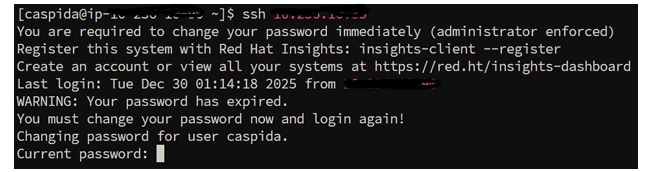
It was observed that the passwordless SSH connection failed, also a password was required to establish SSH connectivity between the management node and node-2.
Step-2: While checking the service status from the management node using the below command:
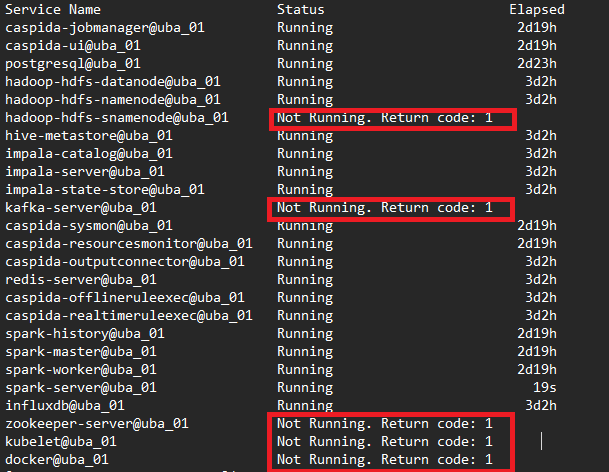
It was observed that the services such as Docker, Kafka, Zookeeper, Kubelet, and Hadoop -snamenode were "not running".
Step-3: The docker service was "running" when checked the docker status using the following command in the node-2:
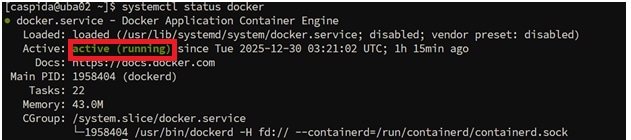
In the 3-node cluster environment, the services (Docker, Kafka, Zookeeper, Kubelet, and Hadoop -snamenode) were successfully running on node-2. However, due to the failure of the passwordless SSH connection, node-1 was unable to connect to node-2 and as a result, incorrectly assumed that the services on node-2 were not running.
[Note: For other multi-node cluster environments such as 5-nodes, 7-nodes, 10 nodes, 20 nodes, check the following path "/opt/caspida/conf/deployment/recipes" to find the services running in the different nodes].
Resolution
Set the caspida password in node-2 using the following command:

After setting the caspida password, verify the ssh connection from management node again using the below command and "exit" the ssh connection:
Check the service status again from the management node using the below command:
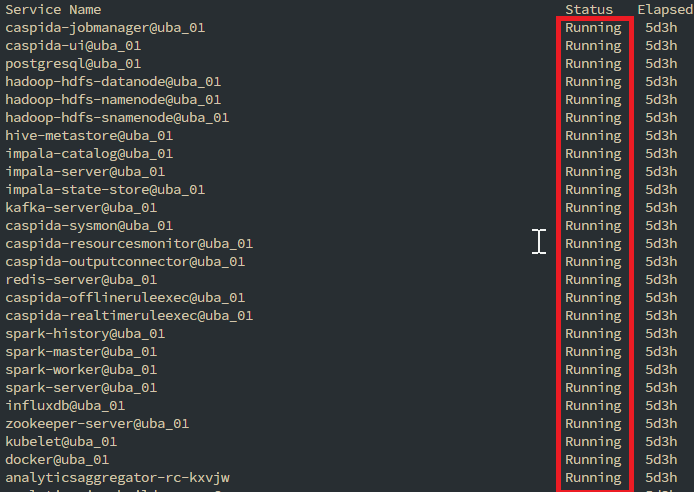
It can be observed that all services are running successfully, as the passwordless SSH connection was restored after updating the Caspida password.
Related Links
Revision History
| Revision | Publish Date | Comments |
|---|---|---|
1.0 |
01-Oct-2026
|
Initial Release |
 Feedback
