UEBA behavior-based detections does not appear on Content Management UI
Available Languages
Applicability
Enterprise Security Premier edition, version lower than 8.8. On-premises deployments only.Description
UEBA behavior-based detections not appeared on Content Management UI.
Investigation
After the UEBA Content App is installed on the ES search head cluster, behavior-based detections do not appear in Content Management UI.
The following symptoms were observed:
- The "Type" filter on the Content Management page has no "Behavior-based detection" option.
- Going directly to the filtered view still shows no UEBA detections:
https://<search_head>:8000/en-GB/app/SplunkEnterpriseSecuritySuite/ess_content_management?typeFilter=cmp_ba_detections - The UEBA detections run normally and appear under Settings > Searches, Reports, and Alerts.
- The same result occurs for the ES admin user and the Splunk local `admin` user.
- The app metadata is exported to `system` with global sharing.
- The ES banner shows the Premier license.
Inspect the network request when loading the Content Mangement UI. Filter and compare these two requests from the same page load:
- `GET /services/apps/local?output_mode=json` (the bare call)
- The `content_management/appsandservices` request
A positive match looks like this:
The bare call returns exactly 30 entries, and `DA-ESS-UEBAContent` is not among them.
The `appsandservices` call returns the full app list, including `DA-ESS-UEBAContent`.
Verify the issue applicability:
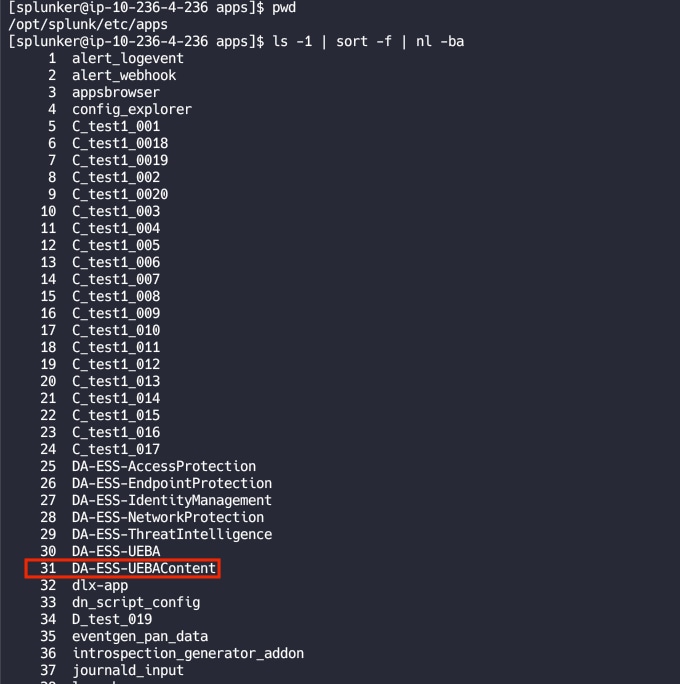
Count the apps whose names sort alphabetically before `DA-ESS-UEBAContent`, using the directory listing of `$SPLUNK_HOME/etc/apps` on a member.
ls -1 "$SPLUNK_HOME/etc/apps" | sort -f | nl -baIf there are 30 or more, the issue applies.
Any on-prem deployment with more than 30 installed apps where the environment's custom app names sort alphabetically before DA-ESS-UEBAContent (extremely common — any A-* / B-* / C-* prefix will do it).
Problematic example below from test lab:
Resolution
This is a known issue, the fix is included in ES 8.8 release.
Workaround:
Option 1:
Rename apps: Modify the names of apps listed alphabetically before DA-ESS-UEBAContent, ensuring that DA-ESS-UEBAContent appears within the first 30 apps when sorted alphabetically.
Option 2:
Manage detections elsewhere: Manage the detections and saved searches from Searches, Reports, and Alerts. All detections and saved searches in the DA-ESS-UEBAContent app remain functional and accessible there.
Revision History
| Revision | Publish Date | Comments |
|---|---|---|
1.0 |
03-Oct-2026
|
Initial Release |
 Feedback
Contact Cisco
- Open a Support Case

- (Requires a Cisco Service Contract)
This Document Applies to These Products
Related Articles
- Deployment Server Forwarder Management UI Exhibits Unexpected Behaviors After Upgrade to Version 9.2.x
- ES Content Management Cloning or Updating error
- UEBA detection annotations are not saved in Content Management in Splunk Enterprise Security 8.5.x
- New clients are not visible on Forwarder Management UI