Deployment Server Forwarder Management UI Exhibits Unexpected Behaviors After Upgrade to Version 9.2.x
Available Languages
Applicability
Splunk Cloud Splunk Enterprise Splunk Deployment ServerDescription
After upgrading the Deployment Server to version 9.2.x, the Forwarder Management UI can display unexpected behavior.
The issue can appear in one or more of the following ways:
Symptom 1:
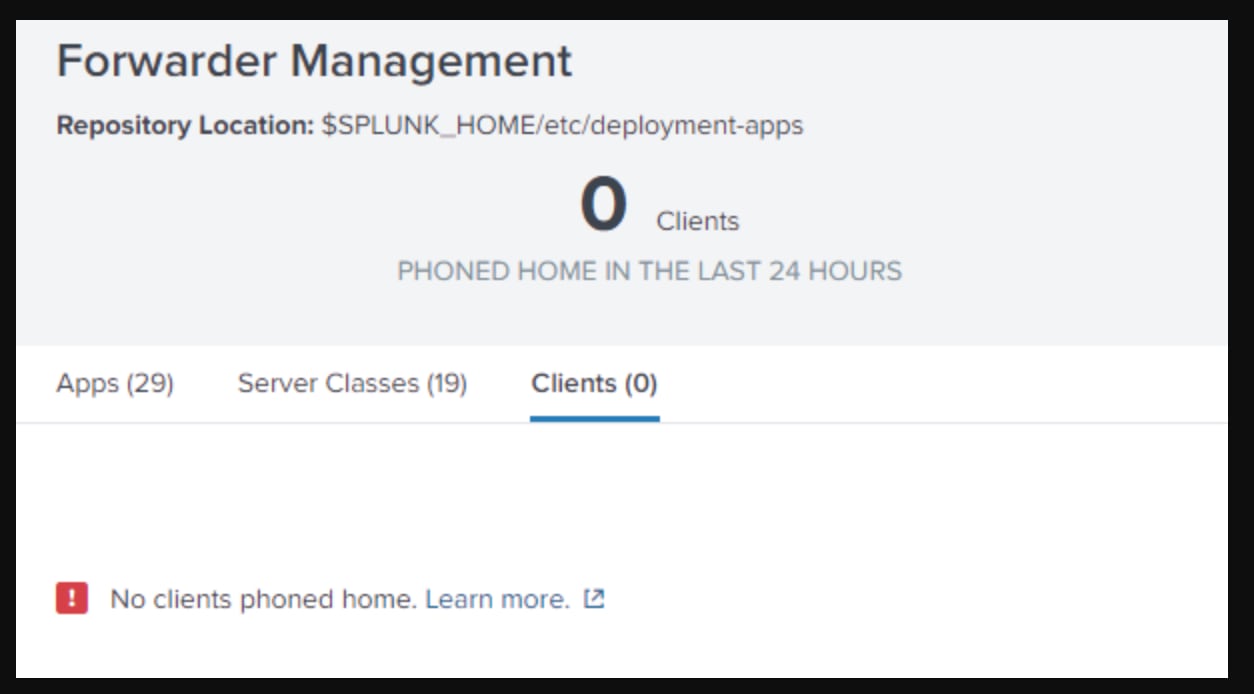
Deployment Clients do not appear in Forwarder Management > Clients.
Symptom 2:
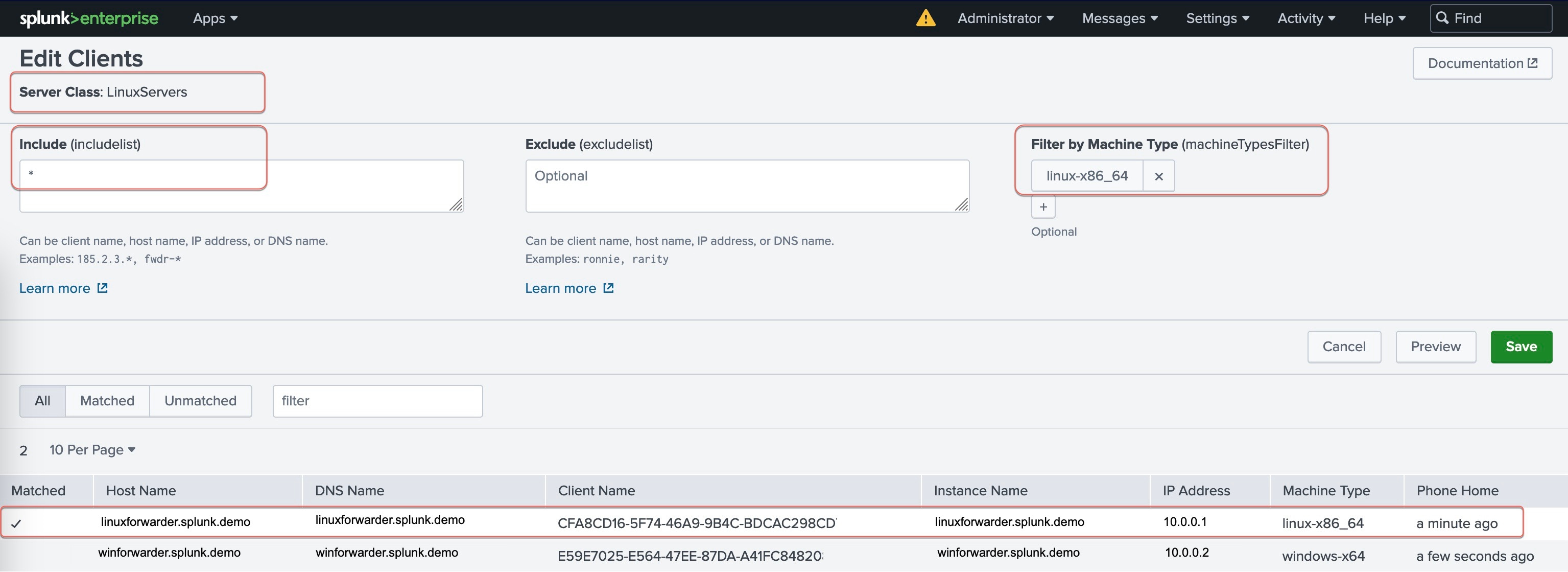
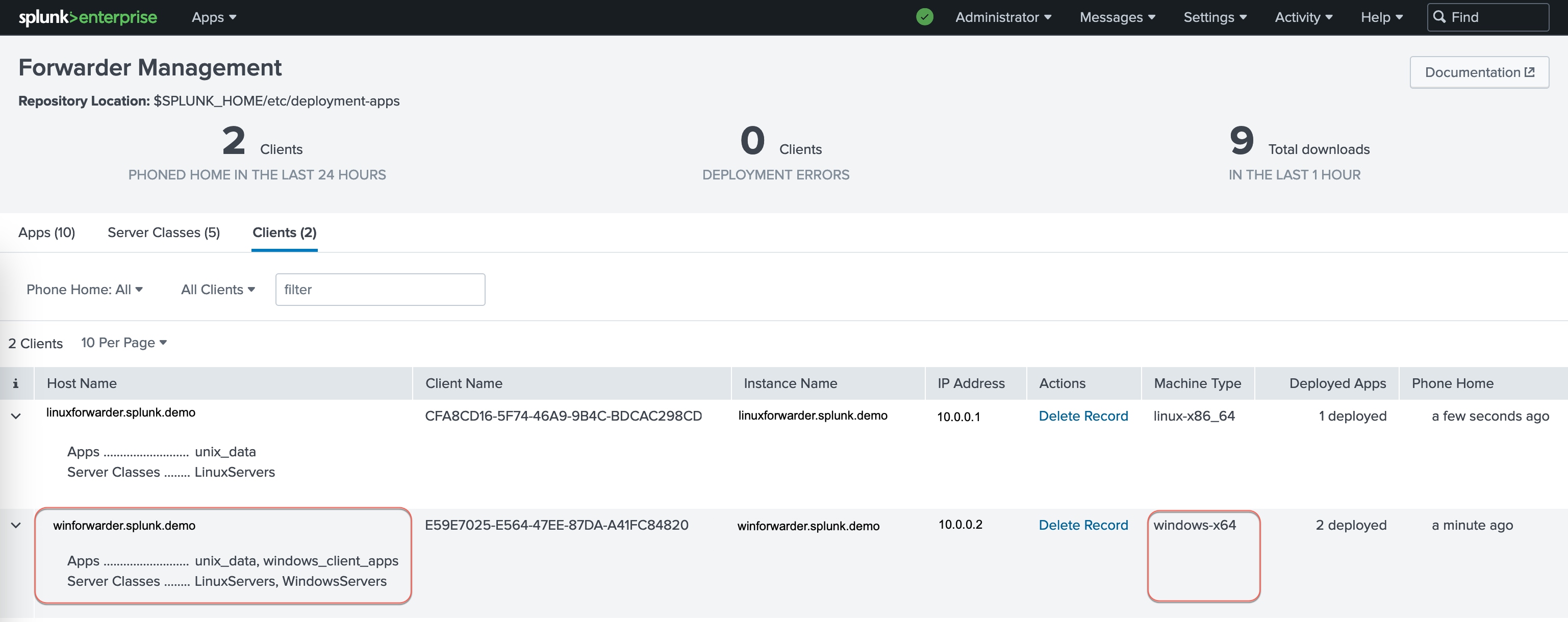
Deployment Clients appear under the wrong server classes. This can occur when server classes use machine type as part of the filter criteria. e.g., clients with linux-x86_64 machine type listed outside the "LinuxServers" server class.
Symptom 3:
Deployment Clients reporting to one Deployment Server appear in the Clients list of another unrelated Deployment Server.
Investigation
For Symptom 1, the following message can appear in splunkd.log after the upgrade:
INFO ClientSessionsManager [21383 TcpChannelThread] - getConnectedHostsManualJoin: clients search result is emptySymptom 2 occurs if server classes filter by machine type and clients are visible in the Clients tab.
Symptom 3 occurs only when two or more Deployment Servers can search the same _ds* indexes, or when copies of the same _ds* events are forwarded between environments.
Resolution
What causes Symptom 1?
Splunk Enterprise 9.2.0 introduces a scalable Deployment Server (DS) feature, which makes the DS tier more resilient and highly available. Under the hood, several new internal indexes are introduced to accommodate this feature:
_dsphonehome
_dsclient
_dsappevent
These indexes are defined in Splunk Enterprise 9.2.x by default. If the deployment server forwards its data to remote indexers and the indexers are running an older Splunk version, the latter will not have the above-mentioned indexes defined. This will result in the DS being unable to forward and search its DS/DC-related events. The DS's Forwarder Management UI is then unable to list the Deployment Clients (DCs), despite the clients phoning home without any issue.
Fix for Symptom 1:
As long as the deployment server can index its DS/DC events to the 3 indexes above and search them back, the clients should appear in the UI.
Steps:
1. Allow the deployment server to selectively index the phone home, client and app events to itself. This is especially applicable to on-prem DS that forwards data to Splunk Cloud indexers, but it can be applied to a completely on-prem/cloud BYO environment as well.
Add the following parameters and values to the deployment server's outputs.conf file, followed by restarting the splunkd service.
[indexAndForward]
index = true
selectiveIndexing = true
2. This step is applicable if the deployment server is forwarding its data to On-prem indexing tier and the indexers' version is older than 9.2.0:
Configure the 3 indexes mentioned earlier on the indexing tier. If the indexers are non-clustered, add the index definitions on each of them manually or use a 3rd party configuration manager. If the indexers are clustered, push the index definitions from the Cluster Manager and enable replication (repFactor = auto) to benefit from cluster redundancy.
Sample indexes.conf configuration:
[_dsphonehome]
homePath   = $SPLUNK_DB/_dsphonehome/db
coldPath   = $SPLUNK_DB/_dsphonehome/colddb
thawedPath = $SPLUNK_DB/_dsphonehome/thaweddb# clustered indexers only #
repFactor = auto[_dsappevent]
homePath   = $SPLUNK_DB/_dsappevent/db
coldPath   = $SPLUNK_DB/_dsappevent/colddb
thawedPath = $SPLUNK_DB/_dsappevent/thaweddb# clustered indexers only #
repFactor = auto[_dsclient]
homePath   = $SPLUNK_DB/_dsclient/db
coldPath   = $SPLUNK_DB/_dsclient/colddb
thawedPath = $SPLUNK_DB/_dsclient/thaweddb# clustered indexers only #
repFactor = auto
There is one additional step only if the deployment clients sends their data to the indexers via an intermediate forwarder AND the intermediate forwarder's version is older than 9.2.x:
Add the following parameter and value to the intermediate forwarder's outputs.conf file, followed by a splunkd service restart.
[tcpout]
forwardedindex.2.whitelist = (_audit|_internal|_introspection|_telemetry|_metrics|_metrics_rollup|_configtracker|_dsclient|_dsphonehome|_dsappevent)
At this point, the deployment clients should appear in the Forwarder Management UI > Clients tab.
Tips:
- If the clients still do not appear, run the following query on the DS and check whether it returns some events:
index=_ds*- If the query returns nothing and the deployment server is also a Distributed Monitoring Console instance, go to Settings > Monitoring Console > Settings > General Setup. Locate the Distributed Monitoring Console (This instance) and click Edit > Edit Server Roles. Tick the Indexer role and click Save. Run the query again to confirm it is working.
What causes Symptom 2?
The incorrect client listing is due to a Forwarder Management UI issue that affects all Splunk Enterprise 9.2.x versions prior to 9.2.2, as well as version 9.3.0 (Reference: SPL‑253411). This is strictly a UI limitation; the Deployment Server will continue to honor the server class filters when deploying apps.
Fix for Symptom 2:
Upgrade to version 9.2.2 or 9.3.1 when it is available. As a workaround, use the server class's preview function to list the deployment clients. Alternatively, do not use machine type to filter the deployment clients.
What causes Symptom 3?
Due to the architectural change mentioned in symptom 1, any Splunk Enterprise servers with UI that have access to the same _ds* indexes (or different _ds* indexes with the same copy of events) will be able to show the same set of Deployment Clients in their Forwarders Management UI.
Fix for Symptom 3:
This symptom is cosmetic and can be safely ignored. A Deployment Client will only communicate with the Deployment Server targetUri configured in the Client's deploymentclients.conf.
In the scenario where _ds* event forwarding is configured from one indexing tier to another indexing tier (for example: production site to DR site), it is possible to block forwarding specific to the remote _ds* indexes by configuring the following outputs.conf parameters:
[tcpout]
forwardedindex.filter.disable = false
forwardedindex.3.blacklist = (_dsclient|_dsphonehome|_dsappevent)
These parameters should be configured on the sending indexers or any intermediate forwarder(s) between the sender site and recipient site.
Tips:
- Adjust the filter(s) based on requirements.
- Refer to the outputs.conf spec document for more information on the parameters.
Related Links
Upgrade pre-9.2 deployment servers
Revision History
| Revision | Publish Date | Comments |
|---|---|---|
1.0 |
30-Sep-2026
|
Initial Release |
 Feedback
Contact Cisco
- Open a Support Case

- (Requires a Cisco Service Contract)