Unable to update notables in the Enterprise Security Incident Review Dashboard
Available Languages
Applicability
Splunk Enterprise Security 7.2.0Description
The following error occurred upon trying to update notables by clicking on "Edit Selected." in the Incident Review Dashboard.

"The update failed: 'list' object has no attribute'startswith'."
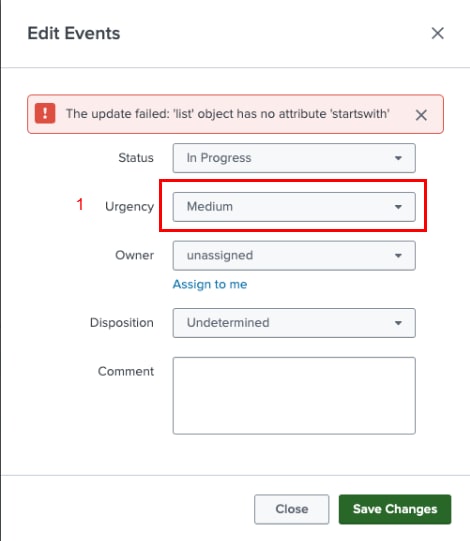
The above error occurs while updating the notable "Urgency" from "low" to "medium"
Investigation
Upon investigation, the issue has been identified as a known issue in the Splunk Enterprise Security 7.2.0.
Resolution
The resolution is to upgrade the Splunk Enterprise Security to the latest version 7.3.2
Workaround:
The workaround is to update the each notable event manually by executing the below command at the CLI.
Note: The above workaround is applicable for only the On-prem environment.
curl -u admin:changeme -k https://localhost:8089/services/notable_update --data "ruleUIDs=29439FBC-FFCB-45FF-93C2-420202012E1E@@notable@@75ecb6a3938d114b29c095f7ee9278b0&comment=Just adding a comment&status=5&urgency=high&newOwner=analyst_name"After upgrading the Splunk Enterprise security to 7.3.2, the notables can be updated, and the error message no longer persists.
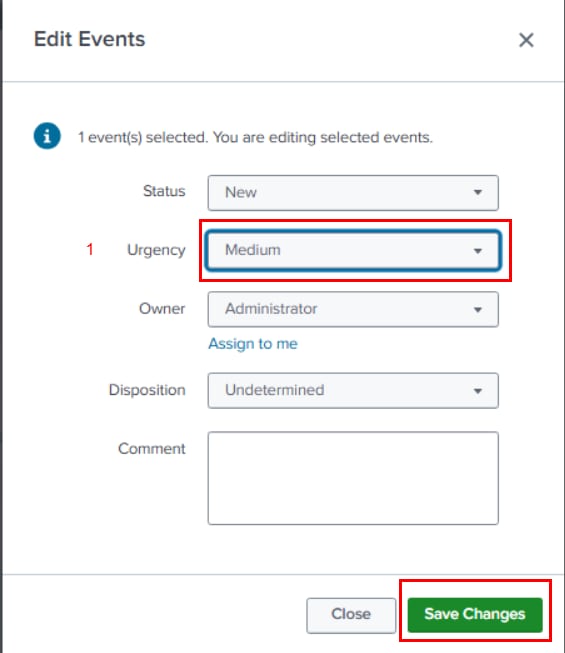
Also, the notable is updated accordingly.

Related Links
Revision History
| Revision | Publish Date | Comments |
|---|---|---|
1.0 |
29-Sep-2026
|
Initial Release |
 Feedback
Contact Cisco
- Open a Support Case

- (Requires a Cisco Service Contract)
Related Articles
- Cannot edit notable status in the Incident Review dashboard.
- Notables appearing in the Incident Review dashboard after several days
- Delete a specific comment from the Incident Review Dashboard in Splunk Enterprise Security 7.x
- Notables are not updated properly with required field values in the Incident Review Dashboard