Start Your Catalyst SD-WAN Upgrade Journey Here
Available Languages
Contents
Introduction
This document describes a comprehensive resource that consolidates key links and guidance to simplify and support the Catalyst SD-WAN upgrade process.
Prerequisites
Requirements
Cisco recommends that you have knowledge of these topics:
- Cisco Software-defined Wide Area Network (SD-WAN)
- Cisco Software Central
- Download the Controllers software from software.cisco.com
Components Used
The information in this document was created from the devices in a specific lab environment. All of the devices used in this document started with a cleared (default) configuration. If your network is live, ensure that you understand the potential impact of any command.
Upgrading Catalyst SD-WAN Manager Workflow
This workflow outlines the procedures for upgrading Cisco SD-WAN Manager across different software versions, covering both Manager Cluster and Standalone configurations with or without Disaster Recovery (DR) enabled.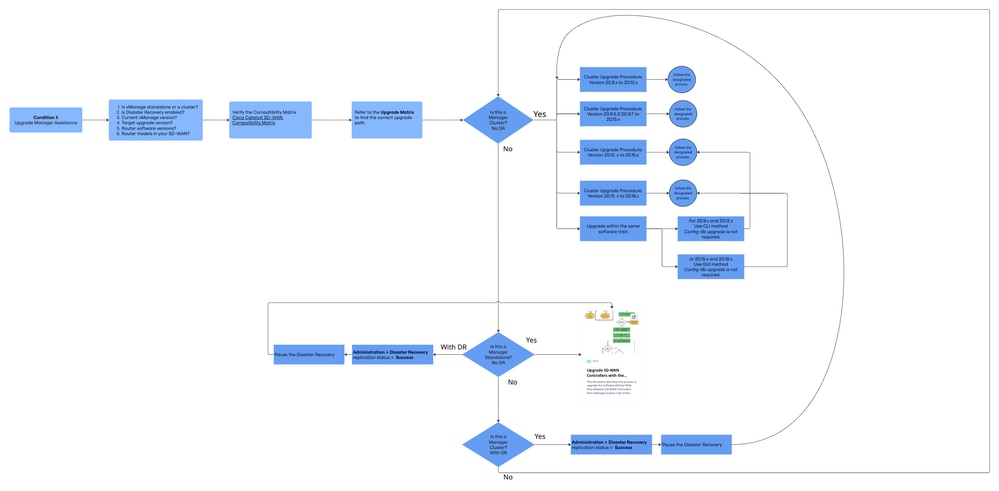
Essential Information Before Upgrading Catalyst SD-WAN
Before beginning the upgrade process, it is crucial to gather the next key information to ensure a smooth and successful Catalyst SD-WAN upgrade:
- Is your vManage deployed as a standalone instance or a vManage cluster?
- Is Disaster Recovery enabled on your vManage?
- What is the current software version running on your vManage?
- Which software version do you plan to upgrade to?
- What software versions are running on your routers?
SD-WAN Compatibility Matrix
To verify compatibility between the software versions of Cisco Catalyst SD-WAN control components and routers for your planned upgrade, please refer to the Cisco Catalyst SD-WAN Compatibility Matrix Tool available at:
Cisco Catalyst SD-WAN Compatibility Matrix
This tool provides up-to-date information on supported device and control component software versions, enabling you to confirm compatibility for your target upgrade version.
Manager Upgrade Matrix
Refer to the Upgrade Matrix to determine the appropriate upgrade path. This guidance applies only to vManage (Manager) software upgrades.
It is essential to specify both the current (X) and target (Y) images. Navigate to Cisco Catalyst SD-WAN Upgrade Matrix
Upgrading Catalyst SD-WAN Manager Standalone
Standalone Manager Upgrade: Image X to Y (No Disaster Recovery)
Refer to the upgrade guide for detailed steps. Disaster recovery procedures are not included in this upgrade scenario.
Upgrade SD-WAN Controllers via vManage Graphic User Interface (GUI)
Standalone Manager Upgrade: Image X to Y ( Disaster Recovery)
Disaster Recovery Considerations
1. In the vManage UI, navigate to Administration > Disaster Recovery and verify the replication status. Ensure the status is Success and not in a transient state such as Import Pending, Export Pending, or Download Pending.
2. If the replication status is Success in Administration > Disaster Recovery (vManage UI):
- Pause Disaster Recovery.
- Proceed to upgrade the individual vManage node or the cluster using the steps outlined below.
3. Verify that Disaster Recovery is successfully paused.
Warning: Means danger. You are in a situation that could cause bodily injury.

Warning: If Disaster Recovery is not successfully paused Open a TAC case for further assistance before proceeding with the upgrade.
4. Once Disaster Recovery is successfully paused, proceed with the standard manager upgrade process.
Disaster Recovery after Upgrade
Once upgrade is complete, UnPause Disaster Recovery and verify that disaster recovery has resumed. See, Verify Disaster Recovery Registration.
For detailed Cisco SD-WAN Disaster Recovery information, please consult the Official DR Documentation.
Refer to the upgrade guide for detailed steps.
Upgrade SD-WAN Controllers via vManage Graphic User Interface (GUI)
Upgrading Catalyst SD-WAN Manager Cluster
Upgrade method: CLI is recommended, per the official Disaster Recovery documentation. Please review the steps carefully before proceeding with the upgrade.
Disaster Recovery Considerations
1. In the vManage UI, navigate to Administration > Disaster Recovery and verify the replication status. Ensure the status is Success and not in a transient state such as Import Pending, Export Pending, or Download Pending.
2. If the replication status is Success in Administration > Disaster Recovery (vManage UI):
- Pause Disaster Recovery.
- Proceed to upgrade the individual vManage node or the cluster using the steps outlined below.
3. Verify that Disaster Recovery is successfully paused.
Warning: If Disaster Recovery is not successfully paused Open a TAC case for further assistance before proceeding with the upgrade.
4. Once Disaster Recovery is successfully paused, proceed with the standard cluster manager upgrade process. It is important to select the appropriate upgrade option for your environment.
Disaster Recovery after Upgrade
Once upgrade is complete, UnPause Disaster Recovery and verify that disaster recovery has resumed. See, Verify Disaster Recovery Registration.
For detailed Cisco SD-WAN Disaster Recovery information, please consult the Official DR Documentation.
Manager Cluster Upgrade Procedure: Version 20.9.x to 20.12.x
Please note a few important considerations when upgrading from the 20.9 release.
Essential Information Before Upgrading from 20.9.x
After upgrading to 20.9.5.2 or a later 20.9 release, the statistics-DB version migration process can take up to 4 hours. It is crucial to ensure that the migration is complete before proceeding with subsequent upgrade hops or any configuration.
Verify migration completion:
- Execute the command
request nms statistics-db diagnostics
- Review the diagnostic output and confirm that there are 0 entries under the section titled Indices with major version less than 6. This indicates that the migration has completed successfully.
vManage1# request nms statistics-db diagnostics
Total indices: 34
Indices with major version lesser than 6: 20 ------------>> This count needs to be 0
- Upgrades from release 20.9 needs to be performed exclusively using the CLI.
- For standalone and 3-node clusters, ensure that the vManage controllers have the COMPUTE+DATA persona. For 6-node clusters, configure 3 controllers with the COMPUTE+DATA persona and 3 controllers with the DATA persona.
Refer to the upgrade guide for detailed steps.
Manager Cluster Upgrade Procedure: Version 20.9.x to 20.12.x
Manager Cluster Upgrade Procedure: Version 20.9.5.2/20.9.7 to 20.15.x
Refer to the upgrade guide for detailed steps.
Manager Cluster Upgrade Procedure: Version 20.9.5.2/20.9.7 to 20.15.x
Manager Cluster Upgrade Procedure: Version 20.12.x to 20.15.x
Refer to the upgrade guide for detailed steps.
Manager Cluster Upgrade Procedure: Version 20.12.x to 20.15.x
Manager Cluster Upgrade Procedure: Version 20.15.x to 20.18.x
Refer to the upgrade guide for detailed steps.
Manager Cluster Upgrade Procedure: Version 20.15.x to 20.18.x
Manager Upgrade Within the Same Software Train
Condition 1: For 20.9.x and 20.12.x
- Use the CLI method.
- Config-db upgrade is not required.
- Refer to the upgrade guide for detailed steps.
Condition 2: For 20.15.x and 20.18.x
- Use the GUI method.
- Config-db upgrade is not required.
- Refer to the upgrade guide for detailed steps.
Upgrade vBond and vSmart: Image X to Y
Refer to the Upgrade Document:
Upgrade SD-WAN Controllers Using vManage GUI or CLI – Cisco
TAC Case Required for vManage/Controller Upgrade Assistance
Open a TAC case for further assistance if you meet any of these scenarios:
- You need help upgrading vManage and have encountered issues during the upgrade.
- You are attempting an upgrade (for vBond, vSmart, or cEdge) and are running into issues, regardless of whether you initially requested help.
Make sure to select the appropriate Subtechnology based on the type of controller or device involved. This helps ensure your case is routed correctly and addressed more efficiently.
| Subtechnology |
| Catalyst Manager (vManage) Single Node - Software Install, Activate or Upgrade |
| Catalyst Manager (vManage) Cluster - Software Install, Activate or Upgrade |
| Catalyst Validator (vBond) - Software Install, Activate or Upgrade |
| Catalyst Controller (vSmart) - Software Install, Activate or Upgrade |
| IOS-XE SD-WAN (cEdge) routers in controller mode - Software Install, Activate or Upgrade |
Related Information
Revision History
| Revision | Publish Date | Comments |
|---|---|---|
2.0 |
20-Feb-2026
|
Updated Image |
1.0 |
20-Feb-2026
|
Initial Release |

 Feedback
Contact Cisco
- Open a Support Case

- (Requires a Cisco Service Contract)