Upgrade Guide for Cisco SD-WAN Manager Cluster
Available Languages
Contents
Introduction
This document describes a clear and practical reference for upgrading Cisco SD-WAN vManage clusters across different software versions.
Background Information
This document covers all major upgrade scenarios, including direct and multi-step paths, in order to help engineers plan and execute upgrades safely. The document also outlines recommended sequences, key pre-checks, cluster considerations, and post-upgrade validations in order to ensure minimal disruption and consistent system stability.
SD-WAN Manager Cluster Upgrade Procedure: Version 20.9.x to 20.12.x
Prerequisites

Note: Base version must be 20.9.5.2 or later release in 20.9.x train in order to upgrade to 20.12.x or later release. If current version is lower than 20.9.5.2, upgrade to 20.9.5.2 or a later 20.9.x version.
1. Controller Snapshots
Create complete snapshots of all SD-WAN controllers prior to beginning the upgrade process.
2. Configuration Database Backup
Execute a backup of the configuration database and store it in a location external to the SD-WAN manager server using the request nms configuration-db backup path <path_and_filename> command.
3. AURA Health Check on SD-WAN Manager Nodes
Perform the AURA health check on all SD-WAN manager nodes as documented in https://www.cisco.com/c/en/us/support/docs/routers/sd-wan/220514-execute-the-aura-script-on-vmanage.html.
4. Image Distribution to SD-WAN Manager Servers
Manually copy the 20.12.5 upgrade image 'vmanage-20.12.5-x86_64.tar.gz' to the /home/admin directory on each Cisco SD-WAN manager server in the cluster.
5. Image Verification
Verify that the upgrade image has been successfully copied to the /home/admin location on all SD-WAN manager servers.
6. Six-Node Cluster Persona Verification
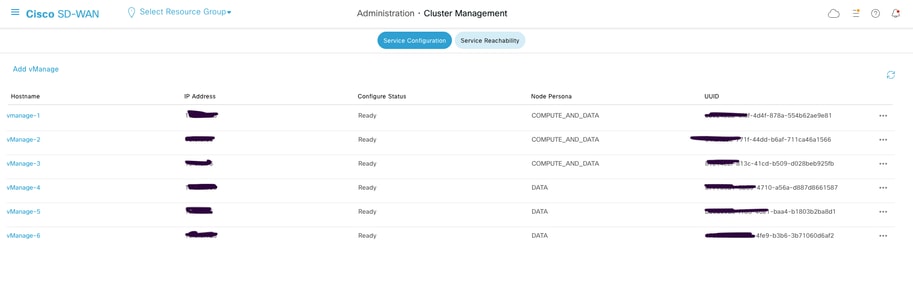
For six-node SD-WAN manager cluster upgrades, verify that the SD-WAN manager persona distribution consists of three COMPUTE_DATA nodes and three DATA nodes. This information can be confirmed on the SD-WAN manager cluster management page.
7. Software Inventory Management
- Execute the show software command on each SD-WAN manager node in order to verify the installed software versions.
- Ensure that no more than two software images are installed on each SD-WAN manager node.
- If additional images are present, remove the obsolete installed images using the request software remove <version> command.
Example output:
vmanage3-2093# show software
VERSION ACTIVE DEFAULT PREVIOUS CONFIRMED TIMESTAMP
--------------------------------------------------------------------------
20.12.5 false false - - 2025-11-24T05:09:38-00:00
20.9.7 true true - - 2025-11-24T05:09:30-00:00
Pre-Upgrade Validation Checks
8. Control Connection Stability Verification
- Verify the stability of control connections between all SD-WAN controllers.
- Capture a screenshot of the SD-WAN manager dashboard for documentation purposes.
9. Site-Level Verification
Choose representative sites and capture these logs and outputs:
a. Control Connection Verification
show sd-wan control connections
b. BFD Session Verification
show sd-wan bfd sessions
c. Routing Table Verification
show ip route vrf <vrf_id>
show sd-wan omp routes vpn <vpn_id>
d. Application Service Testing
You must perform application service testing from a minimum of five branch locations.
10. vSmart Controller Verification
a. Control Connections
Execute show control connections in order to verify that each vSmart maintains control connections with all controllers.
b. OMP Peer Status
Execute show omp peers in order to verify the number of peers on each vSmart controller.
c. OMP Summary
Execute show omp summary in order to verify overall OMP status.
Upgrade Procedure
These high-level steps outline the upgrade process:
1. Software Installation
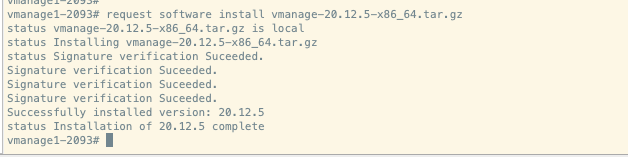
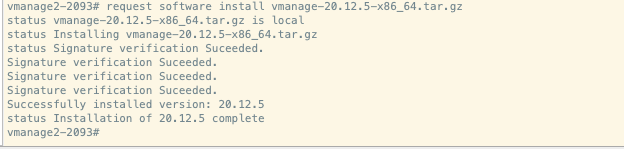
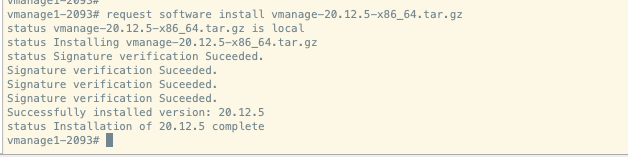
Install the upgrade image on each Cisco SD-WAN manager server using the request software install <path> command. Do not activate the image at this stage.
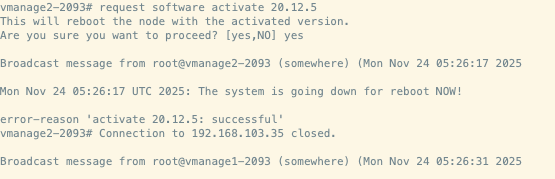
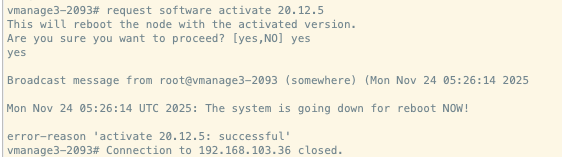
2. Software Activation
Activate the upgrade image on each Cisco SD-WAN manager server using the request software activate <version> command. Note that all SD-WAN manager nodes will reboot simultaneously.

3. Upgrade Confirmation
Confirm the upgrade within 15 minutes of activation using the request software upgrade-confirm command.
Note: Following the upgrade, a manual configuration database upgrade is required. Allow 20-25 minutes after the reboot for services to initialize. During this period, you will observe that the app-server and configuration database services do not start automatically, as they require a manual upgrade procedure.
4. Service Status Verification
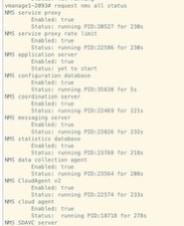
- Execute 'request nms all status' on all nodes in order to verify the status of services.
- Verify that all services except app-server and configuration database are operational.
Expected observation: App-server will be in a down state, and the configuration database will continuously restart.
5. Configuration Database Upgrade
- Perform the configuration database upgrade only on one node that is running the configuration database service.
- Upon successful completion, the app-server and config-DB services will restart on all nodes.
Execute this command on one configuration database node:
vmanage-2# request nms configuration-db upgrade
== Upgrading configuration-db to 4.4.15 version..
== The configuration-db upgrade logs are available at /var/log/nms/neo4j-upgrade.log file
== Previous software version on this vmanage: 20.9.7

== Copying dump files remotely
== Loading configuration-db on remote nodes
== Starting configuration-db in all nodes
== Checking for remote nodes
== Starting application server.
== Configuration-db upgrade completed!
== Waiting for instances to synchronize...
== Successfully upgraded configuration-db to 4.4.15 version.
6. Final Service Status Verification
- Wait approximately five minutes after the configuration database upgrade completes.
- Execute 'request nms all status' on all nodes in order to verify that all services are operational.
Post-Upgrade Validation Checks
1. Software Version Verification
Verify that all controllers are running the correct software version.
2. SD-WAN Manager Service Status Verification
Confirm that all services on the SD-WAN manager servers are operational.
3. Inter-Controller Connection Verification
Verify control connections between all controllers.
4. Policy Activation Verification
Confirm that policies are properly activated on the SD-WAN manager servers.
5. Control Connection Distribution Verification
- Verify that control connections are properly distributed across all SD-WAN manager nodes.
- Navigate to Monitor > Network and verify the control connection column.
6. Site-Level Post-Upgrade Validation
Perform these validation tests on all sites where pre-upgrade checks were conducted:
a. Control Connection and BFD Session Verification
show sd-wan control connections
show sd-wan bfd sessions
b. Routing Verification
show ip route
show ip route vrf <vrf_id>
show sd-wan omp routes vpn <vpn_id>
c. Data Center Service Reachability
Verify reachability to all data center services.
d. Template Synchronization Verification
Verify that device templates are properly attached and synchronized post the upgrade.
e. Policy Verification from vSmart
Execute 'show sd-wan policy from-vsmart' in order to verify policy distribution.
f. User Acceptance Testing
Conduct user acceptance testing on all validated sites to ensure application functionality.
SD-WAN Manager Cluster Upgrade Procedure: Version 20.9.5.2/20.9.7 to 20.15.x
Prerequisites
1. Controller Snapshots
Create complete snapshots of all SD-WAN controllers prior to beginning the upgrade process.
2. Configuration Database Backup
Execute a backup of the configuration database and store it in a location external to the SD-WAN manager server using the request nms configuration-db backup path <path_and_filename> command.
3. AURA Health Check on SD-WAN Manager Nodes
Perform the AURA health check on all SD-WAN manager nodes as documented in https://www.cisco.com/c/en/us/support/docs/routers/sd-wan/220514-execute-the-aura-script-on-vmanage.html.
4. Image Distribution to SD-WAN Manager Servers
Manually copy the 20.15.2 upgrade image 'vmanage-20.15.2-x86_64.tar.gz' to the /home/admin directory on each Cisco SD-WAN manager server in the cluster.
5. Image Verification
Verify that the upgrade image has been successfully copied to the /home/admin location on all SD-WAN manager servers.
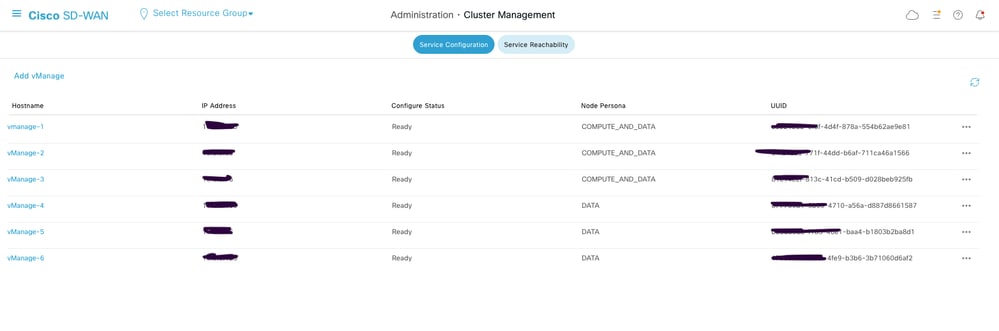
6. Six-Node Cluster Persona Verification
For six-node SD-WAN manager cluster upgrades, verify that the SD-WAN manager persona distribution consists of three COMPUTE_DATA nodes and three DATA nodes. This information can be confirmed on the SD-WAN manager cluster management page.
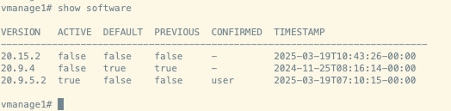
7. Software Inventory Management
- Execute the show software command on each SD-WAN manager node in order to verify the installed software versions.
- Ensure that no more than two software images are installed on each SD-WAN manager node.
- If additional images are present, remove the obsolete installed images using the request software remove <version> command.
Example output:
Pre-Upgrade Validation Checks
8. Control Connection Stability Verification
- Verify the stability of control connections between all SD-WAN controllers.
- Capture a screenshot of the SD-WAN manager dashboard for documentation purposes.
9. Site-Level Verification
Choose representative sites and capture these logs and outputs:
a. Control Connection Verification
show sd-wan control connections
b. BFD Session Verification
show sd-wan bfd sessions
c. Routing Table Verification
show ip route vrf <vrf_id>
show sd-wan omp routes vpn <vpn_id>
d. Application Service Testing
You must perform application service testing from a minimum of five branch locations.
10. vSmart Controller Verification
a. Control Connections
Execute 'show control connections' in order to verify that each vSmart maintains control connections with all controllers.
b. OMP Peer Status
Execute 'show omp peers' in order to verify the number of peers on each vSmart controller.
c. OMP Summary
Execute 'show omp summary' in order to verify overall OMP status.
Upgrade Procedure
These high-level steps outline the upgrade process:
1. Software Installation
Install the upgrade image on each Cisco SD-WAN manager server using the request software install <path> command. Do not activate the image at this stage.
vmanage1#request software install /home/admin/vmanage-20.15.2-x86_64.tar.gz
Signature verification Suceeded.
Signature verification Suceeded.
[2025-09-25 09:04:19,066][INFO][upgrade-context]: Upgrade context written to destination path: /opt/data/extra-packages/20.15.2/upgrade-context.json
Signature verification Suceeded.
Successfully installed version: 20.15.2
vmanage1#


vmanage2#request software install /home/admin/vmanage-20.15.2-x86_64.tar.gz
Signature verification Suceeded.
Signature verification Suceeded.
[2025-09-25 09:04:19,066][INFO][upgrade-context]: Upgrade context written to destination path: /opt/data/extra-packages/20.15.2/upgrade-context.json
Signature verification Suceeded.
Successfully installed version: 20.15.2
vmanage2#

vmanage3#request software install /home/admin/vmanage-20.15.2-x86_64.tar.gz
Signature verification Suceeded.
Signature verification Suceeded.
[2025-09-25 09:04:19,066][INFO][upgrade-context]: Upgrade context written to destination path: /opt/data/extra-packages/20.15.2/upgrade-context.json
Signature verification Suceeded.
Successfully installed version: 20.15.2
vmanage3#
2. Software Activation
Activate the upgrade image on each Cisco SD-WAN manager server using the request software activate <version> command. Note that all SD-WAN manager nodes will reboot simultaneously.
vmanage1# request software activate 20.15.2
This will reboot the node with the activated version.
Are you sure you want to proceed? [yes,NO] yes

vmanage2# request software activate 20.15.2
This will reboot the node with the activated version.
Are you sure you want to proceed? [yes,NO] yes

vmanage3# request software activate 20.15.2
This will reboot the node with the activated version.
Are you sure you want to proceed? [yes,NO] yes
3. Upgrade Confirmation
Confirm the upgrade within 15 minutes of activation using the request software upgrade-confirm command:
Note: Post the upgrade, a manual configuration database upgrade is required. Allow 20-25 minutes after the reboot for services to initialize. During this period, you will observe that the app-server and configuration database services do not start automatically, as they require a manual upgrade procedure.
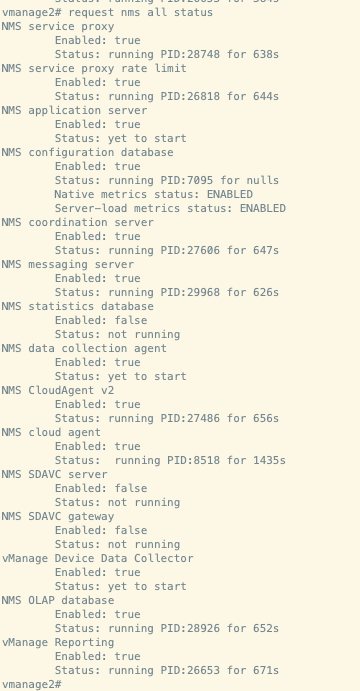
4. Service Status Verification
- Execute 'request nms all status' on all nodes in order to verify the status of services.
- Verify that all services except app-server and configuration database are operational.
Expected observation: App-server will be in a down state, and the configuration database will continuously restart.
5. Configuration Database Upgrade
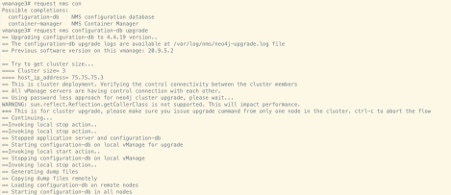
- Perform the configuration database upgrade only on one node that is running the configuration database service.
- Upon successful completion, the app-server and config-DB services will restart on all nodes.
Execute the request nms configuration-db upgrade command on one configuration database node:
6. Final Service Status Verification
- Wait approximately five minutes after the configuration database upgrade completes.
- Execute 'request nms all status' on all nodes in order to verify that all services are operational.
Post-Upgrade Validation Checks
1. Software Version Verification
Verify that all controllers are running the correct software version.
2. SD-WAN Manager Service Status Verification
Confirm that all services on the SD-WAN manager servers are operational.
3. Inter-Controller Connection Verification
Verify control connections between all controllers.
4. Policy Activation Verification
Confirm that policies are properly activated on the SD-WAN manager servers.
5. Control Connection Distribution Verification
- Verify that control connections are properly distributed across all SD-WAN manager nodes.
- Navigate to Monitor > Network and verify the control connection column.
6. Site-Level Post-Upgrade Validation
Perform these validation tests on all sites where pre-upgrade checks were conducted:
a. Control Connection and BFD Session Verification
show sd-wan control connections
show sd-wan bfd sessions
b. Routing Verification
show ip route
show ip route vrf <vrf_id>
show sd-wan omp routes vpn <vpn_id>
c. Data Center Service Reachability
Verify reachability to all data center services.
d. Template Synchronization Verification
Verify that device templates are properly attached and synchronized post the upgrade.
e. Policy Verification from vSmart
Execute 'show sd-wan policy from-vsmart' in order to verify policy distribution.
f. User Acceptance Testing
Conduct user acceptance testing on all validated sites in order to ensure application functionality.
SD-WAN Manager Cluster Upgrade Procedure: Version 20.12.x to 20.15.x
Prerequisites
1. Controller Snapshots
Create complete snapshots of all SD-WAN controllers prior to beginning the upgrade process.
2. Configuration Database Backup
Execute a backup of the configuration database and store it in a location external to the SD-WAN manager server using the request nms configuration-db backup path <path_and_filename> command.
3. AURA Health Check on SD-WAN Manager Nodes
Perform the AURA health check on all SD-WAN manager nodes as documented in https://www.cisco.com/c/en/us/support/docs/routers/sd-wan/220514-execute-the-aura-script-on-vmanage.html.
4. Image Distribution to SD-WAN Manager Servers
Manually copy the 20.15.x upgrade image 'vmanage-20.15.3-x86_64.tar.gz' to the /home/admin directory on each Cisco SD-WAN manager server in the cluster.
5. Image Verification
Verify that the upgrade image has been successfully copied to the /home/admin location on all SD-WAN manager servers.
6. Software Inventory Management
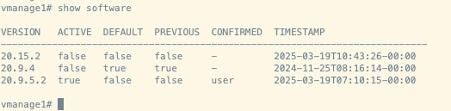
- Execute the show software command on each SD-WAN manager node in order to verify the installed software versions.
- Ensure that no more than two software images are installed on each SD-WAN manager node.
- If additional images are present, remove the obsolete installed images using the request software remove <version> command.
Example output:
Pre-Upgrade Validation Checks
7. Control Connection Stability Verification
- Verify the stability of control connections between all SD-WAN controllers.
- Capture a screenshot of the SD-WAN manager dashboard for documentation purposes.
8. Site-Level Verification
Choose representative sites and capture these logs and outputs:
a. Control Connection Verification
show sd-wan control connections
b. BFD Session Verification
show sd-wan bfd sessions
c. Routing Table Verification
show ip route vrf <vrf_id>
show sd-wan omp routes vpn <vpn_id>
d. Application Service Testing
You must perform application service testing from a minimum of five branch locations.
9. vSmart Controller Verification
a. Control Connections
Execute 'show control connections' in order to verify that each vSmart maintains control connections with all controllers.
b. OMP Peer Status
Execute 'show omp peers' in order to verify the number of peers on each vSmart controller.
c. OMP Summary
Execute 'show omp summary' in order to verify overall OMP status.
Upgrade Procedure
These high-level steps outline the upgrade process:
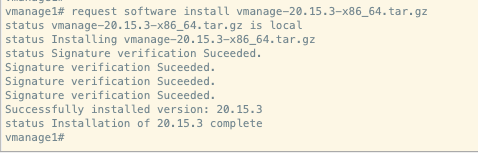
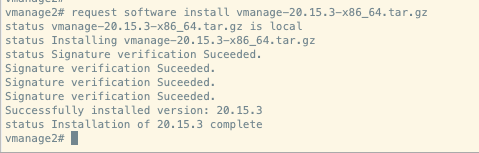
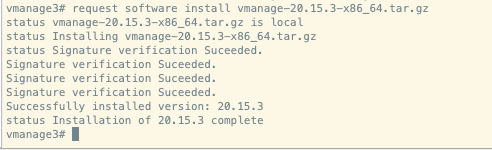
1. Software Installation
Install the upgrade image on each Cisco SD-WAN manager server using the request software install <path> command. Do not activate the image at this stage.
2. Software Activation
Activate the upgrade image on each Cisco SD-WAN manager server using the request software activate <version> command. Note that all SD-WAN manager nodes will reboot simultaneously.
vmanage1# request software activate 20.15.3
This will reboot the node with the activated version.
Are you sure you want to proceed? [no,yes] yes
status activate 20.15.3: successful

vmanage2# request software activate 20.15.3
This will reboot the node with the activated version.
Are you sure you want to proceed? [no,yes] yes
status activate 20.15.3: successful


vmanage3# request software activate 20.15.3
This will reboot the node with the activated version.
Are you sure you want to proceed? [no,yes] yes
status activate 20.15.3: successful
3. Upgrade Confirmation
Confirm the upgrade within 15 minutes of activation using the request software upgrade-confirm command.
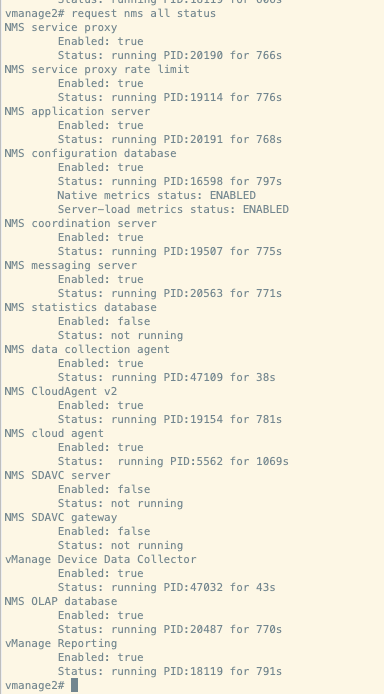
4. Service Status Verification
- Allow approximately 30 minutes after the reboot for services to initialize.
- Execute 'request nms all status' on all nodes to verify the status of services.
Expected output:
Post-Upgrade Validation Checks
1. Software Version Verification
Verify that all controllers are running the correct software version.
2. SD-WAN Manager Service Status Verification
Confirm that all services on the SD-WAN manager servers are operational.
3. Inter-Controller Connection Verification
Verify control connections between all controllers.
4. Policy Activation Verification
Confirm that policies are properly activated on the SD-WAN manager servers.
5. Control Connection Distribution Verification
- Verify that control connections are properly distributed across all SD-WAN manager nodes.
- Navigate to Monitor > Network and verify the control connection column.
6. Site-Level Post-Upgrade Validation
Perform these validation tests on all sites where pre-upgrade checks were conducted:
a. Control Connection and BFD Session Verification
show sd-wan control connections
show sd-wan bfd sessions
b. Routing Verification
show ip route
show ip route vrf <vrf_id>
show sd-wan omp routes vpn <vpn_id>
c. Data Center Service Reachability
Verify reachability to all data center services.
d. Template Synchronization Verification
Verify that device templates are properly attached and synchronized post the upgrade.
e. Policy Verification from vSmart
Execute 'show sd-wan policy from-vsmart' in order to verify policy distribution.
f. User Acceptance Testing
Conduct user acceptance testing on all validated sites in order to ensure application functionality.
SD-WAN Manager Cluster Upgrade Procedure: Version 20.15.x to 20.18.x
Prerequisites
Note: Base version must be 20.15.x in order to upgrade to 20.18.x or later release. If current version is lower than 20.15.x, upgrade to 20.15.x relase first.
1. Controller Snapshots
Create complete snapshots of all SD-WAN controllers prior to beginning the upgrade process.
2. Configuration Database Backup
Execute a backup of the configuration database and store it in a location external to the SD-WAN manager server using the request nms configuration-db backup path <path_and_filename> command.
3. Image copy to SD-WAN Manager Servers
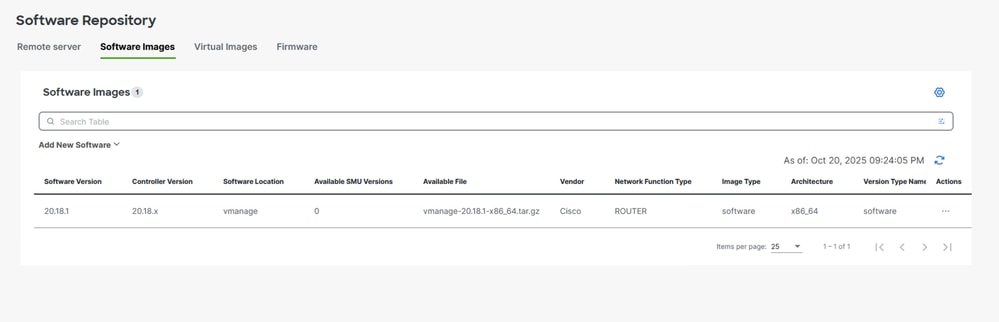
Copy the 20.18.x upgrade image 'vmanage-20.18.1-x86_64.tar.gz' to SD-WAN manager repository.
4. Software Inventory Management
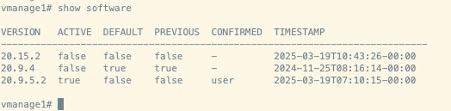
- Execute the show software command on each SD-WAN manager node in order to verify the installed software versions.
- Ensure that no more than two software images are installed on each SD-WAN manager node.
- If additional images are present, remove the obsolete installed images using the request software remove <version> command.
Example output:
5. Verify container status
Verify docket container status using the command shown:
vmanage2# request nms container-manager dia
NMS container manager
Checking container-manager status
Listing all containers
------------------------
CONTAINER ID IMAGE COMMAND CREATED STATUS PORTS NAMES
3578e5ac3e1e sd-wan/messaging-server:0.20.0 "/entrypoint.sh" 25 minutes ago Up 25 minutes (healthy) 127.0.0.1:4222->4222/tcp, 127.0.0.1:6222->6222/tcp, 127.0.0.1:8222->8222/tcp messaging-server
e2c1e54dd48f sd-wan/olap-db:23.3.13.6 "/usr/bin/docker-ini…" 25 minutes ago Up 25 minutes (healthy) 127.0.0.1:8123->8123/tcp olap-db
e3375e1c2254 sd-wan/coordination-server:3.7.1 "/docker-entrypoint.…" 25 minutes ago Up 25 minutes (healthy) 127.0.0.1:2181->2181/tcp, 127.0.0.1:2888->2888/tcp, 127.0.0.1:3888->3888/tcp coordination-server
8ae9ce33bbc8 cloudagent-v2:91a62b952db9 "./entrypoint.sh" 25 minutes ago Up 25 minutes 127.0.0.1:9051-9052->9051-9052/tcp cloudagent-v2
b1a298cc3d4e sd-wan/ratelimit:latest "/usr/local/bin/rate…" 25 minutes ago Up 25 minutes (healthy) 6379/tcp, 127.0.0.1:8460-8462->8460-8462/tcp ratelimit
c077a9cc59b0 sd-wan/reporting:latest "/sbin/tini -g -- py…" 25 minutes ago Up 25 minutes 80/tcp, 127.0.0.1:9080->9080/tcp reporting
07dcbc92acbb sd-wan/data-collection-agent:1.0.1 "/usr/bin/docker-ini…" 25 minutes ago Up 12 minutes (healthy) data-collection-agent
ca58a770f2dc sd-wan/vault:1.0.1 "docker-entrypoint.s…" 25 minutes ago Up 25 minutes (healthy) 8200/tcp, 127.0.0.1:8201->8201/tcp vault
ca838f61299f sd-wan/service-proxy:1.27.2 "/entrypoint.sh" 25 minutes ago Up 25 minutes (healthy) service-proxy
8c0e15c9e552 sd-wan/configuration-db:4.4.19 "/usr/bin/docker-ini…" 25 minutes ago Up 25 minutes (healthy) 127.0.0.1:5000->5000/tcp, 127.0.0.1:6000->6000/tcp, 127.0.0.1:6362->6362/tcp, 127.0.0.1:6372->6372/tcp, 127.0.0.1:7000->7000/tcp, 127.0.0.1:7473-7474->7473-7474/tcp, 127.0.0.1:7687-7688->7687-7688/tcp configuration-db
671dfed47394 sd-wan/device-data-collector:1.0.0 "/bin/sh -c /vMDDC/v…" 25 minutes ago Up 12 minutes (healthy) 127.0.0.1:8129->8129/tcp device-data-collector
ceb808046e34 sd-wan/application-server:19.1.0 "/sbin/tini -g -- /e…" 25 minutes ago Up 25 minutes (healthy) application-server
dd744e0aa80f sd-wan/host-agent:1.0.1 "/entrypoint.sh pyth…" 25 minutes ago Up 25 minutes (healthy) 127.0.0.1:9099->9099/tcp host-agent
972a13290a15 sd-wan/cluster-oracle:1.0.1 "/entrypoint.sh java…" 25 minutes ago Up 25 minutes (healthy) 127.0.0.1:9090->9090/tcp cluster-oracle
Pre-Upgrade Validation Checks
6. Control Connection Stability Verification
- Verify the stability of control connections between all SD-WAN controllers.
- Capture a screenshot of the SD-WAN manager dashboard for documentation purposes.
7. Site-Level Verification
Choose representative sites and capture these logs and outputs:
a. Control Connection Verification
show sd-wan control connections
b. BFD Session Verification
show sd-wan bfd sessions
c. Routing Table Verification
show ip route vrf <vrf_id>
show sd-wan omp routes vpn <vpn_id>
d. Application Service Testing
You must perform application service testing from a minimum of five branch locations.
8. vSmart Controller Verification
a. Control Connections
Execute 'show control connections' in order to verify that each vSmart maintains control connections with all controllers.
b. OMP Peer Status
Execute 'show omp peers' in order to verify the number of peers on each vSmart controller.
c. OMP Summary
Execute 'show omp summary' in order to verify overall OMP status.
Upgrade Procedure
Here are the high-level steps to be observed for the upgrade:
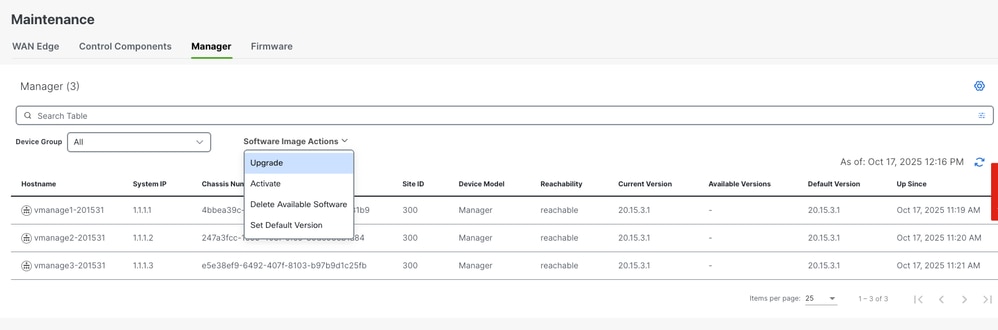
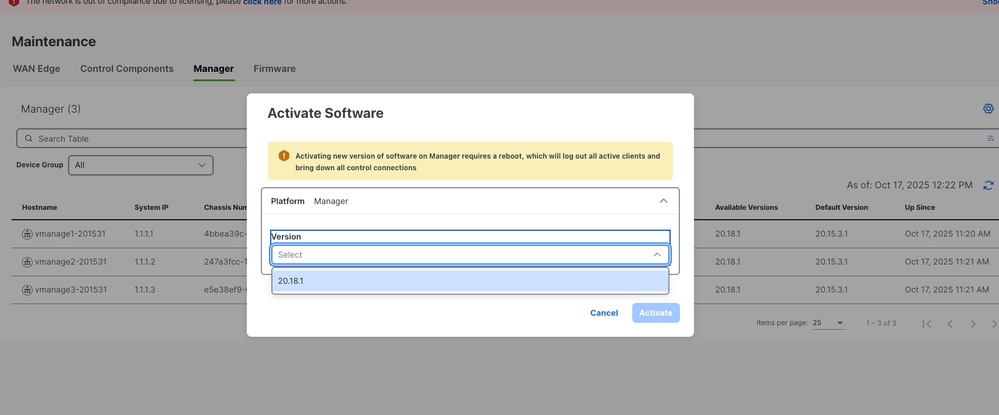
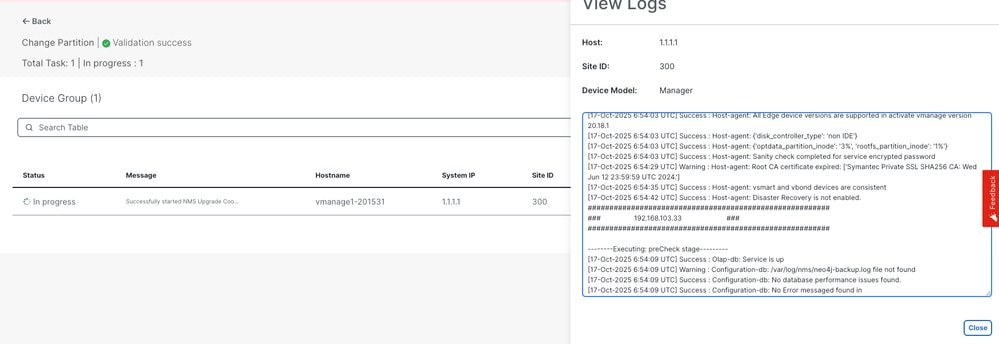
Navigate to Maintainence > Software Upgrade > Manager > Software Image Action and choose Upgrade. Image will be installed on all three nodes.
Installation of the image is successful on all three nodes.
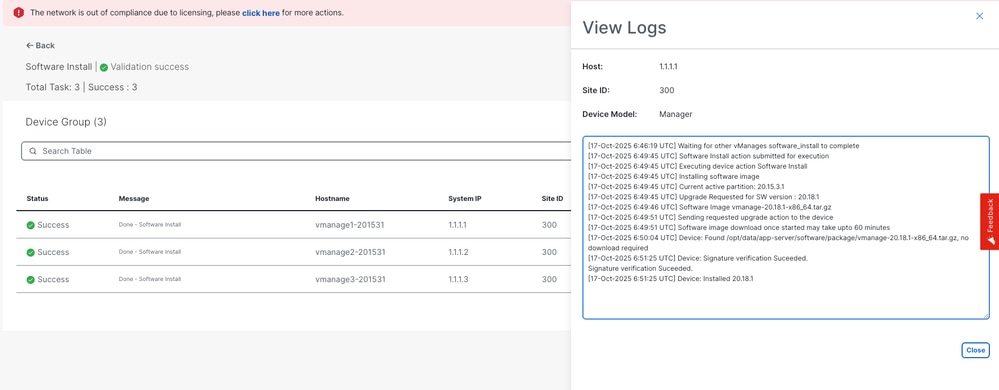
Once installation is complete, activate 20.18.1 image. All three nodes will be rebooted.
Service Status Verification
- Allow approximately 30 minutes after the reboot for services to initialize.
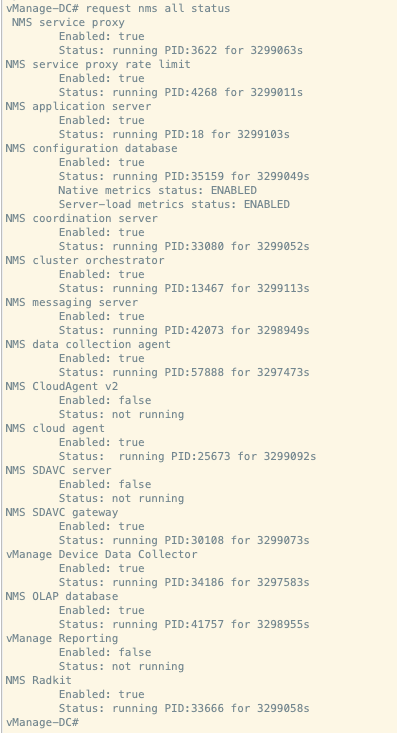
- Execute 'request nms all status' on all nodes in order to verify the status of services.
Expected output:
Verify docker container status post upgradation:
vmanage2# request nms container-manager dia
NMS container manager
Checking container-manager status
Listing all containers
------------------------
CONTAINER ID IMAGE COMMAND CREATED STATUS PORTS NAMES
378d13a98478 sd-wan/messaging-server:0.20.0 "/bin/bash /entrypoi…" 9 minutes ago Up 9 minutes (healthy) 127.0.0.1:4222->4222/tcp, 127.0.0.1:6222->6222/tcp, 127.0.0.1:8222->8222/tcp messaging-server
cf4f3dae69bc sd-wan/olap-db:24.3.6.48 "/usr/bin/tini -- /e…" 10 minutes ago Up 10 minutes (healthy) 127.0.0.1:8123->8123/tcp, 127.0.0.1:9363->9363/tcp olap-db
e6af832a551d sd-wan/configuration-db:4.4.38 "/usr/bin/tini -g --…" 10 minutes ago Up 10 minutes (healthy) 127.0.0.1:2004->2004/tcp, 127.0.0.1:5000->5000/tcp, 127.0.0.1:6000->6000/tcp, 127.0.0.1:6362->6362/tcp, 127.0.0.1:6372->6372/tcp, 127.0.0.1:7000->7000/tcp, 127.0.0.1:7473-7474->7473-7474/tcp, 127.0.0.1:7687-7688->7687-7688/tcp configuration-db
3ff5a7f12bbd sd-wan/coordination-server:3.8.4 "/docker-entrypoint.…" 10 minutes ago Up 10 minutes (healthy) 127.0.0.1:2181->2181/tcp, 127.0.0.1:2888->2888/tcp, 127.0.0.1:3888->3888/tcp, 127.0.0.1:4888->4888/tcp coordination-server
e065840d7736 sd-wan/application-server:24.0.1 "/usr/bin/tini -g --…" 3 days ago Up 11 minutes (healthy) base-application-server
3bdf71f009e9 sd-wan/cluster-orchestrator:1.0.1 "/entrypoint.sh" 3 days ago Up 11 minutes (healthy) 127.0.0.1:9090->9090/tcp, 127.0.0.1:9099->9099/tcp cluster-orchestrator
4c06c0be3efe sd-wan/vault:1.0.1 "docker-entrypoint.s…" 3 days ago Up 11 minutes (healthy) 8200/tcp, 127.0.0.1:8201-8202->8201-8202/tcp vault
Post-Upgrade Validation Checks
1. Software Version Verification
Verify that all controllers are running the correct software version.
2. SD-WAN Manager Service Status Verification
Confirm that all services on the SD-WAN manager servers are operational.
3. Inter-Controller Connection Verification
Verify control connections between all controllers.
4. Policy Activation Verification
Confirm that policies are properly activated on the SD-WAN manager servers.
5. Control Connection Distribution Verification
- Verify that control connections are properly distributed across all SD-WAN manager nodes.
- Navigate to Monitor > Network and verify the control connection column.
6. Site-Level Post-Upgrade Validation
Perform these validation tests on all sites where pre-upgrade checks were conducted:
a. Control Connection and BFD Session Verification
show sd-wan control connections
show sd-wan bfd sessions
b. Routing Verification
show ip route
show ip route vrf <vrf_id>
show sd-wan omp routes vpn <vpn_id>
c. Data Center Service Reachability
Verify reachability to all data center services.
d. Template Synchronization Verification
Verify that device templates are properly attached and synchronized post the upgrade.
e. Policy Verification from vSmart
Execute 'show sd-wan policy from-vsmart' in order to verify policy distribution.
f. User Acceptance Testing
Conduct user acceptance testing on all validated sites to ensure application functionality.
SD-WAN Manager Cluster Upgrade Procedure: Version 20.15.x to 26.x
Prerequisites
Note: Base version must be 20.15.x in order to upgrade to 26.x or later release. If current version is lower than 20.15.x, upgrade to 20.15.x relase first.
1. Controller Snapshots
Create complete snapshots of all SD-WAN controllers prior to beginning the upgrade process.
2. Configuration Database Backup
Execute a backup of the configuration database and store it in a location external to the SD-WAN manager server using therequest nms configuration-db backup path <path_and_filename>command.
3. Image copy to SD-WAN Manager Servers
Copy the 26.x upgrade image 'vmanage-26.1.1.2-x86_64.tar.gz' to SD-WAN manager repository.
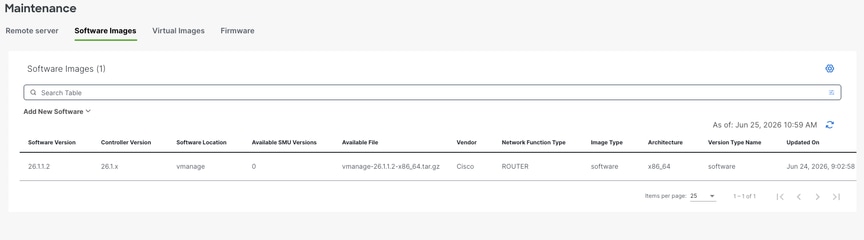
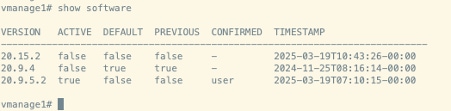
4. Software Inventory Management
- Execute theshow softwarecommand on each SD-WAN manager node in order to verify the installed software versions.
- Ensure that no more than two software images are installed on each SD-WAN manager node.
- If additional images are present, remove the obsolete installed images using therequest software remove <version>command.
Example output:
5. Verify container status
Verify docket container status using the command shown:
Vmanage1# request nms container-manager dia
NMS container manager
Checking container-manager status
Listing all containers
------------------------
CONTAINER ID IMAGE COMMAND CREATED STATUS PORTS NAMES
6cdef9e07916 sdwan/messaging-server:0.20.0 "/entrypoint.sh" 15 hours ago Up 15 hours (healthy) 127.0.0.1:4222->4222/tcp, 127.0.0.1:6222->6222/tcp, 127.0.0.1:8222->8222/tcp messaging-server
32672b00b5ea sdwan/olap-db:23.3.13.6 "/usr/bin/docker-ini..." 15 hours ago Up 15 hours (healthy) 127.0.0.1:8123->8123/tcp olap-db
fbc3fde2a0f2 sdwan/configuration-db:4.4.19 "/usr/bin/docker-ini..." 15 hours ago Up 15 hours (healthy) 127.0.0.1:5000->5000/tcp, 127.0.0.1:6000->6000/tcp, 127.0.0.1:6362->6362/tcp, 127.0.0.1:6372->6372/tcp, 127.0.0.1:7000->7000/tcp, 127.0.0.1:7473-7474->7473-7474/tcp, 127.0.0.1:7687-7688->7687-7688/tcp configuration-db
971b9040d741 sdwan/coordination-server:3.7.1 "/docker-entrypoint...." 15 hours ago Up 15 hours (healthy) 127.0.0.1:2181->2181/tcp, 127.0.0.1:2888->2888/tcp, 127.0.0.1:3888->3888/tcp coordination-server
069054ff3bc5 cloudagent-v2:3bd0f6c45478 "./entrypoint.sh" 15 hours ago Up 15 hours 127.0.0.1:9051-9052->9051-9052/tcp cloudagent-v2
e131691d5991 sdwan/ratelimit:latest "/usr/local/bin/rate..." 15 hours ago Up 15 hours (healthy) 6379/tcp, 127.0.0.1:8460-8462->8460-8462/tcp ratelimit
4b17b4f03a8f sdwan/reporting:latest "/sbin/tini -g -- py..." 15 hours ago Up 15 hours 80/tcp, 127.0.0.1:9080->9080/tcp reporting
f19cb88f758d sdwan/data-collection-agent:1.0.1 "/usr/bin/docker-ini..." 15 hours ago Up 15 hours (healthy) data-collection-agent
a882cfa868a0 sdwan/service-proxy:1.27.2 "/entrypoint.sh" 15 hours ago Up 15 hours (healthy) service-proxy
94e5db8df5d5 sdwan/vault:1.0.1 "docker-entrypoint.s..." 3 months ago Up 15 hours (healthy) 8200/tcp, 127.0.0.1:8201->8201/tcp vault
86598ddc4e42 sdwan/application-server:19.1.0 "/sbin/tini -g -- /e..." 4 months ago Up 15 hours (healthy) application-server
cad291476006 sdwan/device-data-collector:1.0.0 "/bin/sh -c /vMDDC/v..." 4 months ago Up 15 hours (healthy) 127.0.0.1:8129->8129/tcp device-data-collector
84baa8d2aa51 sdwan/host-agent:1.0.1 "/entrypoint.sh pyth..." 4 months ago Up 15 hours (healthy) 127.0.0.1:9099->9099/tcp host-agent
37ae467155e2 sdwan/cluster-oracle:1.0.1 "/entrypoint.sh java..." 4 months ago Up 15 hours (healthy) 127.0.0.1:9090->9090/tcp cluster-oracle
Pre-Upgrade Validation Checks
6. Control Connection Stability Verification
- Verify the stability of control connections between all SD-WAN controllers.
- Capture a screenshot of the SD-WAN manager dashboard for documentation purposes.
7. Site-Level Verification
Choose representative sites and capture these logs and outputs:
a. Control Connection Verification
show sd-wan control connections
b. BFD Session Verification
show sd-wan bfd sessions
c. Routing Table Verification
show ip route vrf <vrf_id>
show sd-wan omp routes vpn <vpn_id>
d. Application Service Testing
You must perform application service testing from a minimum of five branch locations.
8. vSmart Controller Verification
a. Control Connections
Execute 'show control connections' in order to verify that each vSmart maintains control connections with all controllers.
b. OMP Peer Status
Execute 'show omp peers' in order to verify the number of peers on each vSmart controller.
c. OMP Summary
Execute 'show omp summary' in order to verify overall OMP status.
Upgrade Procedure
Here are the high-level steps to be observed for the upgrade:
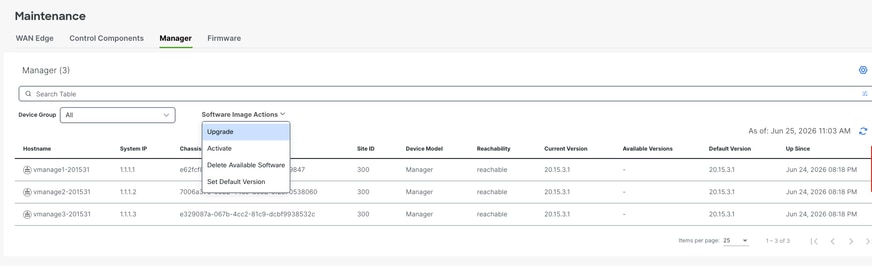
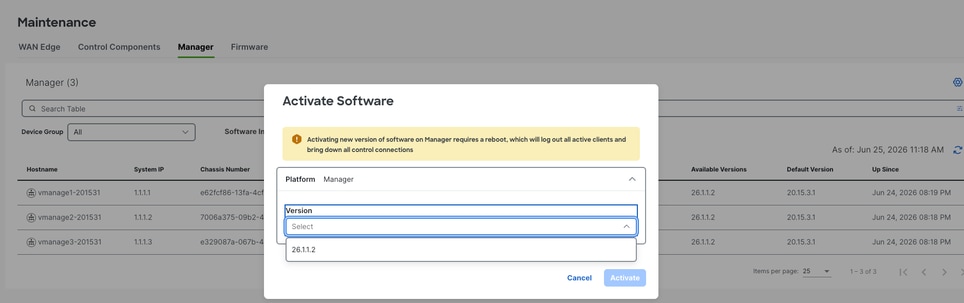
Navigate toMaintainence > Software Upgrade > Manager > Software Image Actionand chooseUpgrade. Image will be installed on all three nodes.
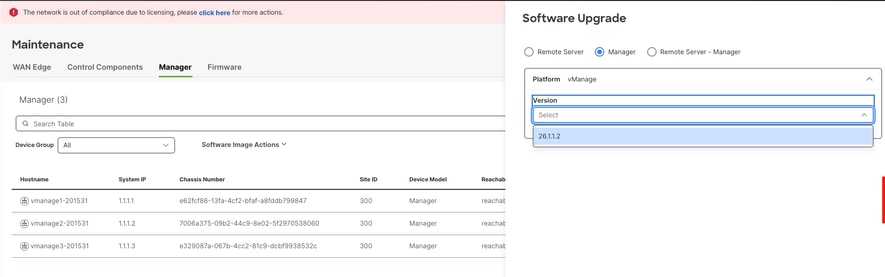
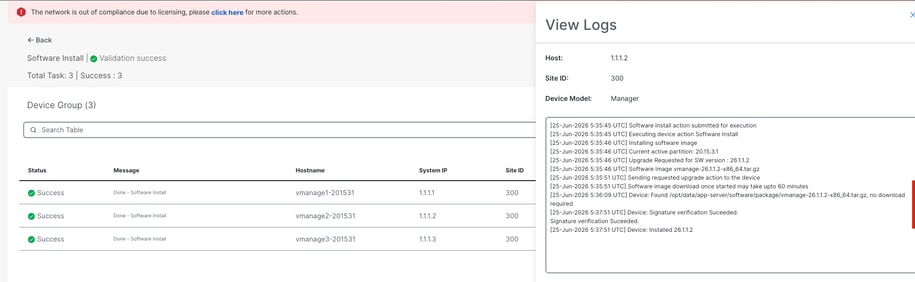
Once installation is complete, activate 26.1.1.2 image. All three nodes will be rebooted sequentially.
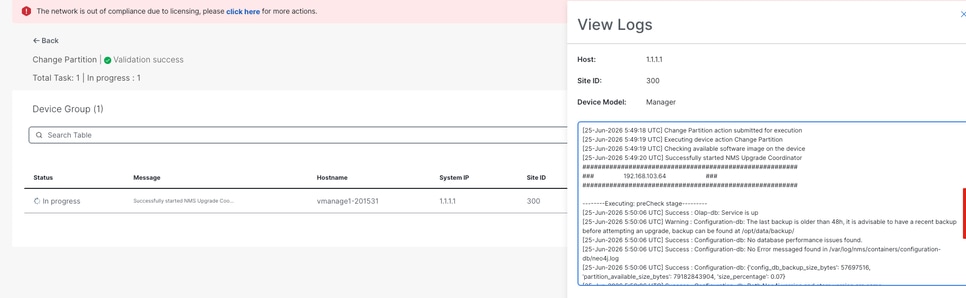
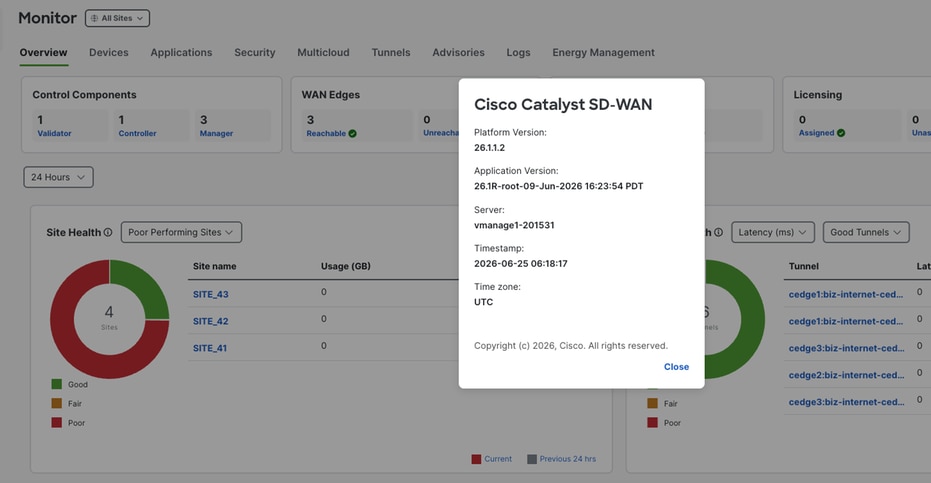
Service Status Verification
- Allow approximately 30 minutes after the reboot for services to initialize.
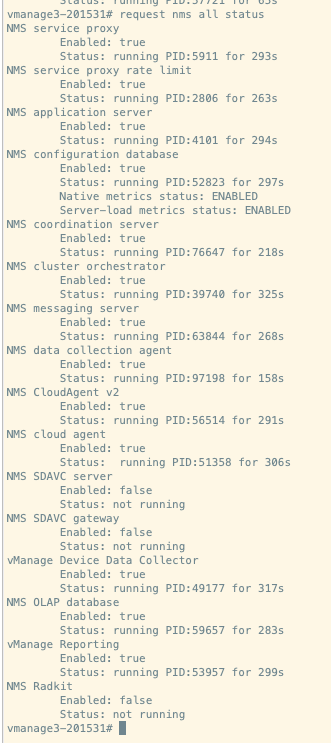
- Execute 'request nms all status' on all nodes in order to verify the status of services.
Expected output:
Verify docker container status post upgradation:
vmanage3# request nms container-manager dia
NMS container manager
Checking container-manager status
Listing all containers
------------------------
Listing all containers
------------------------
CONTAINER ID IMAGE COMMAND CREATED STATUS PORTS NAMES
b296931c434e sdwan/coordination-server:3.8.4 "/docker-entrypoint...." 5 minutes ago Up 5 minutes (healthy) 127.0.0.1:2181->2181/tcp, 127.0.0.1:2888->2888/tcp, 127.0.0.1:3888->3888/tcp, 127.0.0.1:4888->4888/tcp coordination-server
27c014458993 sdwan/messaging-server:0.20.0 "/bin/bash /entrypoi..." 6 minutes ago Up 6 minutes (healthy) 127.0.0.1:4222->4222/tcp, 127.0.0.1:6222->6222/tcp, 127.0.0.1:8222->8222/tcp messaging-server
d2708bb40157 sdwan/olap-db:25.3.6.56 "/usr/bin/tini -- /e..." 6 minutes ago Up 6 minutes (healthy) 127.0.0.1:8123->8123/tcp, 127.0.0.1:9363->9363/tcp olap-db
7de033da69ca sdwan/cloudagent-v2:1.0.0 "./entrypoint.sh" 6 minutes ago Up 6 minutes (healthy) 127.0.0.1:9051-9052->9051-9052/tcp cloudagent-v2
0722e097f24f sdwan/reporting:latest "/usr/bin/tini -g --..." 6 minutes ago Up 6 minutes 80/tcp, 127.0.0.1:9080->9080/tcp reporting
914ca8196acb sdwan/configuration-db:4.4.44 "/usr/bin/tini -g --..." 6 minutes ago Up 6 minutes (healthy) 127.0.0.1:2004->2004/tcp, 127.0.0.1:5000->5000/tcp, 127.0.0.1:6000->6000/tcp, 127.0.0.1:6362->6362/tcp, 127.0.0.1:6372->6372/tcp, 127.0.0.1:7000->7000/tcp, 127.0.0.1:7473-7474->7473-7474/tcp, 127.0.0.1:7687-7688->7687-7688/tcp configuration-db
176e7392ffae sdwan/application-server:24.0.1 "/usr/bin/tini -g --..." 7 minutes ago Up 7 minutes (healthy) base-application-server
fbc7c8c0771c sdwan/cluster-orchestrator:1.0.1 "/entrypoint.sh" 7 minutes ago Up 7 minutes (healthy) 127.0.0.1:9090->9090/tcp, 127.0.0.1:9099->9099/tcp cluster-orchestrator
07dad5ed4072 sdwan/vault:1.0.1 "docker-entrypoint.s..." 8 minutes ago Up 8 minutes (healthy) 8200/tcp, 127.0.0.1:8201-8202->8201-8202/tcp vault
Post-Upgrade Validation Checks
1. Software Version Verification
Verify that all controllers are running the correct software version.
2. SD-WAN Manager Service Status Verification
Confirm that all services on the SD-WAN manager servers are operational.
3. Inter-Controller Connection Verification
Verify control connections between all controllers.
4. Policy Activation Verification
Confirm that policies are properly activated on the SD-WAN manager servers.
5. Control Connection Distribution Verification
- Verify that control connections are properly distributed across all SD-WAN manager nodes.
- Navigate toMonitor > Networkand verify the control connection column.
6. Site-Level Post-Upgrade Validation
Perform these validation tests on all sites where pre-upgrade checks were conducted:
a. Control Connection and BFD Session Verification
show sd-wan control connections
show sd-wan bfd sessions
b. Routing Verification
show ip route
show ip route vrf <vrf_id>
show sd-wan omp routes vpn <vpn_id>
c. Data Center Service Reachability
Verify reachability to all data center services.
d. Template Synchronization Verification
Verify that device templates are properly attached and synchronized post the upgrade.
e. Policy Verification from vSmart
Execute 'show sd-wan policy from-vsmart' in order to verify policy distribution.
f. User Acceptance Testing
Conduct user acceptance testing on all validated sites to ensure application functionality.
SD-WAN Manager Cluster Upgrade Procedure: Version 20.18.x to 26.x
Prerequisites
1. Controller Snapshots
Create complete snapshots of all SD-WAN controllers prior to beginning the upgrade process.
2. Configuration Database Backup
Execute a backup of the configuration database and store it in a location external to the SD-WAN manager server using therequest nms configuration-db backup path <path_and_filename>command.
3. Image copy to SD-WAN Manager Servers
Copy the 26.x upgrade image 'vmanage-26.1.1.2-x86_64.tar.gz' to SD-WAN manager repository.
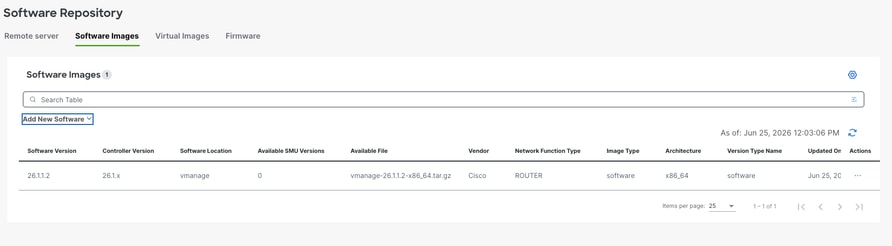
4. Software Inventory Management
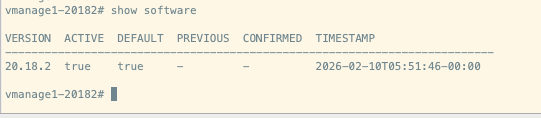
- Execute theshow softwarecommand on each SD-WAN manager node in order to verify the installed software versions.
- Ensure that no more than two software images are installed on each SD-WAN manager node.
- If additional images are present, remove the obsolete installed images using therequest software remove <version>command.
Example output:
5. Verify container status
Verify docket container status using the command shown:
Vmanage1# request nms container-manager dia
NMS container manager
Checking container-manager status
Listing all containers
------------------------
CONTAINER ID IMAGE COMMAND CREATED STATUS PORTS NAMES
ef4ab42dcb9e sdwan/messaging-server:0.20.0 "/bin/bash /entrypoi..." 29 minutes ago Up 29 minutes (healthy) 127.0.0.1:4222->4222/tcp, 127.0.0.1:6222->6222/tcp, 127.0.0.1:8222->8222/tcp messaging-server
019a91df545a sdwan/olap-db:24.3.6.48 "/usr/bin/tini -- /e..." 29 minutes ago Up 29 minutes (healthy) 127.0.0.1:8123->8123/tcp, 127.0.0.1:9363->9363/tcp olap-db
1ef330f425eb sdwan/coordination-server:3.8.4 "/docker-entrypoint...." 29 minutes ago Up 29 minutes (healthy) 127.0.0.1:2181->2181/tcp, 127.0.0.1:2888->2888/tcp, 127.0.0.1:3888->3888/tcp, 127.0.0.1:4888->4888/tcp coordination-server
ee48bdd46e11 sdwan/configuration-db:4.4.38 "/usr/bin/tini -g --..." 30 minutes ago Up 30 minutes (healthy) 127.0.0.1:2004->2004/tcp, 127.0.0.1:5000->5000/tcp, 127.0.0.1:6000->6000/tcp, 127.0.0.1:6362->6362/tcp, 127.0.0.1:6372->6372/tcp, 127.0.0.1:7000->7000/tcp, 127.0.0.1:7473-7474->7473-7474/tcp, 127.0.0.1:7687-7688->7687-7688/tcp configuration-db
23e833bac9a9 sdwan/vault:1.0.1 "docker-entrypoint.s..." 4 months ago Up 30 minutes (healthy) 8200/tcp, 127.0.0.1:8201-8202->8201-8202/tcp vault
75360403c8d6 sdwan/application-server:24.0.1 "/usr/bin/tini -g --..." 4 months ago Up 30 minutes (healthy) base-application-server
a371e8c3771b sdwan/cluster-orchestrator:1.0.1 "/entrypoint.sh" 4 months ago Up 30 minutes (healthy) 127.0.0.1:9090->9090/tcp, 127.0.0.1:9099->9099/tcp cluster-orchestrator
Pre-Upgrade Validation Checks
6. Control Connection Stability Verification
- Verify the stability of control connections between all SD-WAN controllers.
- Capture a screenshot of the SD-WAN manager dashboard for documentation purposes.
7. Site-Level Verification
Choose representative sites and capture these logs and outputs:
a. Control Connection Verification
show sd-wan control connections
b. BFD Session Verification
show sd-wan bfd sessions
c. Routing Table Verification
show ip route vrf <vrf_id>
show sd-wan omp routes vpn <vpn_id>
d. Application Service Testing
You must perform application service testing from a minimum of five branch locations.
8. vSmart Controller Verification
a. Control Connections
Execute 'show control connections' in order to verify that each vSmart maintains control connections with all controllers.
b. OMP Peer Status
Execute 'show omp peers' in order to verify the number of peers on each vSmart controller.
c. OMP Summary
Execute 'show omp summary' in order to verify overall OMP status.
Upgrade Procedure
Here are the high-level steps to be observed for the upgrade:
Navigate toMaintainence > Software Upgrade > Control Components > Actionand chooseUpgrade. Image will be installed on all three nodes.
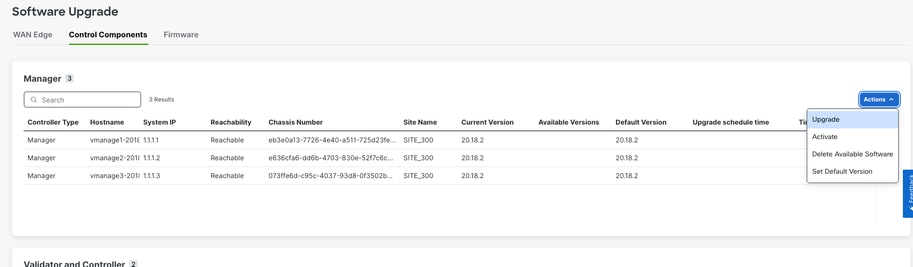
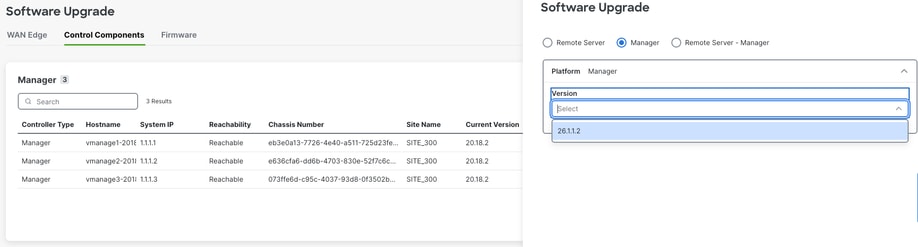
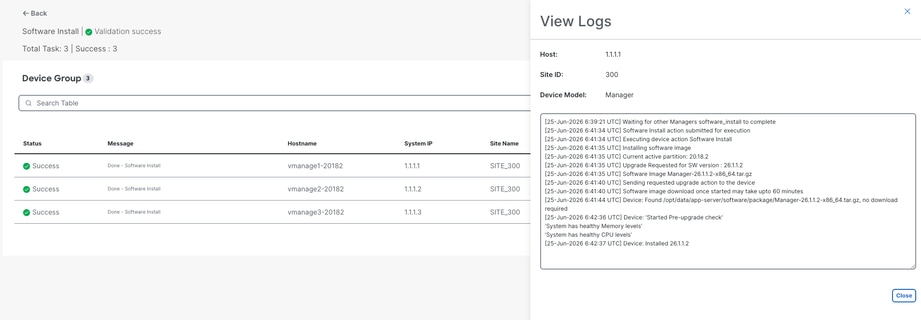
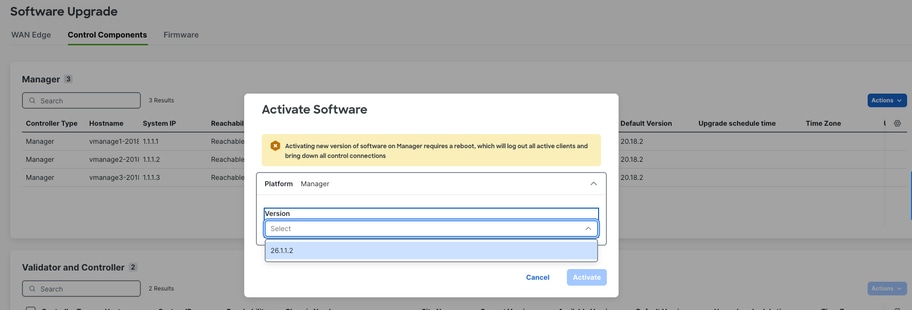
Once installation is complete, activate 26.1.1.2 image. All three nodes will be rebooted.
Note: Upon activating the image, vManage nodes will reboot sequentially not simultaneously.
Service Status Verification
- Allow approximately 30-45 minutes after the reboot for services to initialize.
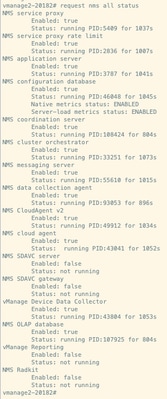
- Execute 'request nms all status' on all nodes in order to verify the status of services.
Expected output:
Verify docker container status post upgradation:
vmanage3# request nms container-manager dia
NMS container manager
Checking container-manager status
Listing all containers
------------------------
Listing all containers
------------------------
CONTAINER ID IMAGE COMMAND CREATED STATUS PORTS NAMES
b998e38656af sdwan/coordination-server:3.8.4 "/docker-entrypoint...." 14 minutes ago Up 14 minutes (healthy) 127.0.0.1:2181->2181/tcp, 127.0.0.1:2888->2888/tcp, 127.0.0.1:3888->3888/tcp, 127.0.0.1:4888->4888/tcp coordination-server
d0cc60f56b2e sdwan/olap-db:25.3.6.56 "/usr/bin/tini -- /e..." 14 minutes ago Up 14 minutes (healthy) 127.0.0.1:8123->8123/tcp, 127.0.0.1:9363->9363/tcp olap-db
718257b77966 sdwan/messaging-server:0.20.0 "/bin/bash /entrypoi..." 17 minutes ago Up 17 minutes (healthy) 127.0.0.1:4222->4222/tcp, 127.0.0.1:6222->6222/tcp, 127.0.0.1:8222->8222/tcp messaging-server
77b9073bb3eb sdwan/cloudagent-v2:1.0.0 "./entrypoint.sh" 18 minutes ago Up 18 minutes (healthy) 127.0.0.1:9051-9052->9051-9052/tcp cloudagent-v2
2c7978562c4b sdwan/configuration-db:4.4.44 "/usr/bin/tini -g --..." 18 minutes ago Up 18 minutes (healthy) 127.0.0.1:2004->2004/tcp, 127.0.0.1:5000->5000/tcp, 127.0.0.1:6000->6000/tcp, 127.0.0.1:6362->6362/tcp, 127.0.0.1:6372->6372/tcp, 127.0.0.1:7000->7000/tcp, 127.0.0.1:7473-7474->7473-7474/tcp, 127.0.0.1:7687-7688->7687-7688/tcp configuration-db
9941b541f493 sdwan/application-server:24.0.1 "/usr/bin/tini -g --..." 18 minutes ago Up 18 minutes (healthy) base-application-server
a619c46600f6 sdwan/cluster-orchestrator:1.0.1 "/entrypoint.sh" 18 minutes ago Up 18 minutes (healthy) 127.0.0.1:9090->9090/tcp, 127.0.0.1:9099->9099/tcp cluster-orchestrator
07f09faeaf59 sdwan/vault:1.0.1 "docker-entrypoint.s..." 19 minutes ago Up 19 minutes (healthy) 8200/tcp, 127.0.0.1:8201-8202->8201-8202/tcp vault
Post-Upgrade Validation Checks
1. Software Version Verification
Verify that all controllers are running the correct software version.
2. SD-WAN Manager Service Status Verification
Confirm that all services on the SD-WAN manager servers are operational.
3. Inter-Controller Connection Verification
Verify control connections between all controllers.
4. Policy Activation Verification
Confirm that policies are properly activated on the SD-WAN manager servers.
5. Control Connection Distribution Verification
- Verify that control connections are properly distributed across all SD-WAN manager nodes.
- Navigate toMonitor > Networkand verify the control connection column.
6. Site-Level Post-Upgrade Validation
Perform these validation tests on all sites where pre-upgrade checks were conducted:
a. Control Connection and BFD Session Verification
show sd-wan control connections
show sd-wan bfd sessions
b. Routing Verification
show ip route
show ip route vrf <vrf_id>
show sd-wan omp routes vpn <vpn_id>
c. Data Center Service Reachability
Verify reachability to all data center services.
d. Template Synchronization Verification
Verify that device templates are properly attached and synchronized post the upgrade.
e. Policy Verification from vSmart
Execute 'show sd-wan policy from-vsmart' in order to verify policy distribution.
f. User Acceptance Testing
Conduct user acceptance testing on all validated sites to ensure application functionality.
Revision History
| Revision | Publish Date | Comments |
|---|---|---|
2.0 |
29-Jun-2026
|
Updated Release |
1.0 |
04-Dec-2025
|
Initial Release |

 Feedback
Contact Cisco
- Open a Support Case

- (Requires a Cisco Service Contract)