Deployment Server Agent Management page fails to load after upgrading to Splunk Enterprise 10.2
Available Languages
Applicability
Splunk Enterprise 10.2.0 Deployment ServerDescription
Following an upgrade to Splunk version 10.2, the Deployment Server may encounter an issue where the Agent Management page does not load and shows the following error:
Agent management unavailable
There is an error in your serverclass.conf file, which is preventing the deployment server from initialization.
Screenshot of the error as below.
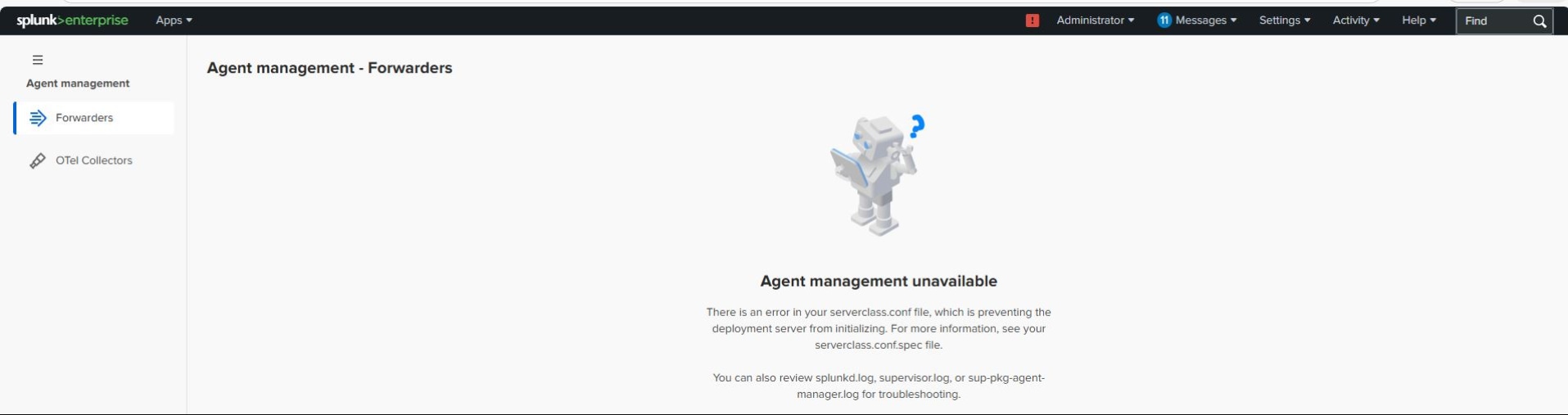
While the Agent Management page is not visible in the web interface, the Deployment Server’s ability to push apps and manage forwarders via configuration files remains unaffected.

Investigation
Additional investigation shows that this issue occurs when the Deployment Server on version 10.2 is also acting in other roles, such as a Search Head, Cluster Manager, or Distributed Monitoring Console. This can be validated by reviewing Settings > Distributed Search > Search Peers on the Deployment Server; if search peers are configured and enabled, the page fails to load.
Resolution
The issue was resolved by upgrading the Deployment Server to Splunk version 10.2.1, in which this behavior has been fixed. After the upgrade, the Agent Management page loaded successfully without any issues.
Related Links
After upgrade 10.0 to 10.2.0, Forwarder Management Web UI is unavailable
Splunk Enterprise 10.2.1 fixed issues
Revision History
| Revision | Publish Date | Comments |
|---|---|---|
1.0 |
01-Oct-2026
|
Initial Release |
 Feedback
Contact Cisco
- Open a Support Case

- (Requires a Cisco Service Contract)