Splunk Add-on for AWS : Incremental S3 input is failing which is configured using AWS China account.
Available Languages
Applicability
Splunk Add-on for Amazon Web Services v7.8.0 Splunk Enterprise Splunk CloudDescription
In the Splunk Add-on for Amazon Web Services (AWS) v7.8.0 the Incremental S3 Input is failing which is configured using the AWS China Account and by checking the Internal logs for that Input found the Error message: "An error occurred (PermanentRedirect) when calling the ListObjects operation."
However, the Generic S3 input which utilises the same S3 Bucket is functioning as expected.
Investigation
Upon Investigation, Ran the below SPL Query to check detailed Error logs In the Internal logs
SPL:
index="_internal" datainput="input_name" level=ERRORAs a result found the below Error Internal logs messages continuously whenever an Incremental S3 input is executed.
Errors:
2024-11-12 13:40:21,536 level=ERROR pid=4333 tid=MainThread logger=splunk_ta_aws.modinputs.incremental_s3 pos=utils.py:wrapper:74 | datainput="input_name" start_time=1731415209 | message="Data input was interrupted by an unhandled exception."
Traceback (most recent call last):
  File "/opt/splunk/etc/apps/Splunk_TA_aws/lib/splunksdc/utils.py", line 72, in wrapper
    return func(*args, **kwargs)
  File "/opt/splunk/etc/apps/Splunk_TA_aws/bin/splunk_ta_aws/modinputs/incremental_s3/__init__.py", line 234, in run
    return handler.run(app, config)
  File "/opt/splunk/etc/apps/Splunk_TA_aws/bin/splunk_ta_aws/modinputs/incremental_s3/handler.py", line 81, in run
    tasks = self._delegate.create_tasks(s3_obj, bucket, data_input_name)
  File "/opt/splunk/etc/apps/Splunk_TA_aws/bin/splunk_ta_aws/modinputs/incremental_s3/cloudtrail_logs.py", line 52, in create_tasks
    partitions = self._enumerate_partitions(s3, bucket)
  File "/opt/splunk/etc/apps/Splunk_TA_aws/bin/splunk_ta_aws/modinputs/incremental_s3/cloudtrail_logs.py", line 61, in _enumerate_partitions
    self._get_organization_partitions(s3, bucket, prefix, partitions)
  File "/opt/splunk/etc/apps/Splunk_TA_aws/bin/splunk_ta_aws/modinputs/incremental_s3/cloudtrail_logs.py", line 68, in _get_organization_partitions
    for prefix in bucket.list_folders(s3, prefix):
  File "/opt/splunk/etc/apps/Splunk_TA_aws/bin/splunk_ta_aws/common/s3.py", line 64, in list_folders
    response = s3.list_objects(Bucket=self._name, Delimiter="/", Prefix=prefix)
  File "/opt/splunk/etc/apps/Splunk_TA_aws/lib/botocore/client.py", line 535, in _api_call
    return self._make_api_call(operation_name, kwargs)
  File "/opt/splunk/etc/apps/Splunk_TA_aws/lib/botocore/client.py", line 983, in _make_api_call
    raise error_class(parsed_response, operation_name)
botocore.exceptions.ClientError: An error occurred (PermanentRedirect) when calling the ListObjects operation: The bucket you are attempting to access must be addressed using the specified endpoint. Please send all future requests to this endpoint.
The above Error message Indicates that the API Requests are not hitting the correct AWS Region or the Endpoint
In the incremental S3 input, bucket_region and host_name get created automatically when inputs are created from the UI. However, If the Input is configured by the AWS China Account, the bucket_region and host_name are created wrongly due to which the input is not working and continuously throwing the above mentioned Error.
RCA from AWS Add-on Code Review
In the below-highlighted code, for China account, it will always go into the else condition. and in that, the group(1) is taken from matched pattern to the regex of config[host_name].
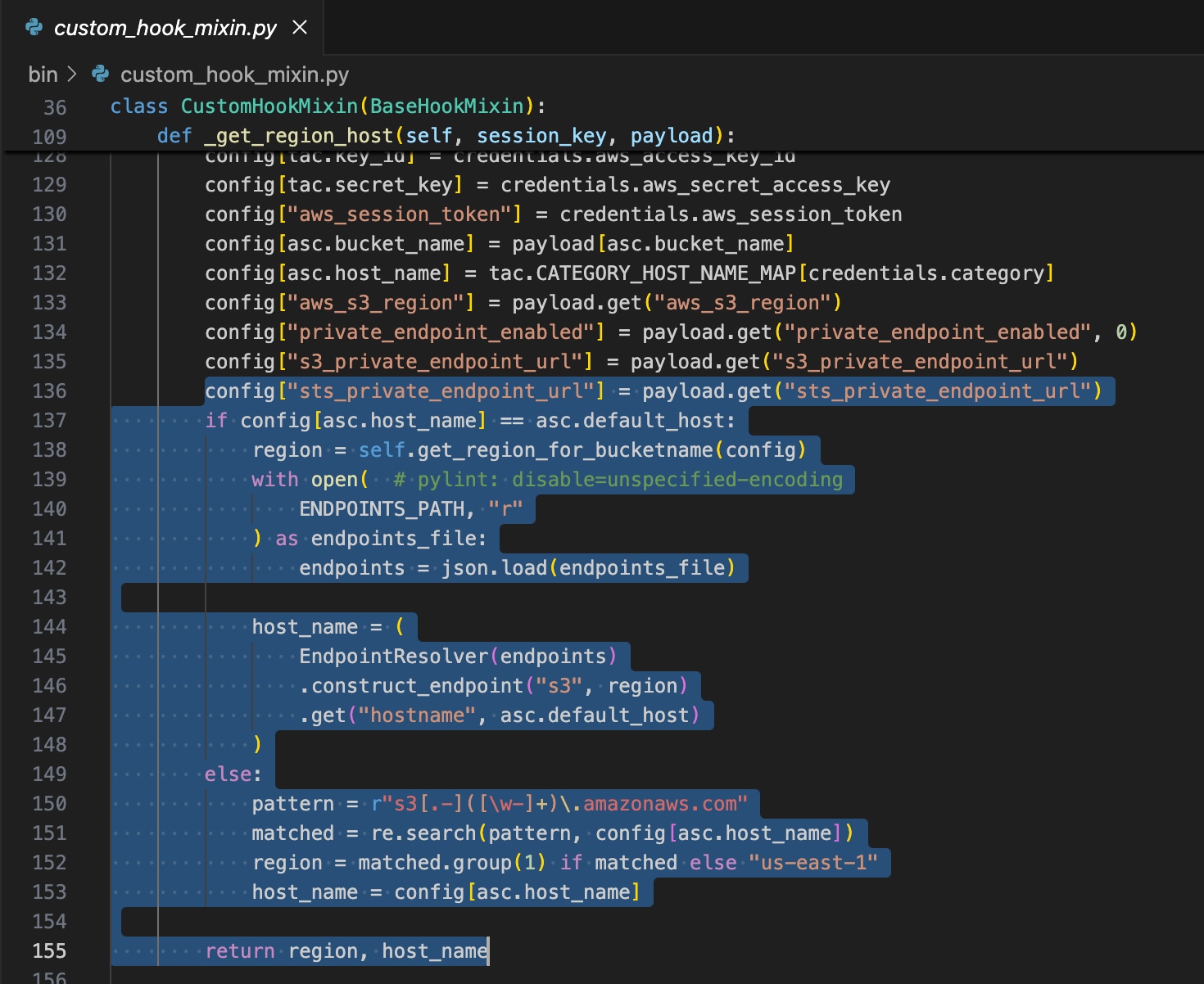
For the China account the host_name is hardcoded in the ta_aws_conts.py file and the value is s3.cn-north-1.amazonaws.com.cn as shown in the below screenshot.
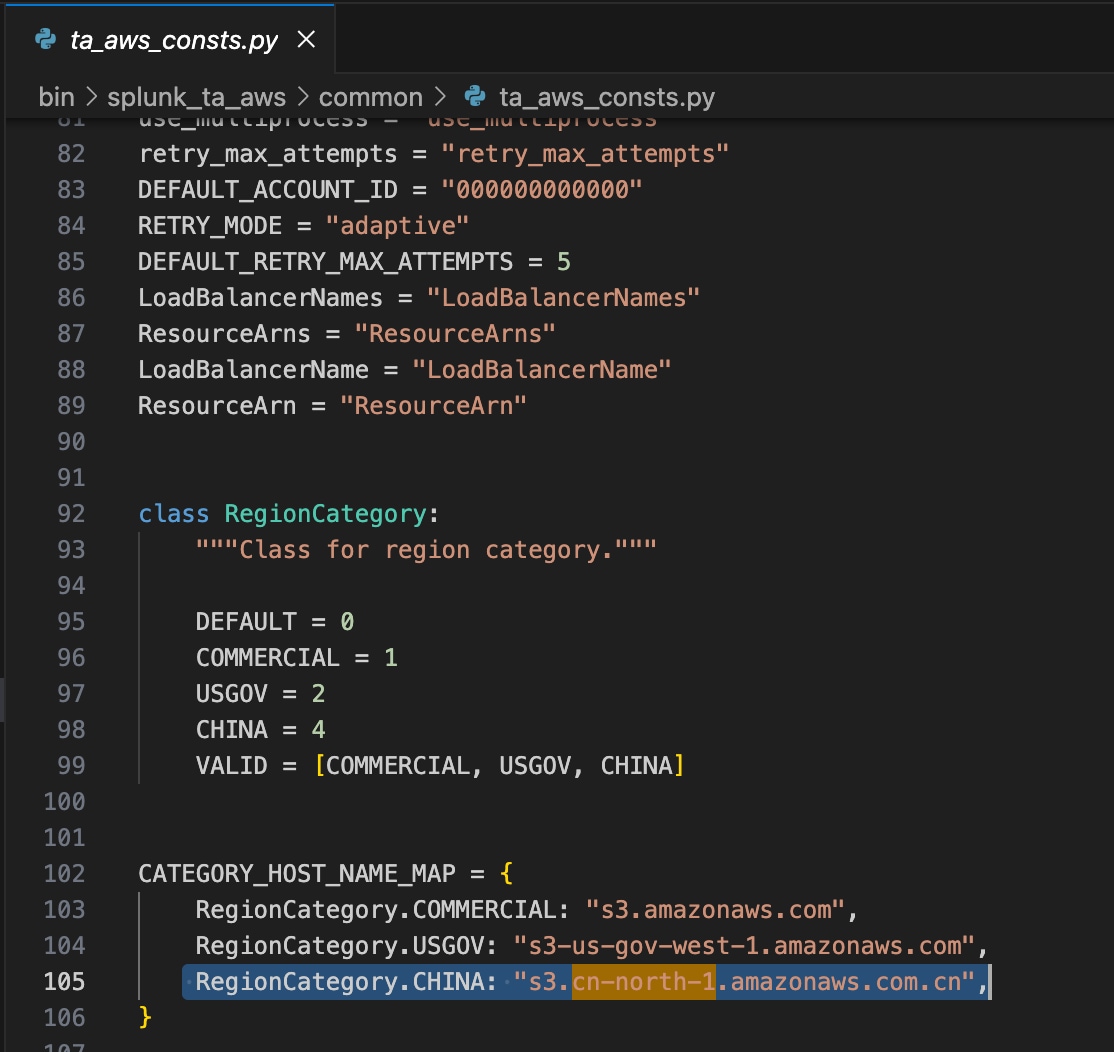
Also, the bucket_region value is taken as matched group 1. So for this s3.cn-north-1.amazonaws.com.cn, the matched group will be cn-north-1 as bucket_region. Hence, it will always take cn-north-1 as bucket_region for incremental s3 input in which the China account is used.
Resolution
The above mentioned Issue is a known Issue acknowledged by the Engineering team and they will fix the Issue in the upcoming release of the Add-on. Currently there is no ETA is present for the same.
As a workaround, Generic S3 input can be used instead of Incremental S3 input or the S3 Bucket region should be cn-north-1 in the AWS end to make the input work
Revision History
| Revision | Publish Date | Comments |
|---|---|---|
1.0 |
29-Sep-2026
|
Initial Release |
 Feedback
Contact Cisco
- Open a Support Case

- (Requires a Cisco Service Contract)
This Document Applies to These Products
Related Articles
- The Splunk Add-on for AWS : Some event are missing for SQS-based-S3 input
- Data duplication while collecting logs from S3 bucket via incremental S3 input in Splunk Addon for AWS.
- While configuring Generic S3 input in the Splunk Add-on for AWS, it is failing due to Missing Permission Issue.
- Generic S3 input stopped collecting new logs configured in Splunk Add-on for Amazon Web Services(AWS)