The Splunk Add-on for AWS : Some event are missing for SQS-based-S3 input
Available Languages
Applicability
Splunk Enterprise Splunk Cloud Splunk add-on & Add-onDescription
When a user tries to bring the event from their Amazon Web Service(AWS) using the Splunk Add-on for Amazon Web Services and with SQS-based S3 input, It throws the following error messages for some events.
botocore.exceptions.ClientError: An error occurred (PreconditionFailed) when calling the GetObject operation: At least one of the pre-conditions you specified did not holdInvestigation
Upon checking the internal logs with the below SPL:
index=_internal sourcetype="*aws*" datainput="<input-name>" log_level="ERROR"Below are the error messages which are present in the logs:
2024-09-05 00:00:10,809 level=ERROR pid=10059 tid=Thread-6 logger=splunk_ta_aws.modinputs.sqs_based_s3.handler pos=handler.py:_download:712 | datainput="axwayna-guardduty" start_time=1725494178, message_id="25ca84b7-df5f-40ba-a703-b034e60b6804" created=1725494410.508467 expires=1725494710.5084844 job_id=1c9144ca-d767-4d53-81ed-1058453f9706 | message="Failed to download file." uri="s3://axway/AWSLogs/<account ID>/GuardDuty/us-east-1/2024/09/05/b3fa32f-c4bb-3305-b49c-79b964801f58.jsonl.gz"2024-09-05 00:00:10,810 level=ERROR pid=10059 tid=Thread-6 logger=splunk_ta_aws.modinputs.sqs_based_s3.handler pos=handler.py:_process:507 | datainput="axwayna-guardduty" start_time=1725494178, message_id="25ca84b7-df5f-40ba-a703-b034e60b6804" created=1725494410.508467 expires=1725494710.5084844 job_id=1c9144ca-d767-4d53-81ed-1058453f9706 | message="An error occurred while processing the message."
Traceback (most recent call last):
  File "/opt/splunk/etc/apps/Splunk_TA_aws/bin/splunk_ta_aws/modinputs/sqs_based_s3/handler.py", line 469, in _process
    headers = self._download(record, cache, session)
  File "/opt/splunk/etc/apps/Splunk_TA_aws/bin/splunk_ta_aws/modinputs/sqs_based_s3/handler.py", line 710, in _download
    return self._s3_agent.download(record, cache, session)
  File "/opt/splunk/etc/apps/Splunk_TA_aws/bin/splunk_ta_aws/modinputs/sqs_based_s3/handler.py", line 892, in download
    return bucket.fetch(s3_bkt, key, fileobj, **condition)
  File "/opt/splunk/etc/apps/Splunk_TA_aws/bin/splunk_ta_aws/common/s3.py", line 84, in fetch
    response = client.get_object(Bucket=bucket, Key=key, **kwargs)
  File "/opt/splunk/etc/apps/Splunk_TA_aws/lib/botocore/client.py", line 535, in _api_call
    return self._make_api_call(operation_name, kwargs)
  File "/opt/splunk/etc/apps/Splunk_TA_aws/lib/botocore/client.py", line 983, in _make_api_call
    raise error_class(parsed_response, operation_name)
botocore.exceptions.ClientError: An error occurred (PreconditionFailed) when calling the GetObject operation: At least one of the pre-conditions you specified did not hold
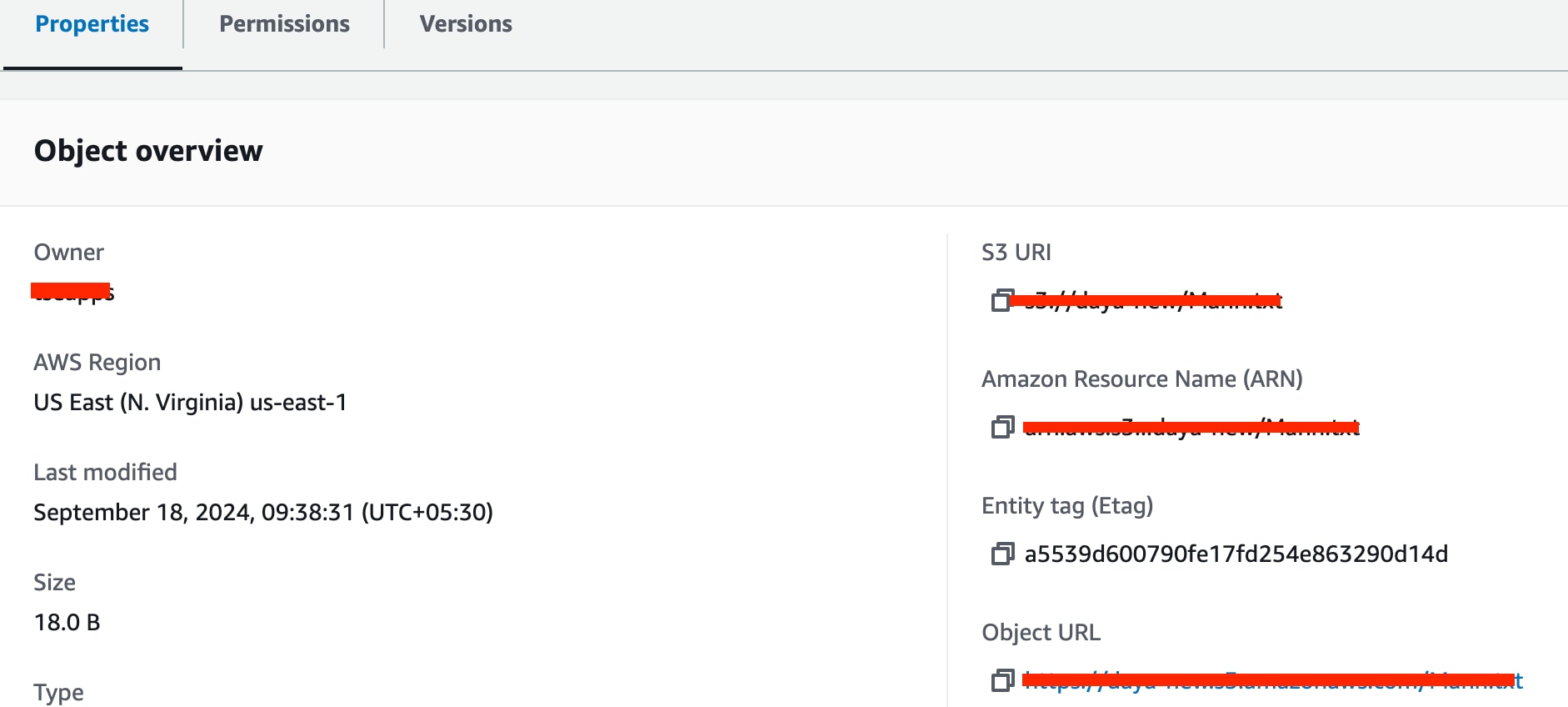
Further investigation revealed that there was a condition mentioned for SQS-based S3 input in the add-on, according to that eTAG present in the body of the notification(SNS) needs to be matched with the eTAG of an actual object. if the condition is not met then it throws an error.
Please follow the below steps to check whether the eTAG of notification for message ID is matched with the actual object or not:
1. To review eTAG from the notification's Body Navigate to the configured SQS queue --> click on send and receive messages --> click on Poll for messages --> select message ID that gives the error --> Search for eTAG on the Body.
2. To search eTAG for an object, navigate the object path mentioned in the value of the key located in the notification's Body --> Click on an object --> In the Property --> Object overview, Entity tag (Etag) as shown in the below image :
Resolution
To resolve this issue, need to check with the AWS team for further investigation to determine the possible reason for the eTAG change.
Revision History
| Revision | Publish Date | Comments |
|---|---|---|
1.0 |
29-Sep-2026
|
Initial Release |
 Feedback
Contact Cisco
- Open a Support Case

- (Requires a Cisco Service Contract)