Submit a BroadWorks License Request
Available Languages
Introduction
This document describes how to submit a BroadWorks license request using the Cisco Support Case Manager (SCM) Portal.
Request using the Cisco Support Case Manager (SCM) Portal
- Log In
Sign into Cisco SCM Portal.
- Start a Case
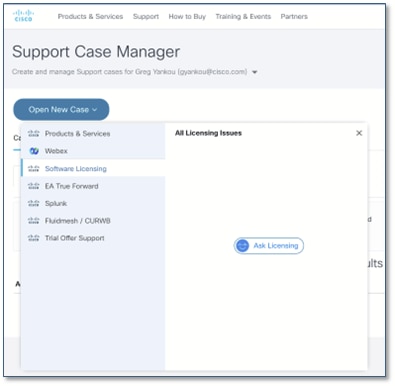
- Click “Create New Case” on the upper left side.
- Click “Software Licensing” on the left-hand sidebar.
- Click “Ask Licensing” on the right-hand sidebar.
- Specify BroadWorks
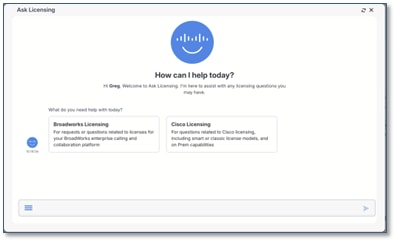
- Ignore the four displayed license buttons, as these are not required for this process.
- Type BroadWorks directly into the message box at the bottom of the screen.
- Click the blue arrow to submit your entry.
- Choose the Category
There are 15 BroadWorks license options organized into three main categories. Refer to this table to identify the correct category for your request and select it.
Category Subcategory Notes Order Fulfillment Perpetual Order Non-subscription orders. New Subscription Deployment Can require WBS connection for usage reporting and the decommissioning of EOL services (such as BTBC). Subscription Renewal Temporary Licenses New Preorder Temp Extend Existing Temp Provide reason for extension. If expiring due to end of term, contact your Account Team for a new order. Requires additional approval time. System Modifications Hardware Swap AS and MS clusters can require a Certificate of Removal. NFM Fingerprint Update Provide V1.1 version of fingerprints. Release Change Specify the license release (such as R26), not the software release Convert Clusters to ADP XSP and PS clusters are converted to ADP on R25+ Convert License-Server Binding from UUID to NFM Certificate of removal could be required. Product Reallocation Specify clusters and Products. Only Products can be moved; Packs cannot. Add/Remove Servers Add/Remove Clusters Add/Remove System General BroadWorks License Question Specific to license files. Contact your Account Team for Capacity or TAC for Installation instructions. 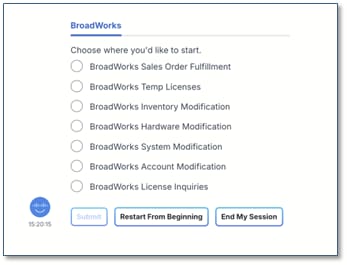
- Choose the Subcategory
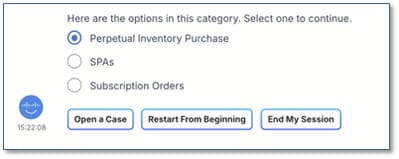
Select the subcategory that best matches your needs and click Continue.
- Confirm Case Type
If you are prompted to confirm your choice, select Create a Support Case. As this is the only option currently available for BroadWorks, simply select it to proceed.
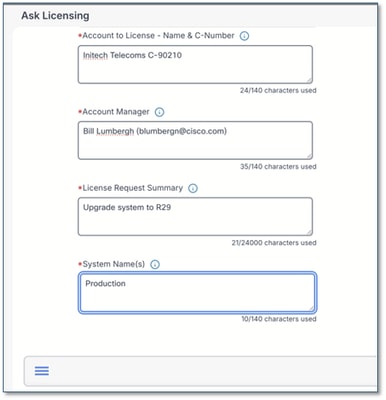
- Fill in the form

- Fields marked with a red asterisk (*) are required.
- Hover over the blue info icon (i) for field-specific guidance.
- Submit Your Request
Click Submit at the bottom of the form to generate your case.

Important note on response times: You could see a message stating that "having information available when connecting to an agent can shorten the time to resolution." This refers to ensuring your case details are complete, which helps the assigned agent resolve your request more efficiently. BroadWorks Licensing does not offer live chat; all communication is handled directly through your case record.
- Confirmation and Case Access
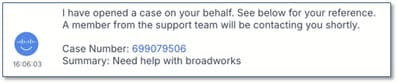
Once your case is submitted, you receive a confirmation containing a link to your case number. Click this link to open the request in the SCM, where you can add additional notes or upload files—such as tech-support reports—as needed.
Additional Notes and Tips
- Processing Times: Typical fulfillment takes 5–7 business days. This is an estimate, not a guarantee. Some requests can require additional time for cross-departmental approvals (such as Finance, Legal, or Product).
- Avoid Delays: ensure your request is clear, complete, and unambiguous.
- Proactive Monitoring: Monitor your license consumption to maintain operational headroom. Submit requests well in advance to avoid operational blockages and maintenance window scheduling challenges.
- Emergency Procedures: The BroadWorks licensing team operates Monday–Friday, 8:00 AM – 5:00 PM EST. If an emergency impacts your live production system:
- Open an SCM BroadWorks license ticket with all relevant details.
- Open a critical TAC case and reference your SCM ticket number to expedite the request.
- Accessing SCM
- If you encounter issues accessing SCM, create or update your profile via Cisco Profile Manager.
- For phone support, visit Cisco Worldwide Contacts (US support number is 1 800 553 2447).
- Communication
- All correspondence must occur within the ticket.
- When emailing, include your case number at the start of the email subject line and CC attach@cisco.com to ensure the email is added to the ticket.
- The SCM “Chat Now” feature is not configured to support BroadWorks license requests.
- Finding Required Data
Some of the required data can be found in your current license files. Example:

- Documentation: Providing complete, clear information—including tech-support files or GET outputs from your AS cluster—is the best way to prevent delays. You can upload these directly to your case once it is created.
- Post-License Confirmation:
- Once BroadWorks licenses are delivered, the case status is updated to “close pending.” If we do not receive any feedback, we automatically close the case after a few days.
- After a case is closed, a new ticket is necessary for any additional license change requests.
By keeping these tips in mind, you help ensure your request is handled as efficiently as possible.
Revision History
| Revision | Publish Date | Comments |
|---|---|---|
5.0 |
10-Sep-2026
|
Steps Updated |
4.0 |
12-Jul-2024
|
Content Update |
1.0 |
03-Apr-2024
|
Initial Release |
 Feedback