Troubleshoot Bidirectional Forwarding Detection in Cisco IOS XE
Available Languages
Contents
Introduction
This document describes how to troubleshoot issues with Bidirectional Forwarding Detection (BFD) in Cisco IOS® XE.
Prerequisites
Requirements
There are no specific requirements for this document.
Components Used
This document is not restricted to specific software or hardware versions.
The information in this document was created from the devices in a specific lab environment. All of the devices used in this document started with a cleared (default) configuration. If your network is live, ensure that you understand the potential impact of any command.
BFD Overview
Bidirectional Forwarding Detection is a detection protocol designed to provide fast forward path failure detection times for all media types, encapsulations, topologies, and routing protocols. In addition to fast forward path failure detection, BFD provides a consistent failure detection method for network administrators. BFD allows network administrators to detect forward path failures at a uniform rate, which contrasts with variable rates in different routing protocols. By standardizing this detection, hello mechanisms, network profiles and planning become more straightforward, and re-convergence times remain consistent and predictable.
A pair of systems transmit BFD packets periodically over each path, and if a system stops receipt of BFD packets long enough, some components in that particular bidirectional path to the neighbor system is assumed to have failed. Under some conditions, systems can negotiate to not send periodic BFD packets to reduce overhead. Reduction of number and frequency of updates can, however, impact the sensitivity of BFD.
The next image shows BFD establishment in a simple network with two routers configured for OSPF and BFD. When OSPF discovers a neighbor (1), it sends a request to the local BFD process to initiate a BFD neighbor session with the OSPF neighbor router (2). The BFD neighbor session with the OSPF neighbor router is established (3). The same progression is used with other routing protocols when BFD is enabled.
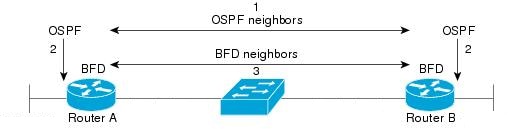
BFD Modes of Operation
BFD Echo Mode is enabled by default and runs asynchronously with BFD. It can be disabled on one side to run with asymmetry, or run on both sides of a neighborship. Echo packets are sent by the forward engine, and forwarded back along the same path. An echo packet is set with a source and destination address of the interface itself, and a destination UDP port of 3785. The neighbor reflects the echo back to the originator, which minimizes its process load of the packet, and increases the possible sensitivity of BFD. In general, echoes are not forwarded to the control plane of the neighbor to reduce delays and CPU load.
BFD Asynchronous Mode tracks the neighbor availability by the exchange of control packets between the two neighbors, which requires static configuration of BFD on both sides.
Troubleshoot BFD Problems
BFD Down
BFD down log messages are crucial to isolation of a down session. There are several different causes which can be seen:
DETECT TIMER EXPIRED: The router no longer receives BFD keepalive traffic and times out.
ECHO FAILURE: The router no longer receives BFD echos from the other side.
RX DOWN: The router receives notifications that the neighbor has gone offline.
RX ADMINDOWN: BFD has been disabled on the neighbor device.
*Mar 31 19:35:51.809: %BFDFSM-6-BFD_SESS_DOWN: BFD-SYSLOG: BFD session ld:4111 handle:3,is going Down Reason: RX DOWN
*Mar 31 19:35:51.811: %BGP-5-NBR_RESET: Neighbor 10.1.1.2 reset (BFD adjacency down)
*Mar 31 19:35:51.812: %BGP-5-ADJCHANGE: neighbor 10.1.1.2 Down BFD adjacency down
*Mar 31 19:35:51.813: %BGP_SESSION-5-ADJCHANGE: neighbor 10.1.1.2 IPv4 Unicast topology base removed from session  BFD adjacency down
*Mar 31 19:35:51.813: %BFD-6-BFD_SESS_DESTROYED: BFD-SYSLOG: bfd_session_destroyed,  ld:4111 neigh proc:BGP, handle:3 active


*Mar 31 19:36:33.377: %BFDFSM-6-BFD_SESS_DOWN: BFD-SYSLOG: BFD session ld:4113 handle:1,is going Down Reason: ECHO FAILURE
*Mar 31 19:36:33.380: %BFD-6-BFD_SESS_DESTROYED: BFD-SYSLOG: bfd_session_destroyed,  ld:4113 neigh proc:OSPF, handle:1 active
*Mar 31 19:36:33.381: %OSPF-5-ADJCHG: Process 1, Nbr 10.30.30.30 on GigabitEthernet3 from FULL to DOWN, Neighbor Down: BFD node down


*Mar 31 19:35:59.483: %BFDFSM-6-BFD_SESS_DOWN: BFD-SYSLOG: BFD session ld:4110 handle:2,is going Down Reason: RX ADMINDOWN
*Mar 31 19:36:02.220: %BFD-6-BFD_SESS_CREATED: BFD-SYSLOG: bfd_session_created, neigh 10.1.1.2 proc:BGP, idb:GigabitEthernet1 handle:3 act
After confirmation of the reason the BFD session is torn down and the directionality of the problem, you can begin to isolate possible causes:
- One-way media failure
- Configuration changes
- BFD blocked in the path
- CPU or forward failures on one device
BFD Neighbor Flaps
Neighbor Flaps Due to Packet Loss
Frequent BFD flaps can (often) be due to a lost link that causes BFD control packets or echos to be lost. If there are different session down reasons, this can be indicative of packet loss.
*Apr  4 17:18:25.931: %BFDFSM-6-BFD_SESS_DOWN: BFD-SYSLOG: BFD session ld:4097 handle:1,is going Down Reason: RX DOWN
*Apr  4 17:18:25.933: %BGP-5-NBR_RESET: Neighbor 10.1.1.2 reset (BFD adjacency down)
*Apr  4 17:18:25.934: %BGP-5-ADJCHANGE: neighbor 10.1.1.2 Down BFD adjacency down
*Apr  4 17:18:25.934: %BGP_SESSION-5-ADJCHANGE: neighbor 10.1.1.2 IPv4 Unicast topology base removed from session  BFD adjacency down
*Apr  4 17:18:25.934: %BFD-6-BFD_SESS_DESTROYED: BFD-SYSLOG: bfd_session_destroyed,  ld:4097 neigh proc:BGP, handle:1 active
*Apr  4 17:18:27.828: %BFDFSM-6-BFD_SESS_UP: BFD-SYSLOG: BFD session ld:4097 handle:1 is going UP
*Apr  4 17:18:32.304: %BFD-6-BFD_SESS_CREATED: BFD-SYSLOG: bfd_session_created, neigh 10.1.1.2 proc:BGP, idb:GigabitEthernet1 handle:1 act
*Apr  4 17:18:32.304: %BGP-5-ADJCHANGE: neighbor 10.1.1.2 Up
*Apr  4 17:18:34.005: %BFDFSM-6-BFD_SESS_UP: BFD-SYSLOG: BFD session ld:4100 handle:1 is going UP
*Apr  4 17:18:34.418: %BFDFSM-6-BFD_SESS_DOWN: BFD-SYSLOG: BFD session ld:4100 handle:1,is going Down Reason: ECHO FAILURE
*Apr  4 17:18:34.420: %BGP-5-NBR_RESET: Neighbor 10.1.1.2 reset (BFD adjacency down)
*Apr  4 17:18:34.422: %BGP-5-ADJCHANGE: neighbor 10.1.1.2 Down BFD adjacency down
*Apr  4 17:18:34.422: %BGP_SESSION-5-ADJCHANGE: neighbor 10.1.1.2 IPv4 Unicast topology base removed from session  BFD adjacency down
*Apr  4 17:18:34.422: %BFD-6-BFD_SESS_DESTROYED: BFD-SYSLOG: bfd_session_destroyed,  ld:4100 neigh proc:BGP, handle:1 active
*Apr  4 17:18:42.529: %BFD-6-BFD_SESS_CREATED: BFD-SYSLOG: bfd_session_created, neigh 10.1.1.2 proc:BGP, idb:GigabitEthernet1 handle:1 act
*Apr  4 17:18:42.529: %BGP-5-ADJCHANGE: neighbor 10.1.1.2 Up
*Apr  4 17:18:43.173: %BFDFSM-6-BFD_SESS_UP: BFD-SYSLOG: BFD session ld:4100 handle:1 is going UP
To isolate packet loss, it is helpful to take an embedded capture of the involved interface.
Some basic commands are:
- monitor capture <name> interface <interface> <in|out|both>
- monitor capture <name> match ipv4 protocol udp any any eq <3784|3785>
You can filter with an access-list to match both BFD control and echo packets.
- config t
- ip access-list extended <ACLname>
- permit udp any any eq 3784
- permit udp any any eq 3785
- end
- monitor capture <name> interface <interface> <in|out|both>
- monitor capture <name> access-list <ACLname>
In this example, captures on the inbound interface show BFD control packets are received consistently, but echoes are intermittent. From the 5 second to 15 second timestamps, there are no echo packets for the local system 10.1.1.1 returned. This would indicate loss from the BFD router towards the neighbor.
BFDrouter#show run | section access-list extended
ip access-list extended BFDcap
 10 permit udp any any eq 3784
 20 permit udp any any eq 3785
BFDrouter#mon cap BFD interface Gi1 in
BFDrouter#mon cap BFD access-list BFDcap
BFDrouter#mon cap BFD start
Started capture point : BFD
BFDrouter#mon cap BFD stop
Stopped capture point : BFD
BFDrouter#show mon cap BFD buffer brief
 ----------------------------------------------------------------------------
 #   size   timestamp     source	     destination      dscp    protocol
 ----------------------------------------------------------------------------
...
 212   54    4.694016   10.1.1.1         ->  10.1.1.1         48 CS6  UDP
 213   54    4.733016   10.1.1.2         ->  10.1.1.2         48 CS6  UDP
 214   54    4.735014   10.1.1.1         ->  10.1.1.1         48 CS6  UDP
 215   54    4.789012   10.1.1.1         ->  10.1.1.1         48 CS6  UDP
 216   54    4.808009   10.1.1.2         ->  10.1.1.2         48 CS6  UDP
 217   54    4.838006   10.1.1.1         ->  10.1.1.1         48 CS6  UDP
 218   66    4.857002   10.1.1.2         ->  10.1.1.1         48 CS6  UDP
 219   66    5.712021   10.1.1.2         ->  10.1.1.1         48 CS6  UDP
 220   66    6.593963   10.1.1.2         ->  10.1.1.1         48 CS6  UDP
 221   66    7.570970   10.1.1.2         ->  10.1.1.1         48 CS6  UDP
 222   66    8.568971   10.1.1.2         ->  10.1.1.1         48 CS6  UDP
 223   66    9.354977   10.1.1.2         ->  10.1.1.1         48 CS6  UDP
 224   66   10.250979   10.1.1.2         ->  10.1.1.1         48 CS6  UDP
 225   66   11.154991   10.1.1.2         ->  10.1.1.1         48 CS6  UDP
 226   66   11.950000   10.1.1.2         ->  10.1.1.1         48 CS6  UDP
 227   66   12.925007   10.1.1.2         ->  10.1.1.1         48 CS6  UDP
 228   66   13.687013   10.1.1.2         ->  10.1.1.1         48 CS6  UDP
 229   66   14.552965   10.1.1.2         ->  10.1.1.1         48 CS6  UDP
 230   66   15.537967   10.1.1.2         ->  10.1.1.1         48 CS6  UDP
 231   66   15.641965   10.1.1.2         ->  10.1.1.1         48 CS6  UDP
 232   66   15.656964   10.1.1.2         ->  10.1.1.1         48 CS6  UDP
 233   54   15.683015   10.1.1.1         ->  10.1.1.1         48 CS6  UDP
 234   54   15.702011   10.1.1.2         ->  10.1.1.2         48 CS6  UDP
 235   54   15.731017   10.1.1.1         ->  10.1.1.1         48 CS6  UDP
 236   54   15.752012   10.1.1.2         ->  10.1.1.2         48 CS6  UDP
Neighbor Flaps Due to Parameters Set Too Low
On lower speed links, it is important to be mindful of appropriate BFD parameters. The interval and minimum receive values are set in milliseconds. If the delay between neighbors is at or near these values, normal delays caused by traffic conditions trigger BFD flaps. For example, if the normal end-to-end delay between neighbors is 100 ms and the BFD interval is set to a minimum of 50 ms with a multiplier of 3, a single missed BFD packet can trigger a neighbor down event as the next two are still in transit.
You can validate the delay to the neighbor by pinging two neighbor IP addresses. Additionally, the minimum supported timers vary per-platform, and must be confirmed prior to BFD configuration.
BFD Does Not Fail Over When Strict Mode is Not Configured
When BFD strict-mode is not enabled, the absence of a BFD session does not prevent the associated routing protocol from establishment.
This can allow re-convergence in undesirable scenarios. In this example, BFD successfully tears down BGP, however, TCP communication remains successful as the neighbor is restored:
*Mar 31 18:53:08.997: %BFDFSM-6-BFD_SESS_DOWN: BFD-SYSLOG: BFD session ld:4097 handle:1,is going Down Reason: DETECT TIMER EXPIRED
*Mar 31 18:53:08.999: %BGP-5-NBR_RESET: Neighbor 10.1.1.1 reset (BFD adjacency down)
*Mar 31 18:53:09.000: %BGP-5-ADJCHANGE: neighbor 10.1.1.1 Down BFD adjacency down
*Mar 31 18:53:09.000: %BGP_SESSION-5-ADJCHANGE: neighbor 10.1.1.1 IPv4 Unicast topology base removed from session  BFD adjacency down^Z
BGPpeer#
*Mar 31 18:53:09.000: %BFD-6-BFD_SESS_DESTROYED: BFD-SYSLOG: bfd_session_destroyed,  ld:4097 neigh proc:BGP, handle:1 active
*Mar 31 18:53:10.044: %SYS-5-CONFIG_I: Configured from console by console
BGPpeer#
*Mar 31 18:53:15.245: %BFD-6-BFD_SESS_CREATED: BFD-SYSLOG: bfd_session_created, neigh 10.1.1.1 proc:BGP, idb:GigabitEthernet1 handle:1 act
*Mar 31 18:53:15.245: %BGP-5-ADJCHANGE: neighbor 10.1.1.1 Up
BGPpeer#show bfd neighbor

IPv4 Sessions
NeighAddr                              LD/RD         RH/RS     State     Int
10.1.1.1                             4097/0          Down      Down      Gi1
Since BGP is up prior to BFD neighborship, the network re-converges. If BFD remains offline, the only way for the neighbor to remain offline is when the two minute hold timer expires, which delays failover:
*Mar 31 18:59:01.539: %BGP-3-NOTIFICATION: sent to neighbor 10.1.1.1 4/0 (hold time expired) 0 bytes
*Mar 31 18:59:01.540: %BGP-5-NBR_RESET: Neighbor 10.1.1.1 reset (BGP Notification sent)
*Mar 31 18:59:01.541: %BGP-5-ADJCHANGE: neighbor 10.1.1.1 Down BGP Notification sent
*Mar 31 18:59:01.541: %BGP_SESSION-5-ADJCHANGE: neighbor 10.1.1.1 IPv4 Unicast topology base removed from session  BGP Notification sent
*Mar 31 18:59:01.541: %BFD-6-BFD_SESS_DESTROYED: BFD-SYSLOG: bfd_session_destroyed,  ld:4097 neigh proc:BGP, handle:1 active
Useful Show Commands
Show BFD Neighbor Details
This command provides details of the configured BFD neighbors, this includes all neighbors independent of the current state:
BFDrouter#show bfd neighbor details

IPv4 Sessions
NeighAddr                              LD/RD         RH/RS     State     Int
10.1.1.2                             4104/4097       Up        Up        Gi1
Session state is UP and using echo function with 50 ms interval.
Session Host: Software
OurAddr: 10.1.1.1
Handle: 3
Local Diag: 0, Demand mode: 0, Poll bit: 0
MinTxInt: 1000000, MinRxInt: 1000000, Multiplier: 3
Received MinRxInt: 1000000, Received Multiplier: 3
Holddown (hits): 0(0), Hello (hits): 1000(36)
Rx Count: 38, Rx Interval (ms) min/max/avg: 2/1001/827 last: 493 ms ago
Tx Count: 39, Tx Interval (ms) min/max/avg: 4/988/809 last: 402 ms ago
Echo Rx Count: 534, Echo Rx Interval (ms) min/max/avg: 23/68/45 last: 26 ms ago
Echo Tx Count: 534, Echo Tx Interval (ms) min/max/avg: 39/63/45 last: 27 ms ago
Elapsed time watermarks: 0 0 (last: 0)
Registered protocols: BGP CEF
Uptime: 00:00:24
Last packet: Version: 1                  - Diagnostic: 0
             State bit: Up               - Demand bit: 0
             Poll bit: 0                 - Final bit: 0
             C bit: 0
             Multiplier: 3               - Length: 24
             My Discr.: 4097             - Your Discr.: 4104
             Min tx interval: 1000000    - Min rx interval: 1000000
             Min Echo interval: 50000

IPv4 Sessions
NeighAddr                              LD/RD         RH/RS     State     Int
10.2.2.2                             4102/4097       Up        Up        Gi2
Session state is UP and using echo function with 50 ms interval.
Session Host: Software
OurAddr: 10.2.2.1
Handle: 2
Local Diag: 0, Demand mode: 0, Poll bit: 0
MinTxInt: 1000000, MinRxInt: 1000000, Multiplier: 3
Received MinRxInt: 1000000, Received Multiplier: 3
Holddown (hits): 0(0), Hello (hits): 1000(2637)
Rx Count: 2639, Rx Interval (ms) min/max/avg: 3/1012/879 last: 10 ms ago
Tx Count: 2639, Tx Interval (ms) min/max/avg: 2/1006/879 last: 683 ms ago
Echo Rx Count: 51504, Echo Rx Interval (ms) min/max/avg: 1/98/45 last: 32 ms ago
Echo Tx Count: 51504, Echo Tx Interval (ms) min/max/avg: 39/98/45 last: 34 ms ago
Elapsed time watermarks: 0 0 (last: 0)
Registered protocols: EIGRP CEF
Uptime: 00:38:37
Last packet: Version: 1                  - Diagnostic: 0
             State bit: Up               - Demand bit: 0
             Poll bit: 0                 - Final bit: 0
             C bit: 0
             Multiplier: 3               - Length: 24
             My Discr.: 4097             - Your Discr.: 4102
             Min tx interval: 1000000    - Min rx interval: 1000000
             Min Echo interval: 50000

IPv4 Sessions
NeighAddr                              LD/RD         RH/RS     State     Int
10.3.3.2                             4100/4097       Up        Up        Gi3
Session state is UP and using echo function with 50 ms interval.
Session Host: Software
OurAddr: 10.3.3.1
Handle: 1
Local Diag: 0, Demand mode: 0, Poll bit: 0
MinTxInt: 1000000, MinRxInt: 1000000, Multiplier: 3
Received MinRxInt: 1000000, Received Multiplier: 3
Holddown (hits): 0(0), Hello (hits): 1000(10120)
Rx Count: 10137, Rx Interval (ms) min/max/avg: 1/2761/878 last: 816 ms ago
Tx Count: 10136, Tx Interval (ms) min/max/avg: 1/2645/877 last: 904 ms ago
Echo Rx Count: 197745, Echo Rx Interval (ms) min/max/avg: 1/4126/45 last: 15 ms ago
Echo Tx Count: 197745, Echo Tx Interval (ms) min/max/avg: 39/4227/45 last: 16 ms ago
Elapsed time watermarks: 0 0 (last: 0)
Registered protocols: CEF OSPF
Uptime: 00:38:39
Last packet: Version: 1                  - Diagnostic: 0
             State bit: Up               - Demand bit: 0
             Poll bit: 0                 - Final bit: 0
             C bit: 0
             Multiplier: 3               - Length: 24
             My Discr.: 4097             - Your Discr.: 4100
             Min tx interval: 1000000    - Min rx interval: 1000000
             Min Echo interval: 50000
Key Fields:
| Session Host |
This field specifies if the session is hosted in software or offloaded to hardware. Hardware offload is available on some platforms to prevent BFD instability due to CPU congestion. |
| MinTxInt/MinRxInt/Multiplier |
The local values for minimum transmit and receive intervals and multipliers. |
| Received MinRxInt/Received Multiplier |
The peer values for minimum receive intervals and multipliers. |
| Rx/Tx Count |
Counters of the sent and received BFD packets. |
| Echo Rx/Tx Count |
Counters for sent and received BFD Echoes. |
| Registered Protocols |
Routing protocol used by the BFD session. |
| Uptime |
Session uptime. |
| LD/RD |
Local Discriminator and Remote Discriminator for the session. |
| RH/RS |
Remote Heard and Remote State. |
Show BFD Summary
The show bfd summary command provides multiple quick outputs of active client protocols, IP protocol sessions, or hardware vs software hosted BFD sessions. This is useful when the output of the full details is long and unwieldy:
BFDrouter#show bfd summary client

Client              Session          Up          Down
BGP                       1           1             0
EIGRP                     1           1             0
OSPF                      1           1             0
CEF                       3           3             0

Total                     3           3             0
BFDrouter#show bfd summary session

Protocol            Session          Up          Down
IPV4                      3           3             0

Total                     3           3             0

BFDrouter#show bfd summary host

Host              Session          Up          Down
Software                  3           3             0
Hardware                  0           0             0

Total                     3           3             0
Show BFD Drops
This command shows BFD packets dropped on the local device and the reason. If local drops are incremented, this can cause sessions to flap:
BFDrouter#show bfd drops
BFD Drop Statistics
                        IPV4    IPV6    IPV4-M  IPV6-M  MPLS_PW MPLS_TP_LSP MPLS_TE_GAL_LSP MPLS_TE_SR_LSP POCH_IPV4
Invalid TTL             0        0       0       0       0       0              0                   0           0
BFD Not Configured      0        0       0       0       0       0              0                   0           0
No BFD Adjacency        12       0       0       0       0       0              0                   0           0
Invalid Header Bits     0        0       0       0       0       0              0                   0           0
Invalid Discriminator   3        0       0       0       0       0              0                   0           0
Session AdminDown       2222     0       0       0       0       0              0                   0           0
Authen invalid BFD ver  0        0       0       0       0       0              0                   0           0
Authen invalid len      0        0       0       0       0       0              0                   0           0
Authen invalid seq      0        0       0       0       0       0              0                   0           0
Authen failed           0        0       0       0       0       0              0                   0           0
Dampenend Down          0        0       0       0       0       0              0                   0           0
SBFD Srcip Invalid      0        0       0       0       0       0              0                   0           0
Invalid SBFD_SPORT      0        0       0       0       0       0              0                   0           0
Source Port not valid   0        0       0       0       0       0              0                   0           0
Show BFD Neighbors History
This command shows recent BFD logs for each neighbor, along with its present state:
BFDrouter#  show bfd neighbors history

IPv4 Sessions
NeighAddr                              LD/RD         RH/RS     State     Int
10.1.1.2                             4101/4097       Down      Init      Gi1
History information:
[Apr  4 15:56:21.346] Event: V1 FSM ld:4101 handle:3 event:RX DOWN state:INIT
[Apr  4 15:56:20.527] Event: V1 FSM ld:4101 handle:3 event:RX DOWN state:INIT
[Apr  4 15:56:19.552] Event: V1 FSM ld:4101 handle:3 event:RX DOWN state:INIT
[Apr  4 15:56:18.776] Event: V1 FSM ld:4101 handle:3 event:RX DOWN state:INIT
[Apr  4 15:56:17.823] Event: V1 FSM ld:4101 handle:3 event:RX DOWN state:INIT
[Apr  4 15:56:16.816] Event: V1 FSM ld:4101 handle:3 event:RX DOWN state:INIT
[Apr  4 15:56:15.886] Event: V1 FSM ld:4101 handle:3 event:RX DOWN state:INIT
[Apr  4 15:56:14.920] Event: V1 FSM ld:4101 handle:3 event:RX DOWN state:INIT
[Apr  4 15:56:14.023] Event: V1 FSM ld:4101 handle:3 event:RX DOWN state:INIT
[Apr  4 15:56:13.060] Event: V1 FSM ld:4101 handle:3 event:RX DOWN state:INIT
[Apr  4 15:56:12.183] Event: V1 FSM ld:4101 handle:3 event:RX DOWN state:INIT
[Apr  4 15:56:11.389] Event: V1 FSM ld:4101 handle:3 event:RX DOWN state:INIT
[Apr  4 15:56:10.600] Event: V1 FSM ld:4101 handle:3 event:RX DOWN state:INIT
[Apr  4 15:56:09.603] Event: V1 FSM ld:4101 handle:3 event:RX DOWN state:INIT
[Apr  4 15:56:08.750] Event: V1 FSM ld:4101 handle:3 event:RX DOWN state:INIT
[Apr  4 15:56:07.808] Event: V1 FSM ld:4101 handle:3 event:RX DOWN state:INIT
[Apr  4 15:56:06.825] Event: V1 FSM ld:4101 handle:3 event:RX DOWN state:INIT
[Apr  4 15:56:05.877] Event: V1 FSM ld:4101 handle:3 event:RX DOWN state:INIT
IPv4 Sessions
NeighAddr                              LD/RD         RH/RS     State     Int
[Apr  4 15:56:04.917] Event: V1 FSM ld:4101 handle:3 event:RX DOWN state:INIT
[Apr  4 15:56:03.920] Event: V1 FSM ld:4101 handle:3 event:RX DOWN state:INIT

10.2.2.2                              104/4097       Up        Up        Gi2
History information:
[Apr  4 15:10:41.820] Event: V1 FSM ld:104 handle:1 event:RX UP state:UP
[Apr  4 15:10:41.803] Event: V1 FSM ld:104 handle:1 event:RX UP state:UP
[Apr  4 15:10:41.784] Event: V1 FSM ld:104 handle:1 event:RX UP state:UP
[Apr  4 15:10:41.770] Event: notify client(CEF) IP:10.2.2.2, ld:104, handle:1, event:UP,
[Apr  4 15:10:41.770] Event: notify client(EIGRP) IP:10.2.2.2, ld:104, handle:1, event:UP,
[Apr  4 15:10:41.770] Event: notify client(CEF) IP:10.2.2.2, ld:104, handle:1, event:UP,
[Apr  4 15:10:41.770] Event: resetting timestamps ld:104 handle:1
[Apr  4 15:10:41.768] Event: V1 FSM ld:104 handle:1 event:RX INIT state:DOWN
[Apr  4 15:10:41.751] Event: V1 FSM ld:104 handle:1 event:Session create state:DOWN
[Apr  4 15:10:41.751]
 bfd_session_created, proc:EIGRP, idb:GigabitEthernet2 handle:1 act

10.3.3.2                             4198/4097       Up        Up        Gi3
History information:
IPv4 Sessions
NeighAddr                              LD/RD         RH/RS     State     Int
[Apr  4 15:26:01.779] Event: notify client(CEF) IP:10.3.3.2, ld:4198, handle:2, event:UP,
[Apr  4 15:26:01.779] Event: notify client(OSPF) IP:10.3.3.2, ld:4198, handle:2, event:UP,
[Apr  4 15:26:01.778] Event: V1 FSM ld:4198 handle:2 event:RX UP state:UP
[Apr  4 15:26:01.777] Event: notify client(OSPF) IP:10.3.3.2, ld:4198, handle:2, event:UP,
[Apr  4 15:26:01.777] Event: V1 FSM ld:4198 handle:2 event:RX INIT state:DOWN
[Apr  4 15:26:01.776] Event: V1 FSM ld:4198 handle:2 event:Session create state:ADMIN DOWN
[Apr  4 15:25:59.309] Event:
 bfd_session_destroyed, proc:CEF, handle:2 act
[Apr  4 15:25:59.309] Event: V1 FSM ld:4198 handle:2 event:Session delete state:UP
[Apr  4 15:25:59.308] Event:
 bfd_session_destroyed, proc:OSPF, handle:2 act
[Apr  4 15:22:48.912] Event: V1 FSM ld:4198 handle:2 event:RX UP state:UP
[Apr  4 15:22:48.911] Event: notify client(CEF) IP:10.3.3.2, ld:4198, handle:2, event:UP,
[Apr  4 15:22:48.911] Event: notify client(OSPF) IP:10.3.3.2, ld:4198, handle:2, event:UP,
[Apr  4 15:22:48.911] Event: notify client(CEF) IP:10.3.3.2, ld:4198, handle:2, event:UP,
IPv4 Sessions
NeighAddr                              LD/RD         RH/RS     State     Int
[Apr  4 15:22:48.911] Event: V1 FSM ld:4198 handle:2 event:RX INIT state:DOWN
[Apr  4 15:22:48.910] Event: V1 FSM ld:4198 handle:2 event:Session create state:DOWN
[Apr  4 15:22:48.909]
 bfd_session_created, proc:OSPF, idb:GigabitEthernet3 handle:2 act
Related Information
- Cisco IOS BFD Reference
- BFD Configuration Guide, Cisco IOS XE 17.x
- IETF RFC 5880 for BFD
- Cisco Technical Support & Downloads
Revision History
| Revision | Publish Date | Comments |
|---|---|---|
4.0 |
21-Aug-2026
|
Updated spelling, grammar, inserted horizontal lines to separate sections for readabillity. |
3.0 |
30-May-2024
|
Updated Target Links and Formatting. |
2.0 |
08-May-2024
|
Recertification |
1.0 |
06-Apr-2023
|
Initial Release |

 Feedback
Contact Cisco
- Open a Support Case

- (Requires a Cisco Service Contract)