Configure BGP with Two Different Service Providers

Available Languages
Introduction
This document describes the outcome of running Border Gateway Protocol (BGP) with more than one service provider (multihoming).
Prerequisites
Requirements
Cisco recommends that you have knowledge of these topics:
- Cisco BGP Implementation
- Basic BGP Configuration Task List
- BGP Case Studies
Components Used
The information in this document is based on Cisco 2900 Series Routers that run Cisco IOS® Software Release 15.7(3)M8.
The information in this document was created from the devices in a specific lab environment. All of the devices used in this document started with a cleared (default) configuration. If your network is live, ensure that you understand the potential impact of any command.
Background Information
This document describes the Border Gateway Protocol (BGP), one of the key protocols to use to achieve Internet connection redundancy. When you connect your network to two different internet service providers (ISPs), it is called multihoming. Multihoming provides redundancy and network optimization. It selects the ISP that offers the best path to a resource. When you run BGP with more than one service provider, you run the risk that your autonomous system (AS) becomes a transit AS. This causes internet traffic to pass through your AS and potentially consume all the bandwidth and resources on the CPU of your router. This document addresses this issue, with appropriate configuration examples.
If you want to receive the full Internet routing table, use theConfiguration to Receive Full Internet Routing Tableon your local router (Router A in the example in this document).
If you want to receive routes that are directly connected to your service providers, but use default routes to the rest of the internet, try theConfiguration to Receive Directly-Connected Routes.
If you want to receive only default routes from the directly connected service providers, use theConfiguration to Receive Default Routes Only. For more information about the regular expressions used in the configurations in this document, refer toUsing Regular Expressions in BGP.
Configure
In this section, you are presented with the information to configure the features described in this document.
Network Diagram
This document uses this network setup:
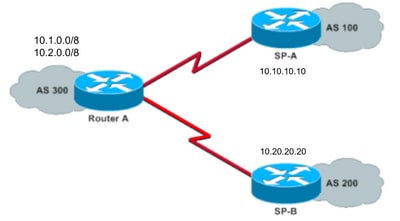
In this network diagram, 10.1.0.0/8 and 10.2.0.0/8 are advertised by AS 300 to the outside.
Configuration to Receive Full Internet Routing Table
This configuration allows Router A to peer with BGP speakers in other autonomous systems. The route-map localonly only allows the locally generated routes to be advertised to both of the service providers. In other words, they filter the internet routes from one service provider that go back to the other service provider. This prevents the risk your autonomous system becomes a transit AS for Internet traffic.
| Router A |
|---|
Current configuration: router bgp 300 network 10.1.0.0 network 10.2.0.0 neighbor 10.10.10.10 remote-as 100 neighbor 10.10.10.10 route-map localonly out !--- Outgoing policy route-map that filters routes to service provider A (SP-A). neighbor 10.20.20.20 remote-as 200 neighbor 10.20.20.20 route-map localonly out !--- Outgoing policy route-map that filters routes to service provider B (SP-B). end |
This AS-Path access list only permits locally originated BGP routes:
ip as-path access-list 10 permit ^$
This is an example of a route map that uses that AS-Path access list to filter the routes advertised to the external neighbors in the service provider networks:
route-map localonly permit 10
 match as-path 10
Configuration to Receive Directly-Connected Routes
| Router A |
|---|
Current configuration: router bgp 300 network 10.1.0.0 network 10.2.0.0 neighbor 10.10.10.10 remote-as 100 neighbor 10.10.10.10 route-map localonly out !--- Outgoing policy route-map that filters routes to SP-A. neighbor 10.10.10.10 route-map as100only in !--- Incoming policy route-map that filters routes from SP-A. neighbor 10.20.20.20 remote-as 200 neighbor 10.20.20.20 route-map localonly out !--- Outgoing policy route-map that filters routes to SP-B. neighbor 10.20.20.20 route-map as200only in !--- Incoming policy route-map that filters routes from SP-B. end |
Because you only accept routes that are directly connected to the service providers, filter the routes they send to you, and the routes you advertise. This access list and route map permit only locally originated routes; use it to filter outbound route updates:
ip as-path access-list 10 permit ^$


!--- If you configure the as-path access-list 10 as !--- IP as-path access-list 10 permit ^$, means that the router !---  only sends the prefixes which are generated locally in !--- AS 300 and not from any other AS.

   route-map localonly permit 10
   match as-path 10
This access list and route map filters out what is not sourced within the first service provider network; use it to filter the routes that are learned from service provider A (SP-A):
ip as-path access-list 20 permit ^100$

route-map as100only permit 10
 match as-path 20
This access list and route map filters out what is not sourced within the second service provider network; use it to filter the routes that are learned from service provider B (SP-B):
ip as-path access-list 30 permit ^200$

route-map as200only permit 10
  match as-path 30
You also need two default routes that are distributed back into the rest of your network, one pointed to each of the service provider entry points:
ip route 0.0.0.0 0.0.0.0 10.10.10.10
ip route 0.0.0.0 0.0.0.0 10.20.20.20
Configuration to Receive Default Routes Only
| Router A |
|---|
Current configuration: router bgp 300 network 10.1.0.0 network 10.2.0.0 neighbor 10.10.10.10 remote-as 100 neighbor 10.10.10.10 route-map localonly out !--- Outgoing policy route-map that filters routes to SP-A. neighbor 10.10.10.10 prefix-list ABC in neighbor 10.20.20.20 remote-as 200 neighbor 10.20.20.20 route-map localonly out !--- Outgoing policy route-map that filters routes to SP-B. neighbor 10.20.20.20 prefix-list ABC in ip prefix-list ABC seq 5 permit 0.0.0.0/0 !--- Prefix list to allow only default route updates. end |
Because you want Router A to receive only default routes and no other networks from SP-A and SP-B, permit only the default route and deny all other BGP updates. Use this prefix list to allow only the default route update 0.0.0.0/0 and deny all other BGP updates on Router A:
ip prefix-list ABC seq 5 permit 0.0.0.0/0
Apply that prefix list on the inbound updates on individual BGP neighbors in this way:
neighbor 10.10.10.10 prefix-list ABC in
neighbor 10.20.20.20 prefix-list ABC in
Troubleshoot
There are currently no specific troubleshooting information available for this configuration.
Related Information
- How to Configure BGP to Accept only Default Routes using Prefix Lists
- BGP Case Studies
- Troubleshooting BGP
- Configure BGP Routers for Optimal Performance and Reduced Memory Consumption
- Cisco Technical Support & Downloads
Revision History
| Revision | Publish Date | Comments |
|---|---|---|
3.0 |
22-Jun-2026
|
Updated spelling, grammar, spacing, and sentence structure. |
2.0 |
07-May-2025
|
Updated Formatting to comply with Cisco Guidelines. |
1.0 |
13-Jul-2022
|
Initial Release |
 Feedback