Understand the Importance of BGP Weight Attribute

Available Languages
Introduction
This document describes the importance of the Border Gateway Protocol (BGP) Weight attribute in network failover scenarios.
Prerequisites
Requirements
Cisco recommends that you have knowledge of these topics:
- Border Gateway Protocol (BGP)
- Routing Protocols Redistribution
- Cisco IOS Command Line Interface (CLI)
Components Used
The information in this document is based on a Cisco Router with Cisco IOS® Version 15.6(2).
The information in this document was created from the devices in a specific lab environment. All of the devices used in this document started with a cleared (default) configuration. If your network is live, ensure that you understand the potential impact of any command.
Background Information
BGP is commonly used to advertise the network prefixes to the Wide Area Network (WAN) once received via an Interior Gateway Protocol (IGP) from the Local Area Network (LAN) and vice versa. Without the correct configuration in place, BGP can fail to restore the original routing path over the WAN after the network recovers from a link failure.
Routers deployed in failover scenarios can have routes stuck, which can cause a redirect of the traffic over the backup path post a failure and recovery network event. This can happen due to the nature of the BGP Weight path attribute.
After a network failure occurs (usually with the WAN link) the network can converge and use the available backup path received via the IGP.
However, upon recovery of the primary path, the Router can still use the backup path and not restore the original route over the WAN link. Consequences like asymmetric and sub-optimal routing paths can be seen.
In redundancy scenarios with two WAN Routers, these can run BGP to exchange network prefixes with the WAN. An IGP-like Enhanced Interior Gateway Routing Protocol (EIGRP) can be used to exchange network prefixes with LAN network devices. In the topology described here, BGP routes are redistributed into EIGRP, and an EIGRP route is redistributed into BGP on the WAN router to accomplish full network connectivity. In these scenarios, appropriate route filtering or tagging is needed to prevent routes from feeding back between the protocols
The high level design of this can be seen in the next topology:
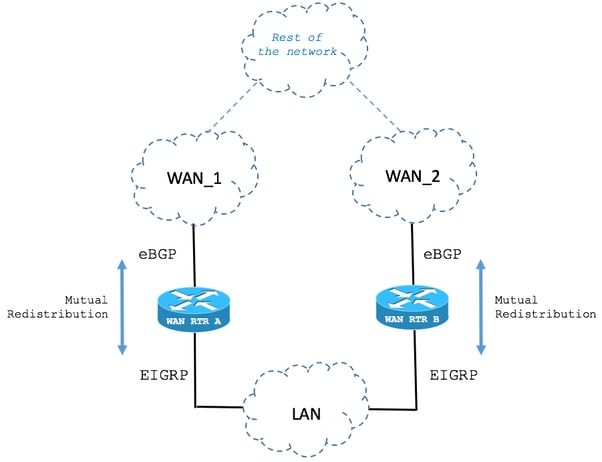
BGP Weight Attribute Set in Locally Originated Routes
The next scenario describes the behavior of the BGP Weight attribute in fail over cases.
1. Route is received via BGP
As shown in the image, the Router named WAN RTR receives the 192.168.1.0/24 network via BGP. With an Administrative Distance (AD) of 20, the route is installed in the routing table.
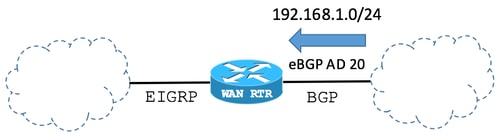
BGP Table:
| WAN_RTR |
|---|
WAN_RTR#show ip bgp
<snip>
     Network          Next Hop            Metric LocPrf Weight Path
 *>  192.168.1.0      10.1.2.2                 0             0 2 i
|
This table shows the route installed by BGP:
| WAN_RTR |
|---|
WAN_RTR#show ip route <snip> B 192.168.1.0/24 [20/0] via 10.1.2.2, 00:00:42 |
2. Route is received via EIGRP
The BGP session becomes unavailable due to link failure. By network convergence, the same route 192.168.1.0/24 is now received via EIGRP.
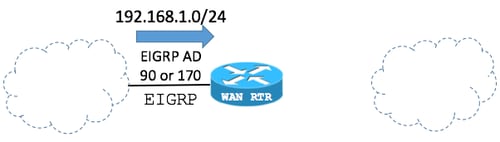
The redistribute eigrp command originates eligible EIGRP routes in BGP. As a result, the EIGRP route appears in the local BGP table.
BGP configuration:
| WAN_RTR |
|---|
WAN_RTR#show running-config | begin router bgp <snip> |
BGP Table:
| WAN_RTR |
|---|
WAN_RTR#show ip bgp <snip> |
This table shows the route installed by EIGRP:
| WAN_RTR |
|---|
WAN_RTR#show ip route <snip> |
3. Route received via BGP (again)
With the EIGRP route now redistributed into BGP, and after the original route is received via the BGP once again; there are now 2 entries for the 192.168.1.0/24 network in the BGP table.
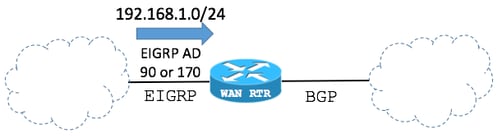
BGP Table:
| WAN_RTR |
|---|
WAN_RTR#show ip bgp
<snip>
Network Next Hop Metric LocPrf Weight Path
* 192.168.1.0 10.1.2.2 0 0 2 i
*> 10.1.3.3 156160 32768 ?
|
In the BGP table:
- The entry created in Step 2 by the EIGRP route redistributed into BGP can still be seen.
- The original route is added back after the BGP session is re-established.
From the BGP best path selection point of view:
- The value of the BGP Weight of the EIGRP route redistributed into BGP is set to 32768 as it originated locally in the router from the BGP point of view.
- The value of the BGP Weight of the original route received via the BGP session with the WAN is 0.
- The EIGRP route redistributed into BGP has the higher weight and is elected as the best path in the BGP table.
- Because BGP selects the locally originated path as its best path, the restored WAN-learned path does not replace the EIGRP route in the routing table.
Routing Table:
| WAN_RTR |
|---|
WAN_RTR#show ip route <snip> D 192.168.1.0/24 [90/156160] via 10.1.3.3, 00:08:55, FastEthernet0/1 |
Modify the BGP Weight Path Attribute
The default value of the BGP Weight can be modified per BGP peer with the use of the weight or route-map command. The next commands set the Weight path attribute to 40000 for all routes received from the BGP peer.
Example 1
| Use of Weight Command |
|---|
router bgp 1 neighbor 10.1.2.2 weight 40000 |
Example 2
| Use of Route-Map Command to Set the Weigh Path Attribute |
|---|
route-map FROM-WAN permit 10 set weight 40000 ! router bgp 1 neighbor 10.1.2.2 route-map FROM-WAN in ! clear ip bgp * soft in |
Example 3
| Use of Route-Map Command to Set the Weigh Path Attribute for Certain Routes |
|---|
ip prefix-list NETWORKS permit 192.168.1.0/24 ! route-map FROM-WAN permit 10 match ip address prefix NETWORKS set weight 40000 route-map FROM-WAN permit 100 ! router bgp 1 neighbor 10.1.2.2 route-map FROM-WAN in ! clear ip bgp * soft in |

Note: The final permit sequence in the route-map FROM-WAN accepts other routes from the peer without assigning them weight 40000.
Note: The wildcard in clear ip bgp * soft in refreshes inbound routes from all BGP peers. To refresh only the peer used in these examples, run the clear ip bgp <ip-address> soft in command.
With the value of the Weight path attribute increased, the original routes received via BGP take precedence as seen in the next case:
Step 1. Route is received via BGP
The next BGP table shows routes received via BGP now have a Weight value of 40000 instead of zero.
BGP Table:
| WAN_RTR |
|---|
WAN_RTR#show ip bgp <snip> |
Routing Table:
| WAN_RTR |
|---|
WAN_RTR#show ip route <snip> B 192.168.1.0/24 [20/0] via 10.1.2.2, 00:09:53 |
Step 2. Route is Received via EIGRP
Locally originated routes still have a value of 32768 in the BGP Table.
BGP Table:
| WAN_RTR |
|---|
WAN_RTR#show ip bgp
<snip>

     Network          Next Hop            Metric LocPrf Weight Path
*> 192.168.1.0 10.1.3.3 156160 32768 ? |
Routing Table:
| WAN_RTR |
|---|
WAN_RTR#show ip route <snip> D 192.168.1.0/24 [90/156160] via 10.1.3.3, 00:01:41, FastEthernet0/1 |
Step 3. Route Received via BGP (again)
With a Weight of 40000, the route received via BGP is selected over the locally originated route. After the WAN route replaces the EIGRP route in the routing table, the network properly converge back to its original state.
BGP Table:
| WAN_RTR |
|---|
WAN_RTR#show ip bgp
<snip>
     Network          Next Hop            Metric LocPrf Weight Path
 *>  192.168.1.0      10.1.2.2                 0         40000 2 i
|
Routing Table:
| WAN_RTR |
|---|
WAN_RTR#show ip route <snip> B 192.168.1.0/24 [20/0] via 10.1.2.2, 00:00:25 |
Failover Scenario
Step 1. Original Network State
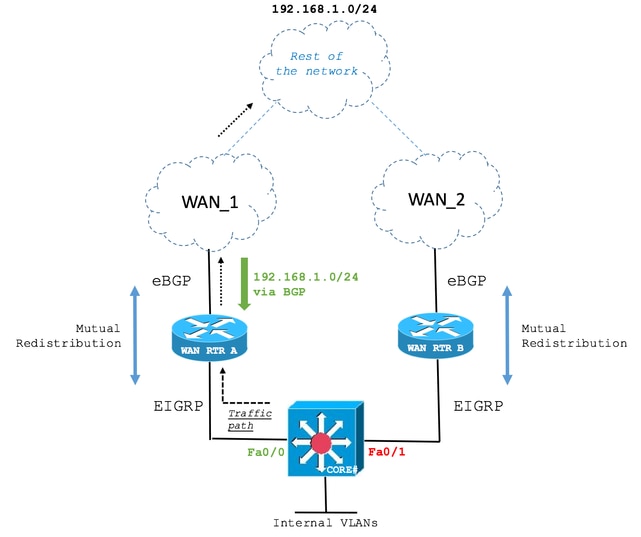
The CORE Layer 3 Switch receives the 192.168.1.0/24 route via EIGRP from WAN RTR A and WAN RTR B. The path over WAN RTR A is elected.
The next output shows how the CORE Switch maintains an EIGRP adjacency with both WAN Routers and WAN RTR A is elected to reach the 192.168.1.0/24 network.
| CORE |
|---|
CORE#show ip eigrp neighbors
EIGRP-IPv4 Neighbors for AS(1)
H   Address                 Interface              Hold Uptime   SRTT   RTO  Q  Seq
                                                   (sec)         (ms)       Cnt Num
0   10.1.2.2  (WAN_RTR_A)   Fa0/0                    10 00:05:15   79  1066  0  10
1   10.1.3.3  (WAN_RTR_B)   Fa0/1                    12 00:06:22   76   456  0  5


CORE#show ip route
<snip>
D EX  192.168.1.0/24 [170/28416] via 10.1.2.2, 00:00:32, FastEthernet0/0


CORE#show ip eigrp topology
EIGRP-IPv4 Topology Table for AS(1)/ID(10.10.10.10)
<snip>
P 192.168.1.0/24, 1 successors, FD is 28416, tag is 4
        via 10.1.2.2 (28416/2816), FastEthernet0/0
via 10.1.3.3 (281856/2816), FastEthernet0/1 |
Step 2. Primary WAN Link Failure
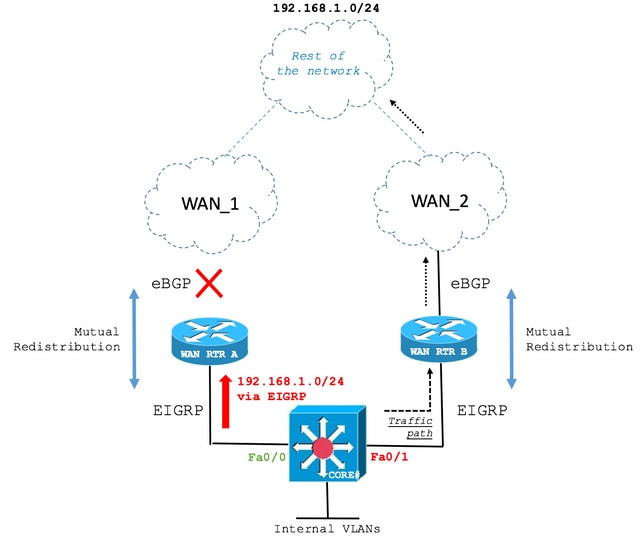
If a link failure occurs, the CORE Switch installs the route via the second best EIGRP path which is WAN RTR B.
| CORE |
|---|
CORE#show ip route
<snip>
D EX  192.168.1.0/24 [170/281856] via 10.1.3.3, 00:00:05, FastEthernet0/1


CORE#show ip eigrp topology
EIGRP-IPv4 Topology Table for AS(1)/ID(10.10.10.10)
<snip>
P 192.168.1.0/24, 1 successors, FD is 28416, tag is 4
via 10.1.3.3 (281856/2816), FastEthernet0/1 |
Step 3. Restoration of Primary WAN Link
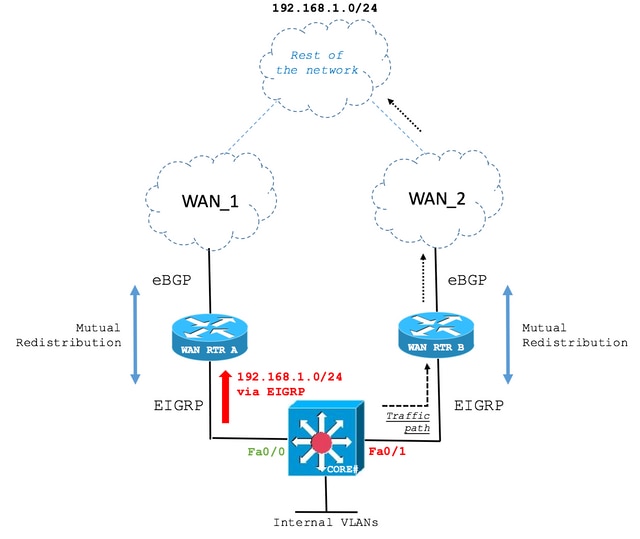
The primary WAN link has been restored. However, the CORE Switch still routes over the backup path as seen in the next output:
| CORE |
|---|
CORE#show ip route
<snip>
D EX  192.168.1.0/24 [170/281856] via 10.1.3.3, 00:06:09, FastEthernet0/1


CORE#show ip eigrp topology
EIGRP-IPv4 Topology Table for AS(1)/ID(10.10.10.10)
<snip>
P 192.168.1.0/24, 1 successors, FD is 28416, tag is 4
via 10.1.3.3 (281856/2816), FastEthernet0/1 |
The reason for this behavior is due to the BGP Weight attribute, as discussed.
In the current state, WAN RTR A installs the EIGRP route in the routing table. In the BGP table, the route redistributed from EIGRP has a higher weight than the route received over the restored WAN link and remains the best path.
| WAN_RTR_A |
|---|
WAN_RTR_A#show ip bgp
<snip>
    Network          Next Hop            Metric LocPrf Weight Path
*   192.168.1.0      10.2.4.4                 0             0 4 i
*>                   10.1.2.1            284416         32768 ?


WAN_RTR_A#show ip bgp summary
BGP router identifier 10.20.20.20, local AS number 2
<snip>
Neighbor        V           AS MsgRcvd MsgSent   TblVer  InQ OutQ Up/Down  State/PfxRcd
10.2.4.4        4            4      12      12       16    0    0 00:03:54   (UP) 4


WAN_RTR_A#show ip route
<snip>
D EX  192.168.1.0/24 [170/284416] via 10.1.2.1, 00:08:22, FastEthernet0/0
|
This behavior can occur when a WAN router redistributes an IGP backup route into BGP and the route that originated locally has a higher weight than the restored WAN-learned route. Network topologies and initial symptoms can differ from this example. Verify the redistribution configuration, BGP weights, and selected routes before attributing persistent backup-path routing to this condition.
Revision History
| Revision | Publish Date | Comments |
|---|---|---|
5.0 |
07-Oct-2026
|
Updated spelling, grammar, spacing, inserted horizontal lines to separate sections for readability. |
4.0 |
16-Apr-2025
|
Recertification |
3.0 |
23-Jan-2024
|
Updated Formatting. |
2.0 |
09-Dec-2022
|
Removed PII.
Added Alt Text.
Updated for title, machine translation, style requirements, gerunds and formatting. |
1.0 |
06-Jun-2018
|
Initial Release |
 Feedback